
35x45 Photo Size (3.5 x 4.5 cm) in mm, cm and Pixels
The 35x45 mm photo is the most widely used passport format outside the United States: 35 mm wide by 45 mm tall, equal to 3.5 × 4.5 cm, 1.38 × 1.77 inches, or 413 × 531 pixels at 300 DPI.
The UK HM Passport Office, every Schengen member state, Australia, New Zealand, Japan, Singapore, South Korea, the Canada visa application, and India's Passport Seva online portal all require this exact size. Get the dimensions, head proportions, background shade, or upload file size slightly wrong and the application is refused before a human reviewer sees it. This guide covers the official specification, pixel conversions, the head-height and file-size rules that differ by country, child photo rules, printing, and how to generate a compliant image in under a minute.
35x45 Photo Size (Quick Answer)
The 35x45 photo size measures 35 mm × 45 mm (3.5 × 4.5 cm or 1.38 × 1.77 inches). At 300 DPI it equals 413 × 531 pixels with a 7:9 portrait ratio. The head must fill 70–80% of the frame height, with the eye line 30–36 mm up from the bottom edge.
| Unit | Value |
|---|---|
| Millimeters | 35 × 45 mm |
| Centimeters | 3.5 × 4.5 cm |
| Inches | 1.38 × 1.77 in |
| Pixels @ 300 DPI | 413 × 531 px |
| Pixels @ 600 DPI | 826 × 1062 px |
| Aspect ratio | 7 : 9 |
| Head height (chin to crown) | 29–34 mm (UK) · 32–36 mm (Schengen, EU, AU) |
| Eye line from bottom edge | 30–36 mm |
| Background | Plain light colour — exact shade varies by country |
| File size (online upload) | 10 KB to 10 MB depending on the portal |
Need a 35x45 photo right now? Skip the math.
Create 35x45 Photo Instantly →35x45 Photo Visual Reference
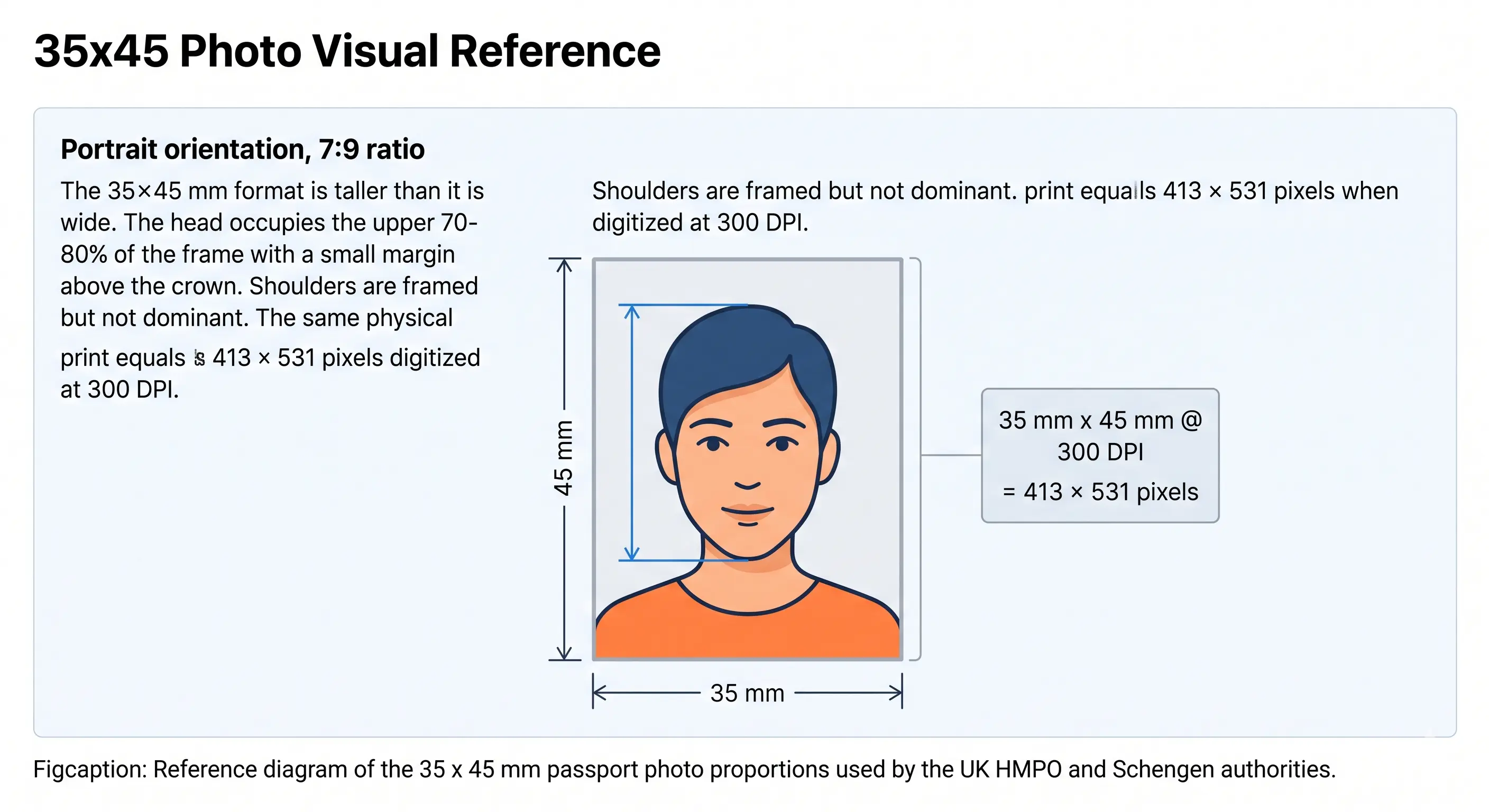
Portrait orientation, 7:9 ratio
The 35x45 mm format is taller than it is wide. The head occupies the upper 70–80% of the frame with a small margin above the crown, and the eye line sits 30–36 mm up from the bottom edge. Shoulders are framed but not dominant. The same physical print equals 413 × 531 pixels when digitised at 300 DPI.
35x45 Photo Size in Pixels
The 35x45 mm photo translates into precise pixel values based on the DPI of the file. Online portals validate uploads against these ranges, and a file below 300 DPI is refused for insufficient resolution rather than wrong size.
35x45 mm in Pixels
| DPI | Pixel Width | Pixel Height | Usage |
|---|---|---|---|
| 72 DPI (screen only) | 99 px | 127 px | Not accepted for official upload |
| 150 DPI | 207 px | 266 px | Below minimum biometric standard |
| 300 DPI (standard) | 413 px | 531 px | UK, Schengen, AU, India PSK, Japan |
| 600 DPI (high-res) | 826 px | 1062 px | High-resolution submissions, print archives |
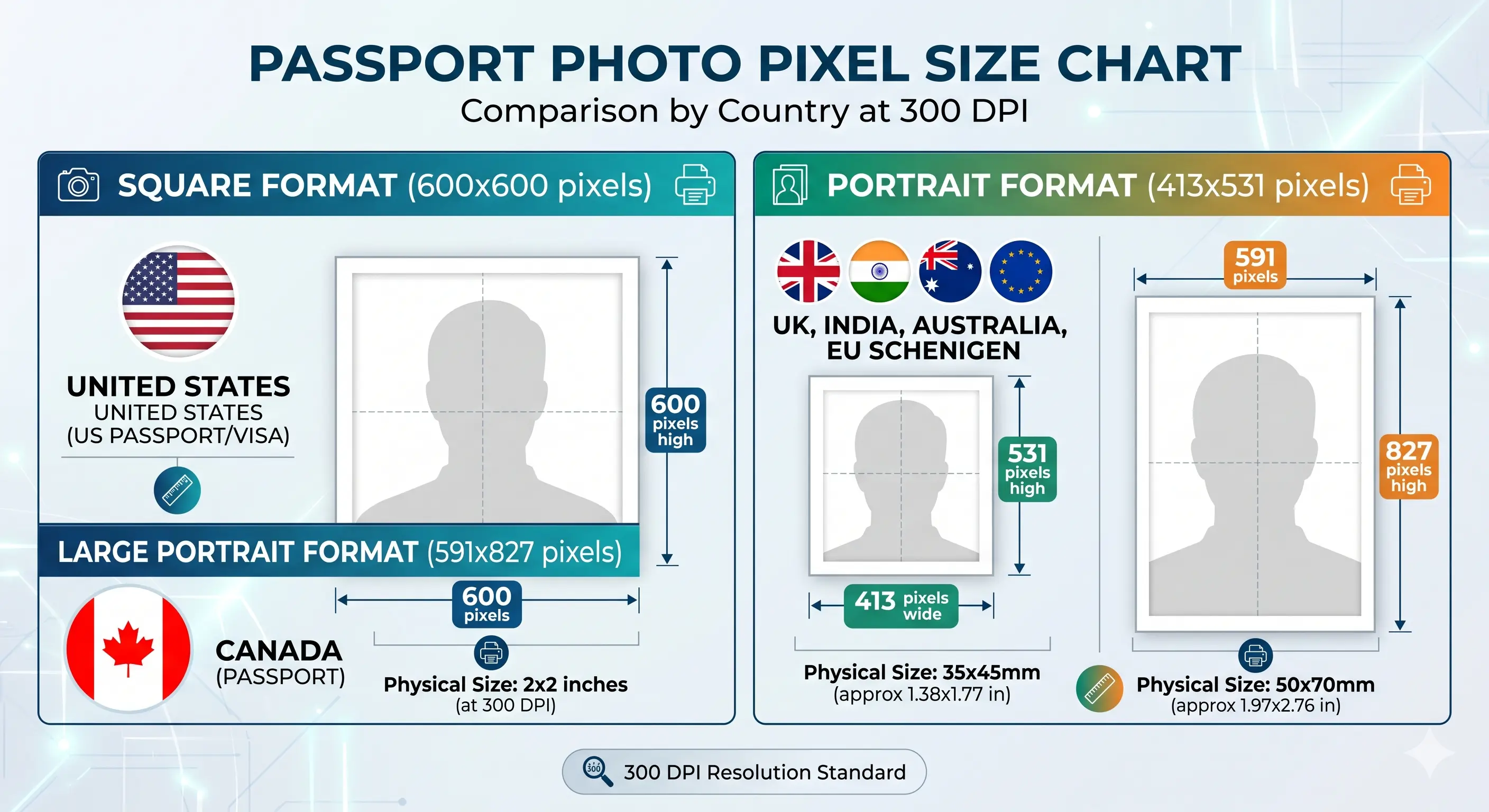
Why you cannot enlarge a small photo
Upscaling a 207 × 266 pixel image to 413 × 531 does not add detail — it interpolates, and the result is soft around the eyes and hairline. Automated checks measure sharpness, so an upscaled file fails even when the pixel count reads correctly. Always shoot wide and crop down; any phone camera from the last five years clears the requirement comfortably.
35x45 mm in Every Unit
Different agencies publish requirements in different units, and some specify a tolerance rather than an exact figure. Use this reference to match any official specification document.
Compare 35x45 mm with the 2x2 photo size used in the United States and India, the 50x70 photo size used by Canada, or browse every country in the master passport photo dimensions reference. Every national standard is indexed in the requirements by country hub.
Countries That Use the 35x45 mm Photo Size
The 35x45 mm format follows the ICAO Doc 9303 biometric standard, which is why it has been adopted by nearly every major issuing authority outside the United States. The size is constant; the background shade, head height and upload file size are what differ.
| Country / Document | Background | Head Height | File Size (Online) |
|---|---|---|---|
| United Kingdom Passport | White, cream, or light grey | 29–34 mm | 50 KB – 10 MB |
| Germany Passport / ID | Light grey | 32–36 mm | ≤ 240 KB |
| France Passport | Light grey | 32–36 mm | ≤ 240 KB |
| Italy Passport / CIE | White / light grey | 32–36 mm | ≤ 240 KB |
| Spain Passport / DNI | Plain white | 32–36 mm | ≤ 240 KB |
| Netherlands Passport | Light grey | 32–36 mm | ≤ 240 KB |
| Belgium Passport / eID | Light grey | 32–36 mm | ≤ 240 KB |
| Sweden Passport / ID | Light grey | 32–36 mm | ≤ 240 KB |
| Poland Passport | Light grey | 32–36 mm | ≤ 240 KB |
| Portugal Passport | Light grey | 32–36 mm | ≤ 240 KB |
| Switzerland Passport | Light grey | 32–36 mm | ≤ 240 KB |
| Ireland Passport | Light grey / off-white | 32–36 mm | ≤ 240 KB |
| EU biometric standard | Light grey | 32–36 mm | ≤ 240 KB |
| Schengen Visa | Light grey | 32–36 mm | ≤ 240 KB |
| Australia Passport | Plain white | 32–36 mm | ≤ 500 KB |
| Australia Visa | Plain white | 32–36 mm | ≤ 500 KB |
| New Zealand Passport | Plain light grey | 32–36 mm | ≤ 250 KB |
| Japan Passport | White | 32–36 mm | ≤ 240 KB |
| Singapore Passport | White | 25–35 mm | ≤ 60 KB |
| South Korea Passport | White | 32–36 mm | ≤ 100 KB |
| Canada Visa / TRV | Plain white | 31–36 mm | ≤ 240 KB |
| Canada PR Card | Plain white | 31–36 mm | ≤ 240 KB |
| India Passport Seva (online) | Pure white | 25–32 mm | 10 – 20 KB |
Generating a 35x45 photo for any country above?
Create 35x45 Photo →File Size in KB: The Limit That Rejects Most Uploads
Size in millimetres and size in kilobytes are two separate checks, and passing one does not pass the other. The 35x45 mm standard has the widest spread of file-size limits of any passport format — from India's 10–20 KB ceiling up to the UK's 10 MB allowance. A file that sails through a UK upload is refused outright by Passport Seva.
| JPEG quality | Typical size at 413 × 531 | Passes |
|---|---|---|
| 100 (maximum) | 180 – 320 KB | UK and Australia only |
| 90 | 90 – 160 KB | UK, AU, NZ, Schengen and EU |
| 85 (recommended) | 45 – 100 KB | All of the above plus South Korea |
| 70 | 25 – 55 KB | Adds Singapore |
| 50 or lower | 10 – 20 KB | Required for India Passport Seva only |
Do not compress below the level your portal demands. Heavy compression introduces blocking around the eyes and hairline, which fails the quality check even when the pixel count and dimensions are correct. Two guides cover the mechanics: reduce file size for general targets and compress to 240 KB for the Schengen and EU ceiling. If your phone saves HEIC files, convert first with the HEIC to JPEG guide. Wider portal rules are covered in the digital passport photo requirements guide.
Create Your 35x45 Photo Size Online
Manually cropping a phone photo to exactly 35x45 mm with the right head proportions is harder than it sounds — most photo editors output to standard print sizes, not biometric dimensions. Our tool eliminates the guesswork.
Upload any portrait, choose your destination country, and the system locks the crop to the official 35x45 mm frame, centres your face, applies the correct background, and exports a portal-ready file at 413 × 531 pixels.
Upload your photo and our Passport Photo Maker automatically:
- Crops the photo correctly to a 7:9 (35x45 mm) ratio
- Centres your face within the official biometric frame
- Applies proper dimensions in millimetres and pixels
- Creates a compliant photo at the file-size limit of your portal
- Generates a print-ready 4x6 sheet with 6 copies for cutting
35x45 mm Photo Requirements
Every row below must pass for the photo to be accepted. Each rule links to the detailed standard in the passport photo rules library.
| Photo size | 35 mm × 45 mm (3.5 × 4.5 cm / 1.38 × 1.77 in) |
|---|---|
| Width | 35 mm (413 px @ 300 DPI) |
| Height | 45 mm (531 px @ 300 DPI) |
| Aspect ratio | 7 : 9 portrait |
| Background | Plain light colour — white, off-white, cream or light grey depending on authority. See background colour rules |
| Lighting | Even and diffuse, no shadow on the face or the wall. See shadow rules |
| Head size (chin to crown) | 29–34 mm (UK), 32–36 mm (Schengen, EU, AU). See head size rules |
| Face coverage | 70–80% of the frame height. See face size requirements |
| Eye line | 30 to 36 mm from the bottom of the photo, both eyes open. See eyes requirements |
| Hair | Must not cover the eyes or obscure the outline of the face. See hair rules |
| Ears | Not mandatory in the UK or Schengen, but the face outline must be clear. See ears visibility rules |
| Resolution | 300 DPI standard, up to 600 DPI accepted. See resolution rules |
| File format | JPEG (.jpg) — universal acceptance |
| File size | 10 KB to 10 MB depending on portal — see the file size table above |
| Colour | 24-bit colour, sRGB, natural skin tones, no filters or beautification |
| Glasses | Not permitted in UK, Schengen, Australia, or India. See glasses rules |
| Expression | Neutral face, mouth closed, eyes open and visible. See smile rules |
| Headwear | Not permitted unless worn for religious or medical reasons. See head covering rules |
| Photo age | Taken within the last 6 months |
How to Create a 35x45 Photo Size
- Take a high-resolution photo — Stand 4-5 feet from a plain white or light grey wall in soft natural light. Face the camera squarely with a neutral expression and closed mouth. Keep at least 20 inches clear of the wall so no shadow falls behind your head.
- Open the Passport Photo Maker — Visit the ClonyPDF Passport Photo Maker and drag your image into the upload area.
- Choose your country — Select UK, Germany, France, Australia, New Zealand or Singapore. Each preset locks the crop ratio, head height and file-size limit to that authority's official specification.
- Auto-crop and adjust — Face detection centres your head and applies the correct chin-to-crown band for the country you chose. Fine-tune the position if the system suggests it. The crop guide explains how the 7:9 ratio and head-height rule are applied together.
- Download the result — Export a 413 × 531 pixel JPEG sized to the portal's KB limit, plus a 4x6 inch print sheet with 6 cuttable copies for in-person submissions.
35x45 Photo Rules for Babies, Infants and Children
The 35 × 45 mm size, background and head-height band apply to children exactly as they do to adults. There is no smaller format for infants. What does change is a narrow set of expression and eye rules, and these differ by authority — the UK is the most accommodating.
Same size, same head height
35 × 45 mm frame with the head filling 70–80% of the height. No age exemption applies to dimensions or framing.
Eyes open, with one exception
UK HMPO does not require open eyes for children under one year old. Schengen states, Australia and Japan expect open eyes at any age where achievable.
Expression relaxed for under-ones
The UK waives the neutral-expression rule for babies under one. Older children must have a closed mouth and neutral face like an adult.
Child alone in the frame
No supporting hands, arms, car seat, toy or dummy may appear, and no other person may be visible. Support the child from behind a plain sheet.
No shadow behind the head
Lay the child on a plain light sheet in soft indirect daylight and shoot from directly above. Side lighting creates the background shadow that fails the check.
Crop from a wide source
Shoot wide and crop down. Cropping tightly in-camera on a small face leaves too few pixels once the 7:9 frame is applied.
Positioning, lighting and timing technique for infants and toddlers is covered in the baby passport photo at home guide. The eyes requirements and shadow rules pages cover the two checks that fail most often on child photos.
Photographing a child? Upload the shot and let the tool apply the 35x45 crop.
Create Child Photo →Printing the 35x45 mm Photo
If you need physical copies for an embassy appointment or a paper application, the 35x45 mm photo prints six-up on standard 4 × 6 inch (10 × 15 cm) photo paper. This is the same format every Boots, CVS, Walgreens, and Kodak self-service kiosk accepts.
| Print Sheet | Copies per Sheet | Recommended Paper |
|---|---|---|
| 4 x 6 in (10 x 15 cm) | 6 copies of 35x45 mm | Glossy or matte photo paper, 200–250 gsm |
| A4 (21 x 29.7 cm) | 20 copies of 35x45 mm | Glossy photo paper, 200 gsm |
| Letter (8.5 x 11 in) | 18 copies of 35x45 mm | Glossy photo paper, 200 gsm |
| Print resolution | 300 DPI — disable fit-to-page and auto-scaling, which change the physical size |
|---|---|
| Colour management | sRGB. Turn off printer auto-enhance, skin smoothing and colour correction |
| Cutting | Guillotine or steel rule for square edges. Do not cut inside the printed border |
| Handling | Let ink dry fully. Do not staple, fold or glue the photo face |
Our tool exports the 4 × 6 inch sheet automatically — print it on photo paper, cut along the guide lines, and the dimensions are exact. Printer settings and cutting technique are covered in full in the print passport photo at home guide, and multi-copy sheet layout in the print sheet guide.
Why 35x45 Photos Get Rejected
Each item below links to the detailed rule so you can confirm the exact tolerance before you submit. The full cross-country breakdown is in passport photo rejection reasons.
Wrong Dimensions
Photo is cropped to 35x40 mm or 40x50 mm instead of the precise 35x45 mm — most common when using basic phone crop tools that snap to ratios like 4:5 or 3:4. See the crop guide.
Head Too Small or Too Large
Face occupies less than 70% or more than 80% of the vertical frame. UK HMPO measures this digitally and rejects within seconds. See head size rules.
File Size Out of Range
A 413x531 file at maximum quality exceeds the 240 KB Schengen ceiling and is far above India's 20 KB limit. Match the portal, not a generic setting.
Wrong Background Shade
Textured wallpaper, gradients, or the wrong shade of grey for Schengen states. A 5% colour shift can fail automated checks. See background colour rules.
Shadows
Side-lit faces create shadows under the chin and on one cheek, breaking the symmetry biometric scanners need. See shadow rules.
Eye Line Off
Eye line below 30 mm or above 36 mm from the photo bottom triggers the face position rejection on UK and Schengen portals. See eyes requirements.
Low Resolution
JPEG saved below 413 x 531 pixels appears pixelated when printed at 35x45 mm. The minimum is 300 DPI. See resolution rules.
Hair Across the Face
A fringe over the eyes or hair obscuring the face outline fails landmark detection. See hair rules.
Glasses or Headwear
Eyewear reflections, sunglasses, and non-religious head coverings cause immediate failure in UK, Schengen, AU, and India. See head covering rules.
Smile or Open Mouth
Biometric systems require a neutral expression with closed lips. Even small smiles distort facial-landmark detection. See smile rules.
Filters and Retouching
Portrait blur, skin smoothing and slimming alter facial geometry and are detected by automated validation. Shoot in a plain, unfiltered mode.
Photo Over 6 Months Old
The photo must reflect your current appearance, including changes in facial hair, hair colour or significant weight.
Frequently Asked Questions
Size & Conversions
What is a 35x45 photo size?
A 35x45 photo is a passport-format photograph measuring 35 mm wide by 45 mm tall, also written as 3.5 x 4.5 cm or 1.38 x 1.77 inches. It is the standard for the UK passport, Schengen visa, Australia, New Zealand, Japan, Singapore, South Korea and most non-US documents.
What is 35x45 mm photo size in pixels?
A 35x45 mm photo equals 413 × 531 pixels at 300 DPI and 826 × 1062 pixels at 600 DPI. These are the resolutions accepted by the UK HMPO, Schengen VFS portals, and India Passport Seva. Below 300 DPI the file prints pixelated and fails the quality check.
What is 3.5 x 4.5 cm photo size in inches?
A 3.5 × 4.5 cm photo equals 1.38 × 1.77 inches. It is the same physical size as the 35 x 45 mm standard.
Is 35x45 the same as 2x2?
No. A 2x2 photo is 51 x 51 mm square with a 1:1 ratio, used by the US and India for in-person applications. A 35x45 photo is 35 mm × 45 mm with a 7:9 portrait ratio, used by the UK, EU, Schengen, and Australia. The two are not interchangeable. See the 2x2 photo size guide.
Specification Detail
What head size should a 35x45 mm photo have?
The head measured from chin to crown must be 29 to 34 mm for the UK and 32 to 36 mm for Schengen states, Australia and most of Europe. In both cases the head fills roughly 70 to 80 percent of the 45 mm frame height, and the eye line should sit 30 to 36 mm up from the bottom edge.
What file size does a 35x45 photo need to be?
It varies sharply by portal. India Passport Seva accepts only 10 to 20 KB. Singapore caps at 60 KB, South Korea at 100 KB, Schengen and most EU states at 240 KB, New Zealand at 250 KB, Australia at 500 KB, and the UK accepts 50 KB up to 10 MB. Always check the limit shown by the form you are completing.
What background is required for a 35x45 photo?
UK HMPO accepts white, cream, or light grey depending on contrast with your face and hair. Schengen states and New Zealand require plain light grey. Australia, Japan and Spain require plain white. India requires pure white. Patterns, gradients and dark colours are rejected everywhere.
Can I wear glasses?
No. The UK banned glasses in 2016, and Schengen, Australia, and India followed. Only medically required eyewear is allowed and requires a doctor's note. Tinted lenses and sunglasses are never accepted.
Countries & Children
Which countries use the 35x45 mm photo size?
The UK, every Schengen member state including Germany, France, Italy, Spain, the Netherlands, Belgium, Sweden, Poland, Portugal and Switzerland, plus Australia, New Zealand, Japan, Singapore, South Korea, Ireland and the Canada visa application. India uses it for Passport Seva online uploads. The United States does not — it uses 2 x 2 inches.
What are the 35x45 photo rules for a baby or child?
The same 35 x 45 mm size, background and head-height band apply. UK HMPO relaxes two rules for children under one: the eyes do not have to be open and a neutral expression is not required. Children of any age must be alone in the frame with no supporting hands, toy or dummy visible, and no other person may appear. See the child and infant rules section.
Taking & Printing
Can I take a 35x45 photo at home?
Yes. Stand 4-5 feet from a plain light-coloured wall, use natural daylight, and upload the result to our Passport Photo Maker to crop and resize it to exact 35x45 mm dimensions.
Can I use my phone camera?
Yes. Any smartphone from the last 5 years exceeds the resolution required. Hold the phone at eye level, use the rear camera, switch off portrait blur and skin smoothing, then crop with our tool to apply the 7:9 ratio.
How do I print a 35x45 mm photo at home?
Print at 300 DPI on glossy or matte photo paper of 200 to 250 gsm. A 4 x 6 inch sheet holds six copies, an A4 sheet holds around twenty, and a US Letter sheet holds around eighteen. Cut with a guillotine for square edges and do not trim inside the printed border. See the print at home guide.
How recent must the photo be?
The photo must be taken within the last 6 months and reflect your current appearance. Changes in facial hair, hair colour, or significant weight require a new photo.
Official Sources & References
- UK HM Passport Office — Photo Rules: gov.uk
- European Commission — Schengen Borders and Visa Policy: home-affairs.ec.europa.eu
- Australian Passport Office — Photo Guidelines: passports.gov.au
- Government of Canada — Photo Specifications: canada.ca
- India Passport Seva — Photo Guidelines: passportindia.gov.in
- ICAO Doc 9303 — Machine Readable Travel Documents biometric photograph standard: icao.int
Create Your 35x45 Photo Size Now
Skip the measuring, the manual cropping, and the rejection emails. Upload one photo and download a compliant 35 x 45 mm image at 413 x 531 pixels — sized to the exact KB limit of your destination country's portal — in under 60 seconds.
Create 35x45 Photo →Other countries that use the 35 x 45 mm photo size
These countries specify the same 35 x 45 mm (3.5 x 4.5 cm) photo. Each page lists that country’s own background, head-height and file requirements.
- Algeria passport photo size
- Armenia passport photo size
- Austria passport photo size
- Azerbaijan passport photo size
- Bulgaria passport photo size
- Croatia passport photo size
- Cyprus passport photo size
- Czech Republic passport photo size
- Denmark passport photo size
- Georgia passport photo size
- Hungary passport photo size
- Iceland passport photo size
- Kazakhstan passport photo size
- Latvia passport photo size
- Lithuania passport photo size
- Luxembourg passport photo size
- Malta passport photo size
- Mongolia passport photo size
- Morocco passport photo size
- Myanmar passport photo size
- Nepal passport photo size
- Nigeria passport photo size
- Norway passport photo size
- Pakistan passport photo size
- Philippines passport photo size
- Romania passport photo size
- Serbia passport photo size
- Slovakia passport photo size
- Slovenia passport photo size
- South Africa passport photo size
- Sri Lanka passport photo size
- Taiwan passport photo size
- Tunisia passport photo size
- Ukraine passport photo size
- Uzbekistan passport photo size