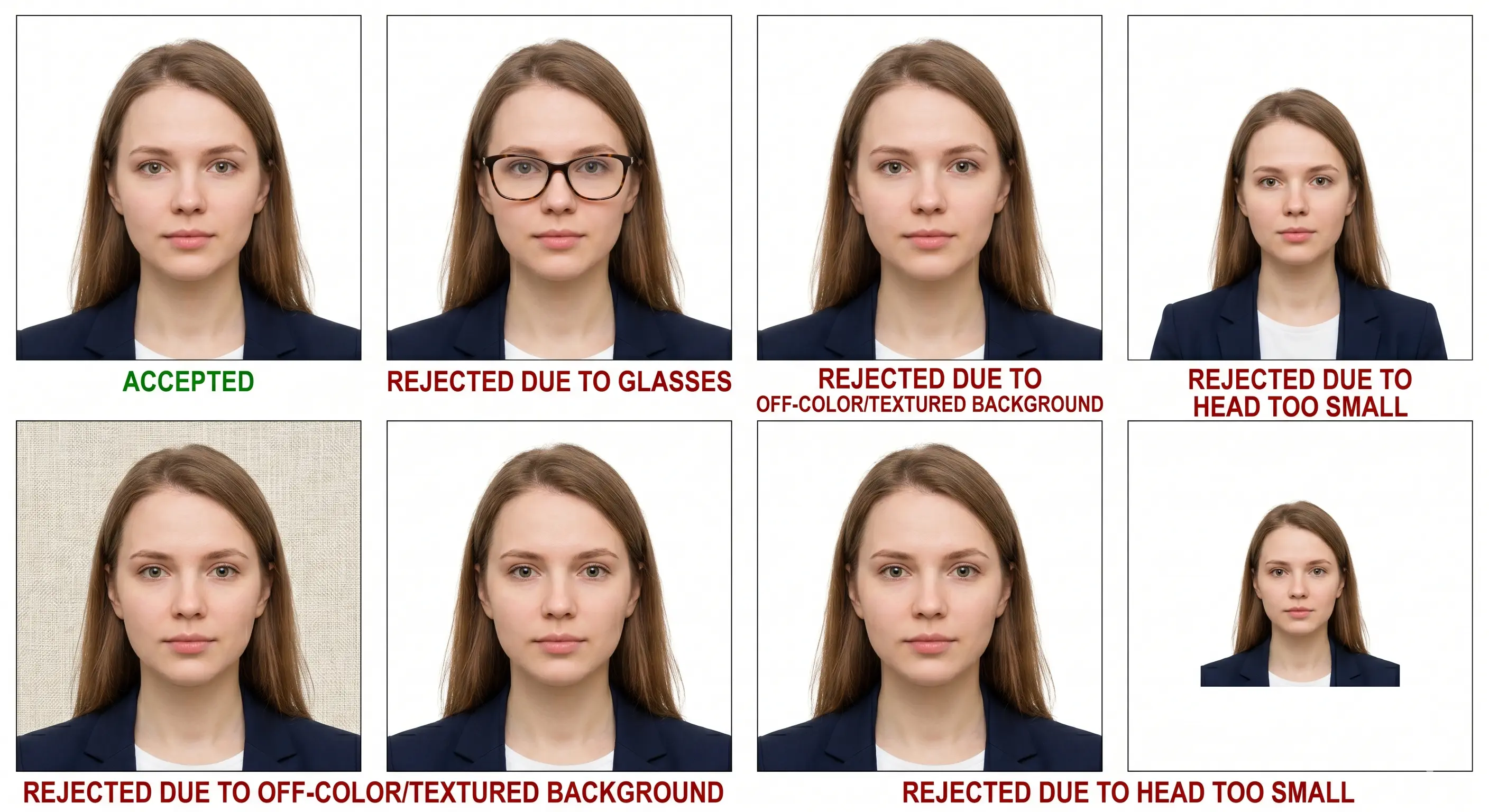
A photo can satisfy every biometric rule and still be refused by an upload form, because portals check two separate things: how the photograph looks, and how the file is built. These eight guides cover the file side — pixel dimensions, kilobyte ceilings, format conversion, cropping, printing, and photographing a baby. For the photograph itself, see the passport photo rules hub; for country-specific dimensions, see the requirements by country hub.
✓ 8 Step-by-Step Guides✓ Cited to Official Portals✓ Expert Reviewed✓ Free Tools, No Signup
600×600pixel minimum for US portal uploads
10–20 KBIndia Passport Seva file window
240 KBDS-160 and Schengen upload ceiling
6 per sheet2×2 photos on 4×6 paper
Edited by Alexandra Chen, Digital Photography & Compliance Editor, and Marcus Reyes, Print & Photo EditorReviewed by Priya Ramesh, CIP, Passport Application SpecialistLast reviewed Sources
Pixel minimums, file-size ceilings and accepted formats are set by each receiving portal and can change without notice. The figures on this page reflect requirements currently published by bodies including the US Department of State, UK HM Passport Office, Government of Canada, the Australian Passport Office, India Passport Seva and Schengen authorities. Always confirm the values displayed by the form you are completing before you upload.
Which Guide Do You Need? (Quick Answer)
Read the error message your portal gave you. "Image too small" or "wrong dimensions" means a pixel problem — use the resize guide. "File too large" means a kilobyte problem — use a compression guide, and note that India's limit is 20 KB while most others are 240 KB. File refused before upload usually means an iPhone HEIC file — convert it to JPEG first.
If you have not taken the photo yet, start with the digital passport photo requirements guide, which covers every specification in one place, then come back for the specific task you need.
Reference
Pixel and File Size Requirements by Portal
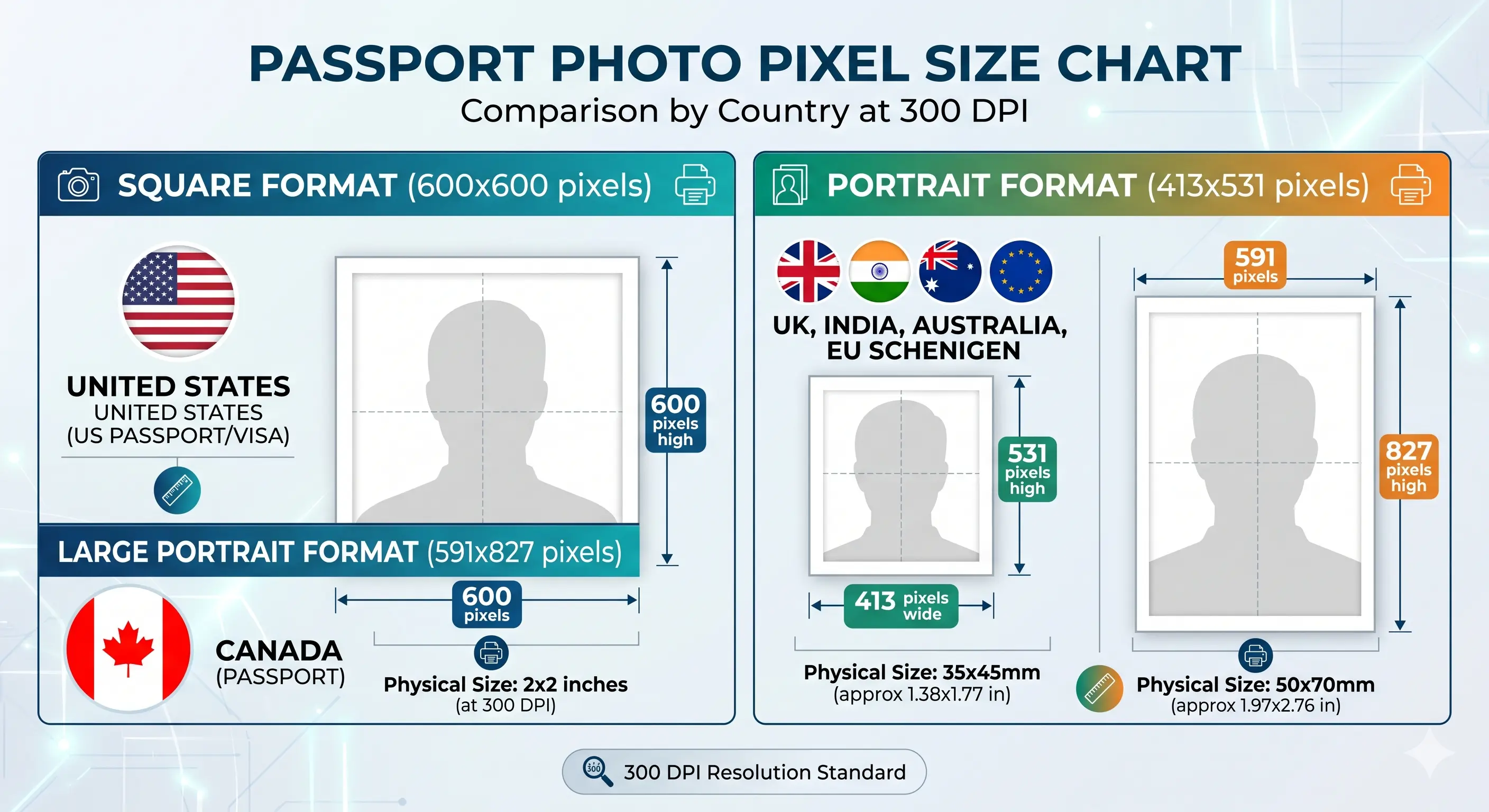
These are the two numbers that decide whether an upload is accepted. Dimensions come from the physical photo format; the kilobyte ceiling is set independently by each portal, which is why the same file passes one system and fails another.
Upload one photo and the Passport Photo Maker applies the crop, pixel size, background and file-size target for your chosen country automatically.
Your image opens directly inside Passport Photo Maker with the correct template selected.
All Guides
Eight Step-by-Step Passport Photo Guides
Start Here
Digital Passport Photo Requirements
Every digital specification in one place: pixel size, file size, format, colour depth, background, head size and the 2026 rules on AI-edited images. The reference guide the others build on.
Common failure: meeting the pixel spec but breaching the portal's kilobyte ceiling.
The square format required for US passport renewal, DS-160 visa and Diversity Visa uploads. Covers hitting the exact pixel count without softening the image or breaking the 1:1 ratio.
Common failure: upscaling a small original, which fails the sharpness check.
The ceiling enforced by the DS-160 visa uploader, Diversity Visa entry form and most Schengen and EU portals. Reduces weight while keeping the 600×600 pixel spec intact.
Common failure: compressing so hard that blocking appears around the eyes.
The tightest window in common use, required by India Passport Seva and by SSC, IBPS, UPSC, PAN card and Aadhaar portals. Keeps the face readable at a fraction of the usual file weight.
Common failure: uploading a 240 KB file to a 20 KB form.
Newer iPhones save HEIC or HEIF by default and no government portal accepts either. Converts to JPEG for DV Lottery, DS-160, UK passport and India visa uploads while preserving colour.
Common failure: the form rejects the file before it even uploads.
Crop any photo to 2×2 in, 35×45 mm, 33×48 mm or a custom ratio, with automatic face-centring and the biometric head-height band applied for the country you choose.
Common failure: correct ratio but the head outside the required height band.
Positioning, lighting and timing for newborns, infants and toddlers, plus which expression and eye rules each authority relaxes for young children and which it does not.
Common failure: a supporting hand, toy or dummy visible in the frame.
Children
Guides for a Baby, Infant or Child Photo
The size, background and head-height requirements are identical for children — no authority reduces the pixel count or relaxes the framing for a newborn. What changes is technique, and a narrow set of expression rules.
UK HM Passport Office waives two rules for children under one year old: the eyes do not have to be open, and a neutral expression is not required. Most other authorities, including Schengen states, Australia and Japan, expect open eyes wherever achievable at any age. Everywhere, the child must be alone in the frame with no supporting hands, arms, car seat, toy or dummy visible, and no other person may appear.
The practical difficulty is meeting an adult framing standard with a subject who cannot sit up. Shoot wide against a plain sheet in soft indirect daylight, photograph from directly above, then crop down — cropping tightly in-camera on a small face leaves too few pixels once the frame is applied.
If you are applying on paper or in person, printing is part of the specification rather than an afterthought. Two settings cause most print rejections: the wrong resolution, and printer software silently rescaling the image.
Print resolution
300 DPI — disable fit-to-page and auto-scaling, which change the physical size
Paper
Glossy or matte photo paper, 200–250 gsm. Plain copier paper is refused everywhere
2×2 in per 4×6 sheet
Six copies in a two by three grid with cutting margins
35×45 mm per 4×6 sheet
Six copies; around twenty on A4, around eighteen on US Letter
Colour management
sRGB. Turn off printer auto-enhance, skin smoothing and colour correction
Cutting
Guillotine or steel rule for square edges. Do not cut inside the printed border
Handling
Let ink dry fully. Do not staple, fold or glue the photo face
2x2 photo size diagram · 600 × 600 pixels
A 600×600 pixel file prints at exactly 2×2 inches when the print resolution is set to 300 DPI. See
2x2 photo size and
2x2 photo size in pixels for the full breakdown.
What is the difference between the guides hub and the rules hub?
The rules hub explains what a compliant photo must look like: background colour, head size, expression, glasses and lighting. This guides hub explains how to produce the file: pixel dimensions, kilobyte limits, format conversion, cropping and printing. Rules govern the photograph; guides govern the file. Most rejections come from the rules, most upload failures come from the file.
Which guide do I need if my upload keeps failing?
Read the error. If it says the image is too small or the wrong dimensions, use the resize to 600×600 guide. If it says the file is too large, use the compress to 240 KB guide, or the reduce to 20 KB guide for Indian exam and visa portals. If the file is refused before uploading at all, it is probably HEIC from an iPhone, so use the HEIC to JPEG guide.
Pixels & File Size
What pixel size does a passport photo need to be?
It depends on the physical format. A 2×2 inch photo is 600×600 pixels at 300 DPI with a 1200×1200 maximum. A 35×45 mm photo is 413×531 pixels. A 50×70 mm Canadian photo is 591×827 pixels. A 33×48 mm Chinese photo is 390×567 pixels for print, but its digital upload range is 354×472 to 420×560 pixels.
What file size in KB does a passport photo need to be?
The spread is wide and portal-specific. India Passport Seva accepts only 10 to 20 KB. Singapore caps at 60 KB, South Korea at 100 KB, the DS-160 visa uploader and Diversity Visa entry at 240 KB, Schengen and most EU states at 240 KB, New Zealand at 250 KB, Australia at 500 KB, and US online passport renewal requires between 54 KB and 10 MB.
Can I enlarge a small photo to meet the pixel minimum?
No. Upscaling interpolates pixels rather than adding detail, and the result is soft or blocky around the eyes and hairline. Automated checks measure sharpness, so an upscaled file fails even when the pixel count reads correctly. Always shoot wide and crop down from a larger source.
Format, Printing & Children
Why is my iPhone photo rejected before it even uploads?
Newer iPhones save photos as HEIC or HEIF by default, and no government portal accepts either format. Convert to JPEG first. Also switch off portrait mode and skin smoothing before shooting, because both alter facial geometry and are detected by automated validation.
How many passport photos fit on one 4×6 inch sheet?
A 4×6 inch sheet holds six 2×2 inch photos in a two by three grid with cutting margins, or six 35×45 mm photos. An A4 sheet holds around twenty 35×45 mm copies and a US Letter sheet around eighteen. Print at 300 DPI on photo paper and disable any fit-to-page scaling, which changes the physical size.
Are the guides different for a baby or infant photo?
The size, background and head-height rules are identical for children, with no age exemption on dimensions. What changes is technique and a narrow set of expression rules: UK HMPO waives the open-eyes and neutral-expression requirements for children under one, while most other authorities expect open eyes where achievable. The child must be alone in the frame with no hands, toy or dummy visible.
Sources & References
U.S. Department of State — passport photo requirements: travel.state.gov
U.S. Department of State — uploading a digital photo for online renewal: travel.state.gov
U.S. Department of State — visa digital image requirements: travel.state.gov
Last reviewed:
Pixel minimums, file-size ceilings and accepted formats are set by each receiving portal and can change. Individual forms may apply additional limits beyond those published centrally. Always confirm the values shown by the form you are completing before you upload.
Every guide on this page describes work the Passport Photo Maker already does automatically: the crop, the pixel size, the background, and the file-size target for your chosen country.
Create Your Passport Photo
Upload one photo and download a compliant file plus a print-ready sheet.
No signup. Your image opens directly inside Passport Photo Maker.