
Passport Size Photo Dimensions: Official Sizes for Every Country
Three formats cover most of the world: 2 × 2 inches (51 × 51 mm) for the US and India, 35 × 45 mm for the UK, EU, Schengen area and Australia, and 50 × 70 mm for the Canadian passport.
Embassies and immigration offices refuse thousands of applications every week because of incorrect sizing, off-centre faces, wrong head proportions, or a file that breaches the portal's byte limit. This guide lists verified passport size photo dimensions in millimetres, centimetres, inches and pixels for every major issuing authority, along with the head-height band, background shade, upload file-size ceiling, child photo rules and printing guidance each one enforces.
Passport Size Photo Dimensions (Quick Answer)
The standard passport photo size is 2 × 2 inches (51 × 51 mm) in the US and India, and 35 × 45 mm in the UK, EU, Schengen area and Australia. Canada's passport uses a unique 50 × 70 mm. China is the main outlier at 33 × 48 mm. At 300 DPI these equal 600×600, 413×531, 591×827 and 390×567 pixels.
| Format | Millimetres | Inches | Pixels @ 300 DPI | Ratio |
|---|---|---|---|---|
| 2 × 2 inch | 51 × 51 mm | 2 × 2 in | 600 × 600 px | 1 : 1 |
| 35 × 45 mm | 35 × 45 mm | 1.38 × 1.77 in | 413 × 531 px | 7 : 9 |
| 50 × 70 mm | 50 × 70 mm | 2 × 2.75 in | 591 × 827 px | 5 : 7 |
| 33 × 48 mm | 33 × 48 mm | 1.30 × 1.89 in | 390 × 567 px | 11 : 16 |
Visual Size Comparison
The three dominant formats side by side. Note that only the US and Indian format is square; every other major standard is portrait, which is why a photo prepared for one cannot be reused for another.
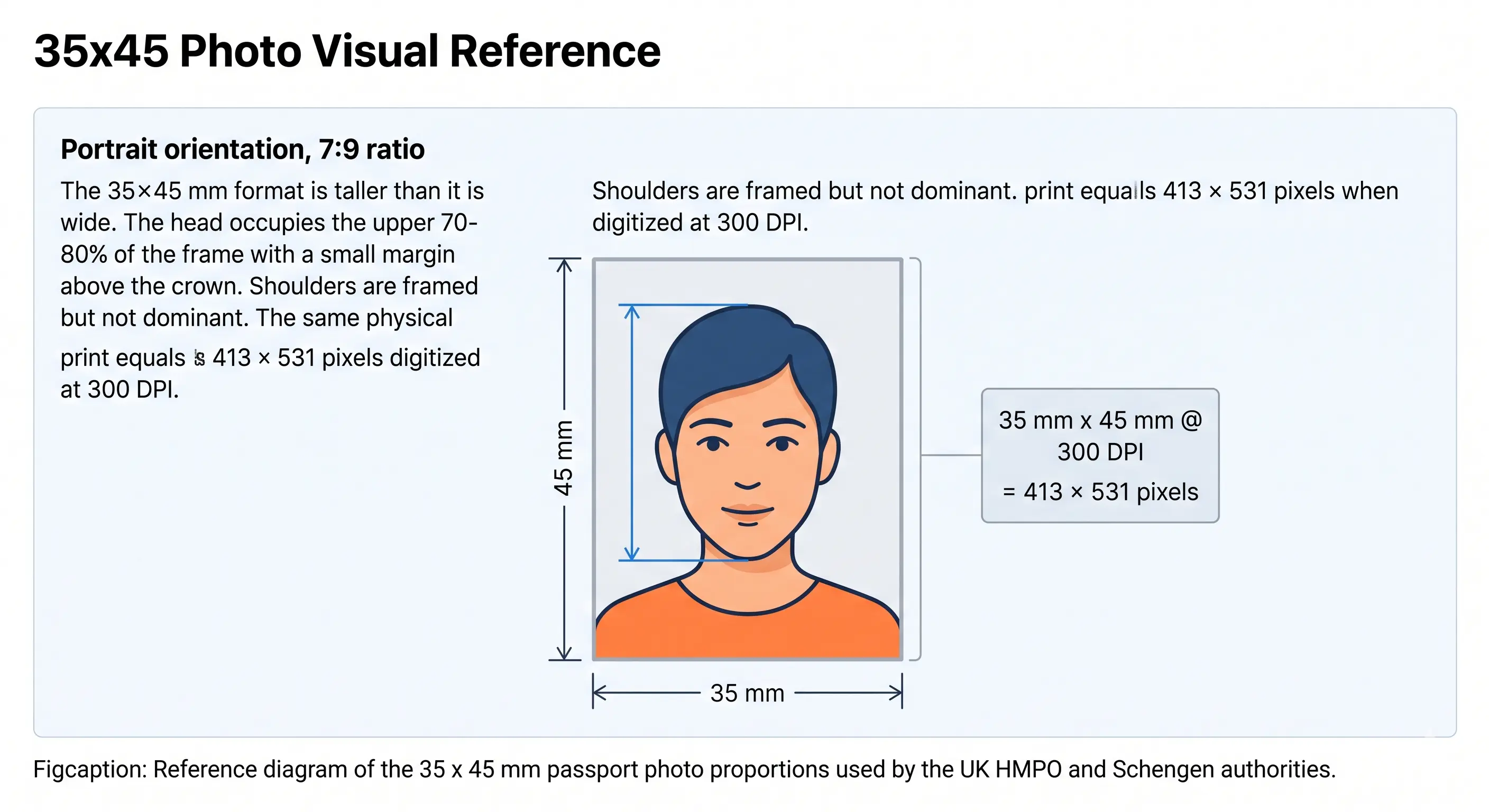
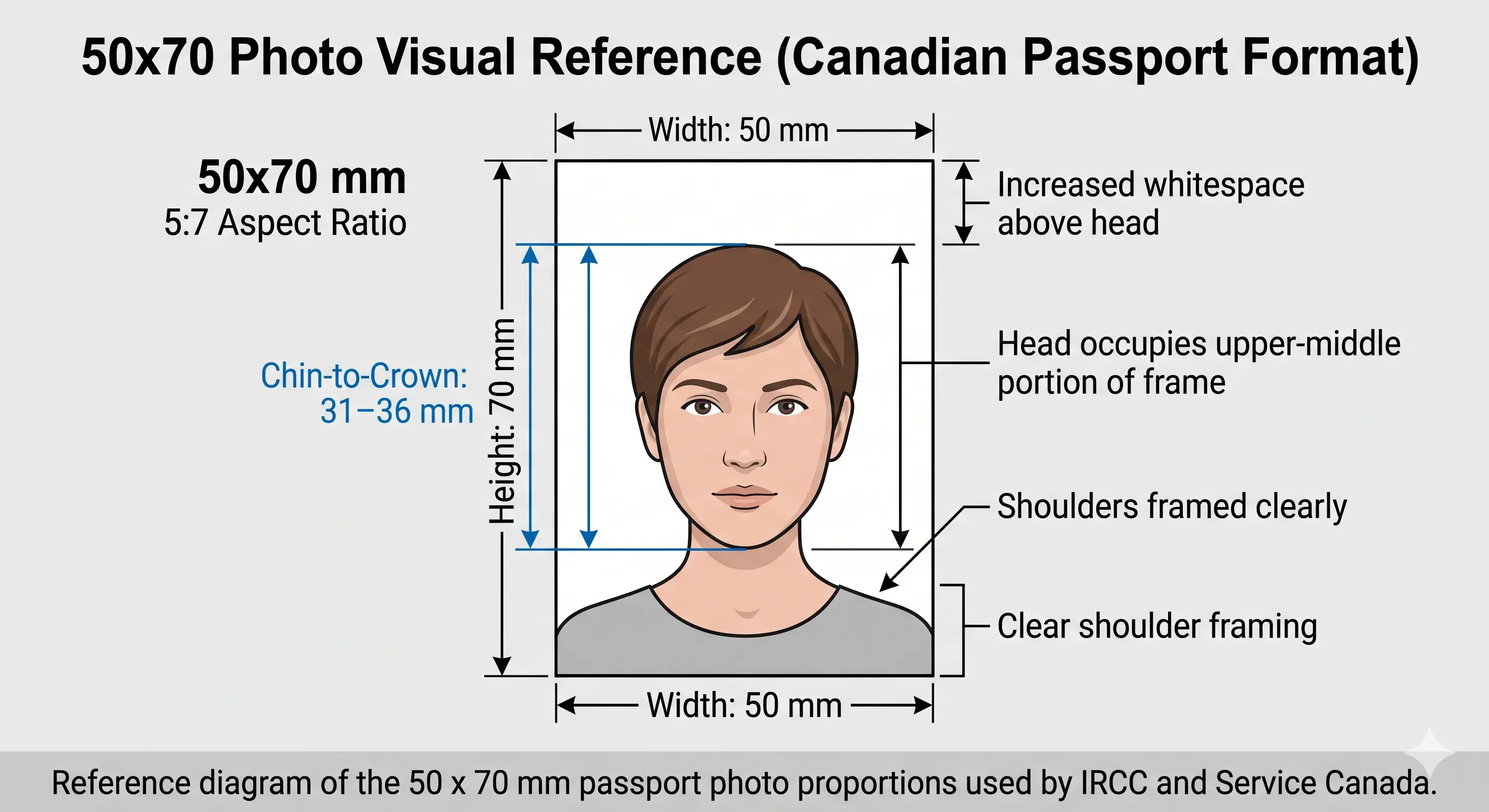
Standard Passport Photo Dimensions by Country
A verified reference of passport picture measurements used by the major issuing authorities. Click any document to open its dedicated guide with the full specification.
| Country / Document | Size (mm) | Size (inches) | Pixels @ 300 DPI | Head Height | Background |
|---|---|---|---|---|---|
| United States Passport | 51 x 51 mm | 2 x 2 in | 600 x 600 px | 25–35 mm | Plain white |
| US Visa (DS-160) | 51 x 51 mm | 2 x 2 in | 600 x 600 px | 25–35 mm | Plain white |
| USCIS Green Card | 51 x 51 mm | 2 x 2 in | 600 x 600 px | 25–35 mm | Plain white |
| United Kingdom Passport | 35 x 45 mm | 1.38 x 1.77 in | 413 x 531 px | 29–34 mm | White, cream or light grey |
| Canada Passport | 50 x 70 mm | 2 x 2.75 in | 591 x 827 px | 31–36 mm | Plain white |
| Canada Visa | 35 x 45 mm | 1.38 x 1.77 in | 413 x 531 px | 31–36 mm | Plain white |
| Canada PR Card | 35 x 45 mm | 1.38 x 1.77 in | 413 x 531 px | 31–36 mm | Plain white |
| India Passport (in person) | 51 x 51 mm | 2 x 2 in | 600 x 600 px | 25–35 mm | Pure white |
| India Passport Seva (online) | 35 x 45 mm | 1.38 x 1.77 in | 413 x 531 px | 25–32 mm | Pure white |
| India Visa | 51 x 51 mm | 2 x 2 in | 600 x 600 px | 25–35 mm | Pure white |
| India OCI Card | 51 x 51 mm | 2 x 2 in | 600 x 600 px | 25–35 mm | Pure white |
| Australia Passport | 35 x 45 mm | 1.38 x 1.77 in | 413 x 531 px | 32–36 mm | Plain white |
| Australia Visa | 35 x 45 mm | 1.38 x 1.77 in | 413 x 531 px | 32–36 mm | Plain white |
| EU Biometric Passport | 35 x 45 mm | 1.38 x 1.77 in | 413 x 531 px | 32–36 mm | Light grey |
| Schengen Visa | 35 x 45 mm | 1.38 x 1.77 in | 413 x 531 px | 32–36 mm | Light grey |
| Germany Passport / ID | 35 x 45 mm | 1.38 x 1.77 in | 413 x 531 px | 32–36 mm | Light grey |
| France Passport | 35 x 45 mm | 1.38 x 1.77 in | 413 x 531 px | 32–36 mm | Light grey |
| Japan Passport | 35 x 45 mm | 1.38 x 1.77 in | 413 x 531 px | 32–36 mm | Plain white |
| South Korea Passport | 35 x 45 mm | 1.38 x 1.77 in | 413 x 531 px | 32–36 mm | Plain white |
| New Zealand Passport | 35 x 45 mm | 1.38 x 1.77 in | 413 x 531 px | 32–36 mm | Plain light grey |
| Singapore Passport | 35 x 45 mm | 1.38 x 1.77 in | 413 x 531 px | 25–35 mm | Plain white |
| China Passport | 33 x 48 mm | 1.30 x 1.89 in | 390 x 567 px | 28–33 mm | Plain white |
| China Visa | 33 x 48 mm | 1.30 x 1.89 in | 390 x 567 px | 28–33 mm | Plain white |
| Hong Kong Passport | 40 x 50 mm | 1.57 x 1.97 in | 472 x 591 px | 32–36 mm | Plain white |
| UAE Passport | 40 x 60 mm | 1.57 x 2.36 in | 472 x 709 px | Varies | Plain white |
Need the correct dimensions applied automatically?
Create Passport Photo →Passport Photo Dimensions in Pixels
Online portals require digital uploads at specific pixel dimensions. The values below are calculated at the standard 300 DPI used for biometric photographs. Note that some authorities publish their own pixel minimum instead, which can differ from the 300 DPI conversion.
| Photo Size | Pixels @ 300 DPI | Pixels @ 600 DPI | Used For |
|---|---|---|---|
| 2 x 2 inch (51 x 51 mm) | 600 x 600 px | 1200 x 1200 px | US, India in-person, Green Card |
| 35 x 45 mm | 413 x 531 px | 826 x 1062 px | UK, EU, AU, NZ, JP, KR, CA visa |
| 50 x 70 mm | 591 x 827 px | 1181 x 1654 px | Canada Passport |
| 33 x 48 mm | 390 x 567 px | 780 x 1134 px | China Passport and Visa |
| 40 x 50 mm | 472 x 591 px | 945 x 1181 px | Hong Kong Passport |
| 40 x 60 mm | 472 x 709 px | 945 x 1417 px | UAE, Thailand |
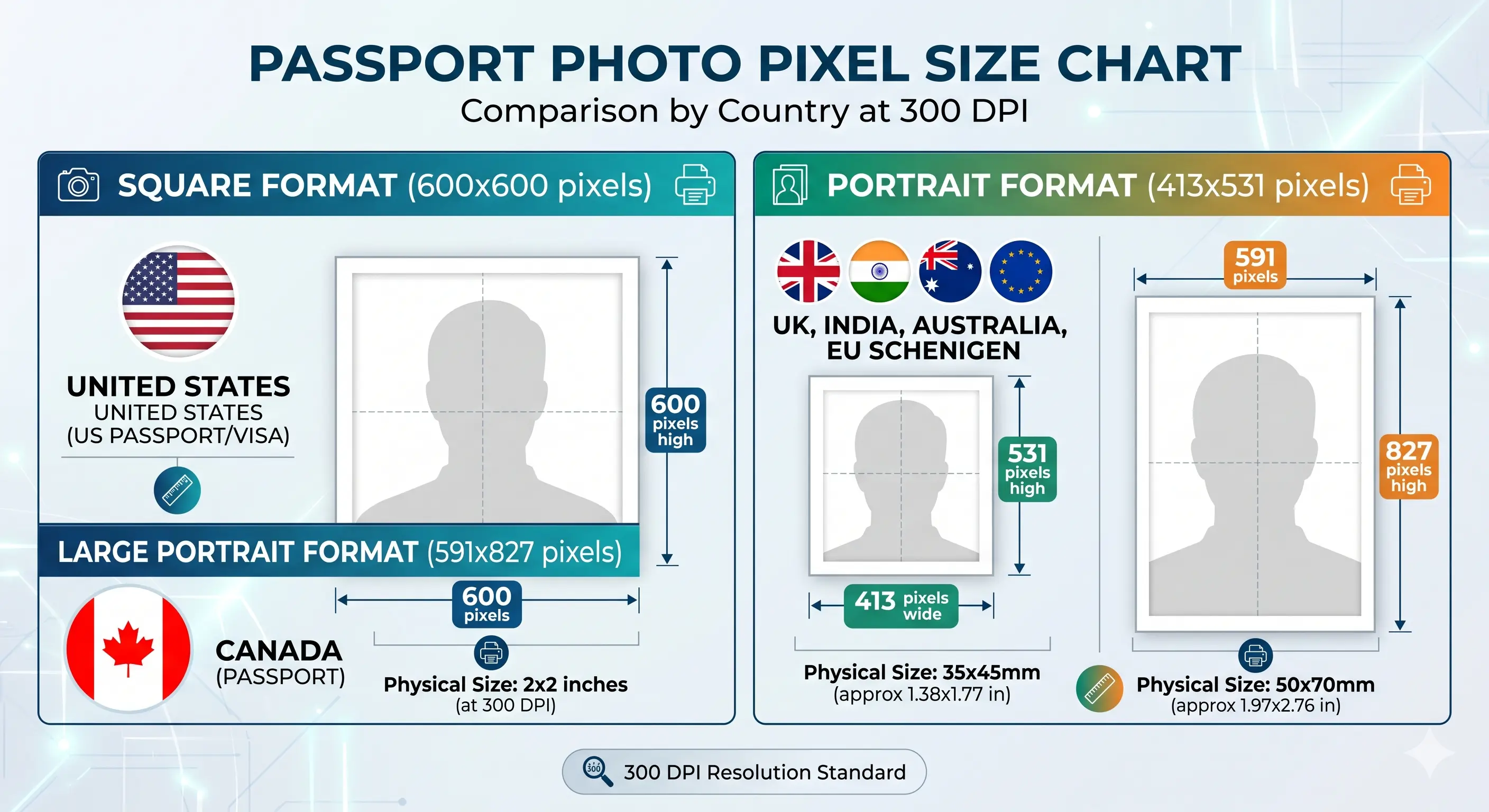
Why upscaling does not work
Enlarging a 207 × 266 pixel image to 413 × 531 does not add detail — it interpolates, and the result is soft around the eyes and hairline. Automated checks measure sharpness, so an upscaled file fails even when the pixel count reads correctly. Always shoot wide and crop down.
Passport Photo Dimensions in Inches, CM and MM
Different agencies publish their specifications in different units. Use this conversion reference to match any requirement in millimetres, centimetres or inches.
| Common Name | Millimetres (mm) | Centimetres (cm) | Inches (in) |
|---|---|---|---|
| US / India passport size | 51 x 51 mm | 5.1 x 5.1 cm | 2 x 2 in |
| UK / EU / AU size | 35 x 45 mm | 3.5 x 4.5 cm | 1.38 x 1.77 in |
| Canada passport size | 50 x 70 mm | 5.0 x 7.0 cm | 2 x 2.75 in |
| China consular size | 33 x 48 mm | 3.3 x 4.8 cm | 1.30 x 1.89 in |
| Hong Kong size | 40 x 50 mm | 4.0 x 5.0 cm | 1.57 x 1.97 in |
| UAE / Thailand size | 40 x 60 mm | 4.0 x 6.0 cm | 1.57 x 2.36 in |
| Stamp size | 20 x 25 mm | 2.0 x 2.5 cm | 0.79 x 0.98 in |
| Print sheet output | 102 x 152 mm | 10.2 x 15.2 cm | 4 x 6 in |
Passport Photo Dimensions for Online Applications
Government e-portals enforce a pixel range and a file-size window, and passing one does not pass the other. A photo that exceeds the byte ceiling is refused even when the dimensions are perfect — and a few portals also reject files that are too small.
| Application Portal | Pixel Dimensions | File Size Limit | Format |
|---|---|---|---|
| US Passport online renewal | 600 x 600 px (min) – 1200 x 1200 px (max) | 54 KB – 10 MB | JPEG |
| US Visa (DS-160 / CEAC) | 600 x 600 px – 1200 x 1200 px | 240 KB max | JPEG |
| US Diversity Visa entry | 600 x 600 px – 1200 x 1200 px | 240 KB max | JPEG |
| USCIS Green Card | 600 x 600 px (2 x 2 in @ 300 DPI) | Printed photo, no byte limit | |
| India Passport Seva | 413 x 531 px (35 x 45 mm) | 10 – 20 KB | JPEG |
| India OCI Card | 200 x 200 px (min) – 1500 x 1500 px (max) | 10 – 200 KB | JPEG |
| UK Online Passport (HMPO) | 600 x 750 px (HMPO's own minimum) | 50 KB – 10 MB | JPEG |
| Canada IRCC PR Card | 420 x 540 px (min) | Up to 240 KB | JPEG |
| Australia ImmiAccount | 900 x 1200 px recommended | 500 KB max per file | JPEG / PNG |
To hit a specific byte target, see the compress to 240 KB guide, the reduce file size guide for tight windows like India's 10–20 KB, or the resize to 600x600 guide for the pixel minimum. iPhone users should convert first with the HEIC to JPEG guide. Full portal rules are in the digital passport photo requirements guide.
Create Your Passport Size Photo Dimensions Online
Skip the measuring tape and the trial-and-error cropping. Our Passport Photo Maker reads your uploaded image, detects your face, and applies the correct dimensions for the country and document you select.
It runs in your browser, supports JPG, PNG, and HEIC, and outputs both a print-ready 4x6 sheet and a digital file sized to the official byte limit of each portal.
Upload your photo and our Passport Photo Maker automatically:
- Crops the photo correctly for your selected country
- Centres your face within the official frame
- Applies proper dimensions in millimetres and pixels
- Creates a compliant photo that meets ICAO 9303 standards
- Generates a print-ready 4x6 sheet with multiple copies
Detailed Passport Photo Requirements
Dimensions alone are not enough. Every row below is checked, and each links to the detailed standard in the passport photo rules library.
| Photo size | 2 x 2 in (US / India) or 35 x 45 mm (UK / EU / AU / CA Visa) or 50 x 70 mm (CA Passport) |
|---|---|
| Width | 33 mm to 51 mm depending on country |
| Height | 45 mm to 70 mm depending on country |
| Background | Plain light colour — white, off-white, cream or light grey by authority. See background colour rules |
| Lighting | Even and diffuse, no shadow on the face or the wall. See shadow rules |
| Head size (chin to crown) | 25–36 mm depending on country. See head size rules |
| Face coverage | 50–80% of frame height depending on format. See face size requirements |
| Eye position | Both eyes open, looking at the camera, inside the authority's vertical band. See eyes requirements |
| Hair | Must not cover the eyes or obscure the outline of the face. See hair rules |
| Ears | Required by some authorities, optional in the UK and Schengen. See ears visibility rules |
| Head coverings | Religious or medical only, with the full face visible. See head covering rules |
| Resolution | 300 DPI standard; pixel dimensions of 390 x 567 up to 1200 x 1200. See resolution rules |
| File format | JPEG (.jpg), 24-bit colour, sRGB. Greyscale is refused |
| File size | 10 KB to 10 MB depending on portal — see the portal table above |
| Glasses | Not permitted in the US, UK, India, Australia, Canada or Schengen since 2016. See glasses rules |
| Expression | Neutral face, mouth closed, eyes open looking at camera. See smile rules |
| Digital editing | Not permitted — no filters, portrait blur, skin smoothing or tone adjustment |
| Photo age | Taken within the last 6 months |
How to Create a Passport Size Photo
- Take or upload a photo — Stand 4-5 feet from a plain light wall in soft natural light, with at least 20 inches of clearance behind you so no shadow falls on the wall. Face the camera directly with a neutral expression.
- Open the Passport Photo Maker — Visit the ClonyPDF Passport Photo Maker and drag your image into the upload box.
- Select your country or document — Choose from US, UK, Canada, India, Australia, Germany, France, Singapore, New Zealand and more, each with locked official dimensions.
- Auto-crop and adjust — The tool detects your face and applies the correct head-to-frame ratio. Fine-tune the position if needed. The crop guide explains how aspect ratio and head height are applied together.
- Download the result — Get a digital JPEG sized to the official byte limit plus a 4x6 print sheet with copies arranged for cutting.
Passport Photo Dimensions for Babies, Infants and Children
Every authority applies the same photo size, background and head-height band to children as to adults. There is no smaller format for infants and no reduced pixel minimum. What varies is a narrow set of eye and expression rules, and the UK is the most accommodating.
Same size, same head height
A newborn photo is measured exactly as an adult photo. 2 × 2 inch stays 2 × 2 inch; 35 × 45 mm stays 35 × 45 mm.
Child alone in the frame
No supporting hands, arms, car seat, toy or dummy may appear, and no other person may be visible. Support the child from behind a plain sheet.
Eyes open, with exceptions
UK HMPO does not require open eyes for children under one. Most other authorities expect open eyes wherever achievable. See eyes requirements.
Expression relaxed for under-ones
The UK waives the neutral-expression rule for babies under one year. Older children must have a closed mouth and neutral face like an adult.
No shadow behind the head
Lay the child on a plain light sheet in soft indirect daylight and shoot from directly above. Side lighting creates the shadow that fails the check.
Crop from a wide source
Shoot wide and crop down. Cropping tightly in-camera on a small face leaves too few pixels once the official frame is applied.
Positioning, lighting and timing technique for infants and toddlers is covered in the baby passport photo at home guide.
Photographing a child? Upload the shot and let the tool apply the correct frame.
Create Child Photo →Printing Passport Photos at the Correct Dimensions
Printed dimensions only come out right if the print resolution is set correctly. At 300 DPI a 600 × 600 pixel file prints exactly 2 × 2 inches, and a 413 × 531 file prints exactly 35 × 45 mm. If your printer software rescales the image or defaults to a lower DPI, the physical size changes and the photo is refused for being the wrong size.
| Print Sheet | 2 x 2 in copies | 35 x 45 mm copies | 50 x 70 mm copies |
|---|---|---|---|
| 4 x 6 in (10 x 15 cm) | 6 | 6 | 2 |
| A4 (21 x 29.7 cm) | 16 | 20 | 8 |
| Letter (8.5 x 11 in) | 16 | 18 | 8 |
| Print resolution | 300 DPI — disable fit-to-page and auto-scaling |
|---|---|
| Paper | Glossy or matte photo paper, 200–250 gsm. Plain copier paper is refused |
| Colour management | sRGB. Turn off printer auto-enhance, skin smoothing and colour correction |
| Cutting | Guillotine or steel rule for square edges. Do not cut inside the printed border |
| Handling | Let ink dry fully. Do not staple, fold or glue the photo face |
Printer settings and cutting technique are covered in full in the print passport photo at home guide, and multi-copy sheet layout in the print 2x2 on 4x6 guide.
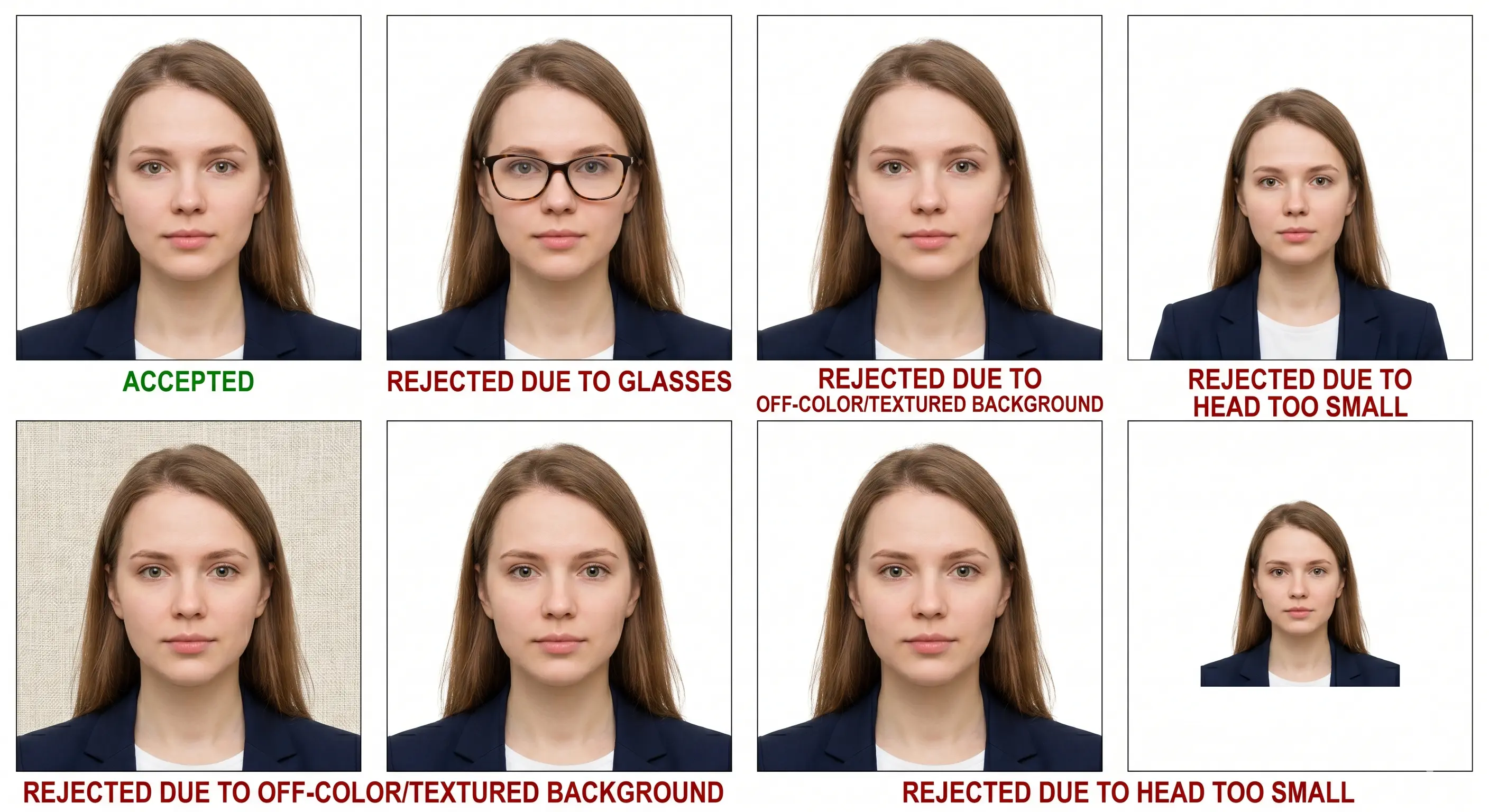
Why Passport Photos Get Rejected
Each item links to the detailed rule so you can confirm the exact tolerance before you submit. The full breakdown is in passport photo rejection reasons.
Wrong Dimensions
The most common reason. A 2x2 photo submitted for a UK passport, which requires 35x45 mm, is rejected instantly by automated systems.
Wrong Format for the Channel
Using India's 2x2 in-person size for the Passport Seva online upload, which needs 35x45 mm. Same country, two specifications.
File Size Out of Range
Exceeding the 240 KB visa ceiling, or falling under the 54 KB floor on US online renewal. Match the portal, not a generic setting.
Wrong Background Shade
Textured walls, gradients, or a shade outside the country's accepted range. See background colour rules.
Shadows on Face or Wall
Side lighting creates shadows behind the head or under the chin. Even small shadows fail ICAO compliance scans. See shadow rules.
Head Outside the Band
Chin-to-crown measurement too small or too large for the country's range. See head size rules.
Face Not Centred
The face must be horizontally centred with a specific margin above the head. Off-centre crops fail facial recognition. See face size requirements.
Cropping Errors
Cutting off the crown or chin, including shoulders too prominently, or distorting the aspect ratio. See the crop guide.
Low Resolution
Photos under 300 DPI appear pixelated when printed at the required size. Most rejected uploads are below the portal's pixel minimum. See resolution rules.
Hair Across the Face
A fringe over the eyes or hair obscuring the face outline fails landmark detection. See hair rules.
Glasses, Hats or Smiling
Eyewear reflections, non-religious headwear, and open-mouth smiles trigger biometric mismatches. See head covering rules.
Filters and Retouching
Portrait blur, skin smoothing and slimming alter facial geometry and are detected by automated validation.
Frequently Asked Questions
Sizes & Conversions
What size is a standard passport photo?
Three formats cover most of the world. 2x2 inches (51x51 mm) is used by the US and India for in-person applications. 35x45 mm is used by the UK, EU and Schengen area, Australia, New Zealand, Japan and the Canada visa. Canada's own passport uses a unique 50x70 mm size. China is the main outlier at 33x48 mm.
What are passport photo dimensions in pixels?
At 300 DPI, a 2x2 inch photo is 600x600 pixels, a 35x45 mm photo is 413x531 pixels, a 50x70 mm photo is 591x827 pixels, and a 33x48 mm photo is 390x567 pixels. Multiply each by two for the 600 DPI equivalent.
What DPI is required for a passport photo?
300 DPI is the standard for both printed and digitally submitted passport photos. It satisfies ICAO 9303 and is accepted by the US State Department, UK HMPO, India Passport Seva and all major immigration agencies. Some portals publish their own pixel minimum instead of a DPI figure.
Why does India appear with two different photo sizes?
Because India uses both. An in-person application at a Passport Seva Kendra requires a printed 2x2 inch photo, while the Passport Seva online portal accepts a 35x45 mm digital upload at 413x531 pixels. Check which channel you are applying through before you crop.
Specification Detail
What is the head size in a passport photo?
Head height from chin to crown is 25–35 mm for the US and India, 29–34 mm for the UK, 31–36 mm for Canada, 32–36 mm for Schengen states, Australia and Japan, and 28–33 mm for China. The head fills roughly 50–80% of the frame height depending on the format.
What file size does a passport photo upload need to be?
The limits vary widely. India Passport Seva accepts only 10–20 KB. The US DS-160 visa uploader caps at 240 KB, while US online passport renewal requires 54 KB to 10 MB. Canada IRCC allows up to 240 KB, Australia ImmiAccount up to 500 KB, and UK HMPO 50 KB to 10 MB.
What background is required?
A plain light background is the global standard, but the shade differs. The US and India require plain white. The UK HMPO accepts white, cream or light grey depending on contrast with your hair and skin tone. Schengen states and New Zealand require plain light grey.
Can I wear glasses?
No. Eyeglasses are prohibited in passport photos for the US, UK, India, Canada, Australia and Schengen states since 2016. Medically required eyewear is the only exception and requires a doctor's note. Tinted lenses and sunglasses are never accepted.
Children, Taking & Printing
What are the passport photo rules for a baby or child?
The photo size, background and head-height band are identical to an adult in every country. There is no smaller format for infants. The child must be alone in the frame with no supporting hands, car seat, toy or dummy visible. UK HMPO relaxes two rules for children under one year: the eyes need not be open and a neutral expression is not required. See the child and infant rules section.
Can I take the photo at home?
Yes. Home photos are fully accepted as long as they meet the dimension, background and lighting rules. Stand against a plain light wall with at least 20 inches of clearance behind you, use daylight from a window, and upload to our cropper to handle the measurements.
Can I use my phone camera?
Yes. Modern smartphone cameras exceed the pixel resolution required. Hold the phone at eye level, use the rear camera, keep a 4-foot distance to avoid wide-angle distortion, and switch off portrait blur and skin smoothing, which alter facial geometry and are detected.
How do I print a passport photo at home?
Print at 300 DPI on glossy or matte photo paper, never plain copier paper. A 4x6 inch sheet holds six 2x2 inch photos or six 35x45 mm photos. Disable fit-to-page scaling, which changes the physical size, and cut with a guillotine for square edges. See the print at home guide.
How recent must the photo be?
Within the last 6 months, reflecting your current appearance. Changes in facial hair, hair colour, significant weight or facial surgery require a new photo even if an older one is still inside the window.
Official Sources & References
- U.S. Department of State — Passport Photo Requirements: travel.state.gov
- U.S. Department of State — Visa Digital Image Requirements: travel.state.gov
- UK HM Passport Office — Photo Rules: gov.uk
- Government of Canada — Passport Photo Specifications: canada.ca
- India Passport Seva — Photo Guidelines: passportindia.gov.in
- Australian Passport Office — Photo Guidelines: passports.gov.au
- European Commission — Schengen Borders and Visa Policy: home-affairs.ec.europa.eu
- ICAO Doc 9303 — Machine Readable Travel Documents biometric photograph standard: icao.int
Create Your Passport Size Photo Dimensions Now
Skip the measuring, the math, and the rejection emails. Upload one photo and get a compliant, perfectly cropped image sized to your portal's exact byte limit, ready for any embassy or online application in under 60 seconds.
Start Creating Your Photo →