
2x2 Photo Size in Pixels: Exact Dimensions for Online Uploads
2x2 Photo Size in Pixels (Quick Answer)
A 2x2 inch photo is 600 × 600 pixels at 300 DPI. That is the minimum US portals accept; the maximum is 1200 × 1200 pixels. The image must be a square 1:1 JPEG in full colour on a plain white background, with the head filling 50–69% of the frame height.
| Specification | Value |
|---|---|
| Pixel size (recommended) | 600 × 600 px — 2 × 2 in at 300 DPI |
| Pixel minimum | 600 × 600 px |
| Pixel maximum | 1200 × 1200 px — 2 × 2 in at 600 DPI |
| Physical size | 2 × 2 inches (51 × 51 mm) |
| Aspect ratio | 1 : 1 (perfect square) |
| File format | JPEG, 24-bit colour, sRGB |
| File size (DS-160 / DV entry) | 240 KB maximum |
| File size (online passport renewal) | 54 KB to 10 MB |
| Background | Plain white or off-white, no shadow |
| Head height | 1 to 1⅜ in (25–35 mm) — 50–69% of frame |
That single number trips up thousands of people every week — students applying for a U.S. visa, parents filing green card paperwork, and travellers uploading passport applications who suddenly hit an "image too small" or "wrong dimensions" error.
The 2x2 inch square is the standard for U.S. passports, U.S. visas, green cards, OCI cards, and Indian passports. The problem is that physical inches mean nothing to an upload form — portals check pixels and kilobytes. Photos get rejected because they are scanned too small, cropped off-centre, saved at the wrong resolution, or compressed past the file-size ceiling. This page gives you the exact pixel values, the file-size windows each portal enforces, the maths behind them, and a free way to get it right on the first try.
2x2 Photo Size Visual Reference
The diagram below shows the same photo expressed three ways: 2 × 2 inches, 51 × 51 millimetres, and 600 × 600 pixels at 300 DPI. All three describe one identical square.
Create Your 2x2 Photo Size in Pixels Online
Instead of fighting with image editors and DPI calculators, drop your photo below. Our Passport Photo Maker reads your image, finds your face, and outputs a perfect 600x600 pixel square that meets the 2x2 standard used by U.S. and international document portals.
No measuring, no Photoshop, no guesswork on resolution. Upload a clear photo of yourself and download a compliant, print-and-upload-ready file in seconds.
Upload your photo and our Passport Photo Maker automatically:
- Crops the photo correctly to a 2x2 square
- Centers your face within the frame
- Applies proper 600x600 pixel dimensions
- Keeps the JPEG inside the 240 KB portal ceiling
- Creates a compliant photo for official use
- Generates a print-ready, high-resolution version
2x2 Photo Size in Pixels for Different Documents
The 600x600 pixel standard applies across all major U.S. government document portals. What differs between them is the file size ceiling, which is where most uploads actually fail.
| Document | Pixel Size | File Size Limit |
|---|---|---|
| US Passport (DS-11 / DS-82 print) | 600 × 600 px | Not applicable — printed |
| US Passport (online renewal upload) | 600 × 600 px to 1200 × 1200 px | 54 KB – 10 MB |
| US Visa (DS-160) | 600 × 600 px to 1200 × 1200 px | 240 KB maximum |
| Diversity Visa (DV) entry | 600 × 600 px to 1200 × 1200 px | 240 KB maximum |
| Green Card (I-485, I-130) | 600 × 600 px | Printed 2 × 2 photo |
| OCI Card | 600 × 600 px | Check the current portal limit |
| US Naturalization (N-400) | 600 × 600 px | Printed 2 × 2 photo |
Already have a 600x600 file that is too heavy? The compress to 240 KB guide gets it under the ceiling without dropping below the pixel minimum.
File Size in KB: The Limit That Actually Rejects Uploads
Pixel dimensions and file size are two separate checks, and passing one does not pass the other. A 600 × 600 pixel JPEG saved at maximum quality can easily exceed 240 KB, which is why an image that looks correct is refused by the DS-160 uploader.
| JPEG quality | Typical size at 600 × 600 | Verdict |
|---|---|---|
| 100 (maximum) | 250 – 400 KB | Too large for DS-160 and DV entry |
| 90 | 120 – 220 KB | Safe for every US portal |
| 85 (recommended) | 60 – 150 KB | Safe, with no visible quality loss |
| 60 or lower | Under 40 KB | Risk of visible compression artefacts |
Two rules keep you inside both windows. First, never compress below roughly 50 KB — blocking and colour banding around the face trigger a quality failure even when the pixel count is right. Second, if a portal enforces a minimum such as the 54 KB floor on online passport renewal, an over-compressed file is refused for being too small.
For the mechanics of hitting a specific target, see the compress to 240 KB guide and the reduce file size guide. To hit the pixel minimum exactly, use the resize to 600x600 guide. Broader digital submission rules across portals are covered in the digital passport photo requirements guide, and the sharpness and compression standard itself in passport photo resolution rules.
Understanding the 2x2 to Pixels Conversion
The conversion from inches to pixels depends entirely on DPI (dots per inch). The formula is simple:
At the government-standard 300 DPI, a 2x2 inch photo equals exactly 600 x 600 pixels. Always aim for 300 DPI or higher, because a portal can shrink a large image but cannot recover detail from a small one.
| 2x2 inches at | Pixel dimensions | Accepted? |
|---|---|---|
| 72 DPI (screen) | 144 × 144 px | No — far below minimum |
| 96 DPI (web) | 192 × 192 px | No — below minimum |
| 150 DPI | 300 × 300 px | No — below the 600 px minimum |
| 200 DPI | 400 × 400 px | No — below minimum |
| 300 DPI (recommended) | 600 × 600 px | Yes — the standard |
| 450 DPI | 900 × 900 px | Yes — inside the range |
| 600 DPI (high-quality print) | 1200 × 1200 px | Yes — the maximum accepted |
| Above 600 DPI | Over 1200 × 1200 px | No — exceeds the maximum |
Why you cannot enlarge a small photo
Upscaling a 300 × 300 pixel image to 600 × 600 does not add detail — it invents pixels by interpolation, and the result is soft or blocky around the eyes and hairline. Automated checks measure sharpness, so an upscaled file fails even though the pixel count now reads correctly. Always start from a source photo where the face alone is at least 600 pixels tall, then crop down. Any modern phone camera clears this comfortably.
2x2 Photo Pixel Calculator
Enter any photo dimensions and DPI below to instantly calculate the exact pixel output. Useful when your portal specifies a different resolution or you're working with an unusual photo size.
2x2 Photo Size Compared to Other Passport Photo Sizes
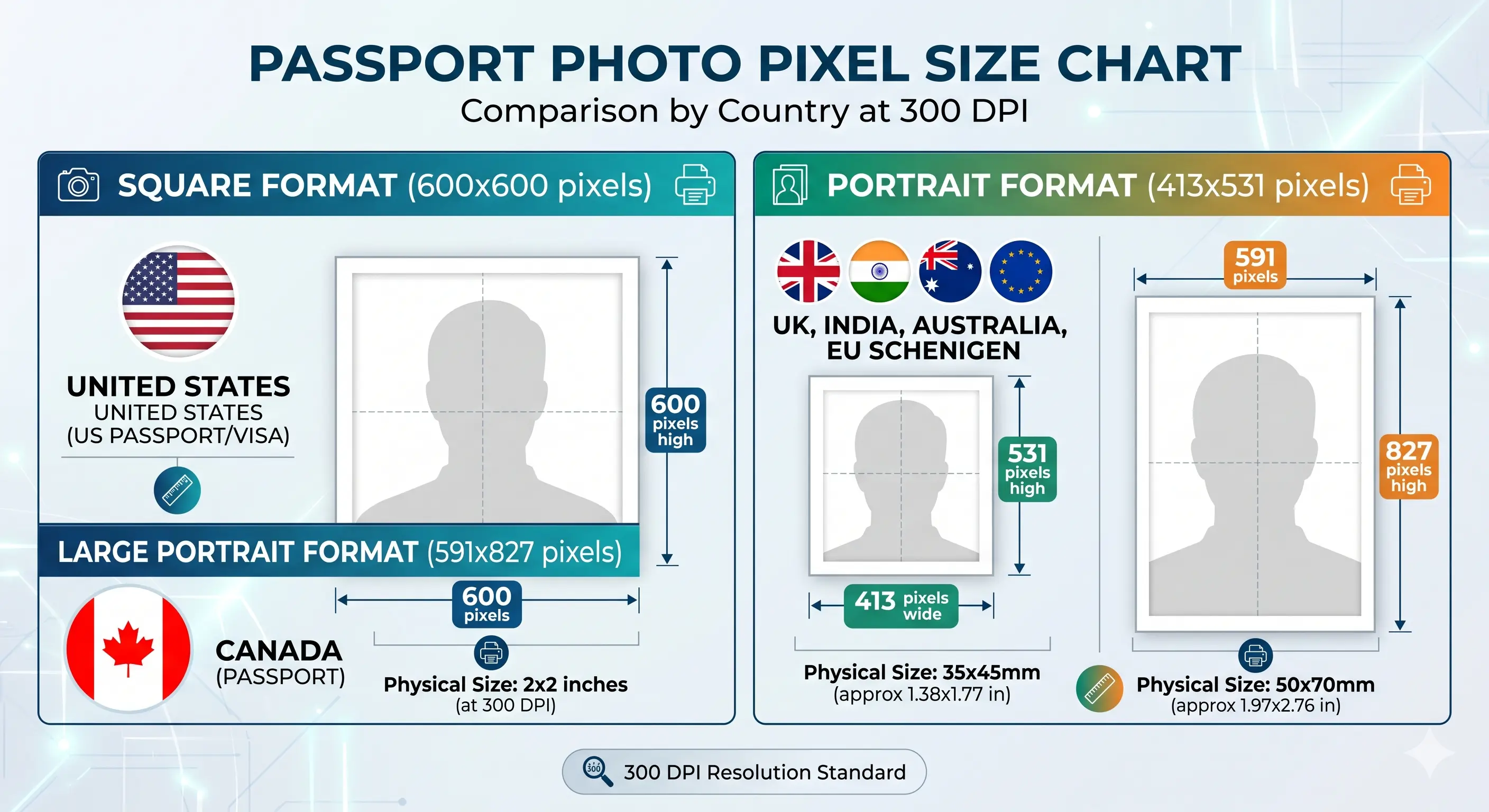
Different countries use different passport photo sizes. The 2x2 inch square is used by the United States and India; most of the world uses a portrait format. Here is how each converts to pixels at 300 DPI, so you can confirm you are using the right dimensions for your specific application.
| Photo Size | Pixels at 300 DPI | Aspect ratio | Common Use |
|---|---|---|---|
| 2 × 2 inch (51 × 51 mm) | 600 × 600 px | 1 : 1 | US Passport, US Visa, Green Card, DV Lottery, India Passport |
| 35 × 45 mm | 413 × 531 px | 7 : 9 | UK Passport, Australia Passport, Schengen and EU standard |
| 50 × 70 mm | 591 × 827 px | 5 : 7 | Canada Passport, Canada PR Card |
| 33 × 48 mm | 390 × 567 px | 11 : 16 | China Passport, China Visa |
| 40 × 50 mm | 472 × 591 px | 4 : 5 | Hong Kong Passport |
| 40 × 60 mm | 472 × 709 px | 2 : 3 | UAE Passport, Thailand |
2x2 Photo Requirements (Full Specification)
These are the official requirements that apply to U.S. passport, U.S. visa, green card, and OCI-style 2x2 photos. A digital 2x2 photo must satisfy every row below to pass automated checks. Each rule links to the detailed standard in the passport photo rules library.
| Photo size | 2 x 2 inches (51 x 51 mm) |
|---|---|
| Width | 600 pixels (at 300 DPI) |
| Height | 600 pixels (at 300 DPI) |
| Pixel maximum | 1200 x 1200 pixels |
| Aspect ratio | 1:1 (perfect square) |
| Resolution | 300 DPI minimum — see resolution rules |
| File format | JPEG (.jpg), 24-bit colour, sRGB |
| File size | 240 KB maximum for DS-160 and DV entry; 54 KB to 10 MB for online passport renewal |
| Background | Plain white or off-white, no shadows — see background colour rules |
| Lighting | Even and diffuse, no shadow behind the head — see shadow rules |
| Head size | 1 to 1⅜ inches (25–35 mm) — about 50–69% of frame height, see head size rules |
| Face coverage | 50–69% of the frame — see face size requirements |
| Eye position | Upper 55–69% of the frame, both eyes open — see eyes requirements |
| Hair | Must not cover the eyes or the face outline — see hair rules |
| Ears | Not mandatory for US photos, but the face outline must be clear — see ears visibility rules |
| Head coverings | Religious or medical only, full face visible — see head covering rules |
| Colour | Full colour (24-bit), no black & white or greyscale |
| Glasses | Not allowed since the November 2016 U.S. rule change — see glasses rules |
| Expression | Neutral face, both eyes open, mouth closed — see smile rules |
| Digital editing | Not permitted — no filters, skin smoothing, slimming or tone adjustment |
| Photo age | Taken within the last 6 months |
How to Create a 2x2 Photo Size in Pixels
- Take or choose a clear photo Use good front lighting, a plain wall, and face the camera squarely with a neutral expression. Stand at least 20 inches clear of the wall so no shadow falls behind your head.
- Upload it to the Passport Photo Maker Drag your JPG, PNG, or HEIC file into the tool — no editing software needed. If your phone saves HEIC, the HEIC to JPEG guide covers conversion.
- Let it auto-crop to 600x600 The tool detects your face, centres it, and sets the exact 2x2 pixel dimensions at 300 DPI. The crop guide explains how the 1:1 ratio and head-height band are applied together.
- Confirm the white background Review the compliant preview and adjust the crop if you want a tighter or looser frame within the rules.
- Download and upload Save the print-ready file and submit it directly to your passport, visa, or green card portal. Check the KB ceiling on the form before you upload.
Ready now? Open the Passport Photo Maker and get a 600x600 pixel file in under a minute.
2x2 Photo Pixel Rules for Babies, Infants and Children
The pixel specification for a child is identical to an adult: 600 × 600 pixels minimum, square 1:1, plain white background, head filling 50–69% of the frame. There is no reduced pixel size and no relaxed head-height band for infants. The difficulty is meeting an adult framing standard with a subject who cannot sit up, so these are the points that most often cause a child photo to be refused.
Same 600 × 600 minimum
No age exemption applies to pixel count, aspect ratio or head height. A newborn photo is measured exactly as an adult photo is.
Child alone in the frame
No supporting hands, arms, car seat, toy or pacifier may appear. Lay the child on a plain white sheet and shoot from directly above.
Eyes open where possible
Relaxed for newborns, enforced for older children. See the eyes requirements.
Crop from a large source
Shoot wide and crop down. Cropping tightly in-camera on a small face leaves too few pixels once the 1:1 square is applied.
Positioning, lighting and timing technique for infants and toddlers is covered in the baby passport photo at home guide.
Printing a 600x600 Pixel Photo at 2x2 Inches
600 pixels divided by 300 DPI equals exactly 2 inches, so a 600 × 600 file prints at precisely 2 × 2 inches — provided the print resolution is set to 300 DPI. If your printer software rescales the image or defaults to 200 DPI, the physical size changes and the photo is rejected for being the wrong size.
| Print resolution | 300 DPI — disable fit-to-page and auto-scaling |
|---|---|
| Paper | Glossy or matte photo paper. Plain copier paper is refused |
| Copies per 4 × 6 inch sheet | Six 2 × 2 photos in a two by three grid with cutting margins |
| Cutting | Guillotine or steel rule for square edges. Do not cut inside the printed border |
| Colour management | sRGB. Turn off printer auto-enhance and colour correction |
| Handling | Let ink dry fully. Do not staple, fold or glue the photo face |
Printer settings and cutting technique are covered in the print passport photo at home guide, and multi-copy sheet layout in the print 2x2 on 4x6 guide.
Why 2x2 Photos Get Rejected
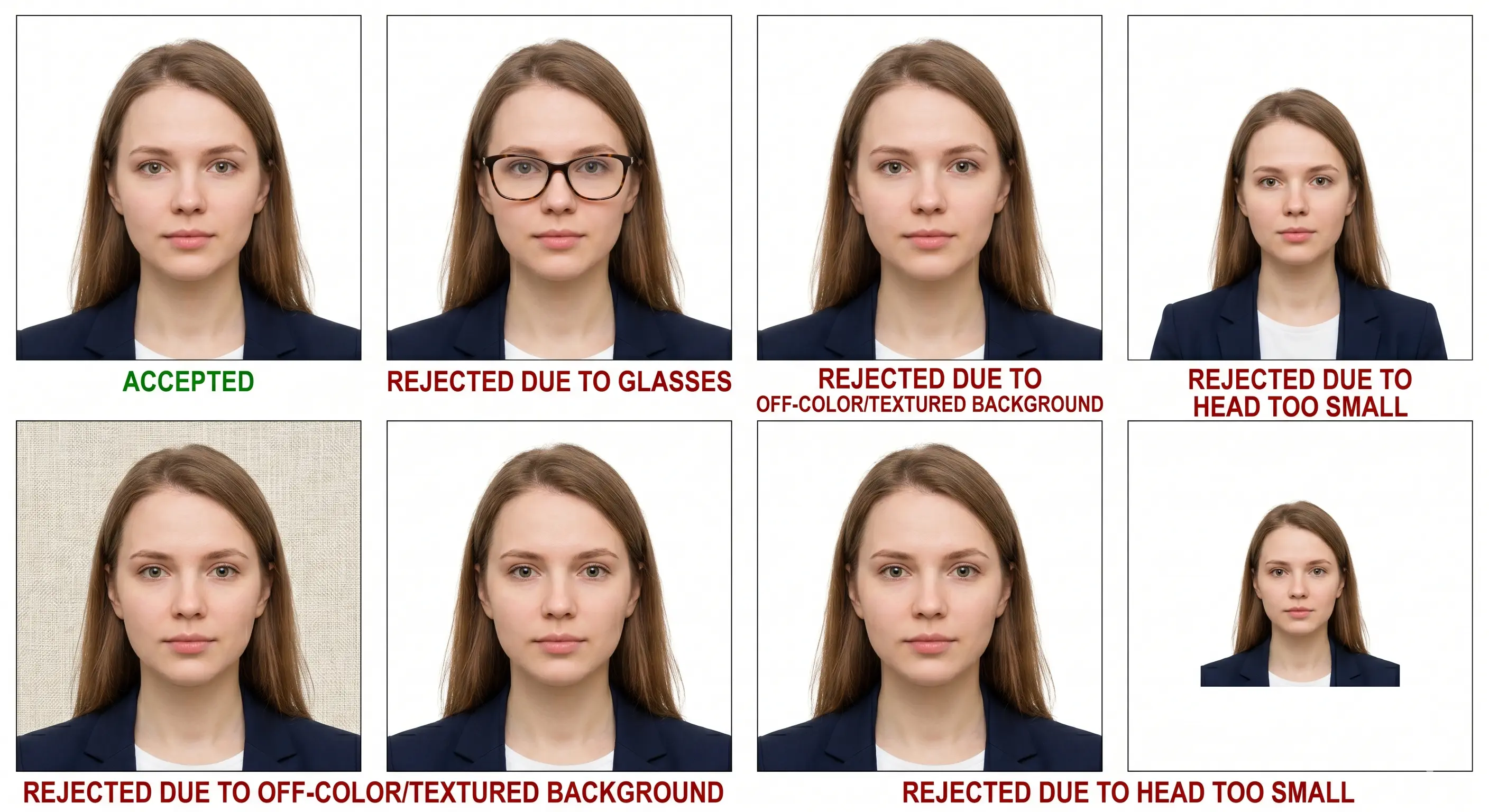
Most rejections come down to a handful of avoidable mistakes. Here is what triggers them and how the right pixel and file-size setup prevents each one. The full cross-country breakdown is in passport photo rejection reasons.
Wrong dimensions
Anything other than a 1:1 square between 600x600 and 1200x1200 px fails the automated check. Rectangular or undersized photos are rejected instantly.
File too large in KB
A 600x600 JPEG saved at maximum quality often exceeds the 240 KB ceiling on DS-160 and DV entry uploads even though the pixel count is correct. Save at quality 85.
File too small in KB
Over-compressing below roughly 50 KB introduces blocking around the eyes and hairline. Online passport renewal refuses anything under 54 KB outright.
Upscaled from a small original
Enlarging a 300x300 image to 600x600 invents pixels rather than detail. The sharpness check catches it. Always crop down from a larger source.
Wrong file format
PNG, HEIC and WebP are not accepted by US portals, and greyscale is refused. Convert to a full-colour JPEG before uploading.
Wrong background
Patterned, coloured, or textured backgrounds are not accepted. The standard requires plain white or off-white — see the background colour rules.
Shadows
Shadows on the face or behind the head are a top reason for rejection. The background must be evenly lit — see the shadow rules.
Face not centred
If your head sits off-centre or the eyes fall outside the required zone, the photo is non-compliant — see the face size requirements.
Head outside 50–69%
Correct pixel dimensions with a head that is too small or too large in frame still fails — see the head size rules.
Cropping errors
Cropping that cuts off the chin or crown, or that distorts the aspect ratio, gets the photo bounced back — see the crop guide.
Filters and retouching
Portrait blur, skin smoothing and slimming alter facial geometry and are detected by automated validation. Shoot in a plain, unfiltered mode.
Poor lighting
Underexposed or harshly lit faces hide facial features. Even, front-facing light keeps skin tones accurate.
Frequently Asked Questions
Pixels & Conversion
What size is a 2x2 photo in pixels?
A 2x2 photo is 600 x 600 pixels at 300 DPI. That is the minimum accepted by U.S. passport, visa and green card upload portals. The maximum accepted is 1200 x 1200 pixels. Anything smaller than 600 x 600 is rejected automatically.
How do I convert 2x2 inches to pixels?
Multiply inches by DPI: 2 inches × 300 DPI = 600 pixels per side, giving 600x600 pixels. At 150 DPI the same 2x2 inch photo is only 300x300 pixels, which is below the accepted minimum, so always work at 300 DPI or higher.
What is the maximum pixel size for a 2x2 photo?
1200 x 1200 pixels, which is 2x2 inches at 600 DPI. Files larger than 1200x1200 are refused by the U.S. visa digital image checker. Staying between 600x600 and 1200x1200 keeps the file valid for every U.S. portal.
Can I enlarge a small photo to reach 600x600 pixels?
Upscaling does not work. Stretching a 300x300 pixel image to 600x600 invents pixels rather than adding detail, and the result is soft or blocky and fails the sharpness check. Always start from a source photo where the face is at least 600 pixels tall and crop down.
Does 600x600 pixels print exactly 2x2 inches?
Yes, provided you print at 300 DPI. 600 pixels divided by 300 DPI equals exactly 2 inches per side. If your printer software rescales the image or prints at 200 DPI, the physical size changes, so set the print resolution to 300 DPI and disable any fit-to-page scaling.
File Size & Format
What file size in KB does a 2x2 photo need to be?
It depends on the portal. The DS-160 visa photo uploader and the Diversity Visa entry form cap the file at 240 KB. Online passport renewal requires between 54 KB and 10 MB. A 600x600 pixel JPEG at quality 85 typically lands between 60 KB and 150 KB, which satisfies both.
What file format should the 2x2 photo be?
JPEG in full 24-bit colour with an sRGB profile. Black and white and greyscale images are refused. PNG, HEIC and WebP are not accepted by U.S. portals, so convert to JPEG before uploading.
Appearance & Compliance
What background is required for a 2x2 photo?
A plain white or off-white background with no shadows, patterns, gradients or objects. The lighting must be even so the wall appears uniformly bright behind your head. Shadow on the background is one of the most common causes of rejection.
Can I wear glasses in a 2x2 photo?
No. Eyeglasses have not been permitted in U.S. passport and visa photos since November 2016. Remove them before shooting. Tinted lenses and sunglasses are never accepted.
How recent must the 2x2 photo be?
Taken within the last six months and reflecting your current appearance. If your appearance has changed significantly through weight change, facial surgery or substantial hair loss, submit a new photo even inside the six-month window.
Taking the Photo
Can I take a 2x2 photo at home?
Yes. Stand against a plain white wall in even daylight, at least 20 inches clear of the wall to avoid shadow, hold the camera at eye level and keep a neutral expression. Switch off portrait blur and beautification, then upload the shot to the Passport Photo Maker to crop it to 600x600 pixels.
Can I use my phone camera for a 2x2 photo?
Yes. Any modern phone camera far exceeds 600x600 pixels. Two settings matter: disable portrait mode and skin smoothing, which alter facial geometry and are detected, and if your phone saves HEIC files, convert to JPEG before uploading.
What are the 2x2 photo pixel rules for a baby or child?
Identical to an adult: 600x600 pixels minimum, square 1:1 ratio, plain white background and a head filling 50–69% of the frame height. There is no reduced pixel size or relaxed head-height band for infants. The child must be alone in the frame with no supporting hands, toy or pacifier visible.
Editorial Review & Sources
The specifications on this page have been verified against official government sources and international standards:
- U.S. Department of State — Passport Photo Requirements: travel.state.gov
- U.S. Department of State — Uploading a Digital Photo for Online Renewal: travel.state.gov
- U.S. Department of State — Visa Digital Image Requirements: travel.state.gov
- Diversity Visa Program — Electronic Diversity Visa Entry Photo Requirements: dvprogram.state.gov
- U.S. Citizenship and Immigration Services — Photo Requirements for Benefit Forms: uscis.gov
- ICAO Doc 9303 — Machine Readable Travel Documents, biometric photograph standard: icao.int
Create Your 2x2 Photo Size in Pixels Now
Skip the DPI math and the rejection emails. Upload one photo and get a precise 600x600 pixel, white-background, compliant 2x2 image — inside the 240 KB portal ceiling — ready to submit anywhere it's accepted.
Create My 2x2 Photo