Australia Passport Photo Maker Online

Direct Answer: The Australia passport photo must be exactly 35 × 45 mm. The background must be light grey (light colours accepted), and your head must occupy 71% to 80% of the photograph. You must maintain a neutral expression with both eyes open.

Source: Official Australian Passport Office photo guidelines

Create Australia Passport Photo
Works on phone, tablet, or desktop  ·  No app or signup needed  ·  Instant download

Australia Passport Photo Size (Quick Answer)

An Australian passport photo must be 35 mm × 45 mm (1.38 × 1.77 inches) on a plain white or light grey background, with the head 32–36 mm from chin to crown and the eye line in the upper 55–65% of the frame. Two identical printed copies are required, taken within the last 6 months.

SpecificationValue
Photo size35 × 45 mm (1.38 × 1.77 in)
Published tolerance35–40 mm wide × 45–50 mm high
Head height (chin to crown)32 – 36 mm, about 70–80% of the frame
Eye lineUpper 55–65% of frame height
BackgroundPlain white or light grey
Pixels for printing @ 300 DPI413 × 531 px
Pixels for digital upload600 × 750 px minimum
Digital file sizeJPEG, generally up to 500 KB
GlassesNot permitted since 1 July 2018
Copies required2 identical printed photos
Age of photoWithin the last 6 months
Issuing authorityAustralian Passport Office (DFAT)
Tool Ready

Create an Australian Passport Photo in Minutes

Our Passport Photo Maker is pre-configured with the official Australian passport photo specifications used by the Department of Foreign Affairs and Trade (DFAT). Upload a clear front-facing photo of yourself, and the tool automatically detects your face, resizes, crops, and adjusts the background to the official 35×45mm Australian passport size. You get a print-ready 4×6 layout and a high-resolution digital JPEG — both compliant for submission at Australia Post or online through the Australian Passport Office renewal portal.

Create Australia Passport Photo

Australia Passport Photo Requirements

The Australian Passport Office, operating under DFAT, sets strict standards for photos submitted with new applications, renewals, and emergency travel documents. These rules apply equally to adult passports, child passports, and overseas travel documents. Below is the complete breakdown of official Australian passport photo requirements, with each rule linked to the detailed standard in our passport photo rules library.

Official Government Source

All specifications on this page are based on guidelines published by the Australian Passport Office (DFAT). View official requirements at passports.gov.au →

RequirementSpecification
Photo size35mm × 45mm
Published tolerance35–40 mm wide × 45–50 mm high — a standard 35×45mm photo sits inside this range
Width35 mm (1.38 inches)
Height45 mm (1.77 inches)
Aspect ratio7 : 9 portrait
BackgroundPlain light grey or white — no patterns, no shadows. See background colour rules
LightingEven and diffuse, no shadow on the face or wall. See shadow rules
Head height32 mm to 36 mm from chin to crown. See head size rules
Face coverage70–80% of the frame height. See face size requirements
Eye lineUpper 55–65% of frame height, both eyes open. See eyes requirements
Head positioningCentred, facing camera directly, level shoulders
HairMust not cover the eyes or eyebrows. See hair rules
EarsNot mandatory, but the outline of the face must be clear. See ears visibility rules
Facial expressionNeutral, mouth closed, eyes open and visible. See smile rules
GlassesNot allowed since 1 July 2018. See glasses rules
Head coveringOnly for religious or documented medical reasons. See head covering rules
ClothingEveryday clothes, no uniforms; contrast with background
Photo ageTaken within the last 6 months
Quantity (printed)2 identical printed photos
Print resolution300 DPI — 413 × 531 pixels at 35×45 mm
Minimum digital resolution600 × 750 pixels for online submission
Digital file sizeJPEG, generally up to 500 KB
File formatJPEG, high quality, sRGB colour space
Digital editingNot permitted — no filters, skin smoothing or portrait blur
Print qualityProfessional photo paper, no creases or marks

The tolerance nobody mentions: DFAT publishes an accepted range of 35–40 mm wide by 45–50 mm high rather than a single fixed size. A standard 35 × 45 mm photo sits at the bottom of that range and is always accepted, which is why it is the safe default. What DFAT does not flex on is head height: 32–36 mm is measured digitally and is the most common single point of failure.

Australia is also more permissive on background than the UK. Both use 35 × 45 mm, but Australia accepts plain white or light grey while the UK rejects plain white outright. Do not reuse a UK-spec photo without checking.

Australia Passport Photo Size in Inches

The official Australian passport photo dimensions are specified in millimetres, but many home printers and photo labs in Australia and overseas use inch measurements. Here is the exact conversion:

35 mm Width = 1.38 inches
45 mm Height = 1.77 inches
32–36 mm Head height = 1.26–1.42 inches

When printing at home or ordering from a photo lab, select the 35×45mm (approximately 1.38×1.77 inch) size. Our tool automatically outputs files at the correct pixel dimensions — you do not need to calculate anything manually. For the full unit breakdown of this format, see our 35x45 photo size guide, and for pixel conversions across every standard see passport photo size in pixels.

Australia Passport Photo Size Diagram

The diagram below illustrates the official Australian passport photo dimensions, showing the required 35×45mm frame and the acceptable head height range of 32mm to 36mm from chin to crown.

Plain White / Light Grey 32–36mm head height 35 mm (1.38 in) 45 mm (1.77 in) Official DFAT / Australian Passport Office

Diagram shows the official 35×45mm Australian passport photo frame and the 32–36mm head height zone as specified by DFAT.

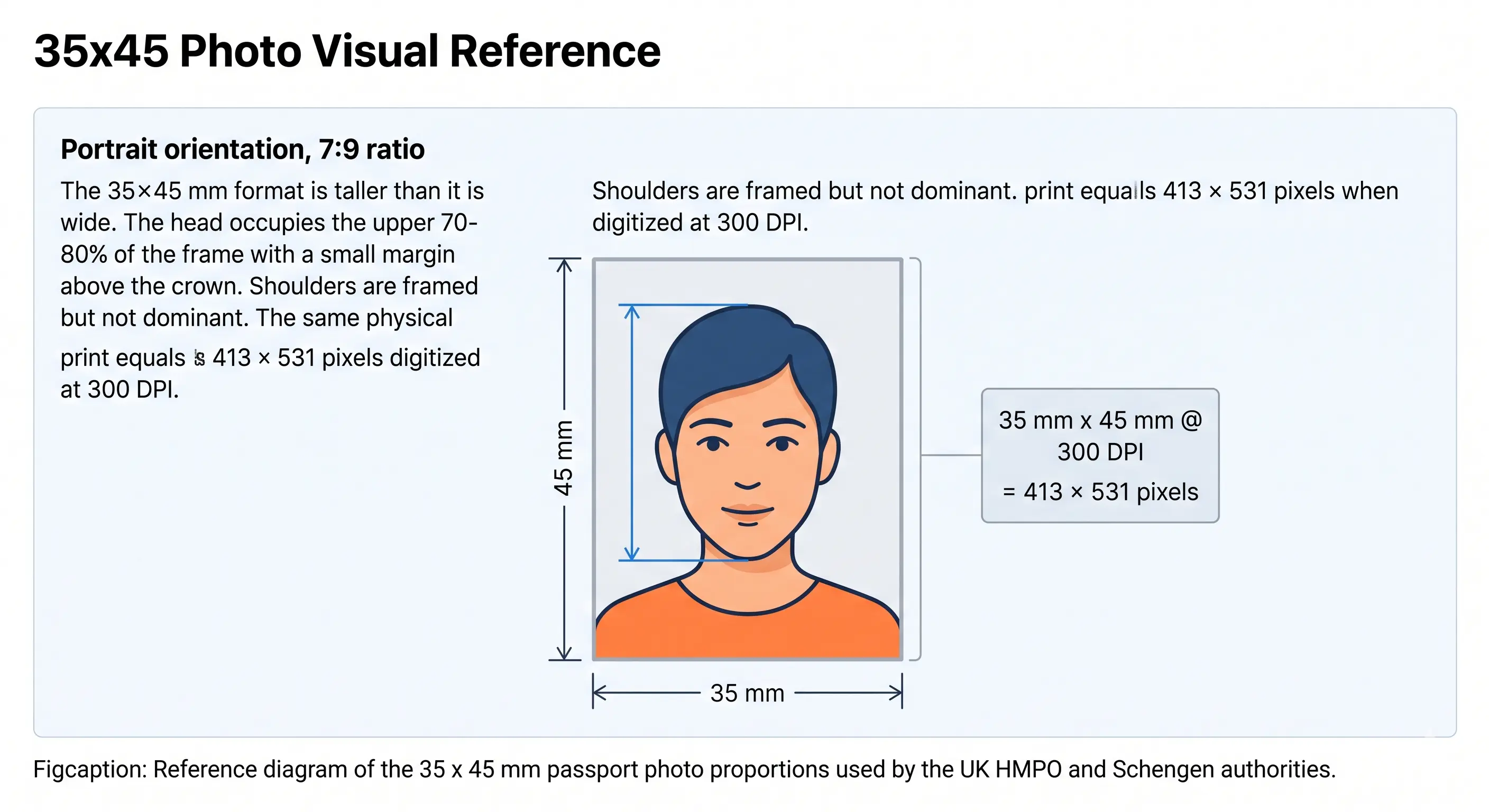
35x45 mm passport photo size reference showing a 35 mm wide by 45 mm tall portrait frame with the head filling 70 to 80 percent of the height
35x45 mm photo size reference · 413 × 531 pixels
Australia shares the 35 × 45 mm frame with the UK, the Schengen area and much of Asia. The size is identical; head height, background shade and upload file limits differ by country. See our 35x45 photo size guide for the full country-by-country table.

Digital vs Print: Which File Do You Need?

Australia uses two different targets for the same photo depending on how you apply, and the printed value is smaller than the digital minimum. Exporting one file and using it for both is the mistake that causes avoidable resubmissions.

SpecificationPrinted photoDigital upload
Defined inMillimetresPixels
Required size35 × 45 mm600 × 750 px minimum
Resolution300 DPI (413 × 531 px)Pixel count governs, not DPI
File sizeNot applicableJPEG, generally up to 500 KB
ColourColour on photo paperColour JPEG, sRGB
QuantityTwo identical copiesOne file
Where usedAustralia Post, passport officeOnline renewal portal

Watch the direction of the mismatch: 413 × 531 pixels is the exact 300 DPI equivalent of 35 × 45 mm and is correct for printing. It is well below the 600 × 750 pixel floor for digital upload. Export a larger file for the online portal and keep the 300 DPI version for print.

If your export is over the file-size limit, the reduce file size guide covers it without dropping below the pixel floor. iPhone users shooting in HEIC should read the HEIC to JPEG guide first. Broader portal rules are in the digital passport photo requirements guide, and sharpness and compression standards in passport photo resolution rules.

Our tool exports both files from one upload — print and digital.

Create Both Files →

Australia Passport Photo Quick Checklist

Use this checklist before submitting your photo to the Australian Passport Office or Australia Post. All items must be satisfied for your application to be accepted.

Pre-Submission Checklist

  • Photo is exactly 35mm × 45mm
  • Head height is between 32mm and 36mm
  • Eye line sits in the upper 55–65% of the frame
  • Background is plain white or light grey
  • No shadows on face or background
  • Neutral expression, mouth closed
  • Both eyes open and clearly visible
  • No glasses of any kind
  • No hat or head covering (unless religious/medical)
  • No hair covering eyes or eyebrows
  • Face centred and looking straight at camera
  • No filters, portrait blur or skin smoothing
  • Photo taken within the last 6 months
  • Printed on professional photo paper
  • No creases, marks, or folds
  • High resolution — min 600×750 px for digital
  • Digital file within the 500 KB limit
  • Two identical copies for paper application

How to Create an Australia Passport Photo Online

Creating a compliant photo at home is quick when you use the right tool. Our Australia passport photo maker handles the technical adjustments — resizing, background correction, head detection — automatically. If you need to reframe a wide or full-body source image first, the crop guide explains how the 7:9 ratio and head-height band are applied together.

1

Take or Upload a Photo

Use a smartphone or camera against a plain wall with good natural light, then upload the image directly.

2

Automatic Face Detection

Our tool detects your face, checks positioning, and verifies that the head height is within the 32–36mm required range.

3

Background Correction

The system removes shadows and corrects the background to a compliant plain light grey or white.

4

Auto Crop to 35×45mm

The photo is cropped exactly to the official Australian passport photo size with correct head proportions.

5

Download Digital and Print Files

Download a high-resolution digital JPEG and a print-ready 4×6 layout with multiple copies on one sheet.

6

Print or Submit Online

Print at home, at a chemist, or Australia Post — or use the digital file for online passport renewal.

When You Need an Australian Passport Photo

A compliant 35×45mm photo is required in more situations than just applying for a new passport. The same specifications apply across these common scenarios.

New Passport Application

First-time applicants must submit two printed photos at Australia Post or a passport office.

Passport Renewal

Renewal applications — paper or online — require a fresh photo taken within the last 6 months.

Child Passport

Children's passports require the same specifications as adults. See the child and infant rules below.

Emergency Travel Document

Emergency passports and travel documents issued by Australian embassies also require this size.

Australian Visa Applications

Many Australian visas — tourist, student, work — also require a 35×45mm photo. See our Australia visa photo guide.

Government ID Documents

Some Australian government ID applications, including immiCards and certain state IDs, use this photo format.

Australia Passport Photo for a Baby, Infant or Child

Australia applies the same 35 × 45 mm specification, background rule and 32–36 mm head height to children and newborns. There is no reduced size and no relaxed head-height band. Every child needs their own passport rather than being added to a parent's, so every child needs a compliant photo. The difficulty is meeting an adult framing standard with a subject who cannot sit up, so the points below are where child photos most often fail.

Same size, same head height

35 × 45 mm frame with the head 32–36 mm chin to crown, filling 70–80% of the height. No age exemption applies.

Child alone in the frame

No supporting hands, arms, car seat, toy or dummy may be visible, and no other person may appear. Support the child from behind a plain sheet.

Eyes open, facing forward

Both eyes should be open and looking towards the camera where achievable. See the eyes requirements.

Mouth closed, neutral face

A relaxed, closed-mouth expression is expected. Avoid a wide open mouth or a dummy-shaped mouth position, which distort the geometry that is measured.

No shadow behind the head

Lay the child on a plain white or light grey sheet in soft indirect daylight and shoot from directly above. See the shadow rules.

Fresh photo every application

The 6-month rule matters more for children because appearance changes fast. A photo that no longer resembles the child is refused even inside the window.

Positioning, lighting and timing technique for infants and toddlers is covered in full in our baby passport photo at home guide.

Photographing a child? Upload the shot and let the tool apply the 35×45mm crop.

Create Child Photo →

Australia vs US vs UK Passport Photo: Key Differences

Australian passport photo requirements differ from American and British standards in several important ways. If you are applying for multiple passports or a visa, use the comparison below to understand what changes between each country.

Feature 🇦🇺 Australia 🇺🇸 United States 🇬🇧 United Kingdom
Photo size35×45 mm2×2 inch (51×51 mm)35×45 mm
Pixels @ 300 DPI413 × 531 px600 × 600 px413 × 531 px
Head height32–36 mm25–35 mm (1–1.375 in)29–34 mm
BackgroundWhite or light greyWhite or off-whiteLight grey or cream, not white
GlassesNot allowedNot allowedNot allowed
Neutral expressionRequiredNeutral or natural smileRequired
Photo validity6 months6 months1 month
Copies required2 identical1 (some facilities ask 2)1 only
Digital minimum600 × 750 px600 × 600 pxVaries by service
Issued byDFAT / Australian Passport OfficeUS Department of StateHM Passport Office

The most important difference is photo size: US passport photos are square at 2×2 inches (51×51mm), while Australian and UK photos use the same 35×45mm rectangular format. However, the head height and background colour requirements differ between Australia and the UK — a UK photo on light grey with a 29 mm head is not automatically valid in Australia, so do not assume cross-compatibility.

Other countries sharing the 35 × 45 mm frame include New Zealand, Japan, Singapore, South Korea, Germany, France and the wider EU standard. Notable exceptions in the region are China at 33 × 48 mm and its China visa photo, plus Hong Kong at 40 × 50 mm. Browse every standard in the requirements by country hub.

Printing Your Australian Passport Photo

Australia requires two identical printed photos for a paper application, so printing is part of the specification rather than an afterthought. One photo is affixed to the form and the second is endorsed on the reverse by your guarantor, which means print quality on both copies matters.

Print resolution300 DPI — export at 413 × 531 pixels. Disable fit-to-page and auto-scaling
PaperProfessional glossy or matte photo paper, 200–250 gsm. Plain copier paper is refused
Copies per 4 × 6 inch sheetSix 35 × 45 mm photos with cutting margins
Copies per A4 sheetAround twenty, though you only need two
CuttingGuillotine or steel rule for square edges. Do not cut inside the printed border
Colour managementsRGB. Turn off printer auto-enhance, skin smoothing and colour correction
HandlingLet ink dry fully. Keep both copies free of creases, marks and fingerprints
Guarantor endorsementThe reverse of one photo must stay clean enough to be written on and signed

Our tool exports the 4 × 6 inch sheet automatically — print it on photo paper, cut along the guide lines, and the dimensions are exact. Printer settings and cutting technique are covered in full in the print passport photo at home guide, and multi-copy sheet layout in the print sheet guide.

Common Reasons Australian Passport Photos Get Rejected

Australian passport applications are delayed every year because of non-compliant photos. Knowing the most common rejection reasons helps you avoid a return trip to Australia Post. The full cross-country breakdown is in passport photo rejection reasons.

Incorrect Dimensions

Photos that are not exactly 35×45mm or have the wrong head height ratio are rejected. The head must measure 32 to 36mm from chin to crown. See the crop guide.

Head Height Outside 32–36 mm

The single most common failure. DFAT measures this digitally, so a head that is even slightly too small or too large is caught. See head size rules.

Eye Line Off

Correct head height with the eyes sitting too low in the frame still triggers a face position rejection. See eyes requirements.

Digital File Too Small

Uploading the 413 × 531 pixel print file to the online renewal portal fails the 600 × 750 pixel minimum. Print and digital sizes are not interchangeable.

Poor or Uneven Lighting

Overexposed, underexposed, or unevenly lit photos fail DFAT standards. Use soft, diffused, frontal lighting and avoid harsh direct sunlight.

Head Position Issues

Tilted heads, turned faces, or off-centre positioning cause immediate rejection. Face the camera directly with level shoulders.

Visible Shadows

Shadows on your face or the wall behind you are one of the most frequent rejection reasons. Stand away from the wall and use diffused light. See shadow rules.

Low Image Quality

Blurry, pixelated, or heavily compressed images are not acceptable. Always use your smartphone's rear camera in good lighting. See resolution rules.

Non-Compliant Background

Coloured, patterned, or textured backgrounds are rejected. Only plain light grey or plain white backgrounds are valid. See background colour rules.

Hair Across the Face

Hair over the eyes or eyebrows, or obscuring the outline of the face, fails landmark detection. See hair rules.

Glasses or Headwear

Eyewear of any kind has been banned since 1 July 2018, and non-religious head coverings are refused. See head covering rules.

Non-Neutral Expression

Smiling, raised eyebrows, open mouth, or squinting leads to rejection. Keep a neutral expression with your mouth firmly closed. See smile rules.

Filters and Retouching

Portrait blur, skin smoothing and slimming effects alter facial geometry and are detected. Shoot in a plain, unfiltered camera mode.

Outdated Photo

Photos older than 6 months, or photos that do not reflect your current appearance, will be rejected by the Australian Passport Office.

Only One Printed Copy

Paper applications require two identical prints. Submitting one is an incomplete application, not just a photo problem.

Damaged Print

Creases, fingerprints, ink smudges or a scuffed surface make the photo unusable even when the framing is perfect.

Tips for Taking a Better Australian Passport Photo at Home

A compliant photo starts with preparation. These practical steps will help you capture an acceptable image on the first attempt and avoid an extra trip to the chemist.

  • Use natural window light. Stand facing a large window mid-morning or mid-afternoon. Avoid direct sunlight, which creates harsh facial shadows.
  • Choose a clean, plain wall. A light grey or white wall without artwork, power sockets, or visible texture works best.
  • Stand one metre from the wall. This eliminates shadow build-up directly behind your head.
  • Hold the camera at eye level. Place your phone on a stable surface at the same height as your eyes to avoid any distortion from shooting up or down.
  • Use the rear camera. The back camera on a modern smartphone captures sharper detail and higher resolution than the front selfie camera.
  • Turn off portrait mode. Background blur and skin smoothing alter facial geometry and are detected by automated checks. Shoot in the plain photo mode.
  • Ask someone to help. A friend taking the photo from about a metre away typically produces better results than a self-timer.
  • Keep shoulders square. Face the camera without leaning forward, tilting your head, or turning to the side.
  • Wear dark, solid-colour clothing. Dark shirts contrast clearly against a light background and give the photo proper definition.
  • Remove all accessories. Take off glasses, hats, headphones, large earrings, and any jewellery that could obscure the face.
  • Check before uploading. Review sharpness, lighting, and background before processing. A quick check saves time later.

Frequently Asked Questions

Size & Measurements

What is the official Australian passport photo size?
The official Australian passport photo size is 35mm wide by 45mm tall (1.38 × 1.77 inches). The Australian Passport Office publishes a tolerance of 35 to 40mm wide by 45 to 50mm high, so a standard 35 × 45mm photo is always accepted. The head must measure between 32mm and 36mm from the chin to the top of the head, taking up roughly 70 to 80 percent of the frame.
What is the Australian passport photo size in inches?
The Australian passport photo size converts to approximately 1.38 inches wide by 1.77 inches tall. The required head height of 32–36mm equals 1.26–1.42 inches. Our tool outputs files at the exact pixel dimensions so you can print at the correct size without any manual calculation.
Where should my eyes sit in an Australian passport photo?
The eye line should sit in the upper 55 to 65 percent of the frame height, roughly 25 to 29mm up from the bottom edge of a 45mm tall photo. Head height alone is not sufficient: a photo with a correct 32–36mm head but a low eye line can still be refused for face position. See the eyes requirements.
Is the Australian passport photo the same size as the UK passport photo?
Both use the same 35×45mm dimensions, but the requirements differ. Australia allows a white or light grey background while the UK requires light grey or cream and rejects plain white. Australian head height is 32–36mm against the UK's 29–34mm, and the UK requires only one printed copy against Australia's two. Do not assume a UK-spec photo will be accepted without verification.

Digital & File Requirements

What file size and pixel dimensions does a digital Australian passport photo need?
A digital photo for Australian online renewal must be a high-quality JPEG of at least 600 × 750 pixels, in sRGB colour, and generally no larger than 500 KB. A 35 × 45mm photo at 300 DPI equals 413 × 531 pixels, which is correct for printing but below the digital minimum — so export a larger file for online upload. See the digital vs print comparison.
Can I submit a digital passport photo in Australia?
Most Australian passport applications still require two identical printed photos submitted at an Australia Post outlet or passport office. Some renewals support digital photo upload through the official online renewal system — in that case the file must be a high-resolution JPEG at a minimum of 600×750 pixels.
How many photos do I need for an Australian passport application?
Two identical printed photos are required for a paper application. One is affixed to the form and one is endorsed on the reverse by your guarantor. Online renewal replaces both with a single digital upload.
Can I take an Australian passport photo with my mobile phone?
Yes. Modern smartphone cameras easily exceed the resolution required. Use the rear camera, good natural lighting, and a plain background. Switch off portrait blur and skin smoothing, which alter facial geometry and are detected. Upload the image to our tool and it will resize and format the result automatically.

Appearance & Compliance

Can I wear glasses in my Australian passport photo?
No. Since 1 July 2018, eyeglasses of any kind are not permitted in Australian passport photos. You must remove them before the photo is taken. The only exception is a documented medical condition supported by a signed letter from a registered medical practitioner. See the glasses rules.
What background colour is required for an Australian passport photo?
A plain light grey or plain white background is required. Avoid coloured walls, patterns, textures, or visible shadows behind the head. Stand about one metre from the wall to eliminate shadow formation. Australia is more permissive here than the UK, which accepts light grey or cream but not plain white. See the background colour rules.
How recent must my Australian passport photo be?
The Australian Passport Office requires that your photo be taken within the last 6 months and clearly show your current appearance, including any recent changes to hair or facial features.
Can I use the same photo for a passport renewal?
No. A fresh photo taken within the last 6 months is required for every renewal, even if your previous passport has not yet expired. The photo must reflect your current appearance.

Children, Printing & Visas

What are the Australian passport photo rules for a baby or child?
The same 35 × 45mm size, background and 32–36mm head height apply to children and newborns, and children need their own passport rather than being added to a parent's. The child must be alone in the frame with no supporting hands, car seat, toy or dummy visible. Eyes should be open and facing forward where achievable, and the mouth closed. See the child and infant rules section and our baby passport photo guide.
How should I print my Australian passport photo?
Print at 300 DPI on professional glossy or matte photo paper. A standard 4 × 6 inch sheet holds six 35 × 45mm photos with cutting margins. Cut with a guillotine for square edges, do not trim inside the printed border, and keep the surface free of creases, marks and fingerprints. Remember the reverse of one copy must stay clean for your guarantor to sign. See the print at home guide.
Can I use this photo for an Australian visa application?
Most Australian visas, including tourist, student, and work visa categories, require a photo that meets the same 35×45mm specification. Visit our Australia visa photo guide for details specific to visa applications.

Official Sources & References

Compliance basis for this guide

  • Australian Passport Office (DFAT) — Photo Guidelines: passports.gov.au
  • Australian Passport Office — Applying for a passport: passports.gov.au
  • ICAO Doc 9303 — Machine Readable Travel Documents biometric photograph standard: icao.int

Last reviewed:
Specifications on this page are compiled from publicly available Australian Passport Office guidance and the ICAO Doc 9303 biometric photograph standard. Requirements can change, and individual Australia Post outlets or overseas posts may apply additional local practice. Always confirm the current specification on passports.gov.au before submitting your application.

Create Your Australia Passport Photo Now

Official 35×45mm size, instant processing, and a print-ready file in under a minute.

  • No signup required
  • Instant processing
  • Official DFAT size
  • Mobile friendly
Create Australia Passport Photo