
ClonyPDF home
Passport Photo Rules · Compliance Guide

Passport Photo Rejection Reasons: Why Photos Get Rejected (and How to Avoid It)

Passport photos are rejected for a small, repeating set of faults: shadows and uneven lighting, the wrong background shade, glasses, a non-neutral expression, a head outside the required size band, poor image quality, and software editing.

Nearly all of these trace back to one biometric standard — ICAO Doc 9303 — which authorities such as the US State Department, UK HM Passport Office and Passport Canada build on. The core reasons are consistent worldwide, though a few (glasses, exact size, background shade) are enforced more strictly in some countries than others. Get one wrong and your application can be held or bounced back, adding days or weeks to processing. Passport Photo Maker checks your image against these rejection triggers automatically before you export.

ICAO-Aligned Standards Auto-Compliance Check Instant Background Processing Print & Digital Ready
Before you rely on this page: passport photo requirements — including the rejection reasons covered here — are set by each issuing country's passport authority and can change without notice. This page reflects rules currently published by major authorities such as ICAO, the US State Department, UK HMPO and Passport Canada. Always confirm against the official application portal or consulate before you submit. Passport Photo Maker helps you produce a compliant photo but cannot guarantee your application is approved.

Why Passport Photos Get Rejected (Quick Answer)

A passport photo is rejected when something in it stops a border officer or a facial-recognition system from reliably matching the picture to your face. In practice that comes down to seven recurring faults:

  1. Shadows or uneven lighting — on the face, under the chin, or on the wall behind the head
  2. Wrong background — coloured, patterned, textured, or the wrong shade of white or grey
  3. Glasses — glare, frames across the eyes, tinted lenses, or worn where they are banned outright
  4. Non-neutral expression — smiling, open mouth, raised eyebrows, eyes closed or looking away
  5. Head size or position — outside the chin-to-crown band, off-centre, tilted or cropped
  6. Poor image quality — blur, low resolution, pixelation, red-eye, over- or under-exposure
  7. Editing or age — filters, beautification, AI enhancement, or a photo older than six months

The first five are the ones that catch most applicants. Items 1–2 and 4–7 are near-universal across ICAO member countries; glasses, exact size and background shade are the details that vary by country.

Which Countries Do These Rejection Reasons Apply To?

Rejection reasons are a mix of near-universal and country-specific rules, so it is worth being precise:

  • Universal (ICAO-based): shadows, glare, blur, closed eyes, a non-neutral expression, a busy or coloured background, hair covering the eyes and software editing are rejected almost everywhere, because every ICAO-member country uses the same biometric baseline.
  • Varies by country: whether glasses are allowed at all, the exact photo size and head height, and the precise acceptable background shade (bright white vs light grey vs off-white) differ between authorities — the comparison table below shows how.
But what if my photo looks perfectly fine to me? That is the trap. A large share of rejections are for problems that are hard to see on a phone screen — a faint wall shadow, a background that is cream rather than white, mild lens glare, or a beauty filter you forgot was on. Automated portal checks and trained reviewers catch these even when the photo looks good to you.

Check Your Photo for Common Rejection Reasons Instantly

Upload your photo and Passport Photo Maker will flag the issues that get applications bounced — shadows, background colour, glare, head size and signs of editing — automatically.

Opens in Passport Photo Maker. Select your country and document there to apply the exact size and background rules for your application.

What Passport Photo Maker Checks for You

This is not a generic resizer. It looks specifically for the faults that cause passport photos to be rejected:

What Are the Main Passport Photo Rejection Reasons?

In plain English: a passport photo is rejected when it stops a border officer or a facial-recognition system from reliably matching the picture to your face. Every documented rejection reason falls into one of a few buckets. The underlying standard is ICAO Doc 9303, the international specification for machine-readable travel documents, which national authorities such as the US State Department and the UK HM Passport Office adopt and then add their own details to.

Here is the full picture at a glance:

CategoryWhat it coversTypical resultDetailed rule
Lighting & shadowsUneven light, shadow on the face, shadow on the wall behind the head, hot spotsRejectedShadow rules, lighting
BackgroundWrong colour, texture, patterns, gradients, visible objects or another personRejectedBackground colour
Pose & expressionSmiling, open mouth, raised eyebrows, tilted head, eyes closed or looking awayRejectedExpression, smile, eyes
Prohibited itemsGlasses (banned in the US and Australia), hats, headphones, tinted lenses, uniformsRejected / flaggedGlasses, head coverings, dress code
Framing & sizeHead too large or small, off-centre, cropped, wrong overall dimensionsRejectedHead size, face position, crop guide
Image qualityBlur, low resolution, pixelation, red-eye, over- or under-exposure, colour castRejectedResolution, quality
Recency & authenticityPhoto older than 6 months, filters, beautification, AI or software alterationRejectedSelfie guide, makeup

Why does the standard bite this hard? Because the photo is not decoration — it is biometric data. The section below on why these rules exist explains what the scanners and reviewers are actually protecting. Where official guidance is genuinely vague (for example, the exact tolerance on a "neutral" expression), authorities leave it to reviewer discretion, so treat borderline cases as risks rather than guarantees. Every rule above is explained in full in the passport photo rules library.
How Passport Photo Rejection Reasons Differ by Country

The universal reasons (shadows, glare, blur, non-neutral expression, editing) apply almost everywhere. What changes between countries is the detail on glasses, size and background shade — and those details are common rejection points. Verified summaries from official authorities:

CountryRule summaryKey restriction / permissionSource / authority
USA 2 x 2 in (51 x 51 mm); white or off-white background; neutral expression; taken within 6 months Glasses banned entirely since 1 Nov 2016 (medical exception with signed note) US Department of State (travel.state.gov)
UK 45 x 35 mm print; face 29-34 mm chin to crown; plain cream or light-grey background; no smiling Photos altered by software are rejected; glasses discouraged, any glare fails HM Passport Office (gov.uk)
Canada 50 x 70 mm; face 31-36 mm chin to crown; plain white or light background; within 6 months For in-person/mail, the photographer must stamp the studio name, address and date on the back IRCC / Passport Canada (canada.ca)
Australia 35-40 mm wide x 45-50 mm high; face 32-36 mm; plain light background; hair off the face Glasses not allowed; eyes open, mouth closed, neutral expression Australian Passport Office (passports.gov.au)
Schengen / EU 35 x 45 mm; face 32-36 mm; neutral light-grey or neutral background; no smiling Over-retouched or beautified photos are refused; national offices follow ICAO National authorities per ICAO (e.g. German Federal Foreign Office)
India White background; online Passport Seva photo 630 x 810 px, face 80-85% of frame; no cap, no glasses ICAO-compliant photo mandatory from 1 Dec 2025; filtered / altered images rejected Ministry of External Affairs / Passport Seva (passportindia.gov.in)
China 33 x 48 mm; plain white background; head 28-33 mm chin to crown; neutral expression Size is unique to Chinese documents — a 35 x 45 mm or 2 x 2 in photo is refused National Immigration Administration (nia.gov.cn)

Figures reflect guidance published by each authority at the time of writing. Sizes and shade tolerances change; always confirm on the official portal. The US strictness on glasses is a good example of why a photo accepted for one country can be rejected for another. Browse every national standard in the passport photo requirements by country hub, or compare the raw dimensions in passport size photo dimensions.

Why These Rejection Rules Exist

None of these rules are arbitrary. A passport photo is read by both machines and people, and each rejection reason maps to a failure that would break one of them:

For the facial-recognition system

  • Even lighting and no shadows let the algorithm map the true contours of your face.
  • A plain, high-contrast background lets it isolate your head cleanly.
  • A neutral expression and open eyes keep your features in the position the system expects to match at a border e-gate.
  • No glasses glare means the eye region — one of the strongest biometric signals — stays visible.

For the human reviewer and border officer

  • Correct size and head position make your photo comparable to every other passport on file.
  • Sharp focus and true colour let an officer confirm it is really you, years later.
  • No editing or filters means the face on the document is the face at the counter.
  • A recent photo (within 6 months for most authorities) keeps the likeness current.

In short, every rejection reason is the standard protecting the one job the photo has to do: prove the traveller and the document are the same person.

How Photo Reviewers Check for These Problems

Your photo is usually screened twice — once by software, once (potentially) by a person. Knowing what each looks for tells you where photos actually fail:

Automated checks (especially on online portals)

Upload portals run facial-detection routines that measure head height and eye position in pixels, test the background for uniform colour and brightness, scan for shadow gradients and glare hot spots, and check file properties like dimensions, resolution and compression. Many portals reject a non-compliant photo the moment you upload it, before you can even continue. The exact pixel and file-size windows are covered in our digital passport photo requirements guide.

Manual review

A caseworker can override or supplement the software. They flag things algorithms handle poorly: a strained or slightly smiling expression, hair drifting over an eyebrow, a head covering worn without a stated religious or medical reason, or a picture that simply does not look like a current, natural photograph. Because part of the decision is human judgement, borderline photos are a gamble.

Will a Violation Definitely Get My Photo Rejected?

Not every fault is equal. Some are automatic, hard rejections; others are discretionary and depend on the reviewer or the portal's tolerance. Being honest about this helps you prioritise what to fix first.

Hard rejection Almost always fails

  • Wrong photo size or head clearly out of the size range
  • Glasses worn where they are banned (US, Australia)
  • Coloured, patterned or busy background
  • Eyes closed, face turned, or someone else in the frame
  • Obvious filters, beautification or AI alteration
  • Photo clearly older than the recency limit

Discretionary Depends on the reviewer

  • A very slight smile or barely-open mouth
  • A faint, soft shadow at the edge of the background
  • Background that is arguably off-white vs white
  • Hair sitting close to, but not over, the eyes
  • Mild lens glare when glasses are permitted

The practical takeaway: treat discretionary faults as if they were hard rejections. A photo that is comfortably inside every rule is never held up by a reviewer's bad day.

Passport Photo Rejection Reasons for Babies and Children

Photos for infants and young children are judged against a relaxed version of the same rules, but they are rejected more often, not less. Here is what actually changes and what does not:

What relaxes for infants

  • The eyes do not have to be fully open for very young babies.
  • A perfectly neutral expression is not expected — authorities accept a natural infant face.
  • The head does not need to be perfectly upright, within reason.

What still causes rejection

  • Other people, hands or supporting arms visible in the shot — a very common baby-photo rejection.
  • Toys, pacifiers or bottles in the frame.
  • Shadows from laying the child on a blanket or against a coloured surface.
  • A background that is not plain and light.

A reliable trick parents use: lay the baby on a plain white sheet and photograph directly from above with even light, keeping hands out of frame. The plain-background and no-shadow rules never relax, so those are where child photos are most often lost. Full technique, including positioning and timing, is in our baby passport photo at home guide.

Digital Upload vs Printed Photo: Do the Rejection Rules Differ?

The appearance rules — background, expression, shadows, glasses — are identical whether you print or upload. What differs is an extra layer of technical rejection reasons that only apply to digital submission:

Rejection reasonPrinted / in-personDigital upload
Wrong pixel dimensionsNot applicableRejected
File size / compression out of rangeNot applicableRejected
Wrong printed dimensions (mm/inches)RejectedNot applicable
Missing photographer stamp (Canada, in-person)RejectedNot applicable
Shadows, background, expression, glassesRejectedRejected
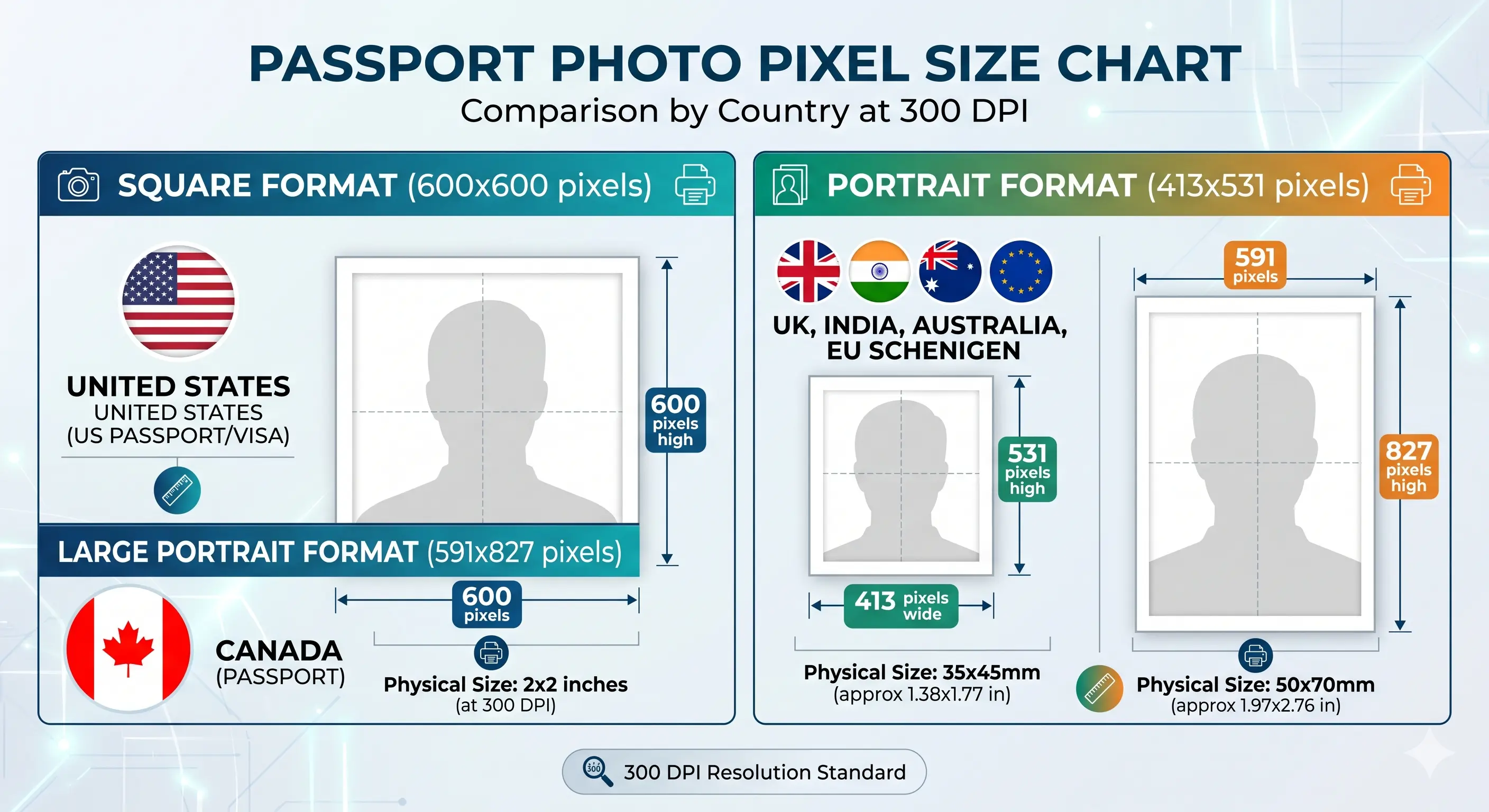
Chart of passport photo sizes and their pixel dimensions at 300 DPI for the United States, United Kingdom, Canada, India, Australia and the Schengen area
Passport photo size and pixel chart by country
Wrong dimensions is a hard rejection in both channels — millimetres for print, pixels for upload. Full conversions are in passport photo size in pixels, and the common square standard in 2x2 photo size in pixels.

Online portals in the US, UK and India run automatic checks at the moment of upload, so digital rejections are usually instant. Printed photos submitted by post or in person may not be checked until processing, which is why a bad print can quietly delay an application. Passport Photo Maker exports both a print sheet and a portal-ready digital file so the technical specs are correct either way. If your file is over a portal's limit, see compress to 240 KB or reduce file size; to hit a minimum pixel size, see resize to 600x600. iPhone users saving HEIC should convert first with the HEIC to JPEG guide.

Recent Changes to Passport Photo Rules

Two shifts are worth knowing about because they are creating new rejections for photos that would have passed a few years ago:

Rules change without notice and this is not an exhaustive list of updates — always check the official portal for your country before you apply.

Taking Your Passport Photo at Home: A Rejection-Proofing Checklist

Home photos fail for the same handful of reasons every time. Run these checks and you remove most of them.

Before you take the photo

  • Find a plain, truly white or light-grey wall with nothing on it — no art, switches or door frames.
  • Stand about half a metre off the wall so no shadow lands behind your head.
  • Use soft, even, front-on daylight; avoid a single overhead bulb that casts nose and eye shadows.
  • Remove glasses, hats and headphones; tuck hair back from your eyes and the outline of your face.
  • Wear a colour that contrasts with the wall so your shoulders do not blend into the background.
  • Hold the camera at eye level, about arm's length or further — see camera distance.

After you take the photo

  • Zoom in: is there any shadow on the wall or across one side of your face?
  • Is the background evenly coloured, or does it shift from white to grey across the frame?
  • Are both eyes open, expression neutral, mouth closed, head straight?
  • Are your ears and face outline clear, not hidden by hair?
  • Is the image sharp and true to colour, with no filter or "auto-enhance" applied?
  • Is your whole head visible with a little space above it, not cropped or tiny?

This is exactly the checklist Passport Photo Maker automates: it detects shadows and uneven backgrounds, measures your head size and position, and warns you about glare or editing — so the mistakes you cannot see on a phone screen do not reach the passport office. For a wider list of slip-ups, see our guide to common passport photo mistakes.

How to Make Sure Your Passport Photo Won't Be Rejected

Five steps that eliminate the reasons behind the overwhelming majority of rejections:

  1. Kill shadows and fix the background. Stand about half a metre from a plain, truly white or light-grey wall and light your face evenly from the front so nothing falls on your face or behind your head.
  2. Remove glasses and set a neutral expression. Take off glasses, hats and anything crossing your face, keep both eyes open, and relax your face with your mouth closed.
  3. Centre and size your head correctly. Frame so your head is centred and fills the required proportion of the photo — wrong head size and position is one of the single biggest rejection causes. The crop guide shows how the ratio and head-height band work together.
  4. Run the automatic compliance check. Upload to Passport Photo Maker and let it flag shadows, background colour, head size, glare and signs of editing before you commit.
  5. Export a compliant print or digital file. Download the corrected, correctly sized photo as a print sheet or a digital upload file and submit it to your application. For home printing, see print passport photo at home.

The Most Common Reasons Passport Photos Get Rejected, in Detail

These are the specific triggers that come up again and again. Each one lists what the violation is, the mechanical reason it fails, and how to avoid it.

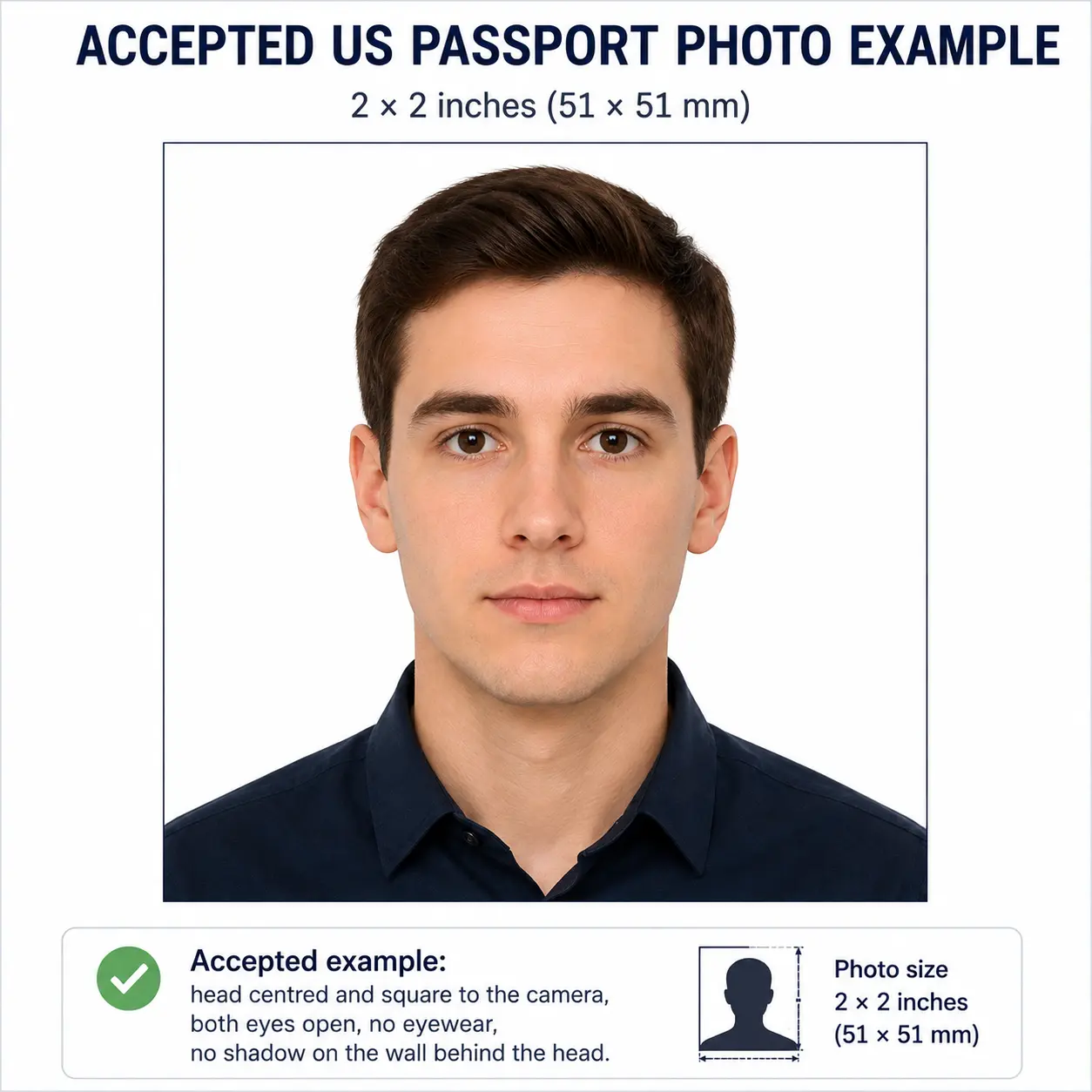
Accepted passport photo example showing even front lighting, no shadow behind the head, a plain background, a neutral expression, both eyes open and no eyewear
Accepted passport photo example
What a photo that passes looks like. Even front lighting with no shadow on the face or the wall, a plain uniform background, head centred and within the size band, both eyes open, mouth closed, no eyewear and no filtering. Every rejection reason below is a departure from this baseline.

1. Shadows on the face or background

The violation: a shadow cast across one cheek, under the chin, or on the wall behind your head.

Why it fails: shadows create false contours that confuse facial-recognition mapping and break the plain-background requirement.

How to avoid it: use even front lighting and stand well away from the wall. See our dedicated guides to removing shadows from passport photos and lighting requirements.

2. Wrong or off-white background colour

The violation: a background that is cream, grey, tinted or subtly patterned when a specific shade is required.

Why it fails: the system cannot cleanly separate your head from the background, and reviewers reject anything that is not the specified colour.

How to avoid it: shoot against a plain wall and let the tool set a compliant background — our background colour guide covers the exact shades by country, and background removal explains how replacement works.

3. Glasses — glare, frames or worn where banned

The violation: lens reflections, frames covering the eyes, tinted lenses, or simply wearing glasses in a country that bans them.

Why it fails: glare hides the eye region, the strongest biometric signal; the US and Australia reject glasses outright.

How to avoid it: remove glasses for the photo unless you have a documented medical exemption. See the glasses rules and, if you wear contacts, glasses vs contact lenses.

4. Non-neutral expression

The violation: smiling, an open mouth, raised eyebrows, or a frown.

Why it fails: expressions distort the facial landmarks the scanner measures, so the photo will not match a neutral face at an e-gate.

How to avoid it: relax your face, look straight at the camera and keep your mouth closed. See expression rules, smile rules and teeth visibility.

5. Incorrect head size or position

The violation: the head is too large, too small, off-centre, tilted or cropped at the top.

Why it fails: every authority sets a chin-to-crown measurement; outside that band the photo cannot be compared to other documents.

How to avoid it: let the tool measure and crop to the correct head height — see head size rules, face size requirements, face position and the framing guide.

6. Poor image quality

The violation: blur, low resolution, pixelation, red-eye, or over- and under-exposure.

Why it fails: a soft or noisy image cannot be verified against your face and fails automated quality thresholds.

How to avoid it: shoot in good light with a steady camera and avoid heavy digital zoom. See resolution rules and quality requirements.

7. Filters, beautification or software alteration

The violation: skin smoothing, a beauty filter, reshaping, or AI enhancement.

Why it fails: authorities require an unaltered image; an edited face is not the face at the border counter.

How to avoid it: turn off all filters and auto-enhance; only crop and resize. Phone camera settings that cause this are covered in the selfie guide, and cosmetic limits in makeup rules.

8. Photo too old or face partly covered

The violation: a photo more than six months old, or hair, a mask or a head covering obscuring the face.

Why it fails: an outdated or obscured face no longer reliably represents the applicant.

How to avoid it: take a fresh photo and keep your full face and the outline of your head clearly visible. See head covering rules, hair rules and beard rules.

Rejection Reasons: Passport Photo vs Visa Photo

For most rejection reasons, passport and visa photos are judged identically — the same ICAO baseline drives both, so shadows, glare, a coloured background or a smile will sink either one. Being honest about it: for the appearance rules there is no meaningful difference to exploit.

Where differences do appear, they are about format and enforcement, not the rule itself:

AspectPassport photoVisa photo
Core appearance rules (background, expression, glasses, shadows)SameSame
Exact size / pixel specSet by passport authorityOften differs (e.g. US visa uses 600-1200 px square)
Submission checkPortal or in-person officeFrequently an online portal (DS-160, e-visa) with instant automated rejection
Recency limitUsually within 6 monthsUsually within 6 months

The honest bottom line: if you produce a photo that satisfies the strict passport rules, it will almost always satisfy the visa rules too — just double-check the required dimensions, because visa portals often specify their own pixel size and will reject on that alone. Compare specific cases in US visa photo, Schengen visa photo and China visa photo, or browse the full visa photo requirements by country hub.

Passport Photo Rejection Reasons: FAQ

General

What is the most common reason a passport photo gets rejected?

Lighting faults and framing faults account for most rejections. Shadows on the face or on the wall behind the head, and a head that sits outside the required chin-to-crown range or off-centre, are the two most frequently cited problems. Glare from glasses and a non-neutral expression follow closely behind.

Can a passport photo be rejected even if it looks fine to me?

Yes. Many rejections are for issues that are hard to see on a phone screen: a faint shadow behind the head, a background that is cream rather than truly white, subtle lens glare, or traces of a beauty filter. Automated portal checks measure these in pixels and catch them even when the photo looks acceptable to you.

How long does a rejected passport photo delay my application?

It depends how you applied. Online portals usually flag a non-compliant photo at the moment of upload, so you simply re-upload and lose minutes. Paper and in-person applications may not be checked until processing begins, so a rejection can put the application on hold and add days or weeks while you supply a replacement.

Do I have to pay again if my passport photo is rejected?

You normally do not pay the application fee twice for a photo fault, but you do bear the cost of producing a replacement photo, and any expedited or courier fee already paid may be lost if the application is delayed past its window. Confirm the fee position with the issuing authority handling your application.

Country differences

Which rejection reasons are universal and which vary by country?

Shadows, glare, blur, closed eyes, a non-neutral expression, a coloured or busy background, hair over the eyes and software editing are rejected almost everywhere because every ICAO member country uses the same biometric baseline. What varies is whether glasses are permitted at all, the exact photo size and head-height band, and the precise acceptable background shade. The comparison table above sets out the differences.

Why does the United States reject passport photos with glasses?

Since 1 November 2016 the US Department of State requires applicants to remove glasses for passport and visa photos, because lenses cause glare and shadows and can obscure the eye region used for biometric matching. The only exception is a documented medical reason supported by a signed statement from a doctor. See the full US passport photo requirements.

Does a photo rejected by one country get rejected by another?

Usually yes for appearance faults, because shadows, glare, expression and background problems break the shared ICAO baseline. The reverse is not reliable: a photo accepted in a country that permits glasses will be rejected in the United States or Australia, and a correctly sized 35x45 mm photo is rejected by the United States, which requires a 2x2 inch square.

Does India reject photos that aren't ICAO-compliant?

As published by the Ministry of External Affairs, uploading an ICAO-compliant photograph became mandatory for Indian passport and visa applications from 1 December 2025, and non-compliant images are rejected during the online process. Because this is a recent change, confirm the current requirement on the Passport Seva portal before you apply. See our India passport photo page.

Specific situations

Are the rejection rules different for baby and child passport photos?

Some rules relax for infants. The eyes do not have to be fully open for very young babies and a perfectly neutral expression is not expected. The plain background, even lighting and no-shadow rules do not relax, and no other person, hands, supporting arms, toys, pacifiers or bottles may appear in the frame. See the baby passport photo guide.

Can editing or AI-enhancing my photo cause rejection?

Yes. Authorities including the US Department of State and UK HM Passport Office reject photos altered by computer software, which includes beauty filters, skin smoothing, reshaping and AI enhancement. Cropping and resizing to meet the required dimensions is acceptable; changing your appearance or the background is not.

Will a smartphone photo be rejected for being a phone photo?

No authority rejects a photo purely for being taken on a phone, and modern phone cameras exceed the required resolution comfortably. Phone photos are rejected for what the phone does automatically: portrait-mode background blur, skin smoothing, beautification and wide-angle distortion from holding the camera too close. Disable those modes and shoot from a normal distance — see the selfie guide.

Can I reuse the photo from my previous passport?

No. Most authorities require a photo taken within the last six months that reflects your current appearance, and reusing the image from a previous passport or application is a common rejection reason. Submit a new photo even if the old one is still technically within the window.

Does using a professional photo booth guarantee my photo won't be rejected?

No. A booth or studio reduces the risk of technical faults such as lighting and size, but photos are still rejected for expression, hair across the eyes, glasses, or a head position slightly outside the band. Responsibility for meeting the standard sits with the applicant, so it is worth checking the result against the rules before submitting.

Sources & References

The rejection reasons on this page are compiled from the international biometric standard and the published guidance of national passport authorities:

  • ICAO Doc 9303 — Machine Readable Travel Documents, biometric photograph specification: icao.int
  • U.S. Department of State, Bureau of Consular Affairs — passport photo requirements: travel.state.gov
  • UK HM Passport Office — photo rules: gov.uk
  • Government of Canada — passport photo specifications: canada.ca
  • Australian Passport Office — photo guidelines: passports.gov.au
  • Passport Seva, Ministry of External Affairs, India: passportindia.gov.in
Last reviewed:
Rejection criteria, size tolerances and background shades are set by each issuing authority and can change without notice. Individual consular posts and application portals may apply additional local requirements. Always confirm the current rules with the authority handling your application before you submit.

Check Your Photo for Rejection Reasons Now

You now know exactly what trips applications up — shadows, background shade, glasses, expression, head size and editing. Instead of guessing at a print shop or hoping a portal accepts it, upload your photo and let Passport Photo Maker scan it against every one of those triggers first. You can start from the Passport Photo Maker tool at any time.

Scan Your Photo for Rejection Triggers Before You Submit

One upload checks shadows, background colour, head size, glare and signs of editing — so you catch a problem here, not weeks later in a rejection letter.

Opens in Passport Photo Maker. Select your country and document there to apply the exact size and background rules for your application.

One last reminder: the rules behind these rejection reasons are controlled by individual passport authorities and may be updated at any time. What you have read here mirrors the guidance published by the major issuing offices at the time of writing — check your country's official portal for the final word before applying. Passport Photo Maker produces photos built to these standards, but approval always rests with the issuing authority.