
Philippines Passport Photo Size (35x45 mm) — DFA Requirements
A Philippine passport-style photo is 35 mm wide by 45 mm tall on a plain white background, with the head measuring 32–36 mm from chin to crown and no glasses. Most rejections at DFA counters and consulates abroad come from a background that isn't pure white, a head framed too large or too small, or a stray pair of glasses — all of which this tool corrects automatically before you download or print.
Philippines Passport Photo Size (Quick Answer)
The Philippines passport photo size is 35 mm × 45 mm (3.5 × 4.5 cm or 1.38 × 1.77 inches) on a plain white background, with the head 32–36 mm from chin to crown. At 300 DPI that equals 413 × 531 pixels with a 7:9 portrait ratio.
| Photo size | 35 × 45 mm (3.5 × 4.5 cm) |
|---|---|
| Pixels @ 300 DPI | 413 × 531 px |
| Aspect ratio | 7 : 9 portrait |
| Background | Plain white, no shadows or patterns |
| Head height (chin to crown) | 32 – 36 mm (about 71–80% of frame height) |
| Expression | Neutral, mouth closed, both eyes open, eyebrows visible |
| Glasses | Not permitted |
| Age of photo | Within the last 6 months |
| Issuing authority | Department of Foreign Affairs (DFA) |
| Printed photo needed? | Usually not for in-country DFA appointments — see below |
The Philippines uses the same 35 × 45 mm frame as the UK, the Schengen area and Australia. For the full format reference see 35x45 photo size, or browse every national standard in the requirements by country hub.
Why Upload Here Instead of Editing Manually
Cropping a photo to exact millimeter dimensions by eye is where most DIY attempts go wrong. Uploading here hands off the parts that are easy to get slightly wrong:
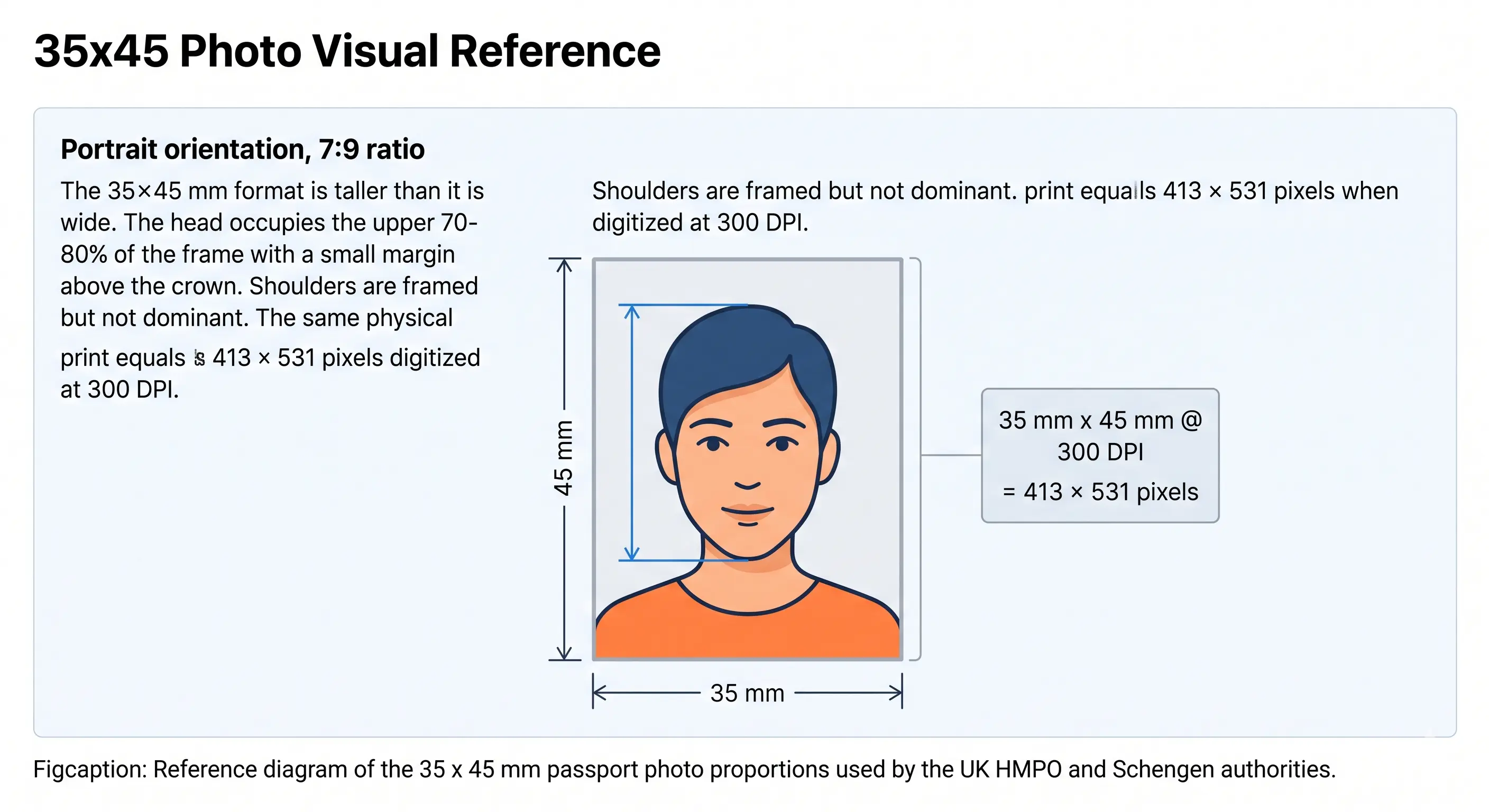
Philippines Passport Photo Visual Reference
The Philippines uses the international 35 × 45 mm frame. The diagram below marks the dimensions and the head-height band the DFA and Philippine consular posts check.
Philippines Passport Photo Requirements
These specifications apply to the printed, passport-style photo used for consular renewals, dual citizenship applications, and similar supporting documents. They follow the ICAO-aligned standard the DFA references for biometric photos generally. Each rule links to the detailed standard in the passport photo rules library.
| Photo Size | 35mm x 45mm (3.5 x 4.5 cm / 1.38 x 1.77 in) |
|---|---|
| Width | 35mm (413 px @ 300 DPI) |
| Height | 45mm (531 px @ 300 DPI) |
| Aspect Ratio | 7 : 9 portrait — not square |
| Background | Plain white, no shadows or patterns — see background colour rules and the note below |
| Lighting | Even and diffuse, no shadow behind the head or across one cheek — see shadow rules |
| Head Size | 32–36mm from chin to crown — see head size rules |
| Face Coverage | About 71–80% of the 45 mm frame height — see face size requirements |
| Eyes | Both eyes open, looking at the camera, both eyebrows visible — see eyes requirements |
| Hair | Bangs must not cover the eyebrows or forehead — see hair rules |
| Ears | Both ears should be visible where hair allows — see ears visibility rules |
| Resolution | At least 300 DPI for printing; sharp focus, no compression artifacts — see resolution rules |
| File Format | JPEG for digital upload; matte or glossy print for physical copies |
| Colour | 24-bit colour, sRGB, natural skin tones, no filters or beautification |
| Glasses Rules | Not permitted — prescription glasses, sunglasses, and tinted lenses must be removed. Clear contacts are fine; coloured contacts are not. See glasses rules |
| Headwear | Daily religious or medical head coverings only, with the full face visible — see head covering rules |
| Expression Rules | Neutral expression, mouth closed, both eyes open, both eyebrows visible; a slight closed-mouth smile is generally tolerated. See smile rules |
| Attire | Decent clothing with a collar or sleeves; avoid white tops that blend into the background |
| Photo Age | Taken within the last 6 months and reflecting current appearance |
| Digital Submission Rules | Not required for in-country DFA applications — see the DFA process section below |
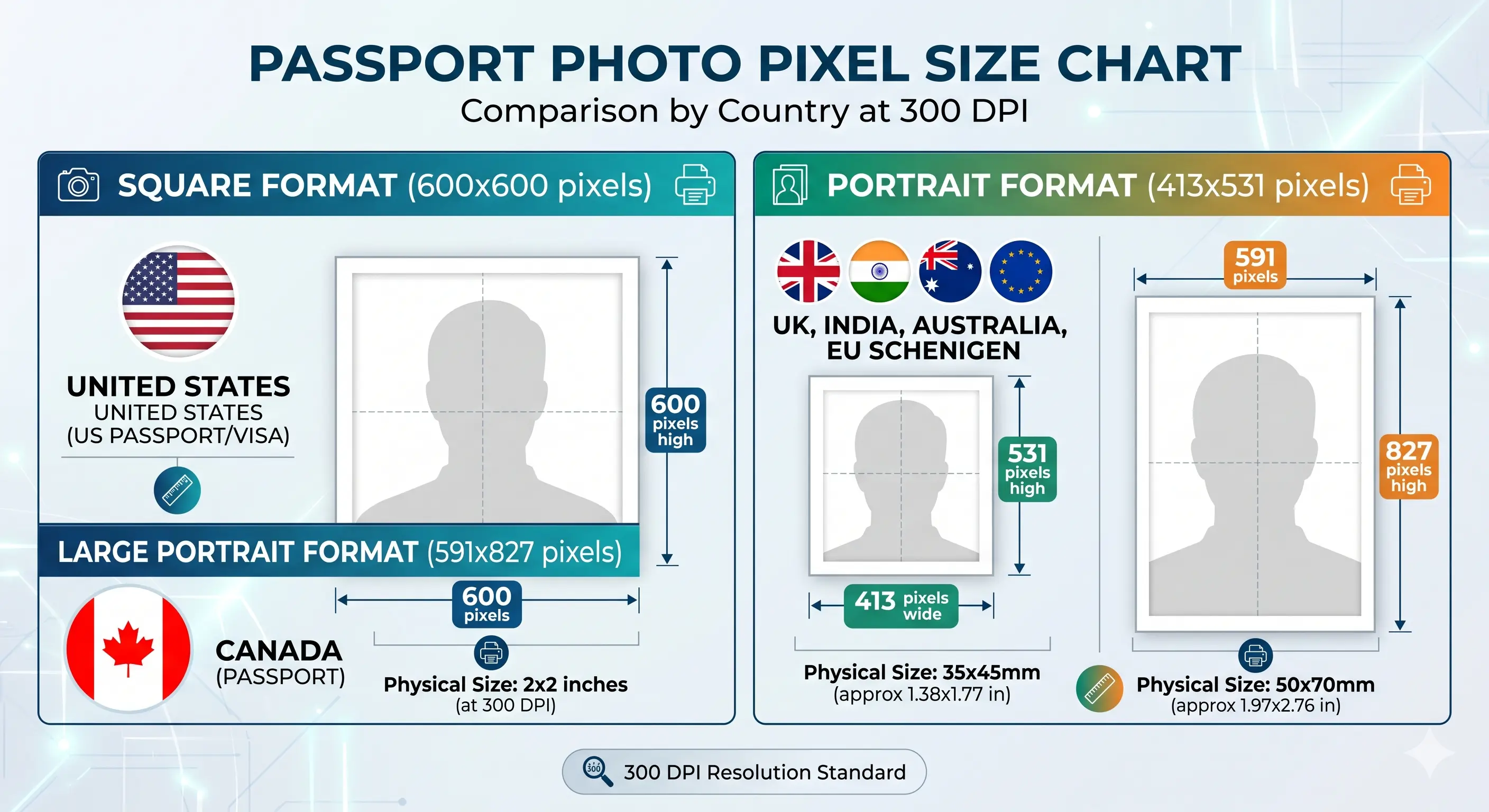
Philippines Passport Photo Size in Pixels
Physical millimetres mean nothing to an upload form, which checks pixels. The 35 × 45 mm Philippine format converts as follows.
If a portal caps the file size, the reduce file size guide and compress to 240 KB guide cover the mechanics. iPhone users shooting in HEIC should convert first with the HEIC to JPEG guide. Wider portal rules are covered in the digital passport photo requirements guide.
The DFA Process: When You Do and Don't Submit Your Own Photo
This is the part most generic passport-photo guides skip, and it matters more for the Philippines than for almost any other country on this site. For new passport applications and renewals processed at a DFA office inside the Philippines, you generally do not bring a printed photo at all. Your photo is captured digitally on-site by DFA data encoders during your appointment, as part of biometric enrollment alongside your fingerprints and signature.
That doesn't make the specifications above pointless, though. The DFA's on-site camera still enforces the same appearance rules — neutral expression, no glasses, ears and eyebrows visible, decent attire with a collar or sleeves — and showing up dressed and groomed incorrectly is one of the most common reasons applicants get turned away or asked to retake the capture. Knowing the standard before your appointment is preparation, not a wasted step.
Who needs a printed 35x45 mm photo
- New or renewed passport at a DFA office in the Philippines: no printed photo needed, but dress and grooming rules still apply to the on-site capture.
- Renewing at a Philippine embassy or consulate abroad: many posts still require 2 printed 35x45mm photos as backup, even when biometric capture also happens on-site. Check your specific post's requirements.
- Dual citizenship under RA 9225: a printed or uploaded photo meeting the specification above is typically required.
- Visa applicants who need a Philippine-format photo for their application.
- OFWs submitting OWWA or POEA paperwork that requires a passport-style photo.
- NBI clearance, school IDs, or similar government forms that ask for a 35x45mm photo.
Can I Take My Philippines Passport Photo at Home?
Yes, for the cases above where a printed or uploaded photo is actually required. A phone camera from the last several years has more than enough resolution; the details that matter are lighting, background, and distance.
Phone camera requirements
Use the rear camera, not the front-facing one, for better sharpness. Have someone else take the photo rather than using a selfie or a timer with a tripod — selfie angles tend to distort facial proportions and aren't accepted for this format. Switch off portrait mode, background blur and skin smoothing, which alter facial geometry.
Lighting
Face a window with diffuse daylight rather than direct sun. Avoid overhead lighting that casts shadows under the eyes or chin, and avoid a single side lamp that lights one half of the face more than the other. The shadow rules page covers the setup in detail.
Background
Stand about 50cm in front of a plain white wall with no texture, artwork, or visible light switches behind you. A blank wall photographed straight-on, with no shadow falling on it from your body, gives the cleanest result.
Distance from camera
Stand roughly 1.5 meters from the camera so your head and shoulders fill the frame without distortion. Standing too close exaggerates the nose and forehead; too far back leaves too much background to crop, which can shrink your head below the 32mm minimum after cropping. The crop guide explains how the 7:9 ratio and head-height band are applied together.
Common mistakes
- Taking the photo with a colored or patterned wall behind you
- Wearing glasses out of habit, forgetting they're not permitted
- Smiling broadly instead of keeping a neutral or slightly closed-mouth expression
- Letting bangs fall across the eyebrows, which the DFA flags as obscuring the face
- Wearing a white top that blends into the white background
- Printing at "fit to page" instead of actual size, which throws off the 35x45mm dimensions
Philippines Passport Photo for a Baby, Infant or Child
The same 35 × 45 mm size, plain white background and 32–36 mm head height apply to minors. There is no smaller format or reduced head-height band for infants. The difficulty is meeting an adult framing standard with a subject who cannot sit up or hold a pose, so these are the points that most often cause a child photo to be refused.
Same size, same head height
35 × 45 mm frame with the head 32–36 mm chin to crown, filling about 71–80% of the height. No age exemption applies.
Child alone in the frame
No supporting hands, arms, car seat, toy or pacifier may appear, and no parent or guardian may be visible — including during on-site DFA capture.
Eyes open, mouth closed
Both eyes should be open and directed at the camera where achievable, with a relaxed closed mouth. See the eyes requirements.
No shadow behind the head
Lay the child on a plain white sheet in soft indirect daylight and photograph from directly above. Overhead side lighting creates the background shadow that fails the check.
Hair off the face
Hair must not fall across the eyes or obscure the eyebrows and face outline. See the hair rules.
Recent photo matters more
Children's appearance changes quickly, so a photo that no longer resembles the child is refused even inside the 6-month window.
Positioning, lighting and timing technique for infants and toddlers is covered in the baby passport photo at home guide.
Photographing a child? Upload the shot and let the tool apply the 35x45 mm crop.
Create Child PhotoPrinting a 35x45 mm Philippines Passport Photo
Consular posts commonly ask for two identical printed copies, so printing is part of the specification rather than an afterthought. Most photo counters in SM, Robinsons and similar malls can handle this format on request.
| Print resolution | 300 DPI at actual size — never use "fit to page", which changes the physical dimensions |
|---|---|
| Paper | Glossy or matte photo paper, 200–250 gsm. Plain copier paper is refused |
| Copies per 4 × 6 in sheet | 6 copies of 35 × 45 mm with cutting margins |
| Copies per A4 sheet | Around 20 copies |
| Copies per Letter sheet | Around 18 copies |
| Colour management | sRGB. Turn off printer auto-enhance, skin smoothing and colour correction |
| Cutting | Guillotine or steel rule for square edges. Do not cut inside the printed border |
| Handling | Let ink dry fully. Do not staple, fold or glue the photo face |
Printer settings and cutting technique are covered in full in the print passport photo at home guide, and multi-copy sheet layout in the print sheet guide.
Philippines Passport Photo Compared to Other Countries
If you're preparing documents for more than one country — common for Filipino-American dual citizens, OFWs and applicants with regional visa needs — the formats are different enough to cause mix-ups. The Philippines shares its 35 × 45 mm frame with much of the world; the United States and China do not.
| Country | Dimensions | Aspect ratio | Head height | Background |
|---|---|---|---|---|
| Philippines | 35 × 45 mm | 7 : 9 | 32–36 mm | Plain white |
| Singapore | 35 × 45 mm | 7 : 9 | 25–35 mm | Plain white |
| Malaysia | 35 × 50 mm | 7 : 10 | Varies | Plain white |
| Thailand | 40 × 60 mm | 2 : 3 | Varies | Plain white |
| Vietnam | 40 × 60 mm | 2 : 3 | Varies | Plain white |
| Japan | 35 × 45 mm | 7 : 9 | 32–36 mm | Plain white |
| South Korea | 35 × 45 mm | 7 : 9 | 32–36 mm | Plain white |
| Hong Kong | 40 × 50 mm | 4 : 5 | 32–36 mm | Plain white |
| China | 33 × 48 mm | 11 : 16 | 28–33 mm | Plain white |
| United States | 2 × 2 in (51 × 51 mm) | 1 : 1 | 25–35 mm | White or off-white |
| India | 2 × 2 in (51 × 51 mm) | 1 : 1 | 25–35 mm | Plain white |
Note the format is rectangular for the Philippines and square for the US and India — a 2 × 2 inch photo will not pass as a Philippine one even if the head size happens to look similar. Travelling to China? Its visa uses a third format again: see the China visa photo requirements.
How to Create a Philippines Passport Photo Online
Ready now? Open the tool and get a 35x45 mm file in under a minute.
Open Passport Photo MakerCommon Rejection Reasons for Philippines Passport Photos
Each item below links to the detailed rule so you can confirm the exact tolerance before you submit. The full cross-country breakdown is in passport photo rejection reasons.
- Background isn't pure white — off-white, cream, or a leftover blue tone from an older studio template. See background colour rules.
- Head outside the 32–36mm range — usually because the photo was cropped by eye rather than to spec. See head size rules.
- Wrong aspect ratio — a square US-style crop submitted for a 7:9 Philippine frame. See the crop guide.
- Glasses worn in the photo, including clear prescription lenses. See glasses rules.
- Visible shadow behind the head or across one side of the face. See shadow rules.
- Smiling with teeth showing, or an exaggerated expression instead of neutral. See smile rules.
- Bangs or hair covering the eyebrows or part of the forehead. See hair rules.
- Ears obscured by hair or styling where the face outline becomes unclear. See ears visibility rules.
- Non-religious headwear such as a cap or hat. See head covering rules.
- Filters or retouching — portrait blur, skin smoothing and slimming alter facial geometry and are detected.
- Low resolution — below 413 × 531 pixels the print looks pixelated at 35x45 mm. See resolution rules.
- Photo older than 6 months and no longer matching current appearance.
- Selfie-style photo submitted instead of one taken by another person or on a stand.
- Printed at "fit to page" rather than actual size, which changes the physical dimensions.
Frequently Asked Questions
Size & Specification
What size does a Philippines passport photo need to be?
35mm wide by 45mm tall (3.5 x 4.5 cm), with the head measuring 32–36mm from chin to crown, on a plain white background.
What is 35x45 mm in pixels for a Philippines passport photo?
A 35 x 45 mm photo equals 413 × 531 pixels at 300 DPI and 826 × 1062 pixels at 600 DPI. The aspect ratio is 7:9 portrait. Anything below 300 DPI prints pixelated at this physical size and fails a quality check.
What head size is required in a Philippines passport photo?
The head must measure 32 to 36 mm from the bottom of the chin to the crown, which fills roughly 71 to 80 percent of the 45 mm frame height. Both eyebrows and both ears should be visible, and the face must be centred with no tilt.
What background color does the DFA require?
Plain white is the current standard for ePassport-era photos. Older guides referencing blue applied to earlier passport formats — default to white unless a specific form tells you otherwise.
The DFA Process
Do I need to bring a printed photo to my DFA appointment?
Generally no for in-country new and renewal applications, since the DFA captures your photo digitally on-site alongside your fingerprints and signature. Printed photos matter more for consular renewals abroad, dual citizenship, visas, and similar supporting documents.
When do I actually need a printed 35x45 mm photo?
For passport renewal through a Philippine embassy or consulate abroad, dual citizenship applications under Republic Act 9225, visa applications requiring a Philippine-format photo, OWWA or POEA paperwork, and NBI clearance or similar government forms. Many consular posts request two printed copies even when biometric capture also happens on-site.
Appearance & Compliance
Can I wear glasses in my Philippines passport photo?
No, under current DFA guidance. Clear contact lenses are fine; colored contacts that alter your natural eye color are not.
Does a head covering disqualify my photo?
Daily religious or medical head coverings are generally allowed as long as your full face remains visible from chin to forehead, with no shadow obscuring your features. Headwear worn for any other reason is typically not accepted.
Can I smile in a Philippines passport photo?
A neutral expression with the mouth closed is expected, and a slight closed-mouth smile is generally tolerated. Showing teeth, laughing or any exaggerated expression distorts the facial geometry that biometric systems measure and is a common cause of a retake.
Children
What are the Philippines passport photo rules for a baby or child?
The same 35 x 45 mm size, plain white background and 32–36 mm head height apply to minors. The child must be alone in the frame with no supporting hands, car seat, toy or pacifier visible, and no other person may appear. Eyes should be open where possible, and the mouth closed. For in-country DFA appointments the photo is captured on-site, but a parent or guardian appearing in the frame is not accepted. See the child and infant rules section.
Other Documents
Can I use the same photo for a US visa and a Philippine passport application?
No. The dimensions are different — 2x2 inches for the US versus 35x45mm for the Philippines — so a photo cropped for one will not fit the other's specification, even from the same source image, because one is square and the other is a 7:9 portrait.
What's the difference between a passport photo and a visa photo for the Philippines?
The printed passport-style format is 35x45mm. Some Philippine visa categories use a different square format, so check the specific visa instructions rather than assuming the passport size applies. See the Philippines visa photo requirements guide.
How long is a Philippine passport photo valid for reuse?
As a general guideline, a photo should reflect your current appearance and be no older than about 6 months. If your appearance has changed significantly — new hairstyle, weight change, facial hair — take a new photo regardless of how recent the old one is.
Taking & Printing
Can I take my Philippines passport photo at home?
Yes, for the cases where a printed or uploaded photo is actually required. Use the rear camera rather than a selfie, stand about 1.5 metres from the camera and 50 cm clear of a plain white wall, and light your face with diffuse daylight from the front. Then apply the 35 x 45 mm crop and head-height check with the Passport Photo Maker.
How do I print a 35x45 mm Philippines passport photo?
Print at 300 DPI at actual size, never using fit-to-page, on glossy or matte photo paper. A 4 x 6 inch sheet holds six 35 x 45 mm copies, an A4 sheet holds around twenty and a US Letter sheet around eighteen. Cut with a guillotine for square edges and do not trim inside the printed border. See the print at home guide.
Official Sources & References
- Department of Foreign Affairs, Republic of the Philippines: dfa.gov.ph
- DFA Office of Consular Affairs — passport appointment and requirements: consular.dfa.gov.ph
- Philippine embassies and consulates worldwide — consular renewal and dual citizenship photo guidance
- ICAO Doc 9303 — Machine Readable Travel Documents biometric photograph standard: icao.int
Related Pages
Create Your Philippines Passport Photo Now
Get a DFA-aligned 35x45mm photo at 413 × 531 pixels with a clean white background, ready to print for your consular renewal, dual citizenship application, or visa form — no design software needed.