Menu
India Passport Photo Maker Online - 35x45 mm Size & Requirements | ClonyPDF
Last Updated: June 2026

India Passport Photo Maker Online

Create a compliant India passport photo online that meets every Passport Seva requirement. Get the official passport size photo India accepts — 35x45 mm dimensions, white background, and proper head positioning in less than a minute.

  • Official 35x45 mm size
  • Auto background fix
  • Print and digital ready
  • Used by thousands of applicants
Create India Passport Photo
Works on phone, tablet, and desktop. No signup required.
Tool Ready

Launch the India Passport Photo Maker

Our Passport Photo Maker is pre-configured with the official Indian passport photo size of 35x45 mm. Upload any clear photo of yourself and the tool automatically detects your face, corrects the background, and crops the image to exact Passport Seva specifications. The result is a print-ready and digital-ready photo you can use immediately.

  • Official India passport photo dimensions
  • Automatic face detection and centering
  • Background correction to plain white
  • Instant download of digital and print versions
Create India Passport Photo
India Passport Photo Size
35 × 45 mm
Head height: 25–35 mm
Background: Plain white
Format: High-quality JPEG

India Passport Photo Requirements

The Ministry of External Affairs and Passport Seva Kendra enforce strict standards for photos submitted with Indian passport applications, renewals, and re-issue requests. The same specifications apply to Tatkaal applications. Below is a complete summary of the official India passport photo requirements.

RequirementSpecification
Photo size35 x 45 mm
Width35 mm (3.5 cm / 1.38 inches)
Height45 mm (4.5 cm / 1.77 inches)
Background colorPlain white
Head positionCentered, facing camera, level shoulders
Head height25–35 mm from chin to top of head
Facial expressionNeutral, mouth closed, both eyes open
Glasses rulesNot recommended; avoid reflective frames
Head coveringAllowed only for religious reasons; face fully visible
ResolutionMinimum 600 x 600 pixels for digital upload
File formatJPEG (for online), printed color photo
Photo ageTaken within the last 6 months
Print requirementsProfessional glossy or matte photo paper
Quantity (printed)2 identical recent color photos

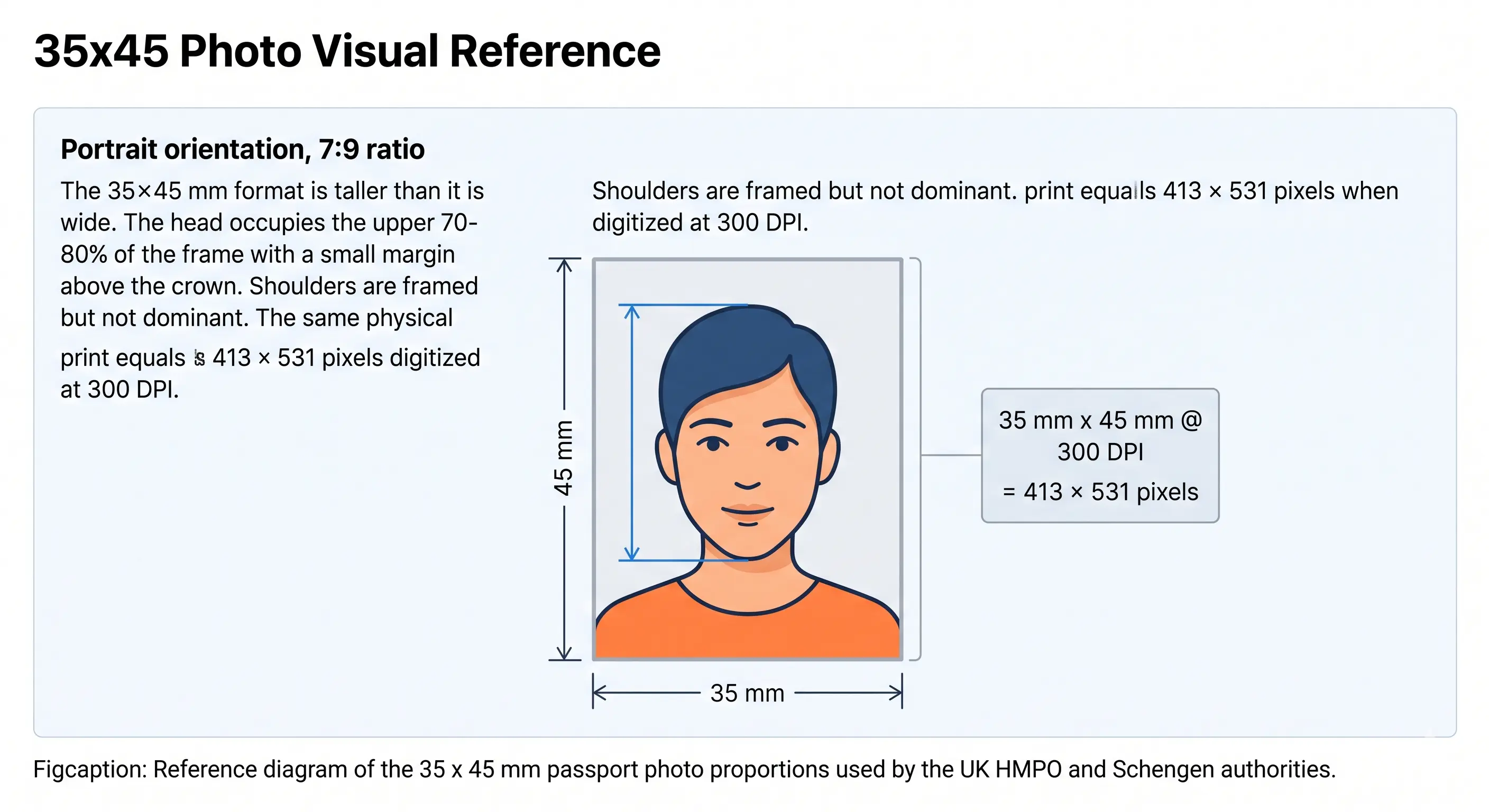
Photo Diagram

Head: 25–35 mm
← 35 mm →
↕ 45 mm
Width35 mm
Height45 mm
Head height (min)25 mm
Head height (max)35 mm
BackgroundPlain white
ExpressionNeutral, mouth closed
EyesBoth open, visible
GlassesNot recommended

Background

India requires a plain white background. Off-white or light grey may be accepted in some cases, but pure white is the safest choice. Coloured walls, patterns, furniture, or shadows behind your head will lead to rejection.

Facial Expression

Look directly into the camera with a neutral expression and your mouth closed. Both eyes must be open and clearly visible. Hair should not cover your eyes or eyebrows.

India Passport Photo Size in mm, cm, and Inches

The official Indian passport photo size is expressed in millimetres, but many photographers and online tools also use centimetres or inches. Here is the complete size reference across all units.

MeasurementMillimetres (mm)Centimetres (cm)Inches
Width35 mm3.5 cm1.38 in
Height45 mm4.5 cm1.77 in
Head height (min)25 mm2.5 cm0.98 in
Head height (max)35 mm3.5 cm1.38 in

When asking a studio to print your passport photos, specify the size as 3.5 cm × 4.5 cm or 35 mm × 45 mm. Most professional photo labs in India understand both formats.

India Passport Photo Size in Pixels

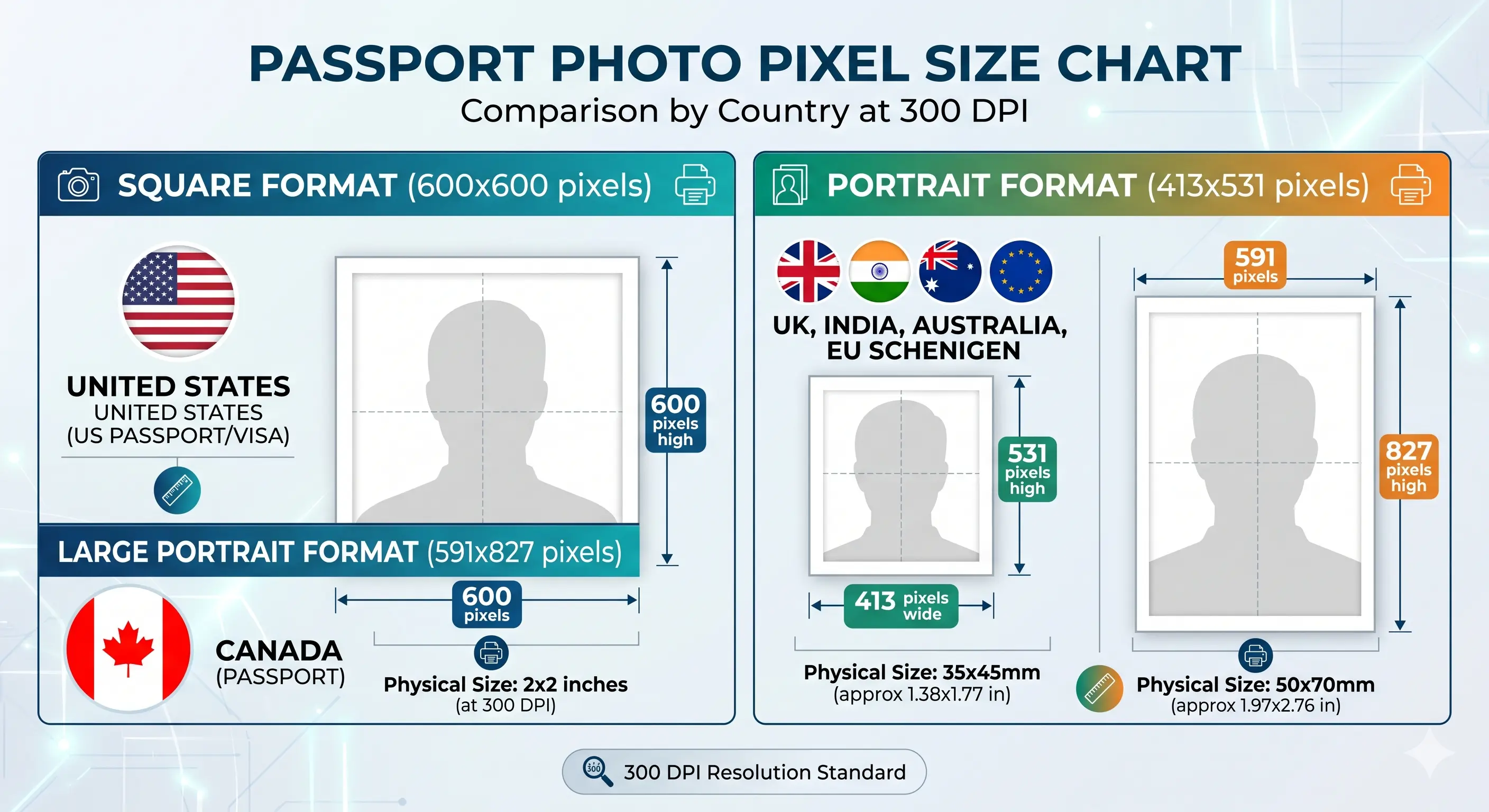
When uploading a digital passport photo to the Passport Seva portal or any online application, the image must meet minimum pixel dimensions. The pixel count depends on the resolution (DPI) used when converting from millimetres to pixels.

ResolutionWidth (pixels)Height (pixels)Use Case
300 DPI (standard) 413 px 531 px Home printing
600 DPI (recommended) 827 px 1063 px Online upload & studio print
Minimum for online upload 600 px 600 px Passport Seva portal

Always use 600 DPI or at least 600 x 600 pixels for digital submissions. Photos below this threshold are rejected by the Passport Seva portal's automated quality check. Our tool outputs at the correct resolution automatically.

File Size

For digital upload, the photo must typically be less than 1 MB in JPEG format. Our tool compresses the output to meet this limit without reducing visual quality. Do not use PNG or HEIC formats for online submission — convert to JPEG first.

Passport Seva Digital Photo Requirements

When uploading your passport photo online through the Passport Seva portal, the file must meet specific digital standards in addition to the visual requirements. Failing any one of these will result in your photo being rejected by the portal before your application is even reviewed.

File FormatJPEG (.jpg) only. PNG and HEIC are not accepted.
File SizeMaximum 1 MB per photo. Compress before uploading if needed.
Minimum Resolution600 × 600 pixels. Higher is better — use 827 × 1063 for best results.
Color ModeFull color (RGB). Black-and-white photos are not accepted.
White BackgroundBackground must be plain white in the digital file, not just in print.
No FiltersRetouching, beauty filters, or auto-enhancements are strictly not allowed.
No BordersDigital file must not have any printed or digital borders around the image.
Recent PhotoTaken within the last 6 months. Outdated photos are flagged and rejected.

Common Passport Seva Upload Errors

  • Error: Photo dimensions do not match. The pixel dimensions do not correspond to a 35x45 mm photo at the accepted resolution. Use our tool to generate a correctly sized file.
  • Error: File size exceeds limit. Compress your JPEG to below 1 MB. Most photo editing apps have an export quality slider.
  • Error: Background not white. The portal's algorithm detects non-white backgrounds. Remove any background tint before uploading.
  • Error: Face not detected. Ensure your face is well-lit, fully visible, and centred in the frame before uploading.
🏛️
Official Reference
These requirements are sourced from the official Government of India passport portal. Always confirm specifications before submission.

Who Needs an India Passport Photo?

The 35x45 mm specification applies to all Indian passport-related applications. The same photo format is also required for a number of related government documents. Here are the most common use cases.

🆕

New Passport

First-time applicants must submit 2 printed photos and a digital upload via the Passport Seva portal.

🔄

Passport Renewal

Renewal applications require a fresh photo taken within the last 6 months, even if your appearance has not changed.

Tatkaal Passport

The Tatkaal scheme for urgent processing requires the same 35x45 mm photo specification. No exceptions.

👶

Minor Passport

Children's passports require a photo of the child alone. Infants must have eyes open. Parents are not in the photo.

📋

Reissue / Re-issue

Reissue due to damage, change of particulars, or lost passport requires a fresh compliant photo.

🌍

Visa Applications

Many Indian visa applications for travel abroad also accept the 35x45 mm format. Check per-country requirements.

How to Create an India Passport Photo Online

Creating a Passport Seva compliant photo at home is straightforward when you follow the right steps. Our tool handles all technical adjustments automatically.

1

Upload Your Image

Take a clear front-facing photo with your phone or camera against a plain white wall, then upload it to the tool.

2

Auto Face Detection

The tool detects your face, checks lighting, and verifies head height proportions against Indian passport specs.

3

Crop and Align

The image is cropped exactly to the official 35x45 mm size with correct head positioning and white background.

4

Download Ready-to-Use Photo

Download the high-resolution digital JPEG and a print-ready 4x6 layout with multiple copies for studio printing.

Common Reasons India Passport Photos Get Rejected

A large number of passport applications are delayed because of photo issues. Understanding the most common causes will help you avoid resubmission and additional Passport Seva appointments.

Wrong Dimensions

Photos that are not exactly 35x45 mm or have incorrect head height ratios are rejected. The head must measure 25 to 35 mm from chin to crown.

Incorrect Background

Colored, patterned, or textured backgrounds are not accepted. Only plain white is recommended for Indian passport photos.

Poor Lighting

Overexposed, underexposed, or unevenly lit photos are rejected. Use soft, even, frontal lighting.

Shadows

Visible shadows on the face or wall behind you cause rejection. Stand away from walls and use diffused light.

Head Not Centered

Tilted heads, turned faces, or off-center positioning cause immediate rejection. Face the camera squarely.

Low Resolution

Blurry, pixelated, or heavily compressed photos do not meet quality standards. Use a high-resolution camera.

Glasses Issues

Reflections, tinted lenses, and thick frames cause rejection. It is best to remove eyewear completely before the photo.

Digital Alterations

Beauty filters, skin smoothing, or any post-processing that alters your appearance is not permitted and will be flagged.

Wrong File Format

For online submission, only JPEG is accepted. Uploading a PNG, HEIC, or WEBP file will result in an immediate upload error.

How to Take an India Passport Photo with a Phone

You do not need a professional studio or camera to get a compliant Indian passport photo. Most modern smartphones have sufficient resolution and camera quality. Follow this step-by-step guide.

1

Find a plain white wall

Choose a clean white or very light wall with no patterns, art, sockets, or furniture in the background. Natural light from a nearby window works best.

2

Stand one metre from the wall

This gap prevents shadows from building up directly behind your head and shoulders, which is one of the most common rejection causes.

3

Use the rear camera

The main (rear) camera on any smartphone produces significantly higher resolution and better colour accuracy than the front-facing selfie camera. Ask someone to take the photo for you.

4

Hold the phone at eye level

Position the phone lens at the same height as your eyes. Shooting from above or below creates distortion and makes it harder to centre your head correctly.

5

Ensure even lighting

Stand facing the light source. Avoid harsh direct sunlight. If indoors, face a large window with diffused natural light. Turn off overhead lights that cast shadows under your eyes and nose.

6

Maintain a neutral expression

Relax your face, close your mouth, and look directly at the camera. Keep both eyes fully open. Do not smile or tilt your head.

7

Upload to our tool

Open our India passport photo maker on your phone browser and upload the photo. The tool crops, resizes, and formats everything to Passport Seva specifications automatically.

8

Download and use

Download the digital file for online submission, or print the 4x6 sheet at your local studio, supermarket print kiosk, or home printer.

India vs Other Countries: Passport Photo Sizes Compared

Understanding how Indian passport photo dimensions compare with other countries helps if you are applying for multiple passports or visas at the same time. The 35x45 mm format is widely used internationally.

CountryWidthHeightBackgroundSame Size as India?
🇮🇳 India 35 mm 45 mm White Reference
🇬🇧 United Kingdom 35 mm 45 mm Light grey/white ✓ Same
🇦🇺 Australia 35 mm 45 mm White ✓ Same
🇩🇪 Germany 35 mm 45 mm White/light grey ✓ Same
🇺🇸 United States 51 mm (2 in) 51 mm (2 in) White ✗ Different
🇨🇦 Canada 50 mm 70 mm White ✗ Different
🇯🇵 Japan 35 mm 45 mm White ✓ Same
🇸🇬 Singapore 35 mm 45 mm White ✓ Same
🇦🇪 UAE Visa 43 mm 55 mm White ✗ Different

If you are applying for a UK, Australian, or Japanese visa alongside your Indian passport, your 35x45 mm photo may be reusable — but always verify with the embassy, as head height and expression requirements may differ slightly.

Tips for Better Indian Passport Photos

You don't need a professional studio to capture a compliant photo. These practical tips help you get it right on the first try using equipment you already have.

  • Use natural daylight. Stand facing a large window during mid-morning or mid-afternoon. Avoid direct sunlight that creates harsh shadows.
  • Find a clean white wall. Make sure there are no posters, sockets, fans, or texture in the frame behind you.
  • Stand a metre from the wall. This distance eliminates shadow buildup directly behind your head.
  • Hold the camera at eye level. Position your phone or camera at the same height as your eyes to avoid distortion.
  • Use the rear camera. The back camera on a smartphone produces sharper, higher-resolution images than the selfie camera.
  • Ask someone to help. A friend or family member taking the photo from a metre away gives better results than a self-timer.
  • Keep your shoulders square. Face the camera directly without leaning forward or tilting your head.
  • Wear darker, solid clothing. Dark shirts stand out clearly against a white background and improve contrast.
  • Remove glasses and large accessories. Take off eyewear, hats, and oversized earrings or jewellery.
  • Skip filters entirely. Beauty filters, skin smoothing, and digital alterations are strictly prohibited.
  • Do not wear a white shirt. A white top blends into the white background and may make the photo look unprofessional. Wear a contrasting solid colour.

Frequently Asked Questions

What is the India passport photo size?
The official Indian passport photo size is 35 mm wide by 45 mm tall (3.5 cm × 4.5 cm). The head must measure between 25 mm and 35 mm from the chin to the top of the head, with the face centered in the frame.
What are the passport size photo dimensions in cm?
The Indian passport photo dimensions in centimetres are 3.5 cm wide by 4.5 cm tall. This is equivalent to 35 mm × 45 mm or approximately 1.38 × 1.77 inches.
What are the passport photo dimensions in inches?
In inches, the Indian passport photo is approximately 1.38 inches wide by 1.77 inches tall. This is the direct conversion from the official 35 mm × 45 mm specification.
Can I use a phone photo for an Indian passport?
Yes. Modern smartphone cameras exceed the resolution required. Use the rear camera, good lighting, and a plain white wall. Our India passport photo tool will resize and format the result correctly.
Can I wear glasses in an Indian passport photo?
It is best to remove glasses for your passport photo. Reflections on the lenses, tinted frames, or thick rims often lead to rejection. Take the photo without eyewear unless you have a documented medical reason.
What background is required for an Indian passport photo?
A plain white background is required. Colored walls, patterns, textures, or shadows are not acceptable. Stand at least a metre away from the wall to prevent shadows behind your head.
Can I print the photo at home?
Yes. You can print your photo at home using a quality photo printer and glossy or matte photo paper. Alternatively, use our 4x6 layout download to print multiple copies at a local studio or photo lab.
How recent should my passport photo be?
Your photo must be taken within the last 6 months and reflect your current appearance. If you have made significant changes to your hair, weight, or facial features, you must take a new photo.
Can I smile in an Indian passport photo?
No. A neutral expression with your mouth closed is required. Smiling, frowning, or showing teeth will lead to rejection. Keep your eyes open and looking directly at the camera.
What file format should I use?
For online applications, use a JPEG file with a minimum resolution of 600 x 600 pixels. For printed submissions, use a high-quality color photo on professional photo paper.
Is 35x45 mm required for all Indian passport applications?
Yes. The 35x45 mm size is the standard for all Indian passport applications, including new passports, renewals, re-issue requests, and Tatkaal applications. Photos in other sizes will be rejected.
Can I create an Indian passport photo online?
Yes. Our online passport photo maker for India creates a fully compliant 35x45 mm photo with the correct background, head positioning, and resolution. The output is ready for both print submission and digital upload.

What are the photo requirements for Tatkaal passport?
Tatkaal passport applications require the same 35x45 mm photo as standard applications. The photo must have a plain white background, neutral expression, and be taken within the last 6 months. There are no relaxed photo requirements for Tatkaal.
What photo do I need for passport renewal?
For passport renewal (re-issue), you must submit a recent photo taken within the last 6 months, even if your appearance has not changed significantly. The photo must meet all standard 35x45 mm Passport Seva specifications.
What photo is required for a minor's or baby's passport?
Children's passports require a photo of the child alone against a plain white background at 35x45 mm. For infants, both eyes must be open. Parents or guardians should not appear in the photo. For very young babies, lay the child on a white sheet and photograph from directly above if they cannot sit unsupported.
Is a beard allowed in an Indian passport photo?
Yes. A beard is allowed in an Indian passport photo. There are no restrictions on facial hair. However, the face — including jaw, chin, and cheeks — must be clearly visible and not obscured.
Are earrings or jewellery allowed?
Small, non-reflective earrings and jewellery are generally acceptable. However, avoid large, dangling, or shiny accessories that might cast reflections, create shadows, or obscure part of your face or hairline.
Can I wear a white shirt in my passport photo?
A white shirt is not recommended for Indian passport photos. Against a white background, a white top reduces the clarity of your outline and may make the photo look unprocessed or unclear. Wear a contrasting solid-coloured top instead.
What is the passport size photo pixel size for Passport Seva?
For online upload to the Passport Seva portal, your photo must be at least 600 x 600 pixels in JPEG format, with a file size under 1 MB. The ideal size is 827 x 1063 pixels at 600 DPI, which precisely matches the 35x45 mm physical dimensions.
How many photos do I need for an Indian passport application?
You need 2 identical printed color photos for physical submission, plus a digital JPEG upload to the Passport Seva portal. The photos must be identical — taken at the same session, with the same expression, lighting, and clothing.

Create Your India Passport Photo Now

Official 35x45 mm size, instant processing, and a print-ready file in seconds.

  • Free Online Tool
  • Instant Results
  • Official Size Support
  • No Signup Required
Create India Passport Photo