
UK Visa Photo Maker
UKVI-Compliant in Minutes
A UK visa photo is 45 mm high by 35 mm wide when printed, or a minimum of 600 × 750 pixels as a JPEG between 50 KB and 6 MB for the online portal, with the head measuring 29–34 mm from chin to crown on a plain light-coloured background.
This page is for foreign nationals applying for a UK visa — including the Standard Visitor, Student, Skilled Worker, Transit, and Family routes. UK visa photo rules are set by UK Visas and Immigration (UKVI), part of the Home Office, with applications processed at VFS Global and TLScontact visa application centres worldwide. Printed photos follow the same 35×45 mm biometric standard used for UK passports, though digital upload is now the default for most routes. One important nuance: visa application photo checks are conducted at biometric appointment centres, and rejection there causes more disruption — and higher cost — than a delayed passport renewal.
UK Visa Photo Size (Quick Answer)
UKVI runs two specifications for the same photo: one in millimetres for print, one in pixels for the online portal. Both are listed below.
Source: Gov.uk (UKVI Photo Rules)
| Specification | Value |
|---|---|
| Print size | 45 mm high × 35 mm wide (also written 35 × 45 mm) |
| Digital minimum | 600 px wide × 750 px tall |
| Digital file size | 50 KB minimum, 6 MB maximum |
| File format | JPEG / JPG only |
| Head height (chin to crown) | 29 – 34 mm, i.e. 64–76% of frame height |
| Background | Plain light-coloured, no pattern, no shadow |
| Expression | Neutral, mouth closed, eyes open |
| Glasses | Avoid unless medically required |
| Copies | 1 digital upload, or 2 identical prints on paper routes |
| Issuing authority | UK Visas and Immigration (Home Office) |
Do UK Visa Photo Specs Differ by Visa Type?
The core biometric photo specification is identical across all UK visa categories — UKVI does not publish a separate size standard for tourist vs. student vs. work visa photos. The practical difference lies in how your photo is submitted, which depends on your application route. Use the table below to confirm what applies to you.
| Visa Type | Photo Spec | Submission Method | Notes |
|---|---|---|---|
| Standard Visitor | Standard UKVI | Online portal (digital JPEG) | Most common route; digital photo uploaded at application stage |
| Student (formerly Tier 4) | Standard UKVI | Online portal (digital JPEG) | Biometric appointment at VFS centre required |
| Skilled Worker (formerly Tier 2) | Standard UKVI | Online portal (digital JPEG) | Sponsor letter required; photo spec unchanged |
| Family / Settlement | Standard UKVI | Online portal (digital JPEG) | Longer processing times make early photo compliance critical |
| Transit (Direct Airside / Short Stay) | Standard UKVI | Online portal (digital JPEG) | Transit visa — same spec, shorter stay |
| eVisa (digital immigration status) | Standard UKVI | Digital only — no physical vignette | eVisa changes how your status is held, not the photo spec used during application |
| Children under 5 | On-site photo | Taken at visa application centre | Per gov.uk guidance, under-5s attend the centre; photo taken on-site |
Biometric auto-crop
Head centred and sized to UKVI's 29–34mm chin-to-crown requirement automatically.Background removal
Replaces any background with a plain light-coloured field — no Photoshop required.Correct dimensions
Output at 35×45mm for print, or 600×750px+ JPEG for the UKVI online portal.Print & digital ready
Download a printable sheet (for any remaining paper routes) or a portal-ready JPEG file.Compliance check
Auto-flagging of shadows, glasses, and expression issues before you download.Child photo guidance
In-tool tips for photographing children under 6 in line with UKVI exceptions.UK Visa Photo Visual Reference
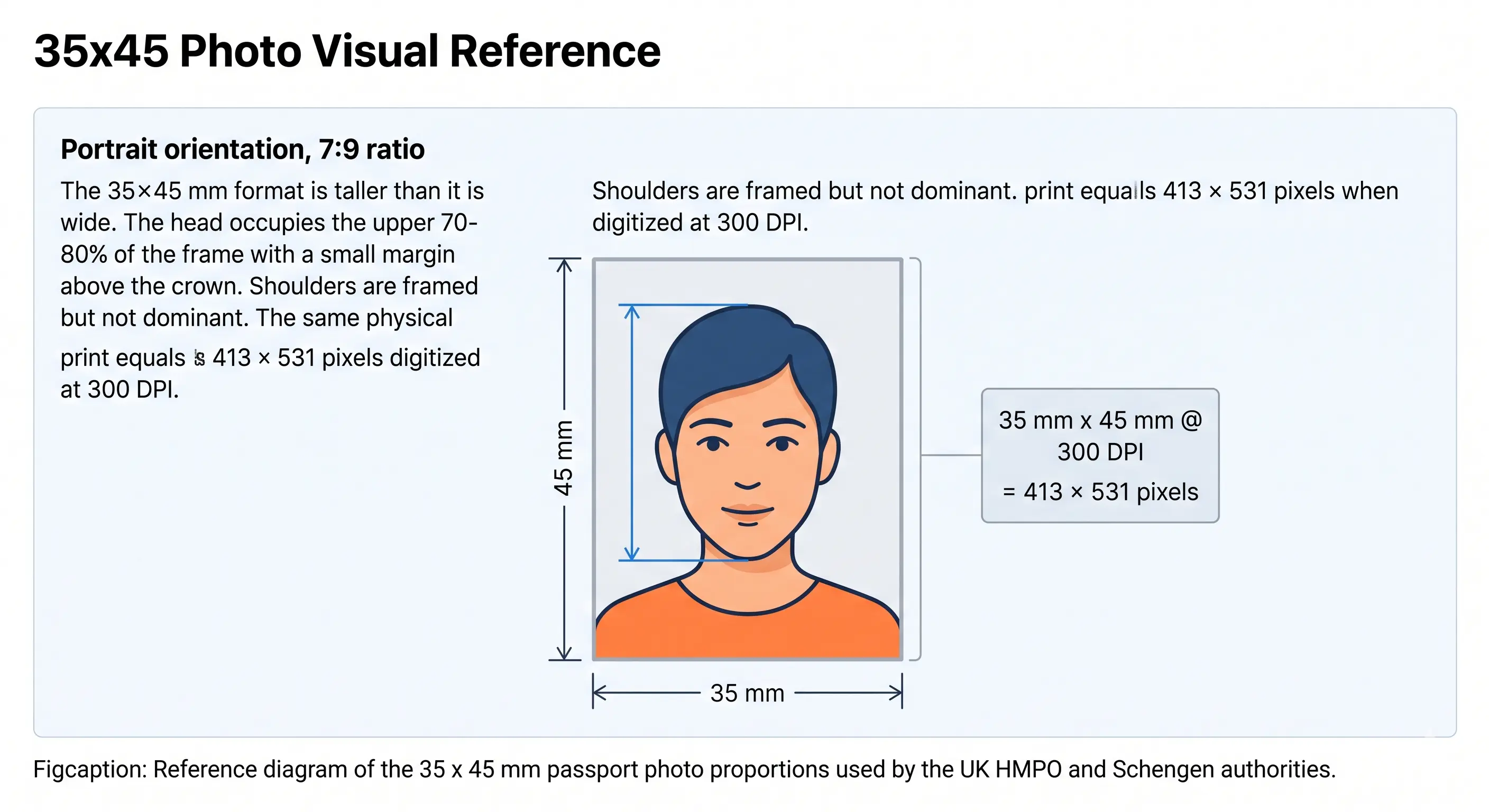
The diagram below shows the printed 45 × 35 mm frame with the biometric head zone marked. The head must measure 29–34 mm from chin to crown, which is 64–76% of the 45 mm frame height.
Official UK Visa Photo Requirements
Specifications below reflect UKVI's official digital photo guidance on gov.uk and the standard UKVI biometric print spec. Where a value could not be confirmed directly from gov.uk, this is noted explicitly. Always verify against the specific application form page before submitting. Each rule links to the detailed standard in our passport photo rules library.
| Requirement | Print Submission | Digital / Online Portal | Source Confidence |
|---|---|---|---|
| Photo dimensions | 45mm high × 35mm wide | Min. 600px wide × 750px tall | ✓ Official (gov.uk) |
| Head height (chin to crown) | 29mm – 34mm | ≈ 483 – 570px at the 750px minimum height | ⚠ mm figure official; pixel equivalent derived |
| Head coverage of frame | 64 – 76% of frame height. See head size rules and face size requirements | ⚠ Derived from the 29–34mm / 45mm ratio | |
| Background | Plain cream or light grey | Plain light-coloured (no pattern). See background colour rules | ⚠ Gov.uk uses "plain light-coloured"; cream/grey widely reported |
| File format | Colour print, glossy or matte | JPEG / JPG only | ✓ Official (gov.uk) |
| File size | N/A (physical print) | 50KB – 6MB | ✓ Official (gov.uk) |
| Print resolution | 300 DPI — at least 413 × 531px for a 35 × 45mm print | N/A | ⚠ Derived from ICAO 300 DPI print convention |
| Colour | Full colour, no filters | Full colour, no filters | ✓ Official (gov.uk) |
| Expression | Neutral, mouth closed | Neutral, mouth closed. See smile rules | ✓ Official (gov.uk) |
| Eyes | Open, clearly visible, no red-eye | Open, clearly visible, no red-eye. See eyes requirements | ✓ Official (gov.uk) |
| Glasses | Avoid; if required: non-tinted, no glare | Avoid; if required: non-tinted, no glare. See glasses rules | ✓ Official (gov.uk) |
| Hair | Must not cover the eyes or obscure the outline of the face. See hair rules | ✓ Official (gov.uk — "nothing covering your face") | |
| Ears | Not required to be visible for UK visas, but the face outline must be clear. See ears visibility rules | ⚠ Gov.uk does not specify ear visibility | |
| Head coverings | Not permitted (religious/medical exception) | Not permitted (religious/medical exception). See head covering rules | ✓ Official (gov.uk) |
| Shadows | None on face or behind subject | None on face or behind subject. See shadow rules | ✓ Official (gov.uk) |
| Orientation | Portrait | Vertically orientated, not mirrored | ✓ Official (gov.uk) |
| Photo age | Recent likeness | Recent likeness | ⚠ Gov.uk says "recent" — 6 months is the widely followed convention |
| Number required | 2 identical photos (paper route) | 1 digital file (online route) | ✓ Official (gov.uk) |
| Digital manipulation | Not permitted | Not permitted (no filters, no retouching) | ✓ Official (gov.uk) |
Want the tool to apply all of the above automatically? Open Passport Photo Maker and upload one photo.
Who Sets UK Visa Photo Rules — and Who Checks Them
UK visa photo requirements are set by UK Visas and Immigration (UKVI), an operational body within the Home Office. UKVI publishes the photo guidance that all applicants must follow, regardless of which country they apply from.
In most countries outside the UK, visa applications are processed by one of two authorised commercial partners: VFS Global and TLScontact. These centres handle the biometric enrolment appointment — fingerprints and a facial scan — and physically check the photo you have submitted before forwarding the application to UKVI for a decision. Photo rejection at a VFS or TLScontact centre means your appointment may not be completed, which delays your application and can incur rebooking fees.
What Happens to Your Photo After Submission
Your digital photo is used for identity verification, linked to your biometric record, and — if your visa is granted as a physical vignette — printed onto the document. Since the UK moved to eVisas for most routes, the vignette sticker is being phased out, but your photo still forms part of the biometric record held in UKVI systems and shared with Border Force for arrival checks.
Digital Photo Submission — UKVI Online Portal Rules
For most UK visa routes, the photo is submitted digitally through the online application form on gov.uk. The UKVI portal runs automated biometric quality checks the moment you upload. If your photo fails, the form will prompt you to upload a replacement before you can proceed.
Confirmed Digital Photo Requirements
- File format: JPEG / JPG only
- Minimum resolution: 600px wide × 750px tall
- File size: 50KB minimum, 6MB maximum
- Orientation: vertical (portrait) — must not be mirrored or flipped
- No filters, no digital retouching, no software alterations
- The photo must not be a scan or photograph of another photo
What the Portal Checks Automatically
- Image is in focus and clearly shows the face
- Face is centred and facing forward
- No other people or objects in the frame
- Background is plain and light-coloured
- No shadows on face or background
- Eyes are open and visible
- File meets size and format requirements
Passport Photo Maker exports a JPEG sized to UKVI's digital specification with a compliant background and biometric crop, so the portal's automated check is satisfied before you submit. If your export lands outside the 50 KB–6 MB window, the reduce file size guide and compression guide cover the adjustment. iPhone users shooting in HEIC should convert first using the HEIC to JPEG guide. Broader portal rules across countries are covered in the digital passport photo requirements guide, and sharpness and compression standards in passport photo resolution rules.
Can I Take My UK Visa Photo at Home?
Yes — UKVI explicitly states the photo can be taken on a phone or tablet. Taking a good home photo is achievable, but the margin for error is smaller than it is for a passport renewal. The biometric centre will check your photo at the appointment, not just the portal.
Camera and Setup
- A modern smartphone camera is sufficient — no DSLR required
- Have a second person take the photo; selfies are harder to frame correctly and more likely to be flagged by the portal's face-detection check
- Use the rear camera, not the front-facing selfie lens, for higher resolution
- Stand approximately 50cm away from the background wall to prevent shadow behind you
- The photographer should stand roughly 1.5 metres from you to capture head, shoulders, and upper body with enough framing for the crop
- Switch off portrait mode, background blur and skin smoothing — these count as digital manipulation and are detectable
Background
- Use a plain, light-coloured wall — light grey or off-white works well
- Avoid patterned wallpaper, wood panelling, or curtains behind you
- Remove anything hanging on the wall in shot
- UKVI requires no shadows on the background; distance from the wall prevents this
Lighting
- Natural light from a window in front of you (not behind) is ideal
- Avoid strong overhead lighting that casts shadows under the chin or nose
- Avoid direct flash, which causes shadows behind the head and red-eye
- Ensure even, diffused light on both sides of the face
Common Home-Photo Mistakes
- Shadow on the face from overhead indoor lighting
- Shadow on the wall behind because the subject stood too close to it
- Glasses glare or reflection from indoor lighting
- Hair partially covering forehead or eyes
- Slight smile — UKVI requires a neutral, plain expression
- Head slightly tilted or rotated off-centre
- Shoulder or torso out of frame
After Taking the Photo
Upload the image into Passport Photo Maker. The tool will resize it to the correct dimensions, remove or replace the background, centre the face biometrically, and export a portal-ready JPEG within UKVI's file size range. Download the digital file for online submission, or the print sheet for any centres that still accept printed photos. If you need to reframe a wide or full-body source image first, the crop guide explains how the 7:9 ratio and head-height band are applied together.
Printing Your UK Visa Photo
Most UK visa applications are now digital-only. If your specific route still accepts or requires printed photos — some paper-form or postal routes do — the print specification is the same 45 × 35 mm biometric size used for UK passports, and you need two identical copies.
| Print size | 45 mm high × 35 mm wide, portrait orientation |
|---|---|
| Print resolution | 300 DPI — export at least 413 × 531 px. Disable fit-to-page and auto-scaling, which change the physical size |
| Paper | Glossy or matte photographic paper, 200–250 gsm. Plain copier paper is refused |
| Copies per 4 × 6 inch sheet | Six 45 × 35 mm photos in a two by three grid with cutting margins |
| Copies per A4 sheet | Around twenty, though you only need two |
| Cutting | Guillotine or steel rule for square edges. Do not cut inside the printed border |
| Colour management | sRGB. Turn off printer auto-enhance and colour correction |
| Handling | Do not staple or crease the photos. Write your full name lightly on the back only if the application instructions ask for it |
Printer settings, paper choice and cutting technique are covered in full in the print passport photo at home guide, and multi-copy sheet layout in the print sheet guide.
The tool exports a print-ready sheet automatically. Generate your print sheet.
Why UK Visa Photos Get Rejected — and What It Costs You
Unlike a passport renewal where a rejected photo results in a resubmission letter and a few days' delay, a photo rejected at a VFS or TLScontact biometric appointment may mean you cannot complete the appointment that day. That can mean rebooking fees, travel costs to a distant centre, and a delay to your visa decision. The stakes are higher. The full cross-country breakdown is in passport photo rejection reasons.
Wrong background
Patterned, coloured, or insufficiently light background. The most common portal rejection. See background colour rules.Head too large or too small
Head height must be 29–34mm, or 64–76% of the frame. A head that fills the frame or sits too small will fail. See head size rules.Shadows on face or background
UKVI explicitly flags shadows as a rejection reason. Even soft shadows from poor indoor lighting are caught. See shadow rules.Glasses (glare or obstruction)
UKVI's guidance says not to wear glasses unless medically required. Glare or frames obscuring the eyes will cause rejection. See glasses rules.Expression not neutral
Any visible smile, raised eyebrows, or open mouth. See smile rules.Hair across the face
A fringe over the eyes or hair obscuring the jawline fails the "nothing covering your face" rule. See hair rules.Photo is a scan of another photo
UKVI specifically prohibits submitting a digital scan of a printed photo. Texture and moiré patterns are detectable.Mirrored or flipped image
The official guidance explicitly states the photo must not be mirrored or flipped. Some editing apps do this automatically when saving.Wrong file format or size
The portal requires JPEG only. Files below 50KB or above 6MB are rejected at upload.Below the pixel minimum
Anything under 600px wide or 750px tall is refused. Upscaling a small original does not help — the sharpness check catches interpolated pixels.Digital manipulation
Filters, skin-smoothing, whitening, or any retouching that alters facial features is not permitted and can be detected.Photo doesn't match current appearance
If your appearance has changed significantly since the photo was taken — new glasses, significant weight change, major haircut — take a new photo.Child Visa Photo Requirements
Children applying for a UK visa follow slightly different rules depending on age. The size, background and head-height specification is unchanged — what relaxes is the expression and eye-contact requirement.
Children Under 5 — On-Site Photo at Visa Application Centre
Children Aged 5 and Over
- Each child needs an individual photo — no other people in the frame
- The same background, resolution, and format rules apply as for adults
- Children under 6 do not need to look directly at the camera or maintain a plain expression (this exception applies to both UK visa and passport photos)
- Children under 1 year: eyes do not need to be open; a supporting hand may be used but must not be visible in the final image
- Toys, blankets, dummies or other objects must not appear in the photo
- Babies and toddlers: photograph lying on a plain, light-coloured sheet, shooting from directly above in soft indirect daylight
- Shoot wide and crop down — cropping tightly in-camera on a small face leaves too few pixels once the frame is applied
When preparing a child's photo, use the same upload and crop workflow in Passport Photo Maker. Positioning, lighting and timing technique for infants and toddlers is covered in the baby passport photo at home guide. The eyes requirements and shadow rules pages cover the two checks that fail most often on child photos.
UK Visa Photo vs. UK Passport Photo — Are They the Same?
This is one of the most common points of confusion. Here is the practical breakdown:
| Requirement | UK Visa Photo | UK Passport Photo |
|---|---|---|
| Print dimensions | 45mm × 35mm (h × w) | 45mm × 35mm (h × w) |
| Head height (print) | 29mm – 34mm | 29mm – 34mm |
| Background | Plain light-coloured (cream/light grey) | Plain cream or light grey |
| Digital file format | JPEG / JPG | JPEG / JPG |
| Digital file size | 50KB – 6MB (UKVI portal) | Not specified as a single range — varies by passport application route |
| Digital min. resolution | 600 × 750px (UKVI) | 413 × 531px at 300 DPI is commonly cited for passports; different portal |
| Issuing authority | UKVI (Home Office) | His Majesty's Passport Office (HMPO) |
| Submission method | UKVI online portal or VFS/TLScontact centre | Passport application portal or Post Office |
| Photo recency | Recent likeness (no specific limit in official guidance) | Taken in the last month (online passport) |
| Number of prints | 2 (if paper route applies) | 2 (paper form only) |
| Consequence of rejection | Higher — appointment may not be completed; rebooking required | Lower — letter issued requesting new photo |
How the UK Compares to Other Visa Standards
If you are applying for several visas in one trip, note that the 35 × 45 mm frame is not universal. The Schengen visa photo shares the size but requires a light grey background specifically, while China's visa photo uses an entirely different 33 × 48 mm frame on pure white and US visa photos use a square 2 × 2 inch format. Compare every standard in the visa photo requirements by country hub or the passport size photo dimensions reference.
Applying for more than one visa? Generate each format from a single upload.
How to Create a UK Visa Photo with Passport Photo Maker
- Upload your photo Click the upload widget above or drag and drop a JPEG, PNG, or WebP image. The tool accepts photos taken on any modern smartphone or camera. A full-face shot with head, shoulders, and upper body visible gives the best results.
- Select "UK Visa" as the document type Passport Photo Maker will pre-select the UK visa template if you uploaded via this page. In the editor, confirm the template is set to UK Visa (not UK Passport) to load the correct UKVI digital spec — 600×750px minimum, JPEG output.
- Crop and background removal The tool auto-crops the image so your head occupies the correct biometric zone (equivalent to 29–34mm chin-to-crown on a 45mm print). Background is automatically replaced with a plain light-coloured field. Check the preview — adjust if a stray hair or shoulder edge has been clipped.
- Verify against UKVI requirements Use the compliance checklist in the editor: face centred, eyes open, no shadows, no glasses glare, neutral expression, background plain and even. Address any flagged items before proceeding.
- Download and submit Download the digital JPEG for upload to the UKVI online portal, or the print sheet (if your application route still accepts or requires printed photos). The JPEG will be within UKVI's 50KB–6MB range and meet the 600×750px minimum resolution.
Frequently Asked Questions
Size & Dimensions
What are the official UK visa photo dimensions?
How much of the frame should the head fill in a UK visa photo?
Does the 600×750 pixel minimum match the 35×45 mm print ratio?
Visa Types & the eVisa
Do UK visa photo requirements differ by visa type — Visitor, Student, Skilled Worker?
Does the UK eVisa mean I no longer need a photo for my visa application?
Appearance & Compliance
What background colour does UKVI require for visa photos?
Can I wear glasses in my UK visa photo?
Do my ears need to be visible in a UK visa photo?
How old can my UK visa photo be?
Children
What are the UK visa photo rules for a baby or child?
Taking, Uploading & Printing
Can I take my UK visa photo at home?
What file format does the UKVI online portal accept?
How do I print a UK visa photo at home?
Sources & Compliance Notice
Official Sources & References
- UK Visas and Immigration — Photograph Guidance: gov.uk/guidance/photograph-guidance
- HM Passport Office — Photos for Passports: gov.uk/photos-for-passports
- UK Government — Visas and Immigration: gov.uk/browse/visas-immigration
- VFS Global — UK visa application centres: vfsglobal.co.uk
- TLScontact — UK visa application centres: uk.tlscontact.com
- ICAO Doc 9303 — Machine Readable Travel Documents biometric photograph standard: icao.int
Create Your UK Visa Photo Now
Upload once — get a UKVI-compliant JPEG ready for the online portal and a print-ready sheet for any centre that still accepts physical photos. Automatic background removal, biometric crop, and file-size validation included.
Photo requirements are set by UKVI and may change without notice. Always verify on gov.uk before submitting. Full sources and review date are listed in the compliance notice above.