
50x70 Photo Size (5 x 7 cm) — Canadian Passport Standard
The 50x70 mm photo is the official Canadian passport format: 50 mm wide by 70 mm tall, equal to 5 × 7 cm, 1.97 × 2.76 inches, or 591 × 827 pixels at 300 DPI, with the head measuring 31–36 mm from chin to crown.
Issued by Service Canada and IRCC, it is one of the only major government photo sizes in the world that is neither 35x45 mm nor 2x2 inch. Anyone applying for a new Canadian passport, renewing an existing one, or submitting a child's application needs this exact size. Canadian rejections are common because the format is unique and most photo booths default to the smaller 35x45 mm. This guide covers the official specification, the strict head-height rule, digital versus printed submission, child photo rules, the photographer certification requirement, printing, and how to generate a print-ready file in under a minute.
50x70 Photo Size (Quick Answer)
The 50x70 photo size measures 50 mm × 70 mm (5 × 7 cm or 1.97 × 2.76 inches). At 300 DPI it equals 591 × 827 pixels with a 5:7 ratio. The head must measure 31–36 mm chin to crown, roughly 44–51% of the frame height.
| Specification | Value |
|---|---|
| Millimeters | 50 × 70 mm |
| Centimeters | 5 × 7 cm |
| Inches | 1.97 × 2.76 in |
| Pixels @ 300 DPI | 591 × 827 px |
| Pixels @ 600 DPI | 1181 × 1654 px |
| Aspect ratio | 5 : 7 |
| Head height (chin to crown) | 31 – 36 mm (about 44–51% of frame) |
| Background | Plain white or plain light grey |
| Colour | Colour or black-and-white both accepted |
| Printed copies required | 2 identical photos, one carrying certification |
Need a Canadian 50x70 photo right now? Skip the trip to the photo store.
Create 50x70 Photo →50x70 Photo Visual Reference
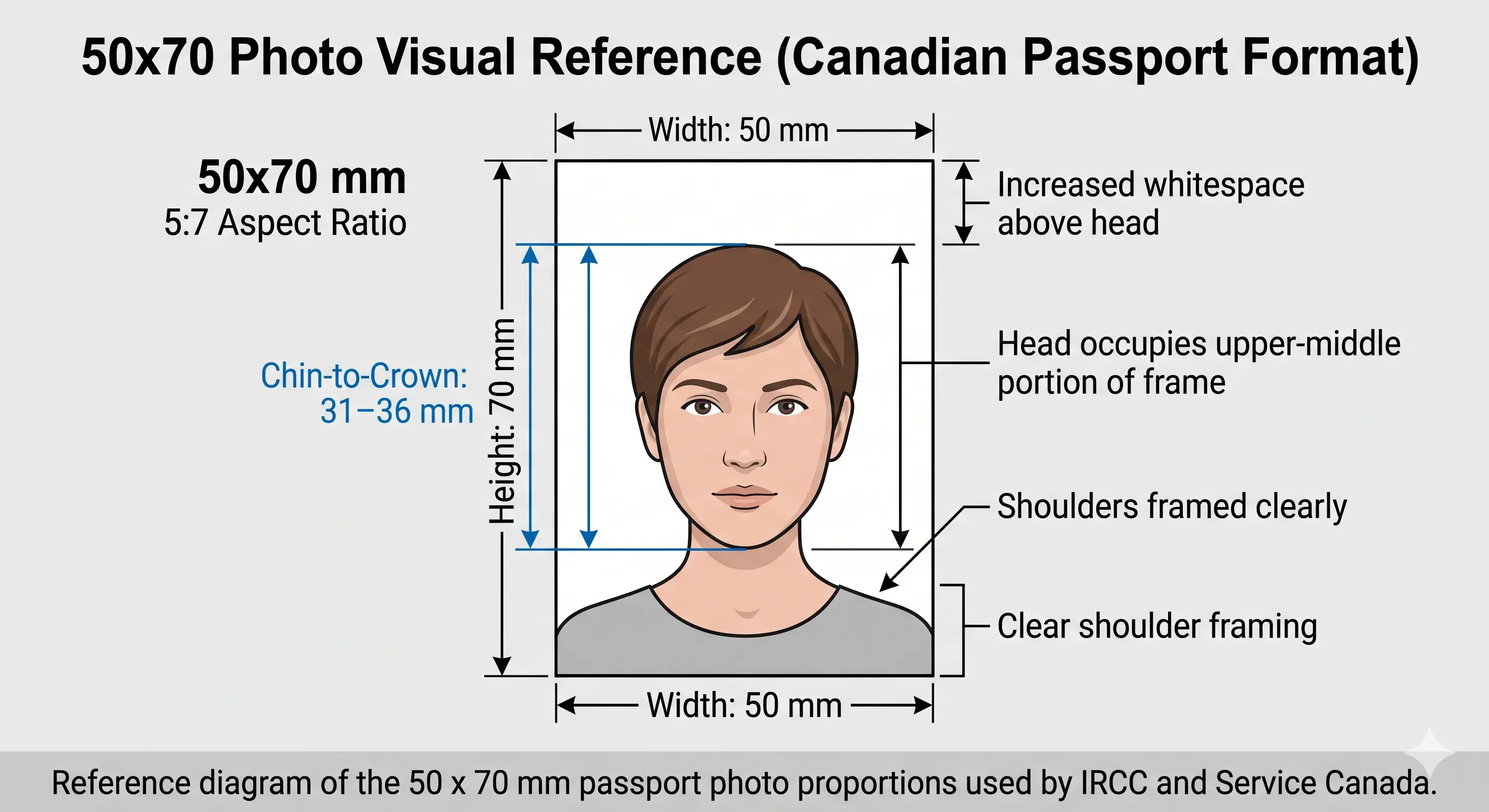
Portrait orientation, 5:7 ratio
The 50x70 mm format is noticeably taller and wider than the 35x45 mm European standard. The head occupies the upper-middle portion of the frame with a 31–36 mm chin-to-crown measurement, which is only 44–51% of the frame height. Shoulders are framed clearly and there is more whitespace above the head than in any other passport format.
50x70 Photo Size in Pixels
The 50x70 mm photo translates into precise pixel values based on the DPI of the file. Canadian portals validate uploads against the 300 DPI standard, and a file below it is refused for insufficient resolution rather than wrong size.
50x70 mm in Pixels
| DPI | Pixel Width | Pixel Height | Usage |
|---|---|---|---|
| 72 DPI (screen only) | 142 px | 198 px | Not accepted |
| 150 DPI | 295 px | 413 px | Below biometric minimum |
| 300 DPI (standard) | 591 px | 827 px | Canadian passport submissions |
| 600 DPI (high-res) | 1181 px | 1654 px | Archive / professional print |
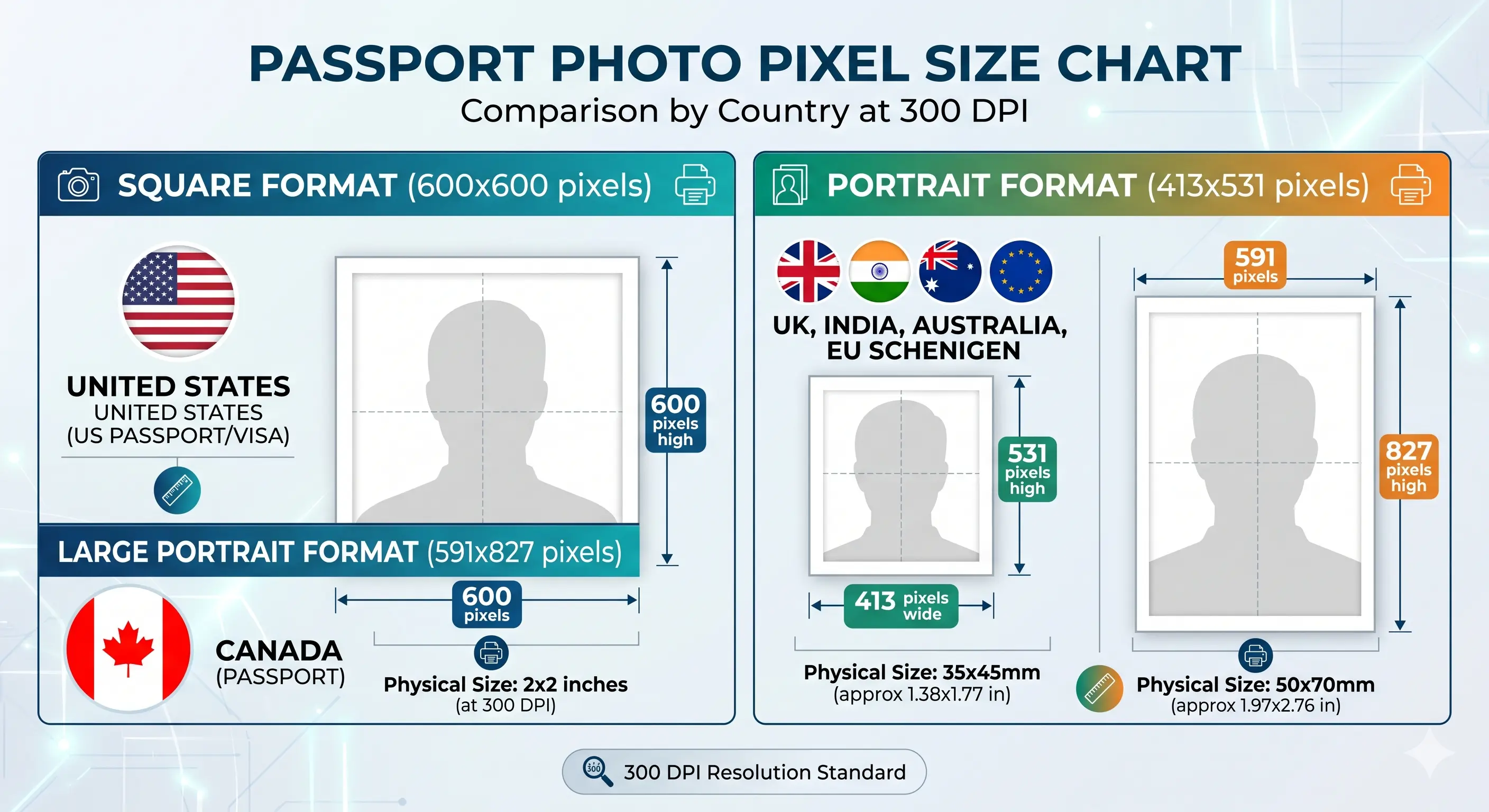
Need a ready-made 591×827 pixel image? Use the Passport Photo Maker to automatically create a compliant Canadian passport photo at exact pixel size.
Why you cannot enlarge a small photo
Upscaling a 295 × 413 pixel image to 591 × 827 does not add detail — it interpolates, and the result is soft around the eyes and hairline. Automated checks measure sharpness, so an upscaled file fails even when the pixel count reads correctly. Shoot wide and crop down; the crop guide covers the technique, and any phone camera from the last five years clears the requirement.
50x70 mm in Every Unit
Canadian passport rules are published in millimetres, but global photo printers and online uploaders often expect centimetres, inches, or pixels. Use the conversions below to match any requirement.
50x70 vs 35x45 Photo Size
Canadians regularly mix up the two photo sizes because IRCC uses both for different documents. The passport requires 50x70 mm, but visas, study permits, work permits and PR cards use the smaller 35x45 mm format.
| Requirement | 50x70 mm (Canada Passport) | 35x45 mm (Canada Visa / PR) |
|---|---|---|
| Physical size | 50 × 70 mm (5 × 7 cm) | 35 × 45 mm (3.5 × 4.5 cm) |
| Inches | 1.97 × 2.76 in | 1.38 × 1.77 in |
| Pixels @ 300 DPI | 591 × 827 px | 413 × 531 px |
| Aspect ratio | 5 : 7 | 7 : 9 |
| Head size (chin to crown) | 31 – 36 mm | 31 – 36 mm |
| Head as % of frame | 44 – 51% | 69 – 80% |
| Background | Plain white / light grey | Plain white |
| Photographer certification | Required (printed photos) | Not required for digital uploads |
| Colour or B&W | Both accepted | Both accepted |
| Used for | Canadian passport (adult & child) | Visitor visa, study permit, work permit, PR card |
Note the head-percentage row: the millimetre range is identical but the frame is much larger, so the head fills a far smaller proportion of a 50x70 photo. This is exactly why a 35x45 photo cannot be scaled up to 50x70 — the head ends up oversized. If you need the smaller Canadian visa format, see the 35x45 photo size guide and the Canada visa photo tool, or the Canada PR card photo page.
50x70 Compared to Other Passport Photo Sizes
The 50x70 mm format is the largest single-photo standard among major passports. This comparison shows why a photo prepared for another country can never be reused for a Canadian passport.
| Photo Size | Pixels @ 300 DPI | Aspect ratio | Head height | Used by |
|---|---|---|---|---|
| 50 × 70 mm | 591 × 827 px | 5 : 7 | 31 – 36 mm | Canada Passport, Brazil Passport |
| 35 × 45 mm | 413 × 531 px | 7 : 9 | 29 – 36 mm | UK, EU, Schengen, Australia |
| 2 × 2 in (51 × 51 mm) | 600 × 600 px | 1 : 1 | 25 – 35 mm | United States, India |
| 33 × 48 mm | 390 × 567 px | 11 : 16 | 28 – 33 mm | China Passport, China Visa |
For the full worldwide reference see passport size photo dimensions, or browse every national standard in the requirements by country hub.
Rules Unique to Canada
The 50x70 mm photo follows ICAO Doc 9303 biometric guidance, but Canada layers on several requirements you will not find in any other passport standard. Dimensions, background and expression are covered in the full requirements table below; the rows here are the Canada-only ones.
| Canada-only rule | What it means |
|---|---|
| Photographer details on the back | Commercial photographer name, studio address and the date the photo was taken, printed or stamped on the back of one of the two photos |
| Two identical printed photos | Both must be from the same session. Mixing sessions is refused |
| Black & white accepted | Canada is one of very few countries that accepts greyscale as well as colour |
| Guarantor signature | Where the application requires a guarantor, they sign the back of one photo |
| Absolute head range, not a percentage | 31–36 mm chin to crown, measured in millimetres rather than as a share of the frame |
| Uncommon 5:7 ratio | No consumer photo editor snaps to 5:7, so manual cropping almost always misses the frame |
The 31-36 mm Head Size Rule
The single most common reason Canadian passport photos are rejected is incorrect head height. Unlike passports that use a 70–80% face-to-frame ratio, Canada specifies an absolute millimetre range — and because the 70 mm frame is unusually tall, that range works out to only 44–51% of the photo height.
| Measurement | Acceptable Range | What It Means |
|---|---|---|
| Chin to crown (top of head) | 31 mm – 36 mm | Includes hair where it forms part of the natural head shape |
| Top of head to top of photo | ~3 mm whitespace | A small visible gap above the head is expected |
| Eye line from photo bottom | ~36 mm – 47 mm | Eyes roughly two-thirds up the photo |
| Head as share of frame | 44% – 51% | A much smaller proportion than the US 2x2 or European 35x45 standards |
Our Passport Photo Maker measures these distances automatically using face detection and adjusts the crop until the head falls inside the 31–36 mm window. The underlying standard is explained in head size rules and face size requirements, and eye-line positioning in eyes requirements.
Want the head size measured automatically?
Create 50x70 Photo →Digital vs Printed Submission
Canada handles the two routes very differently, and the requirements are not interchangeable. A printed passport photo needs physical certification that a digital file cannot carry; a digital upload needs pixel and file-size compliance that a print does not.
| Specification | Printed (passport application) | Digital (IRCC online applications) |
|---|---|---|
| Defined in | Millimetres | Pixels and file size |
| Size | 50 × 70 mm exactly | Follow the pixel and file-size limits shown by the specific IRCC portal |
| Resolution | 300 DPI minimum | Pixel count governs, DPI not enforced |
| Quantity | 2 identical photos | One file |
| Certification | Photographer name, address and date on the back of one copy | Not applicable |
| Paper | Glossy photo paper, 200–250 gsm | Not applicable |
| Format | Photo print, colour or greyscale | JPEG, colour or greyscale |
Pixel and file-size limits vary by IRCC portal and change over time — always use the figures displayed on the form you are completing, and confirm against the official IRCC photo specification. For the mechanics of hitting a target file size see the reduce file size guide, and for portal rules generally the digital passport photo requirements guide. iPhone users shooting HEIC should read the HEIC to JPEG guide first.
Create Your 50x70 Photo Size Online
Cropping a phone photo to exactly 50 mm × 70 mm with the head between 31 and 36 mm is extremely hard in standard photo editors — most snap to common 4:5 or 3:4 ratios, not the unusual 5:7 Canadian passport ratio.
Our tool handles the Canada-specific math for you. Upload any portrait, the system detects your face, locks the crop to 5:7, validates the chin-to-crown height, and exports a 591 × 827 pixel file plus a printable 4 × 6 inch sheet ready for a commercial photographer to certify.
Upload your photo and our Passport Photo Maker automatically:
- Crops the photo correctly to the 5:7 Canadian ratio
- Centres your face within the 31–36 mm head height rule
- Applies proper dimensions in millimetres and pixels
- Exports at 591 × 827 pixels ready for upload
- Generates a print-ready 4 × 6 inch sheet with the two copies Canada requires
50x70 mm Photo Requirements
Every row below must pass for the photo to be accepted. Each rule links to the detailed standard in the passport photo rules library.
| Photo size | 50 mm × 70 mm (5 × 7 cm / 1.97 × 2.76 in) |
|---|---|
| Width | 50 mm (591 px @ 300 DPI) |
| Height | 70 mm (827 px @ 300 DPI) |
| Aspect ratio | 5 : 7 portrait |
| Background | Plain white or light grey, uniform, no shadows. See background colour rules |
| Lighting | Even and diffuse, no shadow on the face or the wall. See lighting requirements and shadow rules |
| Head size (chin to crown) | 31 mm – 36 mm (strict range). See head size rules |
| Head as share of frame | 44–51% of photo height. See face size requirements |
| Eye line | Roughly two-thirds up the photo, both eyes open. See eyes requirements |
| Hair | Must not cover the eyes or obscure the outline of the face. See hair rules |
| Ears | Not mandatory in Canada, but the face outline must be clear. See ears visibility rules |
| Resolution | 300 DPI standard, up to 600 DPI accepted. See resolution rules |
| File format | JPEG (.jpg) for digital submissions |
| Colour | Colour or black-and-white both accepted |
| Glasses | Not permitted (banned since July 2016). See glasses rules |
| Expression | Neutral face, mouth closed, eyes open. See smile rules |
| Headwear | Not permitted unless worn for religious reasons. See head covering rules |
| Digital alteration | Not permitted — no filters, skin smoothing or tone adjustment |
| Photo age | Taken within the last 6 months |
| Back-of-photo info | Commercial photographer name, studio address & date required on one copy |
How to Create a 50x70 Photo Size
- Capture a clean source image — Stand 4-5 feet from a plain white wall in soft, even daylight. Face the camera squarely with a neutral expression and closed mouth. Keep at least 20 inches clear of the wall so no shadow falls behind your head.
- Open the Passport Photo Maker — Visit the ClonyPDF Passport Photo Maker and drag your image into the upload area.
- Select the Canada Passport preset — Choose the 50 × 70 mm Canada passport option. The tool locks the 5:7 crop ratio and the 31–36 mm chin-to-crown rule automatically.
- Auto-crop and verify — Face detection centres your head within the 5:7 frame and warns you if the head height falls outside the 31–36 mm range. The crop guide explains how the ratio and head-height rule are applied together.
- Download the result — Export a 591 × 827 pixel JPEG plus a print-ready 4 × 6 inch sheet with 2 copies. For printed submissions, take the sheet to a commercial photographer for certification on the back.
50x70 Photo Rules for Babies, Infants and Children
The 50 × 70 mm size and the 31–36 mm chin-to-crown range apply to children and newborns with no age exemption. Canada is unusually demanding here: a newborn's head is naturally small, so reaching the 31 mm minimum inside a 70 mm frame is the hardest part of the whole specification.
Same size, same head range
50 × 70 mm frame with the head measuring 31–36 mm chin to crown. No reduced range exists for infants.
Shoot from directly above
Lay the child on a plain white or light grey sheet and photograph from straight overhead. This is the only reliable way to reach 31 mm on a newborn.
Child alone in the frame
No supporting hands, arms, car seat, toy or dummy may appear, and no other person may be visible.
Two certified copies still required
A child's passport application needs the same two printed photos with photographer certification on the back of one.
No shadow on the sheet
Soft indirect daylight from the side of the room, never from directly above the child, which casts the shadow that fails the background check.
Fresh photo each renewal
Children's appearance changes fast. A photo that no longer resembles the child is refused even inside the 6-month window.
Positioning, lighting and timing technique for infants and toddlers is covered in the baby passport photo at home guide. The eyes requirements and shadow rules pages cover the two checks that fail most often on child photos.
Photographing a child? Upload the shot and let the tool measure the head height.
Create Child Photo →Printing the 50x70 mm Photo
Service Canada requires two identical printed photos for passport applications submitted by mail or in person. The 50x70 mm size fits comfortably two-up on standard 4 × 6 inch (10 × 15 cm) photo paper — the same paper every Walmart, Costco, Shoppers Drug Mart, and Loblaws photo kiosk uses.
| Print Sheet | Recommended layout | Maximum yield | Recommended Paper |
|---|---|---|---|
| 4 × 6 in (10 × 15 cm) | 2 copies side by side | 4 copies (2 × 2, tight margins) | Glossy photo paper, 200-250 gsm |
| A4 (21 × 29.7 cm) | 12 copies (3 × 4) | 16 copies (4 × 4) | Glossy photo paper, 200 gsm |
| Letter (8.5 × 11 in) | 9 copies (3 × 3) | 12 copies (4 × 3) | Glossy photo paper, 200 gsm |
| Print resolution | 300 DPI — disable fit-to-page and auto-scaling, which change the physical size |
|---|---|
| Colour management | sRGB. Turn off printer auto-enhance, skin smoothing and colour correction |
| Cutting | Guillotine or steel rule for square edges. Do not cut inside the printed border |
| Handling | Let ink dry fully before writing on the back. Do not fold or glue the photo face |
Because Canada requires exactly two photos, the recommended 4 × 6 layout gives generous cutting margins rather than squeezing in the maximum. Printer settings and cutting technique are covered in full in the print passport photo at home guide, and multi-copy sheet layout in the print sheet guide.
For paper Canadian passport applications, the printed photos generally need to be certified by a commercial photographer — refer to the latest official Service Canada specification for full certification rules before submission.
Why 50x70 Photos Get Rejected
Each item below links to the detailed rule so you can confirm the exact tolerance before you submit. The full cross-country breakdown is in passport photo rejection reasons.
Wrong Dimensions
Photo printed at 35x45 mm or 51x51 mm instead of the precise 50x70 mm Canadian standard. Most overseas photo booths default to other sizes.
Head Outside 31-36 mm
Chin-to-crown measurement below 31 mm or above 36 mm. The most common Canada-specific rejection. See head size rules.
Scaled Up From 35x45
Enlarging a 35x45 photo to fill a 50x70 frame leaves the head oversized, because the head fills 69–80% of a 35x45 frame but only 44–51% of a 50x70 one.
Wrong Background
Off-white, beige, blue, or textured backgrounds are rejected. Canada accepts only plain white or plain light grey. See background colour rules.
Missing Photographer Certification
No commercial photographer name, studio address, or date on the back of the printed photo. Required for paper-based passport submissions.
Two Photos From Different Sessions
The pair must be identical and from the same sitting. Submitting two similar but different photos is refused.
Shadows
Shadows on the wall behind the head, harsh side lighting, or overexposure that washes out skin tones. See shadow rules.
Face Not Centered
Head positioned too far left, right, or low in the frame. The eye line should sit at the upper-middle of the photo. See eyes requirements.
Low Resolution
JPEG saved below 591 × 827 pixels prints pixelated at 50 × 70 mm. Minimum acceptable DPI is 300. See resolution rules.
Hair Across the Face
A fringe over the eyes or hair obscuring the face outline fails landmark detection. See hair rules.
Glasses, Hats, or Smile
Eyewear reflections (banned since 2016), non-religious head coverings, and open-mouth smiles fail biometric checks. See head covering rules.
Filters and Retouching
Portrait blur, skin smoothing and slimming alter facial geometry and are detected. Shoot in a plain, unfiltered mode.
Frequently Asked Questions
Size & Conversions
What is a 50x70 photo size?
A 50x70 photo is a passport-format photograph measuring 50 mm wide by 70 mm tall, equivalent to 5 × 7 cm or 1.97 × 2.76 inches. It is the official Canadian passport photo size issued by Service Canada and IRCC, and it is not used by any other major passport.
What is 50x70 mm photo size in pixels?
A 50x70 mm photo is 591 × 827 pixels at 300 DPI and 1181 × 1654 pixels at 600 DPI, using a 5:7 aspect ratio. The 300 DPI value is the standard for digital Canadian submissions, and 591 × 827 is often written as the 591x827 photo size.
How do I convert a photo to 591x827 pixels?
Upload your image to the ClonyPDF Passport Photo Maker and select the Canada Passport preset. The tool crops to the 5:7 ratio, validates the 31–36 mm chin-to-crown height, and exports exactly 591 × 827 pixels at 300 DPI. Cropping by hand rarely lands on 5:7 because most editors snap to 4:5 or 3:4.
What aspect ratio is a 50x70 photo?
A 50x70 photo uses a 5:7 aspect ratio. This is wider than the 35x45 mm format (7:9) and taller than the 2x2 inch US format (1:1), which is why Canadian passport photos cannot simply be cropped from photos taken for other countries.
What is 5x7 cm photo size in inches?
A 5 × 7 cm photo equals 1.97 × 2.76 inches. It is the same physical size as the 50 × 70 mm Canadian passport photo standard.
Canadian Specification
Is the Canadian passport photo size really 50x70?
Yes, for the passport. Canada is one of very few countries using 50 × 70 mm. However Canadian visa applications, study and work permits, and the PR card use the smaller 35 × 45 mm format instead, so the two are frequently confused.
What is the head size in a 50x70 photo?
The face from chin to crown must measure between 31 mm and 36 mm. This is an absolute range, not a percentage — it works out to roughly 44–51% of the 70 mm photo height and is one of the strictest head-size rules in the world.
Can I use a black-and-white photo for a Canadian passport?
Yes. Canada is one of the few countries that accepts both colour and black-and-white passport photos, as long as the resolution, dimensions, and head size meet the standard. Most other authorities, including the United States, refuse greyscale outright.
What background is required for a 50x70 photo?
A plain white or plain light grey background with no shadows, patterns, or objects behind the head. Off-white, beige, and blue backgrounds are not accepted, and shadow falling on the wall behind the head is a frequent cause of refusal.
Can I wear glasses in a 50x70 Canadian passport photo?
No. Since July 2016, Canada has banned eyeglasses in passport photos. Medically required eyewear is the only exception and requires a doctor's note. Tinted lenses and sunglasses are never accepted.
Submitting, Children & Printing
How many 50x70 photos do I need to submit?
Two identical printed photos are generally required for paper or in-person Canadian passport applications, and one of them normally carries the photographer certification on the back. Always confirm the latest quantity and certification rules on the official Government of Canada website.
What are the 50x70 photo rules for a baby or child?
The same 50 × 70 mm size and 31–36 mm chin-to-crown range apply, with no age exemption on dimensions. The child must be alone in the frame with no supporting hands, car seat, toy or dummy visible. Reaching the 31 mm minimum on a newborn usually requires shooting from directly above. See the child and infant rules section.
How do I print a 50x70 mm photo at home?
Print at 300 DPI on glossy photo paper of 200 to 250 gsm and disable any fit-to-page scaling, which changes the physical size. A 4 × 6 inch sheet comfortably holds the two copies Canada requires, and up to four at maximum yield. Printed passport photos normally still require commercial photographer certification on the back. See the print at home guide.
Official Sources & References
Create Your 50x70 Photo Size Now
Skip the manual measuring. Upload one image and download a compliant 50 × 70 mm Canadian passport photo at 591 × 827 pixels — with the head measured automatically to the strict 31-36 mm IRCC rule — in under 60 seconds. Print two copies on a 4 × 6 inch sheet and take it to a commercial photographer for certification before submitting to Service Canada.
Create 50x70 Photo →