A Singapore passport photo must be 400 × 514 pixels for digital submission or 35 mm × 45 mm printed, on a plain white background, taken within the last 3 months, with no glasses.
Singapore passports are issued by the Immigration & Checkpoints Authority (ICA). Every application — whether submitted in person at ICA Building or online through the e-Service portal — requires a photo that meets strict biometric standards. Common rejection reasons include coloured or shadowed backgrounds, visible glasses, head size falling outside the accepted band, and photos taken more than three months ago. Singapore's three-month window is stricter than the six months most countries allow, and it catches a lot of applicants out.
The Singapore passport photo size is 400 × 514 pixels for ICA e-Service uploads and 35 mm × 45 mm for printed submissions. Both use the same 7:9 portrait ratio, so one crop serves both routes. The background must be plain white, the photo taken within the last 3 months, in full colour at 300 DPI or higher, with no glasses.
| Specification | Value |
|---|---|
| Digital size | 400 × 514 pixels |
| Print size | 35 mm × 45 mm (3.5 × 4.5 cm) |
| Aspect ratio | 7 : 9 portrait (0.778) |
| Resolution | 300 DPI minimum |
| File format | JPEG, full colour, sRGB |
| Maximum file size | Under 2 MB for e-Service upload |
| Background | Plain white, uniform, no shadow |
| Head height (chin to crown) | Approx. 25 – 35 mm on the 45 mm print |
| Expression | Neutral, mouth closed, eyes open |
| Glasses | Not permitted |
| Age of photo | Within the last 3 months |
| Issuing authority | Immigration & Checkpoints Authority (ICA) |
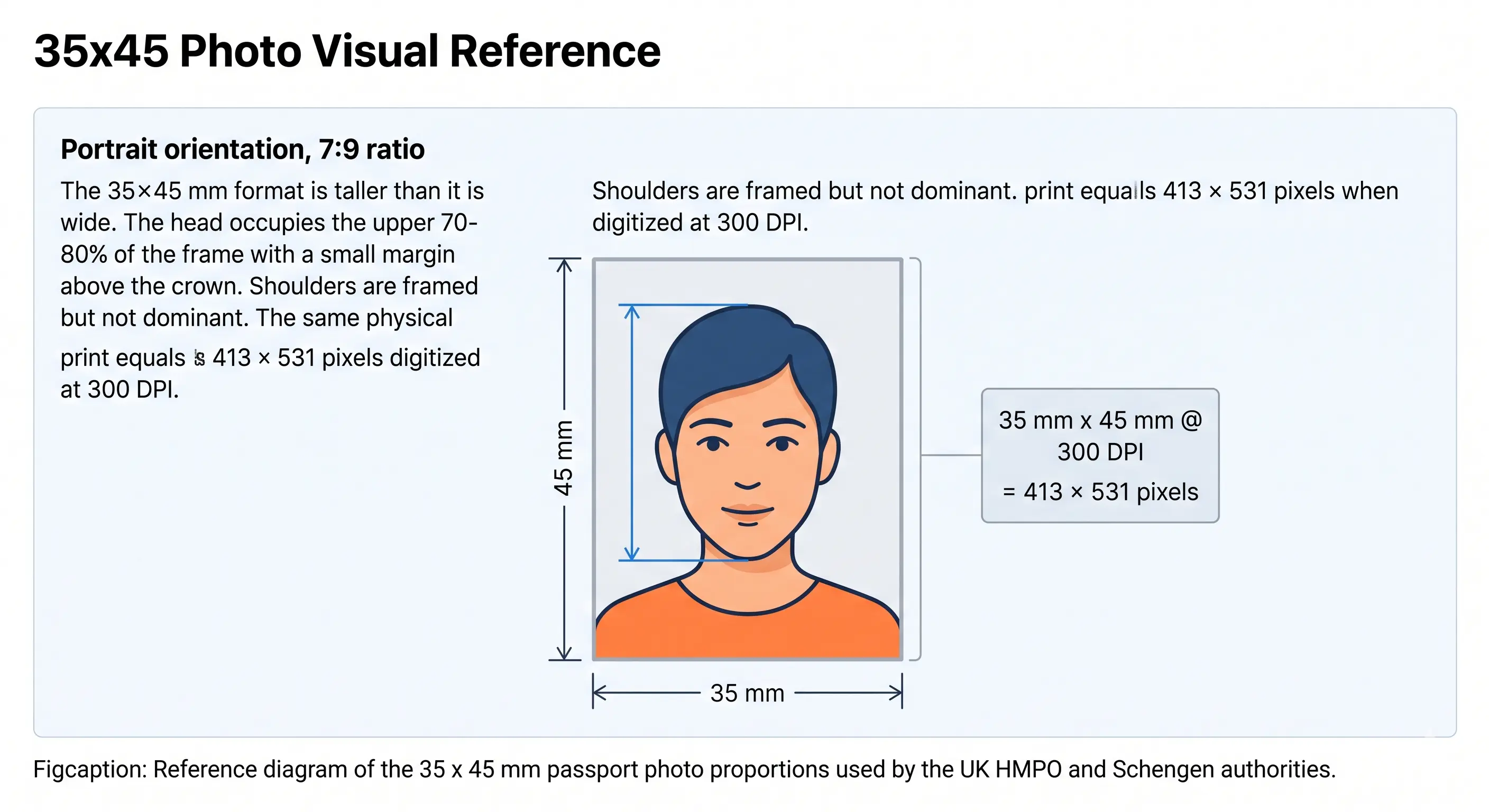
Singapore's printed passport photo uses the international 35 × 45 mm format. The diagram below shows the proportions of that frame: portrait orientation at a 7:9 ratio, head centred with a small margin above the crown, shoulders framed but not dominant.
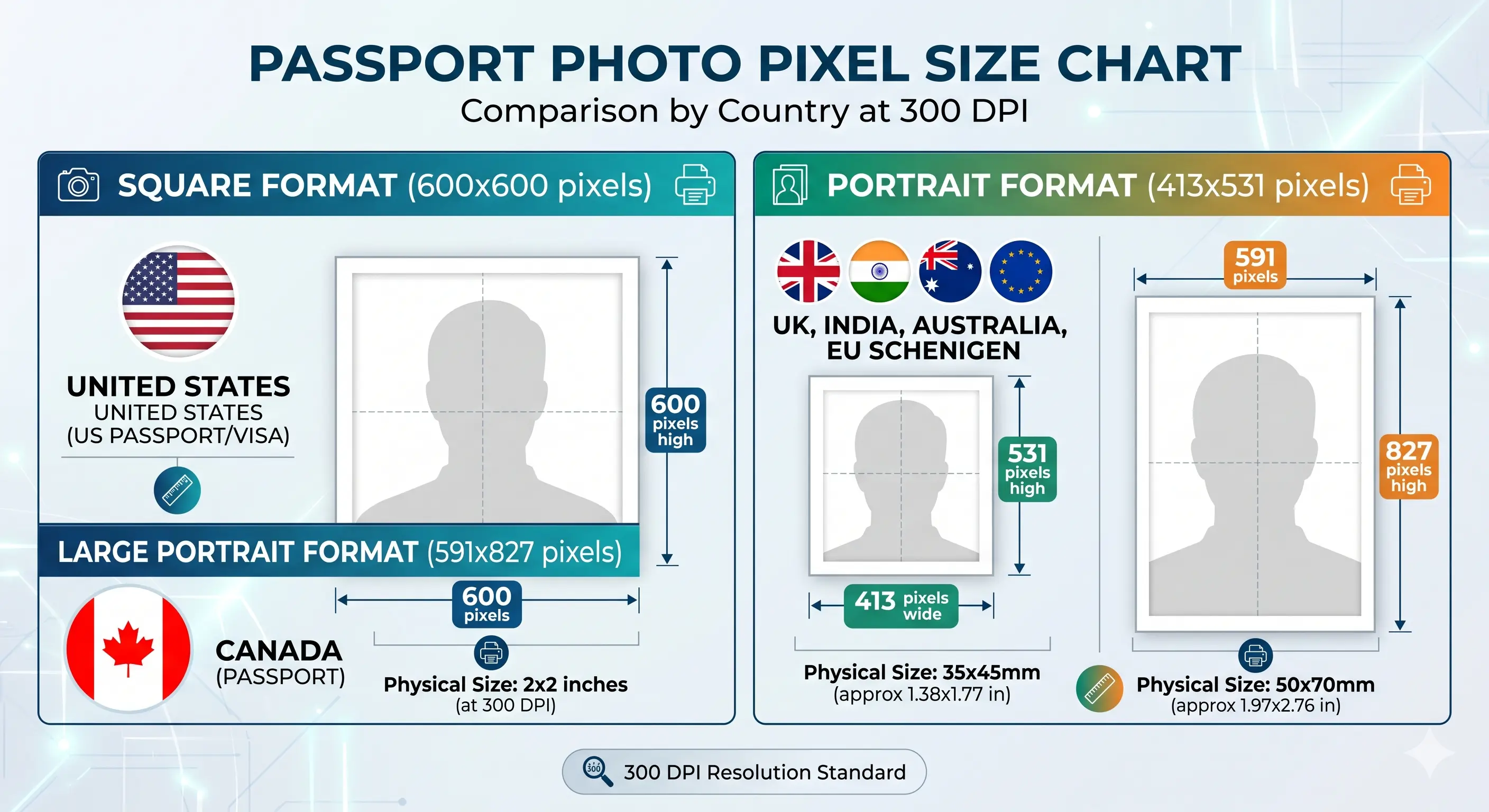
A Singapore passport photo can be rejected for reasons that have nothing to do with how you look in the picture. ICA's automated biometric system checks pixel dimensions, face-to-frame ratio, background uniformity, and lighting balance before a human reviewer ever sees the image. Getting any one of those measurements wrong means starting over.
Passport Photo Maker removes the guesswork. Upload your photo and the tool centres your face to ICA's head-height band, crops to exactly 400 × 514 pixels, normalises the background to a clean white, and generates a print-ready 4R sheet with multiple copies. No app to install, no account required.
Matches ICA's exact digital submission dimensions.
Head positioned inside the ICA chin-to-crown band.
Removes shadows and gradients for uniform white.
Multiple copies per sheet, sized for any photo lab.
These specifications apply to Singapore passport, Identity Card (NRIC), and most Singapore government document photos processed by ICA. Each rule links to the detailed standard in our passport photo rules library.
| Requirement | ICA Specification | Notes |
|---|---|---|
| Digital dimensions | 400 × 514 pixels | Width × Height for e-Service upload |
| Print size | 35 mm × 45 mm | Standard passport print size — see the 35×45 guide |
| Aspect ratio | 7 : 9 portrait | Both the pixel and print sizes share this ratio |
| Resolution | Minimum 300 DPI | Higher is acceptable; lower will be rejected. See resolution rules |
| File format | JPEG (.jpg) | PNG may be acceptable at some counters; JPEG is safest |
| Maximum file size | Under 2 MB | For e-Service upload. See reduce file size if yours is larger |
| Background | Plain white, no shadows | No off-white, cream, or grey tones. See background colour rules |
| Lighting | Even, diffuse, two-sided | No shadow on the face or the wall. See shadow rules |
| Head size | Approx. 25 – 35 mm chin to crown | Measured to the crown, not the top of the hair. See head size rules |
| Face position | Centred, facing front | No tilts; eyes level. See face position rules |
| Expression | Neutral, mouth closed | No smiling, squinting, or raised eyebrows. See smile rules |
| Eyes | Open, clearly visible | No glare; pupils must be visible. See eyes requirements |
| Hair | Must not cover the eyes | The outline of the face must remain clear. See hair rules |
| Ears | Visible where hair allows | Not mandatory, but helps biometric matching. See ears visibility rules |
| Glasses | Not permitted | Applies to all applicants including prescription wearers. See glasses rules |
| Head coverings | Not permitted (medical/religious exceptions) | If worn for religious reasons, face must be fully visible. See head covering rules |
| Digital editing | Not permitted | No filters, skin smoothing, slimming or tone adjustment |
| Age of photo | Within 3 months | Stricter than the 6 months most countries allow |
| Photo paper | Glossy or matte photo-quality | Regular printer paper not accepted for physical submissions |
| Colour | Full colour | Black-and-white photos not accepted |
The Immigration & Checkpoints Authority is a statutory board under Singapore's Ministry of Home Affairs. ICA is responsible for issuing Singapore passports, identity cards (NRIC), long-term immigration passes, and managing all land, air, and sea checkpoints in and out of the country.
Singapore passports are processed through two main channels: in-person applications at ICA Building (10 Kallang Road, Singapore 208718), and online through the ICA e-Service portal for eligible applicants. Biometric data — including facial image, fingerprints (for adults), and iris scans — is captured at ICA appointments for new passport applications.
Singapore's online passport renewal system accepts digital photos directly. This eliminates the need to visit a photo studio for renewals, provided the digital photo meets ICA's technical specifications.
When uploading, ICA's portal displays a real-time face-detection overlay. The system checks that the face occupies the required portion of the frame. If your photo was taken at home, ensure the camera is at eye level on a flat surface, use even lighting from two sides to avoid facial shadows, and stand against a plain white wall. Photos taken in direct sunlight can cause uneven exposure that the biometric system flags.
Three file problems account for most upload failures. If your phone saves images in HEIC rather than JPEG, convert first using the HEIC to JPEG guide. If the export exceeds 2 MB, the reduce file size guide brings it down without dropping below 300 DPI. And if you are starting from a screenshot or a small source image, upscaling will not work — the sharpness check catches interpolated pixels, so always crop down from a larger original. Wider portal rules across countries are covered in the digital passport photo requirements guide.
Passport Photo Maker exports files at exactly 400 × 514 pixels at 300 DPI, formatted as JPEG — ready to upload to the ICA e-Service portal without any manual resizing.
Singapore shares the 35 × 45 mm print format with most of Asia and Europe, but its 3-month recency window and its total ban on glasses are stricter than many neighbours. If you are preparing photos for several applications at once, check each specification separately — the size matching does not mean the rules match.
| Country | Print size | Background | Photo age limit |
|---|---|---|---|
| Singapore | 35 × 45 mm | Plain white | 3 months |
| Malaysia | 35 × 50 mm | Plain white | 6 months |
| Indonesia | 51 × 51 mm | Plain white | 6 months |
| Thailand | 40 × 60 mm | Plain white | 6 months |
| Philippines | 35 × 45 mm | Plain white | 6 months |
| Japan | 35 × 45 mm | Plain white | 6 months |
| South Korea | 35 × 45 mm | Plain white | 6 months |
| China | 33 × 48 mm | Plain white | 6 months |
| Hong Kong | 40 × 50 mm | Plain white | 6 months |
| Taiwan | 35 × 45 mm | Plain white | 6 months |
| Vietnam | 40 × 60 mm | Plain white | 6 months |
| Australia | 35 × 45 mm | Plain white | 6 months |
| United Kingdom | 35 × 45 mm | Light grey or cream | 1 month |
| United States | 51 × 51 mm (2 × 2 in) | White or off-white | 6 months |
Every national standard is indexed in the passport photo requirements by country hub. For the dimension side of the comparison, see passport size photo dimensions and 2×2 photo size.
ICA photo rules do not change based on the applicant's age — the same pixel dimensions, background and head-height band apply from infants through to adults. There is no relaxed standard for babies. What differs is the practical technique needed to hit an adult framing standard with a subject who cannot sit up or hold a pose.
Positioning, lighting and timing technique for newborns and toddlers is covered step by step in the baby passport photo at home guide. The eyes requirements and shadow rules pages cover the two checks that fail most often on child photos.
Follow these five steps to produce an ICA-compliant photo using Passport Photo Maker.
Stand against a white wall in even indoor light, at least 50 cm clear of the wall so no shadow falls behind you. Keep the camera at eye level, face forward, and maintain a neutral expression with your mouth closed. No glasses. Plain clothing with no large logos helps keep the focus on your face. Switch off portrait blur and skin smoothing.
Go to the Passport Photo Maker and click Upload. The tool accepts JPG, PNG, and HEIC files up to 20 MB from any device.
Choose Singapore from the country list. The tool automatically applies the ICA standard: 400 × 514 pixels, white background, biometric head-centring, 300 DPI JPEG output.
Preview the result. The tool shows the face-to-frame ratio and background. If the auto-crop needs adjustment, use the manual fine-tune slider to ensure your chin and the top of your head sit inside ICA's accepted band. The crop guide explains what to look for.
Download the single 400 × 514 px JPEG for the ICA e-Service portal, or download the print-ready 4R sheet with multiple copies for physical submissions at ICA Building. Both files are generated at once.
If you are submitting in person at ICA Building, the photo must be printed on photo-quality paper. Plain copier paper is refused at the counter regardless of how well the image itself complies. The standard Singapore photo-lab format is 4R — 4 × 6 inches, or 102 × 152 mm — which holds six 35 × 45 mm copies with cutting margins.
| Print resolution | 300 DPI minimum — disable fit-to-page and auto-scaling, which change the physical size |
|---|---|
| Paper | Glossy or matte photo paper, 200–250 gsm. Plain copier paper is refused |
| Copies per 4R sheet | Six 35 × 45 mm photos with cutting margins |
| Copies per A4 sheet | Around twenty, though most applications need only one or two |
| Colour management | sRGB. Turn off printer auto-enhance, skin smoothing and colour correction |
| Cutting | Guillotine or steel rule for square edges. Do not cut inside the printed border |
| Handling | Let ink dry fully. Do not staple, fold or glue the photo face |
Printer settings, paper choice and cutting technique are covered in full in the print passport photo at home guide, and multi-copy sheet layout in the print sheet guide.
ICA photo rejections are among the most common causes of passport application delays in Singapore. These are the errors that trigger rejection most frequently, each linked to the detailed rule. The full cross-country breakdown is in passport photo rejection reasons.
Any size other than 400 × 514 px fails ICA's automated pre-screen immediately.
Off-white, cream, grey, or backgrounds with shadows are rejected. See background colour rules.
ICA does not permit glasses of any kind — prescription, tinted, or rimless. See glasses rules.
A chin-to-crown measurement outside the accepted band causes biometric mismatch flags. See head size rules.
Shadow on one side of the face from a single light source, or cast onto the background. See shadow rules.
ICA verifies submission dates. Singapore's window is half the length most countries allow.
A fringe over the eyes or hair obscuring the face outline fails landmark detection. See hair rules.
Both eyes must be open, level and directed at the lens with pupils visible. See eyes requirements.
Hats and headbands are refused. Religious head coverings must leave the full face visible. See head covering rules.
Photos below 300 DPI or visibly compressed lose facial detail needed for biometric comparison. See resolution rules.
The e-Service portal refuses oversized uploads outright. See reduce file size.
Any beauty filter, skin smoothing, or portrait blur alters facial geometry and triggers ICA's biometric mismatch system.
For digital submissions through the ICA e-Service portal, the required size is 400 × 514 pixels. For physical submissions, the printed photo must be 35 mm × 45 mm. Both share the same 7:9 portrait ratio, require a minimum resolution of 300 DPI, and must be full colour on a plain white background.
400 pixels wide by 514 pixels high, saved as a JPEG at 300 DPI or higher and under 2 MB. That pixel ratio is 0.778 — identical to the 35 × 45 mm print ratio — so the same crop serves both submission routes. See passport photo size in pixels for other national standards.
The head measured from the bottom of the chin to the crown should be approximately 25 to 35 mm on the 45 mm tall print, which fills roughly 56 to 78 percent of the frame height. The face must be centred and square to the camera with the eyes level. Confirm the current band on the ICA website before submitting, as published figures are periodically revised. See head size rules.
ICA mandates a plain white background with no shadows, patterns, or visible objects. Off-white, cream, and light grey tones are not compliant. The background must be uniform across the entire image, with no gradients near the edges of the frame. See background colour rules.
No. Glasses are not permitted in Singapore passport photos under ICA's biometric policy. This applies regardless of whether the glasses are prescription, tinted, or very thin rimless frames. Remove all eyewear before taking the photo.
ICA requires the photo to have been taken within the last 3 months — half the window most countries allow. The photo must accurately reflect your current appearance. If you have significantly changed your hairstyle, weight, or facial appearance, a new photo is required even if the previous one falls inside the three months.
Hats and decorative headwear are not permitted. A head covering worn for religious reasons may be accepted provided the full face remains visible from the chin to the forehead with no shadow across the features. See head covering rules.
Singapore passports are issued by the Immigration & Checkpoints Authority (ICA), a statutory board under the Ministry of Home Affairs. Applications can be submitted at ICA Building (10 Kallang Road, Singapore 208718) or through the ICA e-Service portal for eligible renewals.
Yes. Singapore's online passport renewal system accepts digital photos. The photo must be 400 × 514 pixels, saved as a JPEG at 300 DPI or higher, with a file size under 2 MB. Passport Photo Maker generates a file that meets all these specifications.
They share the same 35 × 45 mm print format and plain white background, but they are submitted through different channels and the digital file requirements differ. A passport photo goes to ICA for a Singapore citizen; a visa photo is submitted by a foreign national applying to enter Singapore. See Singapore visa photo requirements.
For applicants aged 16 and above, a Singapore passport is valid for 10 years. For applicants below 16 years old, the passport is valid for 5 years. A new compliant passport photo is required at every renewal, regardless of how similar the applicant's appearance is to their previous photo.
Children — including infants — must meet the same ICA photo specifications as adults: 400 × 514 pixels digitally, 35 × 45 mm printed, white background, eyes open and clearly visible. For infants, lay the baby on a white sheet and photograph from directly above, ensuring no adult hands or supporting objects are visible in the final crop. Dummies must be removed. See the baby passport photo guide.
Print at 300 DPI on glossy or matte photo paper. A 4R sheet — 4 × 6 inches or 102 × 152 mm — holds six 35 × 45 mm copies with cutting margins. Disable printer auto-enhance and fit-to-page scaling, let the ink dry, and cut with a guillotine for square edges. Plain copier paper is not accepted. See the print at home guide.
Yes. Photograph against a plain white wall in even indoor light, standing at least 50 cm clear of the wall to avoid shadow. Keep the camera at eye level and switch off portrait blur and skin smoothing. Then apply the 400 × 514 crop and white background with the Passport Photo Maker.
The specifications on this page are compiled from publicly available guidance issued by the Immigration & Checkpoints Authority and the international biometric travel document standard ICAO Doc 9303. Where ICAO and the Singapore national requirement differ, the ICA requirement takes precedence for a Singapore passport application.
