
Does the Same Crop Apply Everywhere?
No, and this is the single most common cause of a rejected photo. Every ICAO-member country wants a tightly defined crop, but the target size is not the same everywhere. In practice there are three broad conventions:
| Convention | Crop Size | Used By |
|---|---|---|
| Square | 2x2 in (51x51 mm), 1:1 | United States, India (most portals) |
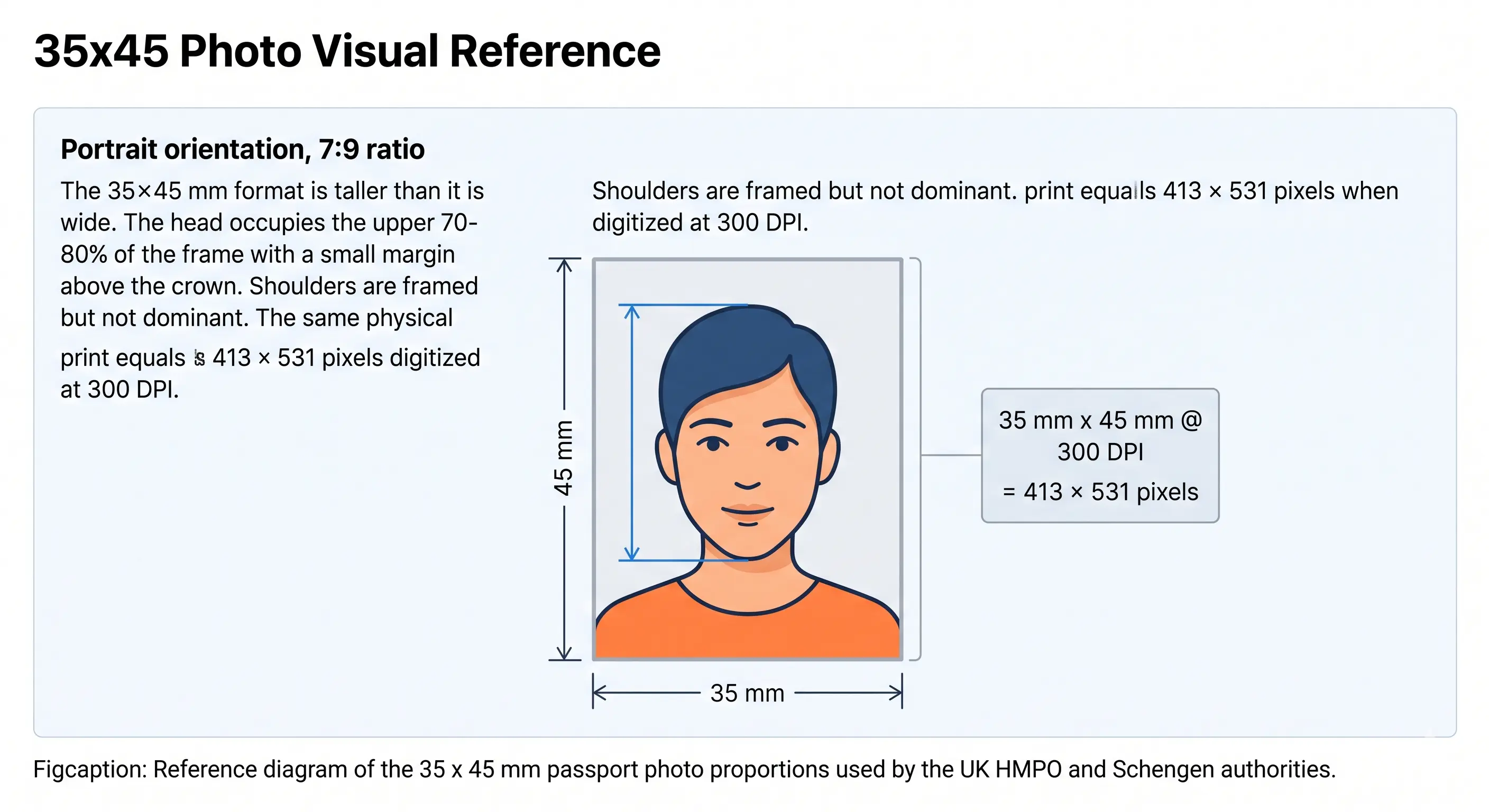
| Standard rectangle | 35x45 mm, about 7:9 | UK, Schengen/EU, Australia, and most others |
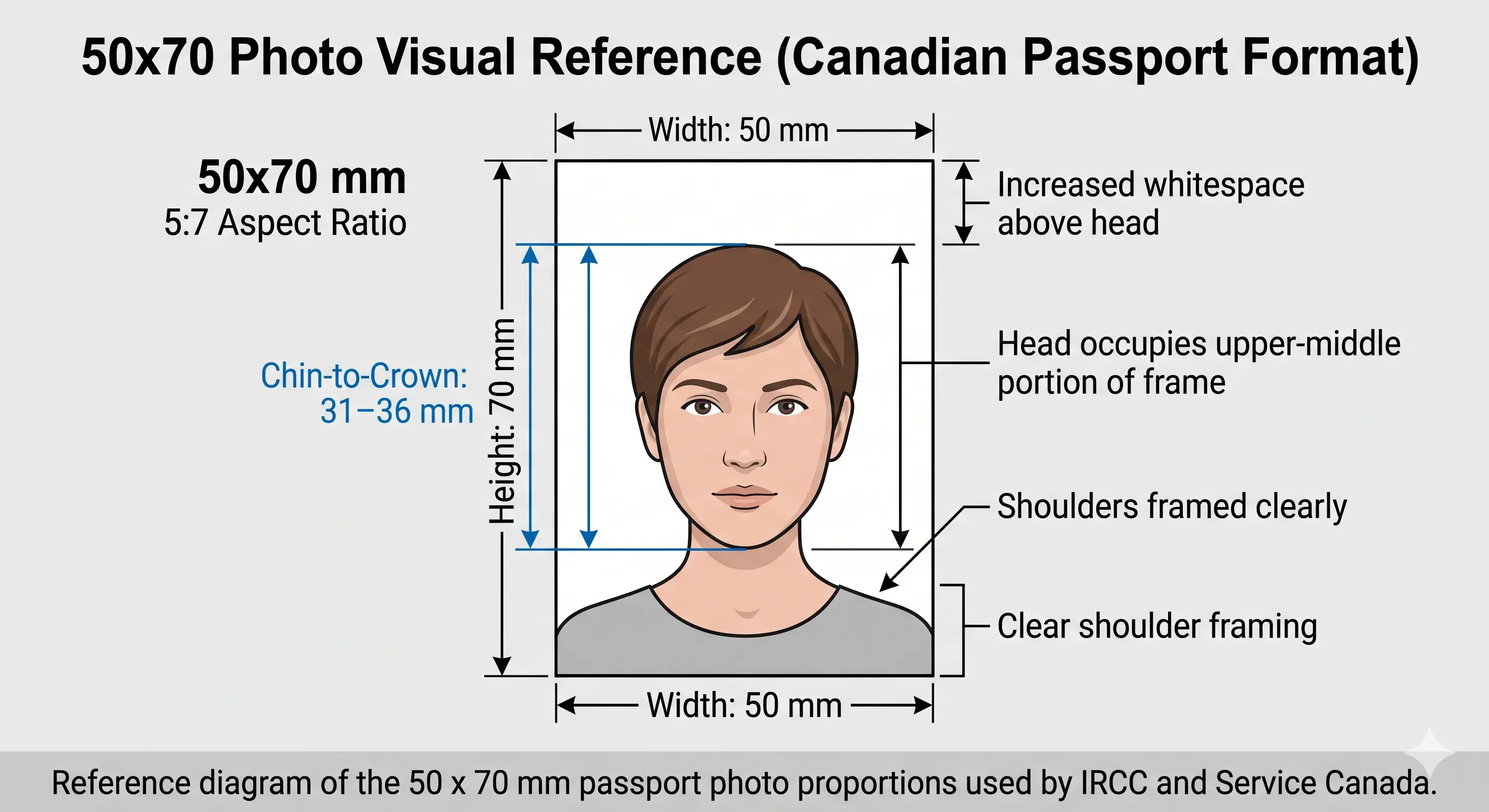
| Tall rectangle | 50x70 mm, 5:7 | Canada (a larger, unique frame) |
So a photo cropped perfectly for a US application is the wrong shape for the UK, and a UK photo is far too small for Canada. Match the crop to the country you are actually applying to. If you are not sure which convention applies, look up your destination in the passport photo requirements by country hub.
But what if I already cropped to the wrong size? You cannot simply stretch a 35x45 mm photo into a 2x2 inch square. Stretching changes the proportions of your face and fails automated review. You need to re-crop from the original image, keeping your head at the right height and centered inside the new frame. Passport Photo Maker does this from your original upload, so you never distort the picture to force it into a different shape.
What Passport Photo Maker Checks in Your Crop
A crop is not one measurement, it is several that have to agree at once. Passport Photo Maker reads your photo and checks the parts that reviewers and biometric scanners care about:
- The overall frame size and aspect ratio for your chosen country (square 2x2 in, 35x45 mm, or 50x70 mm).
- Your head height from chin to crown, so it lands inside the allowed range rather than too large or too small.
- Whether your face is centered horizontally and sitting at the right vertical position, including the eye line for US-style frames.
- Enough headroom and shoulder margin so nothing is clipped at the edges after cropping.
That is the difference between this and eyeballing a crop at a print shop, where a small size error is only caught after you have paid and printed. Because everything runs in the browser, you skip the queue and the reshoot. When you are happy, you export both a print sheet (multiple copies laid out for standard photo paper) and a digital upload file sized to the portal's pixel and file-size limits. No Photoshop, no manual cropping, and no rulers required.
What Are the Passport Photo Crop Rules?
In plain terms, a passport photo crop is defined by three things working together: the overall frame size, the aspect ratio of that frame, and how much of it your head fills, measured from the bottom of the chin to the top of the head. Get all three inside the published tolerances, keep your face centered, and the crop is compliant. Miss any one of them and the photo is out of spec, regardless of how good the rest of the picture looks.
The common ancestor of every national rule is ICAO Doc 9303, the international standard for machine-readable travel documents. It sets the biometric portrait baseline that passport authorities build on. From there each authority publishes its own exact figures: the U.S. Department of State specifies a 2x2 inch square with the head 1 to 1⅜ inches (25–35 mm) tall, while His Majesty's Passport Office in the UK specifies a 35x45 mm photo with the head 29–34 mm from chin to crown.
Why the rule exists in the first place
The crop is not bureaucratic fussiness. Border e-gates and enrolment systems run facial-recognition algorithms that expect a face at a predictable scale and position. If your head fills the frame differently from everyone else's, the software has to work harder to locate landmarks like the eyes, nose, and mouth, which raises the error rate. A consistent crop keeps every passport photo comparable, which is exactly what automated identity checks depend on.
The edge cases that trip people up
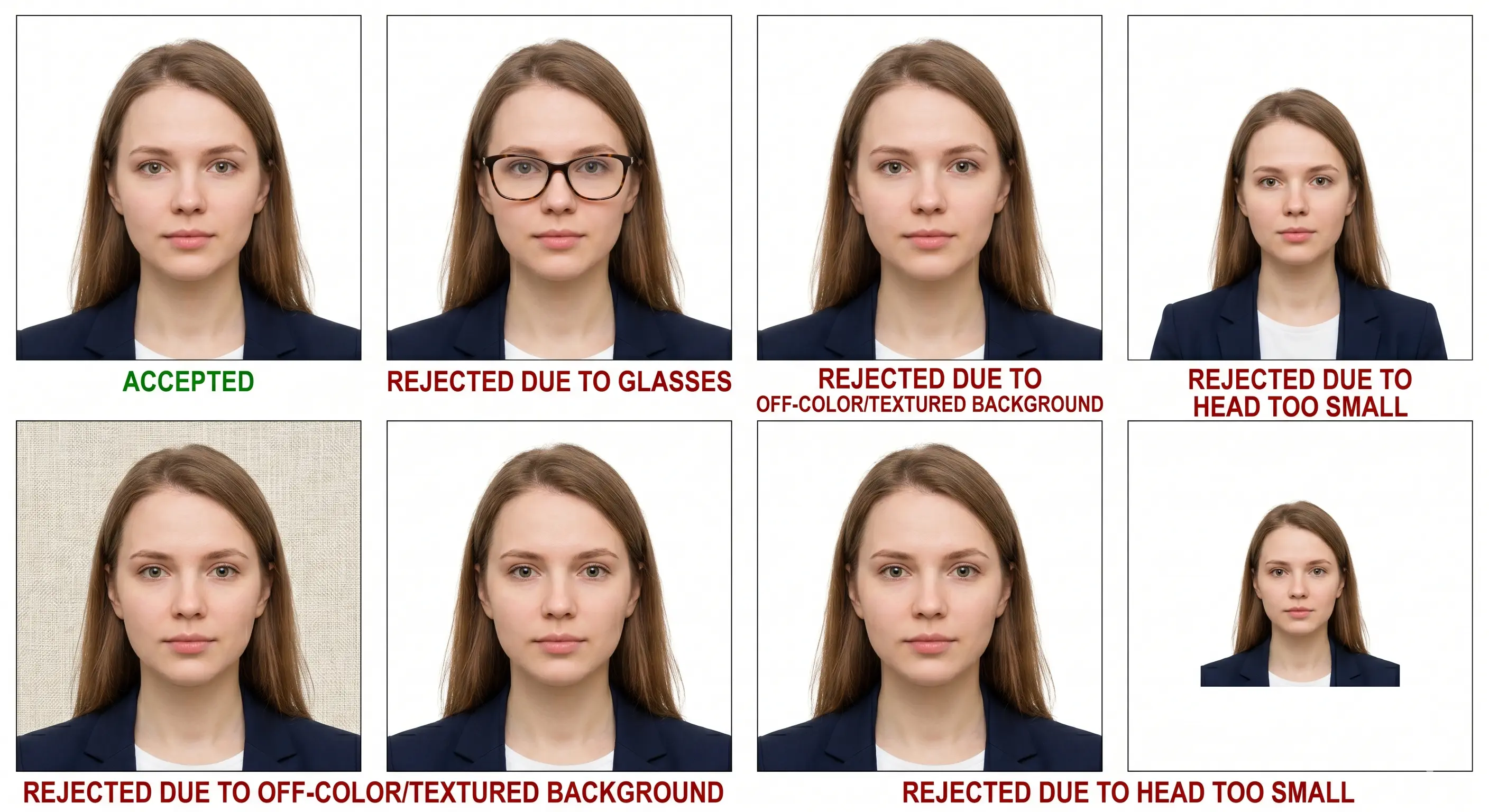
Most crop confusion clusters around a few situations: a photo cropped to the right size but with the head too large or too small; a rectangular photo squeezed into a square (or the reverse); too much empty space above the head; and a face that is centered left-to-right but sitting too high or too low. Where official guidance is genuinely specific, such as the US eye-line band, we give the numbers below. Where an authority only publishes a proportion rather than a millimeter figure, we say so rather than inventing a precise value.
How Passport Photo Crop Rules Differ by Country
These are the crop dimensions currently published by the major passport authorities. Sizes are for standard adult passport photos. The pixel column is the arithmetic equivalent at 300 DPI, which is the resolution most portals expect; digital-upload portals sometimes state their own pixel minimum instead (covered further down). Verify the live figure on the official portal before you submit, since authorities update specifications periodically.
| Country | Crop Size & Ratio | Pixels @ 300 DPI | Head / Face Height | Authority |
|---|---|---|---|---|
| United States | 2x2 in (51x51 mm), 1:1 square | 600 x 600 | 25–35 mm, chin to top of head (eyes 28–35 mm from bottom) | U.S. Department of State |
| United Kingdom | 35x45 mm, about 7:9 | 413 x 531 | 29–34 mm, chin to crown | HM Passport Office |
| Canada | 50x70 mm (2 x 2¾ in), 5:7 | 591 x 827 | 31–36 mm, chin to crown | IRCC / Government of Canada |
| Australia | 35–40 mm wide x 45–50 mm high | 413–472 x 531–591 | 32–36 mm, chin to crown | Australian Passport Office |
| Schengen / EU | 35x45 mm, about 7:9 | 413 x 531 | Head about 70–80% of frame (roughly 32–36 mm) | EU / national authorities |
| India | 2x2 in (51x51 mm) physical; 630x810 px digital (Passport Seva) | 600 x 600 (print) | Face fills about 80–85% of the frame (digital portal) | Passport Seva / Ministry of External Affairs |
Two patterns stand out. First, the 35x45 mm rectangle is the closest thing to a global default, used across the UK, the Schengen area, Australia, and many more. Second, the outliers matter most: the US and India crop to a square, and Canada uses a notably larger frame. If you hold passports or apply in more than one of these systems, treat each crop as a separate job. For the full worldwide reference see passport photo dimensions by country.
Visual Reference: The Three Crop Conventions
The three diagrams below show the same three conventions side by side, so you can see how differently a face has to sit inside each frame. Notice that the square and the tall rectangle are not just different sizes — they need a different amount of headroom and shoulder margin.
Why Passport Photo Crop Rules Exist
It helps to know what the crop is actually for, because it explains why authorities are strict about numbers that feel arbitrary. Three forces drive the rules:
- Facial-recognition scale. Matching algorithms compare the geometry of your face against a stored template. That comparison assumes a standard head size within the frame, so a head that is too big or too small degrades the match.
- Consistency across millions of documents. Every photo in a national system needs to be interchangeable for a human reviewer and a machine. A fixed crop makes them comparable at a glance.
- Print and chip storage. The image is printed at a physical size and stored in the passport chip. A defined crop and resolution keep quality predictable in both places.
This is also why "close enough" rarely works. The tolerances exist because the downstream systems are unforgiving about scale, not because a clerk is being difficult.
Aspect Ratio: Why You Can't Just Stretch a Photo
Aspect ratio is the relationship between a photo's width and its height, and it is the crop rule people break most often without realizing. A US 2x2 inch photo is a perfect square (1:1). A UK or Schengen 35x45 mm photo is a portrait rectangle (about 7:9). Canada's 50x70 mm frame is taller again (5:7).
The temptation, when a photo is the wrong shape, is to stretch or squash it to fit. Do not. Stretching changes the ratio between the width and height of your face, so your head looks wider or longer than it really is. Automated checks measure facial proportions, and a distorted face fails, sometimes silently, with the portal simply refusing the upload. The correct move is always to re-crop from the original at the right ratio, trimming background rather than distorting the subject. If your source photo does not contain enough room around your head to reach the target ratio, you need a new source photo, not a stretched one. For a deeper look at exact frame dimensions, see the 2x2 inch passport photo size reference, or compare it with the 35x45 mm standard.
Head Height and Position Inside the Crop
Once the frame size and ratio are right, the crop still has to place your head correctly. This is where "how to crop a passport photo correctly" really comes down to two measurements:
- Head height (chin to crown). The vertical distance from the bottom of your chin to the top of your head must fall inside the country's range, for example 25–35 mm in the US or 29–34 mm in the UK. Crown means the top of your skull, not the top of your hair.
- Vertical and horizontal position. Your face should be centered left to right, with your eyes at the expected height. The US publishes an explicit eye-line band (roughly 28–35 mm from the bottom of the photo); others express it as the head filling a set percentage of the frame.
Head height is closely tied to three neighboring rules, so it is worth reading them together: our passport photo head size rules guide covers the chin-to-crown measurement in detail, the passport photo framing guide explains how your shoulders and headroom should sit inside the frame, and face position rules cover tilt and rotation. Crop, head size, framing and position are four views of the same problem. If the eye line is what is failing, see eye requirements.
Not sure your crop is inside range? The tool measures head height and ratio for you before you export.
Open Passport Photo MakerDigital vs. Print: Does the Crop Change?
The crop itself, meaning the shape and how your head sits in it, stays the same whether you print the photo or upload it. What changes is how the size is expressed:
| Submission type | How the crop is specified |
|---|---|
| Printed photo | Physical dimensions in millimeters or inches (for example 35x45 mm or 2x2 in), plus a head-height range in millimeters. |
| Digital upload | Pixel dimensions and a file-size limit (for example US 600–1200 px square; UK minimum 600x750 px; India 630x810 px), with the head filling a set proportion. |
The trap is resolution. A crop that looks fine at print size can fall below a portal's minimum pixel count if you cropped into a small area of a low-resolution image. Always crop from a high-resolution original so the final file clears both the physical and the pixel requirements. Passport Photo Maker exports the print sheet and the digital file from the same compliant crop, so the two never drift apart.
For the pixel side of this in depth, see passport photo size in pixels and resolution and DPI rules. If your file needs to hit an exact pixel target such as 600x600, the resize to 600x600 guide walks through it, and digital photo requirements covers portal limits across countries.
Crop Rules People Mix Up
"Crop" gets used loosely, and applicants often confuse it with related rules. Keeping them separate makes it much easier to diagnose why a photo failed:
- Crop vs. head size. The crop is the outer frame and ratio; head size is how much of that frame your head occupies. A correctly sized 35x45 mm photo can still fail if the head is only 25 mm tall.
- Crop vs. framing. Framing is about what is included, such as your head and the top of your shoulders, and how much headroom sits above you. You can crop to the exact size yet frame the subject poorly.
- Crop vs. face size percentage. Some portals state a "face fills X percent" rule instead of millimeters. That is a way of describing head size within the crop, not a separate resizing step. Our passport photo face size requirements guide untangles the percentage-based specs.
- Crop rules vs. cropping the photo. This page is the specification reference — what the numbers are and why. If you want the hands-on walkthrough of actually performing the crop, use the crop a passport photo guide.
Will a Wrong Crop Definitely Get My Photo Rejected?
Not every crop error is equal. Some are hard rejections that a portal or scanner catches automatically; others are discretionary and depend on the reviewer:
- Almost always rejected: wrong overall size or aspect ratio, head clearly outside the height range, a visibly stretched or distorted image, or a head cropped off at the edges.
- Often rejected: head noticeably off-center, or the eye line sitting outside the expected band on a US-style photo.
- Sometimes tolerated: being a millimeter inside the boundary, or a very slight vertical offset, though these still carry risk and are not worth gambling on.
The honest summary: size and ratio errors are the ones that reliably fail, because machines check them first. If you are close to a boundary, crop back toward the middle of the allowed range rather than hugging the edge. For the wider list of failure causes beyond cropping, see passport photo rejection reasons.
Taking Your Passport Photo at Home: Crop Checklist
The best crop starts before you press the shutter. If you shoot with cropping in mind, you avoid the trap of having no usable frame to work with later.
Before you shoot
- Stand back and use a higher-resolution shot so there is room to crop without upscaling.
- Leave clear space above your head and around your shoulders for any country's frame.
- Keep the camera at eye level and square to your face, not tilted up or down.
- Don't zoom in tight or pre-crop on the phone; capture wide and crop afterward.
After you shoot
- Confirm your head height (chin to crown) fits your country's range.
- Check the frame matches the required size and aspect ratio exactly.
- Make sure your face is centered and the eye line sits correctly.
- Verify nothing important, like the crown or chin, is clipped at an edge.
The mistakes that come up again and again with home photos are cropping too tight so the top of the head touches the edge, leaving so much headroom that the face ends up too small, and stretching an image to force it into a square or rectangle. Passport Photo Maker catches all three: it detects your face, measures the head height against your chosen country's rule, and holds the aspect ratio fixed so the crop can never distort your picture.
Cropping a baby or toddler is its own problem, because you cannot direct the subject and several authorities relax the head-position rules for infants. The baby passport photo at home guide covers how to shoot wide enough to leave yourself a usable crop.
How to Make Sure Your Passport Photo Complies with Crop Rules
Five steps take you from a raw photo to a correctly cropped, submission-ready file.
- Start from a high-resolution original Use a sharp, evenly lit photo with visible space above your head and around your shoulders. Do not pre-crop it tightly; the extra room lets you crop to any country's frame without upscaling.
- Select your destination country Choose the country you are applying to so the correct frame size and aspect ratio are applied, for example 2x2 inches for the US or 35x45 mm for the UK and EU.
- Upload to Passport Photo Maker Upload the original and let the tool detect your face, then align the crop to your head height and center your face horizontally in the frame.
- Check the head height and eye line Confirm the chin-to-crown measurement falls inside your country's tolerance and, where required such as in the US, that the eye line sits in the correct band.
- Export print and digital versions Download the print-ready sheet and the digital file already cropped to the exact pixel and millimeter specifications for your application. For home printing, see print a passport photo at home.
Why Passport Photos Get Rejected for Crop and Sizing Errors
These are the crop-related failures reviewers and portals flag most often.
1. Head too large in the frame
The chin-to-crown measurement exceeds the maximum, so the face fills too much of the photo.
Why it fails: the face is at the wrong scale for biometric matching.
Fix: re-crop with more of the frame around the head to bring the height into range.
2. Head too small in the frame
Too much headroom or background leaves the head below the minimum height.
Why it fails: the face is too small for landmark detection to work reliably.
Fix: crop tighter so the head fills the required proportion of the frame.
3. Wrong aspect ratio or a stretched image
A photo squeezed or stretched to fit a shape it was not cropped for.
Why it fails: distortion changes facial proportions, which automated checks reject.
Fix: never stretch; re-crop from the original at the correct ratio.
4. Wrong frame size for the country
Submitting a 2x2 inch square where a 35x45 mm rectangle is required, or vice versa.
Why it fails: the portal or print spec rejects a non-matching size outright.
Fix: select the correct destination country before cropping.
5. Face off-center
The head sits too far left, right, high, or low within the frame.
Why it fails: reviewers and scanners expect a centered face at a set position.
Fix: recenter the crop so the face is balanced and the eye line is correct.
6. Head clipped at an edge
The crown or chin is cut off because the crop was pushed too far.
Why it fails: a full, unbroken head outline is required for the biometric portrait.
Fix: leave a small margin so the whole head is inside the frame.
7. Low resolution after cropping
Cropping into a small part of a low-resolution photo leaves a soft or pixelated result.
Why it fails: the file drops below the portal's minimum pixel dimensions.
Fix: crop from a high-resolution original rather than enlarging a small one.
Passport Photo Crop vs. Visa Photo Crop
For many applicants the crop is identical for passport and visa photos, but not always, and the difference is worth checking before you assume one photo covers both.
- Often identical. In the US the passport and visa photo crop are the same: a 2x2 inch square with the head 25–35 mm tall. If you are a US applicant, one correctly cropped photo works for both.
- Sometimes different. The visa photo follows the destination country's rules, which may not match your home passport size. A clear example is Canada: the Canadian passport photo is 50x70 mm, but a Canadian temporary resident (visitor) visa photo is commonly specified at 35x45 mm. Same country, two different crops.
- Digital portals can be stricter. Visa systems such as online application portals often enforce exact pixel dimensions and file-size caps, so a print-oriented crop may need re-exporting at the portal's pixel spec even when the shape is the same. The Schengen visa photo requirements are a good example of a 35x45 mm crop with its own upload rules.
The honest bottom line: check the specific crop for the exact document and country you are applying for. Where they match, reuse the photo; where they differ, such as a Canadian passport versus a Canadian visitor visa, crop a fresh version from your original. Always confirm against the official portal, as visa specifications are updated independently of passport rules.
Passport Photo Crop: Frequently Asked Questions
Sizes, ratios and pixels
GeneralWhat aspect ratio should a passport photo be cropped to?
PixelsWhat are passport photo crop sizes in pixels?
USWhat size should I crop a US passport photo to?
UK & EUIs the UK passport photo crop the same as the EU or Schengen size?
Getting the crop right
GeneralCan I crop a passport photo from a regular photo I already have?
GeneralHow much of the frame should my head fill after cropping?
GeneralWill my photo be rejected if the crop is only slightly off?
Children and multiple applications
ChildrenDoes the crop change for baby and child passport photos?
Multiple applicationsCan I use one cropped photo for both a US and a UK passport application?
Official Sources & References
The crop dimensions and head-height ranges on this page are compiled from the following primary sources. Pixel values are the arithmetic equivalent of the published millimetre or inch figures at 300 DPI.
- U.S. Department of State — passport photo requirements: travel.state.gov
- HM Passport Office (UK) — photos for passports: gov.uk
- Government of Canada / IRCC — passport photo specifications: canada.ca
- Australian Passport Office — photo guidelines: passports.gov.au
- European Commission — Schengen borders and visa policy: home-affairs.ec.europa.eu
- Passport Seva, Ministry of External Affairs (India): passportindia.gov.in
- ICAO Doc 9303 — Machine Readable Travel Documents biometric portrait standard: icao.int
Check Your Passport Photo Crop Compliance Now
You now know the three things that decide a crop: frame size, aspect ratio, and head height, plus how they shift between the US square, the 35x45 mm rectangle, and Canada's taller frame. Rather than measure it by hand, let the tool do it. Upload your photo and Passport Photo Maker will crop it to your country's exact dimensions and flag any head-height or ratio problem before you ever hit submit. No print-shop reshoots, no guesswork with rulers.
Prefer to start from the full editor with every country preset in one place? Open the Passport Photo Maker and pick your document type there, or browse every country's requirements first.