Canada Visa Photo Tool

Canada Visa Photo Maker Online

Source: Official Government of Canada (IRCC) visa photo requirements

Create a perfect canada visa photo online in seconds. Our free tool automatically crops your picture to the official canada visa photo size of 35×45 mm, applies a clean light background, and ensures full compliance with IRCC canada visa photo requirements. Upload, auto-detect your face, and instantly download a print-ready image — no software or signup needed.

Free forever No signup Instant download Auto crop & resize

Canada Visa Photo Size (Quick Answer)

A Canada visa photo must be 35 mm wide by 45 mm tall on a plain white or light-coloured background, with the head measuring 31–36 mm from chin to crown, taken within the last 6 months, with no glasses. Digital uploads must be at least 420 × 540 pixels and 60 KB; printed submissions require two identical copies.

SpecificationValue
Photo size35 × 45 mm (1.38″ × 1.77″)
Aspect ratio7 : 9 portrait
Head height (chin to crown)31 – 36 mm
BackgroundPlain white or light-coloured, uniform, no shadow
Digital pixel minimum420 × 540 px
Digital file size minimum60 KB, colour JPEG
Printed copies requiredTwo identical photos from the same session
GlassesNot allowed since 2016
ExpressionNeutral, mouth closed, eyes open
Age of photoTaken within the last 6 months
Issuing authorityImmigration, Refugees and Citizenship Canada (IRCC)

Ready to Create Your Canada Visa Photo?

Launch the Passport Photo Maker and select the Canada visa format. We handle face detection, cropping, background, and the exact canadian visa photo dimensions for you.

Create Canada Visa Photo
✓ Free ✓ No Signup ✓ Instant Download ✓ Auto Crop

Canada Visa Photo Requirements (Official IRCC)

Immigration, Refugees and Citizenship Canada (IRCC) enforces strict photo standards for all temporary and permanent resident applications. Use the table below to confirm your photo for canada visa application meets every rule before you submit. Each rule links to the detailed standard in our passport photo rules library.

Photo dimensions35 mm × 45 mm (1.38" × 1.77")
Width35 mm (1.38 inches)
Height45 mm (1.77 inches)
Background colourPlain white or light-coloured, uniform, no shadows — see background colour rules
LightingEven and diffuse, no shadow on the face or the wall — see shadow rules
Head size (chin to crown)31 mm to 36 mm (1.22" – 1.42") — measured to the top of the head, not the hairline. See head size rules
Face and frameFull front view of head and top of shoulders, centred, face square to the camera — see face size requirements
EyesOpen, clearly visible and looking straight at the camera — see eyes requirements
HairMust not cover the eyes or obscure the outline of the face — see hair rules
EarsNot mandatory for IRCC, but the full face outline must be unobstructed — see ears visibility rules
Facial expressionNeutral, mouth closed, eyes open and clearly visible
GlassesNot allowed (since 2016 IRCC update) — see glasses rules
HeadwearOnly for religious reasons; full face must be visible — see head covering rules
Digital pixel minimum420 × 540 pixels
Digital file sizeMinimum 60 KB. The upload form shows the maximum it accepts
Print resolution300 DPI or higher, sharp and in focus
Printed copiesTwo identical photos from the same session for paper or VAC submission
Back of printed photoStudio name, address and the date the photo was taken. If self-taken, write the date
Border and editsNo border, no date printed on the image, no digital alteration of your face
File formatJPEG / JPG for digital uploads
Recent photoTaken within the last 6 months
ColourColour required — black & white not accepted

Chin to crown, not chin to hairline. IRCC measures head height to the crown — the top of the head, excluding hair volume. Several European standards measure to the natural hairline instead, so a photo cropped to a German or Schengen specification can measure correctly there and still fail the Canadian check. If you are reusing a European photo, re-crop it.

Official Source
IRCC — Photo Specifications for Immigration and Visa Applications

Always verify requirements directly with IRCC before submitting your application, as standards may be updated. Note that Canadian passport photos follow a different specification.

Canada Visa Photo Size & Dimensions

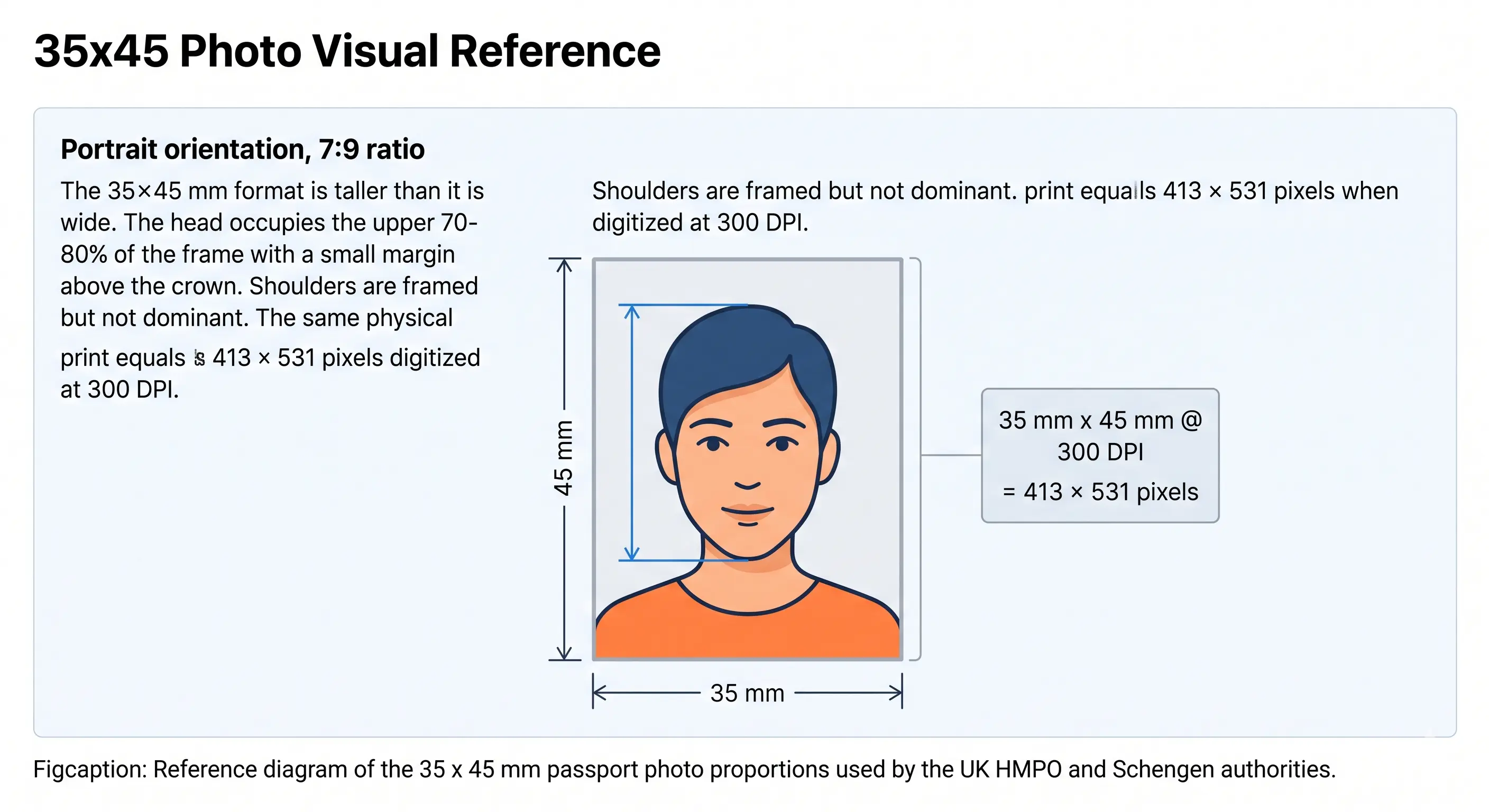
The official canada visa photo size is 35 mm wide × 45 mm tall, a 7:9 portrait frame. The head, measured from the bottom of the chin to the crown, must occupy between 31 mm and 36 mm of the frame height — roughly 69% to 80% of the 45 mm total.

White / light background Crown Chin Eyes 35 mm 45 mm 31–36 mm

35×45 mm — IRCC Official Size

Head zone (31–36 mm)
The head from chin to crown must fill between 31 mm and 36 mm of the frame height. Too large or too small means refusal, and this is the single most common measurement failure.
Crown & chin lines
Orange dashed lines mark the crown, meaning the top of the head excluding hair volume, and the bottom of the chin — the two points IRCC officers measure between.
Eye level
IRCC specifies head height rather than a fixed eye-line percentage. In practice, correctly sizing the head to 31–36 mm places the eyes in the upper-middle third of the frame automatically.
Background (full frame)
Entirely plain white or light-coloured. No shadows, gradients, patterns, or other people. Shadow on the wall behind the head is the most frequent background failure.
35x45 mm photo size diagram showing the portrait frame and head zone used for Canada visa photos
35 × 45 mm photo size diagram
Canada visa photos use the same 35 × 45 mm frame as UK, Schengen and Australian passport photos, but with a Canada-specific 31–36 mm chin-to-crown head height. Full breakdown in the 35x45 photo size guide, and every national standard in the requirements by country hub.

Canada Visa Photo Size in Pixels

The physical size is always 35×45 mm, but the pixel dimensions depend on the resolution. IRCC sets a hard digital floor of 420 × 540 pixels. We export at 600 DPI so a single file serves both digital upload and professional printing.

Resolution Width (px) Height (px) Use For
72 DPI 99 px 128 px Screen preview only — below the IRCC minimum
IRCC minimum 420 px 540 px Absolute floor for digital upload
300 DPI 413 px 531 px Standard lab print
600 DPI ✓ 827 px 1063 px Recommended — clears every requirement

Watch the 300 DPI trap. A 35 × 45 mm photo at exactly 300 DPI is 413 × 531 pixels, which sits below the IRCC digital floor of 420 × 540. It prints perfectly but can be refused on upload. Export at 600 DPI (827 × 1063) and the same file satisfies both channels.

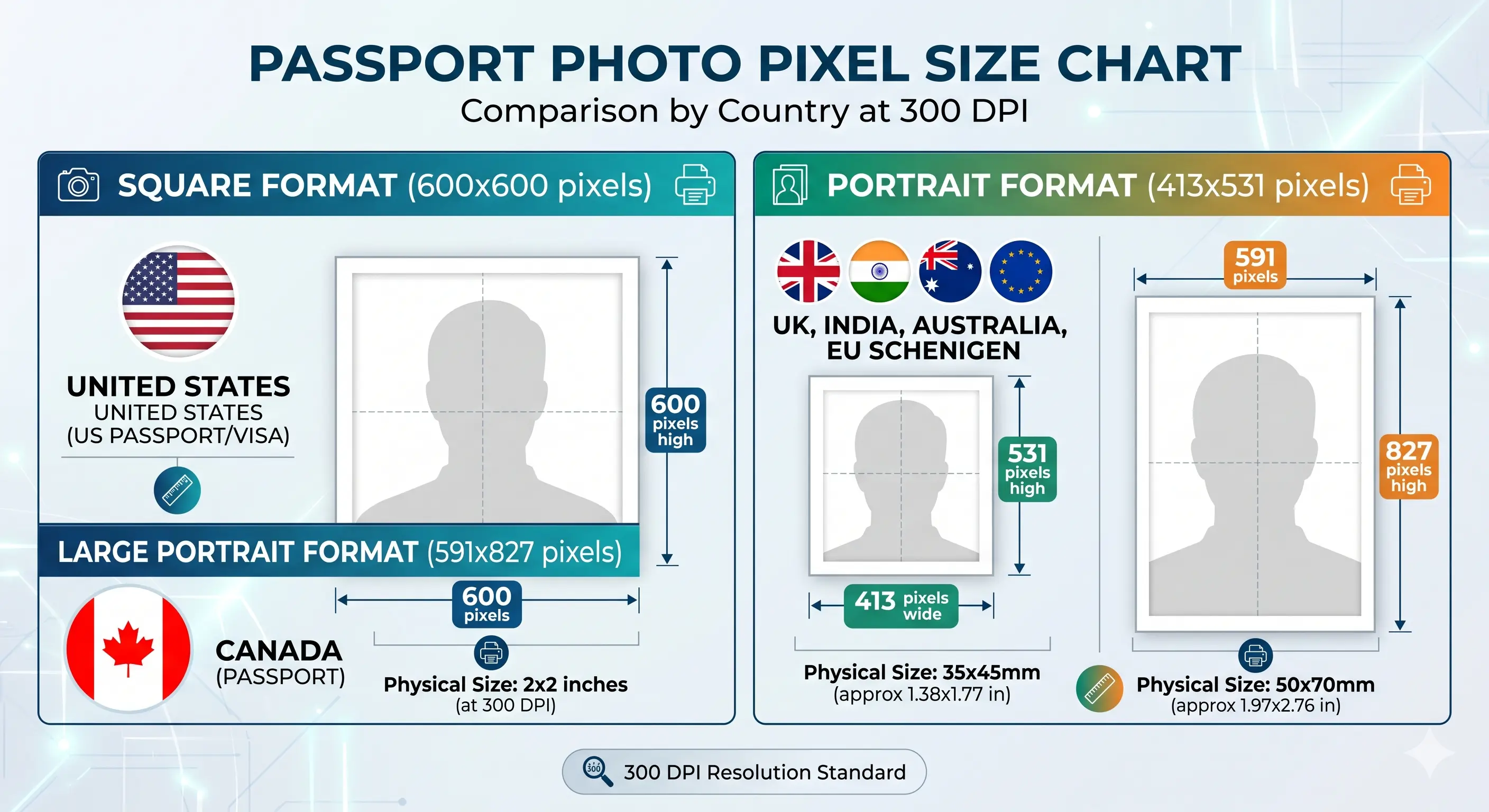
Passport and visa photo pixel size chart showing 413 by 531 pixels for the 35x45 mm format alongside other standards at 300 DPI
Passport photo pixel size chart
Pixel dimensions at 300 DPI across the most requested standards. Full conversions in passport photo size in pixels, and DPI and sharpness standards in passport photo resolution rules.

Digital Submission Rules for IRCC Uploads

Most Canada visa, study permit and work permit applications are filed online, and the upload check is separate from the physical measurement check. A file can be dimensionally perfect and still be refused for pixel count, file size or format.

Requirement Digital upload (IRCC portal) Printed submission (paper / VAC)
Size defined in Pixels Millimetres
Required size Minimum 420 × 540 px Exactly 35 × 45 mm
File size Minimum 60 KB; the form shows the maximum Not applicable
Format Colour JPEG Photo-quality paper, glossy or matte
Quantity One file Two identical prints from the same session
Annotation None Studio name, address and date on the back of one photo
Source Original camera file — not a scan or photo of a print Printed from an original digital file

If your export is too heavy for the upload form, the reduce file size guide and compress guide cover it without dropping below the pixel floor. iPhone users shooting HEIC should convert first with the HEIC to JPEG guide. Broader portal rules are in the digital passport photo requirements guide.

Canada Visa Photo Requirements by Visa Type

The same 35×45 mm photo specification applies across all IRCC applications, but each visa type has context-specific things to know before you apply.

Canada Visitor Visa (TRV)

Temporary Resident Visa applications require a digital photo uploaded as a JPEG through the IRCC portal. The photo must be taken within the last 6 months and meet the 35×45 mm size with a light background. Most visitor visa rejections come down to head size outside 31–36 mm or shadow behind the head.

Canada Study Permit Photo

Study permit photos follow the same 35×45 mm IRCC standard. Digital photos are submitted online; applying via a Visa Application Centre (VAC) requires two printed copies. Ensure the photo is recent — student applications are often delayed by outdated photos.

Canada Work Permit Photo

Work permit applications, including LMIA-based and PGWP submissions, require a 35×45 mm photo. Applying from outside Canada through a VAC means bringing two printed photos. Applying online means uploading a high-resolution JPEG. Neutral expression and no glasses are mandatory.

Canada Super Visa Photo

Super Visa applications, for parents and grandparents of Canadian citizens or permanent residents, use the same 35×45 mm specification. The photo is uploaded digitally or submitted in print depending on the stream. Head size and background rules are strictly enforced.

Canada PR Application Photo

Express Entry, Provincial Nominee Program (PNP), and other permanent residence applications require the standard 35×45 mm photo. Unlike Canadian passport photos, PR visa photos can be taken at home and submitted digitally, provided they clear the 420 × 540 pixel floor.

PR Card Renewal Photo

Permanent Resident Card renewals also use the 35×45 mm format, and two printed copies are typically required — one attached to the form and one held separately. See our dedicated Canada PR Card Photo page for card-specific details and print layout options.

How to Create Canada Visa Photo Online in 4 Steps

Our online tool makes it effortless to create canada visa photo online from any device. No editing skills required.

Upload Photo

Take a fresh photo or upload an existing one from your phone or computer. Use good lighting and a plain wall behind you for the best results.

Face Detection

Our AI automatically locates your face, eyes, and head position to align the image precisely to the IRCC chin-to-crown head-size rule.

Automatic Cropping

The image is cropped to the exact canada visa picture size of 35×45 mm with the correct head proportion and light background at 600 DPI. The crop guide explains how the 7:9 ratio and head-height band combine.

Download Ready Photo

Download your print-ready digital photo instantly. Use it for online IRCC applications or print a 4×6" sheet at any photo lab.

Mobile Photography Guide for Canada Visa Photos

Any modern smartphone can produce a compliant canadian visa photo — if you follow these eight steps. No professional camera needed.

iPhone & Android Camera Settings

Use your phone's rear camera (not the front selfie lens) for higher resolution. On iPhone, shoot in Photo mode (not Portrait — Portrait adds background blur). On Android, disable AI scene enhancement and shoot in standard mode.

Distance from Camera

Stand or sit 60–90 cm (2–3 feet) from the camera. Too close distorts facial proportions; too far reduces resolution. Ask someone else to take the photo so you face forward naturally.

Lighting

Position yourself facing a window during daylight hours. Natural frontal light eliminates shadows on the face and background. Avoid overhead lighting (creates chin shadows) and backlighting (silhouettes your face). See the shadow rules.

Wall Colour & Distance

Stand at least 1 metre away from the wall to prevent shadows falling behind you. A plain white or off-white wall gives our tool the cleanest background to process. Avoid patterned wallpaper or coloured walls.

Camera Angle & Height

Keep the camera at eye level — not below (upward angle distorts the chin) and not above (makes the head appear smaller). Use a phone stand or lean the phone against a stack of books for a stable, level shot.

What to Wear

Choose a mid-tone or darker top such as navy or grey so your shoulders separate cleanly from the light background. Avoid white and cream shirts, which blend into the backdrop and confuse edge detection.

Hair & Accessories

Tie back hair so your full face and jawline are clear — hair must not cover the eyes or eyebrows. Remove glasses, hats (unless religious) and large earrings. See the hair rules and head covering rules.

What to Avoid

No filters, beauty mode, or HDR. Turn off Portrait / Bokeh mode. Shoot at full resolution and do not reduce quality in camera settings. Take 4–5 shots and pick the sharpest with the most even lighting before uploading.

Canada Visa Photo for a Baby, Infant or Child

IRCC applies the same 35 × 45 mm size, background and 31–36 mm head height to children of every age, including newborns. There is no smaller format and no relaxed head-height band. The practical difficulty is meeting an adult framing standard with a subject who cannot sit up or hold still.

Same size, same head height

35 × 45 mm frame with the head 31–36 mm from chin to crown. No age exemption applies to size, framing or background.

Child alone in the frame

No supporting hands, arms, car seat, toy or dummy may be visible, and no other person may appear. Support the child from behind a plain sheet.

Lying down is permitted

A baby who cannot sit upright may be photographed lying on a plain white sheet, shot from directly above, provided the background stays uniform.

Eyes open where achievable

Both eyes should be open and looking towards the camera. This is relaxed for newborns, but a closed-eye photo of an older child will be refused. See the eyes requirements.

Neutral expression, mouth closed

A natural, relaxed expression is acceptable. Avoid a wide open mouth or a dummy-shaped mouth position, which distort the facial geometry that gets measured.

No shadow behind the head

Use soft, indirect daylight from the side of the room rather than directly overhead. Overhead light from one angle creates the background shadow that fails the check.

Positioning, lighting and timing technique for infants and toddlers is covered step by step in our baby passport photo at home guide.

Photographing a child? Upload the shot and let the tool apply the 35 × 45 mm crop and head-height check for you.

Printing and Submitting a Canada Visa Photo

If you are applying on paper or through a Visa Application Centre, printing is part of the specification rather than an afterthought. IRCC asks for two identical prints from the same session, and the back of one must be annotated.

Copies requiredTwo identical photos, same session — never send a single print
Print resolution300 DPI minimum; 600 DPI recommended. Disable fit-to-page scaling
PaperGlossy or matte photo paper. Plain copier paper is refused
Copies per 4 × 6 inch sheetSix 35 × 45 mm photos — one sheet covers the two required with spares
Back annotationStudio name, address and the date the photo was taken. If self-taken, write the date
Front of photoNo border, no printed date, no writing, no stamp across the image
CuttingGuillotine or steel rule for square edges. Do not cut inside the printed border
Colour managementsRGB. Turn off printer auto-enhance, skin smoothing and colour correction
HandlingLet ink dry fully. Do not fold, staple or paper-clip the photo
Not acceptedScans or photographs of an existing print, photocopies, or photos cut from a larger picture

Printer settings, paper choice and cutting technique are covered in full in the print passport photo at home guide, and multi-copy sheet layout in the print sheet guide.

Our tool exports a 4 × 6 inch sheet automatically. Generate your print sheet and cut along the guide lines.

Common Reasons Canada Visa Photos Get Rejected

Each cause below is distinct, and each links to the detailed rule so you can confirm the exact tolerance before you submit. The full cross-country breakdown is in passport photo rejection reasons.

Wrong size or aspect ratio

Submitting a square or 4:3 photo instead of the 35×45 mm portrait frame (roughly 7:9) is a structural error that cannot be corrected at the visa office. See the crop guide.

Head outside 31–36 mm

Head height too small or too large is the most common measurement failure, and it applies even when the overall frame size is exactly right. See head size rules.

Measured to the hairline

Photos cropped to a European hairline-based standard measure short against IRCC's chin-to-crown rule. Re-crop rather than reuse a Schengen photo.

Below the digital pixel floor

Files under 420 × 540 pixels are refused on upload. A 413 × 531 export at exactly 300 DPI falls just short — use 600 DPI instead.

File size under 60 KB

Over-compressing to save space pushes the file below the IRCC minimum and introduces blocking around the eyes. See resolution rules.

Non-white or busy background

Backgrounds with patterns, gradients, or colours other than white or light grey fail validation. See background colour rules.

Shadows or uneven exposure

Shadows on the face or wall, harsh side-lighting, red-eye, and blown-out highlights from direct flash all obscure facial features. See shadow rules.

Wearing glasses

Since 2016, glasses are not allowed in any Canada visa photo — even clear lenses with no glare. See glasses rules.

Smiling or open mouth

Expressions must be neutral with the mouth closed. Smiling, frowning, raised eyebrows, or squinting cause rejection at verification. See smile rules.

Hair covering the face

Hair must not cover the forehead, eyebrows, or fall across the face. IRCC needs an unobstructed view from crown to chin. See hair rules.

Filters or heavy editing

Filters, skin-smoothing, teeth-whitening, slimming or any digital alteration of your face constitutes manipulation and is grounds for rejection.

Only one print supplied

Paper and VAC submissions need two identical photos from the same session. Sending one, or two from different sessions, delays the application.

Missing back annotation

Printed photos without the studio name, address and date — or at minimum the date taken — on the back are returned for correction.

Scanned or re-photographed print

IRCC requires an original digital file. A scan of a printed photo, a photocopy, or a photo cut from a larger picture is not accepted.

Old photo

Photos older than 6 months, or that no longer represent your current appearance, are refused regardless of technical quality.

Canada Visa Photo vs Canada Passport Photo

Many applicants confuse the two. They are handled by different authorities, use different sizes, and differ in who may take the photo and how it is submitted.

Feature Canada Visa Photo Canada Passport Photo
Authority IRCC — immigration and visa Passport Program — travel document
Size 35 × 45 mm 50 × 70 mm
Head height 31–36 mm chin to crown 31–36 mm chin to crown
Background White or light-coloured Plain white only
Taken at home ✓ Allowed ✗ Must be a commercial photographer
Back of print Studio name, address and date — or date if self-taken ✓ Studio name, address and date required
Digital submission ✓ Yes — IRCC portal, min 420 × 540 px ✗ Print only
Copies required One digital, or two prints for paper / VAC Two identical prints
Glasses allowed ✗ No (since 2016) ✗ No
Valid for 6 months from date taken 6 months from date taken
Applies to Visitor visa, study, work, Super Visa, PR Canadian passport renewal or new application

Need a passport photo instead? See our dedicated Canada Passport Photo maker for the correct 50×70 mm format, or the Canada PR Card Photo page for card renewals.

Canada Visa Photo FAQ

Size & Measurements

What is the correct canada visa photo size?

The official canada visa photo size is 35 mm wide by 45 mm tall (1.38" × 1.77"). The head must measure between 31 mm and 36 mm from the bottom of the chin to the crown, meaning the top of the head excluding hair volume. At 300 DPI the frame equals 413 × 531 pixels.

Is the head measured to the hairline or to the crown?

To the crown. IRCC measures from the bottom of the chin to the crown — the top of the head rather than the hairline, and excluding hair volume. This differs from several European standards that measure to the natural hairline, so a photo cropped to a German or Schengen specification can fail the Canadian check even though it measured correctly there.

What is the canada visa photo size in pixels?

IRCC sets a digital minimum of 420 × 540 pixels. At 300 DPI the 35×45 mm frame is 413 × 531 pixels, which is fractionally below that floor — so export at 600 DPI (827 × 1063 pixels) and the same file works for both upload and printing. Our tool outputs at 600 DPI by default.

Digital Submission

What are the digital photo requirements for a Canada visa application?

At least 420 pixels wide by 540 pixels high, minimum file size 60 KB, saved as a colour JPEG. The upload form displays the maximum file size it accepts. The photo must be an original camera file — not a scan or a photograph of an existing print.

Are digital photos accepted for Canada visa applications?

Yes. Most online Canada visa applications (visitor visa, study permit, work permit) require a digital JPEG uploaded through the IRCC portal. Printed copies are only required when applying on paper or at a Visa Application Centre (VAC).

How does the automatic cropping work?

Our face detection locates your eyes, chin and crown, then crops the image so your head occupies the IRCC-required 31–36 mm range inside a 35×45 mm frame. You don't need to measure anything manually.

Appearance & Compliance

What background does a Canada visa photo need?

IRCC requires a plain white or light-coloured background that is uniform and free of shadows, gradients, patterns, or other people. Shadow falling on the wall behind the head is one of the most common causes of refusal. Our tool automatically replaces busy backgrounds.

Can I wear glasses in a Canadian visa photo?

No. Since 2016, glasses are not allowed in any photo submitted to IRCC for visas, study permits, work permits, PR, or citizenship applications — regardless of lens type or glare. Sunglasses and tinted lenses are never accepted.

How long is a Canada visa photo valid?

The photo must be taken within the last 6 months of your application date and must reflect your current appearance. A photo that no longer resembles you is refused even inside the six-month window.

Children, Printing & Related Documents

What are the Canada visa photo rules for a baby or child?

The same 35×45 mm size, white background and 31–36 mm head height apply to children of every age, including newborns. The child must be alone in the frame with no supporting hands, car seat, toy or dummy visible. A baby who cannot sit up may be photographed lying on a plain white sheet. Eyes should be open where achievable, relaxed for newborns. See the child and infant rules section.

How many photos do I need for a Canada visa application?

Online applications require one digital photo. Paper applications and VAC submissions require two identical printed photos taken from the same session — one attached to the form and one kept separately. Never send a single print.

What has to be written on the back of a printed Canada visa photo?

The back of one photo must carry the name and address of the photo studio together with the date the photo was taken. If you took the photo yourself, write the date. Do not write on the front, and do not use a photo with a border or a date printed on the image.

How do I print a Canada visa photo at home or a lab?

Print at 300 DPI or higher on glossy or matte photo paper. A 4×6" sheet holds six 35×45 mm copies, so one sheet covers the two IRCC requires with spares. Cut with a guillotine for square edges, leave no border, and do not fold or staple. See the print at home guide.

Can I take a Canada visa photo with my phone?

Yes. Any modern smartphone camera can produce a compliant photo. Use the rear camera, switch off Portrait mode and filters, stand a metre clear of a plain wall facing a window, then upload it to our Canada visa photo maker to crop and resize it correctly.

What is the difference between a canada visa photo and a canada passport photo?

Visa photos are 35×45 mm, can be taken at home, and are usually submitted digitally through the IRCC portal. Canadian passport photos are 50×70 mm, must be taken by a commercial photographer, and require the studio name, address and date on the back of the print. Both require no glasses and a plain background.

Is this online photo tool really free?

Yes. The Passport Photo Maker is completely free — no signup, no watermark, no hidden fees. You can create unlimited Canada visa photos at no cost.

Popular Visa Photo Tools

Need a photo for a different country? Our passport photo maker covers all major visa and document formats.

Related Canada Visa Photo Guides

Official Sources & References

  • Immigration, Refugees and Citizenship Canada — Photo Specifications for immigration and visa applications: canada.ca
  • Government of Canada — Passport photo requirements (different specification, for comparison): canada.ca
  • ICAO Doc 9303 — Machine Readable Travel Documents biometric photograph standard: icao.int

Last reviewed:
Photo specifications, pixel minimums and file-size limits are set by IRCC and by the individual application portal, and can change. Visa Application Centres may apply additional local practice, such as requesting extra printed copies. Always confirm the current specification with IRCC and with the form you are completing before you submit.

Create Your Canada Visa Photo Now

Stop worrying about millimetres, pixel floors and backgrounds. Let our tool handle every IRCC rule so your application is accepted the first time.

Create Canada Visa Photo
✓ Free ✓ No Signup ✓ Instant Download ✓ Auto Crop