
Photo Size
50 × 70 mm
2" × 2¾"
Create a fully compliant canada pr card photo online in seconds. Our free tool automatically crops your image to the official 50 × 70 mm canada pr card photo size, sets a clean white background, and meets every IRCC canada pr card photo requirements rule for first-time issuance, renewal, and replacement applications.
A Canada PR card photo must be 50 mm wide by 70 mm high (2 × 2¾ inches) on a plain white or light background, with the head measuring 31–36 mm from chin to the natural top of the head — about 44–51% of the frame height. At 300 DPI that equals 591 × 827 pixels.
| Specification | Value |
|---|---|
| Photo size | 50 × 70 mm (2 × 2¾ in) |
| Head height (chin to crown) | 31 – 36 mm |
| Head coverage | 44 – 51% of frame height |
| Pixels @ 300 DPI | 591 × 827 px |
| Pixels @ 600 DPI | 1181 × 1654 px |
| Background | Plain white or light, uniform, no shadow |
| Expression | Neutral, mouth closed, both eyes open |
| Glasses | Not permitted since 2016 |
| Copies (paper application) | Two identical prints, one stamped on the back |
| Age of photo | Taken within the last 6 months |
| Issuing authority | Immigration, Refugees and Citizenship Canada (IRCC) |
Important — Canada does not use 35 × 45 mm. The 35 × 45 mm format belongs to the UK, Schengen area, Australia and most of Asia. IRCC requires 50 × 70 mm for permanent resident cards, passports, citizenship and travel documents. A 35 × 45 mm photo will be refused. Compare the two on our 50×70 photo size and 35×45 photo size pages.
Open the Passport Photo Maker with the permanent resident card photo preset already selected. We handle face detection, head sizing, and the IRCC-required 50 mm × 70 mm dimensions automatically, so you don’t need any photo editing skills.
Create Canada PR Card PhotoThe Permanent Resident Card uses the same photo standard as Canadian passports and travel documents. Here are the key canada pr photo specifications you need to remember.
The diagram below marks every measurement IRCC checks: the 50 × 70 mm frame, the 31–36 mm chin-to-crown head height, and the plain uniform background.
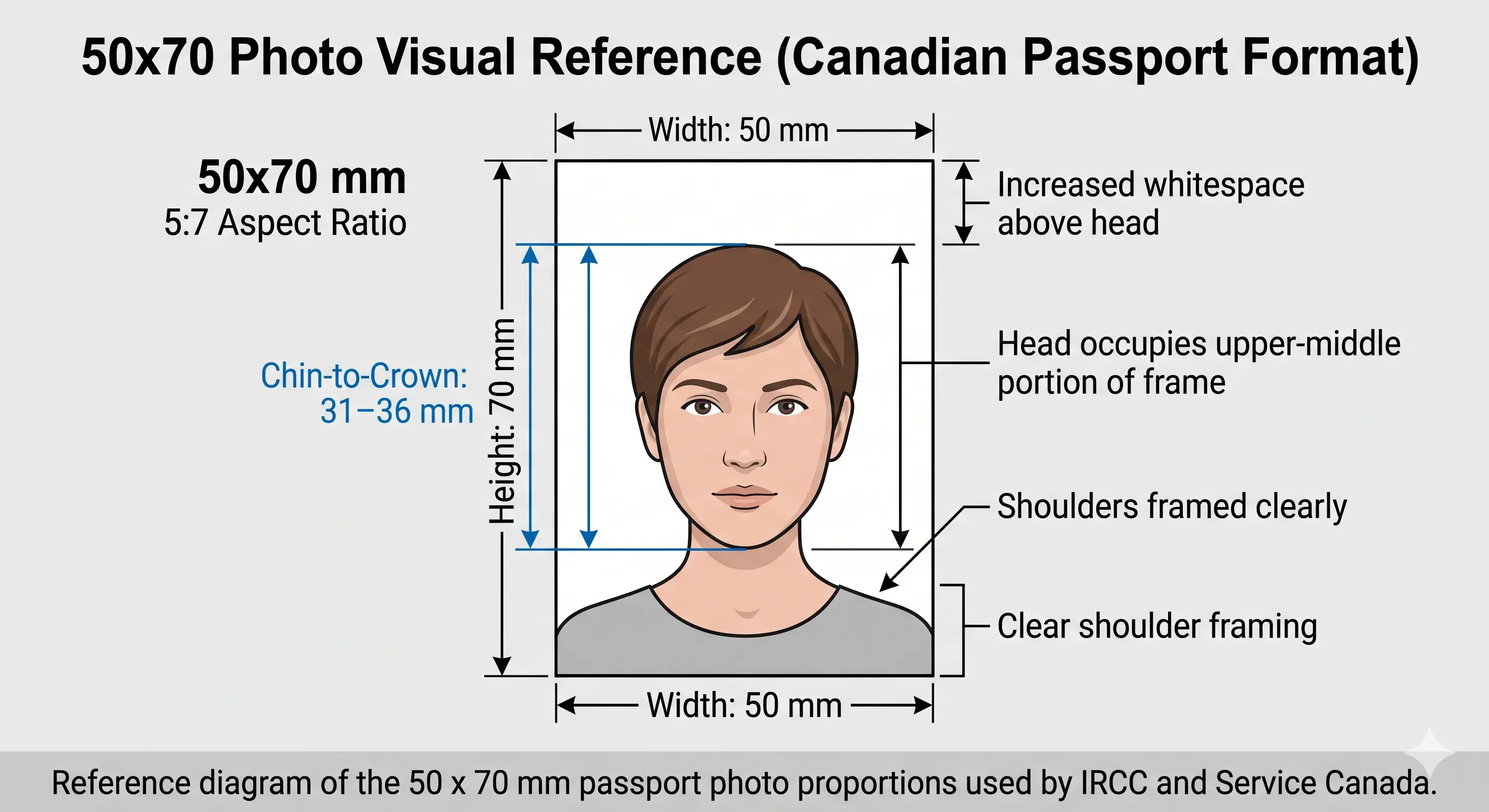
Immigration, Refugees and Citizenship Canada (IRCC) enforces strict rules for every pr card photo canada applicants submit. A single mistake in size, background, or expression can delay your card by weeks. Use the table below as a final checklist before submitting your application. Each rule links to the detailed standard in our passport photo rules library.
| Official photo size | 50 mm × 70 mm (2" × 2¾") |
|---|---|
| Width | 50 mm (591 px @ 300 DPI) |
| Height | 70 mm (827 px @ 300 DPI) |
| Aspect ratio | 5 : 7 portrait |
| Background | Plain white or light-coloured, uniform, free of patterns and shadows — see background colour rules |
| Lighting | Even and diffuse, no shadow on the face or the wall — see shadow rules |
| Head size (chin to natural top of head) | Between 31 mm and 36 mm (1 ¼" – 1 ⁷⁄₁₆") — see head size rules |
| Head coverage | 44 – 51% of the frame height — see face size requirements |
| Facial expression | Neutral, mouth closed, both eyes open and visible — see eyes requirements and smile rules |
| Hair | Must not cover the eyes or obscure the outline of the face — see hair rules |
| Ears | Not mandatory, but the full face outline must be clear — see ears visibility rules |
| Glasses | Not permitted (since 2016 IRCC update) — see glasses rules |
| Headwear | Only for religious reasons; full face from chin to forehead must be visible — see head covering rules |
| Resolution (digital) | 300 DPI minimum, 600 DPI recommended, sharp focus, no pixelation — see resolution rules |
| Digital alteration | Not permitted — no filters, skin smoothing, slimming or AI enhancement |
| Print requirements | Printed on photo-quality paper, original (not photocopied), colour photo — see print at home guide |
| Copies required | Two identical prints for a paper application; one digital file for online submission |
| Digital requirements | JPEG file when uploaded via the IRCC online portal; required for some PR processes |
| Photographer stamp | For printed photos: photographer's name, studio address and date taken on the back of one copy |
| Recency | Taken within the last 6 months and reflecting your current appearance |
If you are uploading a digital canada pr card photo through the IRCC online portal, your file must be sharp enough to print at 50 × 70 mm without any pixelation. The table below shows the exact pixel dimensions at common resolutions.
| Resolution (DPI) | Width (px) | Height (px) | Use Case |
|---|---|---|---|
| 150 DPI | 295 px | 413 px | Below standard — prints soft at 50×70 mm |
| 300 DPI | 591 px | 827 px | Minimum acceptable for digital upload |
| 600 DPI | 1181 px | 1654 px | Recommended — matches IRCC print standard |
| 1200 DPI | 2362 px | 3307 px | Archival quality, accepted by all processors |
Our tool outputs at 600 DPI by default, which satisfies both the IRCC digital upload validator and all standard photo lab print requirements.
Upscaling does not work. Stretching a 295 × 413 pixel image up to 591 × 827 interpolates rather than adding detail, and the result is soft around the eyes and hairline. IRCC checks sharpness, so an upscaled file fails even when the pixel count reads correctly. Shoot wide and crop down instead.
For pixel conversions across every standard see passport photo size in pixels. If your file is too heavy for the upload tool, the reduce file size guide covers it, and iPhone users shooting HEIC should read the HEIC to JPEG guide first. Wider portal rules are in the digital passport photo requirements guide.
IRCC applies one photo standard across all of its documents, which is convenient — the same 50 × 70 mm source image works for your PR card, passport and citizenship application. What differs is what goes on the back of the print and how many copies you submit.
| Document | Photo Size | Head Height | Back of Print |
|---|---|---|---|
| Canada PR Card | 50 × 70 mm | 31 – 36 mm | Photographer stamp only |
| Canada Passport | 50 × 70 mm | 31 – 36 mm | Photographer stamp + guarantor declaration |
| Canada Visa / TRV | 50 × 70 mm | 31 – 36 mm | Photographer stamp only |
| US Green Card | 51 × 51 mm (2 × 2 in) | 25 – 35 mm | Nothing required |
| UK Passport | 35 × 45 mm | 29 – 34 mm | Countersignature in some cases |
| China Passport | 33 × 48 mm | 28 – 33 mm | Nothing required |
Every national standard is indexed in the passport photo requirements by country hub. For a full worldwide size reference see passport size photo dimensions, or compare the square US format on the 2×2 photo size page. Travellers needing a Chinese entry photo should use the China visa photo guide instead.
Follow these four steps to create canada pr card photo online without visiting a studio. The entire process takes less than two minutes.
Take a fresh photo or upload an existing image from your phone, tablet, or computer. Make sure you have good lighting and a plain wall behind you.
Our AI locates your face, eyes, and chin position, then verifies that the head height falls inside the IRCC 31–36 mm window.
The image is cropped to the exact 50×70 mm canada pr card photo size and the background is replaced with a clean, IRCC-compliant white colour. The crop guide explains how the 5:7 ratio and head-height rule are applied together.
Download a print-ready 600 DPI file. Print at home on photo paper, at a pharmacy, or upload directly through the IRCC secure portal.
Ready now? Get a 50×70 mm PR card photo in under two minutes.
Create PR Card Photo →A new canada pr card photo is required in several situations. IRCC will not process any of the following applications without a compliant photo that meets all current specifications.
After landing in Canada as a new permanent resident, you must apply for your first PR card within 180 days. A compliant photo is required to begin production.
PR cards expire every 5 years. You must submit a fresh photo taken within 6 months of the application date, even if your appearance has not changed significantly.
If your PR card is lost inside Canada, IRCC requires a new application with a fresh compliant photo. The replacement process cannot reuse your previous photo on file.
A police report and a new photo are both required when reporting a stolen PR card. The photo must meet all current IRCC specifications at the time of the replacement application.
Cards that are cracked, demagnetized, or otherwise damaged must be replaced. IRCC treats this identically to a lost card — a new application and a new photo are required.
If you legally change your name, the replacement card also requires a new photo, even if your appearance is unchanged. Submit a photo taken within the past 6 months.
Children who are permanent residents need their own PR card, and the same 50 × 70 mm size and 31–36 mm head height apply. There is no smaller format for infants. What IRCC does relax is the expression and open-eyes expectation for very young children — the framing rules do not change.
50 × 70 mm frame with the head 31–36 mm from chin to crown, filling 44–51% of the height. No age exemption applies to dimensions or framing.
No supporting hands, arms, car seat, toy or dummy may appear, and no other person may be visible. Support the child from behind a plain sheet.
IRCC accepts a relaxed expression for babies and does not require a newborn's eyes to be fully open. Older children must have a closed mouth and neutral face.
Lay the child on a plain white sheet in soft indirect daylight and photograph from directly above. Side lighting creates the background shadow that fails the check.
Hair must not fall across the eyes or obscure the outline of the face. See the hair rules.
Shoot wide and crop down. Cropping tightly in-camera on a small face leaves too few pixels once the 5:7 frame is applied.
Positioning, lighting and timing technique for infants and toddlers is covered in the baby passport photo at home guide. The eyes requirements and shadow rules pages cover the two checks that fail most often on child photos.
Photographing a child? Upload the shot and let the tool apply the 50×70 crop.
Create Child PR Card Photo →IRCC officers and Service Canada agents reject thousands of permanent resident card photo submissions every year for avoidable reasons. Watch out for these common mistakes before you mail or upload your application. The full cross-country breakdown is in passport photo rejection reasons.
Submitting a 35×45 mm photo prepared for a UK or Schengen application. Canada requires 50×70 mm. This is the single most common size error on PR card applications.
If the photo is not exactly 50×70 mm, or the head height is below 31 mm or above 36 mm, the photo fails automatic IRCC validation and your PR card production is paused.
Any shadow on the wall, patterned wallpaper, or a darker background like beige or blue is rejected. Only a clean, uniform white or light background is accepted. See background colour rules.
Since 2016, glasses are forbidden in any photo for IRCC documents, including the PR card. This applies even if the lenses are clear and glare-free. See glasses rules.
Smiling with visible teeth, frowning, raised eyebrows, or pursed lips all count as non-neutral expressions. Keep your mouth closed and look directly at the camera. See smile rules.
Side or overhead lighting creates shadow under the chin and on one cheek, breaking the symmetry biometric matching needs. See shadow rules.
Photos older than 6 months or that no longer match your current appearance, such as a new beard, major hair colour change, or significant weight change, are not accepted.
Printed PR card photos must include the photographer's name, studio address, and the date taken on the back of one copy. Photos without this information are returned for resubmission.
Beauty filters, skin smoothing, AI enhancements, portrait blur, and red-eye edits make the photo unusable for biometric matching. Submit a natural, unfiltered image.
A paper PR card application requires two identical prints. Submitting a single photo results in a request for the missing copy and delays production.
Photos cut with scissors out of a larger print, or printed on regular office paper instead of photo paper, fail the printed PR card photo standard.
For digital uploads, IRCC expects sharp JPEG files. Blurry, compressed, or low-resolution images below 591 × 827 pixels get rejected by the upload validator.
A few simple adjustments before you press the shutter can make the difference between an accepted PR card application and a frustrating delay. Use these tips to capture a perfect pr card photo canada with just your phone.
A paper PR card application requires two identical printed photos, so printing is part of the specification rather than an afterthought. The 50 × 70 mm format is larger than most passport photos, which means fewer copies fit on a sheet and cutting accuracy matters.
| Print resolution | 300 DPI minimum, 600 DPI recommended — disable fit-to-page and auto-scaling |
|---|---|
| Paper | Photo-quality paper, glossy or matte. Plain copier paper is refused |
| Copies per 4 × 6 inch sheet | Two 50 × 70 mm photos side by side — exactly what a paper application needs |
| Copies per A4 sheet | Around eight, with cutting margins |
| Cutting | Guillotine or steel rule for square edges. Do not cut inside the printed border |
| Colour management | sRGB. Turn off printer auto-enhance, skin smoothing and colour correction |
| Back of the print | One of the two copies must show the photographer's or studio name, full address and the date taken |
| Handling | Let ink dry fully. Do not staple, fold or write on the photo face |
Printer settings, paper choice and cutting technique are covered in full in the print passport photo at home guide, and multi-copy sheet layout in the print sheet guide. If you print at a pharmacy or photo lab, ask them to add the studio stamp to the back of one copy.
Depending on how you apply for or renew your card, IRCC may ask for a printed photo, a digital photo, or both. Here is how the two formats compare so you choose the right one.
Required when you mail a paper PR card application or send documents to a Case Processing Centre. The print must be:
You can print our auto-cropped output at any pharmacy, photo lab, or home printer with photo paper, then ask the lab to add the stamp if required.
Used when IRCC asks you to upload a photo through their secure online portal or for some PR-linked services. The digital file must be:
Our tool outputs a digital file that already meets every IRCC canada pr card photo requirements rule, so you can upload it straight away.
The official canada pr card photo size is 50 mm wide by 70 mm high (2" × 2¾"), the same standard IRCC uses for Canadian passports and travel documents. Head height from chin to the natural top of the head must be between 31 mm and 36 mm, which fills roughly 44 to 51 percent of the frame height.
No. Canada does not use the 35 × 45 mm format that the UK, Schengen area and Australia use. IRCC requires 50 × 70 mm for permanent resident cards, passports and citizenship documents. A 35 × 45 mm photo will be refused. See the 50×70 photo size page for full conversions.
At 300 DPI a 50 × 70 mm photo equals 591 × 827 pixels. At 600 DPI it equals 1181 × 1654 pixels, and at 1200 DPI it equals 2362 × 3307 pixels. Use 300 DPI as the minimum and 600 DPI when you intend to print.
The dimensions are identical at 50 × 70 mm, so the same source image works for both. The difference is on the back of the print: Canadian passport photos require a guarantor declaration, while PR card photos need only the photographer's studio name, address and the date taken. You can produce both versions from one source image using our Passport Photo Maker.
Yes. IRCC has not allowed glasses in any photo since 2016. Remove all eyewear, including reading glasses and tinted lenses, before taking your photo.
IRCC requires a plain white or light-coloured uniform background. There must be no shadow, no other people, and no patterns. Our tool automatically replaces busy backgrounds with the correct colour. See the background colour rules.
No. Your expression must be neutral with the mouth closed and both eyes open and clearly visible. Light closed-mouth smiles are sometimes accepted, but a fully neutral expression is safer because exaggerated expressions distort the facial geometry that is measured.
It must be taken within the last 6 months and reflect your current appearance. If you have grown or shaved a beard, changed hair colour significantly, or your face has noticeably changed, take a new photo.
The same 50 × 70 mm size, plain background and 31 to 36 mm head height apply to children and newborns. The child must be alone in the frame with no supporting hands, car seat, toy or dummy visible. IRCC allows a relaxed expression for infants and does not require a newborn's eyes to be fully open, but no other person may appear. See the child and infant rules section.
For a paper PR card application, IRCC asks for two identical printed photos, and one of the two must carry the photographer's stamp on the back. For online submissions, a single digital file is enough. Always check the latest checklist on the IRCC website.
Yes, for printed photos sent by mail. The back of one of the two photos must include the photographer's or studio name, complete address, and the date the photo was taken.
Absolutely. Modern smartphones easily exceed the resolution required by IRCC. Take the photo with the rear camera, good light, and a plain wall, switch off portrait blur and beauty modes, then upload to our Canada PR card photo maker for cropping and background processing.
Print at 300 DPI or higher on photo-quality paper, never on plain copier paper. A 4 × 6 inch sheet holds two 50 × 70 mm photos side by side, which matches the two copies a paper application requires. Cut with a guillotine for square edges and do not trim inside the printed border. See the print at home guide.
Yes. The Passport Photo Maker is 100% free, with no watermark, no signup, and no hidden charges. You can create unlimited Canada PR card photos and download high-resolution files instantly.
Don’t risk a delayed renewal or replacement. Let our tool handle every IRCC rule — the 50 × 70 mm sizing, the 31–36 mm head height, the plain white background, and 600 DPI output — so your application is accepted the first time.
Create Canada PR Card Photo