
2x2 Photo Size: Exact Dimensions in Inches, CM, MM & Free Maker
Direct Answer: The standard 2x2 inch passport photo equals exactly 51 x 51 mm, which translates to 600 x 600 pixels when printed or uploaded at the required 300 DPI resolution. Your head must measure between 1 and 1.4 inches (25 to 35 mm) from the bottom of the chin to the top of the hair.
A 2x2 photo is 2 × 2 inches, which equals 51 × 51 mm or 5.1 × 5.1 cm — a perfect square with a 1:1 aspect ratio. The head must measure 1 to 1⅜ inches (25–35 mm) from chin to crown, on a plain white or off-white background.
At 300 DPI the digital file is 600 × 600 pixels, with 1200 × 1200 the accepted maximum. It is the standard format for U.S. passports, U.S. visas (DS-160/DS-260), Green Card (I-485), and other government documents.
The 2x2 inch photo is a strictly regulated format. Most rejections happen because the head size, background colour, or pixel dimensions are slightly off — not because the face looks wrong. This guide covers every specification, explains which documents require it, and shows you how to produce a compliant image in under a minute. Every rule below is explained in depth in the passport photo rules library, and every national standard is indexed in the requirements by country hub.
Create Your 2x2 Photo Online — Free
The ClonyPDF Passport Photo Maker handles every 2x2 photo specification automatically — head positioning, background replacement, DPI scaling, and print layout. No Photoshop, no account, no watermarks.
The tool automatically:
- Crops to exactly 2×2 inches and centres your face
- Scales the image to 600 × 600 pixels at 300 DPI
- Replaces any background with compliant plain white
- Checks head size against chin-to-crown guidelines
- Generates a print-ready 4×6 sheet with six copies
2x2 Photo Size Visual Reference
The diagram below shows the same photo expressed three ways: 2 × 2 inches, 51 × 51 millimetres, and 5.1 × 5.1 centimetres. All three describe one identical square.
2x2 Photo Size Requirements
These specifications follow 22 CFR § 41.102 and the U.S. Department of State Photo Composition Template. They apply equally to U.S. passport, visa, and USCIS applications unless a document-specific exception is noted below. Each rule links to the detailed standard.
| Requirement | Specification |
|---|---|
| Photo dimensions | 2 × 2 inches (square, 1:1 aspect ratio) |
| Width | 2 in / 51 mm / 5.1 cm / 600 px (at 300 DPI) |
| Height | 2 in / 51 mm / 5.1 cm / 600 px (at 300 DPI) |
| Background | Plain white or off-white — no patterns, shadows, or gradients. See background colour rules |
| Lighting | Even and diffuse, no shadow behind the head. See shadow rules |
| Head size (chin to crown) | 1 to 1⅜ inches (25–35 mm) — approx 50–69% of frame height. See head size rules |
| Face coverage | 50–69% of the frame. See face size requirements |
| Eye position from bottom | 1⅛ to 1⅜ inches (28–35 mm), upper 55–69% of the frame. See eyes requirements |
| Hair | Must not cover the eyes or obscure the face outline. See hair rules |
| Ears | Not mandatory for US photos, but the face outline must be clear. See ears visibility rules |
| Print resolution | 300 DPI minimum (600 DPI recommended for pharmacy printing). See resolution rules |
| Digital pixel size | 600 × 600 px minimum to 1200 × 1200 px maximum |
| Digital file format | JPEG (.jpg) only for online submission — PNG, HEIC and WebP are refused |
| Digital file size | 54 KB – 10 MB for online passport renewal; 240 KB maximum for the DS-160 visa photo uploader |
| Colour depth | 24-bit colour, sRGB, natural skin tones — no filters, greyscale is refused |
| Glasses | Not permitted (medical exception requires physician statement). See glasses rules |
| Expression | Neutral, mouth closed, both eyes open and visible. See smile rules |
| Head coverings | Not allowed unless worn daily for religious reasons. See head covering rules |
| Digital alteration | Not permitted — no retouching, skin smoothing, slimming or tone adjustment |
| Photo recency | Taken within the last 6 months |
2x2 Photo Size in Pixels & File Size Limits
The pixel dimensions of a 2x2 inch photo depend on the DPI you print or submit at. The U.S. State Department and USCIS require a minimum of 300 DPI, which produces 600 × 600 pixels. Anything above 1200 × 1200 is refused as too large.
| Resolution (DPI) | Pixel Dimensions | Verdict |
|---|---|---|
| 150 DPI | 300 × 300 px | Below minimum — rejected |
| 300 DPI | 600 × 600 px | ✓ Official minimum — digital upload standard |
| 600 DPI | 1200 × 1200 px | Maximum accepted — best for pharmacy printing |
File size is a separate check, and it is where most uploads actually fail. Online passport renewal accepts 54 KB to 10 MB. The visa photo upload tool used with DS-160 and DS-260 caps the file at 240 KB. A 600 × 600 JPEG saved at maximum quality often exceeds 240 KB even though the pixel count is correct, so save at around quality 85.
Tip: Screenshots taken on iPhone or Android are typically 72–96 DPI and will always fail the resolution check. Upscaling a small photo does not help either — it interpolates rather than adding detail, and the sharpness check catches it. Always crop down from a larger original.
For the full pixel and DPI breakdown, including the conversion maths and portal-by-portal limits, see the dedicated 2x2 photo size in pixels guide. To hit an exact target: resize to 600×600, compress to 240 KB, or reduce file size. iPhone users shooting HEIC should read the HEIC to JPEG guide first, and the digital passport photo requirements guide covers every portal.
2x2 vs. 35×45 vs. 50×70 — International Photo Size Comparison
Different countries use different passport photo sizes, and the 2x2 inch square is the exception rather than the rule — most of the world uses a portrait format. If you are applying for multiple documents, confirm the format required by each country's immigration authority before printing.
| Country / Document | Size (inches) | Size (mm) | Pixels @ 300 DPI | Format |
|---|---|---|---|---|
| 🇺🇸 US Passport / Visa / Green Card | 2 × 2 in | 51 × 51 mm | 600 × 600 | Square |
| 🇮🇳 India Visa | 2 × 2 in | 51 × 51 mm | 600 × 600 | Square |
| 🇮🇳 India Passport | 1.38 × 1.77 in | 35 × 45 mm | 413 × 531 | Portrait |
| 🇬🇧 UK Passport | 1.38 × 1.77 in | 35 × 45 mm | 413 × 531 | Portrait |
| 🇦🇺 Australia Passport | 1.38 × 1.77 in | 35 × 45 mm | 413 × 531 | Portrait |
| 🇩🇪 Germany / EU Biometric | 1.38 × 1.77 in | 35 × 45 mm | 413 × 531 | Portrait |
| 🇿🇦 South Africa | 1.38 × 1.77 in | 35 × 45 mm | 413 × 531 | Portrait |
| 🇨🇦 Canada Passport | 1.97 × 2.76 in | 50 × 70 mm | 591 × 827 | Portrait |
| 🇨🇳 China Passport / Visa | 1.30 × 1.89 in | 33 × 48 mm | 390 × 567 | Portrait |
| 🇭🇰 Hong Kong | 1.57 × 1.97 in | 40 × 50 mm | 472 × 591 | Portrait |
Compare the two dominant standards side by side in the 35×45 photo size guide and the 50×70 photo size guide, or see every country in the master passport size photo dimensions reference.
2x2 Photo Requirements by Document
While the core 2×2 inch standard is consistent, each document type has submission-specific rules for digital files, printed copies, and envelope requirements. Review the relevant section before submitting.
2x2 Photo Size for US Passport
The U.S. Department of State requires one printed 2×2 inch colour photo, taken within the last 6 months, submitted with Form DS-11 (new passport) or DS-82 (renewal by mail). The photo must be printed on quality photo paper — glossy or matte finish, not inkjet plain paper. Applicants eligible for online renewal upload a digital file instead, sized between 54 KB and 10 MB.
- One printed 2×2 inch colour photo (600 × 600 px / 300 DPI minimum)
- Head positioned 1 to 1⅜ inches chin-to-crown, eye line 1⅛ to 1⅜ inches from the bottom
- Plain white or off-white background — no shadows
- No eyeglasses (banned since November 1, 2016)
- No head coverings unless for daily religious observance
- Photo must not be altered with filters, retouching, or cropping errors
- Some acceptance facilities request two identical copies — confirm before your appointment
2x2 Photo Size for US Visa Applications
Form DS-160 (nonimmigrant visa) and DS-260 (immigrant visa) require a digital photo upload during the online application. The photo must be JPEG, square, between 600 × 600 and 1200 × 1200 pixels, and 240 KB or smaller — a tighter ceiling than passport renewal. No printed photo is mailed; only the digital upload counts.
- Digital JPEG upload only (no printed copy required for DS-160/DS-260)
- 600 × 600 pixels minimum, 1200 × 1200 pixels maximum, square
- File size: 240 KB maximum — see the compress to 240 KB guide
- Same head size, eye line and background rules as US passport
- Some consulates may request a printed copy at the interview — bring two
2x2 Photo Size for Green Card Applications
USCIS requires two identical 2×2 inch colour photos submitted with Forms I-485 (Adjustment of Status) and I-130 (Petition for Alien Relatives). Both photos must be printed on photo-quality paper and must have your name and USCIS A-Number written lightly in pencil on the back.
- Two identical printed 2×2 inch colour photos per applicant
- Name and A-Number written in pencil on the back of each photo
- Taken within the last 6 months
- Plain white or off-white background
- Standard 2×2 inch head size and expression requirements apply
2x2 Photo Size for OCI Card Applications
The Ministry of External Affairs of India requires a square colour photo for OCI card applications, with a plain white background, a 70–80% face-to-frame ratio, and taken within the last 6 months. OCI applications submitted via the Indian consulate often require both a digital upload and two printed copies.
- Square format with a plain white background only
- Face must cover 70–80% of the photo frame
- Both digital (JPEG) and two printed copies typically required
- No glasses, no head coverings (unless religious), no shadows
- Confirm the exact dimension on the OCI portal before submitting — the published specification has differed between portal versions
2x2 Photo Size for Babies, Infants & Newborns
Babies and newborns can get a U.S. passport, and they need a compliant 2×2 inch photo too. The size, background and head-height band are identical to an adult — there is no smaller format and no reduced pixel requirement. What the State Department does relax is the expression and open-eyes rule, because infants cannot hold a pose.
2x2 Photo Size for Babies (Under 12 Months)
For babies who cannot sit upright on their own, lay the infant flat on a plain white sheet or blanket and photograph from directly above using a smartphone camera. The background must be fully white or off-white with no other fabric patterns visible. No hands, arms, or other people should appear in the frame — even if someone is supporting the baby's head. After photographing, upload to the Passport Photo Maker and select the 2×2 inch preset to crop correctly.
- Lay baby on a plain white sheet — photograph from directly above
- No hands, arms, other people, toys or pacifiers visible in the frame
- Eyes do not need to be fully open for infants under 1 year
- No glasses on the infant, even prescription
- Plain white or off-white background — no printed fabric
- Same 2×2 inch dimensions and 300 DPI requirement applies
2x2 Passport Photo for Toddlers (Age 1–4)
Toddlers often won't hold a neutral expression or sit still, which makes passport photos challenging. Practical tips: photograph in the morning when the child is rested, sit them in a high chair pushed against a white wall, and take many shots quickly. Eyes should be open and looking toward the camera. A very slight expression variation is generally accepted for children under 4, though neutral is always safest.
- Sit the toddler against a plain white wall or hang a white sheet behind them
- Use burst mode to capture many frames — pick the clearest one
- Eyes must be open; a very slight relaxed expression is acceptable for young children
- No toys, pacifiers, or hands visible in the frame
- Same 2×2 inch and 300 DPI requirements apply as adults
2x2 Newborn Passport Photo
Even newborns under 1 month need their own passport if travelling internationally. For newborns, lay the infant on their back on a plain white surface. You can support the head from below with a white blanket rolled under the neck, but no hands should be visible in the final image. Newborns do not need to have their eyes open for a U.S. passport photo. Note that children under 16 renew in person every five years and need a fresh photo each time, because appearance changes quickly.
Baby photo tip: Have a second person hold the phone directly above the baby to get a straight-down, shadow-free shot. Use the rear camera, not the front camera, for higher resolution. Full technique is in the baby passport photo at home guide, and the shadow rules page covers the lighting setup that fails most often on infant photos.
How to Create a Compliant 2x2 Photo (Step by Step)
The process takes under two minutes. You don't need special equipment — a recent smartphone in good light is sufficient.
- Set up your shot. Stand or sit two feet in front of a plain white wall. Face a window or soft light source directly. Avoid overhead lighting, which causes shadows on the face and neck.
- Take the photo. Keep the camera at eye level, 2–3 feet away. Switch off portrait blur and skin smoothing, which alter facial geometry and are detected. Avoid wide-angle front cameras — they distort facial proportions. Use the rear camera if possible.
- Open the Passport Photo Maker. Select the “2×2 inch / US Passport” preset. This applies the correct State Department crop template automatically.
- Upload the image. The tool detects your face, aligns the eye line, replaces the background, and crops to the exact 2×2 dimensions at 600 × 600 pixels. The crop guide explains how the 1:1 ratio and head-height band are applied together.
- Review the preview. Confirm the background is uniform white, your expression is neutral, and the head-size guide overlays are satisfied. Make adjustments if needed.
- Download. Save the single 600 × 600 px JPEG for DS-160 or DS-260 digital upload, or download the 4×6 print sheet with six 2×2 copies for physical submission.
Why 2x2 Photos Get Rejected
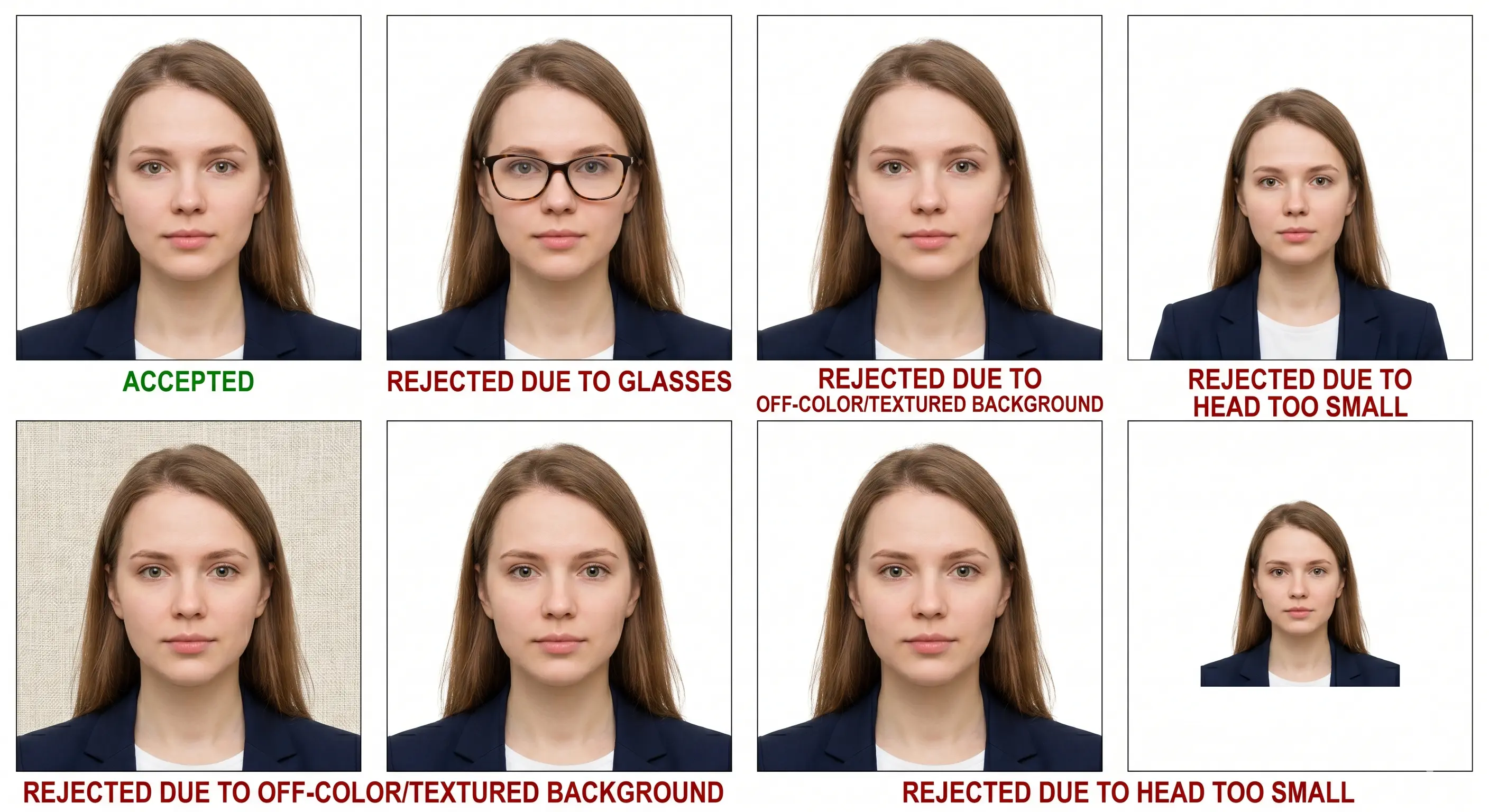
The following are the most common reasons the State Department, USCIS, and consular offices return photos for re-submission. Each links to the detailed rule so you can confirm the exact tolerance. The full cross-country breakdown is in passport photo rejection reasons.
Wrong dimensions or aspect ratio
The photo must be a perfect 2×2 inch square. A 3:4 portrait crop, a 4:3 landscape, or even a 51×52 mm image will be rejected. See the crop guide.
Head too small or too large
Head must occupy 50–69% of the frame height (chin to crown: 1–1⅜ inches). Selfies taken from more than 4 feet away often produce a head that is too small. See head size rules.
Eye line too low
Head height can be correct while the eyes still fall below 1⅛ inches from the bottom edge. Both measurements are checked independently. See eyes requirements.
Off-white or coloured background
Cream, beige, gray, or any visible wall texture will fail. Plain white or off-white only — shadows behind the head count as background violations. See background colour rules.
Poor or uneven lighting
Hard shadows on the face, red-eye, overexposure, or underexposure are all grounds for rejection. Use diffused daylight from a window facing you. See shadow rules.
File size out of range
The DS-160 uploader refuses anything over 240 KB. Online passport renewal refuses files under 54 KB or over 10 MB. Match the portal, not a generic export setting.
Low resolution or screenshot
Images under 600 × 600 px or below 300 DPI, and all screenshots (which are 72–96 DPI), are automatically rejected by digital submission portals. See resolution rules.
Wrong file format
PNG, HEIC and WebP are not accepted, and greyscale is refused. Convert to a full-colour JPEG before uploading. See the HEIC to JPEG guide.
Glasses or face accessories
Eyeglasses have been banned since November 1, 2016. Sunglasses, tinted lenses, and fashion frames all cause rejection regardless of prescription status. See glasses rules.
Hair across the face
A fringe over the eyes or hair obscuring the outline of the face fails facial-landmark detection. See hair rules.
Hats or head coverings
Non-religious headwear is refused, and a religious covering must leave the full face visible from chin to forehead. See head covering rules.
Non-neutral expression
Smiling — even slightly — may trigger a rejection flag. Keep a neutral expression with your mouth fully closed and both eyes looking directly at the camera. See smile rules.
Digital alterations
Beauty filters, skin smoothing, or AI-generated image alterations result in immediate rejection. Do not edit the photo in any gallery app before uploading.
Printed on plain paper
Standard copier paper is refused. Print on glossy or matte photo paper only. See the print at home guide.
How to Print a 2x2 Photo
Once you have a compliant 2×2 JPEG, you can print it in three ways. The 4×6 sheet is the most cost-effective option for multiple applications or backups — six 2×2 photos fit on a single 4×6 inch sheet in a two by three grid with cutting margins.
| Print resolution | 300 DPI minimum — disable fit-to-page and auto-scaling, which change the physical size |
|---|---|
| Paper | Glossy or matte photo paper. Plain copier paper is refused |
| Copies per 4 × 6 inch sheet | Six 2 × 2 photos in a two by three grid |
| Colour management | sRGB. Turn off printer auto-enhance, skin smoothing and colour correction |
| Cutting | Guillotine or scissors along the printed guides. Do not cut inside the border |
| Handling | Let ink dry fully. Do not staple or paper-clip the photo to the form |
After printing the 4×6 sheet, cut along the printed guides with scissors or a paper trimmer. Each photo will measure exactly 2 inches × 2 inches when cut correctly. Printer settings and cutting technique are covered in the print passport photo at home guide, and sheet layout in the print 2x2 on 4x6 guide.
Frequently Asked Questions
Size & Measurements
What is a 2x2 photo size in centimeters and millimeters?
A 2×2 inch photo equals 51 × 51 mm or 5.1 × 5.1 cm — a perfect square with a 1:1 aspect ratio. At the required 300 DPI minimum the digital file is 600 × 600 pixels, with 1200 × 1200 the accepted maximum.
What head size is required in a 2x2 photo?
The head measured from the bottom of the chin to the top of the head must be 1 to 1⅜ inches (25–35 mm), which is roughly 50–69% of the frame height. The eyes must sit 1⅛ to 1⅜ inches (28–35 mm) up from the bottom edge. Both measurements are checked, so a correct head height with a low eye line still fails.
What file size does a digital 2x2 photo need to be?
It depends on the portal. Online passport renewal accepts between 54 KB and 10 MB. The visa photo upload tool used with DS-160 and DS-260 caps the file at 240 KB. Always check the limit shown by the form you are completing, because a file that passes one system can be refused by the other.
Which documents require a 2x2 inch photo?
U.S. passports (DS-11, DS-82), U.S. nonimmigrant visas (DS-160), U.S. immigrant visas (DS-260), Green Card applications (I-485, I-130), Certificate of Naturalization (N-400), Advance Parole (I-131), TSA PreCheck enrollment, India visa, and various Central and South American consular applications.
Appearance & Compliance
Can I smile in a 2x2 passport photo?
A neutral expression with the mouth closed is required. A natural smile with both eyes open is accepted, but a wide grin, raised eyebrows or an open mouth may be flagged by the automated facial recognition systems used by the State Department and USCIS. Both eyes must be open and clearly visible.
Can I wear glasses in a 2x2 photo?
No. Eyeglasses have been prohibited in U.S. passport and visa photos since November 1, 2016. The only exception is a documented medical condition that requires eyeglasses at all times, which must be accompanied by a signed physician's statement submitted with your application.
Can I wear earrings or jewelry in a 2x2 photo?
Yes, jewelry such as earrings, necklaces, or rings is permitted as long as it does not obstruct the face, create glare, or shadow the facial features. Religious or cultural jewelry is also permitted.
Are head coverings allowed in a 2x2 photo?
Hats and decorative headwear are not permitted. A head covering worn daily for religious reasons is accepted with a signed statement, provided the full face stays visible from the bottom of the chin to the forehead with no shadow across the features. See the head covering rules.
What background color is required for a 2x2 photo?
Plain white or off-white. Cream, beige, gray, light blue, or any patterned or textured background will cause rejection. Shadows cast on the background also count as a background violation and must be eliminated by standing at least two feet from the wall.
How recent must the photo be?
The photo must be taken within the last 6 months and must accurately reflect your current appearance. Significant changes such as facial hair growth or removal, substantial weight change, or a new hair colour require a new photo even if the previous one is less than 6 months old.
Children
How do I take a 2x2 passport photo of a baby or newborn?
Lay the baby on a plain white sheet and photograph from directly above. No hands, other people, toys or pacifiers should appear in the frame. Infants do not need to have their eyes fully open. The same 2×2 inch size and 300 DPI requirement applies with no age exemption. Upload to the Passport Photo Maker and select the 2×2 inch preset to auto-crop the result correctly.
Can babies wear glasses in a passport photo?
No. The same glasses prohibition applies to infants and children of all ages. Prescription eyeglasses must be removed for the photo regardless of medical need, unless accompanied by a signed physician's statement.
Taking & Printing
Can I use a selfie for a 2x2 passport photo?
Yes, the State Department permits self-taken photos. However, avoid front-facing wide-angle cameras, which distort facial proportions. Use the rear camera, hold it at eye level 2–3 feet away, switch off portrait blur and skin smoothing, and face a window for even light. Upload to the Passport Photo Maker to crop and validate automatically.
Can I use an iPhone or Android photo for a 2x2 submission?
Yes — modern smartphones produce more than enough resolution. Any iPhone 8 or newer, or Android device with a 12 MP+ rear camera, will exceed the 600 × 600 pixel requirement. Avoid screenshots; use the original photo file. If your phone saves HEIC, convert to JPEG first.
Can I edit or retouch the background myself?
You may replace a non-white background with a compliant plain white one, but the face must not be altered, smoothed, or retouched in any way. The ClonyPDF tool replaces backgrounds automatically without touching facial features.
How many 2x2 photos fit on a 4x6 print sheet?
Six, arranged in a two by three grid with cutting margins. Print at 300 DPI on glossy or matte photo paper at 100% scale with fit-to-page disabled, then cut along the printed guides.
Can I print a 2x2 photo at Walgreens or CVS?
Yes. Download the 4×6 print sheet from the tool, upload it to a Walgreens Photo, CVS Photo, or Walmart Photo kiosk, and order a standard 4×6 print. Cost is typically well under one dollar per sheet. Cut the individual photos after printing.
- U.S. Department of State — Passport Photo Requirements: travel.state.gov
- U.S. Department of State — Visa Digital Image Requirements: travel.state.gov
- U.S. Department of State — Uploading a Digital Photo for Online Renewal: travel.state.gov
- DS-160 Consular Electronic Application Center: ceac.state.gov
- U.S. Citizenship and Immigration Services: uscis.gov
- OCI Services India, Ministry of External Affairs: ociservices.gov.in
- ICAO Doc 9303 — Machine Readable Travel Documents: icao.int
Create Your Compliant 2x2 Photo Now
Skip the pharmacy trip. Get a State Department–compliant 2×2 photo in under 30 seconds — free, no watermarks, no signup required.
Create 2x2 Photo Free →