Direct Answer: The Japan passport photo must be exactly 35 × 45 mm. The background must be plain white, and your head must occupy 98% to 102% of the photograph. You must maintain a neutral expression with both eyes open.
Japan's Ministry of Foreign Affairs runs one of the most precisely measured photo standards in the world. Most rejected applications aren't held up by paperwork — they fail because the head sits a few millimetres outside that window, the background isn't a plain light colour, or a shadow falls behind the head. A rejected photo at a prefectural passport centre usually means another trip, so getting it right the first time matters.
The Japan passport photo size is 35 mm × 45 mm (3.5 × 4.5 cm), borderless. The head must measure 34 mm ±2 mm from chin to the top of the hair, with a 4 mm ±2 mm margin above the head. At 300 DPI the photo equals 413 × 531 pixels.
| Photo size | 35 × 45 mm (3.5 × 4.5 cm), borderless |
|---|---|
| Pixels @ 300 DPI | 413 × 531 px |
| Pixels @ 600 DPI | 827 × 1063 px |
| Digital upload (Mynaportal) | Around 600 × 730 px |
| Head height (chin to top of hair) | 34 mm ±2 mm |
| Margin above the head | 4 mm ±2 mm |
| Background | Plain light colour, single even tone, no shadow |
| Expression | Neutral, mouth closed, both eyes open, no head tilt |
| Copies required | One printed photo in person, or one digital upload online |
| Age of photo | Taken within the last 6 months |
| Issuing authority | Ministry of Foreign Affairs (外務省) |
Japan shares the 35 × 45 mm format with the UK, the Schengen area and Australia — see the 35x45 photo size reference — but the dual head-height and top-margin rule is Japan-specific. Every national standard is indexed in the requirements by country hub, and every individual rule is explained in the passport photo rules library.
Japan's spec isn't just a size — it's a head height and a top margin measured to the millimetre, then checked against a biometric face match. A normal photo app crops to a ratio; it doesn't position your head inside the 34mm window or guarantee the 4mm gap above your hair. Uploading here applies the full MOFA standard for you.
No manual measuring — the tool locks to Japan's exact 7:9 frame so there's no stretching or guesswork.
Head height is positioned to the 34mm target and the 4mm top margin, with the eye line set for face matching.
Output matches MOFA proportions for both print and the Mynaportal online photo size.
Your existing background is removed and replaced with a clean, even, shadow-free light tone.
Download a print-ready sheet sized for a prefectural passport centre if a physical copy is needed.
Everything that normally needs editing software happens in one upload — no software, no learning curve.
Both measurements MOFA checks are marked below: the 34 mm head height from chin to the top of the hair, and the 4 mm gap between the hair and the top edge.
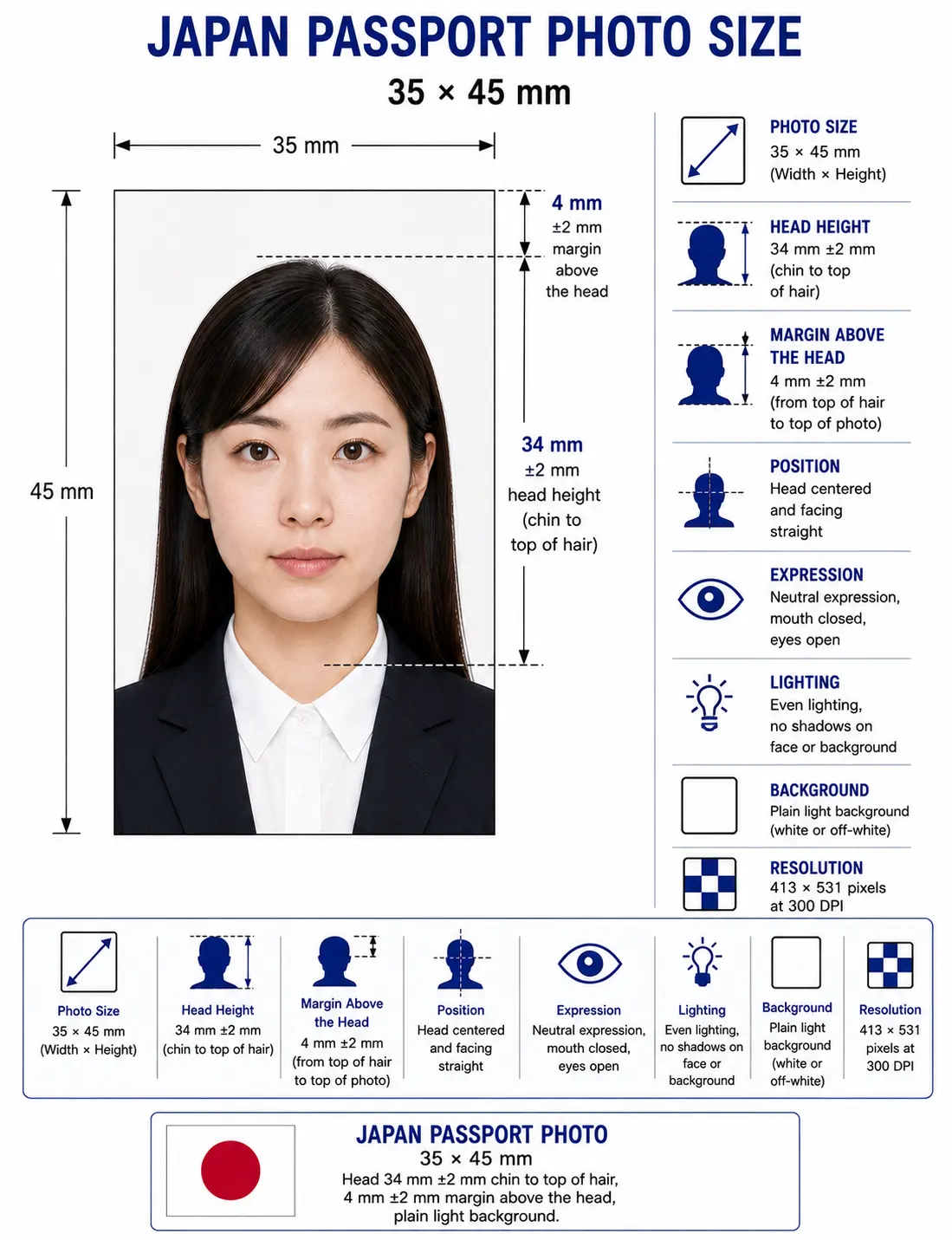
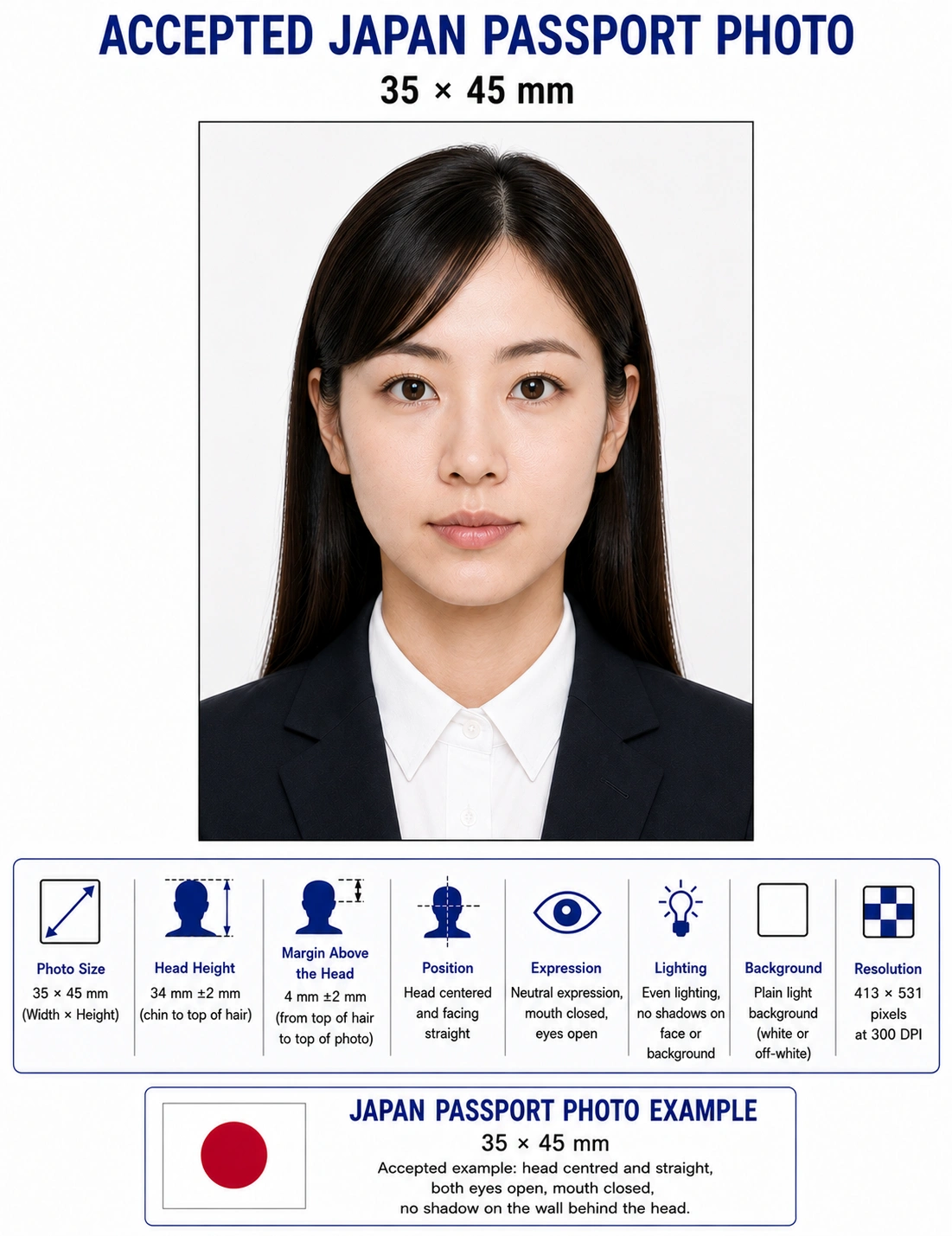
Japanese passports are issued under the authority of the Ministry of Foreign Affairs (MOFA, 外務省), with day-to-day applications handled by the passport centres (旅券センター) of each prefecture inside Japan and by embassies and consulates-general abroad. MOFA sets the photo standard nationally, which is why the same 35×45mm specification, the 34mm head height and the 4mm top margin apply whether you file in Tokyo, Osaka, or at a consulate overseas.
Japan issues two ordinary passport types: a 10-year passport with a red cover for adults, and a 5-year passport with a blue cover available at any age, including minors. The photo requirements are identical for both, and for both new issuance and renewal (切替申請). Because the passport photo is transferred directly onto the data page, passport centres examine it closely at intake — a non-compliant photo is caught at the counter, which means rebooking rather than a quick fix.
These are the core MOFA specifications your photo needs to meet for a Japanese passport application or renewal. Each rule links to the detailed standard in the passport photo rules library.
| Photo Size | 35mm × 45mm (3.5 × 4.5 cm) — width × height, borderless (縁なし) |
|---|---|
| Width | 35mm (413px at 300 DPI) |
| Height | 45mm (531px at 300 DPI) |
| Aspect ratio | 7 : 9 portrait |
| Background | Plain, light-coloured, single even tone (white preferred); no pattern, shadow, or object — see background colour rules |
| Lighting | Even and diffuse; no shadow on the face or the wall behind the head — see shadow rules |
| Head Size | 34mm ±2mm from chin to top of the hair (face fills roughly 70–80% of the height) — see head size rules |
| Face coverage | Roughly 70–80% of the frame height — see face size requirements |
| Head Position / Margin | 4mm ±2mm gap between the top of the hair and the top edge; head centred left-to-right |
| Eyes | Both eyes open, clearly visible and looking straight at the lens — see eyes requirements |
| Hair | Must not cover the eyes or obscure the outline of the face — see hair rules |
| Ears | Not required to be visible by MOFA, but the face outline must stay clear — see ears visibility rules |
| Head Coverings | Hats not permitted; religious or medical coverings accepted if the full face stays visible — see head covering rules |
| Resolution | 300 DPI minimum for print; 600 DPI (827 × 1063px) for high-quality capture — see resolution rules |
| File Format | JPEG, PNG or WEBP for digital upload; matte print for in-person submission |
| Copies required | One printed 35 × 45 mm photo in person, or one digital upload via Mynaportal |
| Print condition | Borderless, no creases, stains, glare or ink marks; face and outline undamaged |
| Glasses Rules | Removal recommended; if worn, no glare, no tint, frames must not cover the eyes — see glasses rules |
| Expression Rules | Neutral expression, mouth closed, both eyes open, face straight, no head tilt — see smile rules |
| Digital editing | Not permitted — no beauty filters, skin smoothing, slimming or tone adjustment |
| Photo Age | Taken within the last 6 months and reflecting current appearance |
| Digital Submission Rules | Mynaportal online photo around 600 × 730px; no heavy editing or beauty filters |
This is the detail that sets Japan apart from the US, UK, India, or Australia. MOFA doesn't simply give a head-height range and leave the rest to the photographer — it specifies two measurements that have to be right at the same time: the head length and the space above it. Miss either one and the photo is non-compliant, even if it looks perfectly normal on a phone screen.
The 35 × 45 mm frame converts to fixed pixel values depending on the resolution of the file. Japan uses two different targets: one for the printed photo handed over at a counter, and a smaller one for the Mynaportal upload.
| Target | Pixel size | Used for |
|---|---|---|
| 300 DPI | 413 × 531 px | Standard printed 35 × 45 mm photo |
| 600 DPI | 827 × 1063 px | High-quality capture and print archives |
| Mynaportal upload | Around 600 × 730 px | Online application and renewal |
| Below 300 DPI | Under 413 × 531 px | Not accepted — prints pixelated at 35 × 45 mm |
Upscaling a small photo to reach 413 × 531 does not work: interpolation invents pixels rather than detail, and the softness around the eyes and hairline fails the quality check. Shoot wide at full resolution and crop down instead. For conversions across every country standard see passport photo size in pixels, and for portal-by-portal file rules see the digital passport photo requirements guide. If your export is too heavy for an upload form, the compress guide covers reducing file size without dropping below the pixel minimum.
Need both the print file and the Mynaportal upload from one photo?
Create Japan Photo →Inside Japan, first-time applicants and most renewals are handled at a prefectural passport centre. A first application typically requires the application form, a copy of the family register (戸籍謄本), one compliant 35×45mm photo, and identity documents; renewals where the current passport is still valid generally need fewer documents. After the application is examined — staff often check the photo on the spot — the passport is usually ready for collection within about a week, and you return in person to pick it up.
Japanese nationals living abroad apply at the nearest embassy or consulate-general. Mail-in submission is generally not accepted, and you collect the passport in person. The 35×45mm photo standard is identical to the domestic one, so a photo prepared correctly works through either channel — the difference is the office, not the specification.
Japan has moved a growing share of passport processing online through Mynaportal (マイナポータル), the government portal linked to your My Number Card. Eligible renewals — and, increasingly, new applications — can be started digitally, with the photo and signature uploaded rather than handed over at a counter. For overseas residents, MOFA also provides a dedicated passport application app that captures the photo and reads the My Number Card's IC chip.
For online submission, the digital photo is generally expected at around 600 × 730 pixels, and heavy editing or beauty filters are not allowed — the face must look natural and match the live capture. The framing rules don't relax just because it's digital: the same 34mm head height, 4mm margin, plain background and neutral expression all still apply to the uploaded image.
Portrait mode, background blur and skin smoothing are the most common cause of a Mynaportal photo being refused, because they alter the facial geometry the check measures. Switch them off before you shoot rather than trying to undo them afterwards.
That's exactly where preparing your photo first helps. Generating a correctly proportioned file before you start the Mynaportal flow means the upload step won't bounce back for being the wrong size or poorly framed, which is one of the more common reasons an otherwise complete online application stalls.
Every child needs an individual passport photo, and the 35×45mm size, 34mm head height and 4mm margin apply at any age — there's no relaxed format for minors and no reduced head-height band for newborns. No other person may appear in the frame, so a parent's hands, a chair edge, a toy or a dummy will all cause a rejection.
For infants who can't yet sit or hold their head up, the accepted method is to lay the baby on a plain light-coloured sheet and photograph from directly above, keeping the head straight and centred. Shoot in soft, indirect daylight from the side of the room rather than under a ceiling light, which casts the shadow behind the head that fails the background check. A fully neutral expression is hard to guarantee with a baby, so the practical priorities are open, visible eyes, no other faces or hands in the shot, and an even background.
Because head height still has to land near 34mm, shoot wide and crop down rather than framing tightly in-camera — a tight shot on a small face leaves too few pixels once the 7:9 frame is applied. Full technique for newborns and toddlers is covered in the baby passport photo at home guide, and the two checks that fail most often on child photos are explained in the eyes requirements and shadow rules.
Photographing a child? Let the tool measure the 34mm head height for you.
Create Child Photo →Yes. A recent smartphone can produce a photo that meets MOFA's standard, as long as you control the framing, lighting and background — and especially the 34mm head height, which is the part home photos most often get wrong.
Use the rear camera rather than the selfie lens to avoid the facial distortion front cameras add, shoot at the highest resolution, and turn off portrait, beauty, and skin-smoothing modes, which MOFA treats as unacceptable editing.
Face soft, indirect daylight from a window, or use two lights at angles to cancel shadows on each side. A single overhead light casts shadows under the chin and nose that the biometric check flags.
Stand about a metre in front of a plain white or very light wall so no shadow falls behind your head. If your wall isn't ideal, that's fine — a compliant background can be applied automatically afterward.
Have someone shoot from roughly two metres away, or use a tripod and timer. Selfie-distance shots exaggerate the nose and forehead and throw off the head-height proportion the spec depends on.
The usual at-home errors are a head that ends up taller than 36mm because of hair volume, no margin left above the head, a slightly tilted face, an off-white or shadowed wall, and applying a filter that smooths the skin.
If you are applying in person at a prefectural passport centre or an embassy, printing is part of the specification rather than an afterthought. The photo is transferred onto the passport data page, so a print that is glossy, creased or slightly off-size is caught at the counter.
| Print resolution | 300 DPI — export at 413 × 531 pixels and disable fit-to-page scaling, which changes the physical size |
|---|---|
| Paper | Matte photo paper. Glossy stock can create glare under counter lighting and make a white background read as grey |
| Exact size | Print at precisely 35 × 45 mm, borderless — no white frame around the image |
| Copies per 4 × 6 inch sheet | Six 35 × 45 mm photos with cutting margins |
| Copies per A4 sheet | Around twenty, though only one is required for the application |
| Cutting | Guillotine or steel rule for square edges. Do not trim inside the printed border |
| Colour management | sRGB. Turn off printer auto-enhance, skin smoothing and colour correction |
| Handling | Let ink dry fully. Do not fold, staple or write on the face of the photo |
Printer settings, paper choice and cutting technique are covered in full in the print passport photo at home guide, and multi-copy sheet layout in the print sheet guide.
Japan shares the 35 × 45 mm size with its regional neighbours South Korea and Taiwan, but the head measurement differs, and China and the United States use entirely different formats. A photo prepared for one of these countries generally cannot be reused for another.
| Requirement | Japan | South Korea | China | United States |
|---|---|---|---|---|
| Dimensions | 35 × 45 mm (7:9) | 35 × 45 mm (7:9) | 33 × 48 mm (11:16) | 51 × 51 mm (1:1) |
| Pixels @ 300 DPI | 413 × 531 px | 413 × 531 px | 390 × 567 px | 600 × 600 px |
| Head height | 34 mm ±2 mm, chin to top of hair | 32–36 mm, chin to crown | 28–33 mm, chin to crown | 25–35 mm, chin to crown |
| Top margin | 4 mm ±2 mm (specified) | Not specified as a fixed value | Not specified as a fixed value | Not specified as a fixed value |
| Background | Plain light colour, white preferred | Plain white | Plain white | Plain white or off-white |
| Glasses | Strongly discouraged | Discouraged | Discouraged | Prohibited since Nov 2016 |
| Digital channel | Mynaportal, ~600 × 730 px | Online and in person | Exit-entry office online services | Online renewal, 600–1200 px square |
Taiwan and Singapore also use 35 × 45 mm, while Hong Kong uses 40 × 50 mm. The full worldwide reference is in passport size photo dimensions.
Use the upload widget above and choose a recent, sharp, front-facing photo — a rear-camera phone photo in even light is fine.
The tool detects your face and crops to Japan's exact 7:9 frame, sizing the head toward the 34mm target.
Your existing background is removed and replaced with a clean, even, shadow-free light tone.
Check the 34mm head height, the 4mm top margin, centring and expression against the MOFA spec before you export.
Save a digital file for a Mynaportal upload and a print-ready 35×45mm copy for a prefectural passport centre, both from one photo.
Each item below links to the detailed rule so you can confirm the exact tolerance before you submit. The full cross-country breakdown is in passport photo rejection reasons.
The Japan passport photo size is 35 mm wide by 45 mm tall (3.5 × 4.5 cm), borderless. At 300 DPI that equals 413 × 531 pixels, and at 600 DPI it equals 827 × 1063 pixels. MOFA applies the same size to both the 10-year and 5-year ordinary passport, and to new applications and renewals alike.
MOFA measures the head from the chin to the top of the hair at 34mm, with a tolerance of ±2mm, inside a 45mm-tall photo. A separate 4mm (±2mm) gap is required between the top of the hair and the top edge. This dual measurement is stricter than most countries, which specify only a head-height range.
One compliant 35 × 45 mm photo is required for an in-person application at a prefectural passport centre or an embassy. It must be borderless, free of creases, stains and glare, and taken within the last six months. An online Mynaportal application replaces the printed photo with a single digital upload.
A plain, light-coloured background is required, and white is the safest choice. It must be a single even tone with no pattern, gradient, object, or shadow, and it has to contrast clearly with your hair and clothing so the outline of your head stays visible. See the background colour rules.
Removing them is strongly recommended. If worn, the frames must not cover the eyes, the lenses must be untinted, and there can be no glare. Because lighting often creates reflections, most applicants simply take the photo without glasses.
Hats and decorative headwear are not permitted. A head covering worn for religious or medical reasons may be accepted provided the full face stays visible from the chin to the hairline and no shadow falls across the features. The 34mm head height is still measured to the top of the hair, not the top of the covering. See the head covering rules.
MOFA does not require both ears to be visible. What it does require is that hair must not cover the eyes and that the outline of the face stays clear, so a fringe over the eyebrows is a problem even though hidden ears are not. See the ears visibility rules.
No. A neutral expression with the mouth closed is required. Both eyes must be open and clearly visible, the face must point straight at the camera, and the head must not be tilted.
It must be taken within the last six months and reflect your current appearance. If your hairstyle, weight, or facial hair has changed noticeably, take a new photo rather than reusing an older one.
The 35 × 45 mm size, the 34mm head height and the 4mm top margin apply at any age, including newborns. No other person may appear in the frame, so a parent's hands, a chair edge, a toy or a dummy will all cause rejection. For infants who cannot hold their head up, lay the baby on a plain light sheet and photograph from directly above. See the child and infant rules section.
They are different documents handled by different offices. The passport photo is submitted by Japanese nationals through MOFA and its prefectural passport centres, while the Japan visa photo is submitted by foreign travellers to a Japanese embassy or consulate. Always prepare the photo against the published specification for the exact application you are filing.
Yes. For eligible renewals and applications through Mynaportal, you can submit a digital photo taken with a smartphone, typically around 600 × 730 pixels. The same framing, background and expression rules still apply, so the image must meet the 35×45mm proportions and head-position standard before it passes.
Print at 300 DPI on matte photo paper. A 4 × 6 inch sheet holds six 35 × 45 mm copies and an A4 sheet holds around twenty. Cut with a guillotine for square edges, do not trim inside the printed border, and avoid glossy paper because it can create glare under counter lighting. See the print at home guide.
It depends on the channel. Applying in person at a prefectural passport centre or an embassy usually needs a printed 35×45mm photo, while a Mynaportal online application needs a digital upload. Creating both from one source photo avoids a mismatch.
Don't let a head that's a couple of millimetres too tall, a missing top margin, or an off-white wall send you back to the passport centre. Upload your photo below and get a MOFA-ready 35×45mm result — correctly framed for both print and Mynaportal — in under a minute.
