
HM Passport Office Compliant

UK Passport Photo Maker Online

Direct Answer: The United Kingdom passport photo must be exactly 35 × 45 mm. The background must be light grey or cream, and your head must occupy 64% to 75% of the photograph. You must maintain a neutral expression with both eyes open.

Source: Official HM Passport Office photo requirements

Create UK Passport Photo Free
HM Passport Office compliant Online & printed applications Digital photo code ready Works on mobile No registration required

UK Passport Photo Size (Quick Answer)

A UK passport photo must be 35mm wide by 45mm tall with the head measuring 29–34mm from chin to crown, on a plain light grey or cream background — not white. Digital photos need a minimum of 600×750 pixels as a JPEG between 50KB and 10MB, taken within the last month.

Photo size35 × 45 mm (3.5 × 4.5 cm / 1.38 × 1.77 in)
Head height29 – 34 mm chin to crown, about 64–76% of the frame
BackgroundPlain light grey or cream — pure white is refused
Digital minimum600 × 750 pixels
Digital fileJPEG, 50 KB to 10 MB
Printed copies (postal)Two identical 35 × 45 mm photos, no border
CountersignatureRequired for first adult, child and replacement applications
ExpressionNeutral, mouth closed, both eyes open
Photo ageTaken within the last month
Issuing authorityHM Passport Office

Every rule is explained in depth in the passport photo rules library, and other national standards are indexed in the requirements by country hub.


UK Passport Photo Visual Reference

The diagram marks every measurement HM Passport Office checks: the 35 × 45 mm frame, the 29–34 mm chin-to-crown head height, and the plain light backdrop behind the head.
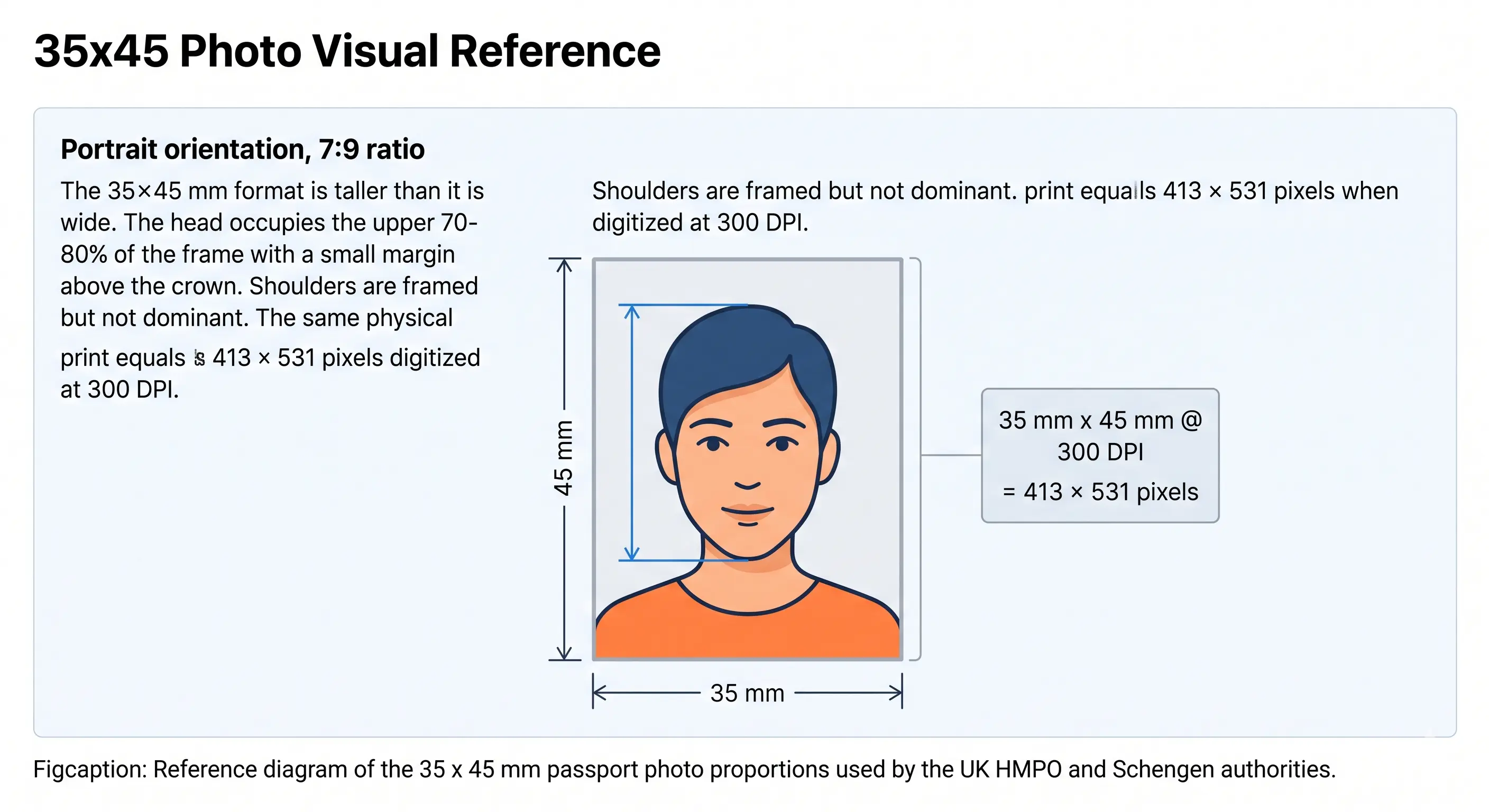
UK passport photo size diagram showing a 35 mm wide by 45 mm tall frame with the head measuring 29 to 34 mm from chin to crown
UK passport photo size diagram · 35 × 45 mm
UK passport photo proportions: 35 × 45 mm at a 7:9 portrait ratio, head 29–34 mm chin to crown, plain light grey or cream background. The same standard is used across the 35×45 mm format by most of Europe and Australia.

UK Passport Photo Requirements

The HM Passport Office has strict rules for passport photographs. Every requirement below must be met or your application will be delayed. Each rule links to the detailed standard in our passport photo rules library.

Photo Size35mm × 45mm (standard UK passport photo size)
Head Height29mm to 34mm from chin to crown — see head size rules
Face Coverage64% to 76% of the 45mm frame height — see face size requirements
BackgroundPlain light grey or cream — no patterns, shadows, or objects. See background colour rules
LightingEven and diffuse, no shadow behind the head — see shadow rules
Head PositionCentred, facing forward, looking straight at the camera
ExpressionNeutral with mouth closed — no smiling or showing teeth. See smile rules
EyesOpen, clearly visible, no red-eye — see eyes requirements
HairMust not cross the face or cover the eyes — see hair rules
EarsNot mandatory for UK photos, but the face outline must be clear — see ears visibility rules
GlassesNot recommended; tinted lenses strictly not allowed. See glasses rules
Head CoveringsNot allowed unless for religious or medical reasons. See head covering rules
ColourFull colour — black and white photos not accepted
Digital AlterationNot permitted — no filters, skin smoothing, or retouching
Photo AgeTaken within the last month, must be a true likeness
File Format (digital)JPEG only
File Size (digital)Between 50KB and 10MB
Resolution (digital)Minimum 600×750 pixels — see resolution rules
Printed Copies (postal)Two identical photos, 35 × 45 mm, no border
Print RequirementsPhotographic paper, plain white, no borders, in colour
CountersignatureRequired for a first adult passport, any child passport, and lost or stolen replacements
The countersignature rule catches people out. If you are applying for a first adult passport, a child passport, or replacing one that was lost or stolen, someone must confirm your identity. On a postal application they write and sign a declaration on the back of one of your two photos. On an online application they confirm your identity digitally instead, so nothing is written on the photo. Check which applies to your application type on GOV.UK before you post anything.

UK Passport Photo Size in MM, CM, and Inches

The official British passport photo dimensions are 35mm wide by 45mm tall. Here is how that converts across every unit of measurement you might need:

35 × 45 mm
Millimetres (official UK spec)
3.5 × 4.5 cm
Centimetres
1.38 × 1.77 in
Inches
Key point: The UK passport photo size is different from the US 2×2 inch (51×51 mm) standard and from the Canadian 50×70 mm standard. If you are applying for more than one country you will need separate photos in different dimensions. The full worldwide reference is in passport size photo dimensions.

UK Passport Photo Size in Pixels

The minimum resolution for a digital UK passport photo submitted via the GOV.UK online application is 600×750 pixels. For high-quality print output, 300 DPI or 600 DPI is recommended.

DPI (Quality) Pixels (Width × Height) Use Case
Min GOV.UK minimum 600 × 750 px Online application only
200 DPI 276 × 354 px Low quality — not recommended
300 DPI 413 × 531 px Standard print quality
600 DPI 827 × 1063 px High-quality print / professional lab

Our tool exports at 600 DPI by default, giving you a photo that meets both the online digital submission requirement (600×750px minimum) and the quality needed for high street printing at Boots, Asda, or a professional photo lab. There is no published pixel maximum for GOV.UK, but the file must stay under 10MB. Full conversions for every country are in passport photo size in pixels.
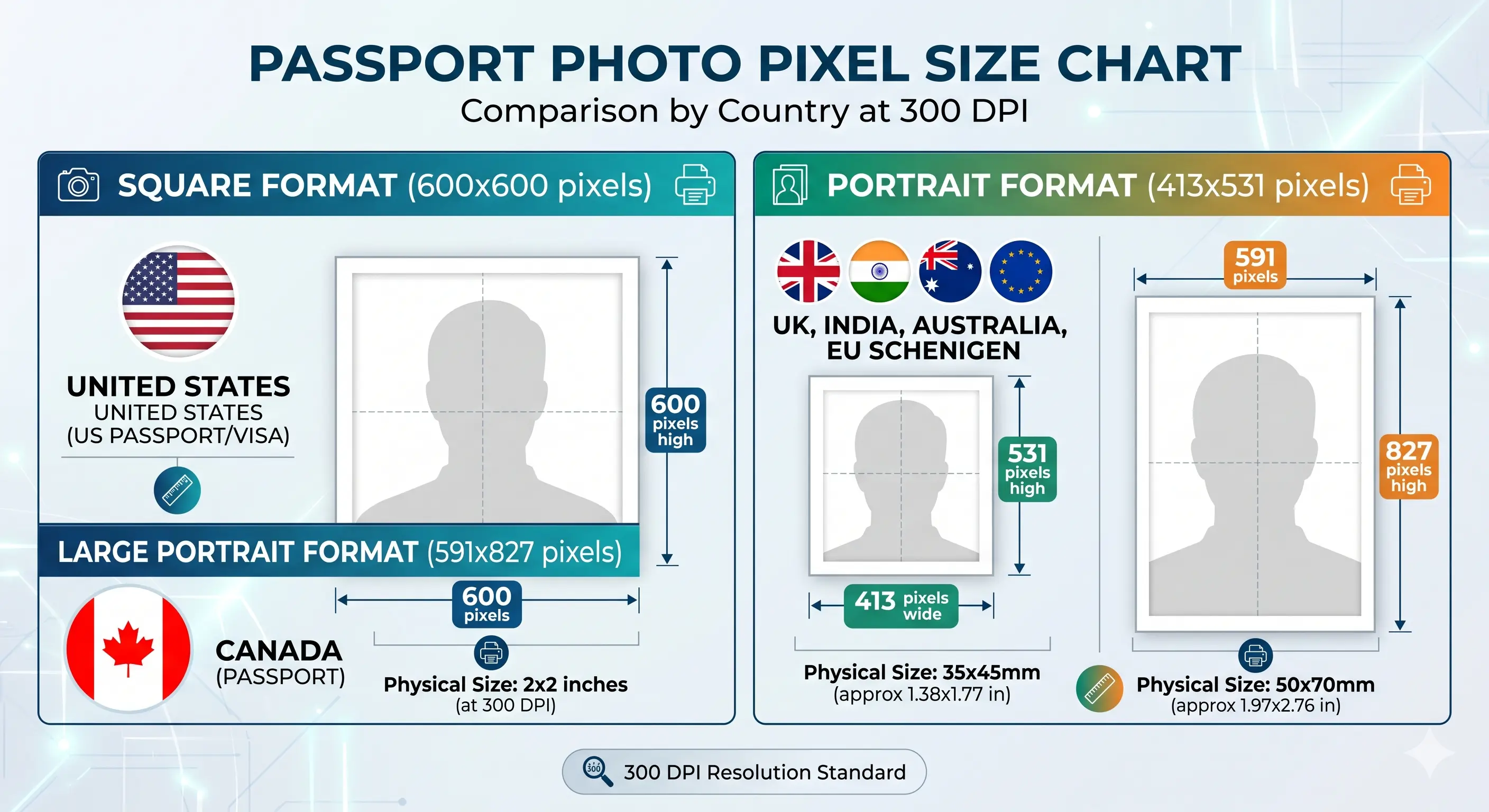
Passport photo pixel size chart showing 413 by 531 pixels for the UK 35x45 mm standard alongside 600 by 600 for 2x2 inch and 591 by 827 for 50x70 mm at 300 DPI
Passport photo pixel size chart by country
Pixel dimensions at 300 DPI across the most requested standards. If your export is too large for a portal, the reduce file size guide covers it; to hit an exact pixel target see the resize guide.

UK Digital Passport Photo Requirements

If you are applying for a UK passport online through GOV.UK, you will need to supply a digital photo that meets these specific technical requirements. The online system will reject files that do not comply.

File Format: JPEG Only

PNG, HEIC, WEBP, and other formats are not accepted. If your phone saves HEIC, convert first with the HEIC to JPEG guide.

File Size: 50KB to 10MB

The file must be no smaller than 50KB and no larger than 10MB. Very small files are usually too low in quality and are refused for sharpness.

Minimum 600 × 750 Pixels

The image must be at least 600 pixels wide and 750 pixels tall. Upscaling a smaller image does not work — the sharpness check detects it.

Full Colour Photo

Black and white or greyscale images are rejected. The photo must be in colour, taken with the white balance set correctly.

Taken Within the Last Month

Digital applications require a recent photo, taken no longer than one month before submission, reflecting your current appearance.

Digital Photo Code (Optional)

If a photographer or chemist issues you a code instead of a printed photo, you can enter this code during the online GOV.UK application instead of uploading an image file. Codes expire, so use it promptly.

Portal-by-portal digital rules across every country are covered in the digital passport photo requirements guide.


How to Create a UK Passport Photo Online

Follow these five steps to produce a fully compliant British passport photo using our free online tool. The whole process takes less than two minutes.

Take or Upload a Photo

Take a recent portrait against a plain wall in good natural light, or use an existing photo from your phone, tablet, or computer. JPG, PNG, and HEIC are all accepted.

Auto-Crop to 35×45mm

Our tool automatically detects your face and crops the image to the official UK passport photo size with the correct head height of 29–34mm from chin to crown. The crop guide explains how the 7:9 ratio and head height are applied together.

Replace the Background

Our AI removes your original background and replaces it with a compliant light grey or cream backdrop, eliminating shadows or objects that would cause rejection.

Review Compliance Checks

The tool automatically checks head position, face visibility, expression detection, lighting evenness, and image quality — so you know your photo is ready before you download it.

Download or Print

Download a digital JPEG for GOV.UK online applications, or save a 6×4 inch printable sheet with multiple copies for postal applications and high street printing.


UK Passport Photo Compliance Checklist

Run through this before you submit. The accepted column is the full pass criteria; the failure column lists the triggers, each explained in detail in the rejection reasons section below.

Accepted — full pass criteria
  • Plain light grey or cream background with no shadows
  • Head centred and facing forward, looking straight at the camera
  • Neutral expression, mouth closed, no teeth showing
  • Both eyes open and clearly visible
  • No hair across the face or covering the eyes
  • Head height between 29mm and 34mm in a 45mm photo
  • No glasses (or clear prescription lenses with no glare)
  • Full colour, sharp, and well-lit with no red-eye
  • At least 600×750 pixels, JPEG, 50KB–10MB
  • Taken within the last month
  • No filters, retouching, or beauty alterations
  • Two identical printed copies if applying by post
Failure triggers — see details below
  • White or dark background
  • Shadow behind the head
  • Smiling or teeth visible
  • Eyes closed or looking away
  • Hair across the face
  • Head outside 29–34mm
  • Glare or tinted lenses
  • Below 600×750 pixels
  • Wrong file format or size
  • Photo over one month old
  • Filters or retouching applied
  • Red-eye from flash

Common Reasons UK Passport Photos Are Rejected

Every failure below can be avoided before you submit. The full cross-country breakdown is in passport photo rejection reasons.

Wrong background colour

Many people use a white wall thinking it is acceptable. The UK requires light grey or cream — not white. Pure white is too bright and creates contrast issues. Patterned or coloured backgrounds are immediately rejected. See the background colour rules.

Shadow behind the head

Standing too close to the wall causes a visible shadow behind your head. The HM Passport Office treats shadows as background obstruction. Stand at least 50cm from the wall to eliminate this. See the shadow rules.

Smiling or showing teeth

The UK requires a completely neutral expression. Even a slight, closed-mouth smile can cause rejection. The photo should look natural but expressionless. See the smile rules.

Hair covering the face

Fringes, side-swept hair, or loose strands covering eyebrows, eyes, or any part of the face outline are not allowed. Tie hair back or pin it away before taking the photo. See the hair rules.

Incorrect head size

The head from chin to crown must measure between 29mm and 34mm within the 45mm frame. Photos taken too close make the head too large; photos from too far away make it too small. See the head size rules.

Glasses glare or tinted lenses

Glasses are strongly discouraged for UK passport photos. If you must wear them for medical reasons, the frames must not cover any part of the eyes, the lenses must be completely clear, and there must be no glare at all. See the glasses rules.

Non-religious headwear

Hats, caps and fashion head coverings are refused. Religious or medical head coverings are permitted provided the full face from chin to forehead stays visible with no shadow. See the head covering rules.

Low resolution or pixelation

Photos below 600×750 pixels for digital applications, or printed photos that appear blurred or pixelated, do not meet the GOV.UK technical requirements. Upscaling a small image does not help. See the resolution rules.

Wrong file format or file size

Only JPEG is accepted, between 50KB and 10MB. A HEIC file straight from an iPhone is refused, and an over-compressed file below 50KB is refused for being too small. Use the reduce file size guide if you need to trim a large export.

Filters and digital alterations

Any beauty filter, skin smoothing, blemish removal, colour correction, or AI retouching that changes your appearance is not allowed. Your passport photo must be an accurate, unedited representation of how you look in real life.

Red-eye effect

Photos taken with flash in low light often result in red-eye. This is easily avoided by using natural light instead of flash. If red-eye is present, our tool can correct it without altering your appearance.

Photo taken more than one month ago

Your photo must reflect your current appearance and must have been taken within the last month. If you have significantly changed your hair, grown a beard, or changed your appearance, you need a new photo even if you have an existing compliant one from two months ago.

Missing countersignature on a postal application

For a first adult passport, a child passport, or a lost or stolen replacement, one of your two printed photos must carry the countersignatory's signed declaration on the back. Sending two unsigned photos delays the application. Online applicants have their identity confirmed digitally instead.


Baby & Child Passport Photos — UK Rules

Children can hold their own UK passport from birth. The rules for baby and child passport photos are mostly the same as for adults, but with some important exceptions depending on the child's age.

Baby Passport Photos (Under 1 Year)

  • Plain light grey or cream background required
  • Head must be facing forward where possible
  • Eyes do not need to be open
  • Neutral expression is not required
  • Same 35 × 45 mm size and 29–34 mm head height
  • No other person or hand must be visible in the photo
  • Baby must not be in a car seat or lying on a patterned surface
  • Dummy or pacifier must not be in the photo
  • No toys or props in frame

Tip: Lay the baby on a white or cream sheet and photograph from directly above. Crop the sheet out using our tool and replace it with a compliant light grey background. Full technique is in the baby passport photo at home guide.

Child Passport Photos (1–17 Years)

  • All standard adult rules apply from age 1 upwards
  • Eyes must be open and clearly visible
  • Neutral expression with mouth closed
  • Plain light grey or cream background
  • Countersignature required for every child passport
  • No other person must appear in the photo
  • No toys, accessories, or props visible
  • No school uniforms with logos visible

Tip: Sit the child against a plain light wall. Use natural light and ask them to look at a spot slightly above the camera to get a forward-facing gaze without tension. A child passport must be renewed every five years, so a fresh photo is needed each time.


Printing a UK Passport Photo

A postal application needs two identical printed photos, so printing is part of the specification rather than an afterthought. A 35 × 45 mm photo prints six-up on standard 6 × 4 inch photo paper, giving you spares.

Printed sizeExactly 35 × 45 mm with no border
Copies neededTwo identical photos for a postal application
Print resolution300 DPI minimum — disable fit-to-page and auto-scaling
PaperPlain white photographic paper, glossy or matte. Plain copier paper is refused
Copies per 6 × 4 inch sheetSix 35 × 45 mm photos with cutting margins
CuttingGuillotine or steel rule for square edges. Do not cut inside the printed border
Colour managementsRGB. Turn off printer auto-enhance and colour correction
Back of photoLeave blank unless a countersignatory must sign one copy
High street optionsBoots Photo, Asda Photo, Snappy Snaps and Tesco all print 6 × 4 inch sheets

Printer settings, paper choice and cutting technique are covered in full in the print passport photo at home guide, and multi-copy sheet layout in the print sheet guide.


Tips for Taking a Better UK Passport Photo at Home

Most UK passport photo rejections are caused by problems that are easy to prevent. These practical tips will help you take a compliant photo on your first attempt using just a smartphone.

Use natural daylight facing a window Stand facing a window during daylight hours. Natural light is diffused, flattering, and prevents the harsh shadows on the face and behind the head that artificial light often creates.
Stand at least 50cm from the wall Distance between you and the wall behind you eliminates the shadow that causes one of the most common rejection reasons. Our background-removal tool handles the rest.
Wear clothing that contrasts with the background Avoid white, cream, or pale grey tops that blend into the background. Solid darker colours — navy, black, burgundy, deep green — work best and make your face the focal point.
Keep the camera at exact eye level Hold the phone or camera level with your eyes, not below chin height. Looking down changes the angle of your face and the proportions of your head, which can cause the head-height check to fail.
Remove glasses if at all possible The HM Passport Office now strongly recommends photos taken without glasses. If you need to wear them for medical reasons, remove any glare by tilting your frames very slightly downward.
Ask someone else to take the photo or use a timer Selfies taken at arm's length distort facial proportions because of the wide-angle effect. A tripod with a self-timer, or having someone else take the photo at distance, gives a more accurate, compliant result.
Turn off portrait mode and beauty filters Portrait blur, skin smoothing and face-slimming modes are on by default on many phones. They alter facial geometry, are detected, and are explicitly not permitted. Switch to the plain photo mode before you shoot.
Wear your normal everyday makeup Heavy or dramatically different makeup can change your appearance enough that your passport no longer looks like you at the airport. Stick to the look you wear every day.
Do not use flash or ring lights Flash creates red-eye and uneven lighting that fails quality checks. Ring lights can cause glare on glasses and overexpose the centre of the face. Natural window light is the best option in every case.

UK Passport Photo Size Compared to Other Countries

If you are travelling internationally and need passport photos for more than one country, the sizes and background rules differ. Here is a comparison so you know exactly what you need.

Country Photo Size (mm) Pixels @ 300 DPI Head Height Background
United Kingdom 35 × 45 mm 413 × 531 px 29 – 34 mm Light grey or cream
Australia 35 × 45 mm 413 × 531 px 32 – 36 mm Plain white or off-white
EU / Schengen 35 × 45 mm 413 × 531 px 32 – 36 mm Light grey
Germany 35 × 45 mm 413 × 531 px 32 – 36 mm Light grey
Ireland 35 × 45 mm 413 × 531 px 32 – 36 mm Light grey or off-white
United States 51 × 51 mm 600 × 600 px 25 – 35 mm Plain white or off-white
Canada 50 × 70 mm 591 × 827 px 31 – 36 mm Plain white
India 51 × 51 mm 600 × 600 px 25 – 35 mm Plain white
China 33 × 48 mm 390 × 567 px 28 – 33 mm Plain white
The UK and Australia trap: both use 35×45mm, but Australia requires a white or off-white background and a 32–36mm head height against the UK's light grey or cream and 29–34mm. A UK photo is not valid for an Australian application and vice versa. Browse every national standard in the requirements by country hub, or compare visa standards such as the Schengen visa photo and the China visa photo.

UK Passport Photo FAQs

Everything you need to know about British passport photos, digital submissions, printing, and special cases.

Size & Specification

What is the official UK passport photo size?
The official UK passport photo size is 35mm wide by 45mm tall (3.5cm × 4.5cm, or 1.38 × 1.77 inches). The head must measure between 29mm and 34mm from chin to crown within that 45mm frame, which is roughly 64% to 76% of the frame height. This size applies to both online digital submissions and printed photos for postal applications.
What is the UK passport photo size in pixels?
The minimum resolution for a digital UK passport photo submitted via GOV.UK is 600×750 pixels. For printed photos at 300 DPI, the equivalent is 413×531 pixels. Our tool exports at 600 DPI (827×1063 pixels) for the highest quality output that works for both digital and print applications. There is no published pixel maximum, but the file must stay under 10MB.
What background colour is required for a UK passport photo?
Plain light grey or cream. Pure white is not accepted because it does not give enough contrast against the face and hair — this is the single biggest difference between UK and US passport photo rules, and a very bright white wall will result in rejection. The background must be completely plain: no patterns, no gradients, no furniture, and no shadows behind the head. Our tool replaces your background with the correct shade automatically, so the colour of the wall behind you does not matter.
Is the UK passport photo size the same as the Australian passport photo size?
Both use a 35×45mm photo size, but the other requirements differ. Australian passport photos require a white or off-white background rather than light grey or cream, and the head height requirement is 32–36mm compared to the UK's 29–34mm range. Always use the correct country-specific specification when preparing photos for different passports.

Appearance & Compliance

Can I smile in a UK passport photo?
No. The HM Passport Office requires a completely neutral expression with the mouth closed. You must not show any teeth. A relaxed, neutral face is correct. Smiling is one of the most common reasons UK passport photos are rejected — even a slight, natural smile can trigger a failure.
Can I wear glasses in a UK passport photo?
The HM Passport Office strongly recommends photos taken without glasses. If you must wear glasses due to a medical reason, there must be no glare on the lenses, the frames must not cover your eyes, and the lenses must be completely clear and untinted. In practice, it is always safer to remove glasses for your passport photo to avoid rejection.
Can I wear a hijab or religious head covering in a UK passport photo?
Yes. Head coverings worn for religious or medical reasons are permitted. Your full face from chin to top of your forehead must still be clearly visible against the light grey or cream background. The covering must not cast any shadows on your face. Head coverings worn for non-religious fashion reasons are not permitted.
What clothes should I wear for a UK passport photo?
There are no specific clothing rules for UK passport photos, but avoid white, cream, or light grey tops that blend into the required background colour. Solid, darker colours such as navy, black, burgundy, or forest green work best. Do not wear uniforms, hats, or accessories that obscure your face or neck. Clothing with visible logos or patterns is allowed but not recommended.
Can I wear makeup in my UK passport photo?
Yes, everyday makeup is fine and is not considered digital alteration. However, heavy stage makeup, dramatic contouring, or unusual looks that significantly change your appearance compared to how you normally look in daily life could cause problems at airport identity checks. Stick to your usual everyday makeup for the most accurate passport photo.
Can I edit my passport photo or remove blemishes?
No. Any digital alteration that changes your appearance — including beauty filters, skin smoothing, blemish removal, teeth whitening, eye brightening, or any AI enhancement — is explicitly not allowed under HM Passport Office rules. Your photo must be an accurate, unedited representation of your current appearance. Minor technical adjustments like correcting red-eye are generally acceptable.
Does my passport photo need to be in colour?
Yes. UK passport photos must be in full colour. Black and white or greyscale photos are rejected. If your camera is set to a black and white mode, switch it back to colour before taking the photo. Our tool also checks colour output before you download.
How recent must a UK passport photo be?
Your passport photo must have been taken within the last month before you submit your application, and it must reflect your current appearance. A photo from three months ago is not acceptable even if it is technically compliant in every other way. If you have recently grown or removed a beard, significantly changed your hair colour or length, or made any other notable change to your appearance, you must take a new photo even if you have a compliant photo from just a few weeks ago that predates the change.

Application & Submission

How many photos do I need for a UK passport application?
A postal application normally requires two identical printed photos measuring 35mm by 45mm with no border. An online application through GOV.UK requires one digital photo upload or one digital photo code instead. Always confirm the exact number stated on your application form before you post it.
Does my UK passport photo need to be countersigned?
For a first adult passport, a child passport, or a replacement for a lost or stolen passport, a countersignatory must confirm your identity. On a postal application they write and sign a declaration on the back of one of your two photos. On an online application they confirm your identity digitally instead, so nothing is written on the photo. Check the current rule on GOV.UK for your specific application type.
What file format is required for an online UK passport application?
Digital photos submitted via GOV.UK must be in JPEG format. The file must be between 50KB and 10MB in size and at least 600×750 pixels. PNG, HEIC, WebP, and other formats are not accepted by the GOV.UK passport application system. Our tool always exports a JPEG that meets these technical requirements.
What is a digital passport photo code and how does it work?
When you have your passport photo taken at a participating pharmacy, post office, or photo studio, they may give you a digital code instead of — or in addition to — a printed photo. You can enter this code during your online GOV.UK passport application to supply your photo digitally without uploading a file. The code is usually valid for a limited period so use it promptly.
What happens if my UK passport photo is rejected?
If you submit an application with a non-compliant photo, HM Passport Office will contact you and ask you to provide a new photo. This adds delays to your application — typically one to two additional weeks. If you are applying close to your travel date, a rejected photo can be very disruptive. Checking compliance with a digital tool before you apply removes this risk.

Taking & Printing

Can I take a UK passport photo on my phone?
Yes. Modern smartphones have sufficient camera resolution for a UK passport photo. Use the rear-facing camera rather than the front camera, ask someone to take the photo for you or use a timer and tripod, stand in natural daylight facing a window, switch off portrait mode and any beauty filter, and use our online tool to crop and check the image against all UK requirements before submitting.
Can I use a selfie for a UK passport application?
Selfies are not recommended. The close distance between your face and the front camera creates a wide-angle distortion that changes facial proportions and often causes the 29–34mm head-size check to fail. It is better to have someone else photograph you from a normal distance, or to set your phone on a tripod or flat surface with a self-timer.
Can I print my UK passport photo at home?
Yes, for postal applications you can print at home if you have a colour photo printer and plain white photographic paper. The printed photo must be 35mm wide by 45mm tall with no border, printed at 300 DPI or higher. Disable any fit-to-page scaling, which changes the physical size. Alternatively download our 6×4 inch print sheet and have it printed at a high street photo shop.
Can I print my UK passport photo at Boots?
Yes. Boots Photo is one of the most convenient and affordable options for printing a UK passport photo from a digital file. Download your cropped, compliant JPEG or the 6×4 inch print sheet from our tool and upload it to the Boots Photo website, or take the image to your nearest Boots store. The cost is typically under £1 for a 6×4 inch print compared to £7–£10 for a Boots passport photo booth. Asda Photo, Snappy Snaps and Tesco offer the same service.

Babies & Children

Can babies close their eyes in a UK passport photo?
Yes. For babies under one year old, the eyes do not need to be open. Babies also do not need to have a neutral expression — they can appear natural. However, no other person's hands or body must appear in the photo, the background must still be plain light grey or cream, no dummy or toy may be visible, and the baby's face must be the clear focus of the image.
Do children follow the same UK passport photo rules as adults?
Children aged one and over must follow all the same rules as adults: plain background, neutral expression, eyes open and visible, facing forward. The only relaxation is for babies under one year, who do not need eyes open or a neutral expression. All children must appear alone in the photo — no parent, hand, or other person should be visible — and every child passport application requires a countersignatory.

Official Sources & References

Last reviewed:
Specifications on this page are compiled from publicly available HM Passport Office guidance and the ICAO Doc 9303 biometric photograph standard. Requirements can change, and rules differ between postal and online applications — particularly the countersignature and photo-count rules. Always confirm the current specification on GOV.UK for your application type before you submit.

Ready to Create Your UK Passport Photo?

Upload one photo and download a fully compliant British passport photo — correct 35×45mm size, 29–34mm head height, and the required light grey or cream background — in under a minute. No software to download, no account required, and no queuing at a photo booth.

Create UK Passport Photo Free

Related UK Passport Photo Resources

Learn more about UK passport photo requirements, sizes, and related passport or visa photo guides.