Create a fully compliant Dutch passport photo that meets every requirement from the Ministerie van Buitenlandse Zaken — sized to 35×45mm with correct biometric framing, ready to print or submit.
A Netherlands passport photo must be 35 mm wide by 45 mm tall on a plain white background, with the face measuring 32–36 mm from chin to crown and the eye line 30–36 mm up from the bottom edge. At 300 DPI that equals 413 × 531 pixels. Glasses are not permitted, and the photo must be no more than 6 months old.
| Requirement | Value |
|---|---|
| Photo size | 35 × 45 mm (3.5 × 4.5 cm), tolerance ±1 mm |
| Pixels @ 300 DPI | 413 × 531 px |
| Aspect ratio | 7 : 9 portrait |
| Background | Plain white (#FFFFFF) or very light grey |
| Face height (chin to crown) | 32 – 36 mm, about 71–80% of the frame |
| Eye line from bottom edge | 30 – 36 mm |
| Glasses | Not permitted since 2021 |
| Expression | Neutral, mouth closed, both eyes open |
| Age of photo | Within the last 6 months |
| Copies required | One printed photo at the gemeentehuis |
| Issuing authority | Ministerie van Buitenlandse Zaken, via your gemeente |
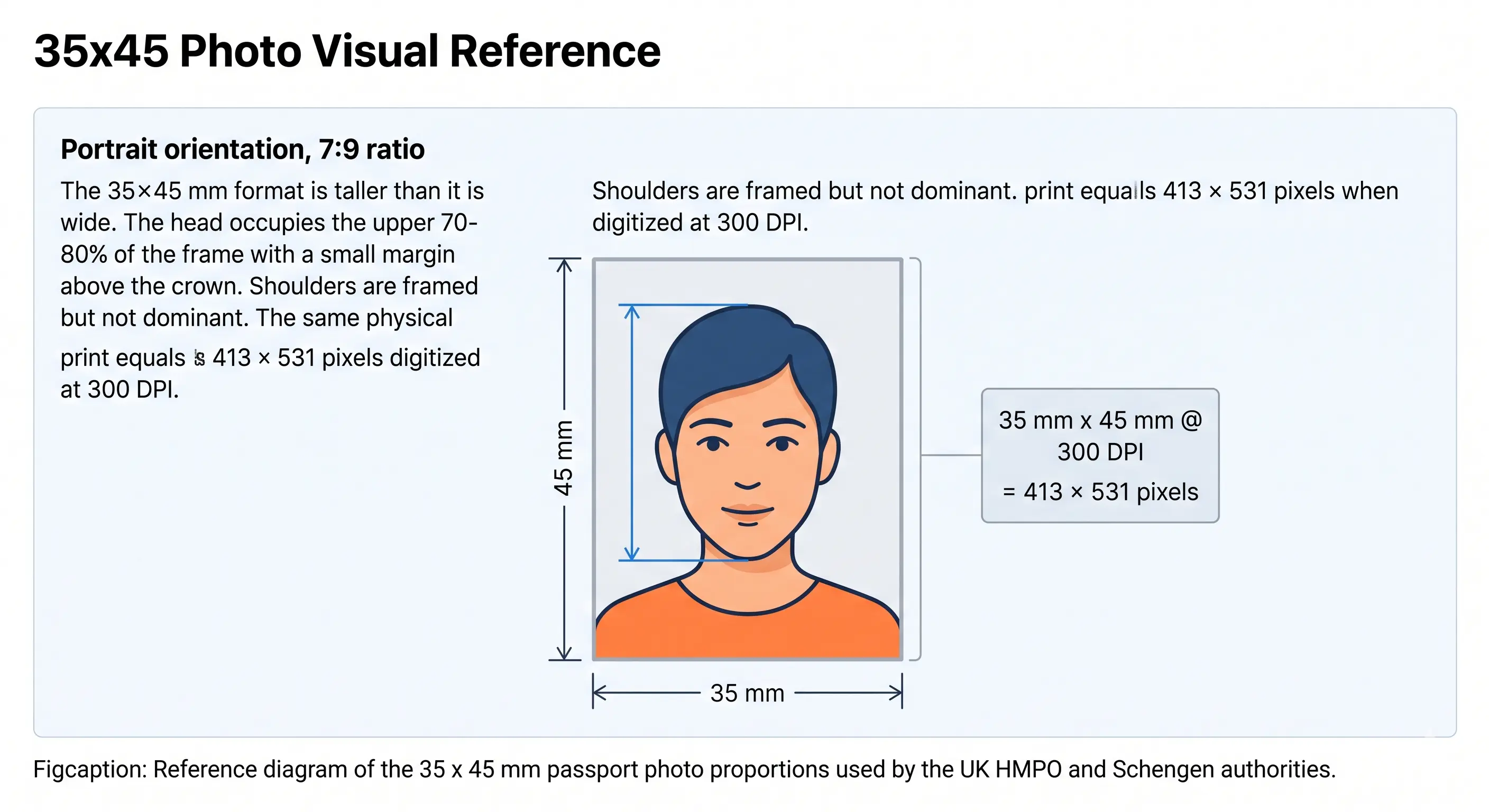
The Netherlands uses the 35 × 45 mm format shared across the Schengen area. The diagram below marks the frame dimensions and the biometric zone the Dutch production system measures: face height of 32–36 mm within the 45 mm total, with a small margin above the crown.
Anyone applying for a Dutch passport — including renewals, first-time applicants, and minors — must submit a photo that satisfies the biometric specifications set by the Ministerie van Buitenlandse Zaken (Ministry of Foreign Affairs). Applications are handled through your local gemeentehuis (municipality office) or, for Dutch nationals abroad, via an embassy or consulate.
Photos are routinely rejected at the counter for reasons that are easy to miss: a background that reads as off-white under the scanner, a face that sits a few millimetres too low, a slight smile, visible shadows, red-eye, or a photo more than six months old. Glasses have not been accepted since 2021.
Getting these details right before your appointment at the gemeente avoids a rebooked appointment and a delayed passport. The Passport Photo Maker tool below handles cropping, biometric framing, and print formatting automatically — no guesswork required. Every underlying rule is explained in depth across the passport photo rules and standards library, and every national standard is indexed in the requirements by country hub.
Dutch passport photos are rejected more often than most applicants expect. The face may be too low in the frame. The background, perfectly white to the human eye, reads as off-white under the scanner. A slight smile disqualifies the image under ICAO biometric rules. Manual cropping and home printing rarely produce consistent results.
Passport Photo Maker solves this by automatically centering your face within the 35×45mm frame, enforcing the 32–36mm face-height rule, and removing background colour to a compliant white — all in seconds.
Upload your photo here
JPG or PNG · Any device · No account needed
These specifications are published by the Ministerie van Buitenlandse Zaken and enforced at every Dutch gemeentehuis and overseas diplomatic post. Each rule links to the detailed standard in the passport photo rules library.
| Requirement | Specification | Notes |
|---|---|---|
| Photo size | 35 × 45 mm (3.5 × 4.5 cm) | Width × Height, tolerance ±1 mm. Same size for the Dutch identity card. |
| Aspect ratio | 7 : 9 portrait | See the crop guide for applying it. |
| Face height (chin to crown) | 32–36 mm | ICAO biometric zone. See head size rules. |
| Face coverage | About 71–80% of frame height | See face size requirements. |
| Eye line | 30–36 mm from the bottom edge | Both eyes open and level. See eyes requirements. |
| Background | Plain white or very light grey | No shadows, patterns, or graduated tones. See background colour rules. |
| Lighting | Even, no shadows on face or background | No red-eye, no harsh flash reflections. See shadow rules. |
| Resolution | 300 DPI minimum for print | 600 DPI recommended for archival print quality. See resolution rules. |
| Digital dimensions | Minimum 413 × 531 px | Equivalent to 35 × 45 mm at 300 DPI. 826 × 1062 px at 600 DPI. |
| File format (digital) | JPEG / JPG | sRGB colour space. Greyscale is not accepted. |
| Glasses | Not permitted | Banned since 2021 per updated Dutch biometric policy. See glasses rules. |
| Expression | Neutral, mouth closed | Eyes fully open, looking straight at camera. See smile rules. |
| Hair | Must not cover the eyes or face outline | See hair rules. |
| Ears | Not mandatory, but the face contour must be distinct | See ears visibility rules. |
| Head coverings | Not permitted | Exception: religious or medical coverings that don't obscure the face. See head covering rules. |
| Digital editing | Not permitted | No filters, portrait blur, skin smoothing or tone adjustment. |
| Age of photo | Maximum 6 months old | Must reflect current appearance. |
| Copies required | One printed photo | Bring a spare — a refused photo cannot be retaken on site. |
Need a 413 × 531 pixel Dutch-ready file with a compliant white background? Open the Passport Photo Maker and get one in under a minute.
The Netherlands permits white or very light grey, but the tolerance is narrower than the wording suggests. The automated scanner measures background luminosity, and a grey that looks acceptable to the eye can register outside range and produce a visible boundary at the photo edges. Cream, beige and warm off-white fail routinely because the scanner reads the colour cast rather than the brightness. In practice, pure white is the only shade that passes consistently.
Your head must be centred horizontally, with the top of the head close to but not touching the top edge. Two measurements are checked independently: the chin-to-crown distance of 32–36 mm, and the eye line at 30–36 mm from the bottom edge. A photo can have a correct face height and still fail because the eyes sit too low. Tilting the head, raising the chin, or turning even a few degrees off-centre constitutes a biometric framing failure.
In 2021 the Netherlands aligned fully with updated ICAO Document 9303 guidelines and removed all exceptions for corrective eyewear. Even thin, frameless glasses are no longer accepted. Tinted lenses are banned regardless of medical documentation. Remove glasses before taking your passport photo.
A head covering worn for religious or medical reasons is permitted, provided it does not obscure the face in any way — the full oval of the face from hairline to chin must be visible. The covering must not cast a shadow on the face or create an indistinct face contour. Hats and decorative headwear are not permitted at all.
A fringe falling across the eyes, or hair styled so the outline of the face becomes indistinct, fails landmark detection during automated processing. Tie longer hair back so the full face oval is clear. Ears do not have to be visible for Dutch photos, but nothing may blur the boundary between face and background.
The Dutch 35 × 45 mm size is shared across the Schengen area, so a photo prepared for a Dutch passport generally works for a neighbouring EU document — provided the background shade matches. Outside Europe the dimensions differ entirely and a Dutch photo cannot be reused.
| Country | Photo size | Face height | Background |
|---|---|---|---|
| Netherlands | 35 × 45 mm | 32–36 mm | White or very light grey |
| Belgium | 35 × 45 mm | 32–36 mm | Light grey |
| Germany | 35 × 45 mm | 32–36 mm | Light grey |
| France | 35 × 45 mm | 32–36 mm | Light grey |
| Luxembourg | 35 × 45 mm | 32–36 mm | Light grey |
| Spain | 35 × 45 mm | 32–36 mm | Plain white |
| EU biometric standard | 35 × 45 mm | 32–36 mm | Light grey |
| United Kingdom | 35 × 45 mm | 29–34 mm | White, cream or light grey |
| United States | 51 × 51 mm (2 × 2 in) | 25–35 mm | Plain white |
| Canada | 50 × 70 mm | 31–36 mm | Plain white |
| China | 33 × 48 mm | 28–33 mm | Plain white |
Note the UK difference: same 35 × 45 mm frame, but a lower face-height band of 29–34 mm. A photo cropped to Dutch proportions is often refused for a UK passport and vice versa. The full worldwide reference is in passport size photo dimensions, and the shared European format is covered in the 35×45 photo size guide. China uses 33 × 48 mm for both its passport and its visa photo.
Children of any age — including newborns — require their own passport to travel internationally. Dutch law does not allow children to be included on a parent's passport. All child photos must meet the same 35×45mm and biometric face-height specifications as adult photos.
The same 6-month validity rule applies: if your child's appearance has changed significantly, a new photo is required even if the existing one is within the time window. Full positioning and lighting technique is covered in the baby passport photo at home guide, and the two checks that fail most often on child photos are explained in eyes requirements and shadow rules.
Stand or sit against a plain white or light background, at least 50 cm clear of the wall so no shadow falls behind your head. Use natural, even light — avoid direct flash. Look straight at the camera, neutral expression, mouth closed, glasses removed.
Click the upload box above or visit the Passport Photo Maker. Upload your JPG or PNG file directly from your phone or computer. If your phone saves HEIC files, convert first with the HEIC to JPEG guide.
The tool loads the 35×45mm template and biometric framing rules automatically. No manual sizing needed. The crop guide explains how the 7:9 ratio and face-height band are applied together.
Check the face-height indicator shows green (32–36mm zone). Confirm the background reads as white. Adjust crop position if needed — the tool keeps the dimensions locked.
Download the print-ready 10×15cm sheet (6 photos) or the individual digital JPEG. Print at home or at a photo kiosk. Bring the required number of printed photos to your gemeentehuis appointment.
Because most gemeenten still want a physical photo at the counter, printing is part of the specification rather than an afterthought. A 35 × 45 mm photo tiles cleanly onto standard 10 × 15 cm (4 × 6 inch) photo paper, so one sheet covers your appointment with spares.
| Print resolution | 300 DPI — disable fit-to-page and auto-scaling, which change the physical size |
|---|---|
| Paper | Glossy or matte photo paper, 200–250 gsm. Plain A4 copier paper is refused |
| Copies per 10 × 15 cm sheet | Six 35 × 45 mm photos with cutting margins |
| Copies per A4 sheet | Around twenty, though you only need one or two |
| Colour management | sRGB. Turn off printer auto-enhance, skin smoothing and colour correction |
| Cutting | Guillotine or steel rule for square edges. Do not cut inside the printed border |
| Handling | Let ink dry fully. Do not fold, staple or write on the photo face |
Printer settings, paper choice and cutting technique are covered in full in the print passport photo at home guide, and multi-copy sheet layout in the print sheet guide.
Gemeente staff and automated biometric checks reject photos for specific, predictable reasons. Understanding these before your appointment prevents a second trip. The full cross-country breakdown is in passport photo rejection reasons.
Not exactly 35×45mm. Home-printed photos on standard A4 paper are a common culprit. See the crop guide.
The Netherlands requires true white. Slightly warm or tinted backgrounds fail automated scanning. See background colour rules.
Face height outside the 32–36mm range fails the biometric zone check even if the photo looks fine visually. See head size rules.
Face height correct but the eyes fall below 30mm from the bottom edge. Both measurements are checked. See eyes requirements.
Any eyewear is prohibited. This includes thin-frame and frameless glasses. See glasses rules.
Overhead or side lighting that creates shadows across the face or behind the head causes rejection. See shadow rules.
A fringe over the eyes or hair blurring the face contour fails landmark detection. See hair rules.
Municipality staff check the approximate age of the photo against your appearance. Old photos are rejected on sight.
Squinting, closed eyes, or partially closed eyelids fail biometric eye-zone detection.
Even a few degrees of tilt or rotation out of centre fails the biometric alignment check.
Hats and decorative headwear are refused. Religious coverings must leave the full face oval visible. See head covering rules.
Portrait blur, skin smoothing and slimming alter facial geometry and are detected during automated processing.
The Netherlands has been gradually rolling out digital photo submission for passport applications. Several large gemeenten — including Amsterdam, Rotterdam, and Den Haag — allow applicants to upload a photo digitally when pre-registering for their appointment via the municipality's online portal or the national DigiD-linked services.
Where digital submission is available, the uploaded photo undergoes the same automated biometric check as a physical photo. The file requirements are:
Even when a digital photo is pre-approved at submission, some gemeenten still ask you to bring a printed copy to your appointment as a backup. Check your confirmation email carefully. The Passport Photo Maker download includes both a print-ready sheet and an individual JPEG for digital upload.
If your export is too large for a portal, the reduce file size guide covers safe compression. To hit an exact pixel target, see the resize guide. Wider portal rules across countries are in the digital passport photo requirements guide.
The specifications on this page are compiled from publicly available Dutch government guidance and the international biometric travel document standard ICAO Doc 9303. Where Dutch national requirements differ from ICAO, the Dutch requirement applies.
Meets every Ministerie van Buitenlandse Zaken requirement. Print at home or download for digital gemeente submission.
Make My Netherlands Passport Photo →