
Form I-485
Adjustment of Status — Filed by applicants already in the US who are changing their immigration status to lawful permanent resident. Two photos required.
Source: Official USCIS photograph requirements
Create a US Green Card photo that meets every USCIS requirement. Correct 2x2 inch size, plain white background, proper head proportions, and natural lighting — all in a few clicks.
Create Green Card PhotoA USCIS green card photo must be 2 x 2 inches (51 x 51 mm) on a plain white or off-white background, with the head 1 to 1 3/8 inches (25–35 mm) from chin to crown, taken within the last 6 months, with no eyeglasses. Paper filings need two identical prints with your name and A-Number written on the back of each.
| Requirement | Value |
|---|---|
| Photo size | 2 × 2 inches (51 × 51 mm), square |
| Head height (chin to crown) | 1 in – 1 3/8 in (25 – 35 mm), 50–69% of frame |
| Eye height from bottom edge | 1 1/8 in – 1 3/8 in (28 – 35 mm) |
| Background | Plain white or off-white, no shadow |
| Digital pixel size | 600 × 600 px minimum to 1200 × 1200 px maximum |
| Number of prints (paper filing) | Two identical photos |
| Labelling on the back | Your name and A-Number, in pencil or felt pen |
| Glasses | Not accepted since November 2016 |
| Age of photo | Taken within the last 6 months |
| Issuing agency | U.S. Citizenship and Immigration Services (USCIS) |
Our Passport Photo Maker comes pre-configured with the official US Green Card photo specifications. Upload a clear photo of yourself, and the tool automatically crops, resizes, and formats it to meet USCIS green card photo requirements. You'll receive a print-ready and digital-ready file in seconds.
Create Green Card PhotoThe US Citizenship and Immigration Services (USCIS) sets strict rules for green card photos. These requirements closely match the US passport photo standard but apply to permanent resident card applications, including Form I-485, Form I-90 renewals, and Form I-751. Every rule below links to the detailed standard in our passport photo rules library.
| Requirement | Specification |
|---|---|
| Photo size | 2 x 2 inches (51 x 51 mm), square 1:1 aspect ratio |
| Head height | 1 to 1 3/8 inches (25 to 35 mm) from chin to top of head — see head size rules |
| Head coverage | 50%–69% of total photo height — see face size requirements |
| Eye height | 1 1/8 to 1 3/8 inches from bottom of photo — see eyes requirements |
| Background | Plain white or off-white — see background colour rules |
| Lighting | Even and diffuse, no shadow on the face or wall — see shadow rules |
| Colour | Full colour, 24-bit, sRGB. Black and white is not accepted |
| Facial expression | Neutral, mouth closed, eyes open — see smile rules |
| Glasses | Not allowed since November 2016 — see glasses rules |
| Head covering | Religious purposes only, face fully visible, signed statement may be required — see head covering rules |
| Hair | Must not cover the eyes, eyebrows or the outline of the face — see hair rules |
| Ears | Not mandatory for US photos, but the face outline must be clear — see ears visibility rules |
| Number of prints | Two identical photos for paper filings including I-485, I-90 and I-751 |
| Labelling | Write your name and A-Number lightly in pencil or felt pen on the back of each print |
| Mounting | Unmounted. Do not staple, paper-clip, glue or laminate the photo |
| Retouching | Not permitted. No filters, skin smoothing, slimming or tone adjustment |
| File format (digital) | JPEG, sRGB colour space |
| Resolution | 600 x 600 pixels minimum, 1200 x 1200 pixels maximum |
| Photo age | Taken within the last 6 months, reflecting current appearance |
| Print quality | Thin, high-quality glossy or matte photo paper |
The two details most people miss. USCIS paper filings want two identical prints, not one — this is the main practical difference from a US passport application. And each print needs your name and Alien Registration Number (A-Number) written lightly on the back in pencil or felt pen so the photo can be matched to your file if it separates from the form.
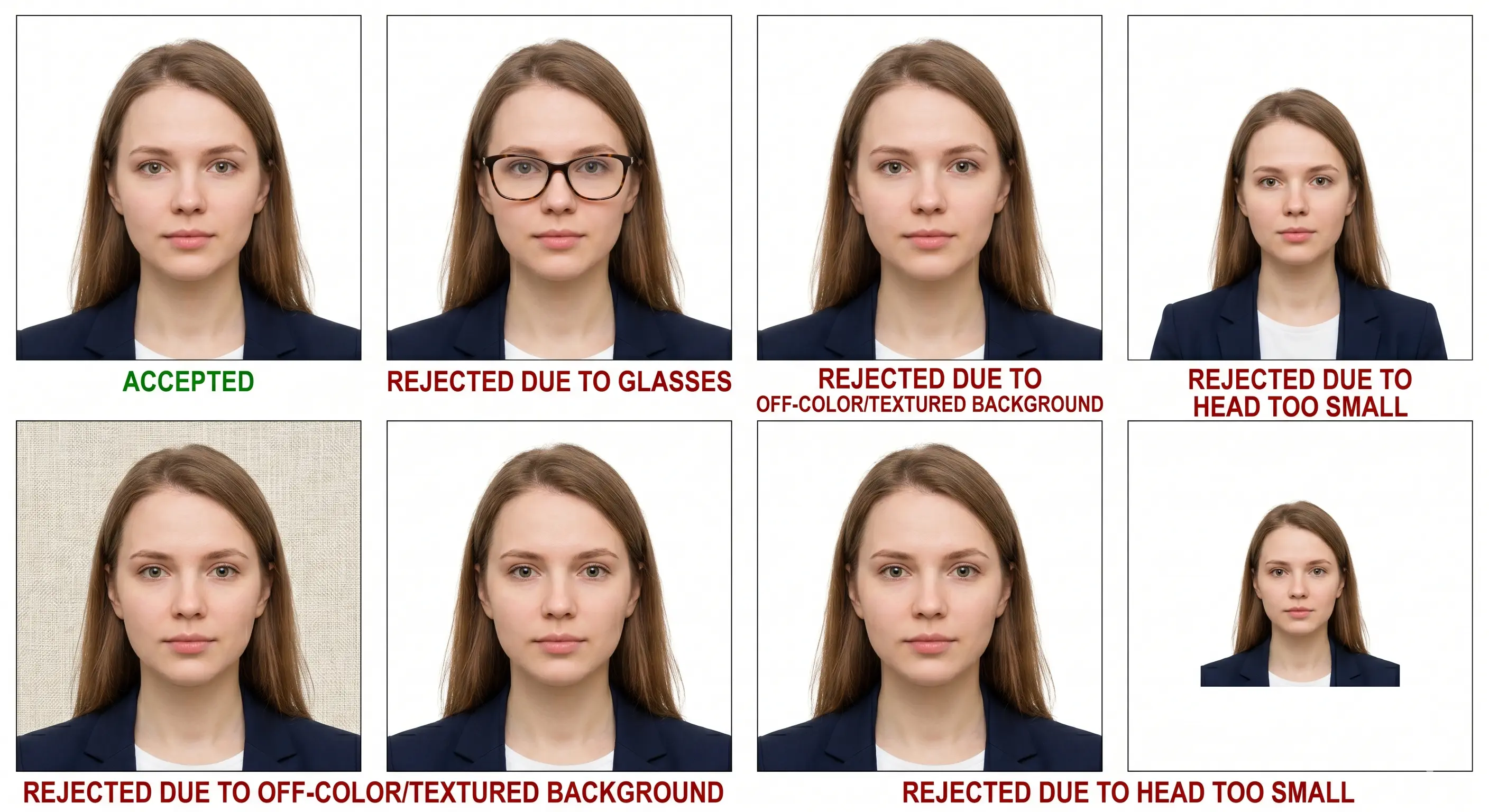
The background must be plain white or off-white. Patterned backgrounds, shadows, textured walls, or coloured backdrops result in immediate rejection. Stand at least 4 feet away from the wall to eliminate shadows behind your head.
Keep a neutral expression or a natural closed-mouth smile. Both eyes must be open, visible, and looking directly at the camera. Hair must not cover your eyes, eyebrows, or any part of your face.
Eyeglasses are no longer accepted in green card photos. Remove them before taking the picture. Hats and head coverings are not allowed unless worn daily for religious reasons, and even then your full face must be visible from the bottom of the chin to the top of the forehead.
Wear what you normally wear. Avoid uniforms, camouflage attire, or clothing that resembles a uniform. White or light-coloured clothing may blend into the background, so choose darker tones for better contrast.
The diagram below shows the official USCIS head placement and proportion requirements for a 2 x 2 inch green card photo.
Head must occupy 50%–69% of the photo height. Eyes positioned between 28 mm and 35 mm from the bottom edge.
Pixel dimensions matter when you submit digitally or print at home. The size in inches is fixed at 2 x 2; what changes is the pixel count, which is a function of DPI.
| Resolution | Pixel Dimensions | Use Case |
|---|---|---|
| 150 DPI | 300 × 300 px | Below minimum — not accepted |
| 300 DPI | 600 × 600 px | Minimum for digital submission and print |
| 450 DPI | 900 × 900 px | Inside the accepted range |
| 600 DPI | 1200 × 1200 px | Maximum accepted, best for home printing |
Upscaling a 300 × 300 pixel image to 600 × 600 does not add detail — it interpolates, and the result is soft around the eyes and hairline. Automated checks measure sharpness, so an upscaled file fails even when the pixel count reads correctly. Always shoot wide and crop down. To hit the minimum exactly, see the resize to 600x600 guide; the resolution rules page covers DPI and compression standards.
Need a 600 × 600 pixel file plus a print sheet? One upload does both.
Create Green Card PhotoA USCIS-compliant green card photo is required for all immigration applications related to permanent residency. Below are the most common forms and situations that require one.
Adjustment of Status — Filed by applicants already in the US who are changing their immigration status to lawful permanent resident. Two photos required.
Green Card Renewal or Replacement — Filed to replace an expired, expiring, lost or damaged permanent resident card. Two photos required.
Removal of Conditions — Filed by conditional permanent residents (typically married couples) to remove the 2-year condition on their green card.
Diversity Visa Program — A digital photo is uploaded with the Electronic Diversity Visa entry, and again with Form DS-260 at the immigrant visa stage.
Immigrant Visa Applicants — People applying for permanent residency from outside the US through a US embassy or consulate.
Travel Document / Re-entry Permit — Green card holders applying for advance parole or a re-entry permit also require compliant photos.
Always check the photo instructions printed on the specific form edition you are filing, because the number of prints and any additional statement requirements are set per form.
The Diversity Visa (DV) Lottery — also called the Green Card Lottery — is submitted through the Electronic Diversity Visa (E-DV) entry form rather than a USCIS paper filing. The photo standard matches the USCIS specification above, with two differences that matter: submission is entirely digital, and there is a hard file size ceiling of 240 KB.
| Aspect | USCIS paper filing | DV Lottery (E-DV) |
|---|---|---|
| Submission | Two printed 2 × 2 photos posted with the form | One digital JPEG uploaded per person |
| File size limit | Not applicable | 240 KB maximum |
| Pixel size | 600 × 600 px minimum for scans | 600 × 600 to 1200 × 1200 px, square |
| Labelling | Name and A-Number on the back | Not applicable |
| Validation | Reviewed by an officer | Automated checker at upload; a failure disqualifies the entry |
| Who needs a photo | The applicant, plus dependants on their own forms | Every person on the entry, including spouse and each child |
The E-DV system runs an automated check on head position, background colour and image dimensions at the moment you upload. Photos that fail are rejected instantly, and because the entry cannot be corrected afterwards, a bad photo disqualifies the whole entry. If your export is over the ceiling, the compress to 240 KB guide brings it inside the limit without dropping below the pixel minimum.
Our online green card photo tool formats images to meet E-DV upload requirements — correct pixel dimensions, file size, and sRGB colour space — in one step.
Every person on an application needs their own photo, including newborns. The 2 x 2 inch size, white background and 25–35 mm head height apply to children exactly as they do to adults — there is no reduced format and no relaxed head-height band. The difficulty is meeting an adult framing standard with a subject who cannot sit up or hold still, so these are the points that most often cause a child photo to be refused.
2 × 2 inch frame with the head filling 50–69% of the height. No age exemption applies to dimensions or framing.
No supporting hands, arms, car seat, toy or pacifier may appear, and no other person may be visible. Lay the child on a plain white sheet and shoot from directly above.
The child's eyes should be open and looking toward the camera. This is relaxed for newborns but expected for older children — see the eyes requirements.
Use soft, indirect daylight from the side of the room, not from directly above. Overhead light from one side creates the background shadow that fails the check.
Shoot wide and crop down. Cropping tightly in-camera on a small face leaves too few pixels once the square frame is applied.
Children's appearance changes quickly. A photo that no longer resembles the child is refused even inside the 6-month window.
Photographing a child? Upload the shot and let the tool apply the 2 × 2 crop.
Create Child PhotoOur online green card photo tool simplifies the entire process. Follow these four simple steps to produce a USCIS-compliant photo from home.
Take a clear photo of yourself with a phone or camera against a plain wall. Upload it to the Passport Photo Maker.
Our tool detects your face and confirms proper positioning, lighting, and proportions automatically.
The image is cropped to the official 2x2 inch size with the correct head height and white background. The crop guide explains how the square ratio and head-height band combine.
Download a high-resolution digital file and a print-ready 4x6 layout in seconds.
Because USCIS paper filings need two identical prints, printing is part of the specification rather than an afterthought. A 2 x 2 inch photo tiles cleanly onto standard 4 x 6 inch photo paper, so one sheet covers your filing with copies to spare.
| Print resolution | 300 DPI minimum — disable fit-to-page and auto-scaling, which change the physical size |
|---|---|
| Paper | Thin, high-quality glossy or matte photo paper. Plain copier paper is refused |
| Copies per 4 × 6 inch sheet | Six 2 × 2 inch photos in a two by three grid with cutting margins |
| Cutting | Guillotine or steel rule for square edges. Do not cut inside the printed border |
| Labelling | Write your name and A-Number lightly in pencil or felt pen on the back of each print |
| Colour management | sRGB. Turn off printer auto-enhance, skin smoothing and colour correction |
| Handling | Let ink dry fully. Do not staple, paper-clip, glue, mount or laminate the photo |
Printer settings, paper choice and cutting technique are covered in full in the print passport photo at home guide, and multi-copy sheet layout in the print 2x2 on 4x6 guide.
Understanding the most common mistakes helps you avoid delays in your application. Each item links to the detailed rule so you can confirm the exact tolerance before you file. The full cross-document breakdown is in passport photo rejection reasons.
Photos that aren't exactly 2x2 inches or have wrong head height proportions are rejected. The head must fill 50-69% of the frame. See the crop guide.
Paper filings including I-485, I-90 and I-751 need two identical photos. Sending one is a common and easily avoided rejection.
Unlabelled prints cannot be matched to your file if they separate from the form. Write both lightly in pencil or felt pen.
Coloured, patterned, or textured backgrounds are not allowed. Only plain white or off-white is acceptable. See background colour rules.
Shadows on the face or behind the head cause rejection. Use even, soft, frontal lighting. See shadow rules.
Since 2016, glasses are not allowed in any USCIS photo. Remove all eyewear before taking the picture. See glasses rules.
Overexposed, underexposed, or unevenly lit photos do not meet standards. Use natural daylight from the front.
Tilted, turned, or off-centre heads cause rejection. Face the camera directly with your head straight. See head size rules.
A fringe over the eyes or hair obscuring the face outline fails landmark detection. See hair rules.
Portrait blur, skin smoothing and slimming alter facial geometry and are detected by automated validation. Shoot in a plain, unfiltered mode.
Blurry, pixelated, or heavily compressed photos are unacceptable. See resolution rules.
Photos must be taken within the last 6 months and reflect your current appearance, including hair and weight.
You do not need a professional photographer or studio to take a compliant green card photo. A modern smartphone produces images at resolutions well above the USCIS minimum. Follow this device-specific guide for best results.
Technically yes, but it is not recommended. Front-facing selfie cameras use a wider lens that introduces barrel distortion, making your face appear wider than it is. Additionally, holding the phone yourself often results in slight tilt or off-centre framing. Ask someone else to take the photo with the rear camera for best results.
A high-quality green card photo starts with the right setup at home. These practical tips will help you capture a usable photo on your first attempt and avoid resubmission.
The US green card photo and US passport photo share the same size and background, but the submission process, print count and labelling differ. This table shows exactly where they diverge.
| Specification | Green Card Photo | US Passport Photo |
|---|---|---|
| Size | 2 x 2 inches | 2 x 2 inches |
| Background | Plain white / off-white | Plain white / off-white |
| Head height | 1 to 1 3/8 inches | 1 to 1 3/8 inches |
| Glasses | Not allowed | Not allowed |
| Issuing agency | USCIS | US Department of State |
| Used for | I-485, I-90, I-751, I-131 applications | Passport book and card |
| Quantity | 2 identical photos | 1 photo |
| Labelling on the back | Name and A-Number required | Not required |
| Digital submission | Depends on the form and filing method | Required for online renewal, 54 KB – 10 MB |
In practice a properly formatted green card photo can also be used for a US passport application, and for a US visa photo, provided all are taken within 6 months of each other. Print fresh copies for each application, and remember that only the USCIS prints need the A-Number on the back. The same 2 x 2 square is used by the OCI card and by India passport in-person applications, while Canada's PR Card uses a 50 x 70 mm format instead.
Get a USCIS-compliant green card photo in seconds — a 600 × 600 pixel digital file plus a 4 × 6 print sheet holding six copies, ready to cut and label.
Create Green Card Photo