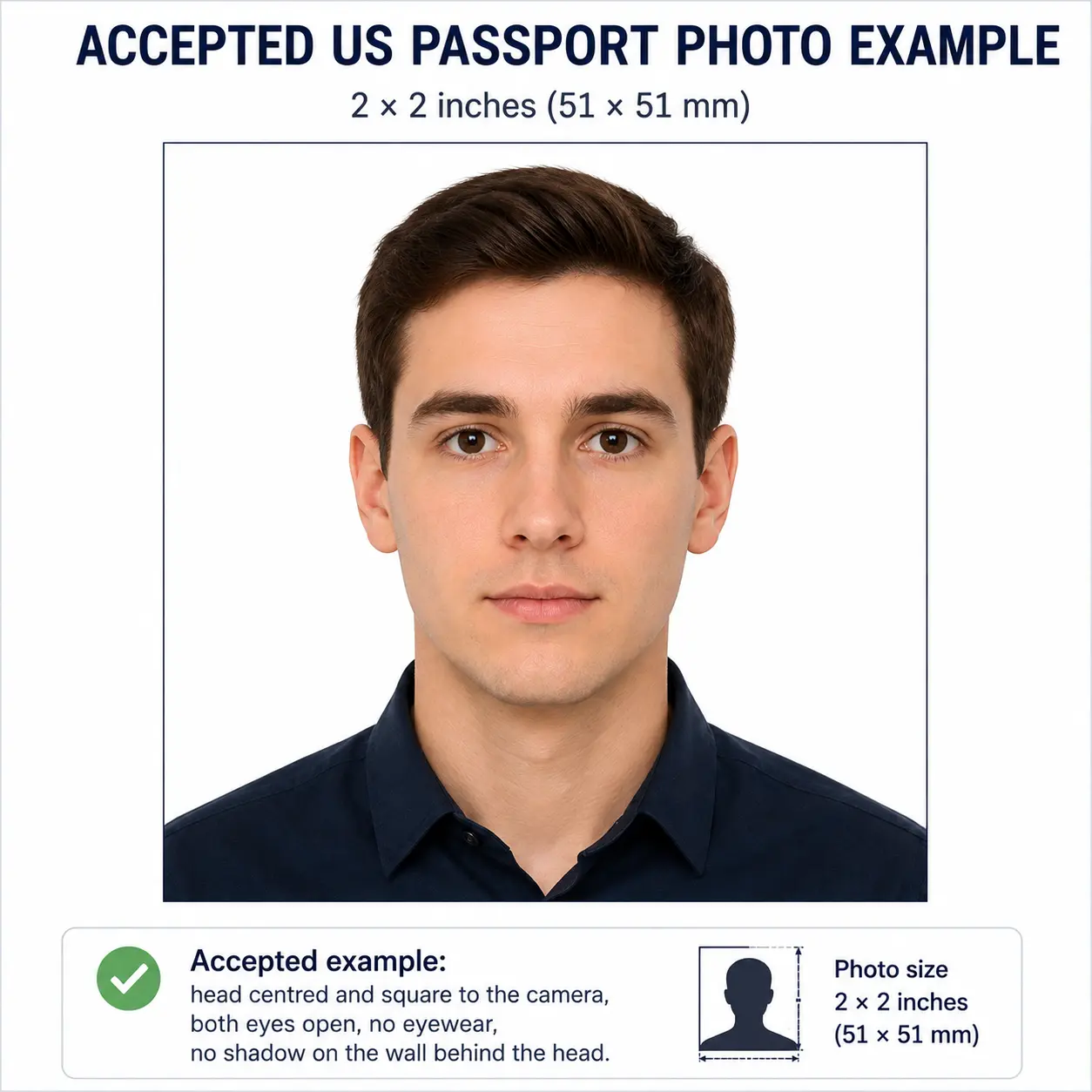
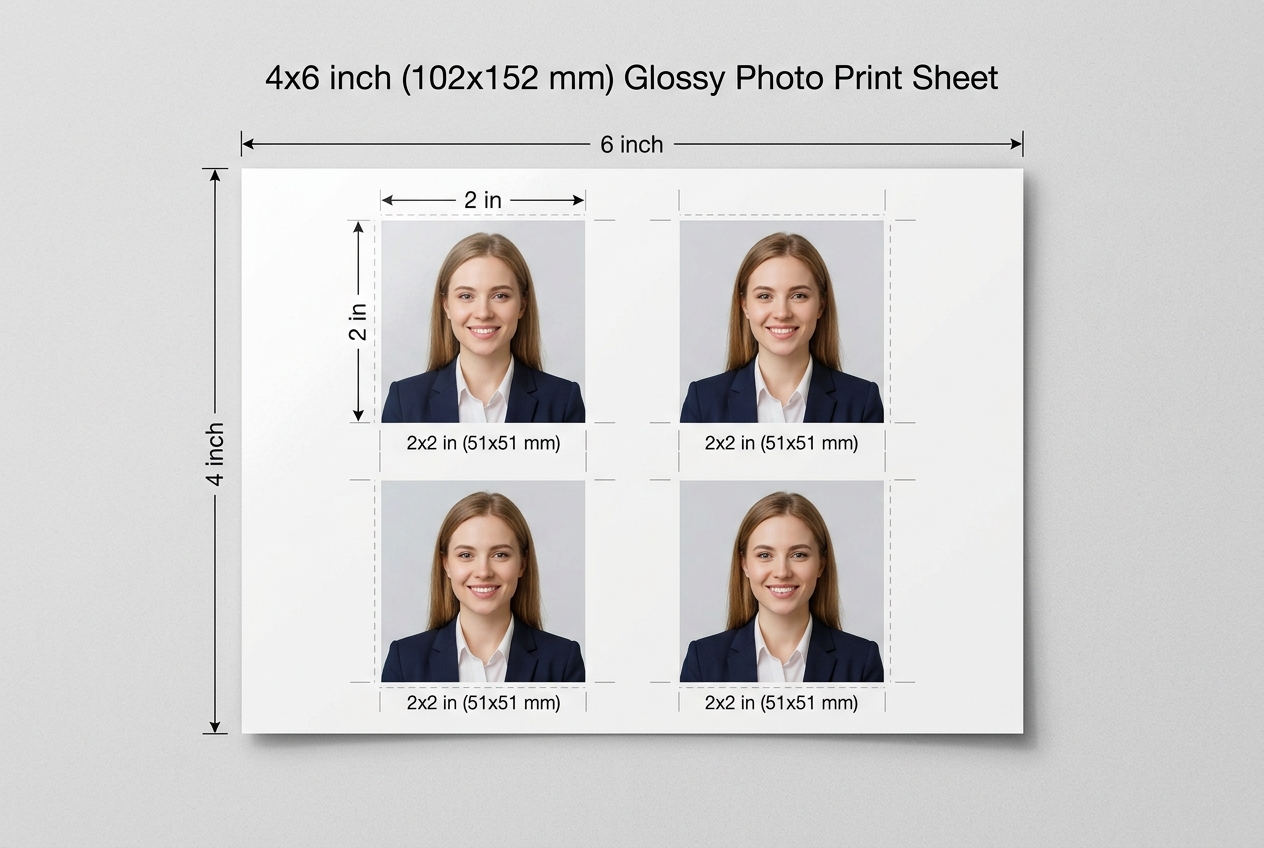
US Passport Photo Visual Reference
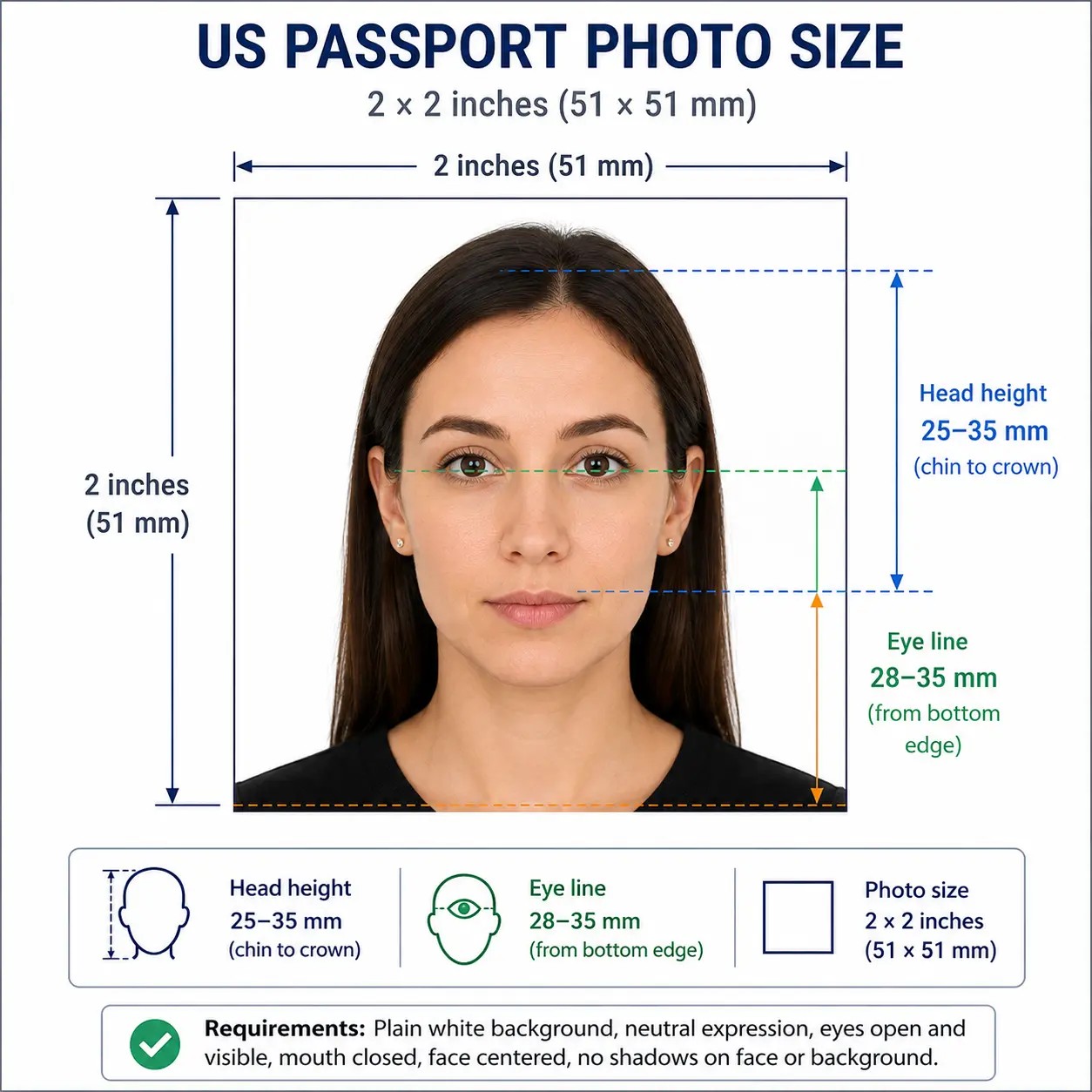
The diagram below marks every measurement the Department of State checks: the 2 × 2 inch square frame, the 25–35 mm chin-to-crown head height, and the 28–35 mm eye line measured up from the bottom edge.
Direct Answer: The United States passport photo must be exactly 51 × 51 mm. The background must be plain white, and your head must occupy 50% to 69% of the photograph. You must maintain a neutral expression with both eyes open.
Source: Official U.S. Department of State photo requirements
A US passport photo must be 2 x 2 inches (51 x 51 mm) on a plain white or off-white background, with the head 1 to 1 3/8 inches (25–35 mm) from chin to crown and the eyes 1 1/8 to 1 3/8 inches (28–35 mm) from the bottom edge, taken within the last 6 months, with no eyeglasses.
| Requirement | Value |
|---|---|
| Photo size | 2 × 2 inches (51 × 51 mm) — square |
| Head height (chin to crown) | 1 in – 1 3/8 in (25 – 35 mm), about 50–69% of frame |
| Eye line from bottom edge | 1 1/8 in – 1 3/8 in (28 – 35 mm) |
| Background | Plain white or off-white, no shadow |
| Digital pixel size | 600 × 600 px minimum to 1200 × 1200 px maximum |
| File size (online renewal) | Between 54 KB and 10 MB, colour JPEG |
| Glasses | Not permitted since November 2016 |
| Expression | Neutral or natural smile, both eyes open |
| Age of photo | Within the last 6 months |
| Copies required | One printed photo for DS-11 / DS-82, or one digital upload |
The diagram below marks every measurement the Department of State checks: the 2 × 2 inch square frame, the 25–35 mm chin-to-crown head height, and the 28–35 mm eye line measured up from the bottom edge.
The US Department of State enforces strict us passport picture requirements so facial recognition systems can verify your identity at borders. A single non-compliant detail, such as a slight shadow or incorrect head size, can delay your application by weeks. Below is the complete official specification used by our passport photo maker USA tool. Each rule links to the detailed standard in our passport photo rules and standards library.
| Requirement | Specification |
|---|---|
| Photo Size | 2 x 2 inches (51 x 51 mm), square aspect ratio 1:1 |
| Head Height | 1 inch to 1 3/8 inches (25 – 35 mm) from chin to top of head — see head size rules |
| Head Coverage | 50 – 69% of total frame height — see face size requirements |
| Eye Position | 1 1/8" to 1 3/8" (28 – 35 mm) from bottom of photo — see eyes requirements |
| Background | Plain white or off-white, no patterns or shadows — see background colour rules |
| Lighting | Even and diffuse, no harsh shadow on face or background — see shadow rules |
| Format | Colour only. Black and white is not accepted. Printed on matte or glossy photo paper |
| Digital Resolution | 600 x 600 px minimum to 1200 x 1200 px maximum, JPEG |
| Digital File Size | 54 KB to 10 MB for online renewal. Other portals such as DS-160 cap at 240 KB |
| Print Resolution | 300 DPI minimum on photo-quality paper |
| Copies Required | One photo for DS-11 or DS-82. Some acceptance facilities request two identical copies |
| Expression | Neutral face or natural smile, both eyes open and looking at the camera |
| Glasses | Not permitted since November 2016 — see glasses rules |
| Head Coverings | Only for religious or medical reasons, full face visible — see head covering rules |
| Hair | Must not cover the eyes or obscure the outline of the face — see hair rules |
| Ears | Not mandatory for US photos, but the full face outline must be clear — see ears visibility rules |
| Clothing | Everyday clothing. No uniforms, camouflage, or clothing resembling a uniform |
| Digital Alteration | Not permitted. No filters, skin smoothing, slimming, or brightness and tone edits |
| Photo Age | Taken within the last 6 months and reflecting current appearance |
The same 2 × 2 inch photo is submitted two different ways depending on how you apply, and each route has its own technical limits. Getting the pixel and file-size window wrong is one of the easiest failures to avoid.
| Specification | Printed photo (DS-11 / DS-82) | Digital upload (online renewal) |
|---|---|---|
| Size | 2 × 2 inches (51 × 51 mm) | 600 × 600 px to 1200 × 1200 px, square |
| Resolution | 300 DPI minimum | Pixel count governs, DPI not enforced |
| File size | Not applicable | 54 KB to 10 MB |
| Colour | Colour only, no black and white | Colour JPEG only |
| Paper | Glossy or matte photo paper | Not applicable |
| Quantity | One photo, some facilities request two | One file |
Watch the file-size limit for your specific portal. Online passport renewal accepts 54 KB to 10 MB, but the DS-160 visa photo uploader caps the file at 240 KB. A file that passes one system can be refused by the other, so check the limit displayed by the form you are filling in.
If your export is too large, the compress to 240 KB guide and reduce file size guide cover this. To hit the minimum pixel size exactly, see the resize to 600x600 guide. iPhone users shooting in HEIC should read the HEIC to JPEG guide first.
For pixel conversions across every country standard see passport photo size in pixels, or the US-specific 2x2 photo size in pixels breakdown. Full digital submission rules across portals are covered in the digital passport photo requirements guide.
Follow these four steps to create a US passport photo online using ClonyPDF. The entire process takes less than a minute and replaces a costly trip to a photo studio.
Stand in front of a plain wall with natural daylight. Use your phone's front or rear camera, then upload the image to our passport photo maker.
Our AI verifies head size, eye level, facial expression, and lighting against the official US passport size and biometric requirements.
The background is instantly replaced with the required plain white, while preserving sharp edges around your hair and shoulders.
Get a digital JPEG for online renewals and a 4x6 inch print sheet holding six 2x2 passport photos, ready for any photo lab or home printer.
If you need to reframe a wide or full-body source image before uploading, the passport photo crop guide explains how the 1:1 square ratio and head-height band are applied together.
The United States is one of only a handful of countries using a square photo. Most of the world uses a portrait format, which is why a photo prepared for a US passport usually cannot be reused abroad, and why a European or Asian passport photo will not pass a US application.
| Country | Photo Size | Aspect Ratio | Head Height | Background |
|---|---|---|---|---|
| United States | 2 × 2 in (51 × 51 mm) | 1 : 1 | 25 – 35 mm | White / off-white |
| India | 51 × 51 mm (2 × 2 in) | 1 : 1 | 25 – 35 mm | Plain white |
| Canada | 50 × 70 mm | 5 : 7 | 31 – 36 mm | Plain white |
| United Kingdom | 35 × 45 mm | 7 : 9 | 29 – 34 mm | Light-coloured |
| Germany / EU | 35 × 45 mm | 7 : 9 | 32 – 36 mm | Light-coloured |
| Australia | 35 × 45 mm | 7 : 9 | 32 – 36 mm | Plain white |
| Japan | 35 × 45 mm | 7 : 9 | 32 – 36 mm | Plain white |
| China | 33 × 48 mm | 11 : 16 | 28 – 33 mm | Plain white |
For the full worldwide reference see passport size photo dimensions, the dedicated 2x2 photo size page, or browse every standard in the passport photo requirements by country hub.
The United States applies the same 2 × 2 inch specification to children and newborns. There is no reduced head-height band for infants and no relaxed background rule. The practical difficulty is meeting an adult framing standard with a subject who cannot sit up or hold a pose, so the points below are the ones that most often cause a child photo to be refused.
2 × 2 inch frame with the head 1 to 1 3/8 inches (25–35 mm) chin to crown. No age exemption applies to size or framing.
No supporting hands, arms, car seat, toy or pacifier may appear. Lay the child on a plain white sheet and photograph from directly above.
Both eyes should be open and looking towards the camera. This expectation is relaxed for newborns, but a closed-eye photo of an older child will be refused.
Soft, indirect daylight from the side of the room, not from directly above. Overhead light from one side creates the background shadow that fails the check.
A natural expression is fine. Avoid a wide open mouth or a pacifier-shaped mouth position, which distort the facial geometry that is measured.
Children under 16 renew in person every five years and need a new photo each time. Appearance changes fast, so a photo that no longer resembles the child is refused even inside the 6-month window.
For positioning, lighting and timing technique with a baby or toddler, our baby passport photo at home guide covers the full process. The eyes requirements and shadow rules pages explain the two checks that fail most often on child photos.
Photo problems are among the most common causes of delay on mailed passport applications. Each item below links to the detailed rule so you can confirm the exact tolerance before you submit. The full cross-country breakdown lives in passport photo rejection reasons.
The photo is not exactly 2x2 inches, or the head is too small or too large within the frame. See the crop guide.
Head height is correct but the eyes fall below 1 1/8 inches from the bottom edge. Both measurements must pass. See eyes requirements.
Standing too close to a wall creates shadows. The background must be uniformly white. See shadow rules.
Any eyewear, including prescription glasses and sunglasses, will cause rejection. See glasses rules.
Closed eyes, exaggerated smile, frowning, or mouth wide open are not accepted. See smile rules.
Beauty filters, portrait blur, and skin-smoothing alter your biometric features and are detected by automated validation.
Online renewal refuses files under 54 KB or over 10 MB. The DS-160 uploader refuses anything over 240 KB.
Blurry, pixelated, or scanned printouts do not meet the 600x600 px minimum.
Colour is mandatory. A greyscale or black and white image is refused for both printed and digital submission.
Military, work, and school uniforms, as well as non-religious hats, are forbidden. See head covering rules.
A fringe over the eyes or hair obscuring the outline of the face fails facial-landmark detection. See hair rules.
The face must look directly at the camera with shoulders square and level.
Standard copier paper is refused. Print on glossy or matte photo paper only. See the print at home guide.
The photo must be recent and reflect your current appearance, including significant weight, hair, or facial changes.
A few smart adjustments before snapping the photo make the difference between instant approval and a second trip to the post office. Use these tips before you upload to the passport photo maker USA:
If you are submitting Form DS-11 or DS-82 by mail or in person, printing is part of the specification rather than an afterthought. A 2 × 2 inch photo tiles cleanly onto standard 4 × 6 inch photo paper, so one sheet covers your application with copies to spare.
| Print resolution | 300 DPI minimum — export at 600 × 600 pixels or larger |
|---|---|
| Paper | Glossy or matte photo paper. Plain copier paper is refused |
| Copies per 4 × 6 inch sheet | Six 2 × 2 inch photos in a two by three grid with cutting margins |
| Cutting | Use a guillotine or steel rule for square edges. Do not cut inside the printed border |
| Colour management | sRGB profile. Disable printer auto-enhance, skin smoothing and colour correction |
| Handling | Let ink dry fully. Do not staple or paper-clip the photo to the form — use photo adhesive or leave it loose in the envelope |
| Submission | Attach one photo to DS-11 or DS-82. Confirm whether your acceptance facility wants a second copy |
Printer settings, paper choice and cutting technique are covered in full in the print passport photo at home guide. For sheet layout specifically, the print 2x2 photo on 4x6 guide shows how multi-copy sheets are arranged and trimmed.
The official US passport photo size is 2 x 2 inches (51 x 51 mm), a square format. The head must measure between 1 inch and 1 3/8 inches (25 mm to 35 mm) from the bottom of the chin to the top of the head, which fills roughly 50 to 69 percent of the frame height.
Your eyes should sit between 1 1/8 inches and 1 3/8 inches (28 mm to 35 mm) from the bottom edge of the photo, placing the eye line in the upper 55 to 69 percent of the frame. Head height alone is not enough: a photo with a correct head size but a low eye line is still refused.
A digital US passport photo must be square and at least 600 x 600 pixels, up to a maximum of 1200 x 1200 pixels, saved as a colour JPEG. For online passport renewal the file must be between 54 KB and 10 MB. Separate upload tools such as the DS-160 visa photo uploader cap the file at 240 KB, so check the limit shown by the system you are using.
One 2 x 2 inch colour photo is required for a paper application on Form DS-11 or DS-82. Online renewal requires a single digital upload instead. Some passport acceptance facilities ask for two identical copies for in-person submission, so confirm with your facility before the appointment.
A plain white or off-white background is required, with no patterns, textures, gradients or objects. Shadows falling on the background behind the head or on the neck are one of the most common causes of refusal. See the background colour rules.
No. Eyeglasses have not been permitted in US passport photos since November 2016. The only exception is a documented medical reason, which requires a signed statement from a doctor. Sunglasses and tinted lenses are never accepted.
A neutral expression or a natural smile with both eyes open is accepted for US passport photos. Avoid a wide grin, raised eyebrows, squinting or an open mouth, because exaggerated expressions distort the facial geometry that automated verification measures.
No uniforms, camouflage or clothing that resembles a uniform are permitted, and hats are not allowed. A head covering worn daily for religious reasons is accepted with a signed statement, provided the full face stays visible from the bottom of the chin to the forehead with no shadow. See the head covering rules.
The photo must be taken within the last 6 months and reflect your current appearance. If your appearance has changed significantly through facial surgery, major weight change or substantial hair loss, submit a new photo even if the existing one is inside the 6-month window.
No. Do not digitally alter brightness, contrast, skin tone or facial features. Beauty filters, skin smoothing, slimming effects and portrait blur all change the biometric geometry and are detected by automated validation at submission. Cropping, resizing and replacing the background are acceptable; altering your face is not.
The same 2 x 2 inch size, white background and 1 to 1 3/8 inch head height apply to children and newborns. The child must be alone in the frame with no supporting hands, car seat, toy or pacifier visible. Eyes should be open where possible, though this is relaxed for newborns. Children under 16 need a fresh photo at every renewal because renewals are made in person every five years. See the child and infant requirements section.
Both use the same 2 x 2 inch square format, white background and head-height range, so the same photo often satisfies each. The difference is the submission channel and file limits: a passport photo goes to the Department of State on Form DS-11, DS-82 or through online renewal, while a visa photo is uploaded through the DS-160 form, which enforces its own file-size cap. See US visa photo requirements.
USCIS uses the same 2 x 2 inch format for permanent resident applications, but each form has its own submission rules and copy counts. See our green card photo page for the I-485 and I-130 detail.
Yes. The Department of State accepts self-taken photos provided they meet every technical requirement. Photograph against a plain white wall in even, diffuse light, stand at least 20 inches from the wall to avoid shadow, and switch off any beautification or portrait blur mode. Then apply the 2 x 2 inch crop and head-height check with the Passport Photo Maker.
Print at 300 DPI on glossy or matte photo paper, never on plain copier paper. A standard 4 x 6 inch sheet holds six 2 x 2 inch photos in a two by three grid with cutting margins. Let the ink dry fully, cut with a guillotine for square edges, and do not staple or paper-clip the photo to the application form. See the print at home guide.
Yes. You can create, preview and download a compliant 2 x 2 inch US passport photo at no cost, including the print-ready 4 x 6 inch sheet. No signup is required.
Generate a fully compliant 2x2 passport photo in less than a minute. No appointments, no waiting, no rejected applications.
Create US Passport Photo