Menu
India Visa Photo Maker Online - Size, Pixels & e-Visa Requirements | ClonyPDF

India Visa Photo Maker Online โ€“ 2x2 Inch, 51x51 mm & e-Visa Requirements

Create a compliant india visa photo that meets every official rule for e-Visa, tourist, business, medical, and conference applications. Get the correct india visa photo size of 2x2 inches (51x51 mm), 600x600 pixels resolution, plain white background, and a JPEG file under 1 MB automatically, ready to upload or print.

  • Official 2x2 inch / 51x51 mm size
  • 600x600 pixels resolution
  • JPEG under 1 MB
  • Designed to meet India e-Visa photo requirements
Create India Visa Photo
Works on phone, tablet, and desktop. No signup needed.
Tool Ready

Ready to Create Your India Visa Photo?

Our Passport Photo Maker is pre-configured for India visa applications. Upload any clear photo of yourself and the tool automatically detects your face, fixes the background, and crops the image to the exact dimensions required by the Indian Bureau of Immigration. The result is an instantly downloadable JPEG ready for the e-Visa portal or a printed 2x2 inch photo for embassy submissions.

  • Official India visa photo dimensions
  • Automatic face detection and centring
  • Background correction to plain white
  • Instant download of digital and print versions
Create India Visa Photo
India Visa Photo Size
2 ร— 2 in (51 ร— 51 mm)
Pixels: 600 ร— 600 (300 DPI)
Background: Plain white
Format: JPEG, sRGB
File size: 10 KB โ€“ 1 MB

India e-Visa Photo Requirements

The India e-Visa portal automatically validates every uploaded photo against strict technical rules. If your image fails any check, the upload is rejected immediately and you cannot complete the application. Below are the current india e visa photo requirements you must follow to upload a valid file.

e-Visa Photo SpecificationRequired Value
File formatJPEG only (PNG, GIF, BMP not accepted)
Image shapeSquare (equal width and height)
Minimum file size10 KB
Maximum file size1 MB
Minimum resolution350 ร— 350 pixels
Recommended resolution600 ร— 600 pixels
Colour modeColour, sRGB colour space
Face coverage70โ€“80% of the frame
BackgroundPlain white, no shadows or patterns
BordersNo borders, frames, or text overlays
Image qualitySharp, no blur, no pixelation, no filters

Common India e-Visa Photo Upload Errors

  • "Photo not in JPEG format" โ€” Convert your image to JPEG before upload.
  • "Photo dimensions are not square" โ€” Crop the image to equal width and height.
  • "Photo size exceeds 1 MB" โ€” Compress the file or reduce resolution.
  • "Photo resolution too low" โ€” Use at least 350ร—350 pixels, ideally 600ร—600.
  • "Face not detected" โ€” Centre your face and use better lighting.
  • "Background is not white" โ€” Re-shoot against a plain white wall or use our auto-background fix.

India Visa Photo Size in Pixels

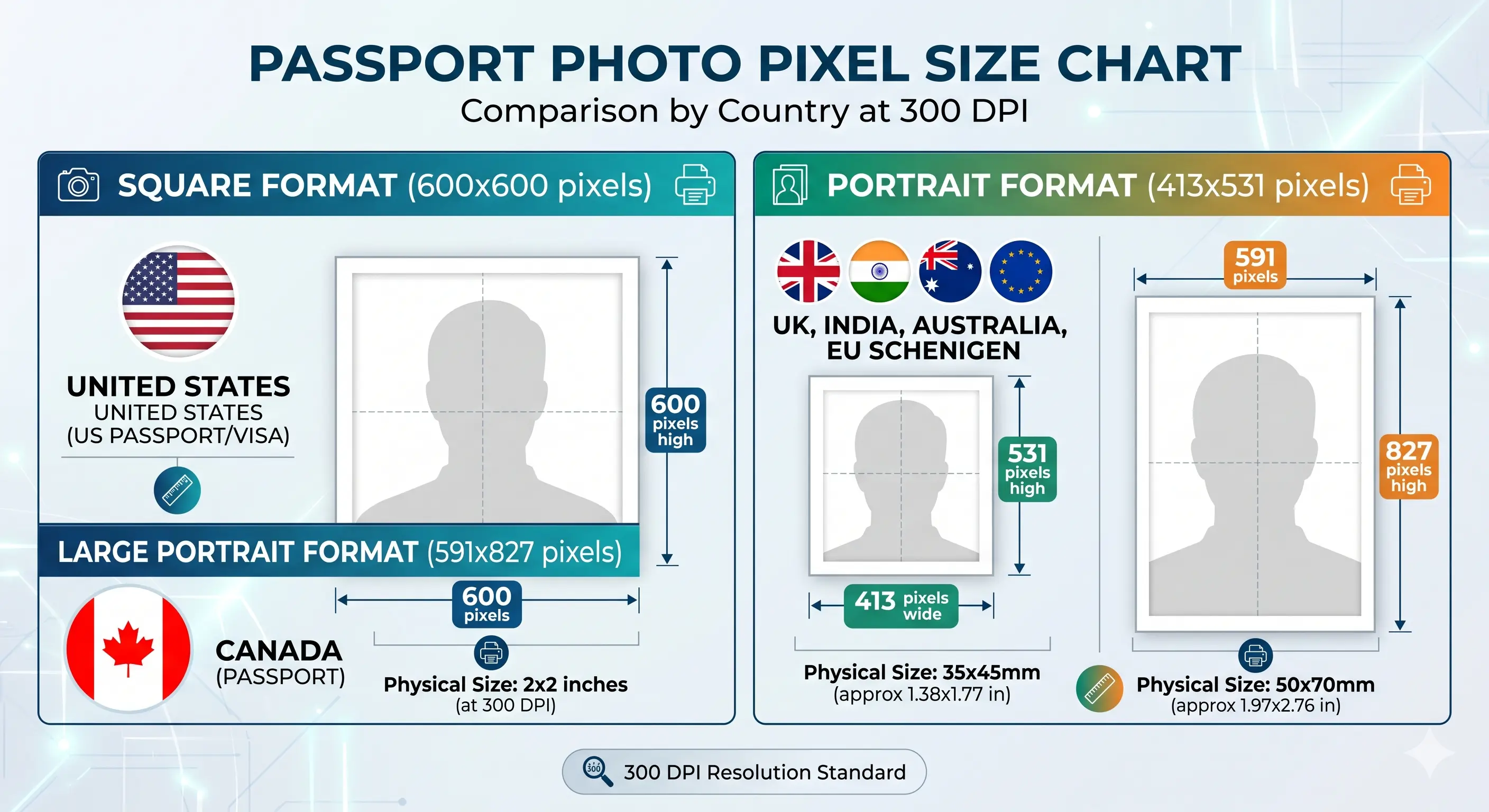
The india visa photo size in pixels depends on the print resolution (DPI). The Indian e-Visa portal accepts any square image of at least 350ร—350 pixels, but 600ร—600 pixels at 300 DPI is the recommended standard because it prints cleanly at the official 2x2 inch size and uploads well within the 1 MB limit.

DPI (Print Quality)Width (pixels)Height (pixels)Use Case
175 DPI350 px350 pxMinimum accepted for e-Visa upload
300 DPI600 px600 pxRecommended for e-Visa and print
600 DPI1200 px1200 pxHigh-quality print, may need compression

Our tool generates the india e visa photo pixels at the recommended 600ร—600 resolution by default, which works for both online upload and 2x2 inch printing without any quality loss.

India Visa Photo Size in MM, CM and Inches

The official India visa photo is a square format. The same dimensions are commonly expressed in millimetres, centimetres, and inches depending on the country or photo studio. All three measurements describe exactly the same photo.

UnitWidth ร— HeightCommonly Used In
Millimetres (mm)51 ร— 51 mmEmbassy forms, Asia, Europe
Centimetres (cm)5.1 ร— 5.1 cmIndian photo studios, general use
Inches2 ร— 2 inchesUSA, UK, Canada, official India spec

When ordering prints at a photo lab, you can ask for either "2 by 2 inch India visa photo" or "51 by 51 mm visa photo" โ€” both will give you the correct result.

Complete India Visa Photo Requirements

The Indian Bureau of Immigration and the e-Visa application portal apply strict standards for photos. These rules cover tourist, business, medical, conference, and e-Visa categories. Below is a complete summary of the current indian visa photo requirements you need to follow before submitting a photo for india visa application.

RequirementSpecification
Photo dimensions2 x 2 inches (51 x 51 mm), square
Recommended pixels600 ร— 600 px at 300 DPI
Background colorPlain white
Face visibilityFull face, front view, no obstructions
Head positioningCentred, facing camera, shoulders level
Head height25โ€“35 mm from chin to top of head
Glasses rulesNot allowed; remove eyewear
ExpressionNeutral, mouth closed, both eyes open
Head coveringOnly for religious reasons; face fully visible
File format (e-Visa)JPEG, sRGB colour space
File size (e-Visa)Minimum 10 KB, maximum 1 MB
Recency of photoTaken within the last 6 months
Quantity (paper visa)2 identical recent colour photos

Photo Requirements by India Visa Type

The photo specifications are the same for every category of Indian visa โ€” the 2x2 inch square format with a plain white background applies whether you are applying for tourism, business, medical treatment, or studies. Our tool produces a single compliant photo that works for all visa types listed below.

India Tourist Visa Photo

For e-Tourist Visa (eTV) and paper tourist visa applications. The standard 2x2 inch square photo applies to all tourist visa subtypes including 30-day, 1-year, and 5-year visas.

2x2 in ยท White BG ยท JPEG

India Business Visa Photo

For e-Business Visa and paper business visa applications. Required for conferences, trade meetings, recruitment, and consulting visits to India.

2x2 in ยท White BG ยท JPEG

India Medical Visa Photo

For e-Medical Visa and Medical Attendant Visa applications. Same photo specifications apply for the patient and any accompanying attendants.

2x2 in ยท White BG ยท JPEG

India Conference Visa Photo

For e-Conference Visa applications attending seminars, workshops, or events organised by Indian ministries, NGOs, or PSUs.

2x2 in ยท White BG ยท JPEG

India Student Visa Photo

For Student Visa (S-Visa) applications for full-time courses at Indian universities and recognised institutions. Same 2x2 inch photo specifications.

2x2 in ยท White BG ยท JPEG

India Employment Visa Photo

For Employment Visa applications by foreign nationals taking up employment with an Indian company. Same photo specifications apply.

2x2 in ยท White BG ยท JPEG

How to Create an India Visa Photo Online

Creating a fully compliant photo at home takes less than a minute. Use our tool to handle all technical adjustments automatically while you focus on getting a clear shot.

1

Take or Upload Your Photo

Use a phone or camera to take a clear front-facing photo against a plain white wall, then upload the image to the tool.

2

Automatic Face Detection

The tool detects your face, verifies lighting, and checks head height proportions against India visa specifications.

3

Background Correction

The system standardises the background to plain white and removes shadows so the photo passes e-Visa checks.

4

Auto Crop to 2x2 Inches

The image is cropped exactly to the official 51x51 mm square format at 600ร—600 pixels with correct face positioning.

5

Download Digital and Print Files

Download a digital JPEG under 1 MB for the e-Visa portal or a print-ready 4x6 layout for embassy applications.

How to Take an India Visa Photo Using Your Phone

You do not need a professional camera to take a compliant India visa photo. Modern smartphones produce images at resolutions far higher than the e-Visa portal requires. Follow this short guide to capture a photo with your phone that will pass every check.

Step-by-Step Phone Method

  • Find a plain white wall. No posters, switches, sockets, or texture should be visible in the frame.
  • Stand one metre from the wall. This distance prevents shadows directly behind your head.
  • Face a large window. Natural daylight from the side or front gives the most even skin tone.
  • Ask someone to take the photo. A helper standing one metre away produces much better framing than a selfie or self-timer.
  • Use the rear camera. The back camera on your phone is sharper and produces higher resolution than the selfie camera.
  • Hold the phone at eye level. Place it on a stable surface or have your helper hold it at the same height as your eyes.
  • Frame from chest up. Include your shoulders and head with a small margin above. Do not zoom in.
  • Take 5โ€“10 shots. Pick the sharpest one with the most neutral expression.
  • Upload to our tool. The system will auto-crop, correct the background, and resize to official India visa specifications.

What to Avoid on Mobile

  • Do not use beauty mode, portrait mode, or any filter.
  • Do not use the front-facing selfie camera at arm's length โ€” it causes distortion.
  • Do not take the photo in direct sunlight outdoors.
  • Do not crop the photo manually in your phone gallery โ€” let the tool handle dimensions.

India Visa Photo vs Other Document Photos

Photo size requirements vary significantly between countries and document types. The India visa photo is square at 2x2 inches, while the Indian passport photo is rectangular at 35x45 mm. Knowing the right size for the right document is essential โ€” using the wrong size leads to rejection.

DocumentSizeBackgroundShape
India Visa51 ร— 51 mm (2x2 in)Plain whiteSquare
India Passport35 ร— 45 mmPlain whiteRectangular
OCI Card51 ร— 51 mm (2x2 in)Plain whiteSquare
US Visa51 ร— 51 mm (2x2 in)Plain whiteSquare
Canada Visa35 ร— 45 mmPlain whiteRectangular
UK Passport35 ร— 45 mmLight grey or creamRectangular
Australia Passport35 ร— 45 mmPlain lightRectangular

The India visa photo shares the same square 2x2 inch format as US visa and OCI card photos, so the same printed photo can sometimes be reused across these document types โ€” but always verify the specific country's current rules before submission.

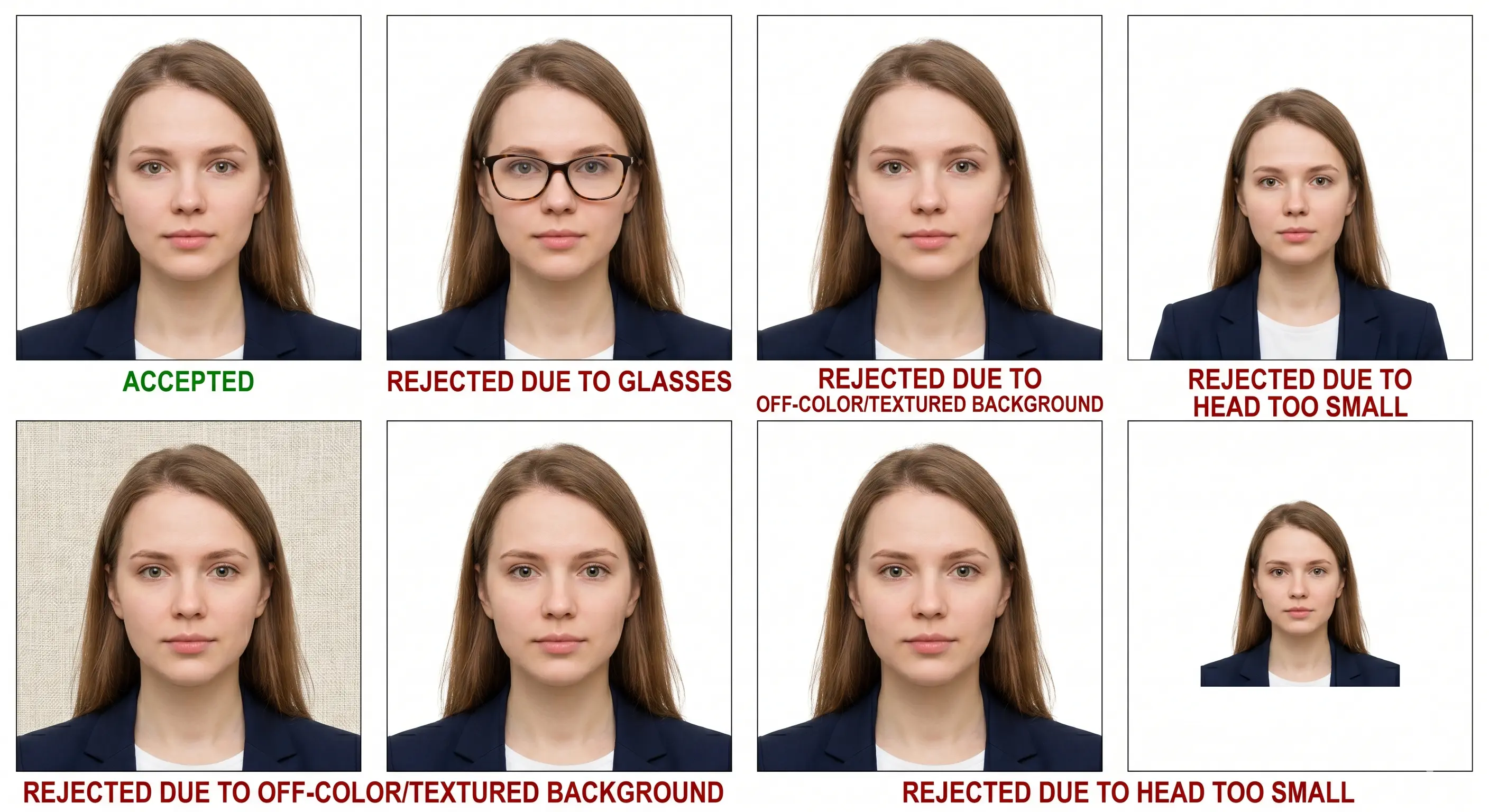
Common Reasons India Visa Photos Get Rejected

The India e-Visa portal automatically scans uploaded photos and rejects anything that fails the technical checks. Embassies also reject paper photos that do not match the published rules. These are the most common causes of rejection.

Wrong Size

Photos that are not perfectly square or do not meet the 2x2 inch / 51x51 mm requirement are immediately rejected by the portal.

Shadows

Shadows on the face or behind the head fail automatic background checks. Use even, diffused lighting and stand away from walls.

Poor Lighting

Overexposed, underexposed, or unevenly lit photos do not meet quality standards and may be flagged during review.

Incorrect Background

Coloured walls, patterned backgrounds, furniture, or other people in the frame all cause rejection. Only plain white is accepted.

Face Obstruction

Glasses, hats, masks, scarves, or hair covering the face will cause rejection. Religious head coverings are allowed if the full face is visible.

Low Quality Image

Blurry, pixelated, or heavily compressed photos do not meet minimum resolution standards. Use a high-resolution rear camera and avoid filters.

File Too Large

JPEGs over 1 MB are rejected by the e-Visa portal. Our tool automatically compresses without quality loss.

Wrong File Format

PNG, GIF, HEIC, and BMP files are not accepted. Only JPEG is allowed for India e-Visa uploads.

Tips for a Perfect India Visa Photo

You do not need a studio to capture a compliant photo. With the right setup at home, you can get the result you need on the first attempt. Use these practical tips before processing your photo through our tool.

  • Use natural daylight. Stand facing a large window mid-morning or mid-afternoon. Avoid direct sunlight that causes harsh shadows.
  • Find a clean white wall. Make sure there are no posters, sockets, switches, or texture in the frame behind you.
  • Stand a metre from the wall. This distance prevents shadow buildup directly behind your head.
  • Hold the camera at eye level. Place your phone or camera on a stable surface at the same height as your eyes to avoid distortion.
  • Use the rear camera. The back camera on a phone produces sharper images than the selfie camera.
  • Ask someone to help. A friend or family member taking the photo from one metre away gives much better framing than a self-timer.
  • Wear darker, solid clothing. Dark shirts give clean contrast against the white background.
  • Remove glasses and accessories. Take off eyewear, hats, large earrings, and headphones before the photo.
  • Skip filters and beauty modes. Any retouching or skin smoothing is treated as image alteration and leads to rejection.
  • Review before uploading. Check the photo for sharpness, even lighting, and a clean background before running it through the tool.

Why Use ClonyPDF for Your India Visa Photo

Our India visa photo tool is built specifically to match the technical requirements published by the Indian Bureau of Immigration and the official e-Visa portal. Every output file is sized, formatted, and compressed to pass automated checks.

AI

Automatic Face Detection

AI-powered face detection centres your head and verifies positioning matches India visa rules.

BG

Background Correction

Automatic plain white background replacement, even if your original photo has a coloured wall.

โœ“

Visa & Passport Support

Covers India visa, Indian passport, OCI card, and 60+ other countries with correct specifications.

๐Ÿ“ฑ

Mobile Friendly

Works on any phone, tablet, or desktop browser. Upload directly from your phone gallery.

โšก

Instant Processing

Photos are processed in seconds. No queue, no waiting, no signup required.

๐Ÿ”’

Privacy First

Photos are processed securely and not stored permanently or shared with third parties.

Frequently Asked Questions

What is the official india visa photo size?
The official India visa photo size is 2 x 2 inches (51 x 51 mm), in a square format. The face must be centred, with the head occupying about 70 to 80 percent of the frame, and the photo must use a plain white background.
What are the india e visa photo requirements?
For the India e-Visa, the photo must be a square JPEG, in colour, with a plain white background. The minimum resolution is 350 x 350 pixels (600 x 600 recommended) and the file size must be between 10 KB and 1 MB. Our India visa photo tool produces files that meet all these limits automatically.
What is the india visa photo size in pixels?
The recommended size is 600 ร— 600 pixels at 300 DPI. The minimum accepted is 350 ร— 350 pixels. Higher resolutions like 1200 ร— 1200 pixels are also fine as long as the final file stays under 1 MB.
What is the india visa photo size in mm and cm?
The India visa photo size is 51 ร— 51 mm or 5.1 ร— 5.1 cm. This is equivalent to 2 ร— 2 inches. All three measurements refer to exactly the same photo dimensions.
Can I take an India visa photo with my phone?
Yes. Any modern smartphone produces images at resolutions far higher than the e-Visa portal requires. Use the rear camera, good lighting, and a plain wall, then let our tool crop and format the result correctly.
Can I wear glasses in an India visa photo?
No. Glasses are not allowed in India visa photos. Remove all eyewear before taking the picture, including prescription glasses and tinted lenses, even if you wear them every day.
What background colour is required?
A plain white background is required for both e-Visa uploads and paper visa applications. Coloured walls, patterns, shadows, or visible objects behind you will result in rejection.
How recent must my India visa photo be?
The photo must be taken within the last 6 months and clearly reflect your current appearance. Significant changes in hair, weight, or facial features mean you should take a new photo even if the old one is technically compliant.
Can I smile in an India visa photo?
No. A neutral expression with your mouth closed is required. Smiling, frowning, or showing teeth will cause rejection. Both eyes must be open and looking directly at the camera.
How do I print my India visa photo?
Print the photo on professional glossy or matte photo paper at home or at a studio. Our tool produces a 4x6 layout containing multiple identical copies that you can take to any photo lab or chemist for printing.
Is the india visa passport photo the same as the passport photo?
No. The dimensions are different. The Indian passport photo is 35x45 mm, while the India visa photo is 2x2 inches (51x51 mm) square. You cannot reuse an Indian passport photo for an India visa application. Use our India passport photo tool for passport applications and the India visa photo tool for visas.
Can I create an India visa photo online for free?
Yes. Our online india visa photo maker creates a fully compliant 2x2 inch JPEG with the correct background and head positioning. The output meets every requirement of the India e-Visa portal and embassy paper applications.

Is a beard allowed in an India visa photo?
Yes. A beard is allowed as long as it reflects your everyday appearance and does not obscure your facial features. The face must be clearly recognisable from chin to forehead.
Are earrings and jewellery allowed?
Small, subtle earrings and jewellery are acceptable as long as they do not cover or distract from the face. Large, reflective, or face-covering jewellery should be removed before the photo.
Can I wear a white shirt in an India visa photo?
It is best to avoid white or very light clothing because it blends into the white background and reduces contrast. Wear a darker colour like navy, grey, or black for the clearest result.
Can I use a selfie as an India visa photo?
A selfie taken at arm's length is not recommended because the close distance causes face distortion. Use the rear camera with a helper standing one metre away, or use a tripod, for natural facial proportions.
Can babies and infants use the same India visa photo size?
Yes. The 2x2 inch (51x51 mm) size applies to all applicants including infants and children. For babies, lay them on a plain white sheet or have a parent hold them with their hands not visible in the frame, keeping eyes open and mouth closed.
Can I crop a passport photo into an India visa photo?
Indian passport photos are 35x45 mm rectangular, while India visa photos are 51x51 mm square. Cropping a passport photo will not give you the correct face proportions for the visa. Take a fresh photo and process it through our India visa photo tool instead.
Can I wear a hijab or religious head covering?
Yes. Religious head coverings such as a hijab, turban, or skullcap are permitted, provided the full face is clearly visible from chin to forehead and both ears are unobstructed by the covering itself.
What is the maximum file size for an India e-Visa photo?
The maximum file size is 1 MB and the minimum is 10 KB. The file must be in JPEG format. Our tool automatically compresses your photo to fit within this range without visible quality loss.
Can I use an old India visa photo?
Only if it was taken within the last 6 months and still reflects your current appearance. The Indian Bureau of Immigration requires recent photos to verify identity against your in-person look at immigration counters.
Is PNG format accepted for India e-Visa upload?
No. Only JPEG format is accepted. PNG, GIF, BMP, and HEIC files will be rejected by the e-Visa portal. Our tool always outputs in JPEG format.

Create Your India Visa Photo Online

Official dimensions, automatic background correction, and an e-Visa ready file in seconds.

  • No signup required
  • Instant processing
  • 600ร—600 pixels output
  • Mobile friendly
Create India Visa Photo