
Create Your US Visa Photo
Upload a recent photo and our tool automatically crops, resizes, and formats it to meet official US Department of State requirements.
Create US Visa PhotoSource: Official U.S. Department of State visa photo requirements
Create a 100% compliant 2x2 inch US visa photo in seconds. Official size, white background, and DS-160 ready. Free, instant download, no signup needed.
Create US Visa PhotoA US visa photo must be 2 × 2 inches (51 × 51 mm) square on a plain white or off-white background, with the head 1 to 1 3/8 inches (25–35 mm) from chin to crown and the eyes 1 1/8 to 1 3/8 inches (28–35 mm) from the bottom edge. For the DS-160 upload it must be a colour JPEG between 600 × 600 and 1200 × 1200 pixels at 240 KB or less.
| Specification | Value |
|---|---|
| Photo size (printed) | 2 × 2 inches (51 × 51 mm) — square |
| Pixel size (digital) | 600 × 600 px minimum to 1200 × 1200 px maximum |
| File size (DS-160 / DS-260) | 240 KB or less |
| File format | Colour JPEG, 24-bit, sRGB — no black and white |
| Head height (chin to crown) | 1 in – 1 3/8 in (25 – 35 mm), about 50–69% of frame |
| Eye line from bottom edge | 1 1/8 in – 1 3/8 in (28 – 35 mm) |
| Background | Plain white or off-white, no shadow |
| Glasses | Not permitted since November 2016 |
| Age of photo | Within the last 6 months, and not previously submitted |
| Applies to | DS-160 nonimmigrant visa, DS-260 immigrant visa, Diversity Visa entry |
Upload a recent photo and our tool automatically crops, resizes, and formats it to meet official US Department of State requirements.
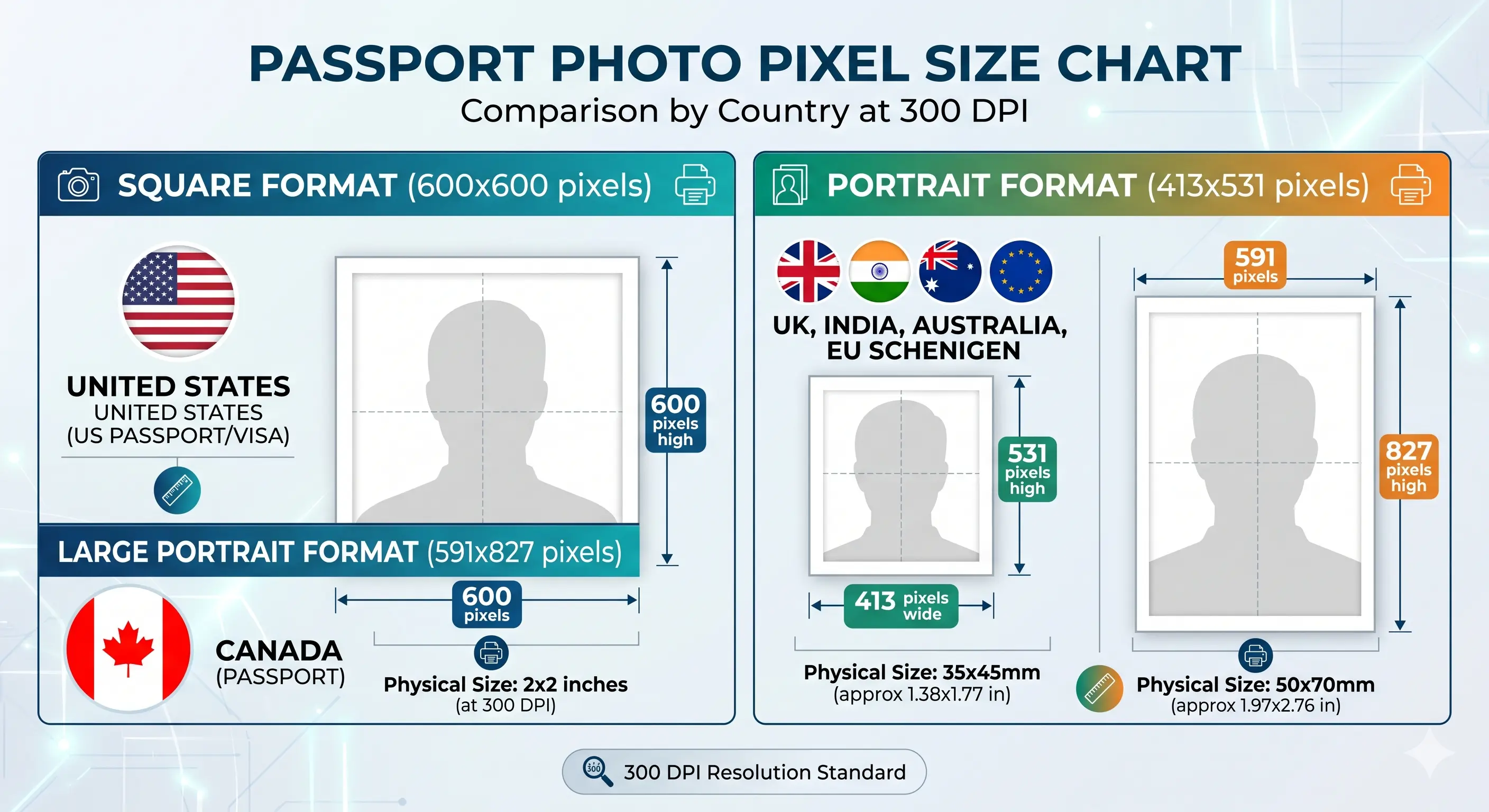
Create US Visa PhotoThe same photo expressed three ways: 2 × 2 inches printed, 51 × 51 millimetres, and 600 × 600 pixels at 300 DPI. All three describe one identical square.
Every US visa application photo must meet strict guidelines defined by the US Department of State. Each rule below links to the detailed standard in our passport photo rules library.
| Photo Size | 2 x 2 inches (51 x 51 mm), square 1:1 ratio |
|---|---|
| Dimensions (pixels) | 600 x 600 minimum to 1200 x 1200 maximum, square |
| File Size | 240 KB or less for the DS-160 and DS-260 upload |
| File Format | JPEG (.jpg) only. PNG, HEIC and WebP are not accepted |
| Colour | Full colour, 24-bit per pixel, sRGB. Black and white is refused |
| Background | Plain white or off-white, no patterns or shadows — see background colour rules |
| Lighting | Even and diffuse, no shadow on the face or behind the head — see shadow rules |
| Head Size | 1 to 1 3/8 inches (25–35 mm) chin to crown, 50%–69% of the photo — see head size rules |
| Face Coverage | 50–69% of the frame height — see face size requirements |
| Eye Position | 1 1/8 to 1 3/8 inches (28–35 mm) from the bottom edge — see eyes requirements |
| Facial Expression | Neutral face, both eyes open, mouth closed — see smile rules |
| Hair | Must not cover the eyes or obscure the outline of the face — see hair rules |
| Ears | Not mandatory for US photos, but the full face outline must be clear — see ears visibility rules |
| Glasses Policy | No glasses allowed since November 2016 — see glasses rules |
| Head Coverings | Not permitted unless worn daily for religious reasons, full face visible — see head covering rules |
| Clothing | Everyday clothing. No uniforms, camouflage, or clothing resembling a uniform |
| Resolution | Minimum 300 DPI for printed copies, sharp and in focus — see resolution rules |
| Digital Alteration | Not permitted. No filters, retouching, skin smoothing, slimming or tone adjustment |
| Recency | Taken within the last 6 months and not previously submitted with another application |
Most applicants need both. The DS-160 form takes a digital file, and the interview at the Embassy or Consulate often requires a printed copy. Each has its own limits.
| Specification | Digital upload (DS-160 / DS-260) | Printed photo (interview) |
|---|---|---|
| Size | 600 × 600 to 1200 × 1200 px, square | 2 × 2 inches (51 × 51 mm) |
| Resolution | Pixel count governs, DPI not enforced | 300 DPI minimum |
| File size | 240 KB or less | Not applicable |
| Format | Colour JPEG, sRGB | Glossy or matte photo paper |
| Quantity | One file | One photo, some posts request two identical copies |
The 240 KB ceiling is where most uploads fail. A 600 × 600 pixel JPEG saved at maximum quality often lands between 250 KB and 400 KB, so the pixel count reads correct but the file is refused. Save at quality 85, which typically produces 60–150 KB with no visible loss.
If your export is too heavy, the compress to 240 KB guide and reduce file size guide cover it. To hit the pixel minimum exactly, see the resize to 600x600 guide. iPhone users shooting in HEIC should convert first with the HEIC to JPEG guide. Broader portal rules are in the digital passport photo requirements guide.
Get your DS-160 ready visa photo in under a minute with these simple steps.
Use a phone or camera in front of a plain white wall with even, natural lighting. Switch off portrait blur and beautification first.
Open the Passport Photo Maker and upload your image with the US visa preset selected.
The tool automatically resizes to 2x2 inches, removes the background, and verifies compliance. See the crop guide for framing detail.
Get your digital photo for DS-160 upload and a printable 4x6 sheet for the consulate.
The 2 × 2 inch square is shared across US document types, so one photo often works for several. Other countries do not use it, which is why a US visa photo cannot be reused abroad.
| Document | Size | Digital | Head height |
|---|---|---|---|
| US Visa (DS-160 / DS-260) | 2 × 2 in | 600–1200 px, ≤ 240 KB | 25 – 35 mm |
| US Passport | 2 × 2 in | 600–1200 px, 54 KB – 10 MB | 25 – 35 mm |
| US Green Card (USCIS) | 2 × 2 in | Printed 2 × 2 photo | 25 – 35 mm |
| India e-Visa | 2 × 2 in | 600 × 600 px | 25 – 35 mm |
| OCI Card | 2 × 2 in | 600 × 600 px | 25 – 35 mm |
| Canada Visa / TRV | 35 × 45 mm | 413 × 531 px, ≤ 240 KB | 31 – 36 mm |
| Schengen Visa | 35 × 45 mm | 413 × 531 px, ≤ 240 KB | 32 – 36 mm |
| China Visa | 33 × 48 mm | 354–420 × 472–560 px | 28 – 33 mm |
| Australia Visa | 35 × 45 mm | 413 × 531 px, ≤ 500 KB | 32 – 36 mm |
Every applicant needs their own photo, including newborns. The 2 × 2 inch specification applies with no age exemption on size or head height.
2 × 2 inch frame with the head 1 to 1 3/8 inches chin to crown. No reduced format exists for infants.
No supporting hands, arms, car seat, toy or pacifier may be visible, and no other person may appear. Lay the child on a plain white sheet and shoot from directly above.
Both eyes should be open and looking towards the camera. This is relaxed for newborns but expected for older children. See eyes requirements.
Use soft indirect daylight from the side of the room, not overhead. Overhead light from one side creates the background shadow that fails the check.
A family applying together needs a separate compliant photo for each person. A child cannot share a parent's photo or appear in it.
Shoot wide and crop down. Cropping tightly in-camera on a small face leaves too few pixels once the 600 × 600 square is applied.
Positioning, lighting and timing technique for infants and toddlers is covered in the baby passport photo at home guide.
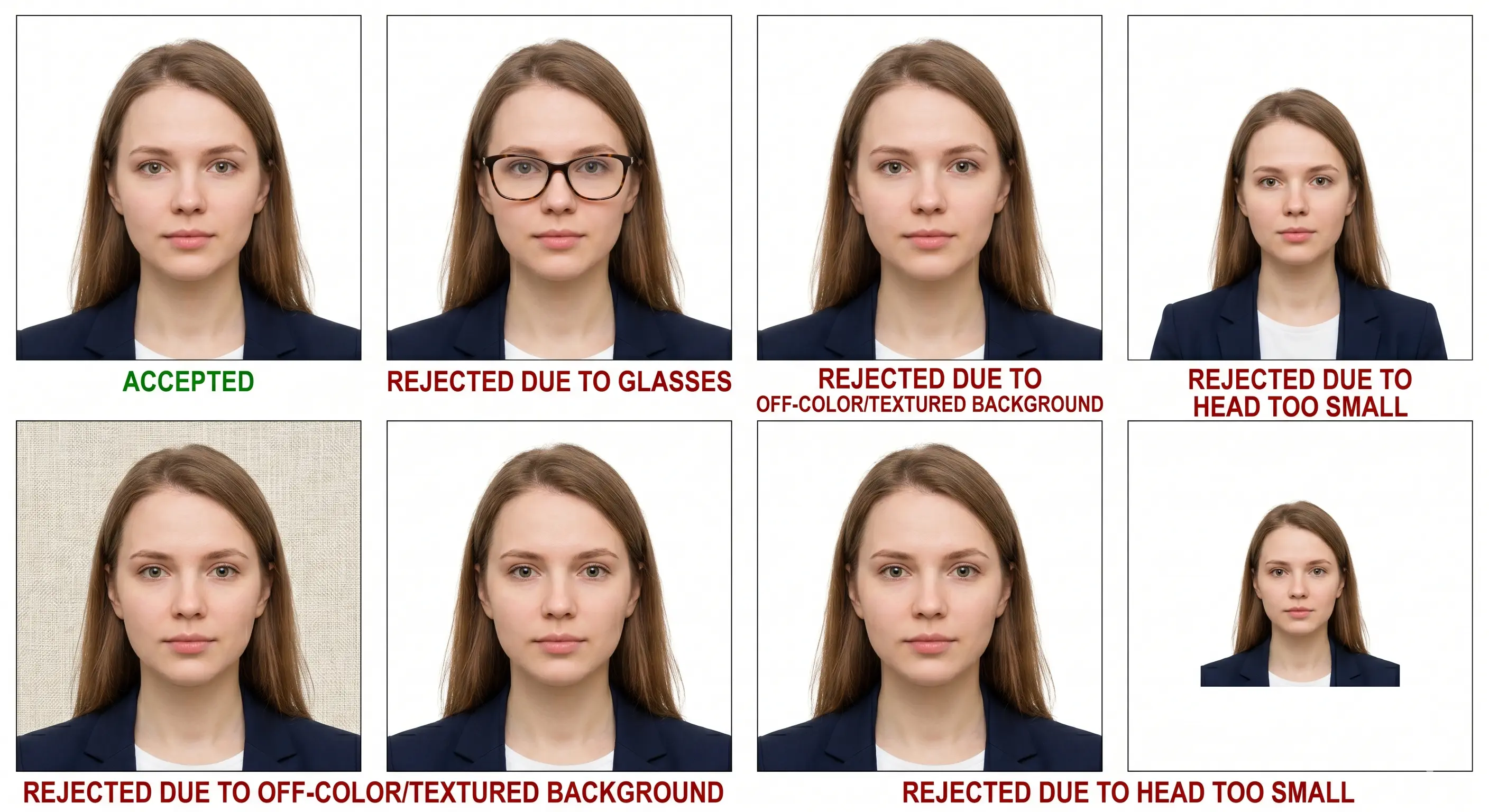
The US Department of State rejects thousands of visa photos every month. Each item links to the detailed rule so you can confirm the tolerance before you submit. The full breakdown is in passport photo rejection reasons.
Photos that aren't perfectly square 2x2 inches or fall outside the 600x600 to 1200x1200 px range will be rejected automatically. See the crop guide.
The DS-160 uploader refuses any file above 240 KB even when the pixel dimensions are correct. Save at JPEG quality 85 rather than maximum.
Any colour besides plain white or off-white, including shadows on the wall, will cause rejection. See background colour rules.
Head must be centred, facing the camera directly, and occupy 50–69% of the frame. See head size rules.
Head height can be correct while the eyes fall below 1 1/8 inches from the bottom edge. Both measurements are checked. See eyes requirements.
Blurry, pixelated, or low-resolution photos are immediately rejected by DS-160 photo validation. See resolution rules.
Shadows on the face, neck, or background indicate poor lighting and are a top rejection reason. See shadow rules.
Glasses have been banned in US visa photos since 2016, including clear lenses and sunglasses. See glasses rules.
Smiling broadly, frowning, raised eyebrows, or open mouth will fail compliance. See smile rules.
A fringe over the eyes or hair obscuring the outline of the face fails landmark detection. See hair rules.
Non-religious headwear and clothing resembling a uniform are refused. See head covering rules.
Colour is mandatory. A greyscale or black and white image is refused for both digital and printed submission.
Only JPEG is accepted. PNG, HEIC and WebP uploads are refused outright by the DS-160 photo tool.
Photos older than 6 months, or the same image already submitted with a previous application, will not be accepted.
Beauty filters, portrait blur, retouching, or digital alterations cause automatic rejection of your application.
Follow these expert tips to get your photo approved on the first try.
Stand near a window during daytime for soft, even lighting that avoids harsh shadows on your face.
Stand at least 1.5 feet away from a clean white wall to prevent shadows from appearing behind you.
Keep your mouth closed and look directly at the camera with a relaxed, natural face.
Avoid white tops that blend with the background. Wear dark or coloured everyday clothing, and never a uniform.
Take off glasses, large earrings, and headphones. Hats and head coverings are not allowed.
Disable portrait mode, background blur and skin smoothing before you shoot. These alter facial geometry and are detected.
Modern smartphones produce excellent results. Ask someone to take the photo at eye level, 4 feet away.
Frame loosely and crop down. A tightly framed source leaves too few pixels once the 600 × 600 square is applied.
Confirm the file is 240 KB or less before you reach the DS-160 upload step, not after.
If your interview requires a printed copy, print settings matter as much as the crop. Plain copier paper is refused at every post.
| Print resolution | 300 DPI minimum — export at 600 × 600 pixels or larger, and disable fit-to-page scaling |
|---|---|
| Paper | Glossy or matte photo paper. Plain copier paper is refused |
| Copies per 4 × 6 inch sheet | Six 2 × 2 inch photos in a two by three grid with cutting margins |
| Cutting | Guillotine or steel rule for square edges. Do not cut inside the printed border |
| Colour management | sRGB. Turn off printer auto-enhance, skin smoothing and colour correction |
| Handling | Let ink dry fully. Do not staple, fold or write on the photo face |
| How many to bring | One printed photo, though some posts request two identical copies. Confirm with your post |
Printer settings and cutting technique are covered in the print passport photo at home guide, and sheet layout in the print 2x2 on 4x6 guide.
Everything you need to know about creating a compliant US visa photo online.
Get your DS-160 compliant photo in seconds — 600 × 600 pixels, under 240 KB, plus a print-ready 4 × 6 sheet. Free, instant, no signup required.
Create US Visa Photo