Direct Answer: The Canada passport photo must be exactly 50 × 70 mm. The background must be plain white, and your head must occupy 44% to 51% of the photograph. You must maintain a neutral expression with both eyes open.
By ClonyPDF Editorial TeamCompiled from Government of Canada (IRCC) and ICAO sourcesLast reviewed Sources
Canada Passport Photo Size (Quick Answer)
A Canada passport photo must be 50 mm wide by 70 mm tall (2 × 2¾ inches) with the face measuring 31–36 mm from chin to crown, on a plain white or light-coloured background. You need two identical prints taken by a professional photographer within the last 6 months, with the studio name, address and date on the back of one.
Specification
Value
Photo size
50 × 70 mm (2 × 2¾ in / 5 × 7 cm)
Face height
31 – 36 mm chin to crown, about 44–51% of the frame
Background
Plain white or light-coloured, clear contrast with the face
Pixels @ 300 DPI
591 × 827 px
Pixels @ 600 DPI
1181 × 1654 px
Glasses
Accepted if eyes visible and no glare — tinted lenses are not
Head coverings
Accepted for religious or medical reasons, full face visible
Canada Requires a Professional Photographer — Read This First
This is the single biggest difference between Canada and countries like the United States or the United Kingdom, and it is the reason a home-made photo cannot complete a Canadian passport application.
Canadian passport photos must be taken in person by a professional photographer, no more than six months before you submit your application. You must supply two identical prints, and the back of one of them must carry the photographer's studio or company name, its complete address, and the date the photos were taken — stamped or handwritten by the photographer. A self-taken photo cannot satisfy that endorsement, no matter how technically compliant the image is.
So what is this page and this tool for?
Three genuinely useful things:
Check compliance before you pay. Studio reshoots cost money and time. Preparing a 50 × 70 mm reference with the correct face height means you arrive knowing exactly what a passing photo looks like, and you can spot a bad shot before you leave the shop.
Prepare the digital file you are allowed to supply. The Canada PR card and Canada visa channels publish their own photo specifications and do accept applicant-supplied photos. This tool is directly usable for those.
Get the framing right for any other 50 × 70 mm use. Provincial ID, institutional cards and overseas applications that use the same format.
Applying from outside Canada? The Canadian photo requirements still apply, and local photo studios may not know them. Bring the printed specification with you, and confirm the photographer will stamp the reverse with their studio name, address and the date. Passport renewals abroad do not need a guarantor signature on the photo, but they do still need the photographer's endorsement.
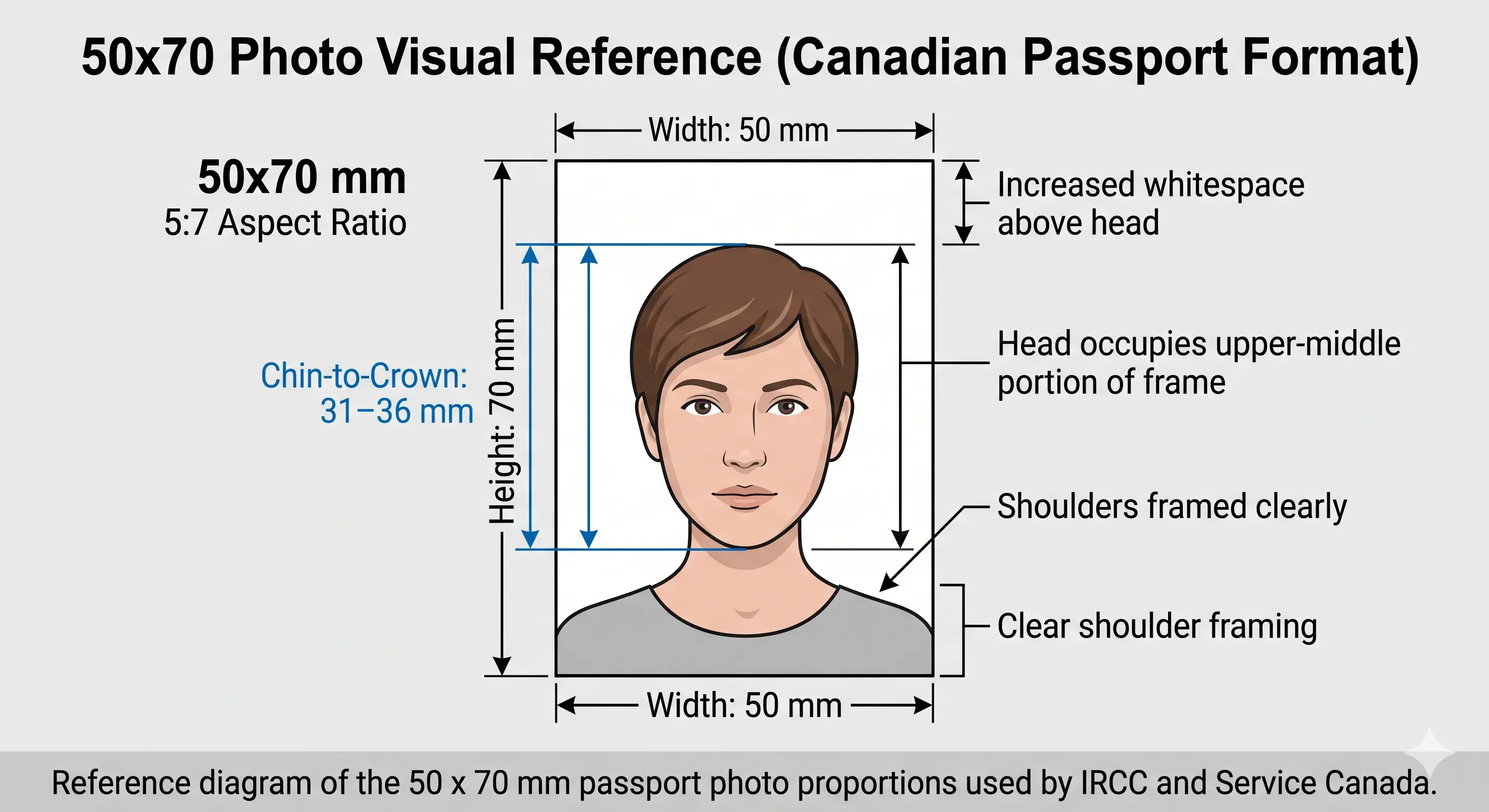
Canada Passport Photo Visual Reference
The diagram marks every measurement the Passport Program checks: the 50 × 70 mm frame and the 31–36 mm chin-to-crown face height.
Canada passport photo size diagram · 50 × 70 mm
Canada passport photo proportions: 50 × 70 mm at a 5:7 ratio, face 31–36 mm chin to crown. The full unit breakdown for this format is in the 50×70 mm photo size guide.
Canada Passport Photo Preparation
Prepare and verify a 50 × 70 mm Canadian-format photo in your browser. No software, no signup, no watermarks.
A practical, plain-English guide to the exact specifications the Government of Canada Passport Program expects on every passport photo.
The Canadian passport photo standard is one of the strictest in the world. Unlike the US 2×2 inch format, Canada uses a taller rectangular photo measuring exactly 50 mm wide by 70 mm tall. The face itself must measure between 31 mm and 36 mm from the bottom of the chin to the natural top of the head (the crown, not the top of the hair). Even a few millimetres off and the photo will be returned by the passport office.
Why the Canada passport picture size is different
Canada follows ICAO Doc 9303 international standards but applies its own physical print size. The 50 × 70 mm format is close to unique to Canada — the United Kingdom, the Schengen area and most of Europe use 35 × 45 mm, while the United States and India use the 2 × 2 inch (51 × 51 mm) square. This is why a US or European passport photo is never accepted as a Canadian one, even if cropped.
Background, lighting, and expression
The Passport Program accepts a plain white or light-coloured background with a clear difference between your face and the background. Lighting must be uniform, with no shadows, glare, or flash reflections, and the photo must be clear, sharp, in focus, and show natural skin tones. Your expression must be neutral with the mouth closed and no smiling, eyes open and clearly visible, and your face and shoulders squared to the camera. See the background colour rules and shadow rules.
Glasses, hair and head coverings
Canada is more permissive than the US or UK on eyewear. Photos with glasses are accepted provided your eyes are clearly visible, there is no glare on the lenses, and the frames do not cover any part of your eyes. Sunglasses and tinted glasses are not accepted even when the eyes are visible. Hair may be worn up or down. Hats and head coverings worn daily for religious beliefs or medical reasons are accepted as long as your full face is clearly visible and no shadow falls across it. See the glasses rules, hair rules and head covering rules.
Canada passport photo dimensions in pixels
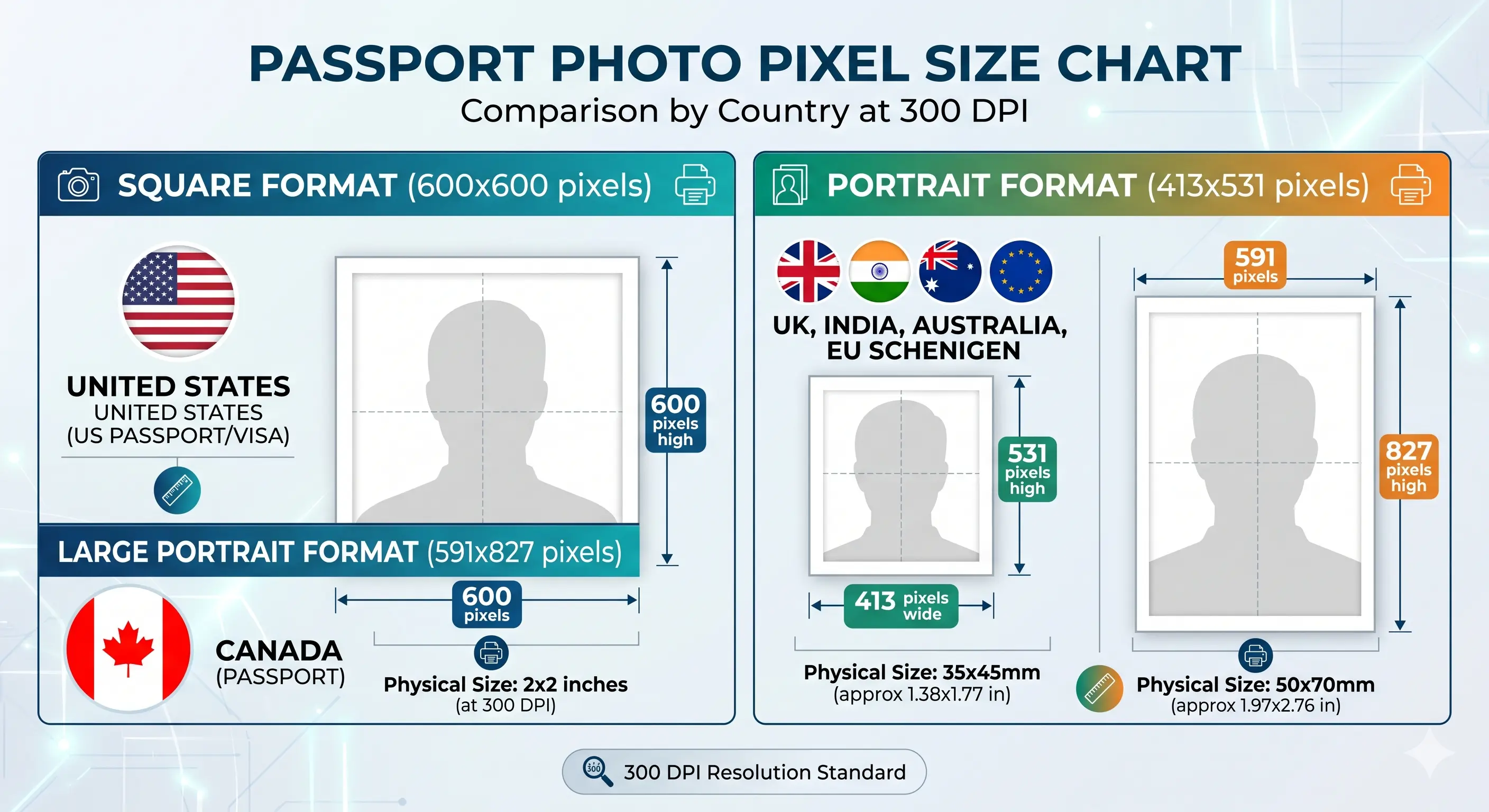
For a print at 300 DPI, the digital file works out to 591 × 827 pixels; at 600 DPI it is 1181 × 1654 pixels. See the pixel conversion table below, and the resolution rules for the sharpness standard.
Where to get your Canada passport photo taken
A commercial photographer is required for the passport channel. Common options across Canada include Shoppers Drug Mart, Walmart Photo, Costco Photo Centre, London Drugs, and Staples, as well as independent studios. Confirm before paying that they will provide two prints and stamp the reverse of one with the studio name, address and date.
Canada passport photo size 50x70 mm - face 31-36 mm chin to crown
The 50 × 70 mm physical size converts to different pixel counts depending on the export resolution. Export high — a printer can downscale, but detail cannot be recovered from a small file.
Resolution
Pixels (W × H)
Use case
150 DPI
295 × 413 px
Below the print minimum — not acceptable
300 DPI
591 × 827 px
Minimum standard print quality
450 DPI
886 × 1240 px
Comfortable headroom for studio printing
600 DPI
1181 × 1654 px
Recommended export for professional labs
Why upscaling does not work
Enlarging a small image to reach 591 × 827 pixels interpolates rather than adds detail, and the result is soft around the eyes and hairline. The Passport Program requires the photo to be clear, sharp and in focus, so an upscaled file fails on quality even when the pixel count reads correctly.
Two Canada-specific reversals worth noting. Canada accepts glasses where the US and UK refuse them — but Canada refuses self-taken photos where the US and UK accept them. If you have made a compliant photo for another country, neither of those rules carries across.
The full specification is in the requirements table above. This is the practical list of things to confirm after the photos are in your hand and before the envelope goes out.
Two prints, identical, from the same session
Studio name and full address on the reverse of one
Date the photos were taken written or stamped on the reverse
Photos taken within the last six months
Prints measure exactly 50 × 70 mm
Original prints — not scans or photocopies
Matte or semi-gloss photo paper, no border
No creases, ink smudges or fingerprints on the surface
Nothing written on the front of either photo
Photos not stapled, clipped or glued to the form
Face still looks like you today
Second print left clean as the spare
Canada Passport Photos for Children and Infants
The same 50 × 70 mm size, 31–36 mm face height and background rules apply to children including newborns. There is no size or framing exemption for age, and the photographer endorsement is still required.
Same size, same framing
50 × 70 mm frame with the face 31–36 mm chin to crown. No age exemption applies to dimensions, background or the photographer rule.
Child alone in the frame
No parent, guardian, supporting hand, toy, pacifier or car seat may appear. Support from behind a plain sheet so nothing enters frame.
Eyes open, mouth closed
Eyes should be open and clearly visible with a neutral expression. See the eyes requirements.
No shadow behind the head
Uniform lighting with no shadows or flash reflections. This is the check that most often fails on infant photos — see the shadow rules.
Children's passports are issued for a shorter validity period than adult ones, so a fresh photo is needed at every renewal because young faces change quickly. Positioning and lighting technique for infants is covered in the baby passport photo guide — useful preparation even though the passport print itself must come from a photographer.
How to Prepare a Canada Passport Photo Online
Four steps to a verified 50 × 70 mm reference file you can check before your studio visit, or submit directly to the PR card and visa channels.
1
Upload Your Photo
Take a fresh photo against a plain light wall or upload one from your phone or computer. JPG and PNG are supported.
2
Auto Crop & Resize
The tool detects your face and crops to the 50×70 mm Canadian format automatically. The crop guide explains how the 5:7 ratio and face-height band work together.
3
Background Correction
The background is replaced with a clean, compliant light tone, removing shadows and clutter.
4
Download & Verify
Download a high-resolution JPEG. Use it as your studio reference, or submit it to the PR card or visa channel where applicant photos are accepted.
Applying for a PR card or visitor visa instead? Those channels accept your own photo.
For the passport channel the prints come from the photographer. This guidance matters when you are printing for the PR card, visa, or any other 50 × 70 mm use where you supply your own photo.
Printed size
Exactly 50 × 70 mm with no border
Print resolution
300 DPI minimum — disable fit-to-page and auto-scaling, which change the physical size
Paper
High-quality matte or semi-gloss photo paper. Plain copier paper is refused
Original print
Must be an original photographic print — a scan or photocopy of a print is refused
Copies per 6 × 4 inch sheet
Two 50 × 70 mm photos with cutting margins
Cutting
Guillotine or steel rule for square edges. Do not cut inside the printed border
Colour management
sRGB. Turn off printer auto-enhance and colour correction
Reverse of one photo
For the passport channel, leave clear for the photographer's studio name, address and date
Handling
Let ink dry fully. Do not staple, fold, or write on the front
Common Reasons Canada Passport Photos Get Rejected
Thousands of Canadian passport applications are delayed every year because of small photo errors. The full cross-country breakdown is in passport photo rejection reasons.
Missing Photographer Endorsement
The reverse of one photo must carry the studio name, complete address and the date taken. An unendorsed pair is returned unprocessed — the most avoidable failure on this list.
Self-Taken Photo
Canada requires photos taken in person by a professional photographer. A home or booth photo without the studio endorsement cannot be accepted for a passport.
Wrong Photo Size
Photos that are not exactly 50×70 mm will be rejected. Standard 4×6 prints and US 2×2 inch sizes do not qualify — see the 2x2 photo size comparison.
Incorrect Face Height
The face must measure 31–36 mm from chin to crown. Photos taken too close or too far from the camera fail this rule — see the head size rules.
Shadows on the Background
Standing too close to the wall causes shadows behind your head. Lighting must be uniform with no shadows, glare or flash reflections — see the shadow rules.
Glare on Glasses
Glasses themselves are accepted, but glare on the lenses or frames covering any part of the eyes is not. Tinted lenses and sunglasses are refused outright — see the glasses rules.
Smiling or Open Mouth
A neutral expression is mandatory. Even slight smiles can lead to rejection — see the smile rules.
Hair Covering the Face
Eyes, eyebrows and the face outline must be clearly visible. Hair may be up or down but must not obscure the face — see the hair rules.
Scanned or Copied Prints
The photos must be original photographic prints. A scan, photocopy or reprint of an existing photo is refused.
Old or Edited Photos
Photos older than six months, filtered, or digitally retouched beyond basic colour correction are not accepted.
Getting the Photo Session Right
Whether you are shooting a reference to take to the studio, or preparing a photo for the PR card and visa channels where your own image is accepted, these details decide whether it passes.
📱
Never Use the Front Camera
Hand the phone to someone else. Stand about 1.5 metres away with the camera at eye level. Arm's-length selfies distort facial proportions and fail the face-height check.
💡
Use Natural Daylight
Stand facing a window during the day. Natural light produces accurate skin tones and avoids the glare and flash reflections the specification prohibits.
🧱
Pick a Clean Light Wall
An empty white or light wall is ideal, and stand at least 50 cm clear of it. Avoid wallpaper, posters, doors and textured surfaces.
👕
Wear Solid, Darker Clothing
Solid colours that contrast with the light background keep a clear difference between your face, shoulders and the backdrop. Avoid white tops and busy patterns.
👓
Angle Glasses Down Slightly
Canada accepts glasses, but not glare. Tilt the frames very slightly downward and move away from direct light so the lenses stay clear and the frames do not cross your eyes.
🚫
Turn Off Portrait Mode
Portrait blur, skin smoothing and face-slimming are enabled by default on many phones. They alter facial geometry and are not permitted. Use the plain photo mode.
Where Canadians Commonly Use Passport Photos
A 50×70 mm photo isn't only for the main passport booklet. The same format is required across multiple Canadian government applications, which is why knowing the specification once saves repeat studio visits.
Most Canadians need a fresh passport photo at least once every five to ten years, but in practice these photos are needed far more often. Whether you are applying for a brand new adult passport, helping a parent renew their travel document, or sending a photo for a child's first passport, the specifications stay identical. Knowing exactly when you'll need one — and that two endorsed prints are required each time — helps you plan ahead.
For new applications you must submit two identical photos taken within the last six months. Renewal applications also require two new photos that reflect your current appearance, even through the simplified renewal process. Children's passports need updated photos every cycle because young faces change quickly. And for emergency or urgent travel documents issued by Canadian consulates abroad, the same 50×70 mm standard applies, though consular staff may apply stricter quality controls.
New Adult Passport
First-time adult applicants submit two identical endorsed 50×70 mm photos taken in the last 6 months.
Passport Renewal
Even simplified renewals need two fresh photos. Photos from your previous passport are not accepted.
Issued by consulates abroad, these still require the standard Canadian photo format and endorsement.
If you need a photo for permanent residency, see our Canada PR Card Photo page. For visa-specific requirements, use our Canada Visa Photo page. Both channels publish their own specifications and accept applicant-supplied photos.
Frequently Asked Questions
Everything you need to know about Canada passport photo requirements.
Size & Specification
What is the Canada passport photo size?
The official Canada passport photo size is 50 mm wide by 70 mm tall (2 × 2¾ inches, or 5 cm × 7 cm). The face must measure 31–36 mm from chin to crown, roughly 44–51% of the 70 mm frame height. At 300 DPI the digital equivalent is 591 × 827 pixels. The full unit breakdown is in the 50×70 mm photo size guide.
Is the Canada passport photo size the same as the UK or Schengen size?
No. Canada uses 50 × 70 mm, which is close to unique. The United Kingdom, the Schengen area and most of Europe use 35 × 45 mm, and the United States and India use a 2 × 2 inch square. A Canadian photo is not interchangeable with any of them.
What background is required?
A plain white or light-coloured background with a clear difference between your face and the background. Lighting must be uniform with no shadows, glare or flash reflections, and the photo must be clear, sharp and in focus with natural skin tones. See the background colour rules.
The Photographer Requirement
Can I take my own Canada passport photo at home?
No. Unlike the United States and the United Kingdom, Canada requires passport photos to be taken in person by a professional photographer, no more than six months before you submit. The back of one of the two photos must carry the studio or company name, its complete address, and the date the photos were taken, stamped or handwritten by the photographer. A self-taken photo cannot satisfy that endorsement. You can still use this tool to check your framing before the studio visit, and it is directly usable for the PR card and visa channels.
How many photos does a Canadian passport application need?
Two identical photos taken in the same session within the last six months. One of the two must be endorsed on the reverse by the photographer with the studio or company name, complete address, and the date taken. Nothing should be written on the front of either photo.
Can I use a selfie?
No — for two separate reasons. The passport channel requires a professional photographer's endorsement, and separately, the close camera distance of a selfie distorts facial proportions and typically fails the 31–36 mm face-height check. For channels that do accept your own photo, have someone else shoot from about 1.5 metres away at eye level.
Appearance & Compliance
Can I wear glasses in a Canada passport photo?
Yes. Canada accepts photos with glasses worn provided your eyes are clearly visible, there is no glare on the lenses, and the frames do not cover any part of your eyes. Sunglasses and tinted glasses are not accepted even when the eyes are visible. Canada is more permissive here than the US or UK, both of which prohibit eyewear — so do not assume a rule from another country carries over. See the glasses rules.
Can I wear a head covering?
Yes, if worn daily for religious beliefs or medical reasons. Your full face must remain clearly visible and no shadow may fall across it. Hats and decorative headwear are not accepted. See the head covering rules.
Can I smile in my Canada passport photo?
No. You must hold a neutral expression with your mouth closed and no smiling. Eyes must be open and clearly visible, with your face and shoulders centred and squared to the camera. See the smile rules.
How recent must the photo be?
Taken no more than six months before you submit your application. Canadian passport photos are only valid for six months from the date they are taken, and that date must appear on the reverse of one photo. If your appearance has changed significantly, get a new photo regardless.
Children & Printing
What are the photo rules for a child or infant Canadian passport?
The same 50 × 70 mm size, 31–36 mm face height and background rules apply to children including newborns, and the photographer endorsement is still required. The child must be alone in the frame with no supporting hands, toy or pacifier visible. Children's passports are issued for a shorter validity period, so a fresh photo is needed at each renewal. See the child and infant section above.
How do I print a Canada passport photo?
For the passport channel the prints come from your photographer and must be original photographic prints — not a scan or photocopy — on high-quality matte or semi-gloss paper at exactly 50 × 70 mm. If you are printing for the PR card or visa channel, print at 300 DPI or higher, disable fit-to-page scaling, and cut with a guillotine for square edges. See the print at home guide.
Is this Canada passport photo tool free?
Yes. You can prepare and check a Canada-format photo for free with full preview and instant download. There are no watermarks, hidden fees, or required signups. Remember that the passport application itself still needs a photographer-endorsed print.
Last reviewed:
Specifications on this page are compiled from publicly available Government of Canada passport and IRCC photo guidance and the ICAO Doc 9303 biometric photograph standard. Requirements differ between the passport, PR card and temporary resident visa channels — particularly on who may take the photo and whether a digital file is accepted. Requirements can also change. Always confirm the current specification on canada.ca for your specific application before you submit.
Check Your Canada Photo Before You Pay
Prepare a verified 50 × 70 mm reference so you know exactly what a passing photo looks like — or generate a submission-ready file for the PR card and visa channels. Free, secure, and accurate.