
Indonesia Passport Photo Maker — Free, Compliant, Instant
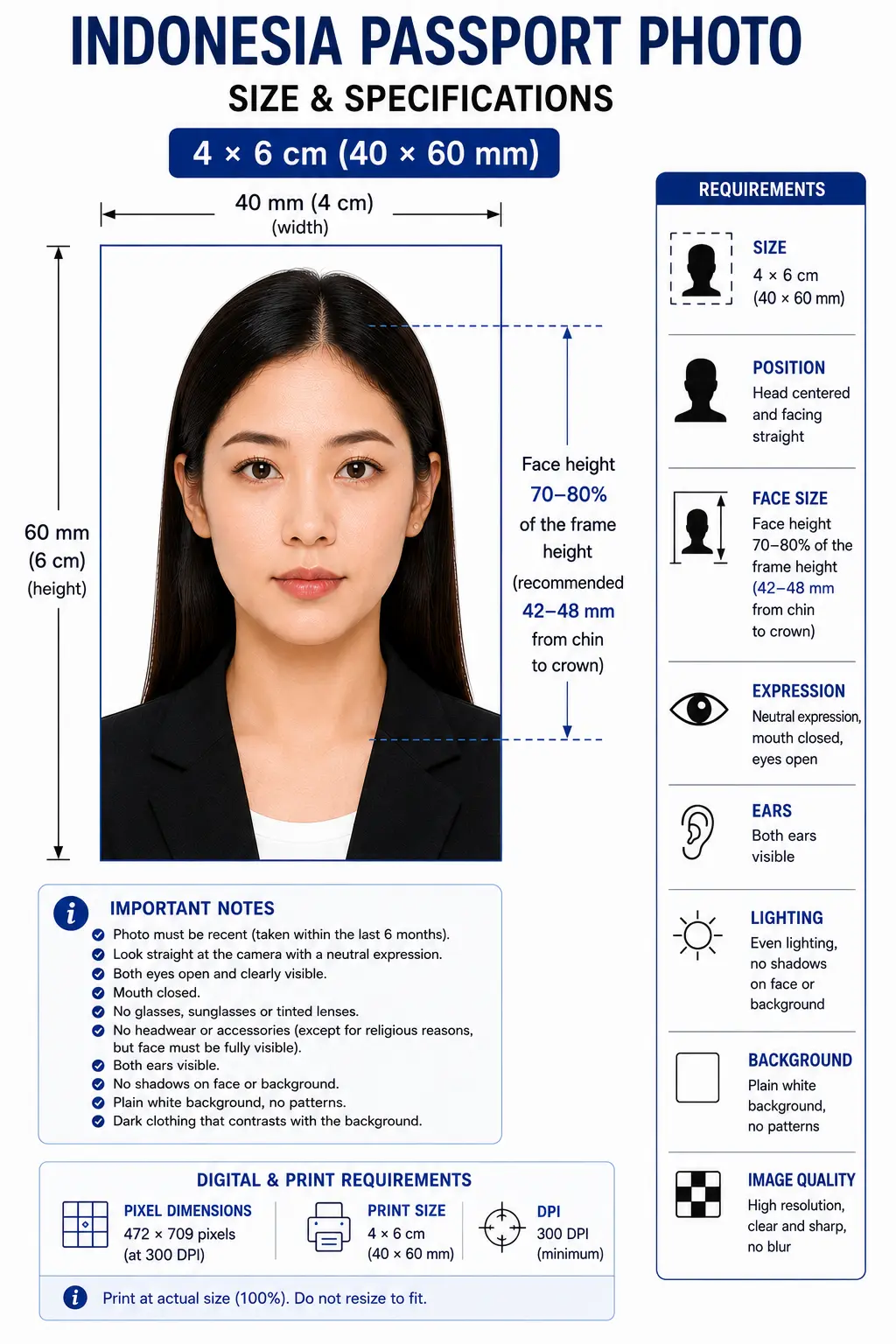
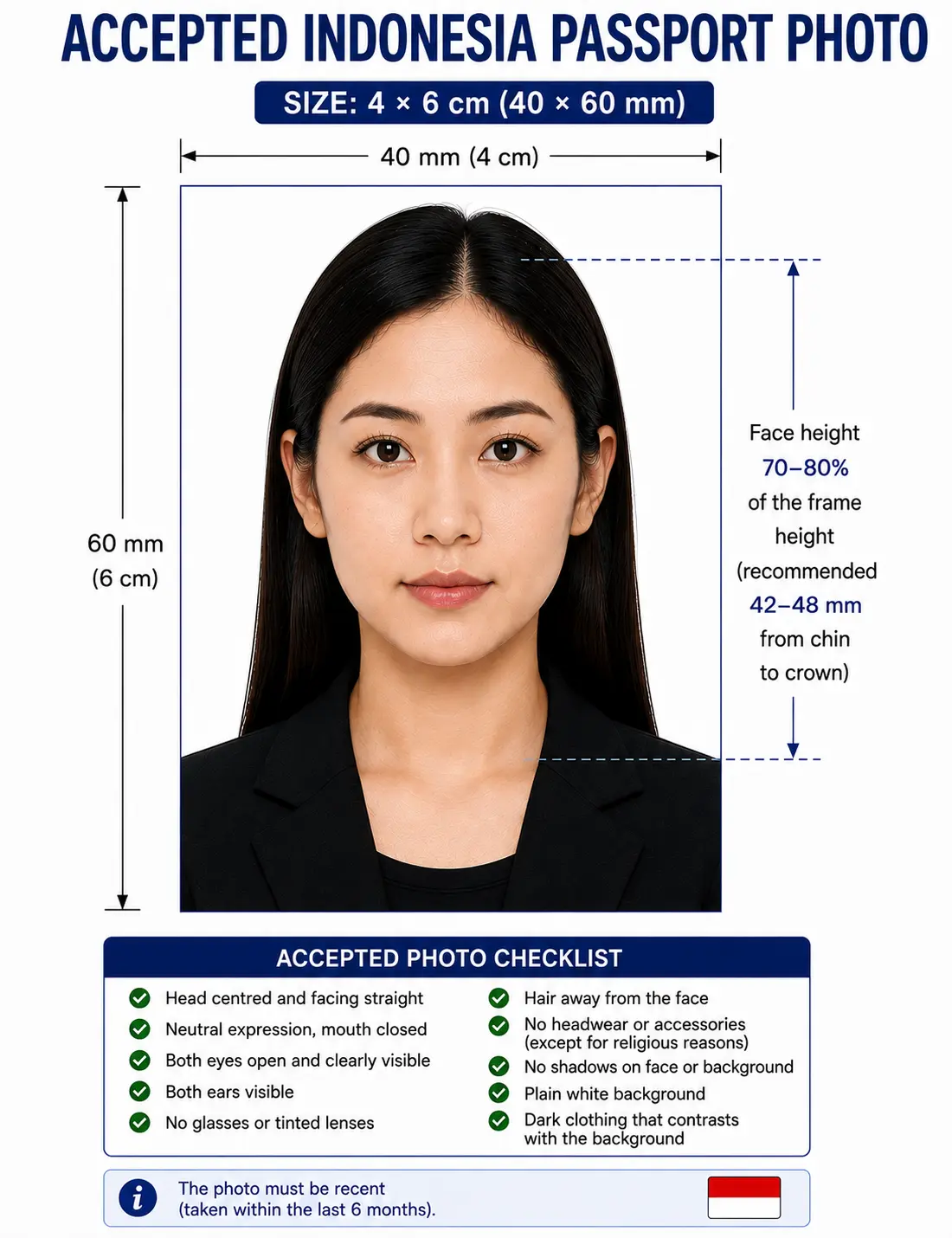
An Indonesian passport photo is most commonly 4 x 6 cm (40 x 60 mm) on a plain white background, with the face filling 70–80% of the frame height — a noticeably tighter crop than most travellers expect.
The process is run through the Direktorat Jenderal Imigrasi (Directorate General of Immigration) and its M-Paspor digital application system, which checks composition both digitally at upload and again in person at the counter. Photos get rejected when the background isn't perfectly even, when light clothing blends into the white backdrop, or when the face is too small or off-centre for the biometric scan. Because the exact size and background colour quoted online vary by source and application channel, this tool builds to the most current, officially aligned specification and flags anything you should double-check before you submit.
Indonesia Passport Photo Size (Quick Answer)
The Indonesia passport photo size most commonly cited is 4 x 6 cm (40 × 60 mm), which equals 472 × 709 pixels at 300 DPI with a 2:3 aspect ratio. The background is plain white, the face fills 70–80% of the frame height, and the photo must be taken within the last 6 months.
| Requirement | Value |
|---|---|
| Photo size | 4 × 6 cm (40 × 60 mm) — some channels use 3.5 × 4.5 cm |
| Pixels @ 300 DPI | 472 × 709 px |
| Pixels @ 600 DPI | 945 × 1417 px |
| Aspect ratio | 2 : 3 |
| Background | Plain white, even, no shadow |
| Face coverage | 70–80% of frame height (roughly 42–48 mm on a 60 mm photo) |
| Expression | Neutral, mouth closed, both eyes open |
| Photo age | Within the last 6 months |
| Submission | Digital upload via M-Paspor, plus in-person verification |
Indonesia Passport Photo Visual Reference
The diagram below marks the measurements an immigration officer and the M-Paspor upload checker both look at: the 40 × 60 mm frame and the 70–80% face coverage.
Why Upload Here Instead of Editing It Yourself
Getting the white background perfectly even and the face proportion exactly right is fiddly to do by hand in a photo app. The tool below handles the technical parts automatically so the photo matches Indonesian passport composition standards on the first try.
Automatic Crop
Resizes your photo to the correct passport dimensions without distorting your face.
Biometric Framing
Positions your head and eyes to match the face-area proportion immigration officers check for.
Correct Dimensions
Outputs at the right millimeter and pixel size for printing or digital upload.
Correct Background
Replaces your background with a clean, even white — no shadows, no gray patches.
Printable Photo Sheet
Generates a ready-to-print sheet if your immigration office wants a physical copy.
No Photoshop Required
Everything happens in the browser — no design skills or extra software needed.
Indonesia Passport Photo Requirements
Every row below must pass for the photo to be accepted, both at upload and at the counter. Each rule links to the detailed standard in the passport photo rules library.
| Photo Size | 4 x 6 cm (40 x 60 mm) is most commonly cited for standard passport applications; some channels and visa submissions use 3.5 x 4.5 cm. Confirm with your specific office. |
|---|---|
| Pixels @ 300 DPI | 472 x 709 px for 4 x 6 cm; 413 x 531 px if your office specifies 3.5 x 4.5 cm |
| Aspect Ratio | 2 : 3 for 4 x 6 cm; 7 : 9 for 3.5 x 4.5 cm |
| Background | Plain white, even, no shadows or texture (current standard for M-Paspor passport submissions). See background colour rules |
| Lighting | Even and diffuse from the front, no shadow behind the head or under the chin. See shadow rules |
| Head / Face Size | Face area (chin to top of head) fills approximately 70-80% of the photo height, roughly 42–48 mm on a 60 mm photo. See head size rules and face size requirements |
| Eye Line | Eyes level, looking straight at the lens, positioned in the upper portion of the frame with a small margin above the crown. See eyes requirements |
| Hair | Must not cover the eyes or obscure the outline of the face. See hair rules |
| Ears | Not strictly required to be visible, but the face outline must be clearly defined. See ears visibility rules |
| Head Coverings | Hijab and other religious coverings permitted with the full face visible from forehead to chin. See head covering rules |
| Clothing | Choose a darker or contrasting colour. White and pale clothing merges with the white background and is a leading cause of upload failure |
| Resolution | Minimum 300 DPI recommended; aim for at least 600 x 800 px for digital upload. See resolution rules |
| File Format | JPG or JPEG (PNG accepted on some portals), 24-bit colour, sRGB |
| File Size | Typically under 200-300 KB for M-Paspor uploads; check the current limit shown in the app |
| Glasses Rules | Generally discouraged; if medically required, no glare and eyes must be fully visible. See glasses rules |
| Expression Rules | Neutral expression, mouth closed, both eyes open and visible. See smile rules |
| Digital Editing | Cropping, background replacement and exposure correction are fine. Beauty filters, skin smoothing and portrait blur are not |
| Photo Age | Taken within the last 6 months, and representative of your current appearance |
| Digital Submission | Uploaded directly through the M-Paspor app as part of the online application |
Need to hit the M-Paspor file-size ceiling without losing sharpness? The reduce file size guide and digital photo requirements guide cover it. iPhone users shooting HEIC should start with the HEIC to JPEG guide.
Why You'll See Different Sizes and Backgrounds Quoted Online
If you search around for Indonesia passport photo specs, you'll run into conflicting answers — some sites say 4x6 cm with a white background, others say 51x51 mm or 35x45 mm, and a fair number insist on a red background. This isn't because the rules keep changing overnight; it's because Indonesia uses several different photo standards across different identity documents, and they get mixed together in search results.
Red and blue backgrounds are standard for Indonesia's national ID card (KTP) and driver's licence (SIM), where the colour is conventionally assigned by birth year — red for those born in odd-numbered years and blue for even-numbered years. Passport photos, by contrast, currently follow a white-background standard under the Direktorat Jenderal Imigrasi for M-Paspor submissions. The 35x45 mm and 51x51 mm sizes you'll see elsewhere typically apply to visa photos or specific embassy submissions rather than the standard domestic passport application.
If you are applying for a visa rather than a passport, the specification differs — see our Indonesia visa photo requirements guide. For the two sizes most often confused with the Indonesian standard, see 35x45 photo size and 2x2 photo size.
Child and Infant Passport Photo Requirements
Children's passport photos follow the same 4 x 6 cm size, white background and 70–80% face composition as adult photos. There is no smaller format for infants and no relaxed background rule. What changes is a narrow set of expression and support allowances.
Same size, same framing
4 x 6 cm frame with the face filling 70–80% of the height. No age exemption applies to dimensions or composition.
Eyes may be closed for babies
Infants who cannot yet hold their head steady do not need both eyes open. Older children are expected to have open eyes looking at the lens.
Supporting hand allowed
A parent's hand may support the child provided it does not appear in the final crop and casts no shadow on the background.
Nothing else in frame
No toys, pacifiers, blankets with patterns, or other people may be visible anywhere in the photo.
Expression still matters
For toddlers and older children an overly cheerful or open-mouthed expression can still trigger a rejection, though officers are usually more lenient with very young applicants.
Watch for shadow
Lay the child on a plain white sheet in soft indirect daylight and shoot from directly above. Side lighting creates the background shadow that fails the check.
Full positioning, lighting and timing technique for babies and toddlers is covered in our baby passport photo at home guide. The eyes requirements and shadow rules pages cover the two checks that fail most often on child photos.
Photographing a child? Open the Passport Photo Maker and let it apply the 4 x 6 cm crop for you.
Can I Take My Indonesia Passport Photo at Home?
Yes — a smartphone photo works fine as long as you control the lighting and background carefully. Here's what actually matters:
Phone Camera
Use the rear camera, not the front-facing selfie camera, since it produces less distortion. Ask someone else to take the photo rather than using a timer, so you can stand straight with your arms relaxed. Switch off portrait mode, background blur and any beauty or skin-smoothing setting before you shoot.
Lighting
Face a window with natural daylight, or use even indoor lighting from the front. Avoid overhead light that casts shadows under your eyes or chin, and avoid a light source directly behind you, which will silhouette your face.
Background
Stand about a meter from a plain, light-colored wall. It doesn't need to be perfectly white — the tool can correct that digitally — but avoid textured walls, doors, or anything with visible patterns or objects behind you.
What to Wear
Choose a darker or clearly contrasting colour. This is the single most impactful decision you make: white and pale clothing merges with the white background, the upload system cannot find a clean edge around your shoulders, and the photo is flagged.
Distance from Camera
Stand back enough that your head and shoulders fill the frame with some room above your head, rather than zooming in tight. This gives the cropping tool enough room to hit the correct face-to-frame ratio without cutting off your chin or forehead. The crop guide explains how the 2:3 ratio and 70–80% face rule are applied together.
Mistakes Specific to Shooting at Home
- Using a selfie with visible lens distortion around the nose and eyes
- Standing too close to the wall, which throws a shadow behind the head
- Tilting the head or the phone rather than shooting dead-on at eye level
- Shooting in warm indoor lamplight, which casts an orange tint across the face
Indonesia Passport Photo Compared to Other Countries
Indonesia shares its 40 × 60 mm format with several regional neighbours but not with the two standards travellers most often already own — the US square and the European 35 × 45 mm. A photo prepared for either will look wrong for an Indonesian application.
| Country | Photo Size | Aspect Ratio | Pixels @ 300 DPI | Background |
|---|---|---|---|---|
| Indonesia | 4 × 6 cm (40 × 60 mm) | 2 : 3 | 472 × 709 px | Plain white |
| Thailand | 40 × 60 mm | 2 : 3 | 472 × 709 px | Plain white |
| Vietnam | 40 × 60 mm | 2 : 3 | 472 × 709 px | Plain white |
| Malaysia | 35 × 50 mm | 7 : 10 | 413 × 591 px | Plain white |
| Singapore | 35 × 45 mm | 7 : 9 | 413 × 531 px | Plain white |
| Philippines | 35 × 45 mm | 7 : 9 | 413 × 531 px | Plain white |
| Brunei | 40 × 52 mm | 10 : 13 | 472 × 614 px | Plain white |
| China | 33 × 48 mm | 11 : 16 | 390 × 567 px | Plain white |
| India | 51 × 51 mm (2 × 2 in) | 1 : 1 | 600 × 600 px | Plain white |
| United States | 51 × 51 mm (2 × 2 in) | 1 : 1 | 600 × 600 px | White or off-white |
The biggest practical difference is the face-to-frame ratio: Indonesia's 70–80% guideline produces a noticeably tighter, closer crop than the US standard, where the head occupies a smaller share of a square frame. A correctly-sized US passport photo will usually look "too zoomed out" if submitted for an Indonesian passport, and vice versa. Browse every national standard in the requirements by country hub, or compare sizes in the passport size photo dimensions reference and passport photo size in pixels chart.
How to Create an Indonesia Passport Photo
Printing an Indonesia Passport Photo
If your immigration office wants a physical photo, printing is part of the specification rather than an afterthought. A home inkjet printout on plain paper is usually refused for being too thin and low quality.
| Print resolution | 300 DPI minimum — export at 472 × 709 pixels for a 4 x 6 cm print |
|---|---|
| Paper | Glossy or matte photo paper, 200–250 gsm. Plain copier paper is refused |
| Copies per 4 x 6 inch sheet | Four 4 x 6 cm photos, in a two by two grid with cutting margins |
| Copies per A4 sheet | Around twenty 4 x 6 cm photos |
| Scaling | Disable fit-to-page and auto-scaling — rescaling changes the physical size and fails the measurement check |
| Colour management | sRGB. Turn off printer auto-enhance, skin smoothing and colour correction |
| Cutting | Guillotine or steel rule for square edges. Do not cut inside the printed border |
| Handling | Let ink dry fully. Do not staple, fold or glue the photo face |
Printer settings, paper choice and cutting technique are covered in full in the print passport photo at home guide, and multi-copy sheet layout in the print sheet guide.
Common Reasons Indonesia Passport Photos Get Rejected
Each item links to the detailed rule so you can confirm the exact tolerance before you upload. The full cross-country breakdown is in passport photo rejection reasons.
- Wrong background colour — using red (mixing it up with KTP/SIM photo rules) instead of the white background passport photos currently require. See background colour rules
- Light clothing blending into the background — white or pale shirts merging with the white backdrop so the upload system cannot find the shoulder edge
- Incorrect face proportion — head too small or too large relative to the 70-80% guideline. See face size requirements
- Wrong dimensions — cropped to 35x45 mm or a 2x2 square instead of the 4x6 cm frame. See the crop guide
- Shadows — uneven lighting causing dark patches behind the head or under the chin. See shadow rules
- Hair across the face — a fringe over the eyes or hair obscuring the face outline. See hair rules
- Hijab casting a shadow — a head covering that shades the forehead or cheeks, or that matches the background too closely. See head covering rules
- Glasses glare — reflections obscuring the eyes. See glasses rules
- File too large or too compressed — above the M-Paspor ceiling, or squeezed so far that blocking appears around the eyes
- Low resolution — below 300 DPI, so the photo prints soft at 4 x 6 cm. See resolution rules
- Outdated photo — submitting an image older than 6 months or that no longer matches your appearance
- Poor lighting — overexposed or underexposed images that wash out facial detail
- Over-edited photos — heavy filters, portrait blur or retouching that alters facial features
- Printed on plain paper — a thin inkjet printout is refused at the counter even when the image itself is correct
Compliance Notice
Passport photo requirements can change, and Indonesia's guidance — particularly around exact size and background color — varies across official channels and third-party sources. Always verify current requirements directly with the Direktorat Jenderal Imigrasi or the M-Paspor app before submitting your application. Passport Photo Maker helps you create a photo aligned with current guidance, but final approval always rests with the issuing authority.
Frequently Asked Questions
Size & Specification
What is the Indonesia passport photo size?
The size most commonly cited for a standard Indonesian passport photo is 4 x 6 cm, which is 40 x 60 mm. At 300 DPI that equals 472 x 709 pixels with a 2:3 aspect ratio. Some channels and visa submissions instead use 3.5 x 4.5 cm, which is 413 x 531 pixels at 300 DPI, so confirm the exact figure with your immigration office or the M-Paspor app before printing.
Is the Indonesian passport photo size 4x6 cm or 3.5x4.5 cm?
Both appear depending on the source and application channel. 4x6 cm is most commonly cited for standard passport prints, while 3.5x4.5 cm shows up for some visa and children's submissions. Confirm the exact size with your immigration office or the M-Paspor app before printing.
How much of the frame should my face fill?
The face measured from chin to the top of the head should fill approximately 70 to 80 percent of the photo height. On a 60 mm tall photo that is roughly 42 to 48 mm of face. This is a noticeably tighter crop than the US 2x2 inch standard, and taking the photo too close so the face exceeds 80 percent is as much a failure as taking it too far away.
What resolution and file size does an M-Paspor upload need?
Aim for 300 DPI minimum, which is 472 x 709 pixels for a 4 x 6 cm photo. Uploads are typically expected under 200 to 300 KB as a JPEG, though the exact ceiling is shown in the M-Paspor app and can change. Do not compress so far that blocking appears around the eyes and hairline, because a soft or artefacted file fails the quality check even at the correct pixel size.
Background & Appearance
Does Indonesia require a red or a white background for passport photos?
Current guidance for standard passport applications through M-Paspor points to a plain white background. Red and blue backgrounds are used for other Indonesian ID documents such as the KTP national ID card and the SIM driving licence, where the colour is conventionally assigned by birth year. That is where most of the online confusion comes from. If applying through an embassy abroad, confirm locally since channels can differ.
Can I wear a hijab in my Indonesian passport photo?
Yes. A hijab is permitted for religious reasons. The requirement is that your full face — forehead, cheeks, and chin — stays visible and uncovered, with no shadow cast across the face. Choose a hijab colour that contrasts with the white background so the edge of the head is clearly defined. See the head covering rules.
What's the biggest mistake Indonesians make submitting passport photos through M-Paspor?
Wearing white or very light clothing against the white background, which blends the shoulders into the backdrop and gets flagged by the upload system. A darker or contrasting shirt avoids this.
Children
What are the photo rules for a child or baby Indonesian passport?
Children's photos follow the same white background, 4 x 6 cm size and neutral expression standard as adults. Babies who cannot yet hold their head steady do not need both eyes open. A parent's hand may support the child provided it does not appear in the final crop and casts no shadow on the background. No toys, pacifiers or other people may be visible, and the same 70 to 80 percent face composition applies to toddlers and older children. See the child and infant requirements section.
Taking, Editing & Printing
Can I use a photo someone took with their phone?
Yes, as long as it's sharp, evenly lit, and taken straight-on. A clear smartphone photo against a plain wall works fine once it's cropped and color-corrected to the right specification. Use the rear camera rather than the selfie camera to avoid lens distortion.
Can I edit or retouch my passport photo?
Light corrections — cropping, background colour, exposure — are normal and expected. Editing that changes your actual facial features, like heavy skin smoothing or reshaping, can get a photo rejected for not matching your real appearance. Switch off portrait blur and beauty filters before you shoot.
How do I print an Indonesian passport photo at home?
Print at 300 DPI on photo paper, not plain paper, which is usually refused for being too thin. A 4 x 6 inch sheet fits four 4 x 6 cm photos and an A4 sheet fits around twenty. Disable printer auto-enhance and fit-to-page scaling, because rescaling changes the physical size. Cut with a guillotine for square edges. See the print at home guide.
How recent does my passport photo need to be?
Most passport authorities, including Indonesia's Direktorat Jenderal Imigrasi, expect a photo taken within the last six months. If your appearance has changed noticeably, it's safer to take a new one even if the six months haven't passed.
Why do passport photos get rejected so often?
Mostly wrong dimensions, an uneven or wrong-coloured background, shadows on the face, and a non-neutral expression. Each is easy to avoid once you know what's being checked.
Official Sources & References
- Direktorat Jenderal Imigrasi (Directorate General of Immigration), Indonesia — imigrasi.go.id
- M-Paspor application — the in-app photo requirements screen shown at upload is the authoritative current specification for your channel
- Local immigration offices (Kantor Imigrasi) — appointment booking, document verification and on-site photo review
- Indonesian embassies and consulates — overseas passport application guidance, which may differ from domestic requirements
- ICAO Doc 9303 — Machine Readable Travel Documents biometric photograph standard: icao.int
Create Your Indonesia Passport Photo Now
Don't risk a trip back to the immigration office over a background color or a few millimeters of crop. Upload your photo now and get a result built to current Indonesian passport guidelines in seconds.