
Singapore Visa Photo Maker — ICA-Compliant 400 x 514 Photo Online
A Singapore visa photo must be exactly 400 x 514 pixels in JPEG format, on a plain white matte background, taken within the last three months, and under 60 KB for the tourist or business visa e-Service upload.
If you're a foreign national applying for a Singapore visa — whether for tourism, business, a Student's Pass, or an Employment Pass — your application photo is reviewed by Singapore's Immigration & Checkpoints Authority (ICA) before anything else gets looked at. ICA validates the photo through an automated upload check, so most rejections aren't about how you look. They're about background tone, file size, or a photo that's quietly out of date. Because a rejected photo can mean a delayed trip, a missed start date, or a resubmission cycle with your sponsor or employer, it's worth getting the file right on the first try. Upload your photo below and we'll generate a version sized and formatted for Singapore's visa e-Service automatically.
Singapore Visa Photo Requirements (Quick Answer)
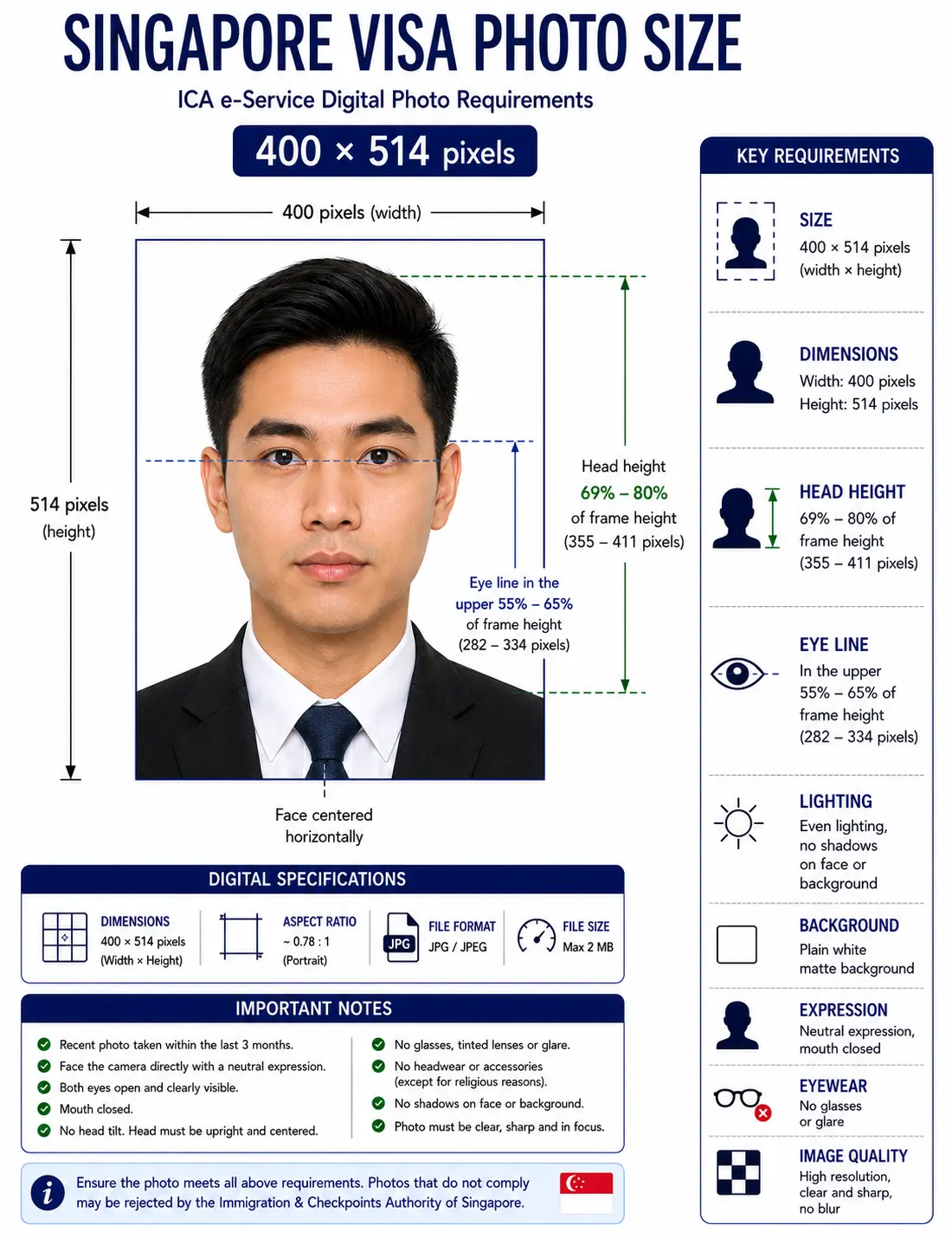
The Singapore visa photo size is 400 × 514 pixels for digital submission through the ICA e-Service, equal to 35 × 45 mm printed. The head must fill 69–80% of the frame height with the eye line in the upper 55–65%, on a plain white matte background, with a neutral expression.
| Specification | Value |
|---|---|
| Digital size (ICA e-Service) | 400 × 514 pixels, JPEG |
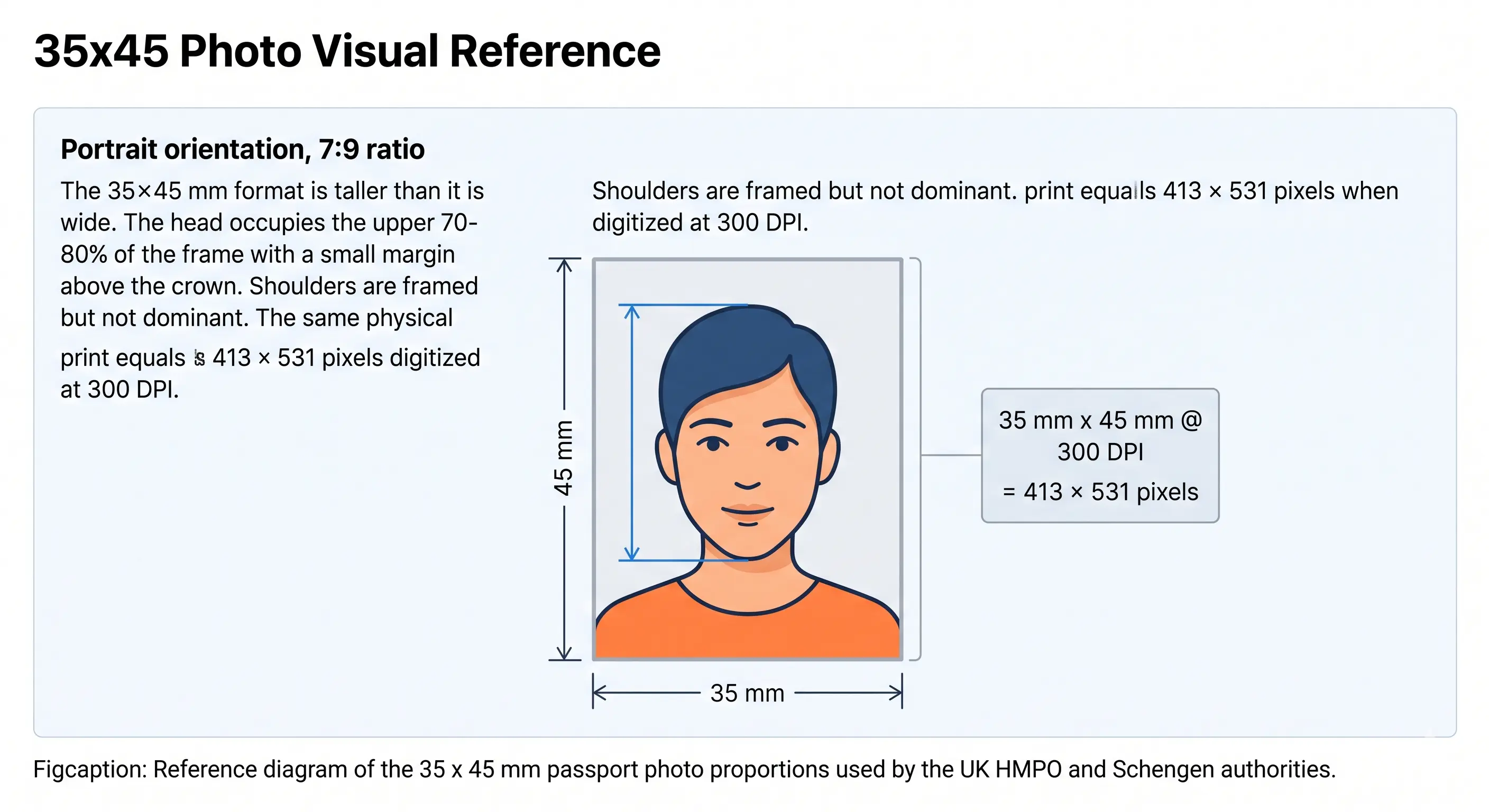
| Print equivalent | 35 × 45 mm (413 × 531 px at 300 DPI) |
| Aspect ratio | 7 : 9 portrait — identical for both |
| File size (tourist / business visa) | 60 KB maximum |
| File size (Student's Pass track) | 8 MB maximum |
| Background | Plain white, matte or semi-matte finish |
| Head height (chin to crown) | 69–80% of frame height, about 25–35 mm |
| Eye line | Upper 55–65% of frame height |
| Expression | Neutral, mouth closed, both eyes open |
| Age of photo | Within the last 3 months |
| Colour | 24-bit colour, sRGB, no filters |
Every rule below links to the detailed standard in the passport photo rules library, and every national standard is indexed in the requirements by country hub.
Singapore Visa Photo Visual Reference
The digital and print specifications describe the same 7:9 portrait frame at two different resolutions. The diagrams below mark the measurements ICA's automated check evaluates.
Do Tourist, Business, Student's Pass, and Employment Pass Photos Use the Same Spec?
Mostly, but not entirely — and this is the part most guides skip. The core 400 x 514 pixel, white-background photo standard is shared across ICA-administered applications. What actually differs is the file-size cap and accepted formats, because different ICA application tracks run on different upload rules:
| Visa Type | Authority / Portal | File Size Cap | Accepted Formats |
|---|---|---|---|
| Tourist / Business Visa | ICA e-Service (visa application) | 60 KB | JPEG only |
| Student's Pass | ICA e-Service (long-term pass track) | 8 MB | JPG, JPEG, HEIC, HEIF, PNG |
| Employment Pass | Ministry of Manpower (MOM) — employer-submitted | Not independently confirmed — see note below | |
The 60KB visa cap and the 8MB long-term-pass cap both come directly from ICA's published e-Service photo guidance, so that gap is real and worth double-checking before you upload — a photo file that's perfectly fine for a Student's Pass can be rejected outright on a tourist visa application for being too large.
Why Upload Here Instead of Editing It Yourself
- Automatic crop to the 400 x 514 pixel ICA frame
- Biometric head and shoulder framing applied automatically
- File-size profile matched to your selected visa type (60KB vs. 8MB track)
- Background swapped to plain matte white, edge-to-edge
- Output ready for both digital upload and printing, if a print copy is ever needed
- No Photoshop, no manual pixel math, no guessing the crop ratio
Singapore Visa Photo Requirements at a Glance
Every row below must pass for the photo to be accepted. Each rule links to the detailed standard so you can confirm the exact tolerance before you upload.
| Requirement | Specification |
|---|---|
| Digital Photo Size | 400 x 514 pixels |
| Width | 400 pixels |
| Height | 514 pixels |
| Aspect Ratio | 7 : 9 portrait |
| Print Equivalent | 35 x 45 mm — 413 x 531 pixels at 300 DPI. See 35x45 photo size |
| Background | Plain white, matte or semi-matte finish. See background colour rules |
| Lighting | Even and diffuse, no shadow on the face or the wall. See shadow rules |
| Head Height | 69–80% of frame height, chin to crown, roughly 25–35 mm on the print equivalent. See head size rules |
| Face Coverage | Full face visible, centred, shoulders square to the camera. See face size requirements |
| Eye Line | Upper 55–65% of frame height, both eyes open and clearly visible. See eyes requirements |
| Hair | Must not cover the eyes or obscure the outline of the face. See hair rules |
| Ears | Not mandatory, but the face outline must stay clear. See ears visibility rules |
| Headgear | Not permitted unless worn for religious or racial reasons, and facial features must remain visible. See head covering rules |
| Resolution | Sharp, no pixelation or compression artefacts. See resolution rules |
| File Format | JPEG only (tourist/business visa e-Service); broader formats apply to ICA's long-term pass track — see visa type table |
| File Size | Tourist/business visa: ≤60KB. Student's Pass track: ≤8MB. See file size section |
| Colour | 24-bit colour, sRGB, natural skin tones, no filters or beautification |
| Glasses Rules | Avoid where possible; if worn, lenses must be clear with no glare, reflection, or tinting. See glasses rules |
| Expression Rules | Neutral expression, mouth closed, eyes open and clearly visible, no smiling. See smile rules |
| Photo Age | Taken within the last 3 months |
| Varies by Visa Type? | Yes — file size cap and accepted formats differ by application track; the core 400 x 514px white-background standard is shared |
File Size and Compression: The Check That Fails Most Uploads
ICA's e-Service validates your photo automatically the moment you upload it — wrong pixel dimensions, an oversized file, or an unsupported format get flagged before your application even reaches a human reviewer. For tourist and business visa applications the ceiling is 60 KB, small enough that a photo straight off a modern smartphone will always need compression. Under the Student's Pass long-term pass track the ceiling is 8 MB, and the accepted format list widens to include HEIC and HEIF alongside JPEG and PNG.
Hitting 60 KB without visibly degrading quality is the single most common technical snag on this application. Compress too far and the face blurs or pixelates, which triggers a separate rejection for image quality rather than file size — so the goal is to land just under the cap, not far below it.
| JPEG quality | Typical size at 400 × 514 | Verdict |
|---|---|---|
| 100 (maximum) | 110 – 180 KB | Too large for the 60 KB visa cap |
| 85 | 55 – 90 KB | Borderline — check before uploading |
| 75 (recommended) | 35 – 58 KB | Inside the cap with quality intact |
| 50 or lower | Under 25 KB | Risk of visible blur and artefacts |
Two guides cover the mechanics: reduce file size for tight targets like the 60 KB cap, and compress to 240 KB for the looser limits used elsewhere. If your phone saves HEIC, convert first with the HEIC to JPEG guide — HEIC is not accepted on the tourist and business visa track. Broader portal rules are covered in the digital passport photo requirements guide.
Singapore Visa Photo Rules for Babies, Infants and Children
Children follow the same 400 × 514 pixel, plain white background standard as adults, with the same head-height band and the same 60 KB cap on the tourist and business track. There is no smaller format and no relaxed background rule. What does change is the expression requirement, and the practical difficulty is meeting an adult framing standard with a subject who cannot sit up or pose.
Same size, same framing
400 × 514 pixels with the head filling 69–80% of the frame height. No age exemption applies to dimensions or head position.
Expression relaxed for infants
A neutral expression is not expected from babies who cannot hold one on command. Older children are held to the adult standard.
Child alone in the frame
No parent's hands, arms or body may be visible, and no toy, dummy or car seat. Support the child from behind a plain white sheet.
Eyes open where possible
Both eyes open and visible is the target. See the eyes requirements.
No shadow behind the head
Lay the child on a plain white sheet in soft indirect daylight and shoot from directly above. See the shadow rules.
Crop from a wide source
Shoot wide and crop down. Cropping tightly in-camera leaves too few pixels once the 7:9 frame is applied.
Positioning, lighting and timing technique for infants and toddlers is covered in the baby passport photo at home guide.
Can I Take My Singapore Visa Photo at Home?
Yes, with a few conditions. Use a phone camera at eye level, roughly 1 to 2 meters from the subject, with the flash off and the room lit evenly from the front to avoid shadows across the face or background. Stand against a genuinely plain white wall or a hung white sheet — ICA's "matte or semi-matte" wording matters because glossy or reflective white surfaces can introduce glare that an automated check may flag. Keep your shoulders square to the camera and your expression neutral, and switch off portrait mode, background blur and skin smoothing, all of which alter facial geometry.
For digital-only submission you won't need to print anything — the file itself is what gets uploaded, so the main risk at home is producing a file that's too large for the 60KB cap or too soft in resolution after over-compressing to hit it. The most common at-home mistake isn't lighting; it's submitting a photo that looks fine on screen but fails the file-size check the moment it's uploaded. If you need to reframe a wide source shot, the crop guide explains how the 7:9 ratio and head-height band are applied together.
Printing a Singapore Visa Photo
Most Singapore visa applications are digital-only, but an overseas mission or a paper form may ask for a printed copy in the 35 × 45 mm equivalent. Note that the 400 × 514 pixel digital file is sized for screen upload, not printing — at 35 × 45 mm it works out to roughly 290 DPI, just under the 300 DPI print standard. Export a separate higher-resolution file at 413 × 531 pixels if you need physical copies.
| Print size | 35 × 45 mm |
|---|---|
| Print resolution | 300 DPI — export at 413 × 531 pixels, not the 400 × 514 upload file |
| Paper | Glossy or matte photo paper, 200–250 gsm. Plain copier paper is refused |
| Copies per 4 × 6 inch sheet | Six 35 × 45 mm copies with cutting margins |
| Cutting | Guillotine or steel rule for square edges. Do not cut inside the printed border |
| Colour management | sRGB. Disable printer auto-enhance and colour correction |
| Handling | Let ink dry fully. Do not staple, fold or glue the photo face |
Printer settings and cutting technique are covered in the print passport photo at home guide, and multi-copy sheet layout in the print sheet guide.
Singapore Visa Photo vs. Singapore Passport Photo
| Attribute | Visa Photo (Tourist/Business) | Passport Photo |
|---|---|---|
| Digital Dimensions | 400 x 514 pixels | 400 x 514 pixels (preferred) |
| Print Equivalent | 35 x 45 mm | 35 x 45 mm |
| Background | Plain white, matte/semi-matte | Plain white |
| Head Height | 69–80% of frame | 69–80% of frame |
| Submission Format | Digital only, via ICA e-Service | Digital upload or in-person capture at ICA |
| File Size Cap | 60 KB | Up to 2MB–8MB depending on source guidance |
| Who It's For | Foreign nationals entering Singapore | Singapore citizens |
| Compliance Authority | ICA (visa track) | ICA (passport track) |
The visual specification is essentially identical between the two. The difference that catches people out is the file-size cap — see the file size section for the detail. If you already have a compliant Singapore passport photo, check its file size before reusing it for a visa application.
Common Reasons Singapore Visa Photos Get Rejected
Each item links to the detailed rule so you can confirm the exact tolerance before submitting. The full cross-country breakdown is in passport photo rejection reasons.
- File exceeds the 60KB cap on the tourist/business visa e-Service upload
- Background is off-white, cream, or shows shadowing from indoor lighting — see background colour rules and shadow rules
- Photo is older than the 3-month window ICA requires
- Head fills less than 69% or more than 80% of the frame height — see head size rules
- Eye line falls outside the upper 55–65% band — see eyes requirements
- Glasses cause glare or visibly alter eye shape or colour — see glasses rules
- Hair covers the eyes or obscures the face outline — see hair rules
- Head covering worn for non-religious reasons obscures part of the face — see head covering rules
- Photo was prepared for a different visa-type track and uses the wrong file-size profile
- Image shows visible compression artifacts after aggressive resizing to hit the file cap
- HEIC file uploaded to the tourist/business track, which accepts JPEG only
- Portrait blur, skin smoothing or a beauty filter has altered facial geometry
How to Create a Singapore Visa Photo
- Upload a clear, front-facing photo taken in good lighting against a plain white wall.
- Select your visa type — tourist/business, Student's Pass, or Employment Pass — so the correct file-size profile is applied.
- Let the tool crop to 400 x 514 pixels and replace the background with plain matte white.
- Verify the result against ICA's published checklist, especially the file-size cap for your specific visa track.
- Download the file — compressed correctly for digital upload, or as a 413 x 531 pixel printable copy if your application calls for one.
Ready now? Open the Passport Photo Maker and get a compliant 400 × 514 file in under a minute.
Frequently Asked Questions
Size & Specification
What size does a Singapore visa photo need to be?
For digital submission through ICA's e-Service, the photo must be exactly 400 x 514 pixels. The print equivalent used across ICA documents is 35mm x 45mm, but for an online visa application, the pixel dimensions are what the portal actually checks.
How much of the frame should the head fill in a Singapore visa photo?
The head should fill roughly 69–80% of the frame height, measured from the bottom of the chin to the crown — about 25–35 mm on the 45 mm print equivalent. The eye line should sit in the upper 55–65% of the frame, with both shoulders square to the camera and the full face visible.
Does the photo requirement differ between Tourist, Business, Student's Pass, and Employment Pass applications?
The visual standard (400 x 514px, white background) is shared. The file-size cap and accepted formats differ by track, and we could not independently verify an official MOM-published file spec for Employment Pass candidate photos specifically — see the visa type section for the detail.
Files & Reuse
Does ICA accept the same photo I used for my passport?
Only if the file also meets your visa track's file-size limit. The visa e-Service caps files at 60KB, far stricter than the 8MB allowance on ICA's long-term pass track — a passport-ready file is often too large for the visa upload as-is.
What's the most common technical mistake applicants make?
Over-compressing a phone photo to squeeze under the 60KB tourist/business cap, which introduces visible blur or pixelation and triggers a separate rejection for image quality rather than file size. Compress to the cap, not far below it.
Why was my Singapore visa photo rejected?
Most rejections come down to an off-white or shadowed background, a file over the 60KB cap, a photo older than three months, or a head covering that obscures facial features in a way ICA doesn't exempt.
Taking, Children & Printing
Can I use a selfie for my Singapore visa photo?
You can start from one, but it will need editing. A raw selfie almost never has the plain matte-white background or even lighting ICA requires — those two factors cause more rejections than pose or expression issues.
Can children use the same visa photo standard?
Children follow the same 400 x 514 pixel, white-background standard as adults, with relaxed expression rules for infants who can't yet hold a neutral expression on command. A parent's hands or body should not be visible in the frame. See the child and infant rules section.
How recent does my Singapore visa photo need to be?
It must be taken within the last three months of your application date. ICA can request a fresh photo if the one submitted appears to predate that window, and a photo that no longer reflects your current appearance is refused even inside the three-month period.
How do I print a Singapore visa photo?
Print at 300 DPI on glossy or matte photo paper at the 35 x 45 mm print equivalent, which is 413 x 531 pixels. A 4 x 6 inch sheet holds six copies with cutting margins. The 400 x 514 pixel digital file is sized for screen upload, so export a separate higher-resolution file for printing.
Official Sources & Verification Notes
- Immigration & Checkpoints Authority (ICA), Singapore — visa and e-Service photo guidance: ica.gov.sg
- Ministry of Manpower (MOM), Singapore — Employment Pass and S Pass applications: mom.gov.sg
- ICAO Doc 9303 — Machine Readable Travel Documents biometric photograph standard: icao.int
Create Your Singapore Visa Photo Now
Whether you're applying as a tourist, on a business visa, or starting a Student's Pass or Employment Pass process, get a 400 x 514 pixel photo formatted for ICA's e-Service in seconds.