
Thailand Visa Photo Size (35 x 45 mm) & Requirements
A Thailand visa photo is 35 × 45 mm (3.5 × 4.5 cm) on a plain white background, with the head filling 70–80% of the frame height and taken within the last 6 months.
That specification covers Tourist (TR), Non-Immigrant Business (Non-B), Non-Immigrant Retirement (Non-O) and Destination Thailand Visa (DTV) applications, whether you file through a Royal Thai Embassy or Consulate-General or online at thaievisa.go.th. Visa photos are reviewed by a different desk than passport photos, and some consulates enforce the background and sizing rules more strictly than passport offices do — a photo that passed for your passport is not automatically safe to reuse here. Because a visa rejection can cost a non-refundable fee and weeks of delay, it is worth getting the photo right before you submit anything.
Does the photo spec change by visa type?
Mostly no — but the submission method changes the size, and that trips up more applicants than the visa category itself does. Here's what we can verify for each visa type covered on this page.
| Visa Type | Photo Size | Submission | What to know |
|---|---|---|---|
| Tourist (TR) | 35×45mm | Embassy / e-Visa | Most-searched size for this country; default template below. |
| Business (Non-B) | 35×45mm | Embassy / e-Visa | Same published spec as TR. No business-specific photo variant found. |
| Retirement (Non-O) | 35×45mm | Embassy / e-Visa | Same published spec as TR. Renewal/extension may request 4×6cm print at the immigration counter — see Renewal section. |
| DTV (Destination Thailand Visa) | Not separately published | e-Visa portal only | Mission checklists say "recent photo, white background" without a confirmed cm/px figure. We recommend using the 35×45mm e-Visa default since DTV files through the same portal. |
| Visa on Arrival (reference only) | 4×6cm | In-person, airport | Larger size, different form — not one of the four visa types this page focuses on, but easy to confuse with TR. Flagged here to prevent that mix-up. |
Why upload here instead of editing manually
- Automatic crop to 35×45mm with correct head-height ratio, no ruler or guesswork needed
- Biometric-style centering so your eyes and chin land where Thai authorities expect them
- Background swapped to plain white, even if your original photo was shot against a wall, curtain, or outdoors
- Output sized correctly for the visa type you selected — TR, Non-B, Non-O, or DTV's e-Visa default
- Exports ready for both printing and direct upload to thaievisa.go.th
- No Photoshop, no manual cropping tool, no separate background-removal app
Thailand Visa Photo Size (Quick Answer)
The Thailand visa photo size is 35 × 45 mm (3.5 × 4.5 cm or 1.38 × 1.77 inches) for embassy, consulate and e-Visa submissions. That is a 7:9 portrait ratio equal to 413 × 531 pixels at 300 DPI, on a plain white background, with the head filling 70–80% of the frame height and the photo taken within the last 6 months.
| Requirement | Value |
|---|---|
| Photo size | 35 × 45 mm (3.5 × 4.5 cm) |
| Pixels @ 300 DPI | 413 × 531 px |
| Pixels @ 600 DPI | 826 × 1062 px |
| Aspect ratio | 7 : 9 portrait |
| Background | Plain white |
| Head height | 70–80% of frame height (roughly 32–36 mm on a 45 mm frame) |
| Expression | Neutral, mouth closed, eyes open |
| Age of photo | Within the last 6 months |
| Format | JPEG for e-Visa upload; photo-quality print for counter submission |
| Prints required | Commonly two, occasionally three — confirm with your mission |
Applying soon? Upload a photo above and the tool applies the 35×45mm crop, head-height band and white background automatically.
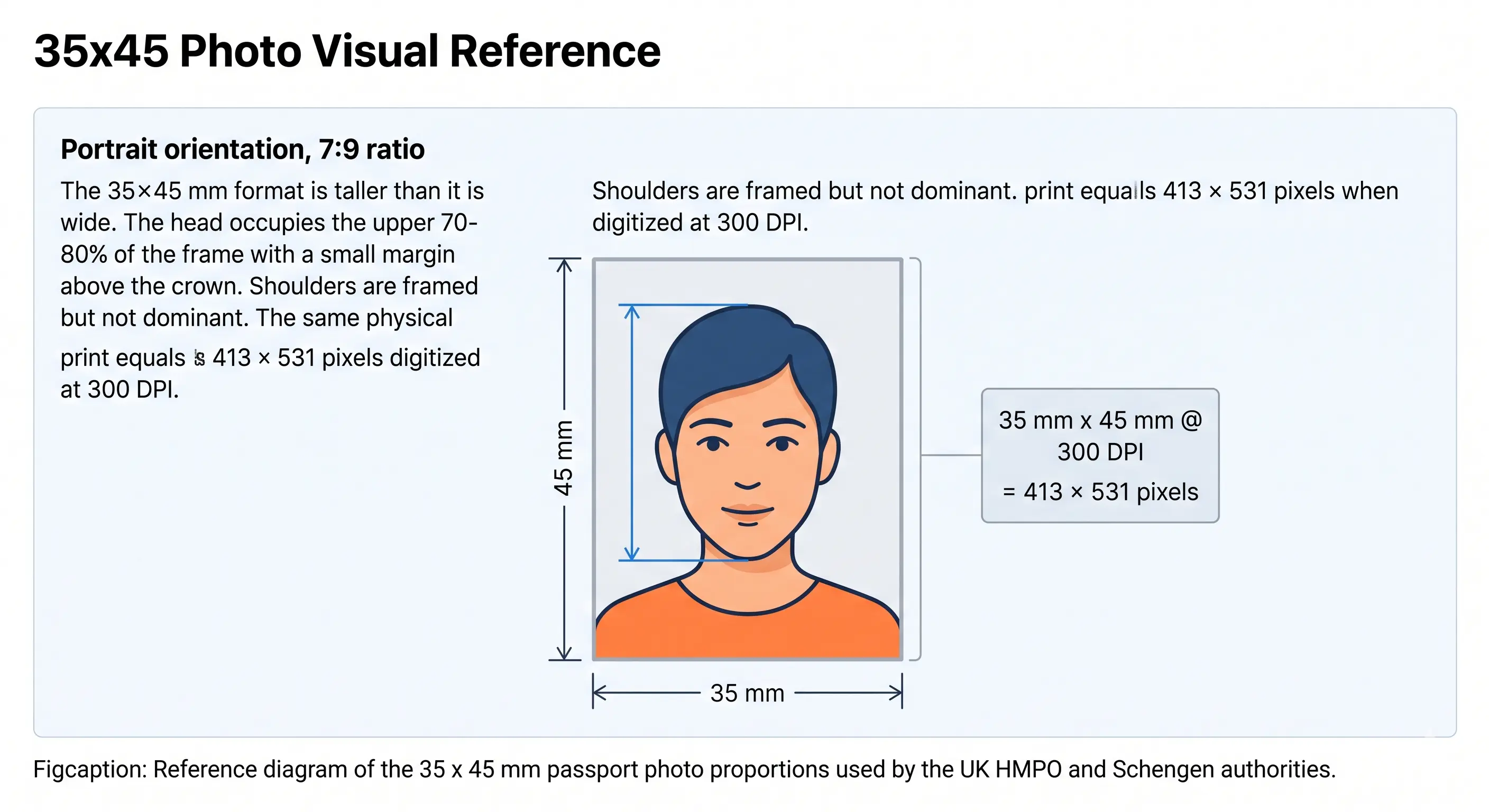
35 × 45 mm visual reference
Thailand's visa photo uses the same 35 × 45 mm frame as the UK, Schengen area and Australia. The diagram below shows the proportions: a portrait 7:9 rectangle with the head occupying the upper 70–80% and a small margin above the crown.
Who sets the rules: Thai visa authority overview
Thailand visa photo specifications are set by the Ministry of Foreign Affairs of Thailand, enforced day-to-day through two channels depending on how you apply: Royal Thai Embassies and Consulates-General abroad for paper applications, and the e-Visa portal at thaievisa.go.th for online applications, which now covers most Tourist, Non-B, Non-O, and DTV filings. Thai passports are handled separately by the Department of Consular Affairs.
This matters for your photo because the two channels don't always describe the same requirement in the same words. An embassy's printed checklist might say "passport-style photo, white background" without a stated millimeter figure, while the e-Visa portal's upload field enforces a specific pixel dimension and file size at the point of submission. When the two appear to conflict, the system you're actually submitting through — portal or embassy counter — is the one whose limit applies to you.
Thailand visa photo requirements
The table below covers the standard 35×45mm specification used for Tourist (TR), Non-B, and Non-O visa applications through an embassy or the e-Visa portal. Rows are marked verified where multiple independent sources agree, and flagged for confirmation where published figures conflict or are thin. Each rule links to the detailed standard in our passport photo rules library.
| Photo size | 35mm × 45mm (3.5cm × 4.5cm) for embassy/e-Visa. 40mm × 60mm (4cm × 6cm) for Visa on Arrival and some in-person extension forms — different submission, not a visa-type variant.Verified |
|---|---|
| Width | 35mm (413 px @ 300 DPI) Verified |
| Height | 45mm (531 px @ 300 DPI) Verified |
| Aspect ratio | 7 : 9 portrait. Cropping to 4:5 or 3:4 is the most common sizing error at this format.Verified |
| Background | Plain white, no pattern, no shadow. One source notes off-white may also be tolerated for paper submissions, but the e-Visa portal explicitly requires solid white. See background colour rules.Verified |
| Lighting | Even and diffuse, with no shadow under the chin or on the wall behind the head. See shadow rules.Verified |
| Head size | Head height (crown to chin) approximately 70–80% of total frame height, which is roughly 32–36 mm on a 45 mm frame. See head size rules and face size requirements.Verified |
| Eye line | Eyes should sit in the upper portion of the frame, level and looking at the lens. No separate millimetre figure is published for Thai visa photos. See eyes requirements.Confirm before submitting |
| Hair | Must not fall across the eyes or obscure the outline of the face. See hair rules.Verified |
| Ears | Not explicitly required to be visible in published Thai visa guidance, but the full face outline must be clear. See ears visibility rules.Confirm before submitting |
| Head coverings | Hats and decorative headwear are not accepted. Religious head coverings may be worn provided the full face stays visible from chin to forehead. See head covering rules.Verified |
| Resolution | Sources cite figures from 1200dpi up to portal-specific pixel minimums; we found no single number confirmed across official pages. 300 DPI (413 × 531 px) is the safe working target. See resolution rules.Confirm before submitting |
| File format | JPEG/JPG for e-Visa portal uploads. Full colour, no greyscale.Verified |
| Glasses | Permitted if eyes are clearly visible with no flash glare; several guides recommend removing glasses entirely to avoid glare-related rejection. See glasses rules.Verified |
| Expression | Neutral expression, mouth closed, eyes open. A slight closed-mouth smile is tolerated by some sources but not guaranteed across all consulates. See smile rules.Verified |
| Photo age | Taken within the last 6 months and reflecting current appearance.Verified |
| Digital submission rules | JPEG upload to thaievisa.go.th; published file-size limits vary by source from roughly 120KB to 1MB, which suggests this may differ by mission or has changed over time.Confirm before submitting |
| Prints required | Commonly two physical prints for counter submission, occasionally three. Photo-quality paper only.Verified |
| Varies by visa type? | No for TR / Non-B / Non-O — all three use the 35×45mm standard. DTV's exact spec is not separately published; see the disambiguation table above.Verified |
Rows marked "Confirm before submitting" reflect genuine disagreement or thin sourcing across the guidance we reviewed — not an oversight. Check the exact figure shown on your application screen or consulate checklist before finalizing your file.
How the application process touches your photo
For e-Visa applications, you create an account on thaievisa.go.th, select your visa type and the Thai mission with jurisdiction over your application, then upload your documents — passport biodata page, supporting paperwork specific to your visa category, and your photo — before paying the visa fee. The portal typically flags an obviously wrong photo at upload time, before you pay, which is the cheapest point to catch a sizing mistake.
For paper applications at an embassy or consulate, the photo is checked manually by consular staff against a printed checklist, often alongside your passport photo if you're submitting both documents in the same visit. Manual review can be more forgiving on exact pixel dimensions but less forgiving on visible quality issues like glare or shadow, since a person is looking at the print rather than software checking pixel dimensions.
What actually differs between the visa types
The photo is the constant; the paperwork around it is not. Tourist, Non-B and Non-O share the identical 35×45mm photo specification, so if you are switching between categories you do not need a new photo — you need different supporting documents:
- Tourist (TR) — proof of onward or return travel, accommodation, and funds for the stay.
- Business (Non-B) — an invitation or sponsor letter from the Thai company, plus company registration documents.
- Retirement (Non-O) — evidence of pension income or a qualifying Thai bank balance, and age eligibility.
- DTV — remote-work, freelance or soft-power activity evidence depending on the qualifying category, filed through the e-Visa portal only.
The DTV is the only category where the photo guidance itself is thinner: mission checklists describe it in general terms without the millimetre figure that appears in TR, Non-B and Non-O documentation. Match the standard 35×45mm e-Visa size, since you are uploading through the identical portal interface.
Child and infant visa photo requirements
Children and infants follow the same 35×45mm size and white-background rule as adults, with a few enforcement points that come up specifically for younger applicants:
- No parent's hand, arm, or any part of another person visible in the frame
- No toys, pacifiers, or bottles in shot
- Eyes open, mouth closed — a neutral expression is held to the same standard as adults
- Background must be plain white with no visible car seat, crib, or furniture edge
- Head height still 70–80% of the frame; there is no reduced band for infants
- Shoot wide and crop down — cropping tightly in-camera on a small face leaves too few pixels once the 7:9 frame is applied
In practice this is harder to get right at home for infants than for adults, since holding a baby still against a plain background for a phone photo takes a few attempts — budget extra time rather than rushing the first shot. Our baby passport photo at home guide covers positioning and lighting technique for newborns and toddlers in full, and the eyes requirements page explains where the open-eyes rule is and is not relaxed.
Visa renewal, extension, and reapplication photo rules
If you're extending a Non-O retirement visa or a TR visa from inside Thailand at a local immigration office, several sources indicate the in-person extension form uses the larger 4cm × 6cm photo box rather than the 35×45mm e-Visa size — the same size requested for Visa on Arrival. This is one of the more common mix-ups: bringing a correctly-sized e-Visa photo to an in-person extension counter that wants the larger print.
Whichever size applies to your renewal, the same six-month recency rule holds. A photo used successfully on your original application that's now older than six months should be retaken, not reused.
Digital e-Visa submission rules
Applications through thaievisa.go.th require a digital JPEG upload. Published file-size ceilings differ across the guidance we reviewed — figures cited range from around 120KB to 1MB — which may reflect a limit that has changed over time or one that varies slightly by mission. Rather than relying on a fixed number here, check the size limit displayed on your actual upload screen before exporting your final file.
Two things are safe to fix in advance regardless of the ceiling. Export at 300 DPI so the file is 413 × 531 pixels, which is comfortably inside every published range. And save as JPEG at quality 85 rather than maximum — a 413 × 531 JPEG at maximum quality can exceed a 120 KB limit for no visible gain, while quality 85 typically lands between 40 and 90 KB.
If your export is still too heavy, the reduce file size guide and compress to 240 KB guide cover the mechanics without dropping below the pixel minimum. iPhone users shooting in HEIC should convert first with the HEIC to JPEG guide. Broader portal rules across countries are covered in the digital passport photo requirements guide.
In-person submission at an embassy, consulate, or VFS counter
For paper applications, bring the number of physical prints your specific mission requests — this is commonly two prints, though some checklists call for three. Photos should be printed on photo-quality paper, not standard printer paper, with no staples or adhesive residue on the print itself, since damaged or stapled photos are noted as a rejection reason in multiple guides covering Thai visa submissions.
It's worth bringing a digital copy of your photo on your phone even for a paper application — if your mission also asks you to register or follow up online, having the same file in digital form saves a second photo session.
Printing a 35 × 45 mm Thailand visa photo
Because most missions want two physical prints, printing is part of the specification rather than an afterthought. A 35 × 45 mm photo tiles cleanly onto standard photo paper, so one sheet covers your application with spares.
| Print resolution | 300 DPI — export at 413 × 531 pixels. Disable fit-to-page and auto-scaling, which change the physical size |
|---|---|
| Paper | Photo-quality paper, matte or glossy, 200–250 gsm. Standard printer paper is a documented rejection reason |
| Copies per 4 × 6 in sheet | Six 35 × 45 mm photos with cutting margins |
| Copies per A4 sheet | Around twenty, though most applicants only need two or three |
| Cutting | Guillotine or steel rule for square edges. Do not cut inside the printed border |
| Colour management | sRGB. Turn off printer auto-enhance, skin smoothing and colour correction |
| Handling | Let ink dry fully. No staples, no glue on the print face, no bent corners |
Printer settings and cutting technique are covered in full in the print passport photo at home guide, and multi-copy sheet layout in the print sheet guide.
Can I take my Thailand visa photo at home?
Yes, with care. A phone camera is sufficient quality for a Thai visa photo as long as you control a few variables that are easy to get wrong without a studio setup.
Phone camera setup
Use the rear camera, not the front-facing camera, for sharper detail. Shoot in normal photo mode rather than portrait mode — portrait mode's background blur and edge softening can interfere with later background removal and is flagged by several guides as a source of blurred edges on visa photos.
Lighting
Face a window with soft, indirect daylight rather than using your phone's flash, which tends to create the under-chin shadows and glasses glare that show up repeatedly in rejection-reason lists for this size of photo. Even, diffused light across your whole face with no harsh shadow on one side is the goal.
Background
Stand at least two to three feet from a plain white or light-colored wall so your own shadow doesn't fall on it. If you don't have a suitable wall, our background removal step replaces whatever's behind you with compliant white automatically.
Distance from camera
Stand back far enough that your head and shoulders fill the frame loosely — you'll crop tighter afterward. Shooting too close distorts facial proportions at this small a final print size. The crop guide explains how the 7:9 ratio and head-height band are applied together.
Common at-home mistakes
- Using flash, which creates shadows and glasses glare
- Shooting in portrait/bokeh mode, which softens edges needed for cropping
- Standing too close to the background, causing a visible shadow
- Uploading a phone photo of a printed photo instead of the original digital file
- Submitting a photo older than six months because it "still looks like you"
Thailand visa photo vs. Thailand passport photo
These are not the same specification, and the difference is bigger than it looks at a glance: the photo sizes are different enough that a photo trimmed for one will be the wrong proportions for the other.
Thailand Visa Photo (TR / Non-B / Non-O)
- Dimensions
- 35 × 45mm (3.5 × 4.5cm)
- Pixels @ 300 DPI
- 413 × 531 px
- Aspect ratio
- 7 : 9
- Head size
- 70–80% of frame height
- Background
- Plain white
- Submission
- e-Visa portal upload or embassy/consulate print
- Reviewed by
- Royal Thai Embassy/Consulate-General, or e-Visa portal automated check
Thai Passport Photo
- Dimensions
- 40 × 60mm (4 × 6cm)
- Pixels @ 300 DPI
- 472 × 709 px
- Aspect ratio
- 2 : 3
- Head size
- Similar proportional guidance to visa photos
- Background
- Plain white
- Submission
- Thai passport office or embassy passport service counter
- Reviewed by
- Department of Consular Affairs / passport office staff
The honest summary: the underlying look of the two photos — white background, neutral expression, full colour — is genuinely similar, which is exactly why people assume one photo works for both. But 35 × 45 mm and 40 × 60 mm are different aspect ratios (7:9 versus 2:3), so a print trimmed for one physically cannot be trimmed to the other without re-cropping from the original. Do not reuse a passport print for a visa application or vice versa.
For passport-specific specifications, see our Thailand passport photo page.
Thailand compared to neighbouring visa photo standards
If you are visa-hopping across Southeast Asia, the size does not stay constant. A photo cut for Thailand will not fit a Chinese or Cambodian application, which is one of the most common reasons travellers end up retaking photos mid-trip.
| Country / Document | Size | Pixels @ 300 DPI | Background |
|---|---|---|---|
| Thailand Visa | 35 × 45 mm | 413 × 531 px | Plain white |
| Thailand Passport | 40 × 60 mm | 472 × 709 px | Plain white |
| Vietnam Visa | Varies by channel | See page | Plain white |
| Malaysia Visa | 35 × 50 mm | 413 × 591 px | Plain white |
| Singapore Visa | 35 × 45 mm | 413 × 531 px | Plain white |
| China Visa | 33 × 48 mm | 390 × 567 px | Plain white |
| Japan Visa | 35 × 45 mm | 413 × 531 px | Plain white |
| Indonesia Visa | See page | See page | Plain white / red per document |
| India Visa | 51 × 51 mm (2 × 2 in) | 600 × 600 px | Plain white |
Every national standard is indexed in the passport photo requirements by country hub and the visa photo requirements hub. For the full worldwide dimension reference see passport size photo dimensions.
How to create a Thailand visa photo
Upload your photo
Use the widget above. Any reasonably sharp, front-facing phone photo works as a starting point.
Select your visa type
Choose TR, Non-B, Non-O, or DTV so the correct template and size are applied automatically.
Crop and background
The tool crops to 35×45mm proportions at a 7:9 ratio and replaces your background with compliant solid white.
Verify against requirements
Check the result against the requirements table above — particularly head size and any file-size limit shown on your actual application screen.
Download for print and/or e-Visa upload
Export a 413 × 531 pixel JPEG for thaievisa.go.th, a print-ready sheet for embassy submission, or both.
Common reasons Thailand visa photos get rejected
Wrong size for the submission method
Bringing a 4×6cm Visa on Arrival print to an e-Visa upload, or vice versa.
Wrong aspect ratio
Cropped to 4:5 or 3:4 instead of the 7:9 the 35×45mm frame requires. See the crop guide.
Non-white background
Off-white, cream, or pale blue backgrounds rejected by the e-Visa portal's stricter check. See background colour rules.
Head too large or too small
Outside the 70–80% frame-height guidance, often from cropping too tight or too loose. See head size rules.
Shadows on the face or background
Usually from on-camera flash or a light source positioned off to one side. See shadow rules.
Glasses glare
Flash reflection across the lenses obscuring the eyes. See glasses rules.
Hair across the face
A fringe over the eyes or hair obscuring the face outline. See hair rules.
Photo older than six months
Doesn't reflect current appearance closely enough.
Visible editing artifacts
Over-smoothed skin, portrait-mode blur, or an obviously pasted-in background edge.
File exceeds the portal's size limit
Check the exact limit on your upload screen rather than assuming a fixed number.
Scanned print instead of digital original
Visible paper texture or blur from rescanning a physical photo.
Smiling with teeth visible
Treated as non-neutral by reviewers expecting a passport-style expression. See smile rules.
Printed on plain paper
Home inkjet output on standard paper is a documented rejection reason at counter submission. See the print guide.
Damaged or stapled print
Bent corners, staple holes, or adhesive residue on the photo face.
The full cross-country breakdown of refusal causes is in passport photo rejection reasons.
Processing tips
- Get the photo right before you pay the visa fee — most fees are non-refundable, and a photo-related resubmission resets your place in the queue rather than your payment.
- If you're applying for a DTV and the photo spec field feels under-specified, default to the 35×45mm e-Visa standard rather than guessing a different size.
- Keep a digital copy of your photo even if you're submitting on paper — useful if your mission later asks for an online follow-up step.
- Take the photo a few days before you plan to submit, not the morning of, so you have time to retake it if the first attempt has shadow or glare issues.
- Export once at 413 × 531 pixels and keep that master file — you can compress a copy down to any portal's KB limit without reshooting.
Frequently asked questions
Size & specification
What is the Thailand visa photo size?
The Thailand visa photo size is 35 × 45 mm (3.5 × 4.5 cm) for embassy, consulate and e-Visa submissions. That is a 7:9 portrait ratio, equal to 413 × 531 pixels at 300 DPI. The head must fill roughly 70 to 80 percent of the frame height on a plain white background, and the photo must have been taken within the last six months.
What is the Thailand visa photo size in pixels?
A 35 × 45 mm photo equals 413 × 531 pixels at 300 DPI and 826 × 1062 pixels at 600 DPI. The e-Visa portal validates the uploaded file rather than the physical print, so export at 300 DPI or higher and check the file size limit shown on your own upload screen.
Why do some sources say 3.5×4.5cm and others say 4×6cm?
Both are real Thai visa photo sizes for different purposes. 3.5×4.5cm (35×45mm) is the standard for embassy and e-Visa submissions covered on this page. 4×6cm is specifically for Visa on Arrival and some in-person extension forms — confirm which applies to your submission before printing.
Does the DTV have different photo rules than the Tourist visa?
Published DTV checklists ask for a recent, white-background photo without a separately confirmed millimeter spec. We recommend matching the standard 35×45mm e-Visa size since DTV applications go through the same portal.
What file size and format does the Thai e-Visa portal accept?
JPEG is the expected format; the exact file-size ceiling varies across the guidance we reviewed, so check the limit shown on your specific upload screen at thaievisa.go.th rather than assuming a fixed number. Exporting at quality 85 typically lands a 413 × 531 file between 40 and 90 KB, inside every published range.
Appearance & compliance
Can I use the same photo for a Thailand visa and a Thailand passport renewal?
No. The Thai visa photo is 35 × 45 mm while the Thai passport photo is commonly specified as 40 × 60 mm, so a print trimmed for one is the wrong proportion for the other. The two are also reviewed by different offices under different specification sheets. Treat them as two separate photo tasks.
Can I wear glasses in my Thailand visa photo?
Generally yes, if there's no glare and your eyes are clearly visible — but glare is common enough at this photo size that several guides recommend removing glasses for the shot if you can see clearly without them.
Will a smiling photo get my Thailand visa application rejected?
A neutral, closed-mouth expression is the safest bet. A very slight smile with no visible teeth is tolerated by some guidance, but a full smile is widely flagged as a rejection risk.
Do children need a different visa photo than adults for Thailand?
The dimensions and background rules are the same, but enforcement is stricter on a few points: no toys, pacifiers, or another person's hands in frame, and the child's eyes must be open with a neutral, closed-mouth expression. Parents are typically asked to step fully out of the shot rather than holding the child off to one side.
Does a Thailand visa photo expire?
The photo itself doesn't have a printed expiry date, but it needs to have been taken within roughly the last six months and reflect your current appearance. Older photos are a common resubmission request.
Taking & printing
Can I submit a scanned printed photo instead of a digital photo?
You can, but scans of printed photos frequently come out blurry or show paper texture, which can trigger a quality rejection on the e-Visa portal. A directly exported digital file tends to upload more cleanly.
How do I print a 35×45 mm Thailand visa photo?
Print at 300 DPI on photo-quality paper, not standard printer paper. A 4 × 6 inch sheet holds six 35 × 45 mm copies and an A4 sheet holds around twenty. Bring the number of prints your mission requests, commonly two, with square cut edges and no staples or adhesive residue on the print face.
Sources & references
- Thailand e-Visa portal — application and document upload: thaievisa.go.th
- Ministry of Foreign Affairs of Thailand: mfa.go.th
- Department of Consular Affairs, Thailand — passport and consular services: consular.mfa.go.th
- Royal Thai Embassy and Consulate-General checklists for the mission with jurisdiction over your application
- ICAO Doc 9303 — Machine Readable Travel Documents biometric photograph standard: icao.int
Related pages
Create Your Thailand Visa Photo Now
Whether you're applying for a Tourist, Non-B, Non-O, or DTV visa, get a correctly sized 35×45mm, white-background photo at 413 × 531 pixels — ready for thaievisa.go.th or your embassy appointment — in less time than a trip to a photo studio.