
Malaysia Visa Photo Size: 35x50mm Made Easy
The exact Malaysia visa photo requirements—35x50mm, white background, head straight-on—plus a free online tool that crops and resizes your picture to spec in seconds.
Malaysia Visa Photo Size (Quick Answer)
A Malaysia visa photo must be 35 mm wide by 50 mm tall (3.5 × 5.0 cm) on a plain white background, with the head filling 70–80% of the frame height. At 300 DPI that equals 413 × 591 pixels with a 7:10 portrait ratio.
- Size: 35 × 50 mm
- Pixels @ 300 DPI: 413 × 591
- Background: Plain white
- Aspect ratio: 7 : 10
- Head size: 70–80% of frame
- Format: JPEG, full colour
- Photo age: Less than 6 months
- Expression: Neutral, mouth closed
If you are applying for a Malaysian eVisa, a sticker visa at a high commission, or an eNTRI entry, you'll need a photograph that matches the Immigration Department of Malaysia (Jabatan Imigresen Malaysia) format. Tourists, students, professionals on an Employment Pass, and dependants all submit the same style of photo: a 35x50mm portrait with a plain white background showing the full face and shoulders.
The most common reasons applications stall are simple ones—an off-white or shadowed background, a head that's too small or too large in the frame, low resolution, or a file uploaded at the wrong aspect ratio. Getting the dimensions right the first time avoids a resubmission delay that can push back your travel dates.
Malaysia Visa Photo Visual Reference
The diagram below marks the measurements the eVisa system checks: the 35 × 50 mm frame, the 70–80% head height, and the plain white background.

Create Your Malaysia Visa Photo Online
Skip the photo studio and the guesswork. Upload any clear, front-facing photo and the ClonyPDF Passport Photo Maker reshapes it into a compliant 35x50mm Malaysia visa photo with a clean white background and correctly positioned head.
Everything runs in your browser—no account, no watermark, no waiting. You get a digital file sized for the eVisa upload and a print-ready sheet you can take to any photo printer.
Upload your photo and our Passport Photo Maker automatically:
- Crops the photo to the 7:10 Malaysia frame
- Centers your face
- Applies the 35 × 50 mm dimensions
- Replaces the background with plain white
- Exports a 413 × 591 pixel JPEG
- Generates a print-ready 4 × 6 sheet
Which Malaysian Applications Use This Photo
The same 35 × 50 mm white-background photo covers every Malaysian entry and residence channel. Only the submission route changes.
Malaysia eVisa
Online application for tourism, business and social visits. One digital 35 × 50 mm JPEG upload.
eNTRI facility
Electronic Travel Registration and Information for eligible nationalities. Same photo specification as the eVisa. Travellers from China should also check the China visa photo rules for the return leg.
Sticker visa at a mission
Applied for in person at a Malaysian high commission or embassy. Typically two identical printed 35 × 50 mm photos.
Employment Pass & Student Pass
Long-term work and study passes issued by the Immigration Department. Same size, same white background.
Dependant Pass
Spouses and children of pass holders. Every dependant needs their own photo, including infants.
Malaysia My Second Home
The MM2H long-stay programme uses the same photograph format as the standard visa channels.
Malaysian Visa Photo Requirements (Full Specification)
These are the standard specifications accepted across the Malaysia eVisa portal and Malaysian missions abroad. Use them whether you're applying for tourism, business, or a long-term pass. Each rule links to the detailed standard in the passport photo rules library.
| Requirement | Specification |
|---|---|
| Photo size | 35 x 50 mm (3.5 cm × 5.0 cm) |
| Width | 35 mm (413 px at 300 DPI) |
| Height | 50 mm (591 px at 300 DPI) |
| Aspect ratio | 7 : 10 portrait — must be preserved exactly |
| Background | Plain white, no shadows or texture — see background colour rules |
| Lighting | Even and diffuse, no shadow behind the head — see shadow rules |
| Head size | Head fills approx. 70–80% of frame height, centred — see head size rules |
| Face coverage | Chin and crown both inside the frame — see face size requirements |
| Eyes | Both open, looking straight at the lens — see eyes requirements |
| Hair | Must not cover the eyes or the outline of the face — see hair rules |
| Ears | Should be visible where hair allows — see ears visibility rules |
| Resolution | 300 DPI minimum, sharp and in focus — see resolution rules |
| File format | JPEG (digital); keep inside the size limit shown by the eVisa portal, commonly around 1 MB |
| Colour | Full colour, natural skin tones, no filters or beautification |
| Glasses | Not recommended; remove to avoid glare and obstruction — see glasses rules |
| Expression | Neutral, mouth closed, both eyes open, looking straight — see smile rules |
| Head coverings | Only for religious reasons; full face must stay visible — see head covering rules |
| Copies | One digital upload for eVisa and eNTRI; typically two printed copies for a sticker visa |
| Photo age | Taken within the last 3–6 months |
Photo already shot? Open the Passport Photo Maker and get a 413 × 591 pixel file with a white background in under a minute.
Malaysia Visa Photo Size in Pixels, Inches & CM
The Malaysia visa photo is officially specified in millimetres, but eVisa portals and photo editors often ask for pixels or inches. Use this conversion chart to set the right canvas size in any software.
Do not upscale a small photo. Stretching a low-resolution image up to 413 × 591 pixels interpolates rather than adds detail, leaving the eyes and hairline soft. Automated checks measure sharpness, so an upscaled file fails even when the pixel count reads correctly. Shoot wide and crop down instead.
Need help hitting a specific target? See the reduce file size guide if your JPEG is too heavy for the portal, the HEIC to JPEG guide if your iPhone saves HEIC files, and the digital passport photo requirements guide for portal rules generally.
Malaysia Visa Photo vs Other Countries
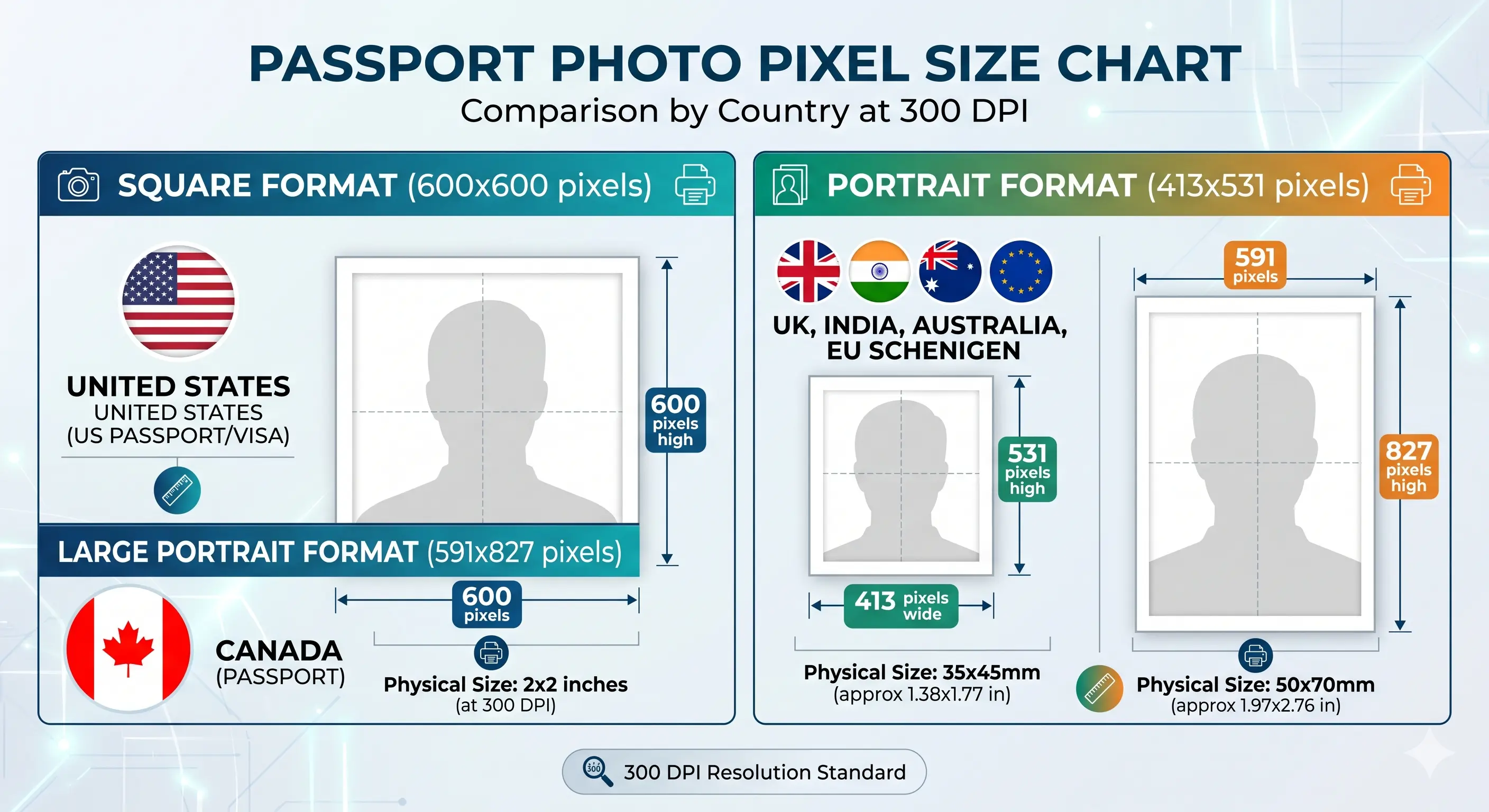
The Malaysia visa photo is unusually tall compared with most international visa sizes—50mm in height rather than the 45mm used by the UK, Schengen, and Canada. Confirm the size below before reusing an old visa or passport photo.
| Document | Photo Size | Pixels @ 300 DPI | Background |
|---|---|---|---|
| Malaysia Visa | 35 × 50 mm | 413 × 591 | White |
| Malaysia Passport | 35 × 50 mm | 413 × 591 | White / off-white |
| Singapore Passport | 35 × 45 mm | 413 × 531 | White |
| Thailand Passport | 40 × 60 mm | 472 × 709 | White |
| Indonesia Passport | 51 × 51 mm | 600 × 600 | White |
| US Visa | 2 × 2 inch (51 × 51 mm) | 600 × 600 | White |
| UK Passport / Visa | 35 × 45 mm | 413 × 531 | Light grey / cream |
| Canada Visa | 35 × 45 mm | 413 × 531 | White / plain |
| Schengen Visa | 35 × 45 mm | 413 × 531 | Light grey / white |
| India Visa | 2 × 2 inch (51 × 51 mm) | 600 × 600 | White |
| China Visa | 33 × 48 mm | 390 × 567 | White |
The 5 mm trap: a 35 × 45 mm UK, Schengen or Canada photo is exactly 5 mm too short for Malaysia. The width is identical, which is why people assume it will pass. Do not stretch it — that distorts the face and fails the biometric check. Regenerate at 35 × 50 mm from the original photo. The crop guide explains how the 7:10 ratio and head-height rule are applied together, and 35x45 photo size covers the format you may be converting from.
How to Create a Malaysia Visa Photo
- Take or choose a photoStand facing a white wall in soft, even daylight and capture a straight-on shot from the shoulders up. Keep at least 50 cm clear of the wall so no shadow falls behind your head.
- Upload it to the toolOpen the ClonyPDF Passport Photo Maker and drop in your JPG, PNG, or HEIC file.
- Set the 35x50mm Malaysia formatThe tool auto-crops to the correct 7:10 dimensions and centers your face within the frame.
- Clean up the backgroundApply the white background and confirm head height and positioning look correct.
- Download & submitSave the 413 × 591 pixel digital file for the eVisa portal, or the print sheet for a 4x6 photo print.
Malaysia Visa Photo for a Baby, Infant or Child
Malaysia applies the same 35 × 50 mm specification to children and newborns. There is no reduced size, no relaxed background rule and no smaller head-height band. Critically, every applicant needs their own photo and their own visa or eNTRI registration, including infants — a child cannot be covered by a parent's photograph.
Own photo, own application
Each child submits a separate 35 × 50 mm photo. Do not reuse a parent's photo or a family group shot.
Same size and head height
35 × 50 mm frame with the head filling 70–80% of the height. No age exemption applies to dimensions or framing.
Child alone in the frame
No supporting hands, arms, car seat, toy or dummy may be visible, and no other person may appear. Support the child from behind a plain white sheet.
Eyes open where possible
Both eyes should be open and looking towards the camera. See the eyes requirements.
No shadow behind the head
Lay the child on a plain white sheet in soft indirect daylight and shoot from directly above. See the shadow rules.
Crop from a wide source
Shoot wide and crop down. Cropping tightly in-camera on a small face leaves too few pixels once the 7:10 frame is applied.
Positioning, lighting and timing technique for infants and toddlers is covered in the baby passport photo at home guide.
Travelling as a family? Create a separate photo for each child — the tool applies the 35 × 50 mm crop automatically.
Printing a 35 x 50 mm Malaysia Visa Photo
If you are applying for a sticker visa in person, you will normally need two identical printed photos, so printing is part of the specification rather than an afterthought.
| Print resolution | 300 DPI minimum — export at 413 × 591 pixels and disable fit-to-page scaling |
|---|---|
| Paper | Glossy or matte photo paper, 200–250 gsm. Plain copier paper is refused |
| Copies per 4 × 6 inch sheet | Six 35 × 50 mm photos with cutting margins |
| Copies per A4 sheet | Around twenty with cutting margins |
| Cutting | Guillotine or steel rule for square edges. Do not cut inside the printed border |
| Colour management | sRGB. Turn off printer auto-enhance, skin smoothing and colour correction |
| Handling | Let ink dry fully. Do not staple, fold or glue the photo face |
Printer settings, paper choice and cutting technique are covered in full in the print passport photo at home guide, and multi-copy sheet layout in the print sheet guide.
Why Malaysia Visa Photos Get Rejected
These are the failures that recur most often on the eVisa portal and at Malaysian missions. Each links to the detailed rule so you can confirm the tolerance before submitting. The full cross-country breakdown is in passport photo rejection reasons.
Wrong dimensions
Uploading a 35x45mm passport crop instead of the required 35x50mm visa size is the single most common error. See the crop guide.
Stretched from 35x45
Scaling a 35x45mm photo up to 50mm tall distorts the face vertically. Biometric checks detect the distortion even though the frame size now looks right.
Wrong background
Cream, grey, or blue walls are rejected. Only a pure, even white background is accepted. See background colour rules.
Shadows
Shadows on the face or behind the head on the wall break the uniform-background rule. See shadow rules.
Poor lighting
Uneven or yellow lighting changes skin tone and creates dark patches that fail facial checks.
Head too small or too large
The head must fill 70–80% of the frame height. See head size rules.
Face not centered
A tilted head or off-center face means the eyes fall outside the expected zone. See eyes requirements.
Hair across the face
A fringe over the eyes or hair obscuring the face outline fails landmark detection. See hair rules.
Head covering shadow
A religious head covering is permitted, but any shadow it casts across the forehead or chin causes refusal. See head covering rules.
Low resolution
Blurry or pixelated images below 300 DPI cannot be verified and are returned. See resolution rules.
File too large
A high-quality 413x591 JPEG can exceed the portal's upload ceiling. Save at quality 85 rather than maximum.
Filters and retouching
Portrait blur, skin smoothing and slimming alter facial geometry and are detected. Shoot in a plain, unfiltered mode.
Cropping errors
Cutting off the top of the head or shoulders distorts the head-to-frame ratio and fails review.
Outdated photo
A photo older than six months no longer reflects your current appearance and is refused.
Malaysia Visa Photo FAQs
Size & Dimensions
What size is a Malaysia visa photo?
A Malaysia visa photo is 35x50mm (3.5cm wide by 5cm tall) on a plain white background. At 300 DPI that equals 413 × 591 pixels with a 7:10 portrait aspect ratio. The head should fill roughly 70–80% of the frame, taken straight-on with a neutral expression.
Is the Malaysia visa photo the same size as a UK or Schengen photo?
No. Malaysia uses 35x50mm while the UK, Schengen area, Australia and Canada use 35x45mm. The width matches but the Malaysian photo is 5mm taller, so a 35x45mm photo is the wrong aspect ratio and is rejected. Always regenerate at 35x50mm rather than stretching an existing photo.
What is the Malaysia visa photo size in pixels?
At 300 DPI a 35x50mm Malaysia visa photo is 413 × 591 pixels. At 600 DPI it is 827 × 1181 pixels. The 7:10 aspect ratio must be preserved exactly; cropping to 7:9 or 1:1 fails the automated dimension check.
Is the Malaysia visa photo the same as a Malaysian passport photo?
Yes, both use 35x50mm on a plain white background. The difference is the submission channel and the number of copies. See the Malaysia passport photo page for the passport-specific detail.
Appearance & Compliance
What background is required for a Malaysian visa photo?
A clean, uniform white background. Off-white, cream, grey, blue, or patterned backdrops are commonly rejected. Stand at least 50cm clear of the wall so no shadow falls behind your head — shadow breaks the uniformity rule even when the wall itself is white.
Can I wear glasses in a Malaysia visa photo?
It's strongly discouraged. Remove glasses to avoid glare and frame obstruction. Tinted lenses, sunglasses or thick frames that cover the eyes are not accepted.
Can I wear a hijab or head covering in a Malaysia visa photo?
Yes, head coverings worn for religious reasons are permitted. The full face—from the bottom of the chin to the top of the forehead and from ear to ear—must remain clearly visible and free of shadow. Decorative hats and non-religious headwear are not accepted.
Can I smile in a Malaysia visa photo?
No. A neutral expression with the mouth closed is required. Smiling, frowning, or showing teeth can cause the biometric facial check to fail because exaggerated expressions distort the facial geometry being measured.
How recent must my Malaysia visa photo be?
It must be taken within the last 3 to 6 months and reflect your current appearance. If your appearance has changed significantly through weight change, facial hair or hair loss, submit a new photo even inside that window.
Can I edit or replace the background of my Malaysia visa photo?
Replacing a non-white or shadowed background with a clean white one is acceptable, and the Passport Photo Maker does this automatically. Altering your face is not: heavy filters, skin smoothing, slimming effects and tone adjustment change the biometric geometry and are detected.
Applications, Children & Copies
Which Malaysian applications use this photo size?
The same 35x50mm white-background photo is used for the Malaysia eVisa, the eNTRI facility, sticker visas issued at a Malaysian high commission or embassy, the Employment Pass, Student Pass, Dependant Pass and Malaysia My Second Home applications.
How many photos do I need for a Malaysia visa application?
The eVisa and eNTRI channels require one digital photo upload. For a sticker visa submitted in person at a Malaysian mission, two identical printed 35x50mm photos are typically required. Confirm the count with your local mission, because practice varies by country.
What are the Malaysia visa photo rules for a baby or child?
Every applicant needs their own photo and their own visa or eNTRI registration, including infants. The same 35x50mm size, white background and 70–80% head height apply, with no age exemption. The child must be alone in the frame with no supporting hands, toy or dummy visible. See the child and infant section.
Can I reuse an old passport photo for my Malaysia visa?
Only if it was taken within the last 6 months and matches the 35x50mm dimensions. Many passport photos are 35x45mm, which is the wrong aspect ratio for a Malaysia visa and will be rejected.
Taking & Printing
Can I take a Malaysia eVisa photo at home?
Yes. Photograph yourself against a plain white wall in even daylight, standing about 1.5 metres from the camera and at least 50cm clear of the wall. Switch off portrait blur and beautification, then upload the image to the Passport Photo Maker, which crops it to the exact 35x50mm size the eVisa system expects.
Can I use my phone camera for a Malaysia visa photo?
Yes. A modern smartphone has more than enough resolution. Two settings matter: disable portrait mode and skin smoothing, which alter facial geometry and are detected, and if your phone saves HEIC files, convert to JPEG before uploading.
What file format and resolution does the Malaysia eVisa accept?
The eVisa portal accepts JPEG files in full colour. Use at least 300 DPI so the file is sharp, and keep the digital upload inside the size limit displayed by the portal, commonly capped at around 1MB. Check the figure shown on the upload screen before submitting, because portal limits change.
How do I print a 35x50mm Malaysia visa photo at home?
Print at 300 DPI on glossy or matte photo paper. A standard 4x6 inch sheet holds six 35x50mm photos with cutting margins, and an A4 sheet holds around twenty. Cut with a guillotine for square edges and do not trim inside the printed border. See the print at home guide.
Official Sources & References
- Immigration Department of Malaysia (Jabatan Imigresen Malaysia): imi.gov.my
- Malaysia eVisa application portal: malaysiavisa.imi.gov.my
- Malaysian high commissions, embassies and consulates — sticker visa and printed photo requirements
- ICAO Doc 9303 — Machine Readable Travel Documents biometric photograph standard: icao.int
Related Passport & Visa Photo Guides
Create Your Malaysia Visa Photo Now
Get a compliant 35x50mm Malaysia visa photo at 413 × 591 pixels with a white background in under a minute—free, watermark-free, and ready for the eVisa portal or printing.
Create Malaysia Visa Photo