
Thailand Passport Photo Size (4 x 6 cm) & Requirements
A Thailand passport photo is 4 × 6 cm (40 × 60 mm) in colour on a plain white background, with the head filling roughly 70–80% of the frame height and a neutral expression.
Passports are issued by the Department of Consular Affairs under the Ministry of Foreign Affairs. Most rejections come from the wrong size, a shadowed or coloured background, glasses glare, or a smiling expression. Because these photos double as biometric records, even small errors cause delays. Our Thailand Passport Photo Maker handles the sizing, framing and background for you automatically.
Thailand Passport Photo Size (Quick Answer)
The Thailand passport photo size is 40 × 60 mm (4 × 6 cm or 1.57 × 2.36 inches) — a 2:3 portrait ratio equal to 472 × 709 pixels at 300 DPI. It must be in colour on a plain white background, taken within the last 6 months, with the head filling 70–80% of the frame.
| Requirement | Value |
|---|---|
| Photo size | 40 × 60 mm (4 × 6 cm) |
| In inches | 1.57 × 2.36 in |
| Aspect ratio | 2 : 3 portrait |
| Pixels @ 300 DPI | 472 × 709 px |
| Pixels @ 600 DPI | 945 × 1417 px |
| Background | Plain white, even and shadow-free |
| Head height | 70–80% of frame height (chin to crown) |
| Expression | Neutral, mouth closed, both eyes open |
| Age of photo | Within the last 6 months |
| Thai visa size (embassy) | 35 × 45 mm — different, see Thailand visa photo |
| Issuing authority | Department of Consular Affairs, Ministry of Foreign Affairs |
Thailand Passport Photo Visual Reference
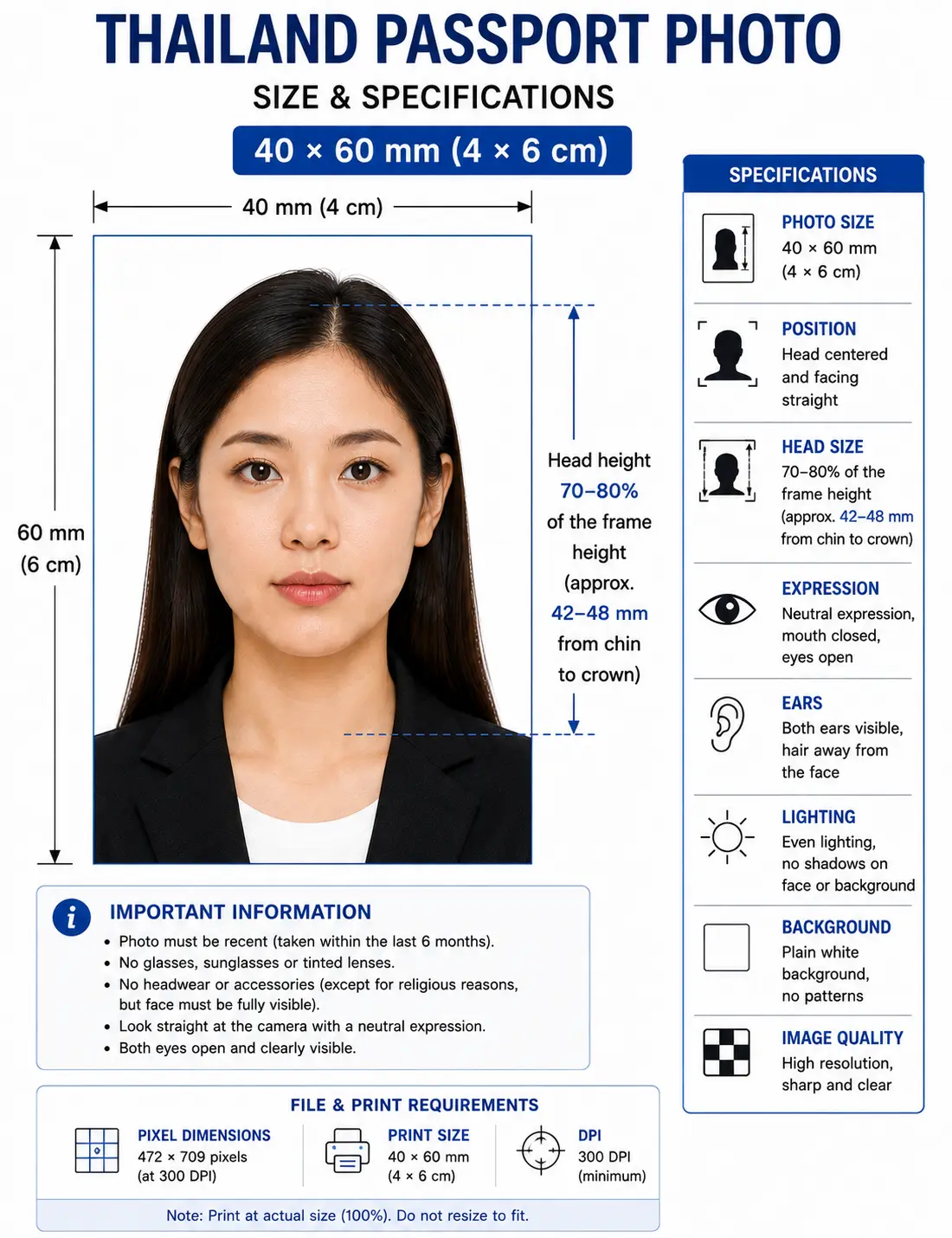
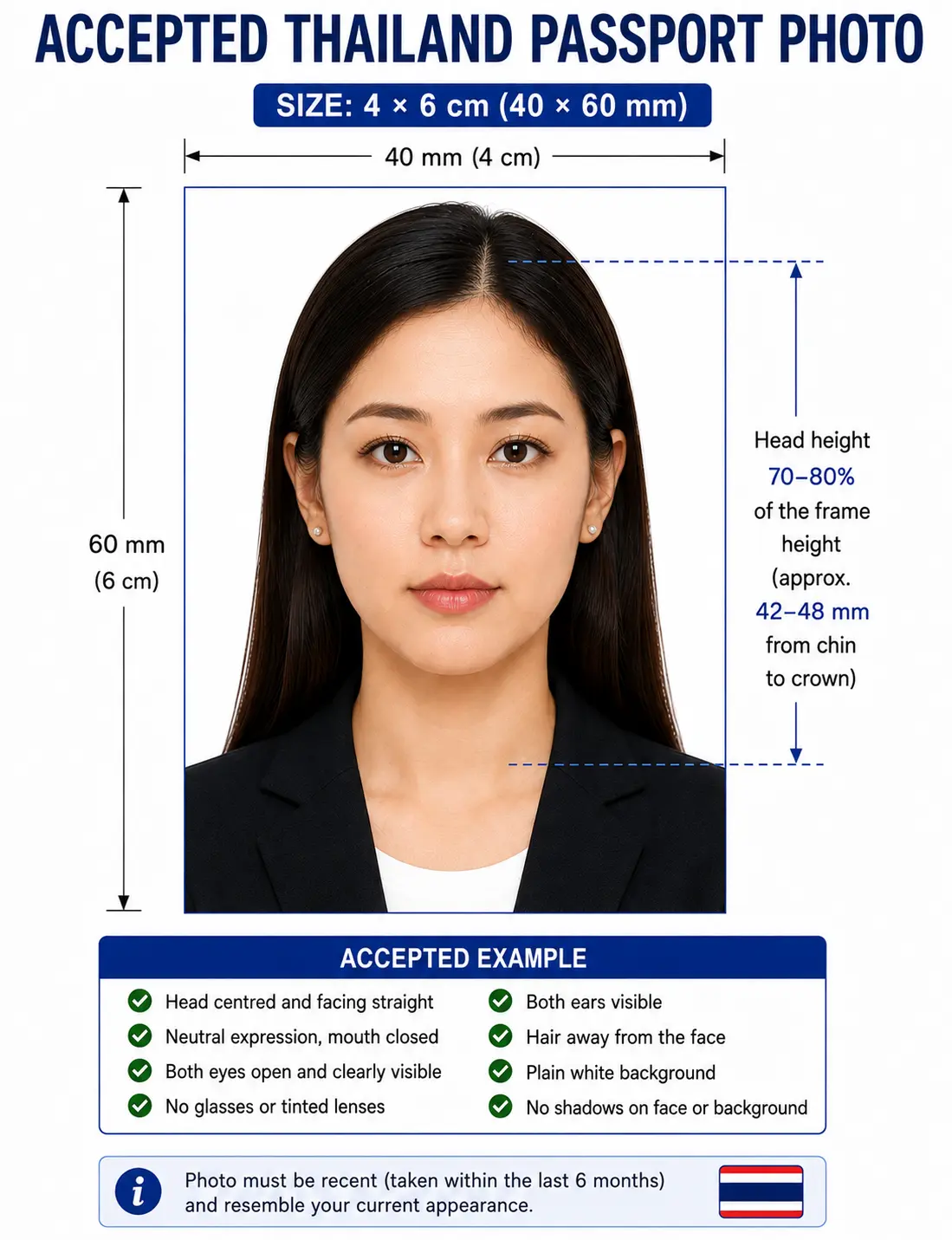
The diagram below marks every measurement a Thai reviewer checks: the 40 × 60 mm frame, the 70–80% head height from chin to crown, and the plain white background.
Why Upload Your Photo Here Instead of Editing It Yourself
Resizing a photo by hand in a phone gallery or a generic image editor is where most Thai applications go wrong — the ratio drifts, the background stays grey, or the head ends up too high in the frame. Uploading to Passport Photo Maker removes the guesswork:
Automatic crop
Your image is trimmed to the exact 2:3 ratio without dragging crop handles by hand.
Biometric framing
The head is positioned and scaled to the 70–80% rule Thai authorities expect.
Print resolution
Output is 472 × 709 pixels at 300 DPI, not an arbitrary screen-sized image.
Correct background
Any cluttered or coloured backdrop is replaced with the required plain white.
Printable photo sheet
Download a single photo or a tiled 4R sheet ready for any print shop.
No Photoshop required
Everything happens in your browser — no software, no design skills, no cost to try.
Thailand Passport Photo Requirements
These are the specifications that apply to Thai photo documents handled by the Department of Consular Affairs and Thai embassies, and the size most people mean when they search for the Thailand passport photo rules or a 4x6 cm photo Thailand. Each rule links to the detailed standard in our passport photo rules library.
| Specification | Requirement |
|---|---|
| Photo Size | 4 × 6 cm (40 × 60 mm) |
| Width | 40 mm (4 cm) — 472 px at 300 DPI |
| Height | 60 mm (6 cm) — 709 px at 300 DPI |
| Aspect Ratio | 2 : 3 portrait |
| Background | Plain white, even and shadow-free — see background colour rules |
| Lighting | Even and diffuse, no shadow behind the head — see shadow rules |
| Head Size | Approximately 70–80% of photo height (chin to crown) — see head size rules |
| Face Coverage | Head centred and forward-facing — see face size requirements |
| Eyes | Both open, looking straight at the camera — see eyes requirements |
| Hair | Must not cover the eyes or the outline of the face — see hair rules |
| Ears | Not mandatory, but the face outline must be clear — see ears visibility rules |
| Resolution | 300–600 DPI (at least 472 × 709 px for a digital 4 × 6 cm photo) |
| File Format | JPEG for submission; PNG and WebP accepted on upload |
| Colour | Natural colour only — black-and-white is rejected. No filters or beauty smoothing |
| Glasses | Not accepted — remove glasses, eyes fully visible, no glare. See glasses rules |
| Head Coverings | Religious reasons only, full face visible from chin to forehead — see head covering rules |
| Expression | Neutral, mouth closed, both eyes open, looking straight at the camera |
| Photo Age | Taken within the last 6 months and reflecting your current appearance |
| Digital Submission | e-Visa accepts a JPEG on white background within the portal size limit; in-person e-passport photos are captured on-site |
Sizes, Pixels & Conversions
Thai forms and photo shops quote the size in centimetres, digital portals quote it in pixels, and international guidance quotes millimetres. All four describe the same photo.
For pixel conversions across every country standard see passport photo size in pixels, or the worldwide reference in passport size photo dimensions. If you need to reframe a wide source photo first, the crop guide explains how the 2:3 ratio and head-height rule are applied together.
About the Department of Consular Affairs
Thai passports are issued by the Department of Consular Affairs (DCA), part of the Ministry of Foreign Affairs. Inside Thailand, applications are handled at DCA passport offices in Bangkok and regional centres; abroad, Royal Thai Embassies and Consulates-General process them on the department's behalf. The current Thai travel document is an e-passport containing an embedded chip with your biometric data.
One detail that sets Thailand apart from countries like the United States: for the e-passport booklet itself, the official portrait is recorded by the office's own equipment at the time of application. The compliant 4 × 6 cm photo you prepare here is still valuable for the many related Thai documents — visas, re-entry permits, alien registration books and supporting forms — that do require you to supply your own print or digital file.
How Thai Passport Applications Work
Thai e-passport applications are made in person. Applicants cannot send a representative, because fingerprints, a facial photograph and iris data are all captured at the counter. A typical visit looks like this:
- Book an appointment at a DCA passport office or your nearest Royal Thai Embassy/Consulate.
- Bring your Thai national ID card (and House Registration / Tabien Baan details where requested).
- Have your biometrics and on-site photograph captured at the counter.
- Pay the fee and collect the e-passport, or have it mailed where that service is offered.
The Thai e-passport is valid for five years (a ten-year option is also offered in some cases). Preparing your own compliant photo in advance keeps the visa and supporting-document side of your trip moving while the booklet is processed.
Thailand-Specific Photo Rules
Beyond the headline dimensions, Thai reviewers look closely at a handful of details:
- Colour only. Black-and-white photos are rejected; the image must be in natural colour.
- Plain white background. A few visa centres tolerate off-white or cream, but white is always safe and is expected for passport-grade photos. See the background colour rules.
- Full head in frame. Everything from the top of the hair to the bottom of the chin must be visible, centred and facing forward.
- Even lighting. No shadows on the face or behind the head, and no hotspots from a direct flash. See the shadow rules.
- No head covering except for religious reasons, and even then the full face must be clear from chin to forehead. See the head covering rules.
- Hair off the face. A fringe over the eyes or hair obscuring the face outline fails biometric landmark detection. See the hair rules.
- Natural skin tones. Heavy filters, beauty smoothing and recolouring cause failures because they break the biometric match.
National Biometric Standards
Thailand's e-passport follows ICAO Doc 9303 machine-readable travel document guidance, which is why the framing rules feel familiar across borders. The chip stores a facial image used for automated identity checks at e-gates, so the photo must be sharp, correctly exposed and free of any digital manipulation that alters your facial geometry. The Thailand Passport Photo Maker keeps the head height, eye line and centring inside the ICAO-aligned range that Thai systems expect, which is far harder to hit by eye.
Child & Infant Passport Photos
Minors under 20 years of age need a parent or legal guardian present to give consent, and the guardian's Thai ID is part of the paperwork. The 4 × 6 cm size, white background and 70–80% head-height band apply exactly as they do to adults — there is no smaller format for infants. Babies and toddlers get a little practical latitude on expression only:
- The child must be alone in the frame — no supporting hands, toys or other faces.
- Lay an infant on a plain white sheet and shoot from directly above for an even background.
- Eyes should be open and looking forward where possible; a neutral expression is preferred.
- No dummies/pacifiers, and keep the mouth closed.
- Shoot wide and crop down — cropping tightly in-camera on a small face leaves too few pixels once the 2:3 frame is applied.
Upload the clearest shot you can capture and let the tool handle the cropping — far easier than trying to size a wriggling toddler's photo manually. Full positioning and lighting technique for newborns and toddlers is covered in our baby passport photo at home guide, and the two checks that fail most often on child photos are explained in the eyes requirements and shadow rules.
Renewing or Replacing a Thai Passport
A Thai e-passport cannot be renewed in the traditional page-extension sense. When it is close to expiry, lost or damaged, you apply for a brand-new booklet, ideally before the old one runs out. Because the replacement is a fresh application, your photograph and biometrics are captured again on-site. If you are handling the visa or residence paperwork that sits alongside the new passport, a current 4 × 6 cm photo prepared here keeps those forms ready to go.
Digital & e-Visa Submission Rules
For online Thai services such as the e-Visa, you upload a digital photo rather than a print. The usual rules apply: a colour JPEG on a plain white background, head height around 70% of the frame, sharp focus and a file that sits within the portal's size limit. Aim for at least 472 × 709 px for a 4 × 6 cm image so the photo stays crisp after upload. Passport Photo Maker exports both a print-ready file and a right-sized digital copy, so you are covered whether you submit online or at a counter.
Do not upscale a small photo to reach 472 × 709 — interpolation adds pixels but not detail, and the softness that results fails the sharpness check. If your export is too heavy for the portal, the reduce file size guide and compress to 240 KB guide cover the mechanics. iPhone users shooting in HEIC should convert first with the HEIC to JPEG guide. Broader portal rules are covered in the digital passport photo requirements guide.
Can I Take My Thailand Passport Photo at Home?
Yes — a phone photo works well as long as you set it up properly before uploading:
Phone camera
Use the rear camera, not the selfie lens, which distorts the nose and cheeks. Set the highest resolution and turn off beauty filters, portrait blur and skin smoothing.
Lighting
Face a window or two soft lights so the illumination is even. Avoid overhead light that drops shadows under the eyes and chin.
Background
Stand against a plain white wall. Leave a gap of at least 50 cm between you and the wall so no shadow falls behind your head.
Distance from camera
Have someone shoot from about 1.5 metres at eye level, framing head and shoulders. Don't crop tightly — the tool needs room to position your head correctly.
Get these four right and almost nothing else can go wrong. The remaining failure modes — hats, glasses, busy backgrounds, a smile, flash glare and out-of-date photos — are all listed with fixes in common rejection reasons below.
Printing Your 4 × 6 cm Photo
If you need physical copies for an embassy appointment, a visa application or a Thai supporting form, the 4 × 6 cm photo tiles neatly onto standard photo-lab paper. Because the photo is small, cutting accuracy matters more than it does for larger formats.
| Print Sheet | Copies of 4 × 6 cm | Recommended Paper |
|---|---|---|
| 4R (4 × 6 in / 10 × 15 cm) | 4 copies | Glossy or matte photo paper, 200–250 gsm |
| 5R (5 × 7 in / 13 × 18 cm) | 6 copies | Glossy photo paper, 200 gsm |
| A4 (21 × 29.7 cm) | Around 20 copies | Glossy photo paper, 200 gsm |
| Print resolution | 300 DPI minimum — disable fit-to-page and auto-scaling, which change the physical size |
|---|---|
| Paper | Glossy or matte photo paper. Plain office paper and home inkjet drafts are common reasons a print is refused |
| Colour management | sRGB. Turn off printer auto-enhance, skin smoothing and colour correction |
| Cutting | Guillotine or steel rule for square edges. Do not cut inside the printed border |
| Handling | Let ink dry fully. Do not staple, fold or glue the photo face |
Printer settings, paper choice and cutting technique are covered in full in the print passport photo at home guide, and multi-copy sheet layout in the print sheet guide.
Need cuttable copies for an embassy visit? Generate a print sheet with your 4 × 6 cm photo tiled and ready to trim.
Thailand Passport Photo Size Compared to Other Countries
Thailand's 40 × 60 mm format is shared with a handful of Middle Eastern and Southeast Asian documents but differs from every one of its immediate neighbours. That is why a photo prepared for a Thai form usually cannot be reused across the region, and vice versa.
| Country | Photo Size | Aspect Ratio | Background |
|---|---|---|---|
| Thailand | 40 × 60 mm (4 × 6 cm) | 2 : 3 | Plain white |
| Vietnam | 40 × 60 mm | 2 : 3 | Plain white |
| Cambodia | 40 × 60 mm | 2 : 3 | Plain white |
| United Arab Emirates | 40 × 60 mm | 2 : 3 | Plain white |
| Laos | 30 × 40 mm | 3 : 4 | Plain white |
| Malaysia | 35 × 50 mm | 7 : 10 | Plain white |
| Singapore | 35 × 45 mm | 7 : 9 | Plain white |
| Myanmar | 35 × 45 mm | 7 : 9 | Plain white |
| China | 33 × 48 mm | 11 : 16 | Plain white |
| Japan | 35 × 45 mm | 7 : 9 | Plain white |
| India | 51 × 51 mm (2 × 2 in) | 1 : 1 | Plain white |
| United States | 51 × 51 mm (2 × 2 in) | 1 : 1 | White or off-white |
Thailand vs United States in detail
If you have made a US photo before, the Thai requirements look similar but are not identical. The size, shape and submission model are the biggest differences:
| Feature | Thailand | United States |
|---|---|---|
| Dimensions | 4 × 6 cm (40 × 60 mm) | 2 × 2 in (51 × 51 mm) |
| Shape | Portrait rectangle, 2:3 | Square, 1:1 |
| Pixels @ 300 DPI | 472 × 709 px | 600 × 600 px |
| Head Size | ~70–80% of photo height | 1 to 1⅜ in (about 50–69%) |
| Background | Plain white | Plain white or off-white |
| Submission Format | On-site biometric capture for the e-passport; printed/digital for visas & forms | Applicant supplies print (in person) or digital upload (online renewal) |
| Compliance Difference | Photo for the booklet is taken by the office; you supply photos mainly for related documents | You always supply your own compliant photo |
Every national standard is indexed in the passport photo requirements by country hub. For the US square format specifically, see 2 × 2 photo size.
How to Create a Thailand Passport Photo
With the Thailand Passport Photo Maker you go from a casual snapshot to a compliant file in five quick steps:
- Upload Drop in a JPEG, PNG or WebP straight from your phone or computer.
- Crop The image is trimmed automatically to the 4 × 6 cm ratio with your head centred.
- Background Any backdrop is replaced with the required plain white, shadow-free.
- Verify Check the live preview against the Thai guides — head height, neutral expression and open eyes.
- Download Save a print-ready 4 × 6 cm file plus a sized digital copy for e-Visa uploads.
Common Reasons Thai Passport Photos Get Rejected
These are the issues that most often send a Thai applicant back for a re-shoot. Each links to the detailed rule so you can confirm the exact tolerance before you submit; the full cross-country breakdown is in passport photo rejection reasons.
- Wrong dimensions — not the required 4 × 6 cm ratio. See the crop guide.
- 4 × 6 inches instead of cm — ordering the wrong unit at a print shop produces a photo roughly 2.5× too large.
- Coloured background — grey, blue or patterned instead of plain white. See background rules.
- Head too large — face cropped or pressing the photo edges. See head size rules.
- Head too small — too much empty space above the hair. See face size requirements.
- Shadows — on the face or cast on the wall behind. See shadow rules.
- Glasses glare — reflections or frames hiding the eyes. See glasses rules.
- Eyes closed or looking away — both eyes must be open and forward. See eyes requirements.
- Hair across the face — a fringe over the eyes fails landmark detection. See hair rules.
- Headwear — hats and non-religious coverings are refused. See head covering rules.
- Black and white — natural colour is mandatory; greyscale is rejected.
- Old photo — older than six months or no longer like you.
- Poor lighting — under-exposed, washed out or uneven.
- Digital editing — filters, portrait blur or smoothing that alter your features.
- Printed on plain paper — office paper is refused; use glossy or matte photo stock.
Compliance Notice
Frequently Asked Questions
Size & Conversions
What is the correct Thailand passport photo size?
Thai photo documents widely use 4 × 6 cm (40 × 60 mm) in colour on a plain white background, with the head filling roughly 70–80% of the frame. That is a 2:3 portrait ratio, equal to 472 × 709 pixels at 300 DPI. A standard Thai visa lodged at an embassy often uses 3.5 × 4.5 cm instead.
What is the Thailand passport photo size in pixels?
A 4 × 6 cm photo equals 472 × 709 pixels at 300 DPI and 945 × 1417 pixels at 600 DPI. For digital uploads such as the Thai e-Visa, aim for at least 472 × 709 pixels so the image stays sharp after compression. See passport photo size in pixels.
What is 4x6 cm in inches?
A 4 × 6 cm photo equals 1.57 × 2.36 inches. Do not confuse it with a 4 × 6 inch print, which is the standard photo lab paper size used to print several 4 × 6 cm passport photos on one sheet.
What is the difference between a Thai passport photo and a Thai visa photo?
Thai photo documents commonly use 4 × 6 cm, while a standard embassy visa often asks for 3.5 × 4.5 cm. The white background, framing and neutral-expression rules are the same — only the dimensions differ — so match the size on your specific application. See our Thailand visa photo guide.
Appearance & Compliance
Can I wear glasses in the photo?
Glasses are not recommended and are usually refused. Take them off so both eyes are clearly visible with no glare. Tinted lenses are never allowed, and any medical exception normally needs supporting documentation.
Can I smile in my Thailand passport photo?
No. Thai standards require a neutral expression with your mouth closed and both eyes open, looking straight ahead. A relaxed, natural face is fine, but an open-mouth smile or raised eyebrows will fail the biometric check.
How recent does my photo need to be?
Use a photo taken within the last six months that reflects how you look now. If your appearance has changed noticeably, take a fresh photo even if an older one technically falls inside the window.
Why do passport photos get rejected?
The usual causes are the wrong dimensions, a coloured or shadowed background, a head that is too large or too small, glasses glare, a non-neutral expression and photos older than six months. Automated sizing clears most of these before you ever submit. See the full list in common rejection reasons.
Children & Application Process
What are the Thailand passport photo rules for a baby or child?
The same 4 × 6 cm size, plain white background and head-height band apply to minors. Applicants under 20 years of age need a parent or legal guardian present to give consent, and the guardian's Thai ID forms part of the paperwork. The child must be alone in the frame with no supporting hands, toys, dummy or other faces visible. See the child and infant section.
Do I need to bring a photo to a Thai e-passport appointment?
For an in-person e-passport application, the photograph is captured at the counter along with your fingerprints and iris data, so a printed photo is generally not needed for the booklet. A compliant 4 × 6 cm photo is still useful for Thai visas, re-entry permits, e-Visa uploads and supporting forms.
Taking & Printing
Can I take a passport photo with my phone?
Yes. A modern smartphone has more than enough resolution as long as you stand about 1.5 metres from a plain white wall, use even front lighting and shoot with the rear camera. Switch off portrait blur and beauty filters, then upload the result and the tool crops, frames and sets the background for you.
How many 4x6 cm photos fit on one print sheet?
Four fit on a standard 4 × 6 inch (4R) print with cutting margins, six fit on a 5 × 7 inch print, and around twenty fit on an A4 sheet. Print at 300 DPI on glossy or matte photo paper, never on plain office paper. See the print at home guide.
Official Sources & References
- Department of Consular Affairs, Ministry of Foreign Affairs of Thailand — consular.mfa.go.th
- Ministry of Foreign Affairs, Kingdom of Thailand — mfa.go.th
- Thailand e-Visa Official Website — thaievisa.go.th
- Royal Thai Embassies and Consulates-General — local photo and document guidance
- ICAO Doc 9303 — Machine Readable Travel Documents biometric photograph standard: icao.int
Related Guides
Create Your Thailand Passport Photo Now
Heading to a Thai embassy, applying for a visa or getting forms ready for the Department of Consular Affairs? Upload a single snapshot and the Thailand Passport Photo Maker returns a compliant 4 × 6 cm photo on a clean white background — sized, framed and ready to print or submit. No editing skills needed.