
Malaysia Passport Photo Requirements (35x50mm)
A Malaysian passport photo must be 35 × 50 mm on a plain white background, wearing dark-coloured clothing, with the head 35–40 mm from chin to crown and no glasses.
That is the Immigration Department's format for every channel — MyOnline Passport renewals, first-time child applications, and UTC counters. Here is the full specification, plus a free tool to generate a compliant photo in under a minute.
Malaysian Passport Photo Size (Quick Answer)
- Size: 35 × 50 mm
- Pixels @ 300 DPI: 413 × 591 px
- Background: Plain white
- Clothing: Dark colours only
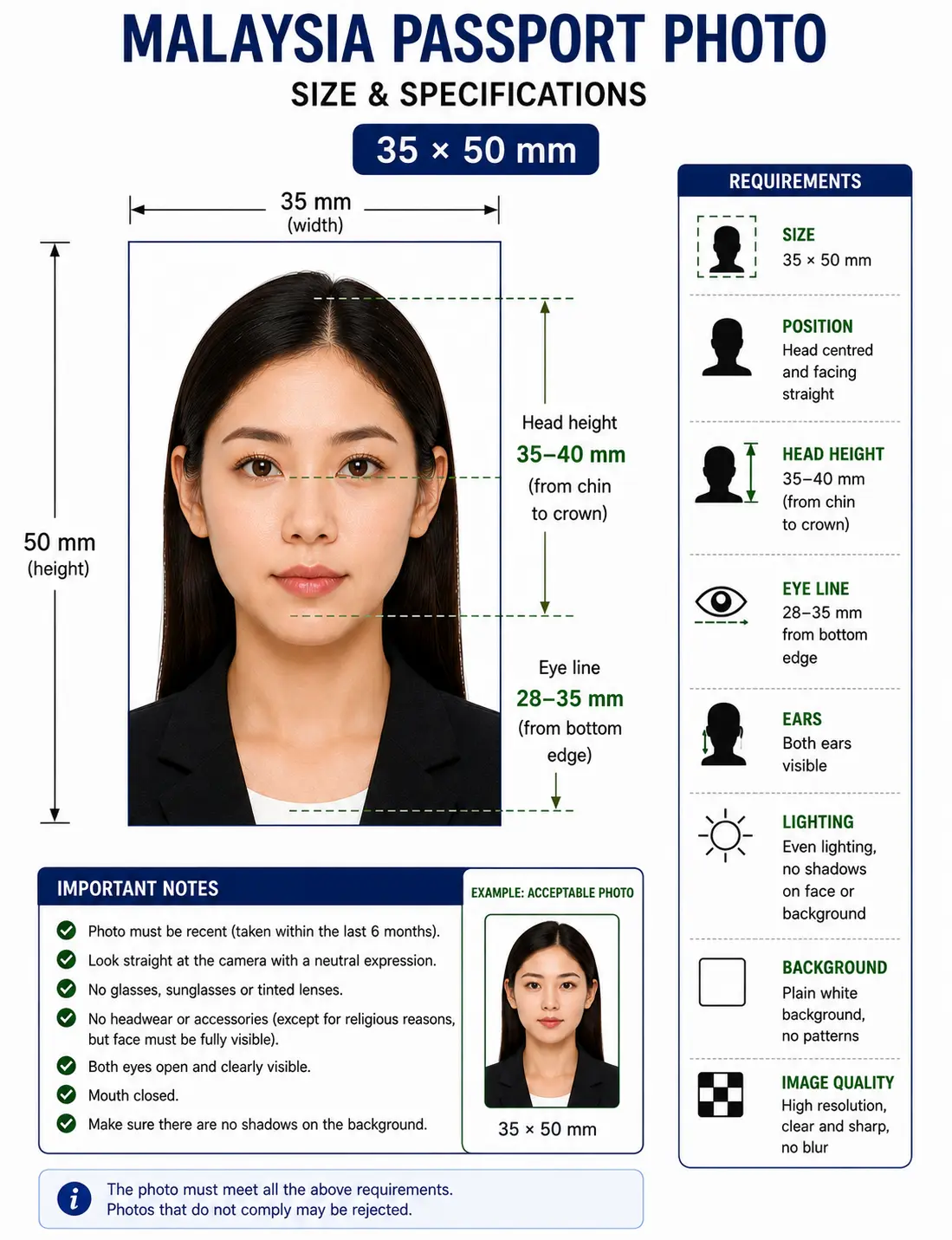
- Head size: 70–80% of frame (35–40 mm)
- Eye line: 28–35 mm from bottom edge
- Glasses: Not allowed
- Resolution: 300 DPI minimum
- Photo age: Within 6 months
- Copies: 2 printed, or 1 digital upload
- Aspect ratio: 7 : 10 portrait
- Format: JPEG, under 1 MB
Whether you're renewing through MyOnline Passport, applying for a first-time passport for a child, or walking into a UTC (Urban Transformation Centre) counter, the photo specification is the same across the board. The Jabatan Imigresen Malaysia uses biometric facial-recognition checks, so even small mistakes — a cream-coloured shirt, a faint shadow, or a 35x45mm crop borrowed from an old UK photo — will trigger a rejection.
The two rules that catch most applicants by surprise are the dark clothing requirement and the 50 mm height (most countries use 45 mm). Get those right and the rest is mechanical: white background, neutral expression, head straight-on, no glasses.
Dark Clothing Rule (Important)
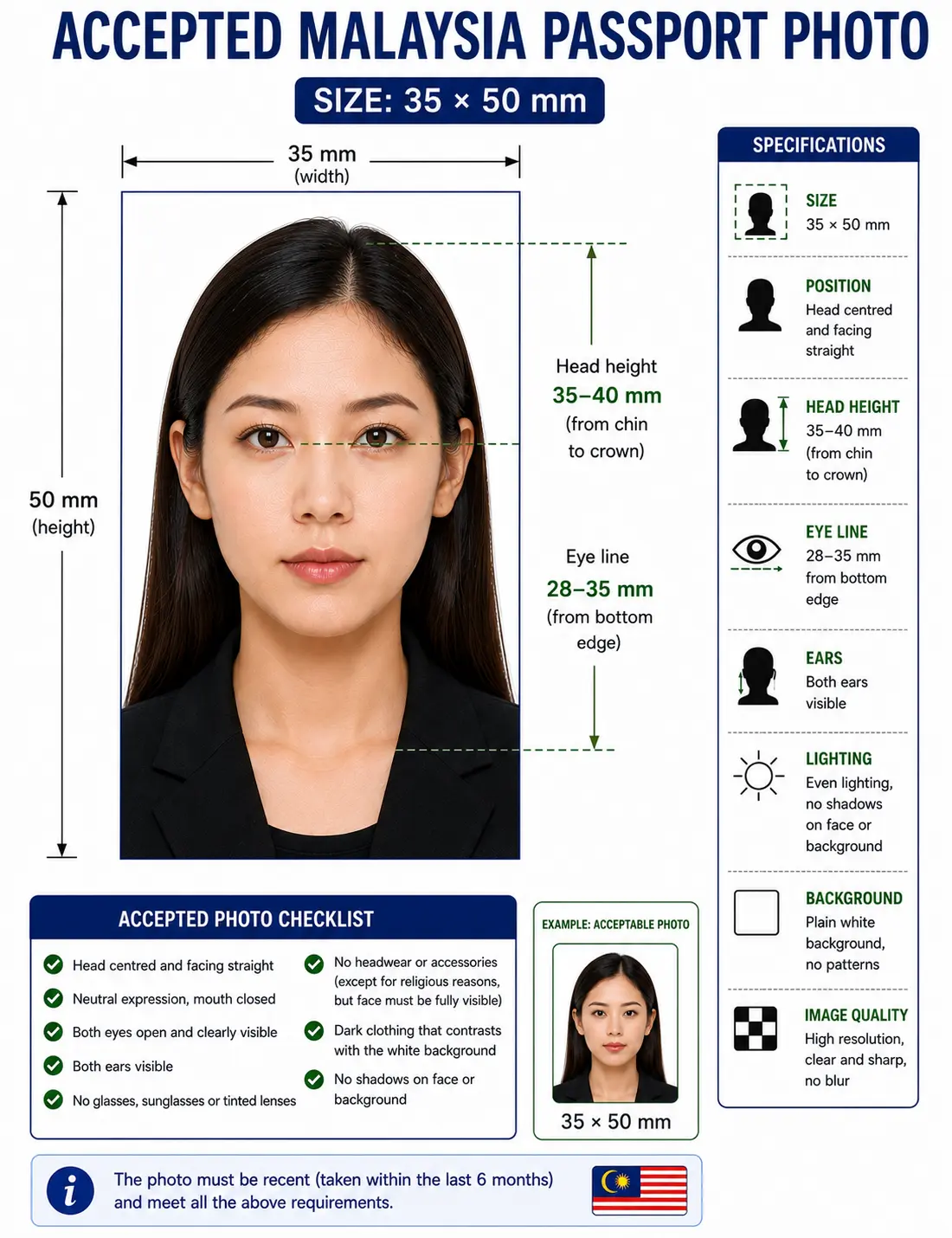
Malaysian passport photos require applicants to wear dark-coloured tops — black, navy blue, or dark grey work best. White, cream, or pastel shirts blend into the background and are routinely rejected at UTC counters. The rule applies to children as well as adults. See the dress code rules for how this compares across countries.
Malaysia Passport Photo Visual Reference
The diagram marks every dimension checked at the counter: the 35 × 50 mm frame, the 35–40 mm chin-to-crown head height, and the eye line 28–35 mm up from the bottom edge.
Create Your Malaysia Passport Photo Online
You don't need a photo studio in Mid Valley or a trip to Kedai Gambar to get a passport-ready photo. Upload a clear, front-facing picture and ClonyPDF's Passport Photo Maker resizes it to the official 35x50mm Malaysian passport format with a clean white background.
Everything runs in your browser — no signup, no watermark, no waiting. You'll receive a digital file for MyOnline Passport and a print-ready 4x6 sheet you can take to any photo printer in Malaysia.
Upload your photo and our Passport Photo Maker automatically:
- Crops the photo correctly to 35 × 50 mm
- Centers your face in the biometric frame
- Applies the plain white background
- Exports 413 × 591 pixels at 300 DPI
- Generates a print-ready 4 × 6 sheet
Malaysian Passport Photo Specifications (Full List)
The following rules are pulled from the Immigration Department of Malaysia's biometric photo guidelines used at UTC counters and on the MyOnline Passport renewal portal. Each rule links to the detailed standard in our passport photo rules library.
| Requirement | Specification |
|---|---|
| Photo size | 35 x 50 mm (3.5 cm × 5.0 cm) |
| Width | 35 mm (approx. 413 px at 300 DPI) |
| Height | 50 mm (approx. 591 px at 300 DPI) |
| Aspect ratio | 7 : 10 portrait |
| Background | Plain white, no shadows or texture — see background colour rules |
| Lighting | Even and diffuse, no shadow behind the head — see shadow rules |
| Clothing | Dark-coloured (black, navy, dark grey) — see dress code rules |
| Head size | 70–80% of frame height, roughly 35–40 mm chin to crown — see head size rules |
| Face coverage | 70–80% of the frame, centred — see face size requirements |
| Eye position | Roughly horizontal, 28–35 mm from bottom edge — see eyes requirements |
| Hair | Must not cover the eyes or the outline of the face — see hair rules |
| Ears | Should be visible where hair allows — see ears visibility rules |
| Resolution | 300 DPI minimum, sharp and in focus — see resolution rules |
| File format | JPEG (digital); under 1 MB for MyOnline Passport |
| Copies required | Two identical prints for counter submission, or one digital upload |
| Colour | Full colour, natural skin tones, no filters or beauty mode |
| Glasses | Not permitted — must be removed. See glasses rules |
| Expression | Neutral, mouth closed, both eyes open — see smile rules |
| Head coverings | Allowed for religious reasons (tudung/hijab/turban) — see head covering rules |
| Photo age | Taken within the last 6 months |
| Earrings/jewellery | Small studs allowed; large items should be removed |
White, not blue. Older Malaysian identity photographs used a blue background, which is why blue-background photos still turn up at counters and get refused. The current biometric passport standard requires a clean, uniform white background with no shadow behind the head.
Wrong background or a light-coloured top? Re-shoot once and let the tool handle the rest.
Create Photo →Malaysian Passport Photo Size in Pixels, Inches & CM
The official specification uses millimetres, but if you're editing in Photoshop, Canva, or another tool that expects pixels or inches, use this conversion chart to set the canvas size correctly.
For pixel conversions across every country standard, see passport photo size in pixels, or the full worldwide reference in passport size photo dimensions.
Malaysia Compared to Neighbouring Countries
Malaysia's 35 × 50 mm format is unique in Southeast Asia. Nothing else in the region uses it, which is why a photo prepared for a neighbouring country is refused for a Malaysian passport, and vice versa.
| Country | Photo Size | Aspect Ratio | Background |
|---|---|---|---|
| Malaysia | 35 × 50 mm | 7 : 10 | Plain white, dark clothing |
| Singapore | 35 × 45 mm | 7 : 9 | Plain white |
| Thailand | 40 × 60 mm | 2 : 3 | Plain white |
| Indonesia | 51 × 51 mm | 1 : 1 | Plain white / red or blue for some documents |
| Brunei | 40 × 52 mm | 10 : 13 | Plain white |
| Vietnam | 40 × 60 mm | 2 : 3 | Plain white |
| Philippines | 35 × 45 mm | 7 : 9 | Plain white |
| China | 33 × 48 mm | 11 : 16 | Plain white |
Compare with the two most common global formats: 35x45 photo size used across Europe and much of Asia, and 2x2 photo size used by the United States. Every national standard is indexed in the passport photo requirements by country hub. Travelling to China from Malaysia? The China visa photo uses 33 × 48 mm, a different size again.
What to Do & Avoid for a Malaysian Passport Photo
Do This
- Wear a black, navy, or dark grey top
- Stand in front of a clean white wall
- Keep at least 50 cm clear of the wall to avoid shadow
- Use soft natural daylight, evenly lit
- Keep your head straight and shoulders square
- Remove glasses before taking the photo
- Hold a neutral expression with mouth closed
- Pull hair away from the face and ears if possible
Avoid This
- White, beige, or pastel-coloured clothing
- Cream, blue, or grey wall as background
- Harsh shadows behind the head
- Filters, beauty modes, or portrait blur
- Tilting the head or looking sideways
- Wearing thick frames, sunglasses, or tinted lenses
- Reusing a 35x45mm photo from another country
How to Create a Malaysia Passport Photo
- Wear dark clothingPut on a dark-coloured top — black, navy, or dark grey — so your shoulders contrast clearly with the white background.
- Take a straight-on photoStand 1.5 metres from a white wall in soft daylight, at least 50 cm clear of the wall, look straight at the camera, and keep a neutral expression.
- Upload to the toolOpen the ClonyPDF Passport Photo Maker and drop in your JPG, PNG, or HEIC file.
- Crop to 35x50mmThe tool auto-crops to the correct dimensions and centers your face within the frame. The crop guide explains how the 7:10 ratio and head-height band are applied together.
- Download & printSave the digital copy for MyOnline Passport and grab the 4x6 print sheet for UTC submission or Kedai Gambar printing.
Malaysia Passport Photo for a Baby, Infant or Child
Malaysia issues passports to children in their own name, so a compliant photo is needed from birth. The 35 × 50 mm size, white background, head-height band and dark clothing rule all apply to children exactly as they do to adults. There is no reduced size or relaxed background rule for infants.
Same size, same framing
35 × 50 mm frame with the head filling 70–80% of the height, roughly 35–40 mm chin to crown. No age exemption applies to dimensions.
Dark clothing for children too
Dress the child in a dark top. A white babygrow blends into the white background and is the single most common reason a child photo is refused at the counter.
Child alone in the frame
No supporting hands, arms, car seat, toy or dummy may be visible, and no other person may appear. Support the child from behind a plain white sheet.
Eyes open, mouth closed
Both eyes should be open and looking towards the camera where achievable. See the eyes requirements.
No shadow behind the head
Lay the child on a white sheet in soft indirect daylight and shoot from directly above. Overhead light from one side creates the shadow that fails the check.
Fresh photo each renewal
Children's appearance changes quickly. A photo that no longer resembles the child is refused even inside the 6-month window.
Positioning, lighting and timing technique for infants and toddlers is covered in our baby passport photo at home guide.
Photographing a child? Upload the shot and let the tool apply the 35x50 crop.
Create Child Photo →Printing a 35x50 mm Malaysian Passport Photo
Counter submissions generally require two identical printed photos, so printing is part of the specification rather than an afterthought. A 4 × 6 inch sheet — the standard size every Kedai Gambar and photo kiosk in Malaysia handles — holds six 35 × 50 mm copies.
| Print resolution | 300 DPI minimum — export at 413 × 591 pixels |
|---|---|
| Paper | Glossy or matte photo paper. Plain copier paper is refused |
| Copies per 4 × 6 inch sheet | Six 35 × 50 mm photos in a two by three grid with cutting margins |
| Copies per A4 sheet | Around twenty-four, though most applicants only need two |
| Cutting | Guillotine or steel rule for square edges. Do not cut inside the printed border |
| Colour management | sRGB. Disable printer auto-enhance, skin smoothing and colour correction |
| Handling | Let ink dry fully. Do not staple, fold or glue the photo face |
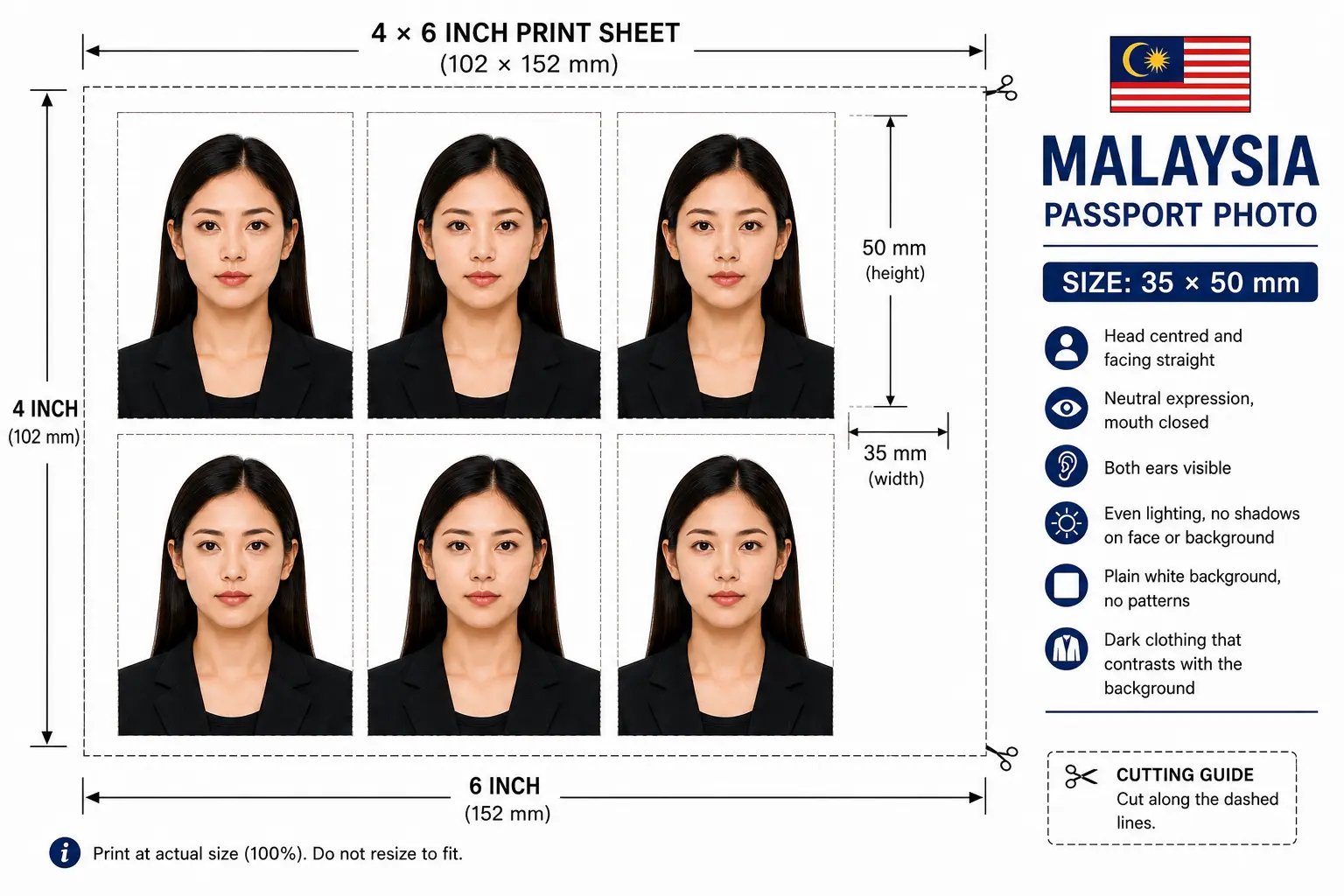
Printer settings, paper choice and cutting technique are covered in full in the print passport photo at home guide, and multi-copy sheet layout in the print sheet guide.
Why Malaysian Passport Photos Get Rejected
Each item links to the detailed rule so you can confirm the tolerance before your appointment. The full cross-country breakdown is in passport photo rejection reasons.
Light-coloured clothing
White, cream, or pastel tops blend into the white background — a uniquely Malaysian rejection reason that catches many first-timers. See dress code rules.
Wrong dimensions
Using a 35x45mm UK, Singapore or Schengen crop instead of the required 35x50mm Malaysian size is the second most common error. See the crop guide.
Blue background
Photos carried over from older Malaysian identity documents used a blue backdrop. Only a pure, even white background is accepted now. See background colour rules.
Shadow behind the head
Standing too close to the wall throws a shadow that breaks the uniform white requirement. See shadow rules.
Poor lighting
Uneven or yellow indoor lighting distorts skin tone and creates patches that fail biometric facial checks. See lighting requirements.
Glasses still on
Malaysia removed the "glasses allowed" exception. Any frames, lenses, or reflections will be flagged. See glasses rules.
Head outside 70–80%
Correct outer dimensions with a head that is too small or too large in frame still fails. See head size rules.
Face not centered
A tilted head or off-centre face means the eyes fall outside the expected biometric zone of the 35x50mm frame. See face position rules.
Hair covering the face
A fringe over the eyes or hair obscuring the face outline fails landmark detection. See hair rules.
Tudung shadowing the face
Religious head coverings are permitted, but the full face from chin to forehead must stay visible with no shadow across the features. See head covering rules.
Low resolution
Blurry or pixelated images below 300 DPI cannot be verified at MyOnline Passport upload and are returned. See resolution rules.
Beauty mode or filters
Portrait blur, skin smoothing and slimming effects alter facial geometry and are detected by biometric validation. Shoot in a plain, unfiltered mode.
Outdated photo
A photo older than six months no longer reflects your current appearance and is refused at the counter.
Mismatched prints
The two printed copies must be identical and from the same session. Mixing photos from different shoots is refused.
Malaysia Passport Photo FAQs
Size & Dimensions
What size is a Malaysian passport photo?
A Malaysian passport photo is 35x50mm (3.5cm wide by 5cm tall) on a plain white background. The head should occupy about 70–80% of the frame height, which works out to roughly 35 to 40 mm from chin to crown, and the photo must show the applicant from the shoulders up.
Why is the Malaysian passport photo 50 mm tall instead of 45 mm?
Malaysia uses a 35x50mm format, 5 mm taller than the 35x45mm size used by the UK, Schengen area, Singapore and the Philippines. That gives a 7:10 aspect ratio rather than 7:9. A 35x45mm photo prepared for another country cannot be reused for a Malaysian passport application — see the regional comparison above.
What is the Malaysian passport photo size in pixels?
At 300 DPI the 35x50mm photo equals 413 × 591 pixels. At 600 DPI it equals 827 × 1181 pixels. Keep the digital JPEG under 1 MB for MyOnline Passport uploads.
Clothing, Background & Appearance
Do I have to wear dark clothing for a Malaysian passport photo?
Yes. The Immigration Department of Malaysia requires applicants to wear dark-coloured clothing — typically black, navy, or dark grey — so the shoulders contrast clearly with the white background. White or light tops are commonly rejected at UTC counters.
Is the background white or blue for a Malaysian passport photo?
White. Older Malaysian identity photographs used a blue background, which is why blue-background photos still turn up at counters and get refused. The current biometric standard requires a clean, uniform white background with no shadow behind the head.
Can I wear glasses in a Malaysian passport photo?
No. Under current Jabatan Imigresen Malaysia guidelines, glasses must be removed for passport photos. Both eyes must be clearly visible without glare, frames, or tinted lenses.
Can I wear a tudung or hijab in a Malaysian passport photo?
Yes. Head coverings worn for religious reasons are permitted. The tudung or hijab should ideally be dark-coloured, and the full face — from the bottom of the chin to the top of the forehead and from ear to ear — must remain clearly visible with no shadow across the features.
Children & Submission
What are the Malaysian passport photo rules for a baby or child?
The same 35x50mm size, plain white background and head-height band apply to children and infants, and the dark clothing rule applies to them too. The child must be alone in the frame with no supporting hands, car seat, toy or dummy visible. Children need their own passport in Malaysia, so a compliant photo is required from birth. See the child and infant section.
How many photos do I need for a Malaysian passport application?
Counter submissions at a UTC or immigration office generally require two identical printed 35x50mm photos taken in the same session. MyOnline Passport renewals require a single digital upload instead. Confirm the exact count with the office handling your application before your appointment.
How recent must my Malaysian passport photo be?
It must be taken within the last 6 months and reflect your current appearance. Outdated photos are a frequent cause of rejection at UTC counters and during MyOnline Passport renewals.
Taking & Printing
Can I take a Malaysia passport photo at home?
Yes. Photograph yourself against a white wall in even daylight while wearing a dark top, standing at least 50 cm clear of the wall so no shadow falls behind your head. Then upload it here — ClonyPDF's Passport Photo Maker crops it to the exact 35x50mm size used by MyOnline Passport and UTC counters.
Can I use my phone camera for a Malaysian passport photo?
Yes. A modern smartphone has more than enough resolution for the 35x50mm format. Stand about 1.5 metres from a white wall in soft light, switch off portrait blur and beauty mode because they alter facial geometry, then let the tool resize and center the image automatically.
How do I print a 35x50 mm Malaysian passport photo?
Print at 300 DPI on glossy or matte photo paper. A standard 4 x 6 inch sheet holds six 35x50mm photos in a two by three grid with cutting margins. Cut with a guillotine for square edges and do not trim inside the printed border. Any Kedai Gambar or photo kiosk in Malaysia accepts a 4 x 6 sheet. See the print at home guide.
Official Sources & References
- Immigration Department of Malaysia (Jabatan Imigresen Malaysia) — passport services and photo guidelines: imi.gov.my
- MyOnline Passport — digital renewal portal operated by the Immigration Department of Malaysia
- Urban Transformation Centre (UTC) immigration counters — in-person submission and on-site photo capture
- ICAO Doc 9303 — Machine Readable Travel Documents biometric photograph standard: icao.int
Related Passport Photo Guides
Create Your Malaysia Passport Photo Now
Get a compliant 35x50mm Malaysian passport photo with a white background and proper crop in under a minute — free, watermark-free, and ready for MyOnline Passport or UTC submission.
Create Malaysia Passport PhotoApplying for a Malaysia visa?
Visa photos follow a separate specification from Malaysia passport photos. See the full Malaysia visa photo requirements.