
Nepal Visa Photo Maker
Get a compliant 35 × 45 mm Nepal visa photo on a plain white background — upload-ready for the online pre-application and print-ready for arrival, in seconds.
Planning a trip to Nepal? Every visa request — a tourist visa on arrival at Tribhuvan International Airport (TIA), the online pre-application, or a visa issued by a Nepalese diplomatic mission — needs a compliant photograph. Nepal’s Department of Immigration (Ministry of Home Affairs) and its embassies ask for a recent 35 × 45 mm passport-size photo on a plain white or light background, taken within the last six months. Photos are commonly refused for the wrong size, a busy or grey backdrop, harsh shadows, or a file the online portal rejects for being too large. A non-compliant photo can stall your pre-application upload, slow your on-arrival processing, or waste a mission appointment. This tool fixes all of that automatically.
Why Create Your Nepal Visa Photo Here
Editing a visa photo by hand in Photoshop means guessing at millimetres, head height and file limits. Uploading here removes the guesswork — the engine applies Nepal’s exact standard for you.
- Automatic crop to Nepal’s 35 × 45 mm portrait ratio (and a square option for on-arrival kiosks)
- Biometric facial framing that positions your head to the recommended size and centres your eyes
- Correct visa dimensions expressed in mm, inches and pixels
- Clean plain white background applied automatically
- Upload-ready digital file that meets the online portal’s pixel and 4 MB file-size limit
- Print-ready photo sheet for your mission appointment or the arrival counter
- Works on any phone or laptop — no software to install
- No Photoshop, no rulers, no guesswork required
Nepal Visa Photo Requirements (35×45 mm)
The specification below reflects the photo standard for Nepal visa applications. Some fields are enforced by the online pre-application portal, others at the in-person counter (visa on arrival or a mission), and some by both.
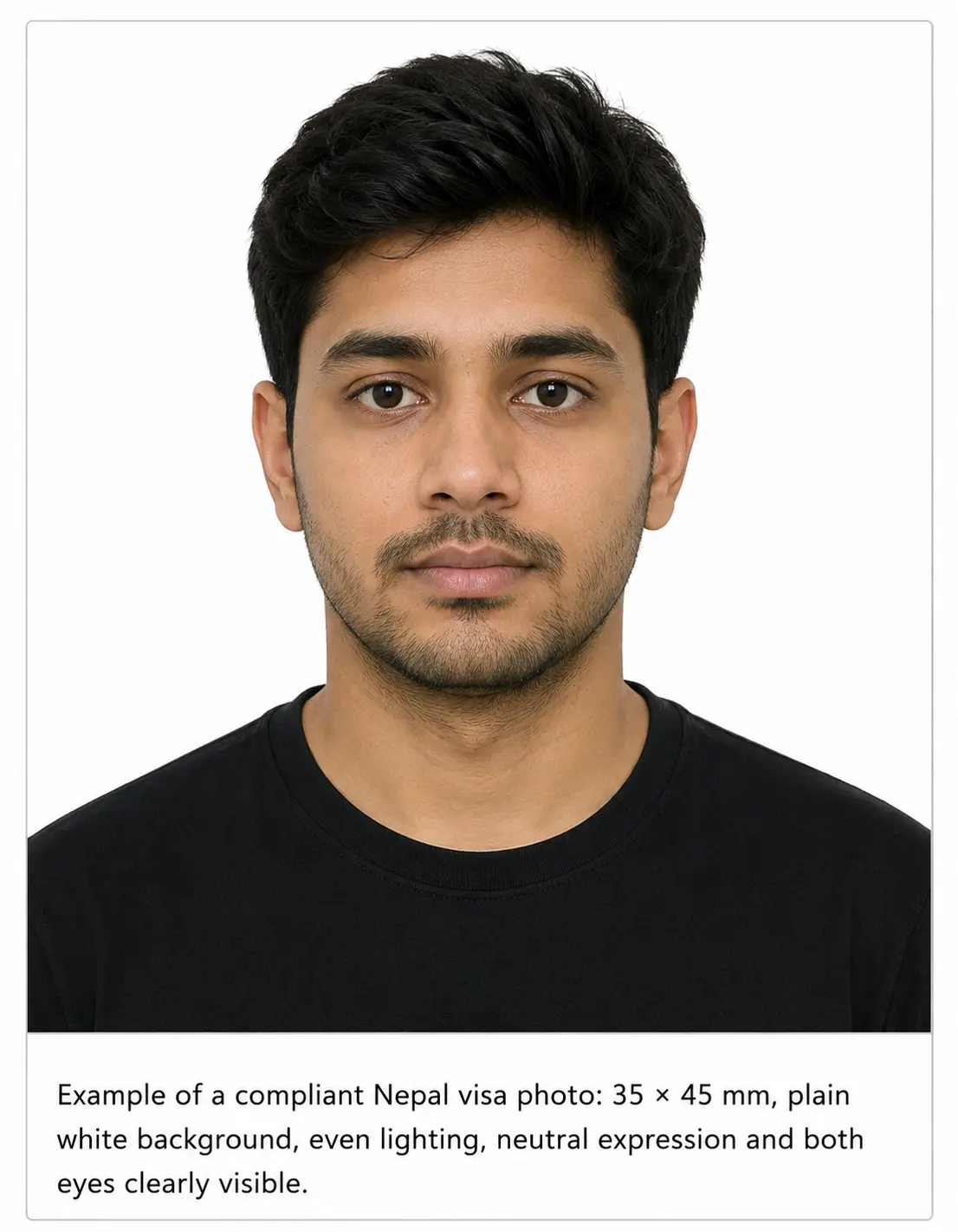
| Requirement | Nepal Visa Photo Specification | Enforced at |
|---|---|---|
| Photo size (mm) | 35 × 45 mm (width × height) | Both |
| Photo size (inch) | ~1.38 × 1.77 in (3.5 × 4.5 cm); on-arrival kiosks also accept ~1.5 × 1.5 in | On arrival |
| Width | 35 mm (1.38 in) | Both |
| Height | 45 mm (1.77 in) | Both |
| Aspect ratio | Rectangular / portrait (~7:9). Square (1:1) accepted at TIA arrival kiosks | Both |
| Background colour | Plain white or very light grey — no patterns, shadows or textures | Both |
| Head height / size | Face centred and front-facing, occupying roughly 70–80% of the frame (~31–36 mm chin to crown) | Both |
| Print resolution | 300 DPI recommended for a crisp printed photo | On arrival |
| Digital pixel dimensions | ~413 × 531 px at 300 DPI (keep at least ~350 × 450 px for portal clarity) | Online portal |
| Maximum digital file size | Keep uploaded images under 4 MB (mission online guidance) | Online portal |
| File format | JPEG (JPG) preferred; PNG generally accepted for upload | Online portal |
| Glasses | Best removed; no tinted lenses, no glare, eyes fully visible | Both |
| Head covering | Not worn except for religious/medical reasons; face visible chin to forehead | Both |
| Expression | Neutral, mouth closed, both eyes open, looking straight at the camera | Both |
| Photo age / recency | Taken within the last 6 months and reflecting your current appearance | Both |
| Digital submission | Uploaded during the online pre-application at the nepaliport portal (JPEG, under 4 MB) | Online portal |
| Printed copy | 1–2 prints at 35 × 45 mm — one affixed to the mission form, or carried for arrival | On arrival |
Pixel and file-size values are practical targets that satisfy the online portal while remaining sharp in print. Always confirm current figures with the official authority before submitting.
Visa Authority & Consular Overview
Nepal’s entry visas are governed by the Department of Immigration under the Ministry of Home Affairs, which runs the immigration counters at Tribhuvan International Airport and other entry points, and by Nepalese diplomatic missions (embassies and consulates) abroad. The online pre-application and fee system is hosted at nepaliport.immigration.gov.np.
Most travellers obtain a tourist visa on arrival, which carries multiple re-entry and is the standard entry visa even if you later change category for a different purpose. Nationals of a specified list of countries, and holders of some travel documents, must instead secure a visa from a Nepalese mission before departure. Whichever route applies to you, the photo standard is the same: a recent 35 × 45 mm image on a plain white background.
Nepal Visa Application Process
There are three common paths, and your photo needs to work for whichever you choose:
1. Online pre-application
Complete the form on the nepaliport portal before you travel and upload your digital photo (under 4 MB). You carry the printed confirmation to the airport.
2. Visa on arrival (TIA)
Use the arrival kiosks or counters at Tribhuvan International Airport, pay the fee, and present a printed photo. Fees run about US$30 (15 days), US$50 (30 days) and US$125 (90 days).
3. Nepalese mission abroad
Apply at an embassy or consulate with a printed 35 × 45 mm photo affixed to the form. If issued by a mission, you generally must enter Nepal within six months.
Because the same image serves both a digital upload and a physical print, generating a dual-output photo up front saves a return trip to a photo shop.
Nepal-Specific Visa Photo Rules
- Size: 35 × 45 mm is the reference size across missions and the online form; the ~1.5 × 1.5 in square is a convenience accepted at arrival kiosks.
- Background: plain white or very light grey. Avoid coloured walls, curtains and visible edges.
- Framing: head centred, shoulders square, looking straight into the lens with a neutral face.
- Recency: within the last six months. If issued by a mission, remember the six-month entry window tied to the visa date.
- Consistency: the printed photo and the uploaded file should be the same shot, so your appearance matches at every checkpoint.
Child & Infant Nepal Visa Photo Requirements
Children and infants need their own 35 × 45 mm photo that meets the same background and framing rules — a child cannot appear on a parent’s photo. For babies who cannot sit or hold their head up:
- Lay the infant on a plain white sheet and photograph from directly above, keeping the face centred and evenly lit.
- No toys, pacifiers, hands or other people should appear in the frame.
- Eyes should be open where possible; a neutral or relaxed expression is fine for very young children.
- Upload the shot here and the maker crops it to the Nepal ratio and cleans the background automatically.
Digital Visa Photo Upload Rules (Online Portal)
When you pre-apply online, the portal accepts a digital photograph alongside a passport copy. To pass the upload smoothly:
File size
Keep the image under 4 MB. Oversized files are the most common upload failure.
Format & resolution
Use JPEG at a clear resolution (around 413 × 531 px or higher) so the face is sharp on screen and in print.
Background
Plain white reads cleanly on the portal preview and avoids automated rejections.
One consistent shot
Upload the same photo you intend to print, so nothing differs between your online record and the counter.
Repeat & Extension Visa Photo Rules
Nepal visas are not “renewed” the way a passport is. If you extend your stay through the Department of Immigration, or apply again on a future trip, treat it as a fresh application with a fresh compliant photo. Do not resubmit the exact image from a previous visa — use a recent 35 × 45 mm shot that reflects how you look now, on the same plain white background. Generating a new photo takes seconds and avoids a mismatch during processing.
Biometric & Facial-Recognition Standards
Immigration systems increasingly compare your submitted photo with the person in front of the officer or camera. To stay on the right side of facial recognition:
- Face the camera squarely with even, shadow-free lighting across the whole face.
- Keep a neutral expression — wide smiles and raised brows can distort key measurements.
- Remove glasses to prevent glare over the eyes, which are central to biometric capture.
- Avoid beautifying or slimming filters; an altered face may not match you in person.
Can I Take My Nepal Visa Photo at Home?
Yes — a modern phone is more than good enough. The trick is treating your photo like a mini studio session and letting the tool handle the technical crop.
Camera & distance
Use the rear camera if you can. Stand about 1–1.5 m away at eye level so your face isn’t distorted, then crop later.
Lighting
Face a window or soft daylight. Even light on both sides prevents shadows on your face and on the wall behind you.
Background
Stand a step away from a plain white wall. The maker will still clean it, but a light backdrop gives the best result.
Framing & expression
Shoulders square, head straight, neutral face, both eyes open, hair off the face.
Digital file
Export keeps the image under 4 MB at portal-ready pixels for the online pre-application.
Printing
Download the print sheet and use glossy photo paper (or a print shop) for the arrival/mission copy.
Common self-shooting mistakes: filling the frame with your head, a colour cast from indoor bulbs, a shadow behind your shoulder, tilting the phone, or a cluttered background. Upload your shot and the tool corrects the crop and background for you.
Nepal 35×45 mm vs US 2×2 in Visa Photo
Travellers often compare Nepal’s photo against the widely referenced US visa standard. The two differ in shape, sizing and how they’re submitted.
| Feature | Nepal visa photo | US visa photo (DS-160) |
|---|---|---|
| Dimensions | 35 × 45 mm (~1.38 × 1.77 in) | 2 × 2 in (51 × 51 mm) |
| Aspect ratio | Rectangular / portrait | Square (1:1) |
| Head size | ~70–80% of frame height | 50–69% of frame height (~1 to 1⅜ in) |
| Background | Plain white / very light | Plain white / off-white |
| Submission format | Online pre-application upload + printed photo at arrival/mission | Uploaded to the DS-160; printed 2×2 sometimes requested at interview |
| File / pixel rules | Under 4 MB; ~413 × 531 px, JPEG | Under 240 KB; 600×600 to 1200×1200 px, JPEG |
| Key difference | Rectangular shape, larger head, larger file allowance | Square shape, smaller head range, tight file limit |
Nepal visa photo vs Nepal passport photo
A frequent question is whether a passport photo can be reused for a Nepal visa. The dimensions are similar (both are 35 × 45 mm on a white background), but they are separate submissions: a visa photo must be recent and unused, not the print already affixed inside your passport application. When you need a passport-specific image instead, use the ClonyPDF Passport Photo Maker — keeping the two purposes distinct avoids a stale or mismatched photo.
How to Create a Nepal Visa Photo in 5 Steps
The Nepal visa photo maker turns any decent snapshot into a submission-ready image. Here’s the full flow.
Upload your photo
Add a recent front-facing photo from your phone or computer. The maker opens with the Nepal 35 × 45 mm template already selected.
Auto-crop & biometric framing
Your face is detected and cropped to Nepal’s ratio, with your head sized correctly and eyes centred.
Set the background
Background removal swaps a busy or grey backdrop for the plain white background Nepal expects.
Verify against the Nepal spec
Confirm size, head height, pixel dimensions and file size so it clears both the online portal (under 4 MB) and the printed submission.
Download digital & print
Save an upload-ready JPEG for the nepaliport pre-application and a print-ready 35 × 45 mm sheet for arrival or your mission appointment.
Common Nepal Visa Photo Rejection Reasons
- Wrong dimensions or the wrong shape (not 35 × 45 mm)
- Background that isn’t plain white — grey, coloured or textured walls
- Head too large or too small within the frame
- Shadows across the face or behind the head
- Glasses glare, or glasses worn where the eyes are obscured
- Photo older than the six-month recency window
- Uneven or dim lighting that hides facial features
- Beautifying, slimming or skin-smoothing filters
- Digital file larger than the portal’s 4 MB limit
- Pixel dimensions too low for a clear on-screen preview
- Low-resolution print that fails inspection at the counter
- Appearance no longer matching you at the arrival or interview check
Visa Processing & Appointment Tips
- Pre-apply online to shorten your time at the TIA arrival counter, especially in peak season.
- Carry a spare printed 35 × 45 mm photo in case a counter or kiosk needs a physical copy.
- Match your on-file photo to your current look — a recent haircut or new glasses can raise questions.
- If applying through a mission, factor in the six-month entry window that starts from the visa issue date.
- Keep the digital file handy on your phone in case you need to re-upload.
Compliance Notice
Visa photo requirements can change and may vary by visa category and application route. Always verify the current rules with the official embassy, consulate, visa application centre, or the Department of Immigration of Nepal before submitting. The Visa Photo Maker helps you create a compliant photo, but final acceptance always rests with the issuing embassy, consulate, or immigration authority.
Nepal Visa Photo FAQ
Does my Nepal visa photo need a white background?
Can I reuse my passport photo for a Nepal visa application?
Do I submit the Nepal visa photo online or in person?
How recent does the photo for my Nepal visa need to be?
What size is a Nepal visa photo?
What is the maximum file size for the Nepal online visa photo upload?
Can I wear glasses or a head covering in my Nepal visa photo?
Can I take my Nepal visa photo at home for a visa on arrival?
Create Your Nepal Visa Photo Now
Whether you’re pre-applying online, heading for a visa on arrival at Tribhuvan International Airport, or applying at a Nepalese mission, get a 35 × 45 mm photo that’s upload-ready and print-ready in one step. Upload below to start.
Applying for a Nepal passport?
Passport photos follow a separate specification from Nepal visa photos. See the full Nepal passport photo size and requirements.