
Japan Visa Photo Size (Quick Answer)
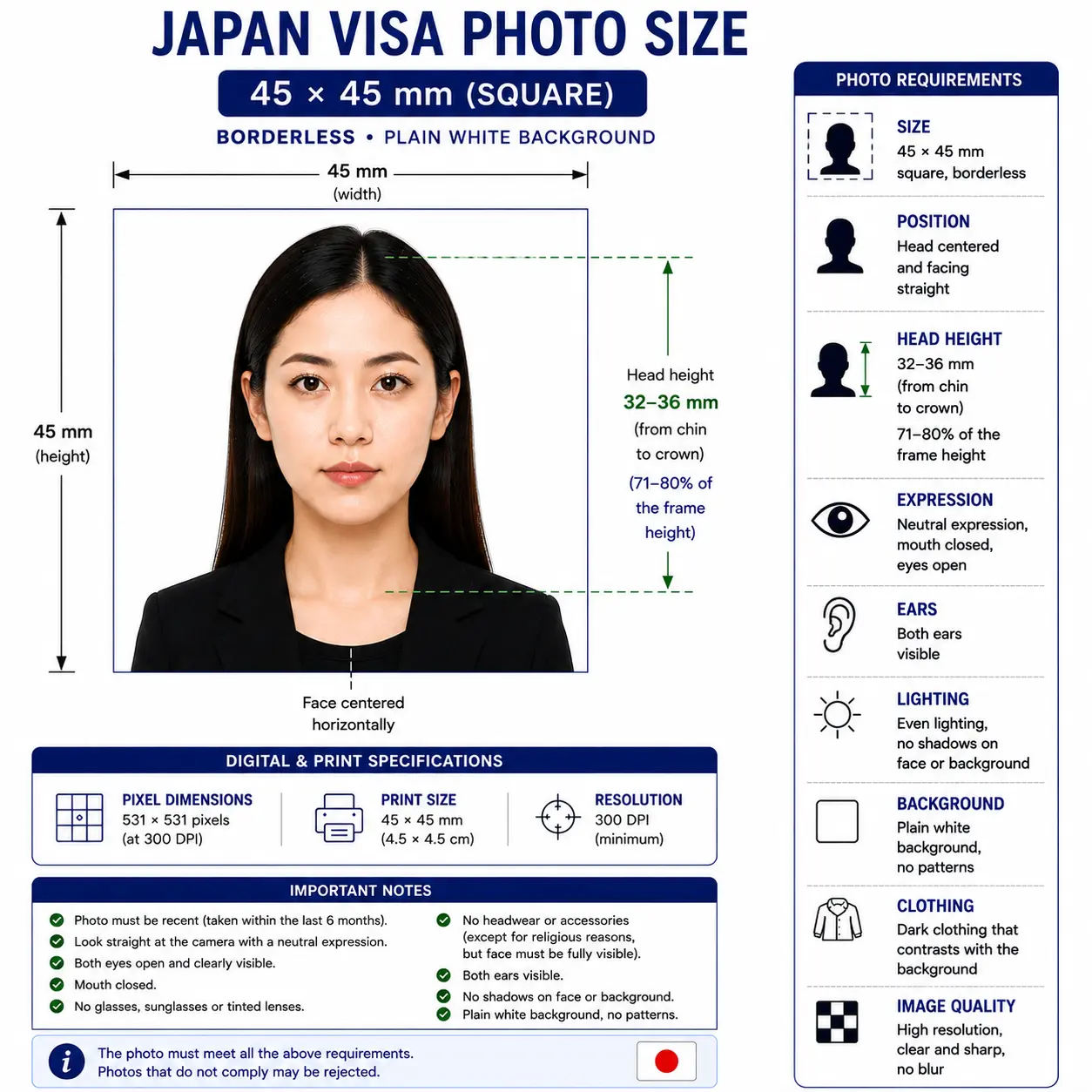
Most Japanese missions publish 45 × 45 mm, printed borderless with no edge, on a plain white background, with the head measuring 32–36 mm from chin to crown and the photo taken within the last 6 months. Some missions instead publish 45 × 35 mm, and a few reference 2 × 2 inches — so confirm the figure with the mission handling your application before you print.
| Most-cited size | 45 × 45 mm square, borderless |
|---|---|
| Also published | 45 × 35 mm (incl. Certificate of Eligibility filings) · 2 × 2 in |
| Head height | 32–36 mm chin to crown (about 32 mm on 45 × 35 mm formats) |
| Face coverage | Roughly 70–80% of the frame height |
| Background | Plain white, no shadow, pattern or object |
| Expression | Neutral, mouth closed, both eyes open, facing forward |
| Photo age | Within the last 6 months |
| Print paper | Matte or glossy photo paper — plain copy paper is refused |
| Copies | One or two prints for paper filings; one file for e‑Visa |
| e‑Visa upload | PDF, TIF, JPG, PNG, GIF or BMP, 2 MB or less recommended |
- Automatic cropFramed to the head-and-shoulders ratio Japanese visa photos require, no manual measuring.
- Biometric framingHead height and centring checked against ICAO-style biometric proportions.
- Visa-type-correct sizingSwitches output dimensions based on the visa type you select.
- Background cleanupReplaces your background with the plain white most missions require.
- Print + digital outputOne upload produces both a print-ready file and an e‑Visa-sized digital file.
- No Photoshop requiredWorks from a phone photo — no editing software or studio visit needed.
Japan visa photo visual reference
The diagram below shows the most commonly published Japanese visa format: a 45 × 45 mm square frame with the head measuring 32–36 mm from chin to crown on a plain white background, printed with no border or white edge.
Who sets Japan's visa photo rules
Japan's Ministry of Foreign Affairs (MOFA) sets the overall visa framework, but day-to-day application instructions — including the exact photo specification — are published by the individual Japanese embassy, consulate-general, or consular office with jurisdiction over where you live. In many countries, applications are instead routed through an accredited agency or the Japan Visa Application Centre, operated by VFS Global, which publishes its own photo specification sheet. The JAPAN eVISA system is a separate, MOFA-run online portal that currently handles a single visa category.
Because three different bodies (a diplomatic mission, a visa center, and an online portal) can each be the one reviewing your photo depending on where and how you apply, the safest approach is to identify which of the three is processing your specific application and check that one's current photo instructions directly, rather than relying on a single number that's assumed to apply everywhere. Every source we used is linked in Sources.
How a Japan visa application typically moves
For most visa types, you submit a completed application form, your passport, a recent photo, and supporting documents (such as an itinerary, financial proof, or a Certificate of Eligibility for work and long-term visas) either in person, through an accredited agency, or via the Japan Visa Application Centre. Processing commonly takes around a week once a complete file is received, though missions note that additional review can extend this. The JAPAN eVISA route, where eligible, replaces the in-person drop-off with an online form and document upload, including the photo, and issues an electronic visa rather than a sticker in your passport.
Japan visa photo requirements
| Photo size | Most commonly published as 45 × 45 mm, printed borderless with no white edge. Some missions instead specify 45 × 35 mm or 2 × 2 in — confirm with your specific mission. |
|---|---|
| Width | 45 mm (square format) or 35 mm (passport-style format), depending on mission |
| Height | 45 mm in both the square and passport-style formats |
| Background | Plain white, no shadows, patterns, or objects — see background colour rules |
| Lighting | Even and diffuse, with no shadow behind the head — see shadow rules |
| Head height | 32–36 mm chin to crown as published by Japanese consular guidance; around 32 mm on 45 × 35 mm Certificate of Eligibility filings — see head size rules |
| Face coverage | Roughly 70–80% of the frame height — see face size requirements |
| Eyes | Open, clearly visible, looking straight at the camera — see eyes requirements |
| Hair | Must not cover the eyes or obscure the outline of the face — see hair rules |
| Ears | Not explicitly mandated by Japanese missions, but the face outline must be unobstructed — see ears visibility rules |
| Head coverings | Not permitted other than for documented religious reasons, with the full face visible — see head covering rules |
| Resolution | Minimum 300–600 dpi reported across sources; higher resolution is safer for print submissions — see resolution rules |
| File format | JPG/JPEG or PNG for most digital uploads; the eVISA portal also accepts PDF, TIF, GIF, and BMP |
| Print paper | Matte or glossy photo paper. Plain inkjet copy paper is described as unacceptable by multiple missions |
| Glasses | Permitted if medically necessary, with clear (untinted) lenses, no glare, and frames that don't obscure the eyes; otherwise discouraged — see glasses rules |
| Expression | Neutral, mouth closed, no smiling, eyes open and visible, facing forward — see smile rules |
| Retouching | Not permitted — no filters, skin smoothing, slimming or tone adjustment |
| Photo age | Taken within the last 6 months |
| Digital submission rules | File size limits are reported differently by source (some cite roughly 120–240 KB for older paper-visa digital copies; the eVISA portal itself recommends files of 2 MB or less). Check the portal you're using for its current limit. |
| Varies by visa type? | Yes — the core photo look is consistent, but the submission channel (paper vs. digital) and that channel's size/format rules differ. See differences between visa types. |
Not sure which size your mission wants? Generate both the square and passport-style crops from one upload with the Passport Photo Maker.
How the Japan visa photo compares to other formats
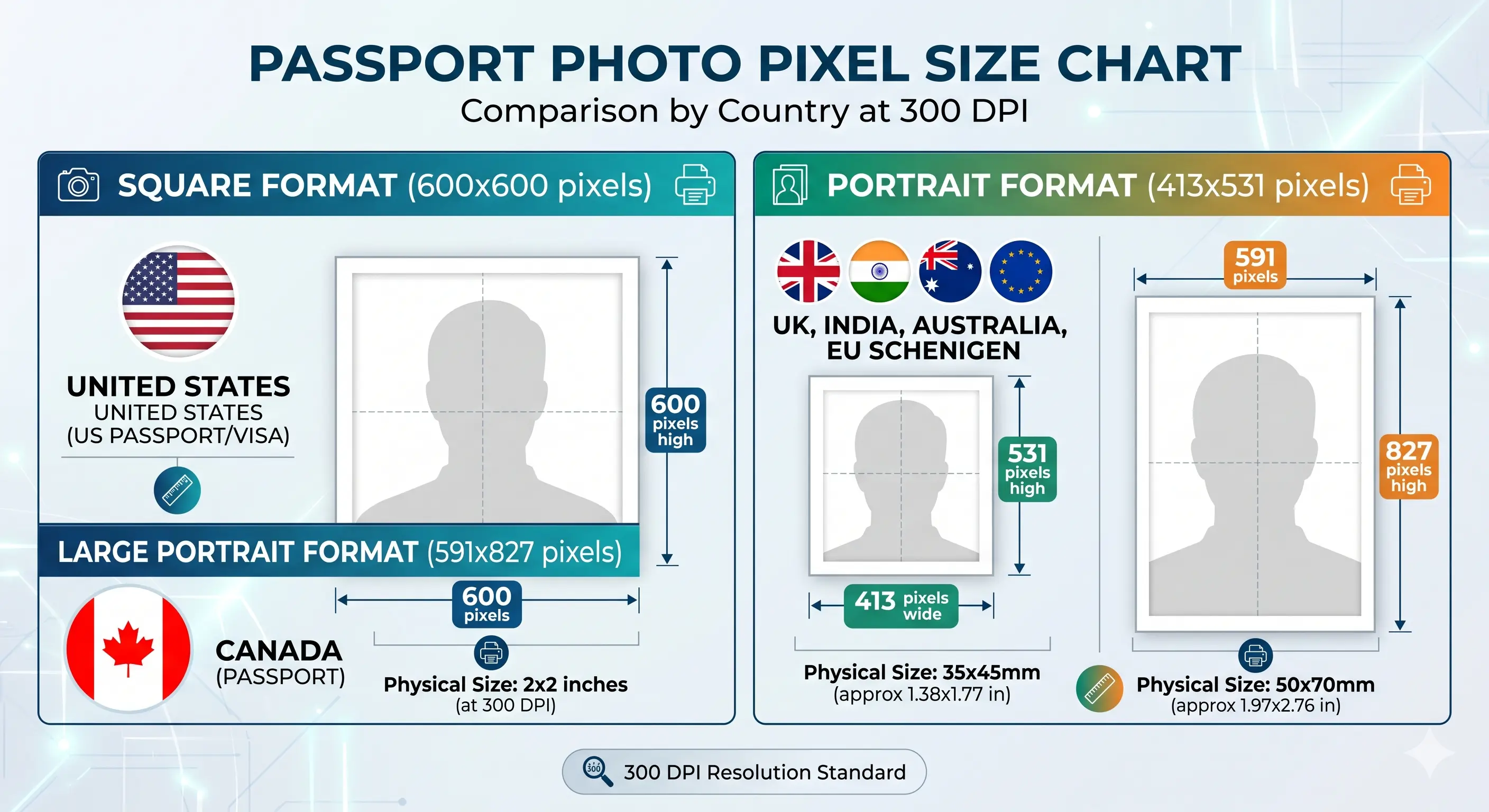
Japan is one of the few countries whose visa photo can differ in shape from its own passport photo. This comparison shows the pixel equivalents at 300 DPI so you can see exactly what changes between formats.
| Format | Pixels @ 300 DPI | Ratio | Used for |
|---|---|---|---|
| 45 × 45 mm | 531 × 531 px | 1 : 1 | Japan visa (most-cited format) |
| 35 × 45 mm | 413 × 531 px | 7 : 9 | Japan passport, UK, Schengen, Australia |
| 45 × 35 mm | 531 × 413 px | 9 : 7 | Some Japanese missions and VFS centres, Certificate of Eligibility filings |
| 2 × 2 in (51 × 51 mm) | 600 × 600 px | 1 : 1 | Referenced by a few Japanese missions; standard for the US and India |
| 33 × 48 mm | 390 × 567 px | 11 : 16 | China visa and China passport |
| 35 × 45 mm | 413 × 531 px | 7 : 9 | South Korea visa, Taiwan |
Differences between visa types
Tourist, business, student, and work visas filed on paper generally follow the same photo look and the print-size guidance of whichever mission or visa center you're using. The e‑Visa route is the clearest structural difference: it is currently limited to single-entry short-term tourist visas for nationals of specific countries, accepts only a digital photo upload, and is governed by the eVISA portal's own file rules rather than a printed-photo standard. If your visa purpose is business, study, work, family stay, or anything beyond short-term tourism, you'll be filing on paper through an embassy, consulate, or accredited agency, and should follow that mission's printed photo specification.
Can I take my Japan visa photo at home?
Yes — a phone camera is enough for most applicants, provided you control lighting and background carefully.
Phone camera setup
Use the rear camera if possible for sharper detail, hold the phone roughly 3–4 feet away, and have someone else take the photo rather than using a selfie or front camera, since selfie-style framing tends to distort facial proportions. Our selfie guide covers this in more detail.
Lighting
Even, diffused light from a window or two soft lamps works best. Avoid a single overhead light or on-camera flash, both of which cast shadows under the eyes or on the background. See the shadow rules.
Background
Stand 3–4 feet in front of a plain white or light wall, or hang a white sheet, so there's enough separation to avoid your own shadow falling on it.
Distance from camera
Frame from roughly the top of the shoulders to a little above the head, leaving room to crop precisely to whichever size your mission requires. The crop guide explains how the ratio and head-height rule are applied together.
Turn off camera enhancements
Disable portrait mode, background blur, skin smoothing and any beauty filter before you shoot. These alter facial geometry and are detected as retouching. If your phone saves HEIC files, convert them first with the HEIC to JPEG guide.
Common mistakes
Using a cropped social-media photo, submitting a printout of a digital photo rather than an original print, wearing a top close in colour to the background, and reusing a photo older than 6 months are the mistakes that come up most often in mission guidance.
Digital (e‑Visa) submission rules
The JAPAN eVISA system currently accepts PDF, TIF, JPG, PNG, GIF, or BMP files, with a recommended file size of 2 MB or less per upload, and a maximum of 50 pages where multiple documents are combined into one file. This is the portal's own published guidance on file handling; for the photo's specific pixel dimensions or head-size crop, the portal's application flow and your jurisdictional mission are the sources to confirm against, since published third-party figures (commonly cited around 1060×1060 px at 300 dpi) vary depending on the source.
If your export lands above a portal's ceiling, the reduce file size guide and compress to 240 KB guide cover how to get under a target without dropping below the resolution minimum. Broader upload rules across portals are covered in the digital passport photo requirements guide.
Printing your Japan visa photo
For paper filings the print itself is part of the specification. Japanese missions describe plain inkjec copy paper as unacceptable, and at least one requires the photo to be borderless with no white edge — so a photo printed inside a white margin can be refused even when the image is correct.
Paper
Matte or glossy photo paper, 200–250 gsm. Plain copier paper is refused by multiple missions.
Borderless
Print with no white edge where the mission specifies it. Trim to the exact frame rather than leaving a margin.
Resolution
300 DPI minimum. Disable fit-to-page and auto-scaling, which silently change the physical size.
Colour
sRGB profile. Turn off printer auto-enhance, skin smoothing and colour correction.
Cutting
Guillotine or steel rule for square edges. Do not cut inside the printed image area.
Handling
Let ink dry fully. Do not staple, fold or glue the photo face, and bring spare copies to the appointment.
Printer settings and cutting technique are covered in full in the print passport photo at home guide, and multi-copy sheet layout in the print sheet guide.
In-person submission (embassy, consulate, VFS)
For paper applications, you'll typically submit one or two prints alongside your passport and application form at the consular section of the relevant embassy or consulate, an accredited agency, or the Japan Visa Application Centre operated by VFS Global. VFS Global's own published specification for at least one jurisdiction lists a 4.5 x 3.5 cm (45 x 35 mm) photo — a different orientation again from the 45×45 mm square format cited elsewhere — which is why the size should be confirmed against the exact centre or mission you're filing with.
Child and infant visa photo requirements
Every child travelling to Japan needs their own visa photo and their own application — there is no option to include them on a parent's photo. The size, background and head-height rules are the same as for an adult; what relaxes is expression enforcement for the youngest applicants.
Own photo, own application
A child cannot appear on a parent's photo or share an application. Each applicant is assessed separately.
Same size and background
The same mission-published size and plain white background apply. There is no smaller format for infants.
Expression relaxed for infants
Infants who cannot hold a neutral expression, or whose eyes briefly close, are generally given some leeway.
Child alone in frame
No hands, arms, toys, dummy or other people may be visible. Support from behind a plain sheet.
Babies who cannot sit
Lay the baby on a plain white sheet, or cover a car seat with one, and photograph from directly above.
Shoot wide, crop down
Cropping tightly in-camera on a small face leaves too few pixels once the visa frame is applied.
Positioning, lighting and timing technique for infants and toddlers is covered in the baby passport photo at home guide. The eyes requirements and shadow rules pages cover the two checks that fail most often on child photos.
Visa renewal and reapplication photo rules
Japan doesn't "renew" a visa in the way a passport is renewed — a new visa application is generally filed for each trip or stay, following the same photo rules as a first-time application. If you're extending or changing your status of residence while already in Japan, that process runs through the Immigration Services Agency rather than MOFA or an overseas mission, and is governed by separate photo guidance from that agency.
Japan visa photo vs. Japan passport photo
A Japanese passport photo and a Japan visa photo are not interchangeable, even though the numbers look similar enough to confuse:
The honest summary: these are not the same spec. A passport-ready photo using the 35×45 mm passport crop may happen to satisfy a mission that also accepts that size for visas, but you shouldn't assume it will. The full passport standard is on our Japan passport photo page.
How to create a Japan visa photo
Upload
Add a recent, well-lit photo taken against a plain background.
Select visa type
Choose tourist, business, student, or work so the right template loads.
Crop & background
The tool auto-crops to the selected size and swaps in a plain white background.
Verify against requirements
Compare the output against your specific mission's published spec before finalizing.
Download
Export a print-ready file, a digital upload file, or both.
Ready now? Open the Passport Photo Maker and get both a print and a digital file from one upload.
Common rejection reasons
Each item links to the detailed rule so you can confirm the exact tolerance before you submit. The full cross-country breakdown is in passport photo rejection reasons.
- Photo sized for the wrong visa channel — for example using a passport-style 35×45 mm crop where a mission expects 45×45 mm, or vice versa. See the crop guide
- A white border or margin left around the image where the mission requires a borderless print
- Off-white or patterned background — see background colour rules
- Visible shadows behind the head or under the chin — see shadow rules
- Head outside the 32–36 mm chin-to-crown band, or too large or small for the frame proportion — see head size rules
- Smiling, an open mouth, or eyes not fully visible — see smile rules and eyes requirements
- Hair falling across the eyes or obscuring the outline of the face — see hair rules
- Glasses with glare, tinted lenses, or thick frames covering the eyes — see glasses rules
- Non-religious headwear, or a religious covering that shadows the face — see head covering rules
- A photo older than 6 months, or one that no longer resembles the applicant
- Visible digital retouching, including skin smoothing, slimming or filters
- Plain copy paper used for a print submission instead of photo paper — see the print at home guide
- A digital file that exceeds the receiving portal's file-size or format limit
- Low resolution or visible compression artefacts — see resolution rules
Processing tips
- Identify which of the three submission paths applies to you — embassy/consulate, VFS/accredited agency, or JAPAN eVISA — before you source your photo's exact size.
- If your mission's instructions list a size that differs from what's on this page, follow your mission's instructions; local mission guidance is more authoritative than any general guide, including this one.
- Keep both a print and a digital version on hand if you're not certain which format you'll ultimately need.
- Don't reuse an old passport photo without checking the dimensions match what's currently being requested.
- Bring one spare print to an in-person appointment; some missions request two copies for certain applicant groups.
Frequently asked questions
Size & Specification
What size is a Japan visa photo?
Most Japanese missions publish 45 x 45 mm, printed borderless with no edge. Others publish 45 x 35 mm, and a few reference a 2 x 2 inch format. Because the figure genuinely differs between embassies, consulates and visa application centres, confirm it against the instructions published by the mission handling your application before you print or upload.
What head height does a Japan visa photo need?
Japanese consular guidance commonly specifies a chin-to-crown measurement of no less than 32 mm and no more than 36 mm. For applications filed with a Certificate of Eligibility on a 45 x 35 mm photo, missions typically state a head height of about 32 mm. In frame terms the head occupies roughly 70 to 80 percent of the photo height.
Is the Japan visa photo the same as the Japan passport photo?
No — treat them as separate specs. The passport photo is consistently 35 x 45 mm. The visa photo size depends on which mission or portal is processing your application, so don't assume a passport-ready photo will pass for a visa. See our Japan passport photo page for the passport standard.
Do all Japan visa types use the same photo specification?
The core look is consistent across tourist, business, student and work visas: recent, colour, neutral expression, plain white background. What changes is the submission channel. JAPAN eVISA covers single-entry short-term tourism only and takes a digital upload governed by its own file rules. Every other category is filed on paper at an embassy, consulate or accredited visa application centre following that mission's printed-photo size.
Appearance & Compliance
Can I wear glasses in my Japan visa photo?
Yes, if they're medically necessary, the lenses are clear and untinted, there's no glare, and the frames don't cover any part of your eyes. Sunglasses and tinted lenses aren't accepted. Where glasses aren't medically necessary, removing them is the safer choice.
How old can my visa photo be?
It should be no older than 6 months, and should still resemble your current appearance — a photo taken before a significant change in weight, hairstyle, or facial hair is generally not accepted.
Taking, Printing & Submitting
Can I use a selfie for my Japan visa photo?
It's better to avoid it. Several mission and visa-centre guides note that selfie framing distorts facial proportions and recommend having someone else take the photo with a regular camera or phone held at a normal distance of roughly 3 to 4 feet using the rear camera.
How many photos do I need for a Japan visa?
Paper applications commonly ask for one or two prints, depending on the mission and your nationality — some missions request two for certain applicant groups. Digital e‑Visa applications generally need one uploaded file. Check your specific mission's checklist for the exact count.
Can I print a Japan visa photo at home?
Yes, provided you print on matte or glossy photo paper. Japanese missions describe plain inkjet copy paper as unacceptable, and at least one requires the print to be borderless with no white edge. Print at 300 DPI or higher, disable printer auto-enhance, and cut with a guillotine for square edges. See the print at home guide.
Does the e‑Visa option work for every visa type?
No — JAPAN eVISA currently covers only single-entry short-term tourist visas, for nationals of specific eligible countries. Business, student, work, and most other categories are filed on paper through an embassy, consulate, or accredited agency.
What file size does the JAPAN eVISA portal accept for photo uploads?
The portal's own FAQ recommends keeping uploaded files at 2 MB or under, in PDF, TIF, JPG, PNG, GIF, or BMP format, with a maximum of 50 pages where multiple documents are combined. Some third-party guides cite smaller historical limits for older paper-visa digital copies, so use the eVISA portal's current instructions if you're applying through that system.
Children
What are the Japan visa photo rules for a baby or child?
Every child needs their own visa photo and their own application; a child cannot be included on a parent's photo. The same size and background rules apply, but expression enforcement is generally more relaxed for infants who cannot hold a neutral expression or keep their eyes open. The child must be alone in frame with no hands, toys or other people visible. See the child and infant requirements section.
Sources & references
Every figure on this page is drawn from the sources below. Where Japanese missions publish different sizes, we have reported the variance rather than picking one number.
- Ministry of Foreign Affairs of Japan — Visa information: mofa.go.jp
- Ministry of Foreign Affairs of Japan — Short-term stay visa documents: mofa.go.jp
- Consulate-General of Japan in Denver — Visa photo standard, head height 32–36 mm: denver.us.emb-japan.go.jp
- Consulate-General of Japan in Mumbai — Photograph standard, 45 × 45 mm with no edge: mumbai.in.emb-japan.go.jp
- Embassy of Japan in Hungary — Certificate of Eligibility application, 45 × 35 mm with about 32 mm head height: hu.emb-japan.go.jp
- Embassy of Japan in Pakistan — Visa applicant information, 45 mm × 45 mm: pk.emb-japan.go.jp
- ICAO Doc 9303 — Machine Readable Travel Documents biometric photograph standard: icao.int
Create Your Japan Visa Photo Now
Upload a photo, pick your visa type, and get a properly cropped, white-background Japan visa photo — ready to print or upload — in under a minute.
Visa photo requirements vary by visa type and issuing mission, and can change without notice — always verify against the official visa application portal or your consulate's current guidance before submitting. Passport Photo Maker helps create a compliant photo but does not guarantee visa approval; final approval rests solely with the issuing authority.