
South Korea Visa Photo Requirements — Tourist, K-ETA, Business, Student & Work
If you're a foreign national applying to enter South Korea — whether through a consulate visa or the K-ETA travel authorization — your photo is reviewed by the Ministry of Foreign Affairs, a Korean consulate or VFS center, or the K-ETA portal directly, depending on which one you're using. Tourist, business, student, and work visas generally call for a printable 35 × 45mm photo. K-ETA, which is not technically a visa but is often searched alongside one, runs entirely online and expects a square digital file sized for upload rather than print. Most rejections come down to head size, background color, or — for K-ETA specifically — submitting a print-format file where a square digital one was expected.
South Korea Visa Photo Size (Quick Answer)
A South Korean consulate visa photo is 35 × 45 mm (413 × 531 pixels at 300 DPI, a 7:9 portrait ratio) on a plain white or light grey background, with the face measuring 25–35 mm chin to crown and filling 70–80% of the frame height, taken within the last 6 months. K-ETA is different — it takes a square 1:1 digital file, never a print.
| Specification | Value |
|---|---|
| Consulate visa size | 35 × 45 mm (3.5 × 4.5 cm) |
| Pixels @ 300 DPI | 413 × 531 px |
| Pixels @ 600 DPI | 826 × 1062 px |
| Print aspect ratio | 7 : 9 portrait |
| K-ETA format | Square 1 : 1 digital file, commonly cited up to 700 × 700 px |
| Background | Plain white or light grey, no shadow |
| Head height (chin to crown) | 25 – 35 mm, filling 70–80% of frame height |
| Expression | Neutral, mouth closed, both eyes open, both ears visible |
| Age of photo | Within the last 6 months |
| Printed copies | Bring at least 2 identical prints to a consulate appointment |
35 × 45 mm Visa Photo Visual Reference
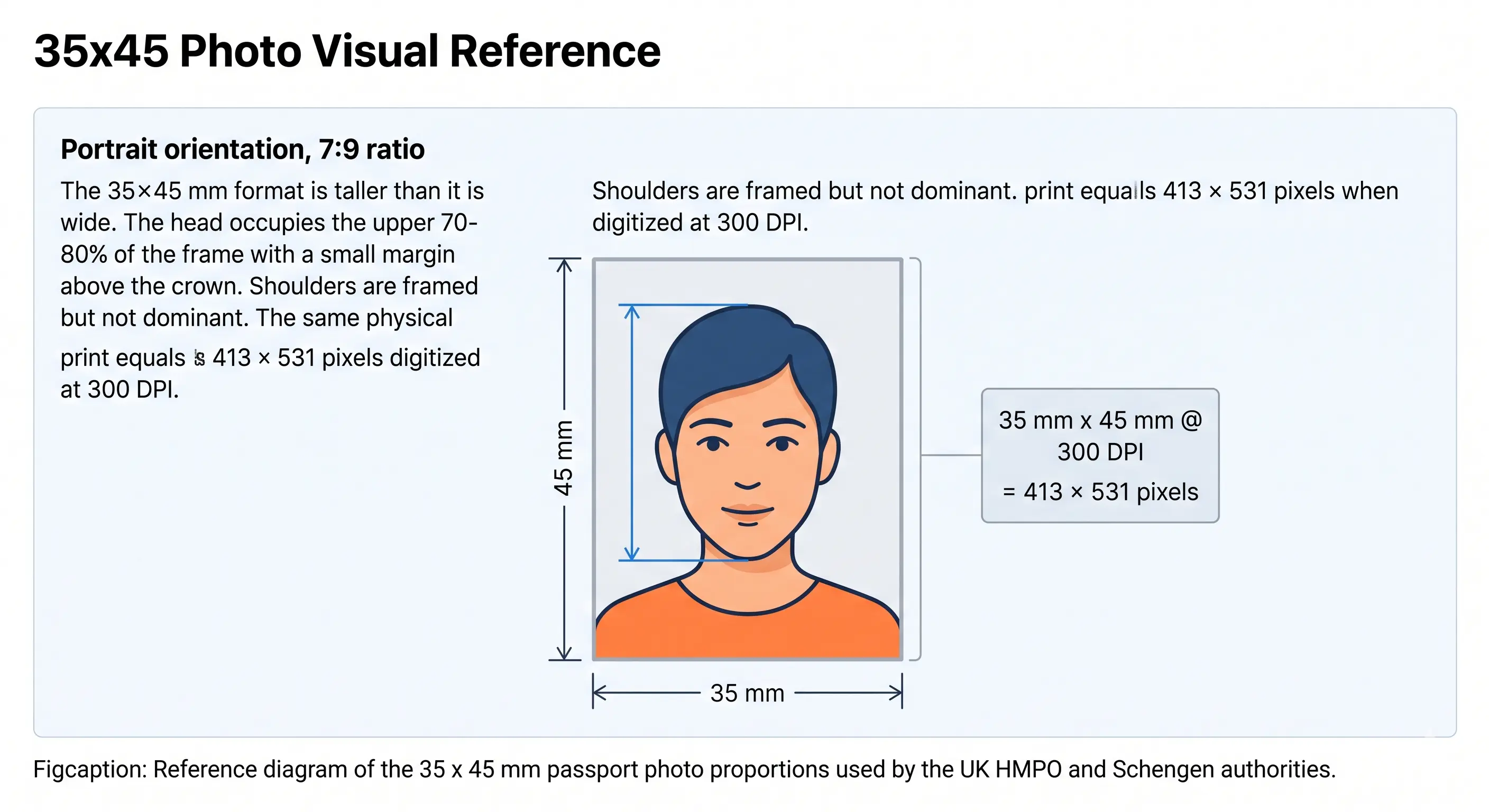
The diagram below shows the 35 × 45 mm frame used for South Korean consulate visas: a 7:9 portrait rectangle with the head occupying the upper 70–80% of the height and a small margin above the crown. Remember that K-ETA does not use this shape — it takes a square file.
Does the photo spec change by visa type?
Yes — and this is the detail most guides skip. The face framing, expression, and background rules are the same across all five visa types below. What actually changes is the file format and submission channel, and for K-ETA, the physical shape of the file itself (square digital vs. rectangular print).
| Visa Type | Size / Format | Submission |
|---|---|---|
| Tourist (C-3) | 35 × 45mm · 413 × 531 px | Print at consulate/VFS, digital copy sometimes requested for online pre-forms |
| K-ETA | Square 1:1, commonly cited up to 700 × 700px, under ~100KB | Digital only — uploaded directly to k-eta.go.kr |
| Business | 35 × 45mm · 413 × 531 px | Print for consulate/VFS submission |
| Student (D-2/D-4) | 35 × 45mm · 413 × 531 px | Print, often alongside in-person biometric enrollment |
| Work (E-series) | 35 × 45mm · 413 × 531 px | Print, frequently tied to a sponsor-led consulate appointment |
File-size limits on e-portals can change without notice. The figures above reflect what's currently published across K-ETA guidance as of this writing — confirm the live limit on k-eta.go.kr at the time you apply.
South Korea Visa Photo Requirements
These specifications apply to the consulate-issued visa types covered on this page — tourist, business, student, and work. K-ETA's digital-only spec is called out separately in the rows where it diverges. Each rule links to the detailed standard in our passport photo rules library.
| Requirement | Specification |
|---|---|
| Photo size | 35 × 45mm for tourist, business, student, work. K-ETA: square 1:1, commonly cited up to 700 × 700px digital. |
| Width | 35mm — 413 px at 300 DPI (consulate visas) |
| Height | 45mm — 531 px at 300 DPI (consulate visas) |
| Aspect ratio | 7 : 9 portrait for print · 1 : 1 square for K-ETA — the two are not interchangeable |
| Background | Plain white or light gray, no patterns or shadows. See background colour rules |
| Lighting | Even and diffuse, no shadow under the chin or on the wall. See shadow rules |
| Head size | Face height roughly 25–35mm, occupying about 70–80% of the frame. See head size rules |
| Face coverage | 70–80% of frame height. See face size requirements |
| Eyes | Both open, looking directly at the camera, unobstructed. See eyes requirements |
| Ears | Both ears should be visible. See ears visibility rules |
| Hair | Must not cover the eyes or obscure the face outline. See hair rules |
| Head coverings | Not permitted unless worn for religious reasons with the full face visible. See head covering rules |
| Resolution | 300 DPI is a safe target for a sharp 35 × 45mm print; K-ETA balances resolution against the file-size cap below. See resolution rules |
| File format | JPG or PNG for digital upload; JPG only for K-ETA. Standard photo paper for consulate prints |
| Colour | Full 24-bit colour, sRGB, natural skin tones. Black and white is not accepted |
| Glasses | Discouraged across all visa types covered here unless medically necessary; no glare or frame obstruction if worn. See glasses rules |
| Expression | Neutral, mouth closed, eyes open, looking directly at the camera. See smile rules |
| Digital editing | Not permitted — no filters, beautification, skin smoothing or retouching |
| Photo age | Taken within the last 6 months for every visa type on this page |
| Printed copies | At least 2 identical prints from the same session for a consulate appointment |
| Digital submission limits | K-ETA guidance commonly cites a square file under roughly 100KB in JPG/JPEG — some sources note portals tolerating up to 300KB. Confirm the live limit on k-eta.go.kr before you upload, since this is the figure most likely to shift without notice. |
| Varies by visa type? | Yes, in submission format only — see the comparison table above. Framing and background rules are shared across all five visa types. |
Need to hit a tight KB ceiling for K-ETA? The reduce file size guide and compression guide cover it without dropping below the pixel minimum.
Visa Authority Overview
Consulate visas — tourist, business, student, and work — are issued through South Korea's Ministry of Foreign Affairs (MOFA), typically processed at a Korean embassy or consulate in your home country, sometimes via an authorized visa application center. K-ETA sits slightly outside this — it's an electronic travel authorization, similar in spirit to the US ESTA, run through the K-ETA portal rather than a consulate, and is aimed at nationals from countries that already have visa-free or visa-waiver access. If you're unsure which track applies to you, check your eligibility on the K-ETA site or the Korea Visa Portal before assuming either path is the right one.
Visa Application Process Overview
Consulate visa applications generally involve completing an application form, gathering supporting documents specific to your visa type — for example, a sponsor letter for a work visa or an admission letter for a student visa — and submitting your photo either in person or attached to an online pre-application. K-ETA is shorter end to end: you fill in passport and travel details on the portal, upload your photo digitally, pay a small fee, and typically receive a result within 24 hours, though it's worth applying earlier than that in case of delays.
Differences Between Visa Types
The photo itself doesn't change across tourist, business, student, and work visas. What changes is the process around it. Student and work visas are more likely to involve an in-person appointment with biometric enrollment, where officers capture fingerprints at the visit and expect a fresh print on the form. Tourist and business applications are more often a straightforward document drop-off, and some consulates now accept a courier or agency submission where you never attend in person at all — in which case your print quality matters more, because nobody is there to swap it if it's refused.
Digital Visa Submission Rules
K-ETA's upload field is the strictest digital checkpoint covered on this page — it validates your photo automatically the moment you upload it, and a file that's the wrong pixel shape or over the size limit gets rejected instantly rather than flagged later by a reviewer. Stick to JPG or JPEG, keep the file square, and aim for the smaller end of the published size range rather than the largest tolerance you've seen cited, since limits do shift. Some consulate visa applications now also accept a digital copy of your photo attached to an online pre-form even though the final document submitted in person is a print — when in doubt, prepare both formats from the same photo.
If your phone saves images as HEIC, convert before uploading — K-ETA will not accept the format. The HEIC to JPEG guide covers conversion, and the digital photo requirements guide covers pixel, format and file-size rules across portals generally.
In-Person Submission Rules
For tourist, business, student, and work visas submitted at a consulate or VFS-style application center, bring a fresh, unaltered 35 × 45mm print on quality photo paper — avoid printing yourself on home inkjet paper, since matte or glossy photo stock holds detail better and is what staff expect to see. Some offices will scan or photocopy the photo onto your application rather than returning it, so bring more than one print if your appointment involves multiple forms.
Printing the 35 × 45mm Photo
Print settings matter as much as the crop. A 413 × 531 pixel file prints at exactly 35 × 45 mm when the print resolution is set to 300 DPI — if your printer software rescales the image or defaults to fit-to-page, the physical size changes and the photo is refused at the counter for being the wrong dimensions.
| Print resolution | 300 DPI — export at 413 × 531 pixels and disable fit-to-page scaling |
|---|---|
| Paper | Glossy or matte photo paper, 200–250 gsm. Plain copier paper is refused |
| Copies per 4 × 6 inch sheet | Six 35 × 45 mm photos with cutting margins |
| Copies per A4 sheet | Around twenty, though you only need two or three |
| Cutting | Guillotine or steel rule for square edges. Do not cut inside the printed border |
| Colour management | sRGB. Turn off printer auto-enhance, skin smoothing and colour correction |
| Handling | Let ink dry fully. Do not fold, staple through the face, or use glue on the image side |
Printer settings and cutting technique are covered in full in the print passport photo at home guide, and multi-copy sheet layout in the print sheet guide. K-ETA applicants can skip this section entirely — there is no print stage.
South Korea Visa Photos for Babies, Infants and Children
A child needs their own photo and, for K-ETA, their own separate application — a minor cannot be added to a parent's authorization. The 35 × 45 mm size, background and framing rules apply unchanged to minors, including newborns. There is no reduced format and no relaxed head-height band. The difficulty is meeting an adult framing standard with a subject who cannot sit up or hold a pose.
Same size, same framing
35 × 45 mm at 413 × 531 pixels, with the head filling 70–80% of the frame height. No age exemption applies to dimensions.
Child alone in the frame
No supporting hands, arms, car seat, toy or dummy may be visible, and no other person may appear. Support the child from behind a plain sheet.
Own K-ETA application
Every traveller including an infant needs a separate K-ETA authorization with their own square digital photo.
Eyes open where achievable
Both eyes open and looking towards the camera. See the eyes requirements.
No shadow behind the head
Lay the child on a plain light sheet in soft indirect daylight and shoot from directly above. See the shadow rules.
Crop from a wide source
Shoot wide and crop down. Cropping tightly in-camera on a small face leaves too few pixels once the 7:9 frame is applied.
Positioning, lighting and timing technique for infants and toddlers is covered in the baby passport photo at home guide.
Photographing a child? Upload the shot and let the tool apply the 35 × 45 mm crop.
Can I Take My South Korea Visa Photo at Home?
Yes, for any of the five visa types on this page — the equipment you need is a phone camera and a plain wall, not a studio.
Phone camera
Any modern smartphone camera has enough resolution. Skip the front-facing selfie camera if you can — a rear camera held by someone else, or propped on a stand with a timer, avoids the slight warping selfie lenses introduce. Switch off portrait mode, background blur and any beautification filter before shooting; these alter facial geometry and are explicitly disallowed.
Lighting
Face a window for soft, even daylight. Avoid overhead lighting that casts shadows under your eyes or chin, and avoid backlighting that puts your face in shadow while the background is bright.
Background
Stand at least 3–4 feet in front of a plain white or light-colored wall. A light bedsheet pinned up works if you don't have a bare wall available.
Distance from camera
Stand back enough that your head and shoulders fill the frame without your face being distorted by a too-close lens — roughly arm's length plus a step back is a reasonable starting point.
Cropping
Crop to 7:9 for a consulate print or 1:1 for K-ETA. The crop guide explains how the aspect ratio and head-height band are applied together, and the cropping guide walks through the mechanics.
Printing requirements
If you're applying for tourist, business, student, or work visas, print at 35 × 45mm on photo-quality paper — most pharmacies and photo kiosks can do this from a digital file. See the printing section above for the full settings.
Digital upload requirements
If you're applying for K-ETA, skip printing entirely and export a square JPG or JPEG file, keeping it under the file-size limit published on k-eta.go.kr at the time you apply.
Common mistakes
The two we see most: photographing too close so the head size exceeds 80% of the frame, and uploading a rectangular passport-style photo to K-ETA's square field without converting it first.
South Korea Visa Photo vs. South Korea Passport Photo
Here's the honest answer: for South Korean nationals' own passports, and for the consulate visa types covered on this page, the core dimensions are the same — 35 × 45mm, white or light background, neutral expression. Where it diverges is K-ETA, which isn't comparable to a passport photo at all since it's a digital-only square format.
Consulate Visa Photo
- 35 × 45mm at 413 × 531 px, same as a Korean passport photo
- Face height 25–35mm
- White or light gray background
- Submitted as a print at consulate/VFS, sometimes paired with a digital copy
- Enforcement can be stricter — e-portals and VFS centers may auto-screen before a human reviews your file
K-ETA Digital Photo
- Square 1:1 format, commonly cited up to 700 × 700px — not 35 × 45mm
- No print version needed or accepted
- White or light background, same framing logic
- Uploaded directly to the K-ETA portal
- Automated validation on upload — wrong file shape or size is rejected instantly
If you only need one photo type, a consulate tourist or business visa photo and a South Korean passport photo share the same spec — you genuinely don't need to take two separate photos for those. K-ETA is the one that needs its own digital export.
How South Korea Compares to Nearby Countries
Most of East Asia uses 35 × 45 mm, which means one correctly framed photo often covers several destinations on the same trip. China is the notable exception, and getting the two confused is a common cause of refusal.
| Country | Size | Pixels @ 300 DPI | Background |
|---|---|---|---|
| South Korea (consulate visa) | 35 × 45 mm | 413 × 531 px | White or light grey |
| Japan visa | 35 × 45 mm | 413 × 531 px | Plain white |
| Taiwan visa | 35 × 45 mm | 413 × 531 px | Plain white |
| Singapore visa | 35 × 45 mm | 413 × 531 px | Plain white |
| China visa | 33 × 48 mm | 390 × 567 px | Plain white |
| Hong Kong visa | 40 × 50 mm | 472 × 591 px | Plain white |
A 35 × 45 mm photo prepared for South Korea will not pass a Chinese visa application, which requires 33 × 48 mm on a strictly white background. Browse every national standard in the requirements by country hub, or compare all formats in the passport photo dimensions reference.
How to Create a South Korea Visa Photo
- 1Upload a recent photo of yourself — a phone photo against any background works.
- 2Select your visa type — tourist, K-ETA, business, student, or work — so the tool applies the right template, rectangular print or square digital.
- 3Crop and remove the background automatically, replacing it with the plain white or light background your visa type expects.
- 4Verify against the requirements shown on screen — head size, framing, and file size are checked before you download.
- 5Download a print-ready 413 × 531 pixel file for consulate submission, a compressed square file for K-ETA, or both from the same upload.
Common Rejection Reasons
Each cause below links to the detailed rule so you can confirm the exact tolerance before submitting. The full cross-country breakdown is in passport photo rejection reasons.
- Wrong shape for the visa type — a rectangular 7:9 print submitted where K-ETA's square 1:1 digital format is expected. See the crop guide
- Background isn't plain white or light gray — shadows, patterns, or furniture visible behind you. See background colour rules
- Head too large or too small for the 70–80% framing guideline. See head size rules
- Glasses glare or frames obscuring the eyes. See glasses rules
- Hair covering the eyes or obscuring the face outline. See hair rules
- Ears not visible where hair could have been tied back. See ears visibility rules
- Non-religious headwear, or a religious covering that shadows the face. See head covering rules
- Photo older than 6 months, or visibly doesn't match your current appearance
- Poor lighting — shadows under the chin or eyes, or harsh overhead light. See shadow rules
- Visible digital editing, filters, or retouching, which several recent guidance sources flag as explicitly disallowed
- Printed on plain paper rather than photo stock, so the print looks flat or ink-streaked at the counter
- K-ETA file rejected on upload for exceeding the pixel or file-size limit — this happens instantly, before any human reviews it
Visa Processing Tips
Apply earlier than the minimum stated window — K-ETA is often approved within 24 hours, but giving yourself a buffer protects you if a resubmission is needed. For consulate visas, bring at least two prints of your photo to your appointment in case more than one form needs one attached. And keep your original high-resolution photo file on hand — if you need to re-export for a different visa type later, you won't need to start from scratch with a brand-new photo session.
Frequently Asked Questions
Size & Format
What size does a South Korea visa photo need to be?
For consulate-issued visas (tourist, business, student, work), the standard is 35 × 45mm with the face measuring roughly 25–35mm from chin to crown. K-ETA uses a different digital spec — commonly cited as a square file up to 700 × 700px under around 100KB. Confirm the exact current figure on the portal you're submitting to.
What is the South Korea visa photo size in pixels?
A 35 × 45mm consulate visa photo equals 413 × 531 pixels at 300 DPI, or 826 × 1062 pixels at 600 DPI, with a 7:9 portrait ratio. K-ETA is different: it expects a square 1:1 file, commonly cited up to 700 × 700 pixels. The two files are not interchangeable because the aspect ratio differs.
Is the South Korea visa photo the same for a K-ETA application as it is for a tourist visa?
No — this is the most common point of confusion on this page. Tourist, business, student, and work visas expect a printable 35 × 45mm photo. K-ETA is processed entirely online and expects a square digital file. Submitting a print-format file to K-ETA's upload field without converting it can cause an instant rejection.
Do I need a printed photo or a digital file for my South Korea visa?
It depends on the application channel. Consulate and VFS visits typically want a physical 35 × 45mm print. K-ETA and most e-portals want a digital upload only. Some consulates now ask for both a print at the counter and a digital copy on an online pre-form — check your specific consulate's instructions rather than assuming.
Appearance & Compliance
Can I wear glasses in my South Korea visa photo?
It's safest to remove them. Recent guidance leans toward discouraging glasses entirely unless medically required. If you keep them on, there can be no glare and no frame obstructing your eyes.
What background is required for a South Korea visa photo?
Plain white or light grey with no patterns, gradients, objects or shadows. Shadow falling on the wall behind the head is one of the most common causes of refusal, so stand at least three to four feet clear of the background and use even, diffuse light. See the background colour rules.
How old can my visa photo be?
Taken within the last 6 months, reflecting your current appearance — this applies across all five visa types on this page.
Why was my South Korea visa photo rejected even though it looked fine to me?
Usually a head-size issue (outside the 70–80% range), a non-plain background, glasses glare, or — for K-ETA — a file with the wrong pixel shape or size for the upload field.
Children & Visa Types
What are the South Korea visa photo rules for a baby or child?
The same 35 × 45mm size, background and framing apply to minors, and a child travelling under K-ETA needs their own application and their own photo. The child must be alone in the frame with no supporting hands, car seat, toy or dummy visible, and no other person may appear. Eyes should be open and looking towards the camera where achievable. See the child and infant rules section.
Does a student or work visa photo need to look different from a tourist visa photo?
The framing, background, and expression rules are identical. What differs is the process around it — student and work visas more often involve in-person biometric enrollment alongside the photo submission.
Printing & Submission
How many printed photos should I bring to a consulate appointment?
Bring at least two identical prints. Some offices scan or affix the photo to your application rather than returning it, and long-stay applications such as student and work visas can involve more than one form requiring a photo. Both prints must be from the same session and identical.
How do I print a 35 × 45mm South Korea visa photo?
Print at 300 DPI from a 413 × 531 pixel file onto glossy or matte photo paper, never plain copier paper. A standard 4 × 6 inch sheet holds six 35 × 45 mm copies with cutting margins. Cut with a guillotine for square edges and do not trim inside the printed border. See the print at home guide.
Will a compliant photo guarantee my visa is approved?
No. A correctly sized, correctly composed photo removes one possible reason for rejection, but the consulate or K-ETA system makes the final call based on your whole application.
Official Sources & References
- K-ETA — Korea Electronic Travel Authorization portal: k-eta.go.kr
- Korea Visa Portal, Ministry of Foreign Affairs: visa.go.kr
- Ministry of Foreign Affairs, Republic of Korea: mofa.go.kr
- Korea Immigration Service — HiKorea: hikorea.go.kr
- ICAO Doc 9303 — Machine Readable Travel Documents biometric photograph standard: icao.int
Related Pages
Create Your South Korea Visa Photo Now
Whether you're headed to a consulate appointment with a tourist, business, student, or work application, or uploading straight to the K-ETA portal, get the right format — rectangular 413 × 531 pixel print or square digital — from one photo.