
France Visa Photo Maker — Schengen, Business, Student & Work Visas
If you're applying for a French visa — whether a short-stay Schengen tourist or business visa, a long-stay student visa through Campus France, or a work permit — your application photo needs to measure 35×45mm with your face covering 70–80% of the frame. French consulates, TLScontact centres, and VFS Global offices process these applications, and each applies ICAO biometric photo standards when reviewing your file. Visa photo enforcement can be stricter than what you'd encounter renewing a passport at home, because a rejected visa photo doesn't just mean a reprint — it can delay your entire application timeline and cost you a rebooking fee.
Compliance note: Visa photo requirements are set by the issuing consulate or visa centre and can change without notice. Passport Photo Maker helps produce a photo that meets published specifications, but final approval rests solely with the authority reviewing your application. Always verify against your specific consulate's checklist before submitting.
France Visa Photo Size & Requirements
A France visa photo must be 35 mm wide by 45 mm tall (413 × 531 pixels at 300 DPI) on a plain light background, with your face filling 70–80% of the frame height, taken within the last 6 months. Digital uploads to the France-Visas portal are commonly capped at 120 KB.
| Photo size | 35 × 45 mm (3.5 × 4.5 cm) |
|---|---|
| Pixels @ 300 DPI | 413 × 531 px |
| Aspect ratio | 7 : 9 portrait |
| Face coverage | 70–80% of frame height (chin to crown ≈ 31–36 mm) |
| Background | Plain light — white, off-white or light grey all accepted for visas |
| Digital file size | Under 120 KB for France-Visas; some TLScontact systems allow up to 2 MB |
| Printed copies | One or two identical prints at the appointment — check your confirmation |
| Photo age | Within the last 6 months (some centres specify 3) |
| Processing authority | French consulate via TLScontact or VFS Global |
France does not vary photo specifications by visa category. One compliant photo covers every application type below — you do not need a different photo for each.
- Tourist / Schengen Same specs
- Business Same specs
- Student (Long-Stay) Same specs
- Work Permit Same specs
If you're applying for a type not listed here (transit, family reunification, etc.), the same ICAO photo standard is expected — but confirm with your specific consulate, as rare exceptions are possible.
What Happens When You Upload
Instead of manually measuring and cropping your photo in an editor, the tool handles the technical compliance steps for you — tuned specifically for French visa requirements.
Schengen Visa Photo Standard Applied to France
A French visa is a Schengen visa, so the photo standard is the shared Schengen biometric specification. The reference below marks the 35 × 45 mm frame, the plain light background requirement, and the 70–80% face coverage zone that TLScontact and VFS Global measure against.
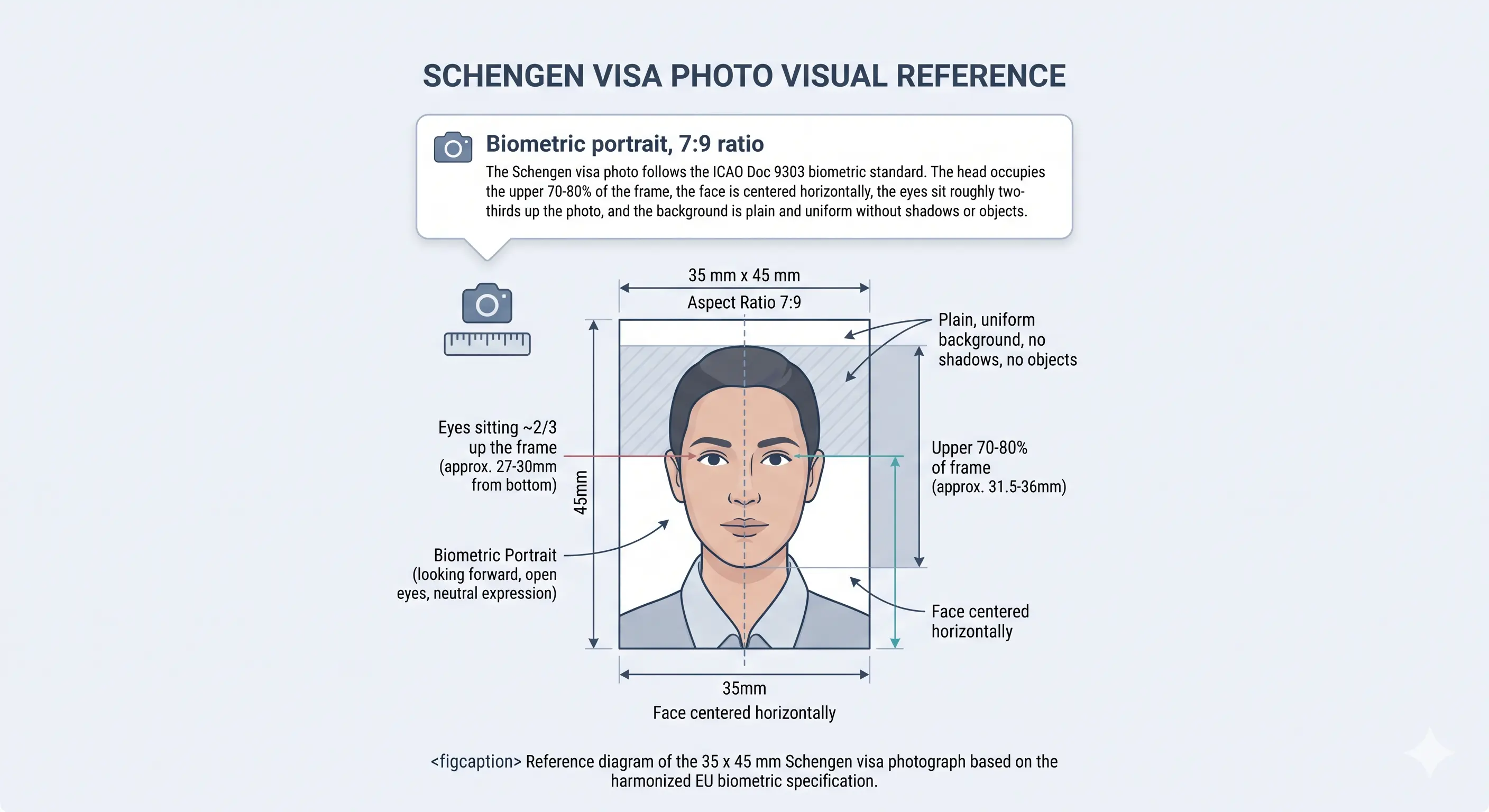
France Visa Photo Requirements
These specifications apply to all France visa categories — Schengen short-stay, business, student, and work visas — as published by French consulates and the France-Visas portal. Each rule links to the detailed standard in the passport photo rules library. Requirements as of the review date above; always confirm directly before filing.
| Photo size | 35 × 45 mm (3.5 × 4.5 cm) |
|---|---|
| Width | 35 mm (413 px @ 300 DPI) |
| Height | 45 mm (531 px @ 300 DPI) |
| Aspect ratio | 7 : 9 portrait — a square or 2:3 crop is refused |
| Background | Plain, light-coloured — white, off-white, or light grey are accepted. Must be uniform with no patterns or shadows. See background colour rules |
| Lighting | Even and diffuse, no shadow on the face or the wall behind the head. See shadow rules |
| Head size | Face should occupy 70–80% of the frame height (chin to crown roughly 31–36 mm). See head size rules |
| Face coverage | 70–80% of frame height. See face size requirements |
| Eye line | Roughly the upper third of the frame, both eyes open and clearly visible. See eyes requirements |
| Hair | Must not cover the eyes or obscure the outline of the face. See hair rules |
| Ears | Not mandatory for Schengen visas, but the face outline must be unobstructed. See ears visibility rules |
| Head coverings | Only for religious or medical reasons, with the full face visible from chin to forehead. See head covering rules |
| Resolution | 300 DPI minimum (≈413 × 531 px); 600 DPI recommended for print. See resolution rules |
| File format | JPEG or PNG for digital uploads; high-quality print on photo paper for in-person submission. HEIC and TIFF are refused |
| Colour | Full 24-bit colour, sRGB, natural skin tones. No filters, portrait blur or beautification |
| Digital file size | Under 120 KB for the France-Visas portal (some TLScontact systems accept up to 2 MB — check your specific upload interface) |
| Printed copies | One or two identical prints at the appointment, listed on your confirmation |
| Glasses | Permitted only with thin, untinted frames and zero glare — removing glasses is strongly recommended. See glasses rules |
| Expression | Neutral, mouth closed, eyes open and clearly visible, head straight facing the camera. See smile rules |
| Photo age | Taken within the last 6 months (some centres specify 3 months — check your appointment checklist) |
| Same across visa types? | Yes — identical specifications for tourist, business, student, and work visas |
Where Your Photo Fits in the France Visa Application
Understanding where photos are checked in the application flow helps you avoid surprises. Here's the typical sequence for a France visa filed through TLScontact or VFS Global:
-
Online application on France-Visas
You fill out the application form on france-visas.gouv.fr and may be asked to upload a digital photo. The portal runs basic checks on file format and dimensions — an oversized file or wrong aspect ratio gets rejected immediately.
-
Appointment booking at TLScontact or VFS
Once your online form is complete, you book an in-person appointment at the relevant visa centre. The appointment confirmation usually includes a document checklist specifying the number of printed photos required (typically one or two).
-
In-person submission and biometric capture
At the centre, your printed photos are reviewed against ICAO standards. Fingerprints and a fresh digital scan are captured. If your photo doesn't pass — wrong background, head outside the acceptable range, visible shadows — the centre may refuse to process the file until you provide a replacement.
-
Consular review
Your file is forwarded to the French consulate for the actual visa decision. The photo is part of the biometric record attached to your visa sticker.
Digital Visa Photo Submission: Portal Requirements
If the France-Visas portal asks you to upload a photo during the online application step, the digital file needs to meet stricter technical constraints than a printed photo. The portal's upload field typically enforces:
- File format: JPEG or PNG. Other formats (HEIC, TIFF, BMP) are usually rejected. If your phone saves HEIC, see the HEIC to JPEG guide.
- File size: Under 120 KB is the common limit on the France-Visas portal. TLScontact's own appointment systems sometimes accept up to 2 MB, but this varies by country.
- Aspect ratio: The system checks for approximately 35:45 proportions. A photo cropped to a square or 2:3 US-style ratio will be flagged. The crop guide explains how the 7:9 ratio and head-height band are applied together.
- Resolution: High enough to resolve facial features clearly at biometric inspection — 300 DPI minimum at the 35×45mm output size (approximately 413 × 531 pixels). See passport photo size in pixels.
Common trip-up: phone cameras produce files that are several megabytes in size. If you upload a raw phone photo to the France-Visas portal without resizing, it will likely exceed the file size limit. Passport Photo Maker exports at the correct resolution and compresses the file to meet typical portal limits.
If you need to hit the 120 KB ceiling manually, the reduce file size guide covers the mechanics, and the digital passport photo requirements guide compares upload rules across portals.
Even if you successfully upload a digital photo, most visa centres still require one or two printed copies at the appointment. Both the digital and printed versions must meet the same 35×45mm specification.
France Visa Photo vs. France Passport Photo
Since both documents use the same 35×45mm format, people often assume they're interchangeable. The dimensions are identical, but there are practical differences in how the photo is produced and submitted.
| Specification | France Visa Photo | France Passport Photo |
|---|---|---|
| Dimensions | 35 × 45 mm | 35 × 45 mm |
| Head size | 70–80% of frame | 32–36 mm chin-to-crown (same proportion, measured differently in official guidance) |
| Background | White, off-white, or light grey — all accepted | Light grey or light blue-grey only — pure white is explicitly forbidden |
| Capture method | Any quality source (studio, self-taken, online tool) — no approved-booth requirement for visa filings | Must come from an approved photographer or Ministère de l'Intérieur-certified booth (domestic filings) |
| Submission format | Digital upload to France-Visas portal + printed copies at TLScontact/VFS appointment | ePhoto code through ANTS or physical print at mairie/préfecture |
| File size limits | Often under 120 KB for the France-Visas portal | ePhoto handled server-side; no direct user upload to ANTS |
The bottom line: if you already have a compliant French passport photo with a light grey background, it will almost certainly work for your visa application too. Going the other direction is less reliable — a visa photo with a pure white background may be rejected for a domestic passport filing.
Other Schengen states apply the same 35 × 45 mm standard with minor background variations. Compare Germany, Italy, Spain and the shared EU biometric standard, or browse every country in the requirements by country hub.
Child Visa Photo Requirements for France
Children of any age — including infants — need their own visa photo meeting the same 35×45mm specification. There is no reduced size or relaxed head-height band for minors. The child must appear alone in the frame: no parent's hands, toys, pacifiers, or car seats visible. Eyes should be open and looking toward the camera.
For babies who can't sit upright, lay them on a plain white or light grey sheet and photograph from directly above. The background needs to be completely uniform, with no creases or shadows from the sheet visible in the final crop — the most common cause of a refused infant photo. See the shadow rules.
A strictly neutral expression is difficult to guarantee with young children. Most visa centres will accept a relaxed, natural look as long as the mouth is closed and the eyes are open and visible. If the child is too young to follow instructions, the photo still needs to show a clear, unobstructed view of their face — see the eyes requirements.
Shoot wide and crop down rather than framing tightly in-camera: cropping close on a small face leaves too few pixels once the 35 × 45 mm frame is applied. Full positioning and lighting technique for infants and toddlers is covered in the baby passport photo at home guide.
Can I Take My France Visa Photo at Home?
Unlike domestic French passport photos — which must be captured by an approved photographer or certified booth — visa applications processed through TLScontact or VFS Global don't generally impose a capture-method restriction. A home photo can work, provided you get the technical details right.
Camera
Any smartphone with a rear camera of 8 MP or higher works. Avoid front-facing selfie cameras — rear cameras produce sharper results with less lens distortion.
Lighting
Face a large window during daylight hours. Avoid direct sunlight, overhead-only lights, or side lighting — all create shadows that will get your photo flagged.
Background
Stand in front of a plain white or light grey wall, at least 50 cm clear of it. No patterns, no furniture edges, no visible texture. Alternatively, the tool's background removal handles this automatically.
Distance
Stand roughly 1–1.5 metres from the camera. Too close causes facial distortion; too far means low resolution after cropping to 35×45mm.
Camera settings
Switch off portrait mode, background blur and skin smoothing. These alter facial geometry and are detected during biometric review.
For digital upload
Export as JPEG, compress to under 120 KB, and make sure the pixel dimensions match the 35:45 aspect ratio. The tool handles this automatically.
Common home-photo mistakes: using a flash (creates hot spots and red eye), wearing white clothing against a white background (your outline disappears), or having someone else partially visible in the frame. Any of these will trigger a rejection at the visa centre.
How to Create a France Visa Photo
-
Upload your source photo
Take a front-facing photo under even lighting — or use any existing photo where your face is clearly visible and unobstructed. Drop it into the upload widget on this page or open Passport Photo Maker directly.
-
Select France Visa as the document type
If you uploaded through this page, the France visa template is pre-selected. If you opened the tool directly, choose "France" from the country list and "Visa" as the document type. The correct 35×45mm template loads automatically.
-
Crop and background correction
The tool detects your face, scales it to the 70–80% coverage zone, and replaces your background with a uniform light tone. Review the preview — your head should be centred, eyes at roughly the upper third of the frame, with no visible shadows.
-
Verify against the requirements
Compare your cropped photo against the requirements table above. Check head position, expression, background uniformity, and make sure no hair or accessories are obscuring your eyes or face outline.
-
Download for print and digital submission
Export a digital file for the France-Visas portal upload (compressed, correct aspect ratio) and a print-ready sheet for the physical copies you'll bring to your TLScontact or VFS appointment. Both versions are generated from the same compliant crop.
Printing Your France Visa Photo
You will almost certainly need physical prints as well as the digital upload, because TLScontact and VFS Global centres attach printed photos to the paper file at the appointment. Print quality is assessed alongside the crop, so a correct photo on the wrong paper is still refused.
| Print resolution | 300 DPI minimum, 600 DPI preferred — export at 413 × 531 px or 826 × 1062 px |
|---|---|
| Paper | Matte or glossy photo paper, 200–250 gsm. Standard copy paper bleeds and is refused |
| Copies per 4 × 6 in sheet | Six 35 × 45 mm photos with cutting margins |
| Copies per A4 sheet | Around twenty, though you only need one or two |
| Scaling | Disable fit-to-page and auto-scaling — both change the physical size off 35 × 45 mm |
| Colour management | sRGB. Turn off printer auto-enhance, skin smoothing and colour correction |
| Cutting | Guillotine or steel rule for square edges. Do not cut inside the printed border |
| Handling | Let ink dry fully. Do not staple, fold or glue the photo face. Bring prints flat, not folded in a wallet |
Printer settings, paper choice and cutting technique are covered in full in the print passport photo at home guide, and multi-copy sheet layout in the print sheet guide.
Common Reasons France Visa Photos Get Rejected
Visa centres tend to enforce photo standards more rigorously than many applicants expect — particularly TLScontact and VFS Global, which use standardised checklists. These are the rejections that come up most frequently. The full cross-country breakdown is in passport photo rejection reasons.
- Wrong dimensions: the photo isn't cropped to 35×45mm, or the aspect ratio is off — a 2×2 inch US-style crop is a common mistake for applicants who've previously applied for American visas. See the crop guide.
- Face too small or too large: the head occupies less than 70% or more than 80% of the frame height, usually from cropping too loose or too tight. See head size rules.
- Background not plain enough: visible furniture edges, textured walls, or uneven colour gradients behind the head. See background colour rules.
- Shadows on face or background: side lighting from a single lamp or window creates shadows that read as non-uniform to the reviewer. See shadow rules.
- Glasses glare: reflections on lenses under any lighting condition — even subtle glare is flagged at most TLScontact centres. See glasses rules.
- Hair across the face: a fringe over the eyes or hair obscuring the face outline fails landmark detection. See hair rules.
- Non-religious headwear: hats and decorative head coverings are refused; religious coverings must leave the full face visible. See head covering rules.
- Photo older than 6 months: a technically perfect photo gets rejected once it falls outside the freshness window. Some centres enforce a 3-month limit.
- Expression issues: smiling, open mouth, or partially closed eyes. Neutral expression with mouth closed is mandatory. See smile rules.
- Digital file too large for the portal: uploading a raw multi-megabyte phone photo to the France-Visas system, which commonly caps uploads at 120 KB. See the reduce file size guide.
- Wrong file format: HEIC files from iPhones aren't accepted — you need JPEG or PNG for digital submission. See the HEIC to JPEG guide.
- Filters or retouching: portrait blur, skin smoothing and slimming effects alter facial geometry and are detected during biometric review.
- Poor print quality: printing on regular office paper instead of photo-quality paper, or using a low-resolution file that produces a blurry print. See the print at home guide.
France Visa Photo Questions
Size & Specification
What size photo do I need for a France visa application?
35mm wide by 45mm tall — the standard ICAO biometric format used across all Schengen visa applications. Your face should cover 70–80% of the frame height, which is roughly 31–36 mm from chin to crown. This applies to tourist, business, student, and work visas equally.
What is a France visa photo in pixels?
At 300 DPI a 35 × 45 mm photo is 413 × 531 pixels, which is the resolution the France-Visas portal expects. At 600 DPI it is 826 × 1062 pixels, which is better for the printed copies you bring to your appointment. Below 300 DPI the file is refused for insufficient resolution. See passport photo size in pixels.
Can I use a white background for my France visa photo?
Yes, for visa applications. French consulates and visa centres (TLScontact, VFS Global) accept white, off-white, or light grey backgrounds for visa photos. This is different from domestic French passport photos, which forbid pure white and require light grey specifically. If you want a photo that works for both, light grey is the safest choice.
How recent must my France visa photo be?
Within the last 6 months, according to the France-Visas portal. Some TLScontact centres specify 3 months on their appointment checklists — check the confirmation email from your specific centre.
Submission & Copies
How many photos do I need for a France visa application?
Most TLScontact and VFS Global centres ask for one or two identical printed photos at the appointment, and the France-Visas portal may separately ask for a digital upload during the online form. Your appointment confirmation lists the exact number for your centre, so bring two to be safe.
Do I need separate photos for the online application and the in-person appointment?
Potentially, yes. The France-Visas portal may ask you to upload a digital photo during the online form. At the TLScontact or VFS appointment, you typically need to bring one or two printed copies as well. Both must meet the same 35×45mm specification, but the digital version has additional file-size constraints (usually under 120 KB).
Are France visa photo requirements the same across all visa types?
Yes. Tourist (Schengen short-stay), business, student (long-stay), and work visa applications all require the same photo specifications: 35×45mm, light background, neutral expression, 70–80% face coverage. The application process and required documents differ by visa type, but the photo itself does not.
What if the France-Visas portal rejects my photo upload?
The portal usually rejects uploads for file-size (over 120 KB), wrong format (not JPEG or PNG), or incorrect aspect ratio. Resize and compress the file, then re-upload. If the rejection message is vague, try a JPEG under 100 KB at exactly 413 × 531 pixels — this hits the 35:45 ratio at 300 DPI precisely.
Taking, Children & Printing
Can I take my France visa photo with my phone at home?
For visa applications (not domestic passport filings), there's no approved-booth requirement. A phone photo works if it meets the technical specs: sharp focus, even lighting, plain background, correct aspect ratio, and high enough resolution to crop to 35×45mm at 300 DPI. Use the rear camera, face a window for natural light, and stand about 1–1.5 metres from the lens.
What are the France visa photo rules for a baby or child?
Children of any age including infants need their own 35 × 45 mm photo meeting the same specification. The child must be alone in the frame with no parent's hands, toys, pacifiers or car seats visible. Eyes should be open and looking toward the camera. For babies who cannot sit upright, lay them on a plain light sheet and photograph from directly above with no creases or shadows in the crop. See the child requirements section.
Will my visa photo be rejected if I wear glasses?
Glasses are technically allowed only if the frames don't obscure your eyes and there is zero glare on the lenses. In practice glare is nearly impossible to avoid in standard lighting, and many TLScontact and VFS Global centres flag glare as non-compliant. The safest approach is to remove your glasses entirely for the photo. Tinted lenses are never accepted.
How do I print a 35x45 mm France visa photo?
Print at 300 DPI or higher on matte or glossy photo paper of 200 to 250 gsm. A 4 × 6 inch sheet holds six 35 × 45 mm copies and an A4 sheet holds around twenty. Disable printer auto-enhance and fit-to-page scaling, cut with a guillotine for square edges, and let the ink dry before handling. See the printing section.
Will my France visa photo work for a French passport application later?
It depends on two things: the background colour and how the photo was captured. If your visa photo has a light grey background and was taken by a professional, it may be reusable for a passport filing — provided it's still within the 6-month freshness window. If it has a pure white background or was self-taken, a domestic French passport office will likely reject it.
Sources & References
The specifications on this page are compiled from official government publications and the international biometric travel document standard. Where a French national requirement differs from the general Schengen guidance, the French requirement is applied.
- France-Visas — official French visa portal: france-visas.gouv.fr
- Ministry for Europe and Foreign Affairs — consular services: diplomatie.gouv.fr
- European Commission — Schengen borders and visa policy: home-affairs.ec.europa.eu
- TLScontact — French visa application centres (intake operator in most countries)
- VFS Global — French visa application centres (intake operator in selected regions)
- ICAO Doc 9303 — Machine Readable Travel Documents biometric photograph standard: icao.int
Related Visa & Passport Photo Guides
Create Your France Visa Photo Now
Get a 35×45mm photo compliant with French consulate standards in under a minute — print-ready for your TLScontact appointment and sized for the France-Visas portal upload.