
Netherlands Visa Photo Size (35 x 45 mm) & Requirements
Planning to apply for a Netherlands visa? Whether you are a foreign national visiting Amsterdam on a Schengen tourist or business trip, coming to study, or relocating long term on an MVV, your application turns on one small, unforgiving detail: the photo. Dutch consulates and VFS Global expect a 35 × 45 mm colour photo that follows the Netherlands' own photo standard, which is famously precise about head size and background. Most refusals trace back to a head sized wrong, a shadowed backdrop, or an out-of-date shot. Getting it right matters more than for a passport renewal: a flagged visa photo can stall travel, force a rebooked appointment, and delay an approval you cannot easily reschedule.
Worth knowing up front: a country's visa photo rules can be enforced more strictly, or simply differently, than its passport photo rules — and the Netherlands is a country where the head-size and background expectations catch people out.
- Authority Compliant
- Correct Dimensions
- Automatic Background Removal
- Print & Digital Ready
Netherlands visa photo requirements (quick answer)
A Netherlands visa photo must be 35 × 45 mm in colour, on a plain light grey or off-white background, with the head measuring 26–30 mm from chin to crown under the Dutch photo matrix (ages 11+), taken within the last 6 months, with a neutral expression and no glasses.
| Requirement | Value |
|---|---|
| Photo size | 35 × 45 mm (3.5 × 4.5 cm) |
| Aspect ratio | 7 : 9 portrait |
| Pixels at 300 DPI | 413 × 531 px |
| Head height (chin to crown) | 26–30 mm, ages 11+ (Dutch photo matrix) |
| Background | Plain light grey or off-white, evenly lit, no shadows |
| Expression | Neutral, mouth closed, both eyes open |
| Glasses | Best removed; medical exception only, no glare |
| Age of photo | Within the last 6 months |
| Who supplies it | Short-stay Schengen: you do. MVV long-stay: usually taken at your appointment |
The 35 × 45 mm format is shared across the Schengen area — see the 35x45 photo size reference for full unit conversions, or the Schengen visa photo guide for the area-wide standard.
Before you submit anything
Visa photo requirements vary by visa type, are set by the issuing authority or consulate, and can change without notice. Always check the official Dutch visa portal (NetherlandsWorldwide), the IND, or your VFS Global page before applying. Passport Photo Maker helps you produce a compliant image but cannot guarantee visa approval — the final decision rests solely with the issuing authority.
Visual reference: frame, dimensions and background
The Netherlands issues Schengen short-stay visas, so the visa photo frame follows the Schengen 35 × 45 mm template shown below. What sets the Dutch standard apart is the smaller head within that frame and the specific light grey backdrop.
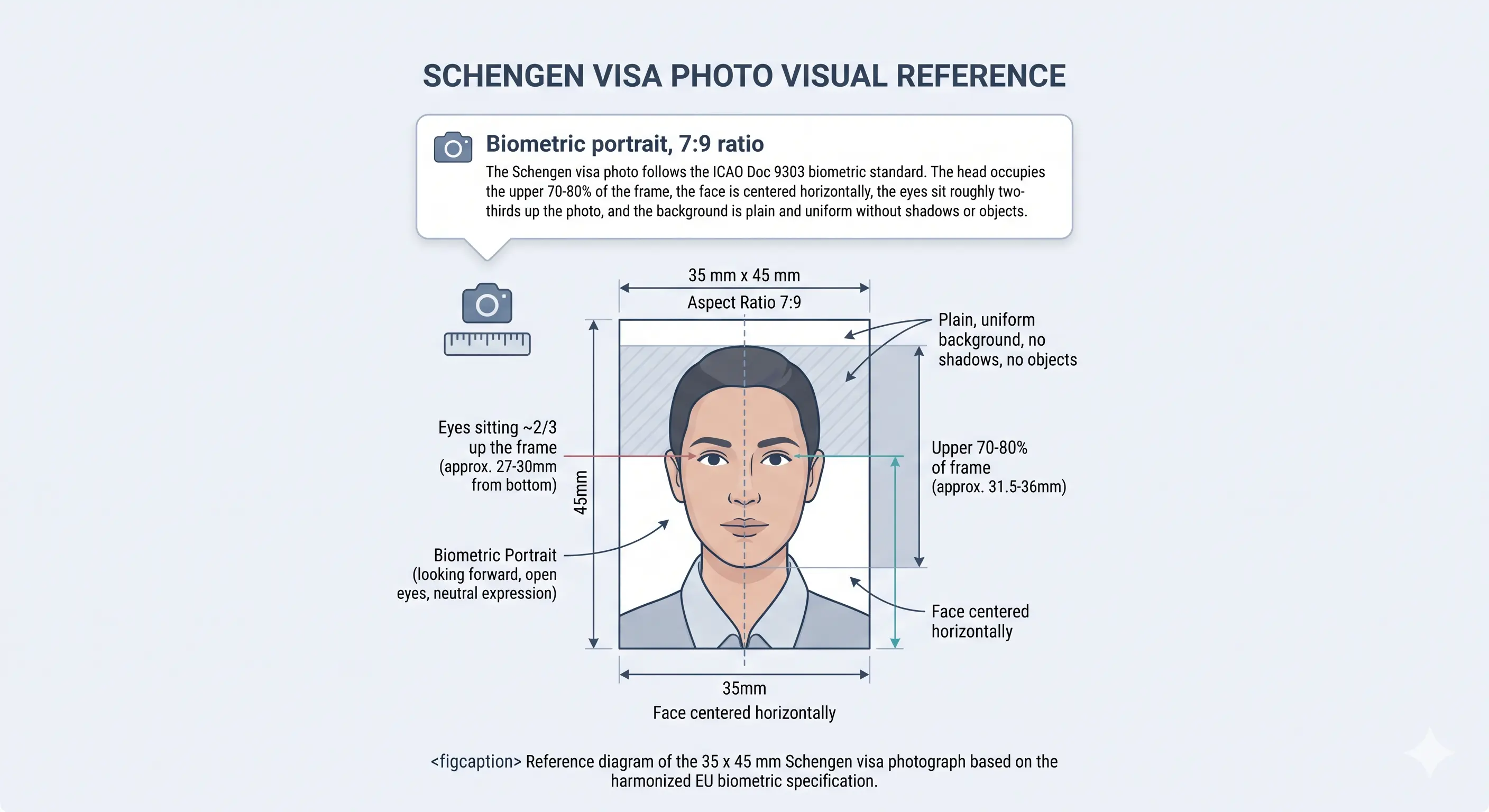
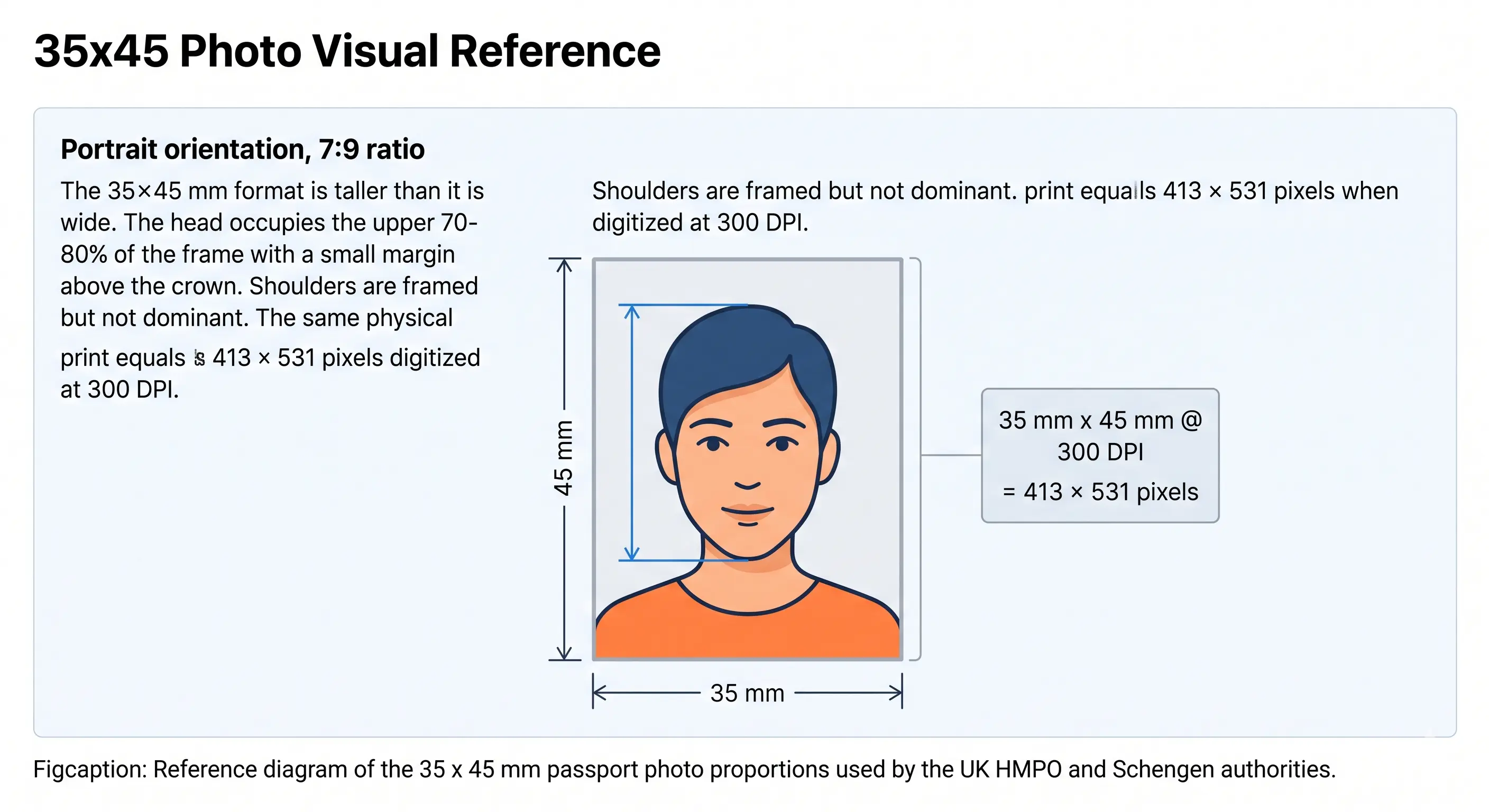
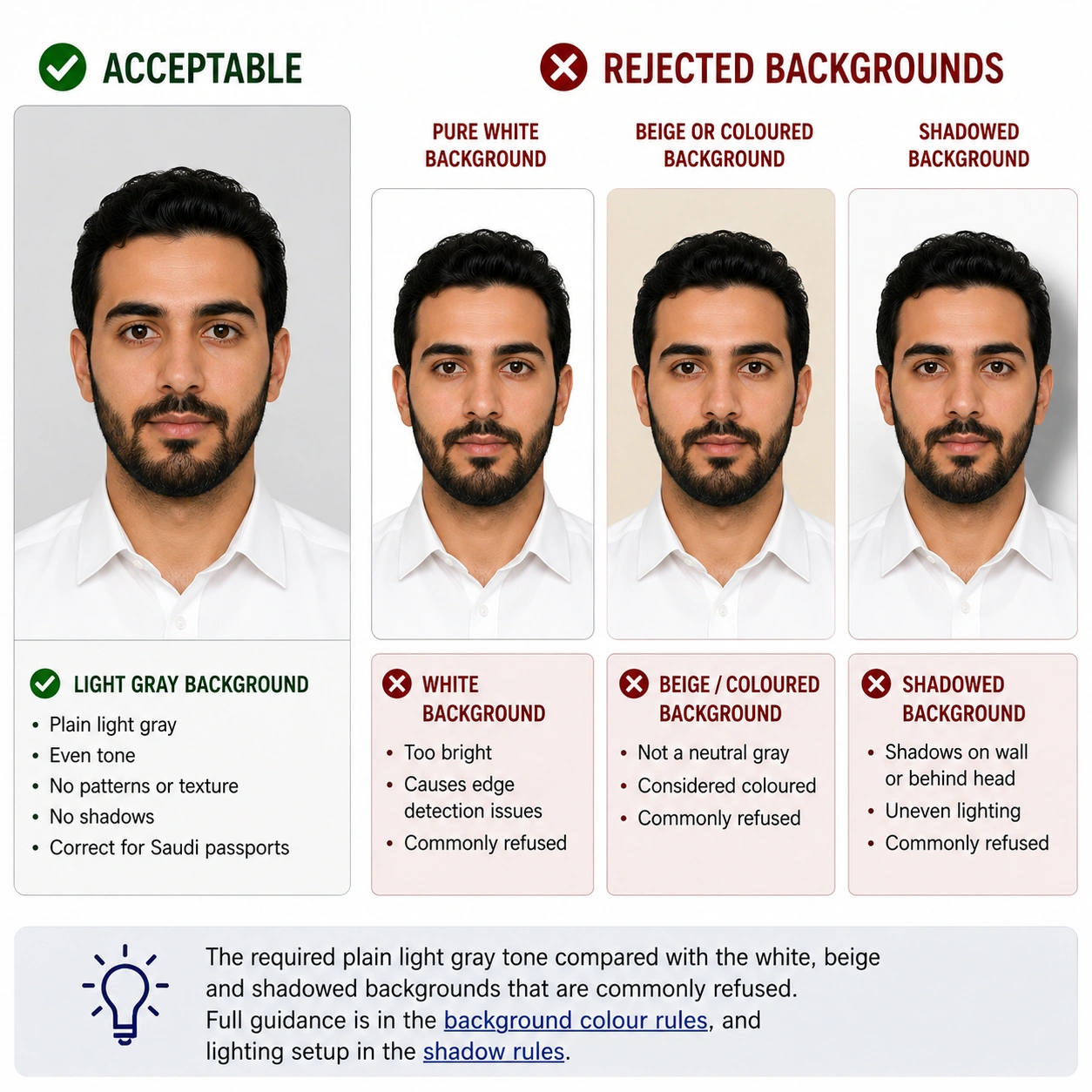
Does every Netherlands visa need the same photo?
No — and this is where the Netherlands differs from a simple "one spec fits all" page. The size (35 × 45 mm) is constant, but how the photo is supplied changes with the visa category. Short-stay Schengen applicants hand in their own photo; long-stay MVV applicants usually have it captured for them at the appointment.
| Visa type | Do you supply the photo? | What differs |
|---|---|---|
| Tourist (Schengen, ≤90 days) | Yes — bring/submit a 35 × 45 mm photo | Follows the Dutch/Schengen photo standard; a digital copy may be needed for online booking |
| Business (Schengen, ≤90 days) | Yes — same as tourist | Identical photo spec to the tourist visa |
| Student (short course ≤90 days) | Yes — submit a Schengen-standard photo | Treated as short-stay; longer studies move to MVV below |
| MVV / long-stay (study, work, family >90 days) | Often no — photo taken at the appointment | Biometric photo usually captured digitally by the embassy, consulate or IND; some posts still ask you to bring one |
Honest caveat: biometric-capture practice is not identical at every Dutch post or VFS centre, and we could not confirm a single universal rule for all of them. Treat the table as a guide and verify with the exact location handling your application.
Why upload here instead of editing it yourself?
Trimming a photo to exactly 35 × 45 mm with a Dutch-correct head height is fiddly by hand. The tool does the measuring for you:
- Automatic cropThe frame is cut to 35 × 45 mm so the ratio is never off.
- Biometric framingYour head is positioned and sized within the frame automatically.
- Clean backgroundThe backdrop is replaced with an even, shadow-free light tone.
- Print and digital outputGet a print-ready sheet and a portal-ready file together.
- No PhotoshopNo design skills, plug-ins, or manual pixel-pushing needed.
- Verify before you printCompare the preview against the specification on this page.
Netherlands visa photo requirements at a glance
The specification below reflects the Dutch national photo standard (the "photo matrix" set out in the Netherlands' photo specification guidelines) combined with common Schengen short-stay practice. Where sources disagree, that is flagged in the row rather than smoothed over. Each rule links to the detailed standard in our passport photo rules library.
| Requirement | Specification |
|---|---|
| Photo size | 35 × 45 mm (3.5 × 4.5 cm) — standard Schengen and Dutch document size. See 35x45 photo size. |
| Width | 35 mm (413 px at 300 DPI) |
| Height | 45 mm (531 px at 300 DPI) |
| Background | Plain, even, light grey / off-white, no shadows, patterns or objects (Dutch national standard). Generic Schengen guidance also accepts plain white or very light backgrounds. See background colour rules. |
| Lighting | Even and diffuse, no shadow on the face or behind the head. See shadow rules and lighting requirements. |
| Head size (chin to crown) | 26–30 mm for ages 11+ under the Dutch photo matrix. Note: this is smaller than the generic Schengen framing (~32–36 mm). Sources differ on which is enforced for short-stay visa photos, so treat the Dutch figure as the safer target and confirm with your post. See head size rules. |
| Head position | Centred, facing the camera squarely, head upright (not tilted or turned). See face position rules. |
| Face coverage | Framed so the head and upper shoulders fill the frame without crowding the crown. See face size requirements. |
| Eyes | Both open, unobstructed, looking straight at the lens. See eyes requirements. |
| Hair | Must not cover the eyes or obscure the outline of the face. See hair rules. |
| Ears | Not explicitly mandatory in the Dutch standard, but the face outline must be clear. See ears visibility rules. |
| Resolution | Sharp and in focus; roughly 600 × 800 px minimum for digital, and about 827 × 1063 px at 600 DPI for a printed 35 × 45 mm photo. See resolution rules. |
| File format | JPEG is the most widely accepted for digital submission; PNG/WebP are fine for editing. Printed copies on quality photo paper. |
| Glasses | Best removed. If worn for medical reasons: no glare or reflection, both eyes fully visible, no tinted lenses, frames must not cover the eyes. See glasses rules. |
| Expression | Neutral, mouth closed, both eyes open, looking straight at the lens. See smile rules. |
| Head covering | Not permitted except for religious or medical reasons; the face must stay fully visible from chin to crown. See head covering rules. |
| Photo age | Taken within the last 6 months and a true current likeness |
| Digital submission | Typically JPEG at high resolution. Exact file-size and format limits depend on the appointment or e-application portal and were not independently verified here — check your portal's stated limits before uploading. General guidance: digital photo requirements. |
| Varies by visa type? | Yes. Short-stay (tourist/business/short study): you submit a photo. MVV long-stay/residence: usually captured at your biometrics appointment. See the comparison near the top of the page. |
Who sets the rules: the Dutch visa authorities
A Netherlands visa application can pass through several official bodies, and each one touches the photo at a different stage:
- Dutch embassies and consulates — issue Schengen short-stay visas and the MVV sticker, and at many posts capture biometrics directly.
- VFS Global — the external service provider running Visa Application Centres in many countries, where short-stay applications and documents are submitted.
- IND (Immigration and Naturalisation Service) — decides on residence permits behind an MVV and takes biometrics at its desks inside the Netherlands.
- NetherlandsWorldwide — the Dutch government's official information service for applying from abroad, and the most reliable place to confirm current photo guidance.
Because more than one body can be involved, the safest habit is to read the photo instructions on the exact page for your country and visa type rather than assuming a single national rule. Direct links to each authority are in the official sources section below.
How a Netherlands visa application fits the photo in
For a short-stay Schengen visa, the usual flow is: complete the application form, gather supporting documents (travel insurance, itinerary, proof of funds), attach your 35 × 45 mm photo, and book an appointment at a VFS Global centre or consulate to submit and, where required, give fingerprints. The photo is checked at submission, so a non-compliant one can mean a wasted appointment slot.
For an MVV long-stay, the sponsor or applicant first applies to the IND for the residence permit. After a positive decision, you book an appointment to collect the MVV sticker, and your biometric photo is typically taken there. That is why MVV applicants often do not need to bring a printed photo — though, as noted, this is not universal.
The Dutch photo standard, and why it trips people up
The Netherlands publishes a detailed national photo standard, often called the photo matrix, that is used for passports, ID cards and Dutch travel documents. Two points in it surprise applicants used to other countries:
- A smaller head. The Dutch matrix puts the head at 26–30 mm chin to crown for ages 11+. Photos cropped for, say, a US or Indian application look too close-up by comparison and can be rejected for an oversized head.
- A specific light backdrop. A neutral light grey works reliably; pure bright white is sometimes accepted but a busy, coloured or shadowed background is not.
For Dutch travel documents this standard is applied strictly. For a short-stay Schengen visa, enforcement can be a little more flexible toward the generic Schengen template, but because we cannot guarantee how any individual officer or centre will judge it, the conservative move is to meet the stricter Dutch numbers.
Neighbouring Schengen states share the 35 × 45 mm size but not always the same head band — compare Belgium, Germany, France and Luxembourg if you are applying to more than one.
Where the visa types genuinely diverge
The disambiguation table up top shows the headline difference; here is the detail that matters in practice:
- Short-stay (tourist, business, short study): you are responsible for providing a compliant 35 × 45 mm photo. Bring a printed copy, and keep a digital version for any online appointment booking.
- MVV long-stay (work, study over 90 days, family reunification): the photo is generally taken for you at the biometrics appointment, alongside fingerprints and a signature, so it ends up on your residence document. A few posts still request a physical photo — check yours.
The practical risk is using a short-stay, self-supplied photo workflow when your case is actually a long-stay one (or vice versa). Confirm your category before you print anything.
Child and infant visa photo requirements
Children need their own visa photo at the same 35 × 45 mm size, with a few age-appropriate allowances:
- For young children the head-size range is more lenient than the adult 26–30 mm, because a baby cannot be posed precisely.
- No other person, hand, toy or dummy may be visible in the frame, and the background must still be plain and even.
- Eyes should be open and the face unobstructed; for newborns, a neutral expression and closed mouth are encouraged but judged sympathetically.
- Lay infants on a plain light sheet and photograph from directly above to keep the background uniform.
For an MVV/residence case, a child's biometric photo is usually captured at the appointment in the same way as an adult's. For step-by-step technique with a baby or toddler, see our baby passport photo at home guide.
Biometric data and MVV appointments
Long-stay applicants give biometric data — a digital facial photo, fingerprints and a signature — which is then used to produce the residence document. At many embassies and consulates, and at IND desks inside the Netherlands, this photo is taken on site, so you do not supply your own.
Short-stay Schengen applicants may also give fingerprints (reused for up to five years), but the facial photo for a short-stay visa is normally the one you bring. If you are unsure whether your photo will be taken for you, assume you may need a compliant 35 × 45 mm photo and prepare one; an unused photo costs little, whereas a missing one can derail an appointment.
Submitting online versus in person
Digital / online submission
Where an online appointment system or e-application is used, you will usually upload a JPEG at high resolution. File-size ceilings and exact pixel requirements are set by that specific portal and tend to be stricter and less forgiving than a human reviewer at a counter. We have not independently verified a fixed kilobyte limit for every Dutch system, so read the on-screen upload rules and keep the original high-resolution file in case you must re-export.
If your export is too heavy for a portal, our reduce file size and compress to 240 KB guides cover how to hit a target without dropping below the resolution minimum. iPhone users shooting in HEIC should convert first with the HEIC to JPEG guide.
In-person submission (VFS / consulate / embassy)
At a VFS Global centre or consulate you typically hand over a printed 35 × 45 mm photo with your documents. Some centres can take or print a compliant photo for a fee if yours is rejected, but relying on that adds cost and time. Bring a photo that already meets the Dutch standard so the counter check is a formality.
Printing a 35 × 45 mm Netherlands visa photo
If you are submitting in person, printing is part of the specification rather than an afterthought. A photo even a millimetre off size can be questioned at the counter, and scaling a page "to fit" on a home printer is the most common way that happens.
| Print resolution | 300 DPI minimum — disable fit-to-page and any auto-scaling |
|---|---|
| Paper | Photo-quality paper, matte or gloss. Plain copier paper is not accepted |
| Copies per 4 × 6 inch sheet | Six 35 × 45 mm photos with cutting margins |
| Copies per A4 sheet | Around twenty, though most applications need only one or two |
| Cutting | Guillotine or steel rule for square edges. Do not cut inside the printed border |
| Colour | sRGB. Turn off printer auto-enhance, skin smoothing and colour correction |
| Handling | Let ink dry fully. Do not staple, fold or glue the photo face |
Printer settings and cutting technique are covered in full in the print passport photo at home guide, and multi-copy sheet layout in the print sheet guide.
Reapplying or renewing: do not reuse the old photo
Whether you were refused and are reapplying, or are simply applying again after a previous trip, use a fresh photo. Reusing a shot from a past application is a common, avoidable error: it may now fall outside the six-month window, may no longer match your appearance, and some systems flag duplicate images. A new, compliant photo removes a needless reason for a second refusal.
Common reasons a Netherlands visa photo is rejected
Most rejections are mundane and preventable. Watch for these — each links to the detailed rule so you can check the tolerance before you submit:
- Head too large — cropped to another country's bigger framing instead of the Dutch 26–30 mm. See head size rules.
- Wrong background — coloured, textured, or with a visible shadow behind the head. See background colour rules.
- Head too small or off-centre — too much space around the face, or the head tilted/turned. See face position rules.
- Glasses glare or frames covering the eyes. See glasses rules.
- Non-neutral expression — smiling broadly, mouth open, or eyes partly closed. See smile rules.
- Out-of-date photo older than six months or no longer matching you.
- Poor lighting — uneven exposure, red-eye, or harsh shadows on one side of the face. See lighting requirements.
- Over-editing — beauty filters, heavy retouching, or skin smoothing that alters your likeness.
- Wrong template for the visa type — using a generic passport-style crop for a case that needs a different setup. See the crop guide.
- Digital file rejected by an e-portal for being the wrong format or over the file-size limit.
The full cross-country breakdown of refusal causes is in passport photo rejection reasons.
Practical tips to keep your application moving
- Prepare the photo early — not the night before a hard-to-get appointment.
- Generate both a print sheet and a digital file so you are ready for either submission route.
- Save the high-resolution original in case a portal asks for a different size or format.
- Cross-check your final image against the requirements table above before you print.
- If anything about your visa type's photo handling is unclear, email or check your specific consulate/VFS page first.
Netherlands visa photo vs. Netherlands passport photo
A fair question for any country page is whether the visa photo really differs from the passport photo. For the Netherlands the honest answer is: in raw specification, far less than you might expect.
| Aspect | Netherlands visa photo | Dutch passport photo |
|---|---|---|
| Dimensions | 35 × 45 mm | 35 × 45 mm |
| Head size | 26–30 mm under the Dutch matrix (short-stay may be judged against the wider Schengen range) | 26–30 mm, applied strictly |
| Background | Plain light grey / light, no shadows | Plain light grey / light, no shadows |
| Submission format | Short-stay: photo you submit at VFS/consulate. MVV: usually taken at the appointment | Submitted to the municipality or embassy when applying for the document |
| Who applies | Foreign nationals seeking entry to the Netherlands | Dutch nationals applying for a travel document |
Straight answer: if you follow the strict Dutch national photo matrix, the visa and passport photos are essentially identical in size, head height and background. The meaningful differences are not the pixels but who submits the photo, where, and whether the image is captured for you at an appointment. We are not inventing a size difference where none reliably exists.
If you are a Dutch national rather than a visa applicant, use the Netherlands passport photo guide instead. For the shared European standard, see EU passport photo requirements.
Can I take my Netherlands visa photo at home?
Yes, a phone photo can work if you are careful, then let the tool handle cropping and the background. Set it up like this:
- Camera: use the rear camera (higher quality than the selfie lens) at eye level, held by someone else or propped on a stand.
- Distance: stand about 1.5–2 metres from the camera so the face is not distorted, and fill the frame with head and upper shoulders. See camera distance rules.
- Lighting: face a window or use soft, even light from the front. Avoid overhead light that casts shadows under the eyes and nose.
- Background: stand an arm's length in front of a plain light wall so no shadow falls behind you; a light grey backdrop is ideal for Dutch requirements.
- Expression: neutral face, mouth closed, eyes open, looking straight at the lens.
- Switch off beautification: disable portrait blur and skin smoothing, which alter facial geometry. See the selfie guide.
- Printing: if your application accepts a printed photo, use photo paper and a true 35 × 45 mm output — do not scale a home-printer page by eye.
- Digital upload: export a high-resolution JPEG and check it against the portal's size and format limits before uploading.
Common home mistakes: shooting too close (big-head distortion), a shadow on the wall, warm indoor lighting that tints skin, and tilting the head. Upload the raw shot here and the crop, framing and background are fixed automatically.
How to create a Netherlands visa photo with the Passport Photo Maker
Using the Passport Photo Maker takes well under a minute and removes the guesswork from sizing and background:
- Step 1 — UploadDrop in any clear, front-facing photo (JPEG, PNG or WebP) using the upload box above.
- Step 2 — Auto-crop to 35 × 45 mmThe tool cuts the frame to the Schengen 35 × 45 mm ratio and centres your face within it.
- Step 3 — BackgroundThe backdrop is replaced with an even, shadow-free light tone suitable for a Dutch application.
- Step 4 — Verify against requirementsCompare the preview with the requirements table — head size, expression, lighting and background. Adjust the crop if the head looks larger than the Dutch 26–30 mm band.
- Step 5 — DownloadExport a print-ready sheet and a digital file so you are covered for both in-person and online submission.
Netherlands visa photo FAQ
Size & specification
What size is a Netherlands visa photo?
What head size does a Netherlands visa photo need?
What background colour should I use?
How recent does my visa photo need to be?
Appearance & compliance
Can I wear glasses in the photo?
Why is the Dutch head size smaller than for other countries?
Are the Netherlands visa photo and Dutch passport photo the same?
Visa type & submission
Do a short-stay visa and an MVV long-stay need the same photo?
Does VFS Global take my photo or do I bring my own?
Do I need a printed photo or a digital file?
How do I print a 35 × 45 mm photo at home?
Official sources & references
The specification on this page is compiled from Dutch government guidance, the Netherlands' national photo standard and the Schengen/ICAO biometric framework. Where a figure could not be confirmed for a specific visa type or portal, that is stated in the relevant row rather than presented as certain.
- NetherlandsWorldwide — official Dutch government service for applying from abroad: netherlandsworldwide.nl
- IND (Immigration and Naturalisation Service) — residence permits and MVV: ind.nl/en
- RvIG (Rijksdienst voor Identiteitsgegevens) — publisher of the Dutch photo standard / photo matrix: rvig.nl
- VFS Global — Visa Application Centres handling short-stay submissions: vfsglobal.com
- European Commission — Schengen borders and visa policy: home-affairs.ec.europa.eu
- ICAO Doc 9303 — Machine Readable Travel Documents biometric photograph standard: icao.int
Related photo guides
Create your Netherlands visa photo now
Heading to a Dutch consulate or VFS Global appointment? Don't let a mis-sized head or a shadowy background cost you the slot. Upload your photo and the Netherlands visa photo maker will crop it to 35 × 45 mm, centre your face in the frame, clean up the background, and hand you both a print sheet and a portal-ready file — ready for a tourist, business, student or MVV application.
Compliance reminder: Dutch visa photo rules vary by visa type, are set by the consulate or issuing authority, and can change without notice. Verify the current specification on the official portal before you submit. This tool produces a compliant photo but does not guarantee visa approval — the decision rests solely with the issuing authority. Where a specific visa-type requirement could not be independently confirmed, we have said so rather than presenting it as certain.