
Turkey Visa Photo Size (50 x 60 mm) — Requirements & Free Maker
A Turkish sticker visa photo must be 50 mm wide by 60 mm high (5 × 6 cm) on a plain white background, with the head measuring 32–36 mm from chin to crown and taken within the last 6 months.
Turkey is unusual in one important respect: the electronic visa normally does not ask for a photo at all. The e-Visa system works from the scan of your passport biometric data page. A 50 × 60 mm print is what you need for a physical sticker visa — work, student, long-stay, and tourist categories not covered by the e-Visa — submitted at a Turkish consulate or an authorised visa application centre.
That distinction matters, because visa photo rules are enforced more strictly than domestic passport renewals. A slight shadow, an incorrect head proportion, or a US-standard 2 × 2 inch print instead of the Turkish 50 × 60 mm format can mean a rescheduled appointment.
Turkey Visa Photo Size (Quick Answer)
The Turkey visa photo size is 50 × 60 mm (5 × 6 cm, or 1.97 × 2.36 in) on a plain white background, head 32–36 mm chin to crown, neutral expression, taken within 6 months. At 300 DPI that is 591 × 709 pixels. The Turkey e-Visa normally requires no separate photo.
| Requirement | Value |
|---|---|
| Printed photo size | 50 × 60 mm (5 × 6 cm) |
| Aspect ratio | 5 : 6 portrait |
| Pixels at 300 DPI (derived) | 591 × 709 px |
| Pixels at 600 DPI (derived) | 1181 × 1417 px |
| Background | Plain white, no shadow or texture |
| Head height (chin to crown) | 32 – 36 mm |
| Head as share of frame (derived) | Approx. 53 – 60% of the 60 mm height |
| Expression | Neutral, mouth closed, eyes open |
| Age of photo | Within the last 6 months |
| Prints usually required | Two identical copies |
| Needed for the e-Visa? | Normally no separate photo |
Create Your Turkey Visa Photo
Upload one photo and get a compliant 50 × 60 mm biometric image in seconds.
- Crops to the 50 × 60 mm frame at a true 5:6 ratio
- Positions the head inside the 32–36 mm range
- Replaces the background with plain white
- Exports a print sheet holding four copies, ready to cut
JPG, PNG or WEBP • up to 15 MB • your image opens directly inside the Passport Photo Maker.
Automatic biometric framing
No manual measuring. Face detection positions the head inside the 32–36 mm chin-to-crown band and centres it in the 5:6 frame.
Plain white background
Off-white, cream and textured walls are routinely refused. The background is detected and replaced with an even white field.
Print and digital output
A 4 × 6 inch sheet with four 50 × 60 mm copies for a photo shop or home printer, plus a single digital file if a portal asks for one.
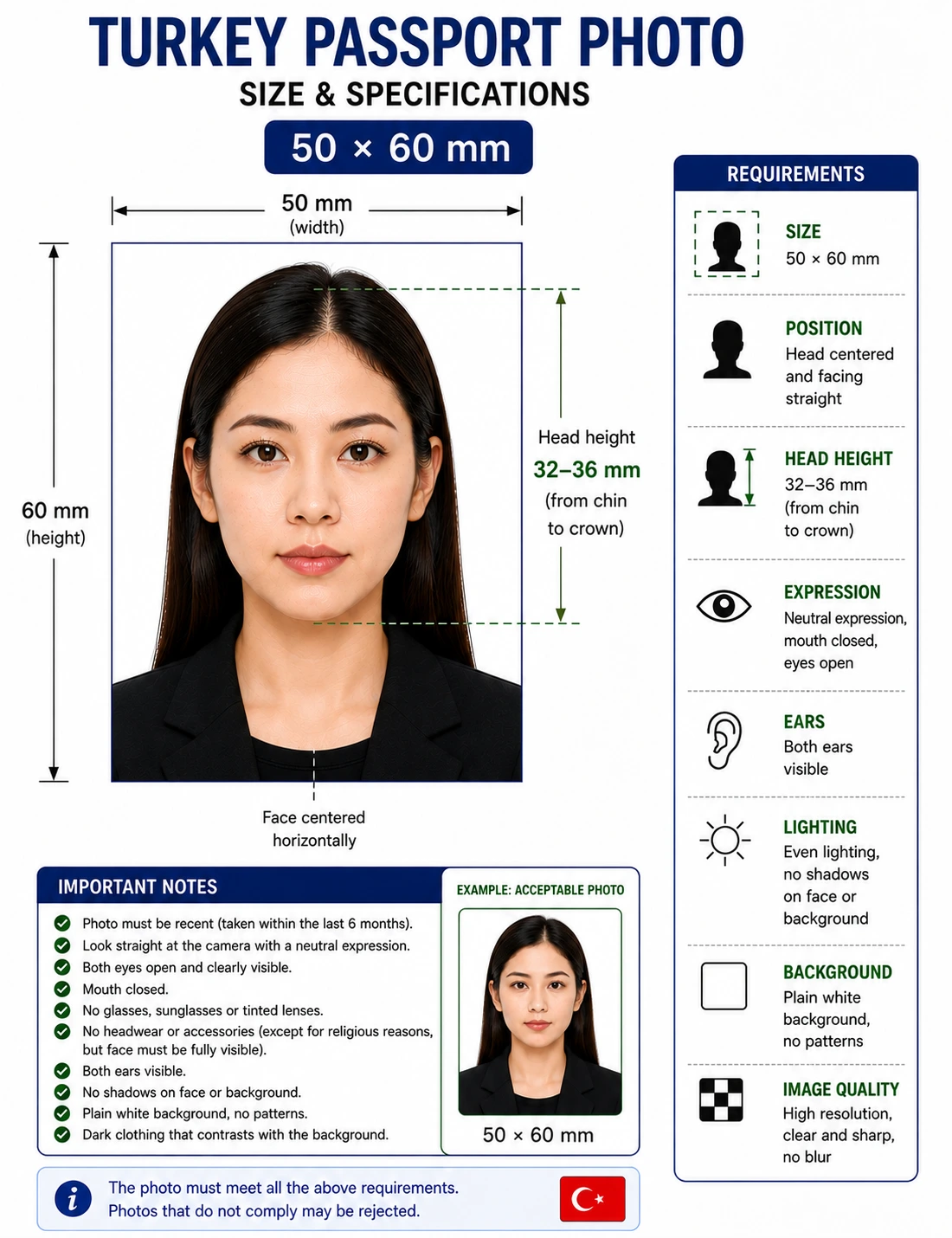
Turkey Visa Photo Visual Reference
The diagram marks every measurement checked at the counter: the 50 × 60 mm frame, the 32–36 mm head height, and the plain white field behind the head.

Full Turkey Visa Photo Requirements
Every row below has to pass for the photo to be accepted at a consulate or visa application centre. Each rule links to the detailed standard in our passport photo rules library.
| Printed photo size | 50 mm × 60 mm (5 × 6 cm / 1.97 × 2.36 in) |
|---|---|
| Aspect ratio | 5 : 6 portrait |
| Background | Plain white, no shadows, patterns, gradients or objects — see background colour rules |
| Lighting | Even and diffuse, no shadow on the face or the wall — see lighting requirements and shadow rules |
| Head height (chin to crown) | 32 – 36 mm — see head size rules |
| Head share of frame | Approx. 53 – 60% of the 60 mm height (derived from the 32–36 mm range) — see face size requirements |
| Eyes | Both open, looking straight at the lens, unobstructed — see eyes requirements |
| Expression | Neutral, mouth completely closed — see expression rules and smile rules |
| Hair | Must not cover the eyes or blur the outline of the face — see hair rules |
| Ears | Tuck hair back so the side of the face reads clearly — see ears visibility rules |
| Glasses | Best removed. Clear lenses only if there is zero glare and frames do not cross the eyes. Tinted lenses prohibited — see glasses rules |
| Head coverings | Permitted for religious reasons provided the full face stays visible and unshadowed — see head covering rules |
| Makeup | Keep it minimal; heavy contouring can interfere with facial landmark detection — see makeup rules |
| Print resolution | 300 DPI minimum; some visa centres ask for 600 DPI — see resolution rules |
| File format | JPEG (.jpg), full colour, sRGB — for digital uploads where one is requested |
| Paper | Glossy or matte photo paper, free of creases and ink smudges. Plain copier paper is refused |
| Prints required | Usually two identical copies for an in-person application |
| Photo age | Taken within the last 6 months and matching your current appearance |
| Varies by visa type? | Yes — see e-Visa vs sticker visa below |
Turkey Visa Photo Dimensions & Pixels
The 50 × 60 mm format is uncommon internationally, which is why photos prepared for another country rarely transfer. The pixel figures below are straightforward conversions of the printed size, not separately published portal limits.
For conversions across every national standard see passport photo size in pixels and passport size photo dimensions. If your source image needs reframing first, the crop guide explains how a fixed ratio and a head-height band are applied together.
Turkey e-Visa vs Sticker Visa: Which Photo Do You Actually Need?
The format you submit depends entirely on whether you are applying for a physical sticker visa at a consulate or visa application centre, or an electronic visa online. Getting this wrong is the most common wasted effort on Turkish applications — people buy prints they never needed, or turn up to an appointment with none.
| Application route | Photo format | What actually happens |
|---|---|---|
| Consular / sticker visa Work, student, business, long-stay |
Physical print | Requires 50 × 60 mm biometric prints, usually two, handed over in person at a consulate or authorised visa application centre. |
| Turkey e-Visa Tourist and transit, eligible nationalities |
Normally none | The portal works from the scan of your passport biometric data page. A standalone photo upload is rarely requested. If a nationality-specific rule does prompt you, standard digital biometric dimensions apply. |
Unsure which applies? Default to the 50 × 60 mm biometric standard. It is accepted for every physical Turkish visa application, and having prints you did not need costs far less than an appointment you cannot complete.
Applying for a sticker visa? Generate the 50 × 60 mm print sheet before your appointment, or read the digital photo requirements guide if a portal asks for a file.
Visa Authority & Processing Centres
The Republic of Turkey Ministry of Foreign Affairs sets the national biometric standard for travel documents. Physical visa applications, however, are usually not lodged directly at an embassy. Depending on your country of residence they are handled by an authorised intermediary such as Gateway Management or VFS Global on the consulate's behalf.
Those intermediaries perform the first screening. If the print is not 50 × 60 mm, or the background is not cleanly white, the desk agent can refuse the file before it ever reaches consular staff. That is why the format matters more than applicants expect: the person checking it is following a checklist, not exercising judgement.
In-Person Submission Rules
- Quantity: usually two identical prints. Confirm the number for your visa category before the appointment, since it varies by country of residence.
- Quality: printed on photographic paper, no ink smudges, no creases, edges cut square.
- Attachment: do not staple or tape the photo to the form unless the desk agent asks you to. Puncturing or taping over the face can interfere with biometric readability.
- Consistency: both prints must come from the same photo session. Mixing two different sittings is refused.
Biometric Data Capture at the Appointment
Your photograph is one half of the biometric record. For most sticker visas you will also give fingerprint scans at the visa application centre, and staff may capture a live facial image on site.
Because that live capture is cross-referenced against your printed 50 × 60 mm photo, the submitted photo needs unobstructed visibility of every facial feature: hair tucked back, no heavy makeup, no hat unless worn for religious reasons, and nothing casting a shadow across the face. A print that a human would accept can still fail an automated comparison.
Turkey Visa Photo Compared to Other Formats
Turkey's 50 × 60 mm is one of the larger visa formats in use. If you hold photos prepared for another destination, this table shows why they usually cannot be reused.
| Destination | Photo size | Aspect ratio | Interchangeable with Turkey? |
|---|---|---|---|
| Turkey | 50 × 60 mm | 5 : 6 | — |
| Schengen area | 35 × 45 mm | 7 : 9 | No — smaller and a different ratio |
| Greece | 35 × 45 mm | 7 : 9 | No |
| United Arab Emirates | 43 × 55 mm | Approx. 4 : 5 | No |
| Qatar | 38 × 48 mm | Approx. 4 : 5 | No |
| Egypt | 51 × 51 mm | 1 : 1 | No — square format |
| United States (2 × 2 in) | 51 × 51 mm | 1 : 1 | No — the most common mistake |
Full references: 35 × 45 mm photo size, 2 × 2 inch photo size, or browse every standard in the visa photo requirements hub.
Turkey Visa Photo vs Turkish Passport Photo
Comparing the requirement for a Turkish visa photo (foreign nationals) against a Turkish passport photo (Turkish citizens), the biometric specification is the same. What differs is the submission route.
| Requirement | Turkey visa photo | Turkish passport photo |
|---|---|---|
| Size | 50 × 60 mm | 50 × 60 mm |
| Background | Plain white | Plain white |
| Head height | 32 – 36 mm | 32 – 36 mm |
| Who it is for | Foreign nationals entering Turkey | Turkish citizens |
| Where it is submitted | Consulate or authorised visa application centre | Provincial population directorate (Nüfus) |
If you are a Turkish citizen rather than a visa applicant, the specification is the same but the process is not — see our Turkey passport photo requirements guide.
Turkey Visa Photo for a Baby, Infant or Child
Turkey applies the same 50 × 60 mm specification to minors, including newborns. There is no smaller format and no relaxed background rule. The difficulty is meeting an adult framing standard with a subject who cannot sit still, so these are the points that most often cause a child photo to be refused.
Same size, same head band
50 × 60 mm frame, 32–36 mm chin-to-crown head height. No age exemption applies to dimensions or framing.
Child alone in the frame
No supporting hands, arms, car seat, toy, pacifier or highchair back may be visible, and no other person may appear.
Eyes open where achievable
Both eyes open and directed towards the lens. See eyes requirements.
No shadow behind the head
Lay the child on a plain white sheet in soft indirect daylight and shoot from directly above. See shadow rules.
Positioning, lighting and timing technique for infants and toddlers is covered in our baby passport photo at home guide.
Can I Take My Turkey Visa Photo at Home?
Yes, and a modern phone camera comfortably exceeds the resolution needed. Four things decide whether it passes.
- Lighting: face a window in daylight for even illumination. Avoid direct overhead light, which casts shadow under the eyes and nose — a leading cause of refusal. See lighting requirements.
- Wall distance: stand roughly 45–60 cm clear of a plain wall so no shadow falls behind you. If the wall is not white, the background is replaced automatically — see background removal.
- Camera distance: have someone hold the camera at eye level about one metre away. Do not take a selfie — a front lens at arm's length enlarges the nose and distorts the proportions biometric checks measure. See camera distance and the selfie guide.
- Camera settings: switch off portrait mode, background blur and skin smoothing. These alter facial geometry and are detected.
Shooting on an iPhone that saves HEIC? Convert first with the HEIC to JPEG guide.
How to Create a Turkey Visa Photo
- Take the photo — follow the home guidelines above: even daylight, plain wall, camera at eye level, neutral expression, mouth closed.
- Upload it — drop the file into the widget above or at the foot of this page.
- Confirm the 50 × 60 mm format — check the Turkey visa template is selected so the 5:6 ratio and 32–36 mm head band are applied.
- Crop and replace the background — face detection centres the head; the background becomes plain white. Adjust the crop if prompted.
- Verify before exporting — mouth closed, both eyes clearly visible, no glare on lenses, no shadow on the wall.
- Download — take the 4 × 6 inch print sheet to a photo shop or home printer, and keep the single digital file in case a portal asks for one.
Printing a 50 x 60 mm Turkey Visa Photo
Because two prints are usually required, printing is part of the specification rather than an afterthought.
| Print resolution | 300 DPI minimum. Disable fit-to-page and auto-scaling, which change the physical size |
|---|---|
| Paper | Glossy or matte photo paper. Plain copier paper is refused |
| Copies per 4 × 6 inch sheet | Four 50 × 60 mm photos in a two by two grid with cutting margins |
| Copies per A4 sheet | Around sixteen, though you normally only need two |
| Cutting | Guillotine or steel rule for square edges. Do not cut inside the printed border |
| Colour | sRGB. Turn off printer auto-enhance and colour correction |
| Handling | Let the ink dry fully. No creases, no glue on the photo face |
Printer settings and cutting technique are covered in the print at home guide, and multi-copy sheet layout in the print sheet guide.
Why Turkey Visa Photos Get Rejected
These are the failures that recur most often at Turkish visa application centres. Each links to the detailed rule so you can check the tolerance before your appointment. The full cross-country breakdown is in passport photo rejection reasons.
Wrong size
Submitting a 2 × 2 inch (51 × 51 mm) print instead of 50 × 60 mm. The most frequent error from applicants in the US and India. See the crop guide.
Head cropped to the wrong percentage
Cropping to 70–80% of frame height because that figure was copied from the 35 × 45 mm standard. In a 60 mm frame the head belongs at roughly 53–60%.
Background not white
Off-white, cream, grey or textured walls are refused. See background colour rules.
Shadow on face or wall
Side or overhead lighting casts shadow under the chin or behind the head. See shadow rules.
Glasses glare
Even a small reflection off a lens fails the biometric comparison. See glasses rules.
Smile or open mouth
A neutral expression with closed lips is required. See smile rules.
Hair across the face
A fringe over the eyes or hair blurring the face outline fails landmark detection. See hair rules.
Photo older than 6 months
The print must match your current appearance, including changes in facial hair, hair colour or weight.
Printed on plain paper
Copier paper is refused outright. Use glossy or matte photo stock. See the print at home guide.
Filters and retouching
Portrait blur, skin smoothing and slimming change facial geometry and are detected by automated validation.
Mismatched prints
The two copies must come from the same session. Mixing sittings is refused.
Low resolution
A file below roughly 591 × 709 pixels prints soft at 50 × 60 mm. See resolution rules.
Frequently Asked Questions
Size & measurements
What size must a Turkish visa photo be?
For physical sticker visas covering work, student, and non-e-Visa tourist applications, the requirement is a 50 × 60 mm (5 × 6 cm) biometric photo on a plain white background. Do not submit a 2 × 2 inch photo: the US square format is the most common reason applications from the United States and India are turned away at the counter.
What is 50 x 60 mm in pixels?
A 50 × 60 mm photo equals approximately 591 × 709 pixels at 300 DPI, and 1181 × 1417 pixels at 600 DPI. These are direct conversions of the printed size, not separately published portal limits. The aspect ratio is 5:6.
How much of a Turkey visa photo should the head fill?
The head should measure 32 to 36 mm from chin to crown. In a 60 mm tall frame that works out to roughly 53 to 60 percent of the photo height. The 70 to 80 percent figure widely quoted online belongs to the 35 × 45 mm European format and does not apply to the taller Turkish 50 × 60 mm frame.
Is the Turkey visa photo size the same as the Schengen visa?
No. Schengen visas require 35 × 45 mm. Turkey requires the larger 50 × 60 mm format for physical applications. A photo prepared for a Schengen application cannot be reused for a Turkish sticker visa.
Which photo you actually need
Do I need a separate photo for the Turkey e-Visa?
For most nationalities applying through the official Turkish e-Visa portal, no standalone photo upload is requested. The system works from the scan of your passport biometric data page. If a nationality-specific rule does prompt you for a photo, standard digital biometric dimensions apply. This is the single biggest difference between Turkey and most other visa systems.
How many photos do I need for a Turkish sticker visa?
Two identical prints are usually requested for an in-person sticker visa application. Confirm the exact number with the visa application centre or consulate handling your file before the appointment, because it varies by visa category and country of residence.
What if I am applying for a Turkish transit visa?
If your transit requires a physical sticker visa obtained at a consulate, supply the standard 50 × 60 mm biometric prints. If you are eligible for an e-Visa instead, follow the portal instructions, which normally do not ask for a separate photo.
Is the Turkey visa photo the same as the Turkish passport photo?
The photo specification is the same: 50 × 60 mm, plain white background, head 32 to 36 mm. What differs is who submits it and where. Turkish citizens submit passport photos to provincial population directorates, while foreign nationals submit visa photos to a consulate or an authorised visa application centre. See our Turkey passport photo guide.
Appearance & compliance
Can I smile in my Turkey visa photo?
No. Keep a neutral expression with your mouth closed. Smiling changes the facial geometry that biometric verification measures and is a routine cause of rejection at a visa application centre or consulate.
Can I wear glasses in my Turkey visa photo?
Removing glasses is strongly advised. Clear prescription lenses are theoretically acceptable when there is no glare and the frames do not cross the eyes, but in practice even a small reflection gets photos refused. Tinted lenses and sunglasses are never accepted.
Can I wear a head covering in a Turkey visa photo?
Yes, a head covering worn for religious reasons is permitted. The covering must not cast a shadow across the face, and the full facial features from the bottom of the chin to the top of the forehead, including both edges of the face, must stay clearly visible. See head covering rules.
Children, taking & printing
Can my child's Turkey visa photo include toys or a pacifier?
No. Child and infant visa photos follow the same 50 × 60 mm size and plain white background rules. No supporting hands, toys, pacifiers, car seats or highchair backs may appear in the frame, and no other person may be visible. See the child and infant rules above.
Can I take my Turkey visa photo at home?
Yes. Face a window in daylight, stand about 45 to 60 cm clear of a plain wall so no shadow falls behind you, and have someone else hold the camera at eye level about one metre away rather than taking a selfie. Then apply the 50 × 60 mm crop with the Passport Photo Maker.
How do I print a 50 x 60 mm visa photo?
Print at 300 DPI or higher on glossy or matte photo paper. A standard 4 × 6 inch sheet holds four 50 × 60 mm photos in a two by two grid with cutting margins. Plain copier paper is refused, and prints must be free of creases and ink smudges.
Official Sources & References
- Republic of Turkey Electronic Visa Application System — evisa.gov.tr
- Republic of Turkey Ministry of Foreign Affairs, visa information for foreigners — mfa.gov.tr
- ICAO Doc 9303, Machine Readable Travel Documents biometric photograph standard — icao.int
- Your local Turkish consulate or authorised visa application centre — category-specific photo counts and local practice
Related Guides & Resources
Create Your Turkey Visa Photo Now
Don't risk a rescheduled appointment over the wrong dimensions. Format a compliant 50 × 60 mm biometric photo in under a minute — free, no signup.
Upload your photo
Get a 50 × 60 mm biometric photo plus a four-up print sheet.
JPG, PNG or WEBP • up to 15 MB • processed in your browser, nothing stored.