
Saudi Arabia Visa Photo
Saudi Arabia Visa Photo Maker for Foreign Nationals
If you're a foreign national applying for a Saudi Arabia visa — through the Saudi e-Visa Portal, a Tasheer application center, or a Saudi embassy — your photo has to match the issuing authority's specification exactly, not just "look like a passport photo." The Ministry of Foreign Affairs (MOFA) and its Tasheer visa centers process millions of applications a year, and a photo that doesn't meet spec is one of the more common, and most avoidable, reasons an application stalls.
Saudi Arabia Visa Photo Size (Quick Answer)
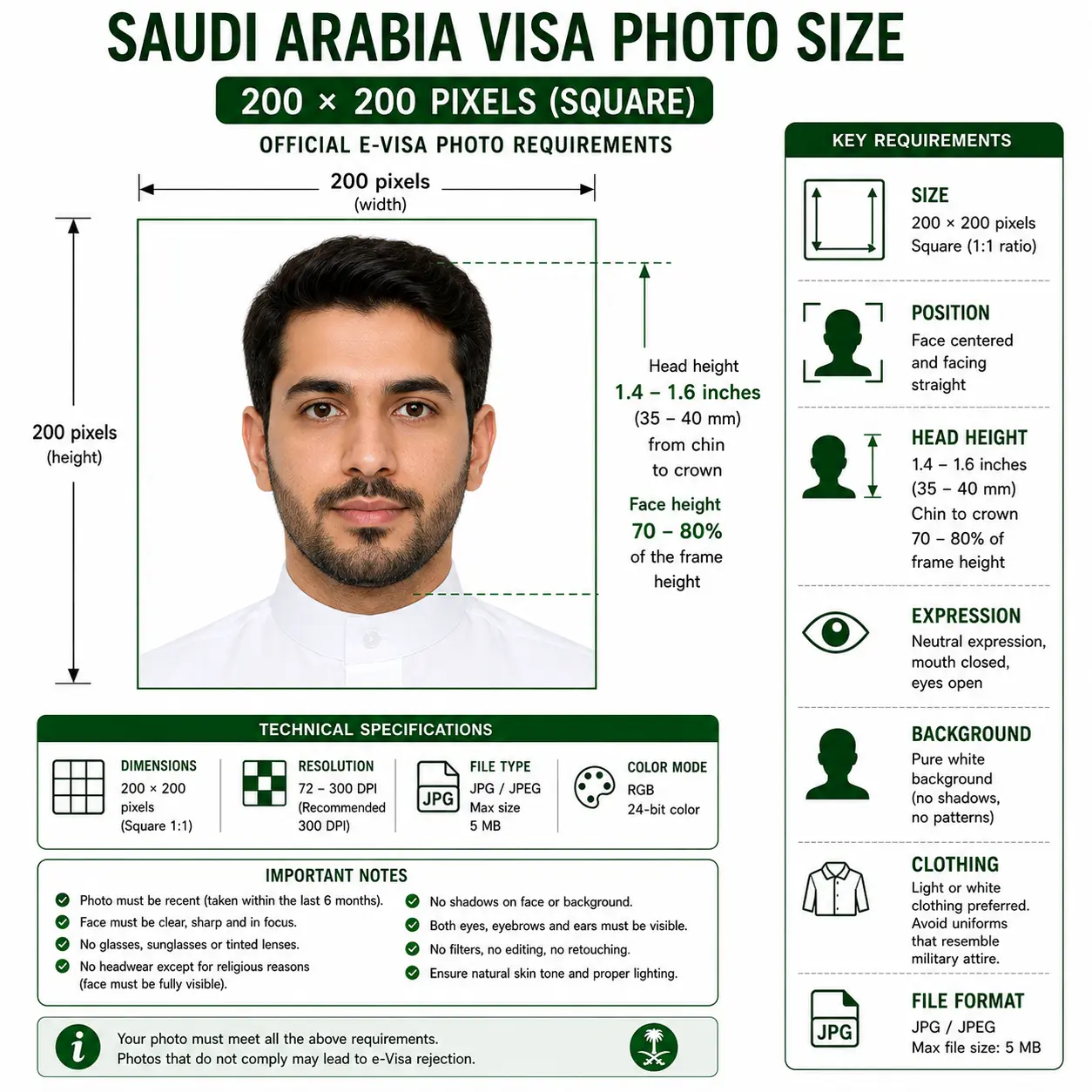
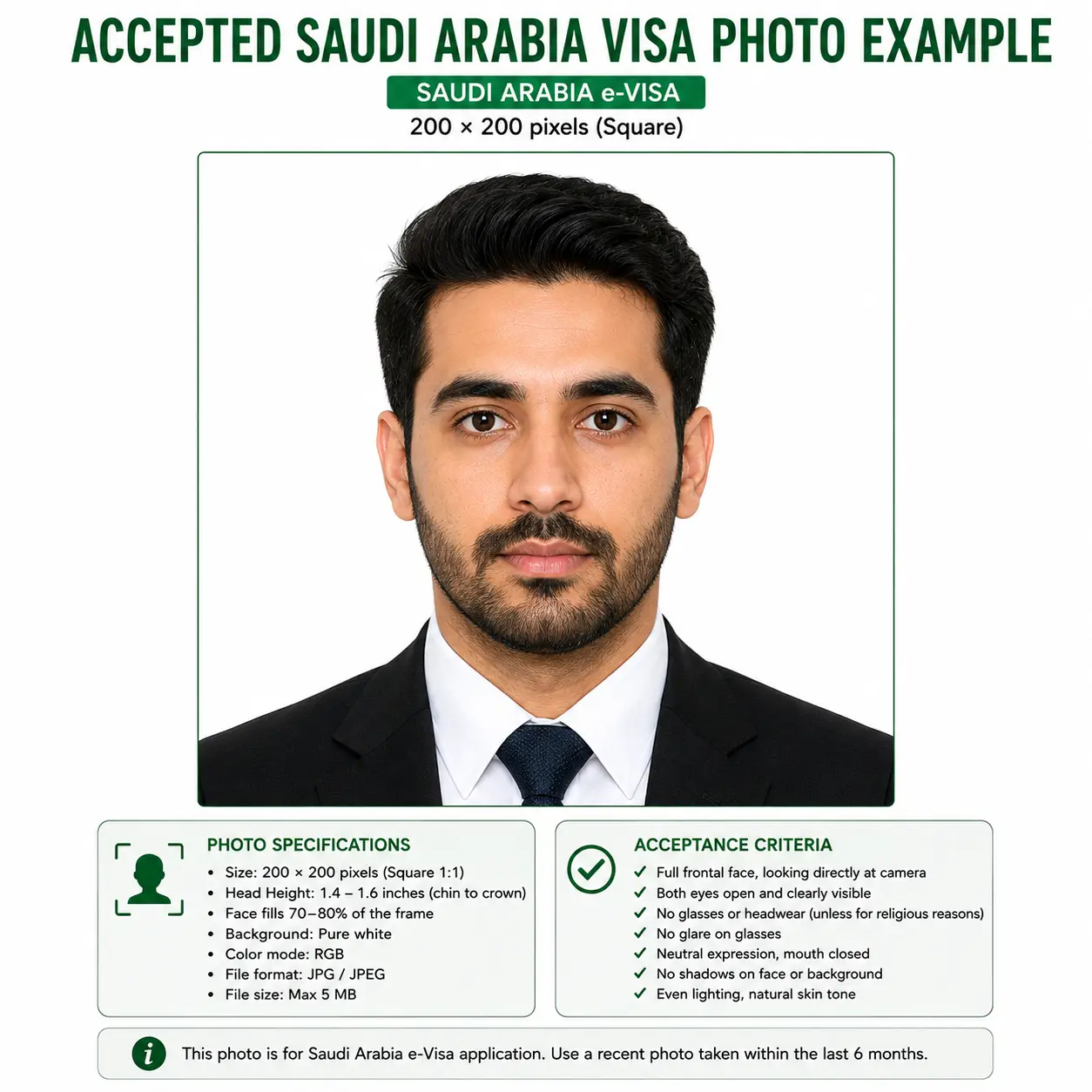
A Saudi Arabia e-Visa photo must be 200 × 200 pixels — a square 1:1 image between 5 KB and 100 KB — on a plain white background, showing your face and the top of your shoulders with the face filling 70–80% of the frame, or about 1.4–1.6 inches (36–41 mm) from chin to crown. One identical photograph is required, taken within the last 6 months.
| Digital size (e-Visa) | 200 × 200 pixels, square 1:1 |
|---|---|
| File size (e-Visa) | 5 KB – 100 KB |
| File format | JPG, JPEG or PNG |
| Background | Plain white, no pattern, no shadow |
| Face coverage | 70–80% of the image |
| Head height (chin to crown) | Approx. 1.4 – 1.6 in (36 – 41 mm) |
| Number of photos | One identical photograph for e-Visa upload |
| Expression | Neutral, mouth closed, both eyes open, facing forward |
| Photo age | Taken within the last 6 months |
| Print route (Tasheer / embassy) | Printed white-background photo — most commonly cited as 51 × 51 mm (2 × 2 in); confirm with your centre |
Why Upload Instead of Cropping It Yourself
- Automatic crop to the exact pixel or millimeter dimensions for the visa type you select.
- Biometric framing that keeps your face at the required 70–80% of the frame, chin to crown.
- Correct background — pure white, with shadows and color casts removed automatically.
- File size control — output kept inside the 5–100 KB window the e-Visa Portal enforces.
- Dual output — a digital file sized for e-Visa upload, and a print-ready file for Tasheer or embassy submission.
- No Photoshop, no guesswork on head size, resolution, or file size limits.
Saudi Arabia Visa Photo Visual Reference
The diagram below marks the measurements the e-Visa Portal checks: the square 200 × 200 pixel frame, the 70–80% face coverage, and the 1.4–1.6 inch chin-to-crown head height on a pure white background.
Visa Authority Overview
Saudi visa applications are issued under the authority of the Ministry of Foreign Affairs (MOFA). Depending on your nationality and visa type, your application is routed one of two ways: directly online through the e-Visa Portal for eligible tourist applicants, or through Tasheer — the visa facilitation network MOFA appointed to handle in-person processing — for Business, Work, Family, and Hajj applications. Tasheer centers also collect biometric data (fingerprints and a digital photo) on-site for most applicants aged six and up, separate from the photo you submit with your paperwork.
Because two different systems are in play, the photo you need depends on which one your application goes through — not just on your nationality or purpose of travel. Every national standard we hold is indexed in the passport photo requirements by country hub, and the composition rules behind all of them are explained in the passport photo rules library.
Saudi Arabia Visa Photo Requirements Table
Each rule below links to the detailed standard where one applies across countries.
| Photo size (e-Visa) | 200 x 200 pixels, square 1:1 aspect ratio |
|---|---|
| Photo size (Tasheer/embassy) | Printed white-background photo. Most commonly cited as 51 × 51 mm (2 × 2 in); 4 × 6 cm and 45 × 35 mm also appear. Confirm with your centre before printing |
| Background | Plain white, no pattern, no shadows — see background colour rules |
| Lighting | Even and diffuse, no shadow on the face or the wall — see shadow rules |
| Head size | Face fills 70%–80% of frame; approx. 1.4 – 1.6 in (36 – 41 mm) chin to crown — see head size rules |
| Face coverage | 70–80% of the image, showing the face and the top of the shoulders — see face size requirements |
| Eyes | Both eyes open, looking directly at the camera, fully visible — see eyes requirements |
| Hair | Must not cover the eyes or obscure the outline of the face — see hair rules |
| Ears | Not mandatory, but both sides of the face must remain visible — see ears visibility rules |
| Resolution | Sharp, in focus, no pixelation; for e-Visa the file is constrained by KB rather than DPI |
| File format (digital) | JPG, JPEG, or PNG |
| File size (digital) | 5 KB – 100 KB |
| Number of photos | One identical photograph for e-Visa upload; Tasheer and embassies typically request two prints |
| Colour | Full colour, natural skin tones, no filters or retouching |
| Glasses | Discouraged; if worn, no glare, no tinted lenses, eyes fully visible — see glasses rules |
| Expression | Neutral, mouth closed, both eyes open, facing forward |
| Headwear | Not permitted, except for religious reasons with the face visible chin to forehead — see head covering rules |
| Photo age | Taken within the last 6 months |
Pixel size, file-size window, face coverage and the 1.4–1.6 inch chin-to-crown figure are taken from the official Saudi e-Visa photo specification page linked in Sources. Printed-photo dimensions for Tasheer and embassy routes vary across the sources we reviewed — always confirm the exact figure with the centre handling your application before printing.
Differences Between Visa Types
| Visa Type | Submission Format | Photo Spec |
|---|---|---|
| Tourist e-Visa | Digital, online upload | 200x200px, 5–100 KB, white background, one photograph |
| Business | Printed, via Tasheer or embassy | White background print photo; confirm exact size with your center |
| Umrah | Covered by the tourist e-Visa, or via an operator/Tasheer | 200x200px if applying online; printed white-background photo if routed through an operator or Tasheer |
| Hajj | Via an approved operator or Tasheer — not covered by the tourist e-Visa | Printed white-background photo; follow your operator's instruction |
| Work | Printed, via Tasheer; biometric photo also captured on arrival in Saudi Arabia | White background print photo; must visually match biometric capture (facial hair, hair length, etc.) |
If you're unsure which channel your visa type uses, check your invitation letter or Tasheer booking confirmation — it will tell you whether you're uploading a file or bringing a printed photo to an appointment.
Digital e-Visa Submission Rules
If you're applying through the e-Visa Portal, your photo is uploaded as part of the online form. The portal enforces the 200x200 pixel dimension and the 5–100 KB file size strictly — files outside that range are typically rejected by the upload tool itself before you can even submit the application, rather than being flagged later by a reviewer. Save your file as JPG or PNG, and avoid heavily compressed images that fall under the 5 KB floor, since over-compression blurs facial detail and fails the sharpness check.
The 100 KB ceiling is tight for a photographic image. A 200 × 200 pixel JPEG at quality 85 typically lands between 10 KB and 30 KB, which sits comfortably inside the window. If your export is too heavy, the reduce file size guide covers how to bring it down without dropping below the floor. iPhone users shooting in HEIC should convert first using the HEIC to JPEG guide, since the portal accepts only JPG, JPEG and PNG. Broader portal rules across countries are covered in the digital passport photo requirements guide.
Our tool exports inside the 5–100 KB window automatically. Open the Passport Photo Maker.
In-Person Submission via Tasheer or Embassy
Business, Work, Family, and Hajj applicants submit through a Tasheer center or directly at a Saudi embassy/consulate. These routes typically ask for two printed photos with a white background, attached to your application — not glued, and not stapled across the face. You'll also have biometric data (fingerprints and a digital photo) collected on-site, which is separate from the printed photo you bring. For Work visa holders specifically, a second biometric capture happens after arrival in Saudi Arabia at a Ministry of Interior registration center, and that image gets linked to your Iqama — so keep your appearance (facial hair, hair length) reasonably consistent with your submitted photo in the meantime.
Child and Infant Visa Photo Requirements
Children need their own visa photo — they cannot be included in a parent's photo. The same 200 × 200 pixel size, white background and framing rules apply with no age exemption, including the 70–80% face coverage requirement.
Child alone in the frame
No other people, supporting hands, arms, car seat, toy or dummy may be visible anywhere in the image.
Same size and framing
200 × 200 pixels, square, with the face filling 70–80% of the frame exactly as for an adult.
Eyes open where possible
Neutral expression with a closed mouth and eyes open. See the eyes requirements.
Shoot from directly above
For infants who cannot hold their head up, lay the baby on a plain white sheet and photograph from directly overhead in soft indirect daylight.
No shadow across the face
Overhead light from one side casts the shadow that fails the background check. See the shadow rules.
Biometrics from age six
Tasheer centres collect fingerprints and an on-site photo for most applicants aged six and up, in addition to the photo you submit.
Positioning, lighting and timing technique for infants and toddlers is covered in the baby passport photo at home guide.
Can I Take My Saudi Arabia Visa Photo at Home?
Yes, in most cases — your phone camera is sharp enough for both the digital e-Visa upload and a printed Tasheer photo, as long as you control the conditions carefully.
Phone camera setup
Use the rear camera, not the front-facing one, for sharper detail. Hold the phone at eye level, about an arm's length away, and have someone else take the photo rather than using a timer and a wall mirror. Switch off portrait mode, background blur and any beautification filter — these alter facial geometry and are detected.
Lighting
Face a window with soft daylight, or use two even light sources from either side. Avoid a single overhead light, which casts shadows under the eyes and chin — a common rejection cause.
Background
Stand at least two feet from a plain white wall if you can find one. If you can't get a clean white background at home, our tool removes and replaces the background automatically.
Distance from camera
Frame from the top of your shoulders to just above your head, leaving a little headroom — the tool will crop precisely to the 70–80% face-fill requirement from there. The crop guide explains how the square ratio and face-coverage rule are applied together.
Digital upload check
For e-Visa uploads, export at exactly 200x200px and check the file lands between 5 KB and 100 KB before submitting — our tool checks this automatically.
Printing Guidance for Tasheer and Embassy Submission
If your visa type routes through a Tasheer centre or an embassy, printing is part of the specification rather than an afterthought. Because the exact print dimension differs between centres, confirm the figure first — then print to that size at 300 DPI.
| Print resolution | 300 DPI minimum. Disable fit-to-page and auto-scaling, which change the physical size |
|---|---|
| Paper | Matte or glossy photographic paper. Standard printer paper is refused |
| Copies | Tasheer centres and embassies typically request two identical prints |
| Cutting | Guillotine or steel rule for square edges. Do not trim inside the printed border |
| Colour management | sRGB. Turn off printer auto-enhance, skin smoothing and colour correction |
| Attaching to the form | Do not glue the photo or staple across the face. Attach as the centre instructs |
| Handling | Let the ink dry fully. Avoid bent corners and fingerprints on the print surface |
Printer settings, paper choice and cutting technique are covered in full in the print passport photo at home guide, and multi-copy sheet layout in the print sheet guide.
Need both files at once? Generate the digital upload and the print-ready copy from a single photo.
Saudi Visa Photo Compared to Other Gulf States
Gulf visa photo standards look similar at a glance but differ on size and, in some cases, background. A photo prepared for a UAE or Qatar application will not automatically pass a Saudi e-Visa upload.
| Country | Visa Photo | Passport Photo | Background |
|---|---|---|---|
| Saudi Arabia | 200 × 200 px digital; printed size varies by centre | 40 × 60 mm | White (visa) / light grey (passport) |
| United Arab Emirates | 43 × 55 mm | 40 × 60 mm | Plain white |
| Qatar | 38 × 48 mm | 38 × 48 mm | Plain white |
| Oman | 45 × 35 mm | 40 × 60 mm | Plain white |
| Egypt | 51 × 51 mm | 40 × 60 mm | Plain white |
For a wider comparison, the passport size photo dimensions reference lists every standard we hold, and passport photo size in pixels converts each one for digital upload. Outside the Gulf, the China visa photo at 33 × 48 mm is another country-specific size that generic passport photos fail.
Saudi Arabia Visa Photo vs. Saudi Arabia Passport Photo
These two photos are easy to confuse, but they aren't interchangeable.
| Specification | Visa Photo | Passport Photo |
|---|---|---|
| Dimensions | 200x200px digital, or printed per visa type | 40x60 mm printed |
| Background | White | Light gray |
| Who it is for | Foreign nationals travelling to Saudi Arabia | Saudi citizens applying for their own passport |
| Submission | Online portal or Tasheer/embassy, depending on visa type | Absher platform or in-person passport office |
| Compliance risk | Higher — a rejected visa photo can cost you an appointment slot and delay travel dates that may not be flexible | Lower — passport renewal timelines are usually more forgiving |
The background color is the detail people miss most often: a passport photo's light-gray background will not pass for a Saudi visa application, which specifically calls for white. Full specification for the citizen document is on the Saudi Arabia passport photo page.
How to Create a Saudi Arabia Visa Photo
Upload
Choose a recent photo from your phone or computer — daylight, plain wall, no hats or glasses.
Select visa type
Pick Tourist e-Visa, Business, Umrah/Hajj, or Work so the tool applies the right output format.
Crop & background
The tool centers your face, fills 70–80% of the frame, and replaces your background with pure white.
Verify against requirements
Check the result against the table above — dimensions, file size, and head position.
Download
Get a 200x200px digital file for e-Visa upload, a print-ready file for Tasheer, or both.
Common Rejection Reasons
Each cause below links to the detailed rule where one applies, so you can confirm the tolerance before you submit. The wider cross-country breakdown is in passport photo rejection reasons.
- Background isn't pure white, or shows shadows from uneven lighting — see background colour rules and shadow rules
- Digital file falls outside the 5–100 KB range for e-Visa upload
- Digital file is not exactly 200 x 200 pixels, or is not square
- Head fills less than 70% or more than 80% of the frame — see face size requirements
- Chin-to-crown measurement falls outside roughly 1.4–1.6 inches — see head size rules
- Photo is older than six months
- Glasses cause glare, or lenses are tinted — see glasses rules
- Hair covers the eyes or obscures the outline of the face — see hair rules
- Headwear obscures part of the face without a religious exemption — see head covering rules
- Eyes closed, looking away, or partly hidden — see eyes requirements
- A gray-background passport photo is mistakenly submitted instead of a white-background visa photo
- Printed photo doesn't match the dimension your specific Tasheer center expects
- Photo has been digitally retouched, filtered, or shot in portrait-blur mode
- Printed on standard paper instead of photographic paper — see the print at home guide
Frequently Asked Questions
Size & File Requirements
What size photo do I need for a Saudi Arabia visa?
It depends on how you're applying. For the e-Visa Portal, you upload one identical digital photograph at 200x200 pixels, 5–100 KB. For visa types processed through Tasheer or an embassy in person, you'll bring printed photos instead — most commonly cited as 51 × 51 mm (2 × 2 in), though centres differ, so confirm with yours.
What head size does a Saudi visa photo need?
The official e-Visa specification states the photo must show a close-up of your face and the top of your shoulders, with the face filling 70 to 80 percent of the image — equivalent to approximately 1.4 to 1.6 inches (36 to 41 mm) measured from the chin to the crown of the head.
What file size and format does the Saudi e-Visa photo need?
JPG, JPEG or PNG between 5 KB and 100 KB. The portal enforces both the 200x200 pixel dimension and the file size window at upload, so a file outside that range is refused before you can submit rather than being flagged later by a reviewer.
How many photos do I need for a Saudi visa?
The e-Visa Portal requires one identical photograph uploaded with the online form. Tasheer centres and embassies handling in-person applications typically ask for two printed photographs, plus an on-site biometric capture that is separate from the photo you bring.
Visa Types & Related Documents
Is the Umrah visa photo different from the tourist e-visa photo?
The composition rules are identical — white background, neutral expression, no headwear except for religious reasons. The Saudi tourist e-Visa explicitly covers Umrah but excludes Hajj, so an eligible Umrah applicant uploads the same 200x200 pixel digital photo. Applications routed through a group operator or Tasheer generally want printed photos instead.
Do I need a printed photo or a digital photo for a Work visa?
Work visas are processed through Tasheer, which generally requires printed photos as part of your application file. You'll also have a separate biometric photo taken after arrival in Saudi Arabia, linked to your Iqama, so try to keep your appearance consistent between the two.
Can I use the same photo for my Saudi visa and my Saudi passport?
Not directly. A Saudi passport photo uses a light-gray background at 40x60 mm, while visa photos require pure white. The framing rules are close, but the background colour and dimensions differ, so a passport photo needs reprocessing before it works for a visa.
Appearance & Children
Can I wear glasses in my Saudi visa photo?
It's best to remove them. If you need them for medical reasons, make sure there's no glare and your eyes are fully visible through clear, untinted lenses. Tinted lenses and sunglasses are not accepted.
Does a headscarf count as headwear that's not allowed?
Religious head coverings are permitted. The rule is about coverage, not the item itself — your face needs to stay visible from the bottom of your chin to your forehead, with no shadow across the features. See the head covering rules.
What are the Saudi visa photo rules for a baby or child?
Children need their own visa photo and cannot appear in a parent's photo. The same 200x200 pixel size, white background and framing rules apply with no age exemption. The child must be alone in the frame with no supporting hands, toy or dummy visible. See the child and infant requirements section.
Rejections & Approval
Why was my Saudi visa photo rejected?
Most often a non-white or shadowed background, a file size outside the 5–100 KB e-visa range, incorrect head size, an outdated photo, or glasses glare. Submitting a gray-background passport-style photo to a white-background visa portal is also a frequent, avoidable mistake.
Will the photo I upload here guarantee my visa gets approved?
No. Our tool helps your photo meet the published dimension, background, and framing specifications, but visa approval depends on your full application and is decided solely by MOFA, Tasheer, or the relevant embassy.
Official Sources & References
- Saudi e-Visa Portal — Photo Specifications: visa.visitsaudi.com
- Saudi e-Visa Portal — Tourist visa eligibility and scope: visa.visitsaudi.com
- Ministry of Foreign Affairs of Saudi Arabia: mofa.gov.sa
- Tasheer visa application centres — in-person submission, print dimensions and biometric capture (confirm with the centre handling your file)
- ICAO Doc 9303 — Machine Readable Travel Documents biometric photograph standard: icao.int
Related Pages
Create Your Saudi Arabia Visa Photo Now
Whether you're uploading to the e-Visa Portal or printing for a Tasheer appointment, get a compliant photo in under a minute — no studio visit, no manual cropping.