
UAE Visa Photo Maker — Compliant Photos for Every UAE Visa Type
Most published guidance puts the UAE visa photo at 43 × 55 mm on a plain white background — 508 × 650 pixels at 300 DPI — with the head filling 70–80% of the frame.
If you're a foreign national applying for a UAE visa — as a tourist, in transit, on a work permit, as a student, or under the Golden Visa programme — your photo is checked against standards set by the Federal Authority for Identity, Citizenship, Customs and Port Security (ICP) and, for Dubai-sponsored applications, the General Directorate of Residency and Foreigners Affairs (GDRFA). That 43 x 55mm figure isn't automatically the same standard used for a UAE national's own passport photo, so don't assume the two match. Rejections usually come down to background colour, an outdated photo, or the wrong size — and a refused visa photo costs more than a refused passport photo, since it can delay travel, a job start date, or university enrolment.
UAE Visa Photo Size (Quick Answer)
A UAE visa photo is most consistently published as 43 mm wide × 55 mm high (4.3 × 5.5 cm) on a plain white background, with the head filling 70–80% of the frame height. At 300 DPI that is 508 × 650 pixels; at 600 DPI it is 1016 × 1299 pixels. The photo must be taken within the last 6 months.
| Specification | Value |
|---|---|
| Photo size | 43 × 55 mm (4.3 × 5.5 cm / 1.69 × 2.17 in) |
| Pixels @ 300 DPI | 508 × 650 px |
| Pixels @ 600 DPI | 1016 × 1299 px |
| Aspect ratio | 43 : 55 (portrait, roughly 0.78 : 1) |
| Background | Plain white, no shadow, pattern or texture |
| Head coverage | 70–80% of frame height |
| Head height in mm | Approximately 38.5–44 mm chin to crown |
| Expression | Neutral, mouth closed, both eyes open |
| Age of photo | Within the last 6 months |
| Format | Colour JPEG, no black and white |
| Authorities | ICP (federal) and GDRFA (Dubai-sponsored) |
Public sources are not fully consistent on the millimetre figure. See the requirements footnote for the detail, and always confirm against the upload screen you are actually using.
Do tourist, transit, work, student and Golden Visa photos use different specs?
Based on published ICP and GDRFA guidance, the photo itself — size, background, framing — does not change between UAE visa categories. What does change is which authority handles your application and whether the process includes an in-person biometric step afterwards. See the visa type comparison further down for the detail.
Why Upload Instead of Editing It Yourself
- Automatic crop to UAE visa proportions
- Biometric-style framing, centred and squared
- Correct 43 x 55mm dimensions applied automatically
- Background swapped to compliant plain white
- Printable and digital-upload-ready output together
- No Photoshop, rulers, or guesswork required
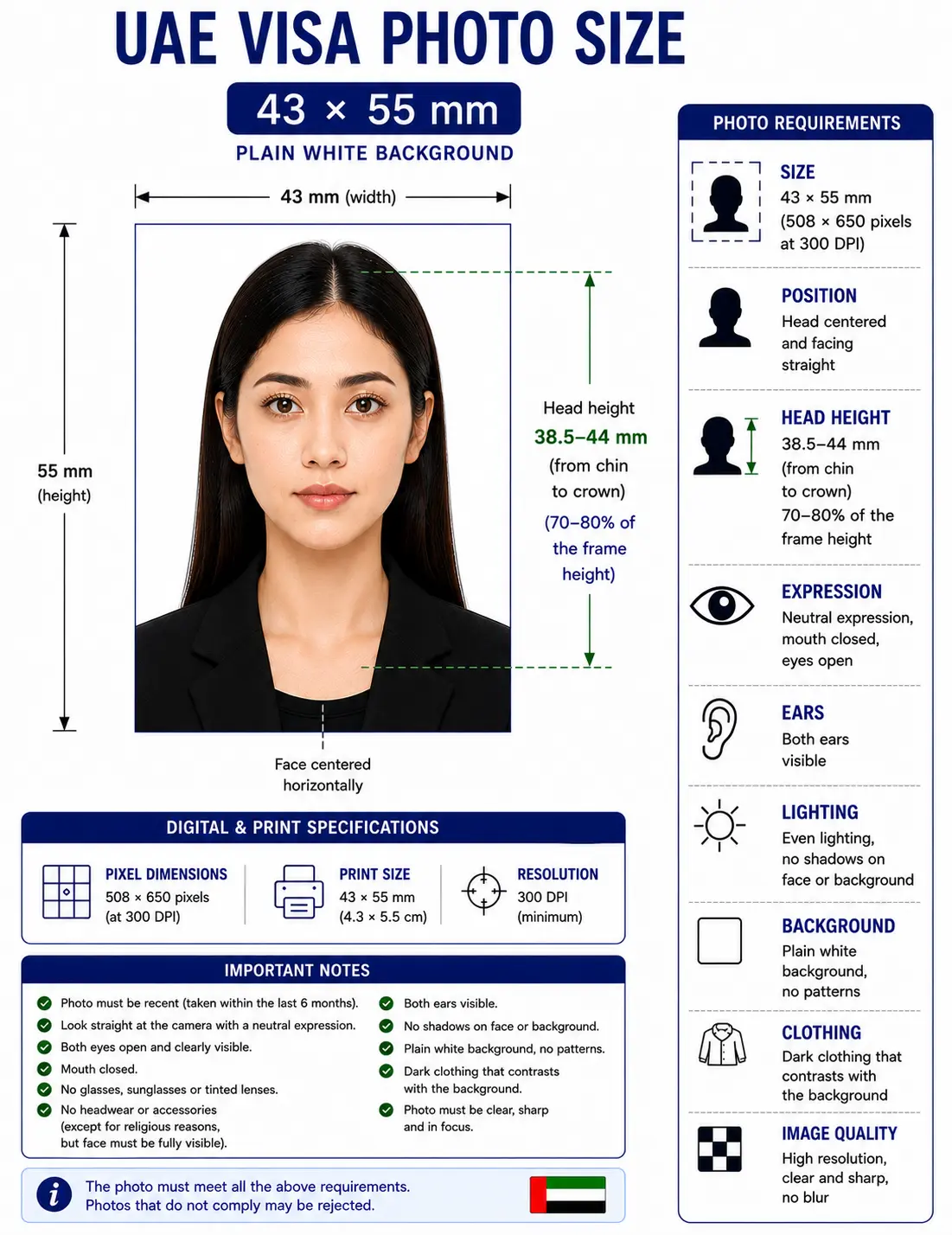
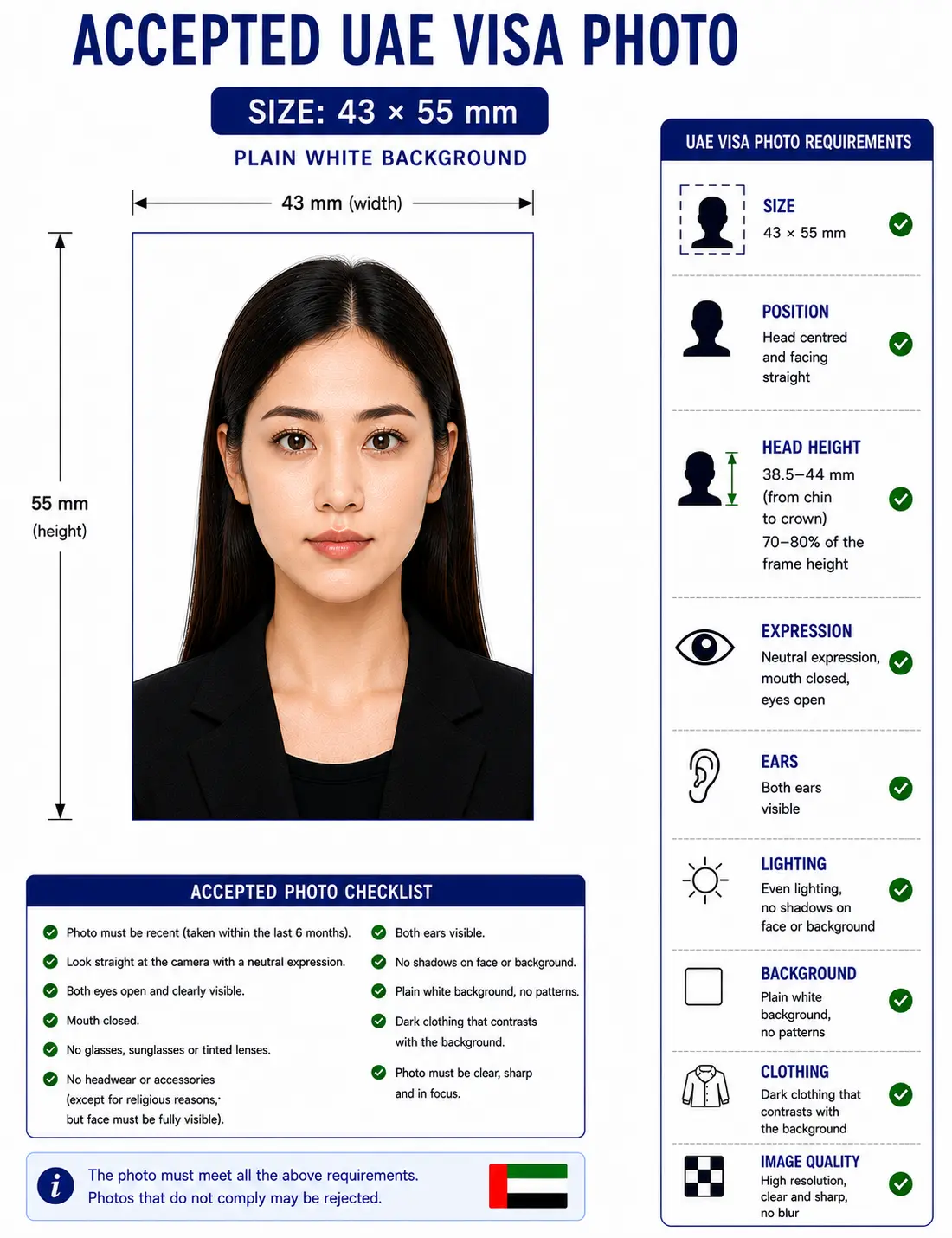
UAE Visa Photo Visual Reference
The diagram marks the measurements the automated checks look at: the 43 × 55 mm frame, the 70–80% head coverage, and the plain white background.
UAE Visa Photo Requirements
Every row below has to pass. Each rule links to the detailed standard in the passport photo rules library.
| Spec | Requirement |
|---|---|
| Photo size | 43 x 55mm (4.3 x 5.5cm) print — see footnote on a published sizing discrepancy* |
| Width | 43mm (508 px @ 300 DPI) |
| Height | 55mm (650 px @ 300 DPI) |
| Aspect ratio | 43 : 55 portrait — see the crop guide |
| Background | Plain white, no shadows, patterns, or texture — see background colour rules |
| Lighting | Even and diffuse, no shadow behind the head — see shadow rules |
| Head size | Face fills roughly 70–80% of the frame, chin to crown (about 38.5–44 mm) — see head size rules |
| Face coverage | 70–80% of frame height — see face size requirements |
| Eyes | Both open, looking directly at the camera, unobstructed — see eyes requirements |
| Hair | Must not cover the eyes or obscure the outline of the face — see hair rules |
| Ears | Not explicitly mandated, but the face outline must be clear — see ears visibility rules |
| Head coverings | Religious head coverings accepted with the full face visible from chin to forehead; decorative hats are not — see head covering rules |
| Resolution | 600 DPI recommended for prints; digital pixel minimums vary by portal (see note) |
| File format | Colour JPEG/JPG (some portals accept PNG); no black-and-white photos |
| Glasses | Remove glasses where possible; tinted or dark lenses are not accepted — see glasses rules |
| Expression | Neutral expression, mouth closed, eyes open, facing the camera directly |
| Digital editing | Not permitted — no filters, beautify mode, skin smoothing or portrait blur |
| Photo age | No more than 6 months old, and not identical to a previous document photo |
| Digital submission | File size and pixel limits differ between GDRFA Dubai, ICP Smart Services, and sponsor-managed channels — confirm on the upload screen you're actually using |
| Varies by visa type? | Composition — no. Digital file specs and submission channel — yes, by authority and visa category |
* Published sources don't fully agree here. Most visa-specific guides quote 43 x 55mm for UAE visa photos, while a number of ICP services — including the Emirates ID — are documented at 35 x 45mm, and ICP's own general personal-photo specification sheet is ambiguous in places. Because a wrong guess is expensive for a visa applicant, treat 43 x 55mm as the figure most consistently associated with visa applications specifically, not as a number we're independently certifying — confirm the exact pixel and millimetre requirement on the application portal you're actually using before you submit.
Don't want to measure any of this by hand? Open the Passport Photo Maker and the 43 x 55mm frame is applied for you.
UAE Visa Photo Size in Pixels and Other Units
Portals validate pixels, not millimetres, so the DPI you export at decides whether the file passes. These are the exact conversions for a 43 × 55 mm photo.
| Setting | Pixel width | Pixel height | Suitability |
|---|---|---|---|
| 72 DPI (screen only) | 122 px | 156 px | Far too small for any official upload |
| 150 DPI | 254 px | 325 px | Below the practical minimum |
| 177 DPI | 300 px | 369 px | Matches the lowest figure some guides quote |
| 300 DPI (standard) | 508 px | 650 px | Safe default for digital upload and print |
| 600 DPI (high-resolution) | 1016 px | 1299 px | Matches the highest figure some guides quote |
This resolves a lot of the confusion around conflicting pixel figures for UAE visa photos. The often-quoted "300 × 369" and "over 1000 × 1300" ranges are not two different specifications — they are the same 43 × 55 mm photo captured at roughly 177 DPI and at 600 DPI respectively. Exporting at 300 DPI (508 × 650) sits comfortably inside that range and is accepted by every channel we have seen documented.
| Unit | Value |
|---|---|
| Millimetres | 43 × 55 mm |
| Centimetres | 4.3 × 5.5 cm |
| Inches | 1.69 × 2.17 in |
| Pixels @ 300 DPI | 508 × 650 px |
| Pixels @ 600 DPI | 1016 × 1299 px |
| Aspect ratio | 43 : 55 |
For conversions across every other national standard see passport photo size in pixels and the master passport photo dimensions reference. DPI, sharpness and compression standards are covered in passport photo resolution rules.
Why you cannot enlarge a small photo
Upscaling a 300 × 369 pixel image to 508 × 650 interpolates rather than adding detail, and the result goes soft around the eyes and hairline. Automated checks measure sharpness, so an upscaled file fails even when the pixel count reads correctly. Shoot wide and crop down instead — any recent phone camera clears the requirement easily.
Who Sets the Rules: ICP and GDRFA
Two authorities govern UAE entry and residence, and which one applies to you depends on the emirate and visa type. The Federal Authority for Identity, Citizenship, Customs and Port Security (ICP) runs the federal Smart Services platform used for most visa categories outside Dubai, plus Emirates ID and citizenship services. The General Directorate of Residency and Foreigners Affairs (GDRFA) handles Dubai-sponsored visa applications through its own portal. Both authorities apply photo rules that trace back to ICAO biometric standards, which is why the underlying photo composition looks the same regardless of which one processes your file — but the online forms, file limits, and even some terminology differ between them.
How Requirements Differ by Visa Type
The photo doesn't change shape from one visa category to the next. What changes is the channel that processes it, and whether a second, in-person photo step follows later.
| Visa type | Typical channel | Photo submission | Biometric follow-up |
|---|---|---|---|
| Tourist / Visit eVisa | GDRFA Dubai or ICP Smart Services, via a sponsor, airline, or hotel | Digital upload | Not usually required for short stays |
| Transit visa | Airline-managed, or GDRFA/ICP depending on entry point | Digital upload, often arranged with the flight booking | No |
| Golden Visa (long-term residence) | ICP Smart Services | Digital upload at application stage | Yes — Emirates ID biometric capture after approval |
| Work / employment visa | ICP Smart Services, submitted by employer's PRO | Digital file sent to your employer or typing centre | Yes — Emirates ID biometric capture |
| Student visa | ICP Smart Services or the sponsoring institution's channel | Digital file sent to your institution or its agent | Yes — Emirates ID biometric capture |
That last column is the part most guides skip. If you're moving from a short-stay to a residence category — work, study, or Golden Visa — the photo you upload during the application isn't the last photo in the process. You'll typically attend an in-person appointment afterward where a fresh photo is captured for your Emirates ID, so don't over-invest in getting the perfect home photo for that later step.
Uploading to a UAE e-Visa Portal
Most UAE visa applications today are digital-first. You'll either upload the photo yourself through GDRFA Dubai's portal or ICP Smart Services, or send a compliant file to whoever is sponsoring your application. E-visa portals tend to be stricter than a typing-centre print counter: an upload that's a few kilobytes over the limit, or saved in the wrong colour mode, gets bounced before a human ever looks at it. The pixel dimensions and maximum file size quoted across different guides vary — anywhere from roughly 300 x 369 pixels up to over 1000 x 1300 pixels depending on the source — which, as the pixel table above shows, is the same physical photo captured at different DPI settings. Use the specification shown on the actual upload screen as your final word, not a number from a blog post, including this one.
If your export is heavier than the portal allows, the reduce file size guide and compress to 240 KB guide cover how to get under a ceiling without dropping below the pixel minimum. iPhone users shooting in HEIC should convert first using the HEIC to JPEG guide. Broader portal rules are covered in the digital passport photo requirements guide.
Biometric Capture After Arrival
Residence-category visas — work, student, and Golden Visa — generally lead to an Emirates ID, and getting one means visiting an approved typing centre or service point in person for fingerprints and a fresh photo. This in-person photo follows its own on-the-spot capture process and isn't the file you uploaded during the visa application. Short-stay visas (tourist, transit) typically don't include this step, since there's no Emirates ID involved.
UAE Visa Photos for Children and Infants
Children need their own visa photo — they can't appear in a parent's photo or be added to it later. The 43 × 55 mm size, white background and 70–80% head coverage apply to infants exactly as they do to adults. What relaxes is a narrow set of expression and eye rules.
Same size, same framing
43 × 55 mm frame with the head filling 70–80% of the height. No age exemption applies to dimensions or head coverage.
Eyes need not be fully open
A baby does not need both eyes fully open. Older children are expected to look at the camera with eyes open. See the eyes requirements.
Child alone in the frame
An adult may support the child from behind, but no hand, arm, car seat, toy or dummy may appear in the photo, and no second person may be visible.
No props or pacifiers
Avoid toys, dummies and patterned clothing that draws the eye. Keep the expression as neutral as a child's expression reasonably can be.
No shadow behind the head
Lay the child on a plain white sheet in soft indirect daylight and shoot from directly above. Side lighting creates the background shadow that fails the check. See the shadow rules.
Crop from a wide source
Shoot wide and crop down. Cropping tightly in-camera on a small face leaves too few pixels once the 43 : 55 frame is applied.
Full positioning, lighting and timing technique for babies and toddlers is covered in the baby passport photo at home guide.
Photographing a child? Upload the shot and the 43 x 55mm crop is applied automatically.
Visa Processing Tips
A handful of habits prevent most photo-related delays: take the photo within a week or two of applying rather than reusing one from months ago, check the background for shadows on a phone screen at full brightness before submitting, and avoid any filter, beautify mode, or auto-retouch — automated checks on these portals are tuned to catch smoothed skin and flag it as an edited photo. If your application is being submitted on your behalf by an employer, sponsor, or institution, send them the digital file directly rather than a screenshot or a photo of a printed copy, since recompression at each step degrades quality enough to trigger a resubmission request.
Can I Take My UAE Visa Photo at Home?
Yes — most applicants do. A few things make the difference between a usable photo and a rejected one:
Camera and distance
A modern phone camera is sharp enough; you don't need a dedicated camera. Stand roughly 1.5 metres from the camera so the lens doesn't distort your features, and have someone else take the shot rather than using a front-camera selfie at arm's length.
Lighting
Face a window for soft, even daylight. Avoid direct overhead light, which casts shadows under the eyes and chin, and avoid flash, which tends to wash out detail and create red-eye. The shadow rules cover the setup in detail.
Background
A plain white or light-coloured wall works best. A bedsheet pinned up behind you is a reasonable substitute if you don't have a blank wall — just check it's not creased or casting its own shadow. See the background colour rules.
Framing
Leave headroom above the crown and include the top of the shoulders, then crop to the 43 : 55 frame so the head lands at 70–80% of the height. The crop guide explains how the ratio and head-height rule are applied together.
Digital upload requirements
Save as a colour JPEG at 300 DPI (508 × 650 pixels), then check the file size and pixel dimensions against the specific upload screen you're using — GDRFA Dubai, ICP Smart Services, and sponsor-managed portals don't all publish the same limits.
Common mistakes
- Using a passport-style 35 x 45mm photo for a visa application that expects 43 x 55mm
- An off-white or grey background that looks fine on screen but flags as non-compliant
- Beautify filters or skin smoothing applied automatically by the phone's camera app
- Glasses left on, causing lens glare during automated checks
Printing a 43 x 55mm UAE Visa Photo
If your application channel still accepts a physical print — typing centres and some in-person submissions do — printing is part of the specification rather than an afterthought. A 43 × 55 mm photo is larger than most passport formats, so fewer copies fit per sheet.
| Print sheet | Copies per sheet | Recommended paper |
|---|---|---|
| 4 × 6 in (10 × 15 cm) | 4 copies of 43 × 55 mm | Matte or semi-gloss photo paper, 200–250 gsm |
| A4 (21 × 29.7 cm) | Up to 20 copies | Matte or semi-gloss photo paper, 200 gsm |
| Letter (8.5 × 11 in) | Up to 20 copies | Matte or semi-gloss photo paper, 200 gsm |
| Print resolution | 300 DPI minimum, 600 DPI preferred — disable fit-to-page and auto-scaling |
|---|---|
| Paper finish | Matte or semi-gloss. Plain copier paper is refused |
| Borders | No border, and no trimming once printed beyond the cut lines |
| Colour management | sRGB. Turn off printer auto-enhance and colour correction |
| Cutting | Guillotine or steel rule for square edges. Do not cut inside the printed border |
| Handling | Let ink dry fully. Do not staple, fold or glue the photo face |
Printer settings, paper choice and cutting technique are covered in full in the print passport photo at home guide, and multi-copy sheet layout in the print sheet guide.
UAE Visa Photo vs. UAE Passport Photo
These are two different documents with two different published specifications, and conflating them is one of the most common photo mistakes we see.
| Spec | UAE visa photo | UAE national passport photo |
|---|---|---|
| Dimensions | 43 x 55mm (most-cited figure for visa applications) | 35 x 45mm, per ICP's published personal-photo specification |
| Head size | 70–80% of frame | 70–80% of frame |
| Background | Plain white | Plain white |
| Submission format | Mostly digital, via GDRFA/ICP portals or a sponsor's channel | Submitted in person or via ICP Smart Services for a citizen's passport renewal |
| Compliance difference | Built around visa-application portals, which run automated rejection checks before review | Built around ICAO/ICP's general personal-photo standard used across several citizen-facing services |
The honest summary: the composition rules (background, expression, lighting, head position) line up almost exactly between the two. The dimensions, based on what's currently published, don't — so a photo sized for a UAE passport isn't a safe substitute for a UAE visa application, and vice versa. The full national specification is on our UAE passport photo page.
UAE Visa Photo Compared to Nearby Countries
If you're travelling across the region on one trip, do not reuse a single photo across applications. Gulf and neighbouring states each publish their own visa photo specification, and the aspect ratios are not interchangeable.
| Application | Format | Pixels @ 300 DPI |
|---|---|---|
| UAE visa | 43 × 55 mm (43 : 55) | 508 × 650 px |
| UAE passport | 35 × 45 mm (7 : 9) | 413 × 531 px |
| China visa | 33 × 48 mm (11 : 16) | 390 × 567 px |
| Schengen visa | 35 × 45 mm (7 : 9) | 413 × 531 px |
| US visa | 2 × 2 in / 51 × 51 mm (1 : 1) | 600 × 600 px |
| India visa | 2 × 2 in / 51 × 51 mm (1 : 1) | 600 × 600 px |
Regional visa guides that publish their own specification: Saudi Arabia, Qatar, Oman, Egypt and Turkey. Every national standard is indexed in the requirements by country hub.
How to Create a UAE Visa Photo
- Upload. Choose a recent photo from your phone or computer — even a plain, unedited selfie works, as long as no filter or beautify mode was applied.
- The UAE visa template loads automatically. The same 43 x 55mm composition covers tourist, transit, work, student and Golden Visa applications, so there is nothing to pick between.
- Crop & background. The tool centres your face, crops to the 43 : 55 visa proportions, and replaces the background with compliant white.
- Verify against requirements. Compare the result against the requirements table above, especially the digital file specs for your specific portal.
- Download. Save the print-ready file, the digital upload file, or both, depending on how you're submitting.
Common Rejection Reasons
Each item below links to the detailed rule so you can check the tolerance before you submit. The full cross-country breakdown is in passport photo rejection reasons.
- Wrong dimensions for the visa type or document being applied for — see the crop guide
- Off-white, grey, or patterned background — see the background colour rules
- Head too large or too small within the frame — see the head size rules
- Shadows on the face or behind the head — see the shadow rules
- Glasses glare or tinted lenses — see the glasses rules
- Hair falling across the eyes or obscuring the face outline — see the hair rules
- A head covering that hides the jawline, eyebrows or hairline — see the head covering rules
- Eyes closed, squinting, or looking away from the lens — see the eyes requirements
- Photo older than six months, or noticeably out of date
- Poor or uneven lighting
- Visible filters, skin smoothing, portrait blur, or other digital editing
- Using a passport-style template for a visa that expects different specs, or the reverse
- Digital file rejected by the portal for exceeding its size or pixel limits
- Upscaling a small photo to reach the pixel minimum, which fails the sharpness check
Frequently Asked Questions
Size & Format
What is the UAE visa photo size?
Published visa guidance most consistently cites 43 x 55 mm (4.3 x 5.5 cm) for UAE visa photos on a plain white background. At 300 DPI that equals 508 x 650 pixels, and at 600 DPI it equals 1016 x 1299 pixels. Because public sources are not fully consistent on this figure, confirm the exact millimetre and pixel requirement on the portal you are actually submitting through.
What is the UAE visa photo size in pixels?
A 43 x 55 mm photo equals 508 x 650 pixels at 300 DPI and 1016 x 1299 pixels at 600 DPI. This is why some guides quote figures around 1000 x 1300 pixels: that is the same physical photo captured at 600 DPI rather than a different specification.
Is the UAE visa photo size the same as the Emirates ID photo size?
Not necessarily, and this is one of the most common sources of confusion. Published visa guidance commonly cites 43 x 55 mm for UAE visa photos, while Emirates ID and several other ICP personal-document services are documented at 35 x 45 mm. Do not assume one photo works for both; check which document you are submitting for.
Appearance & Compliance
How old can a UAE visa photo be before it's rejected?
UAE visa photos should generally be no more than six months old. If your appearance has changed noticeably since the photo was taken, such as a new beard, a different hairstyle, or glasses you no longer wear, take a new one even if it is technically within six months.
Can I wear glasses in my UAE visa photo?
Most current ICP and GDRFA guidance asks applicants to remove glasses entirely, since lens glare and frame shadows are a common cause of automated rejection. If you need glasses to see clearly while setting up the shot, remove them only for the photo itself. Tinted or dark lenses are never accepted.
Are head coverings allowed in a UAE visa photo?
A head covering worn for religious reasons is generally accepted, including a hijab or a ghutra, provided the full face stays visible from the bottom of the chin to the forehead with no shadow across the features and no fabric obscuring the jawline or eyebrows. Decorative hats and caps are not accepted.
Visa Types & Channels
Does a UAE Golden Visa photo follow different rules than a tourist eVisa photo?
Based on currently published ICP guidance, the photo composition and dimensions are the same across Golden Visa and short-stay visa categories. The difference is procedural: Golden Visa applicants also complete an in-person biometric capture for their Emirates ID after the visa is issued.
Who uploads the photo for a UAE work or student visa — me or my sponsor?
For employer-sponsored work visas, the company's PRO or typing centre typically uploads the photo on your behalf through ICP Smart Services. For student visas, this is often handled through the sponsoring institution. You will usually be asked to send them a compliant photo file rather than upload it yourself.
Are UAE transit visa photo rules different from tourist visa rules?
No meaningful difference has been published for the photo itself. The practical difference is the channel: transit visa photos are sometimes submitted through the airline rather than directly through GDRFA or ICP, so the upload step may look different even though the photo specification does not change.
Taking, Printing & Children
Can I use a phone selfie for a UAE visa application?
Yes, a phone camera is fine as long as the lighting is even, the background is plain white, and the final image is cropped and resized to the visa photo specification rather than submitted as a casual selfie crop. Switch off portrait blur and any beautify mode first, because automated checks flag smoothed skin as an edited photo.
Do I need both a printed and a digital version of my visa photo?
It depends on how you are applying. Fully online applications through an e-visa portal only need a digital file, while some in-person or typing-centre submissions still ask for printed copies. Passport Photo Maker generates both from a single upload.
How many copies fit on a print sheet?
At 43 x 55 mm, four copies fit on a 4 x 6 inch photo sheet with cutting margins, and around twenty fit on A4. Print at 300 DPI or higher on matte or semi-gloss photo paper, and cut with a guillotine so the edges stay square.
Do children need their own UAE visa photo?
Yes. Every child needs an individual photo at the same 43 x 55 mm size on a plain white background. A child cannot appear in a parent's photo. Infants do not need both eyes fully open, and an adult may support the child from behind provided no hand, arm, toy or dummy enters the frame.
Official Sources & References
- Federal Authority for Identity, Citizenship, Customs and Port Security (ICP) — Smart Services and personal photo specification: icp.gov.ae
- General Directorate of Residency and Foreigners Affairs, Dubai (GDRFA) — visa application portal: gdrfad.gov.ae
- Official UAE Government Portal — visa and Emirates ID services: u.ae
- ICAO Doc 9303 — Machine Readable Travel Documents biometric photograph standard: icao.int
Related UAE Visa & Photo Resources
Create Your UAE Visa Photo Now
Whether you're booking a Dubai stopover, starting a job in Abu Dhabi, enrolling at a UAE university, or settling in on a Golden Visa, get the photo right before it slows down your application.
Reminder: requirements vary by visa type and channel, and final approval rests with ICP, GDRFA, or your sponsor — not with this tool. Always confirm against your specific application portal before submitting.