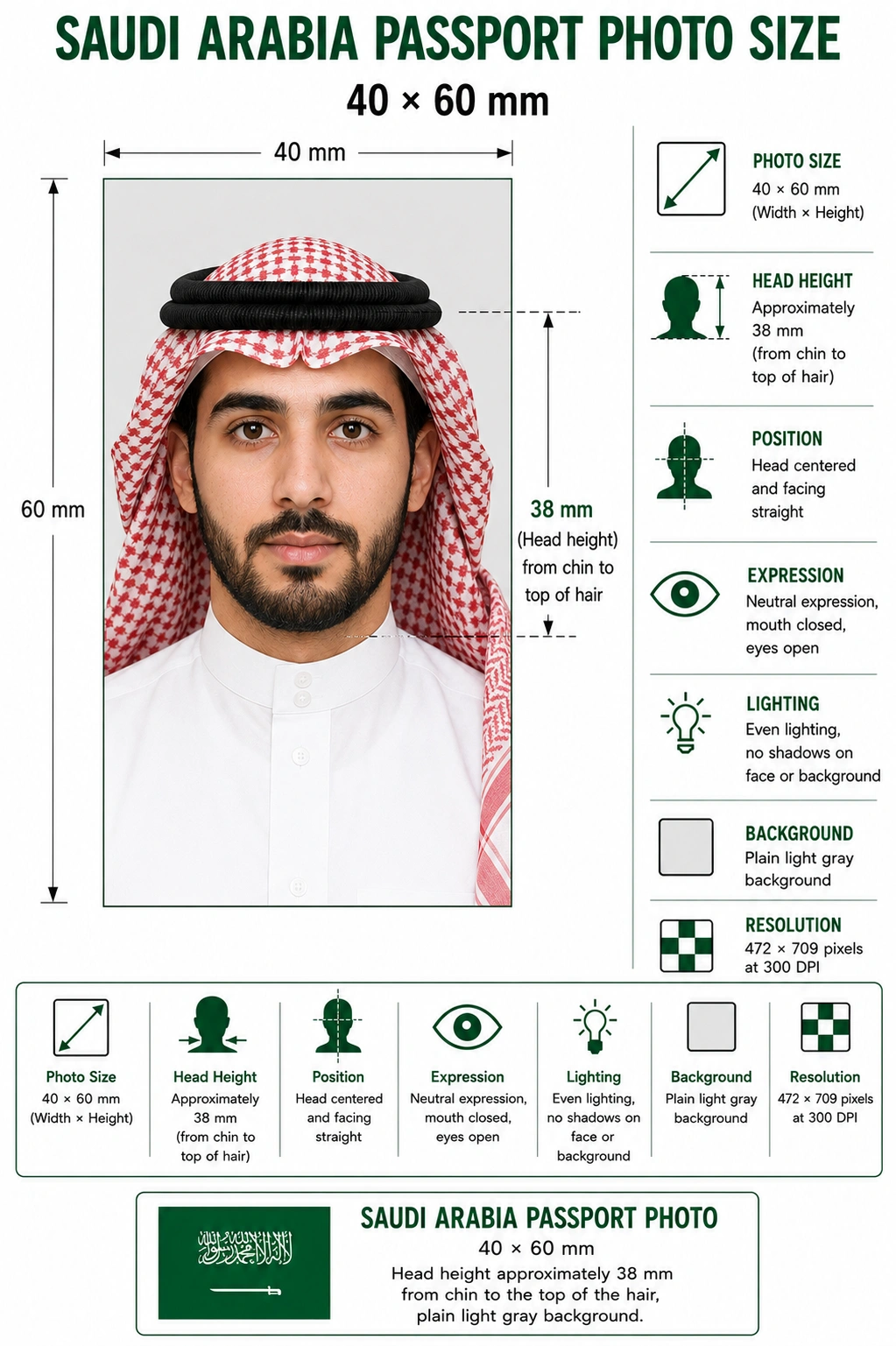
A Saudi Arabia passport photo must be 40 mm wide by 60 mm high (4 × 6 cm) on a plain light gray background, with the head measuring approximately 38 mm from chin to the top of the hair.
Every Saudi passport application processed through the General Directorate of Passports (Jawazat) depends on that exact specification. Photos taken at home or repurposed from a visa application are rejected often, usually over background colour, head size, or shadowing rather than anything dramatic. Whether you are applying in person at a Jawazat office or submitting digitally through Absher, getting the dimensions and background right the first time saves a return trip and a processing delay.
Cropping a Saudi passport photo by hand in a generic photo editor usually misses at least one requirement — the head size, the exact gray tone, or the resolution needed for printing. The Passport Photo Maker handles the crop, framing and background in one pass.
The crop is locked to the 40x60mm proportion so the output is never stretched or letterboxed.
Head height and eye position are aligned automatically so the head sits near the 38 mm target.
Exports at 472 × 709 pixels, the print resolution Jawazat expects for a 40x60mm photo.
Your existing background is detected and replaced with a clean, even plain tone.
Download a print-ready sheet sized for standard photo paper if you need a physical copy.
Everything happens in the browser — no design software or studio visit needed.
The Saudi Arabia passport photo size is 40 mm × 60 mm (4 × 6 cm, or 1.57 × 2.36 inches) on a plain light gray background, with the head approximately 38 mm from chin to the top of the hair. At 300 DPI that equals 472 × 709 pixels.
| Photo size | 40 × 60 mm (4 × 6 cm) |
|---|---|
| Inches | 1.57 × 2.36 in |
| Pixels @ 300 DPI | 472 × 709 px |
| Aspect ratio | 2 : 3 portrait |
| Background | Plain light gray — not white |
| Head height | Approximately 38 mm (about 63% of frame height) |
| Expression | Neutral, mouth closed, both eyes open |
| Photo age | Within the last 6 months |
| Issuing authority | General Directorate of Passports (Jawazat), Ministry of Interior |
The diagram below marks the measurements Jawazat checks: the 40 × 60 mm frame, the roughly 38 mm chin-to-crown head height, and the plain light gray background that distinguishes the passport photo from the e-visa photo.
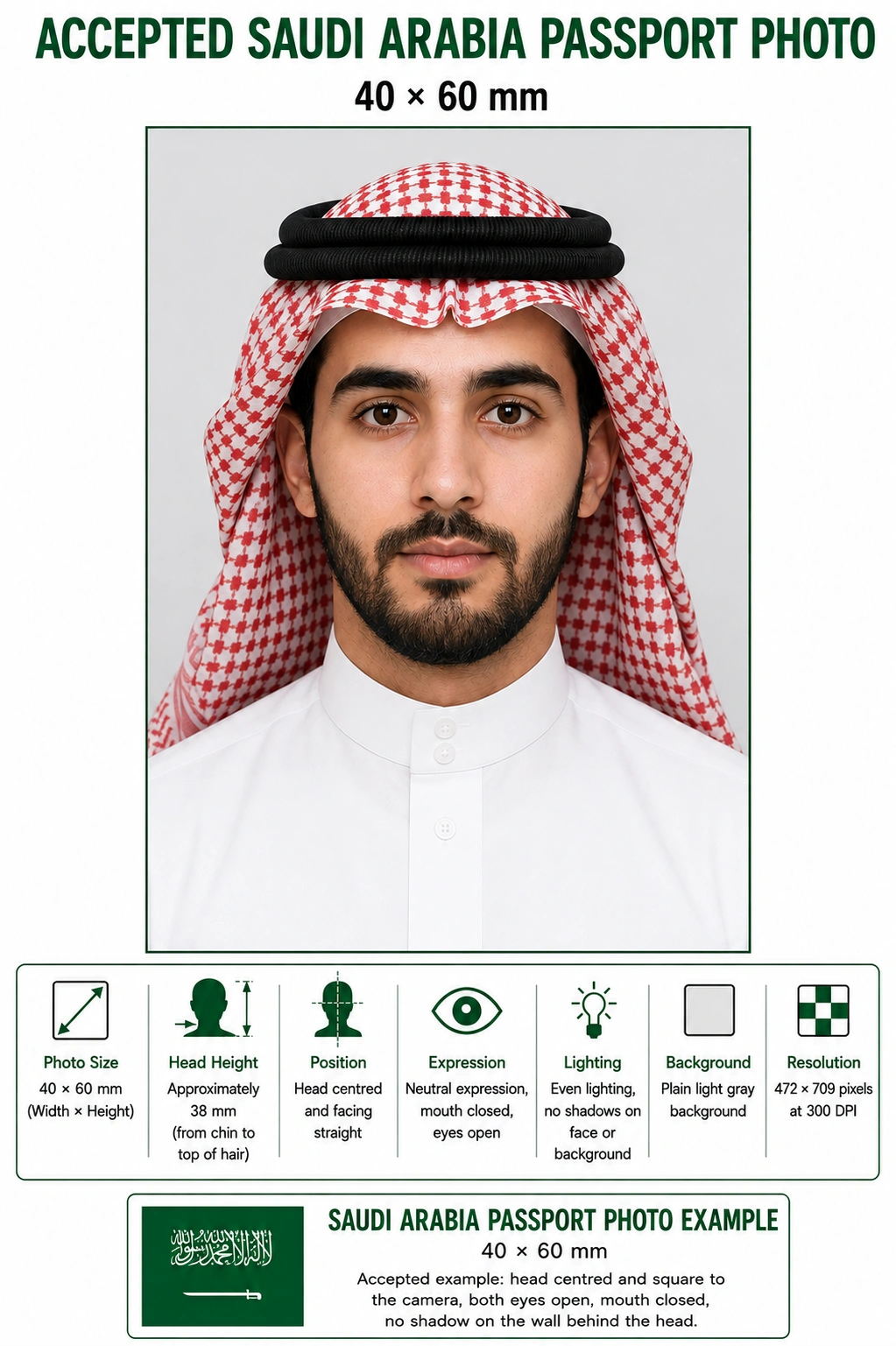
These specifications apply to adult and child passport photos submitted to Jawazat. They differ from the Saudi e-visa photo, which uses a white background and 2 × 2 inch sizing. Each rule links to the detailed standard in the passport photo rules library.
| Photo Size | 4x6 cm (40mm x 60mm), a 2:3 portrait ratio |
|---|---|
| Width | 40mm (472 px at 300 DPI) |
| Height | 60mm (709 px at 300 DPI) |
| Inches | 1.57 in x 2.36 in |
| Background | Plain light gray, no shadows or patterns — see background colour rules |
| Head Size | Approximately 38mm from top of hair to bottom of chin, about 63% of the frame height — see head size rules |
| Face Coverage | Head and upper shoulders in frame, face centred — see face size requirements |
| Eyes | Both eyes open, looking directly at the camera — see eyes requirements |
| Lighting | Even and diffuse, no shadow on the face or behind the head — see shadow rules |
| Hair | Must not cover the eyes or obscure the outline of the face — see hair rules |
| Ears | Not mandatory when a head covering is worn, but the face outline must be clear — see ears visibility rules |
| Head Coverings | Hijab, ghutrah and shemagh are permitted provided the full face stays visible — see head covering rules |
| Resolution | High resolution, minimum 300 DPI for printing |
| File Format | JPG, PNG, or PDF for digital submission, in colour |
| Glasses Rules | Avoid glasses where possible; if worn, no glare and eyes fully visible — see glasses rules |
| Expression Rules | Neutral expression, closed mouth, both eyes open and facing forward |
| Digital Editing | No filters, skin smoothing, slimming or tone adjustment |
| Photo Age | Taken within the last 6 months and reflecting current appearance |
| Digital Submission Rules | File should be under roughly 300KB and uploaded in colour |
Background colour is the single most common reason a Saudi passport photo is refused, and the reason is almost always the same: the applicant used a white background because that is what the Saudi e-visa requires. The passport photo needs plain light gray. White, off-white, cream and beige all fail, and so does a gray wall that is unevenly lit, because the shading reads as a pattern rather than a plain tone.
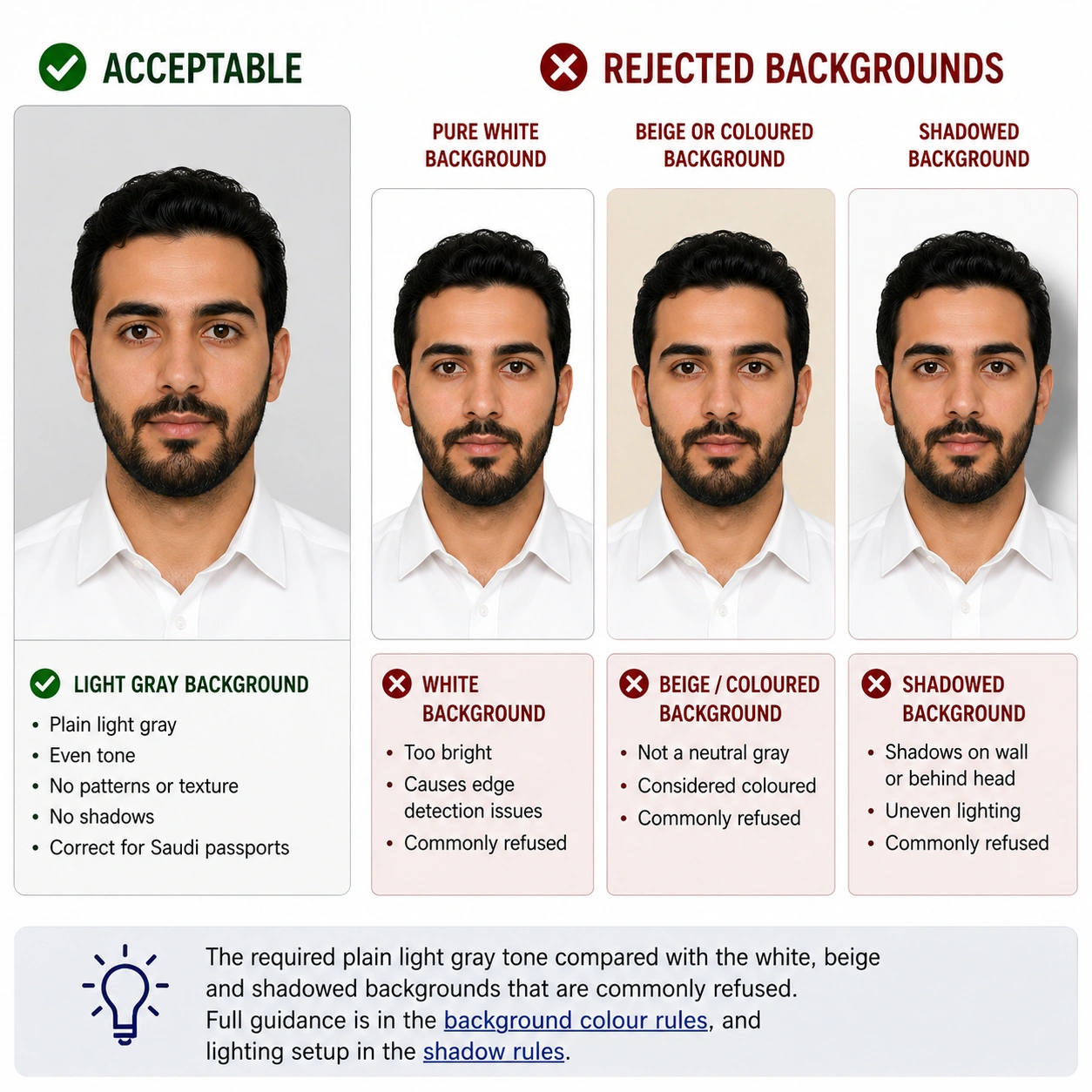
Wrong background on the photo you already have? Open the Passport Photo Maker and replace it in one step.
The General Directorate of Passports, known locally as Jawazat, operates under the Ministry of Interior and is responsible for issuing, renewing, and verifying Saudi passports. Most applications today are initiated through the Absher digital platform, where citizens upload supporting documents including their photo before attending an appointment at a Jawazat office for biometric capture, if required. Because the photo is checked against Jawazat's printed specification before any appointment is booked, a photo that fails the background or sizing check can delay the entire appointment process rather than just the photo itself.
Children, including infants, need their own passport and their own compliant photo — they cannot be included in a parent's passport. The same 40 × 60 mm size, light gray background and head-height target apply at every age. There is no smaller format and no reduced head height for babies.
40 × 60 mm frame with the head near the 38 mm target. No age exemption applies to dimensions or proportions.
No supporting hands, arms, car seat, toy or dummy may be visible. Crop out anything holding the child steady.
For infants who cannot sit upright, lay the baby on a plain light gray or white sheet and shoot from directly overhead.
Jawazat allows some flexibility for very young infants, but an older child with closed eyes will be refused. See the eyes requirements.
Soft indirect daylight from the side of the room, never overhead. Overhead light is what creates the background shadow that fails the check.
Shoot wide and crop down. A tight in-camera crop on a small face leaves too few pixels once the 2:3 frame is applied.
Positioning, lighting and timing technique for babies and toddlers is covered step by step in the baby passport photo at home guide.
Photographing a child? Upload the shot and let the tool apply the crop and background.
Absher allows applicants to upload a digital photo as part of a new passport or renewal request before visiting a Jawazat branch in person. The uploaded file needs to match the printed specification in proportion and background even though it is submitted electronically — uploading a phone photo with a cluttered background or incorrect aspect ratio is one of the most common reasons an Absher application gets flagged for correction before an appointment is confirmed.
| Pixel size at 300 DPI | 472 × 709 px |
|---|---|
| Pixel size at 600 DPI | 945 × 1417 px |
| Proportion | 2 : 3 portrait — must match the printed ratio exactly |
| Colour | Full colour, sRGB. Greyscale is refused |
| File size | Generally under about 300 KB to avoid upload errors |
| Format | JPG or PNG for upload; some flows accept PDF |
If your export is too heavy for the upload, the reduce file size guide and compress to 240 KB guide cover how to lower the KB without dropping below the pixel minimum. iPhone users shooting in HEIC should convert first using the HEIC to JPEG guide. Broader portal rules are covered in the digital passport photo requirements guide.
Yes, a modern phone camera is sharp enough for a compliant Saudi passport photo, provided you control the lighting and background carefully.
Use the rear camera rather than the front-facing camera for better resolution, and disable any beauty filter or portrait mode that softens skin or blurs the background edge. These effects alter facial geometry and are detected.
Face a window with soft, indirect daylight rather than direct sun or overhead lighting, which tends to create shadows under the eyes and chin that can trigger a rejection.
Stand at least one metre in front of a plain light gray or neutral wall. A patterned wall or visible furniture in the frame is one of the easiest ways to fail the background check.
Stand roughly two metres from the camera so your shoulders and head fit naturally in frame without a wide-angle lens distorting your facial proportions.
Do not crop by hand before uploading. Shoot wide, then let the tool apply the 2:3 frame and head-height rule together — the crop guide explains why cropping to height alone still fails.
If a printed copy is needed, use proper photographic paper rather than plain inkjet stock, since matte paper and ink bleed change how the gray background reads. See printing the photo below.
Saudi Arabia shares the 40 × 60 mm format with several Gulf and Southeast Asian neighbours, which is why a photo prepared for one of those often works for another. It does not match the European 35 × 45 mm standard or the American 2 × 2 inch square.
| Country | Photo Size | Pixels @ 300 DPI | Aspect Ratio | Background |
|---|---|---|---|---|
| Saudi Arabia | 40 × 60 mm | 472 × 709 px | 2 : 3 | Plain light gray |
| United Arab Emirates | 40 × 60 mm | 472 × 709 px | 2 : 3 | Plain white |
| Oman | 40 × 60 mm | 472 × 709 px | 2 : 3 | Plain white |
| Egypt | 40 × 60 mm | 472 × 709 px | 2 : 3 | Plain white |
| Thailand | 40 × 60 mm | 472 × 709 px | 2 : 3 | Plain white |
| Qatar | 38 × 48 mm | 449 × 567 px | 19 : 24 | Plain white |
| Turkey | 50 × 60 mm | 591 × 709 px | 5 : 6 | Plain white |
| UK, EU & Schengen | 35 × 45 mm | 413 × 531 px | 7 : 9 | Light grey or white |
| United States | 51 × 51 mm (2 × 2 in) | 600 × 600 px | 1 : 1 | Plain white |
| China | 33 × 48 mm | 390 × 567 px | 11 : 16 | Plain white |
The full worldwide reference is in passport size photo dimensions, with pixel conversions in passport photo size in pixels. Every national standard is indexed in the requirements by country hub.
These two are routinely confused, and the confusion is the leading cause of refusal. They share a country but almost nothing else: different size, different background, different submission channel.
| Requirement | Saudi Passport Photo | Saudi Visa Photo |
|---|---|---|
| Size | 40 × 60 mm (4 × 6 cm) | 2 × 2 inches (51 × 51 mm) |
| Aspect ratio | 2 : 3 portrait | 1 : 1 square |
| Background | Plain light gray | Plain white |
| Who it is for | Saudi citizens applying for or renewing a passport | Foreign travellers applying to enter Saudi Arabia |
| Issuing authority | General Directorate of Passports (Jawazat) | Saudi e-visa platform and consular posts |
| Submission | Absher upload plus Jawazat appointment | e-visa portal upload |
If you are a traveller rather than a Saudi citizen, the size and background are different — see the dedicated Saudi Arabia visa photo requirements guide. The same passport-versus-visa distinction catches applicants elsewhere too: China visa photo uses the identical size as the Chinese passport photo but a different submission channel, and UAE visa photo differs from the UAE passport standard.
Choose any recent photo of yourself from your phone or computer using the upload widget above.
The tool crops your photo to the 2:3 proportion of the 40x60mm Saudi frame and aligns your head height.
Your existing background is removed and replaced with a clean, even plain tone with no shadow.
A compliance check confirms sizing, head position, and background before you download.
Save the digital file at 472 × 709 pixels for Absher upload, or download a print-ready sheet for a physical copy.
Jawazat expects photographic paper, not plain office stock. A 40 × 60 mm photo tiles cleanly onto standard photo paper, so one sheet gives you spare copies for the application file.
| Print resolution | 300 DPI — export at 472 × 709 pixels and disable fit-to-page scaling |
|---|---|
| Paper | Photographic paper, glossy or semi-gloss. Plain inkjet paper distorts the gray tone |
| Copies per 4 × 6 inch sheet | Four 40 × 60 mm photos in a two by two grid with cutting margins |
| Copies per A4 sheet | Around twenty, though most applications need only two |
| Cutting | Guillotine or steel rule for square edges. Do not cut inside the printed border |
| Colour management | sRGB. Turn off printer auto-enhance and colour correction, which shift the gray background |
| Handling | Let ink dry fully. Do not staple, fold or glue the photo face |
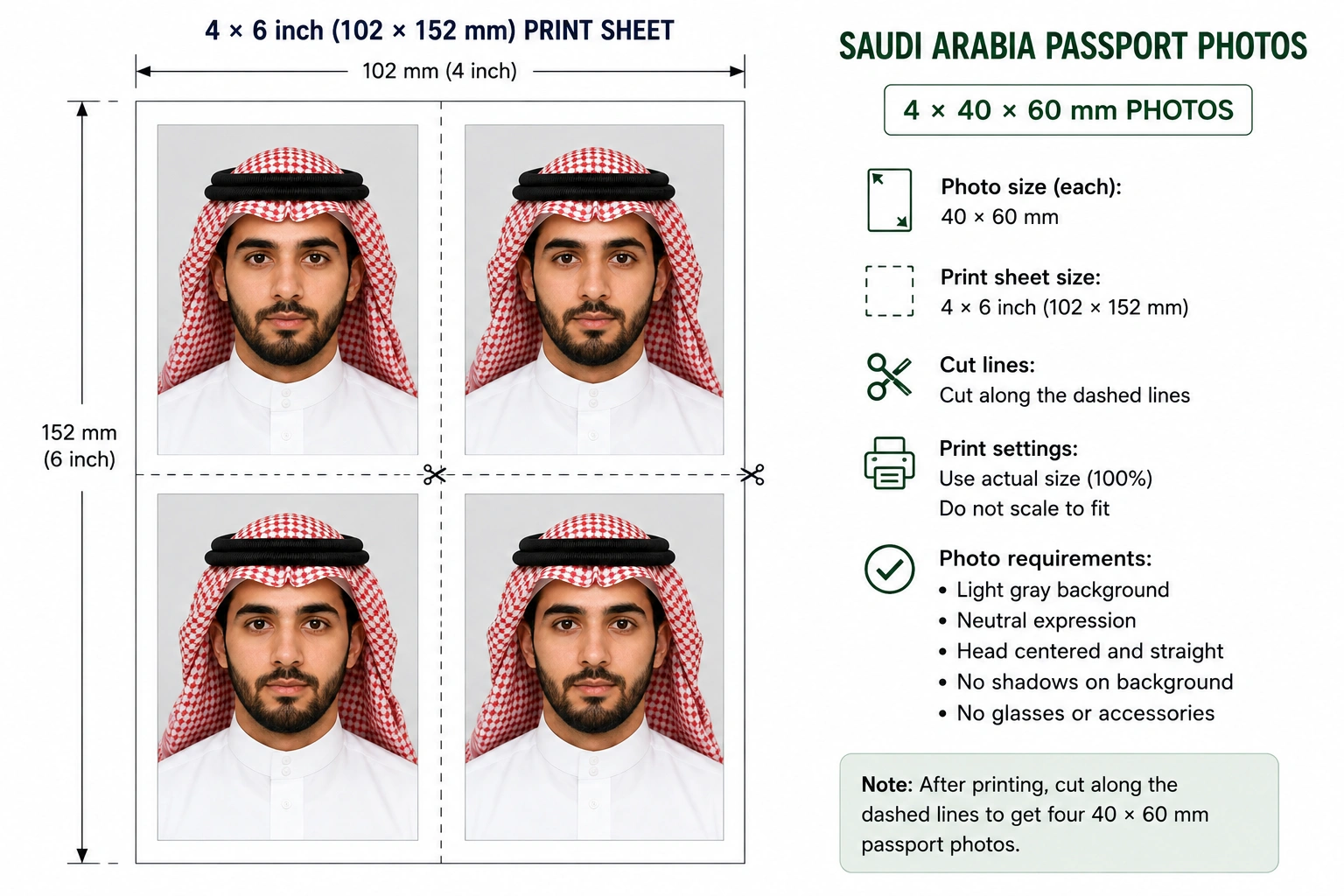
Printer settings, paper choice and cutting technique are covered in full in the print passport photo at home guide, and multi-copy sheet layout in the print sheet guide.
Each item below links to the detailed rule so you can confirm the exact tolerance before you submit. The full cross-country breakdown is in passport photo rejection reasons.
A Saudi Arabia passport photo must measure 40mm by 60mm (4x6 cm), which is 1.57 x 2.36 inches and a 2:3 portrait ratio. At 300 DPI that equals 472 x 709 pixels. It is printed on photographic paper against a plain light gray background.
The head should measure approximately 38mm from the bottom of the chin to the top of the hair, which fills roughly 63% of the 60mm frame height. Framing that leaves the head noticeably smaller or larger than this is a frequent cause of rejection.
A 40 x 60 mm photo at 300 DPI equals 472 x 709 pixels, and at 600 DPI it equals 945 x 1417 pixels. Keep the uploaded file in colour and generally under about 300 KB so the Absher platform accepts it without an upload error.
Saudi passport photos require a plain light gray background. This differs from the white background used for the Saudi e-visa photo, and mixing up the two is one of the most common submission errors. Off-white, cream and beige walls are refused because they are not gray.
Yes, a hijab is permitted and does not need to be removed, provided the full face from the bottom of the chin to the top of the forehead remains visible and unobstructed. The head covering must not cast a shadow across the face or blend into the gray background. See the head covering rules.
Saudi passport photos should reflect your current appearance and are generally expected to be no older than six months at the time of application.
Cosmetic filters, skin smoothing, or background replacement that misrepresents your appearance can cause rejection. Tools that only correct sizing, lighting, and background colour to meet the official specification are acceptable.
Incorrect background colour is among the most frequent rejection reasons, since applicants often submit a white-background photo intended for a visa instead of the light gray background required for the passport itself.
Children including infants need their own passport and their own compliant photo, and the same 40 x 60 mm size and light gray background apply at every age. The child must be alone in the frame with no supporting hands, toy or dummy visible. Eyes should be open where possible, though some flexibility is allowed for very young infants. See the child and infant rules section.
When applying through the Absher platform you upload a digital copy of your photo that matches the official dimensions, 2:3 proportion and light gray background. Some application types still require a printed copy at the passport office. A file with the wrong aspect ratio or a cluttered background is flagged for correction before an appointment is confirmed.
Yes, as long as the final image is cropped to 40x60mm, shows a neutral expression against a plain light gray background, and is sharp enough to print at 300 DPI without blur or pixelation. Use the rear camera and switch off portrait mode and any beauty filter.
Print at 300 DPI on photographic paper. A 4 x 6 inch sheet holds four 40 x 60 mm photos and an A4 sheet holds around twenty, both with cutting margins. Avoid plain inkjet paper, because matte stock and ink bleed change how the light gray background reads. See the print at home guide.
Skip the photo studio and the guesswork on background colour. Upload your photo below and get a 40x60mm result at 472 × 709 pixels in seconds.
