
Mexico Visa Photo Size (3.1 x 3.9 cm) & Requirements
For foreign nationals applying for a Mexico visa, submitting an exact, regulation-compliant photo is a critical step in the application process. Mexican Consulates and the Instituto Nacional de Migración (INM) maintain strict biometric standards, heavily favoring the specific 3.1 x 3.9 cm (31x39 mm) dimension known locally as tamaño infantil. Visa photo rules are frequently enforced with far less leniency than standard passport photos; a non-compliant background, minor shadowing, or the presence of earrings can trigger immediate processing delays or outright visa refusals. Because visa rejections cost you time and non-refundable fees, getting your Mexican visa photo requirements perfectly aligned on the first try is paramount.
Mexico Visa Photo Size (Quick Answer)
A Mexico visa photo must be 3.1 × 3.9 cm (31 × 39 mm) — the size Mexico calls tamaño infantil — on a pure white background, with the face covering 70–80% of the frame height. At 300 DPI that equals 366 × 461 pixels. No glasses, earrings, necklaces or piercings are permitted, and both ears must be visible.
| Specification | Value |
|---|---|
| Photo size | 3.1 × 3.9 cm (31 × 39 mm) |
| Inches | 1.22 × 1.54 in |
| Pixels @ 300 DPI | 366 × 461 px |
| Pixels @ 600 DPI | 732 × 921 px |
| Aspect ratio | 31 : 39 (portrait) |
| Background | Pure white, no shadow |
| Face coverage | 70–80% of frame height |
| Head height (chin to crown) | Approximately 27–31 mm on a 39 mm frame |
| Accessories | No glasses, earrings, necklaces or piercings |
| Ears and forehead | Both must be fully visible |
| Expression | Neutral, mouth closed, eyes open |
| Age of photo | Within the last 6 months |
Visa Type Differences: Read Before Uploading
For foreign nationals dealing directly with the Instituto Nacional de Migración (INM), the base photo requirements (3.1x3.9 cm, white background, front-facing, no glasses or earrings) are identical across tourist, business, student, and temporary resident visa applications.
However, enforcement varies significantly depending on where you apply. While INM domestic offices strictly require the 3.1x3.9 cm size, some international Mexican Consulates (particularly in the US or Canada) will accept standard 2x2 inch passport-sized photos for tourist and resident applications. Always check your specific consulate's website. If you are uncertain, providing the 3.1x3.9 cm tamaño infantil size is the safest approach, as it adheres to Mexico's internal immigration standard.
Why Use Our Mexico Visa Photo Maker?
- Automatic Cropping: Instantly scales your photo to the exact 31x39 mm specifications.
- Biometric Framing: Ensures your head size and eye line sit precisely where INM guidelines require.
- Correct Backgrounds: Replaces non-compliant backgrounds with the mandatory pure white backdrop.
- Dual Formats: Outputs high-resolution files ready for both consulate digital portals and physical printing.
- Zero Editing Skills Needed: No Photoshop required—the tool handles the complex compliance geometry automatically.
Mexico Visa Photo Visual Reference
The diagram below marks the measurements an INM office checks: the 31 × 39 mm frame, the 70–80% face coverage, and the pure white background with both ears and the full forehead exposed.
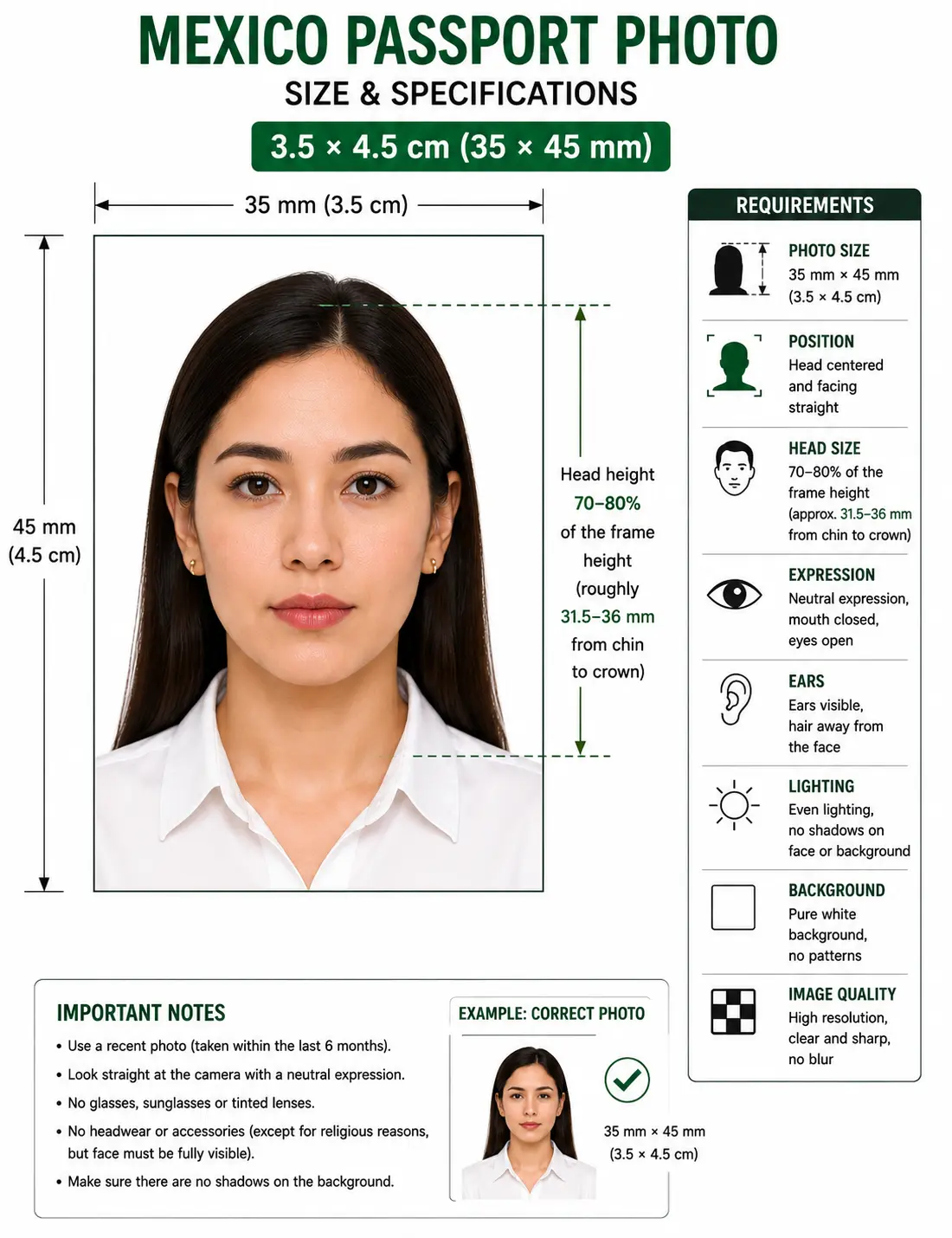

Mexican Visa Photo Requirements
The following specifications apply to the standard INM submission format. Please confirm with your local Mexican consulate prior to submission. Each rule links to the detailed standard in our passport photo rules library.
| Photo Size (Width x Height) | 3.1 x 3.9 cm (31 x 39 mm) - "Tamaño Infantil" |
|---|---|
| Pixels @ 300 DPI | 366 x 461 px — see passport photo size in pixels |
| Inches | 1.22 x 1.54 in |
| Aspect Ratio | 31 : 39 portrait |
| Background Color | Pure white, with no shadows or patterns — see background colour rules |
| Lighting | Even and diffuse, no shadow on the face or the wall — see shadow rules |
| Head Size & Position | Face must cover roughly 70-80% of the photograph — see face size requirements |
| Head Height (chin to crown) | Approximately 27–31 mm on the 39 mm frame — see head size rules |
| Eyes | Both open, looking directly at the lens — see eyes requirements |
| Hair | Pushed back behind the ears, forehead fully visible, no fringe over the eyebrows — see hair rules |
| Ears | Both must be visible. Stricter than the UK or Schengen standard — see ears visibility rules |
| Resolution (Digital) | Minimum 300 DPI |
| File Format | JPEG or PNG (for digital portal submissions) |
| Colour | Full colour, sRGB, natural skin tones, no filters or beautification |
| Glasses Rules | Strictly Prohibited. No glasses allowed — see glasses rules |
| Head Coverings | No hats. Religious coverings must leave the full face, forehead and ears visible — see head covering rules |
| Expression Rules | Neutral expression, mouth closed, eyes open looking directly at the lens. |
| Photo Age | Must be taken within the last 6 months (cannot match a previous visa or current passport). |
| Accessories | No hats, no earrings, no necklaces, no visible piercings. |
| Number of Prints | Varies by consulate and visa category — confirm the required count before your appointment |
| Varies by Visa Type? | No. Base biometric specs apply to Tourist, Business, Student, and Temporary Resident visas. |
Have a photo ready? Open the Passport Photo Maker and apply the 31 × 39 mm crop and white background in under a minute.
Country-Specific Visa Photo Rules
Mexico’s photo requirements feature some unique strictness compared to North American or European standards. The most notable rule is the absolute prohibition of facial accessories. The SRE and INM guidelines explicitly state that applicants must not wear earrings, necklaces, or any facial piercings in their visa photos. Furthermore, hair must be pushed back behind the ears, and the forehead must be completely visible (no bangs obscuring the eyebrows).
Two of those rules are stricter than most of the world. Ear visibility is optional in the UK and across the EU biometric standard, and jewellery is generally tolerated as long as it does not obscure the face. Mexico permits neither. If you are reusing a photo prepared for another country, check those two points first.
In-Person Submission Rules
Most Mexican visa applications (such as Temporary Resident or Student Visas) require an in-person interview at a consulate. For these appointments, you must bring physically printed photos.
- Photos must be printed on high-quality photographic paper.
- They must be in color.
- They should not be stapled, taped, or glued to the application form before arriving unless explicitly instructed to do so.
- Smudged ink or low-quality home-printer paper will result in an immediate rejection.
Printing Your Mexico Visa Photo
Because most Mexican visa categories require an in-person appointment, printing is part of the specification rather than an afterthought. The 31 × 39 mm format is smaller than most passport sizes, so more copies fit on a sheet and cutting accuracy matters more.
| Print resolution | 300 DPI minimum — export at 366 × 461 pixels. Disable fit-to-page scaling, which changes the physical size |
|---|---|
| Paper | Glossy or matte photographic paper in colour. Plain copier paper is refused |
| Copies per 4 × 6 inch sheet | Up to nine 31 × 39 mm photos in a three by three grid with cutting margins |
| Cutting | Guillotine or steel rule for square edges. Do not cut inside the printed border |
| Colour management | sRGB. Turn off printer auto-enhance, skin smoothing and colour correction |
| Handling | Let ink dry fully. Do not staple, tape or glue the photo unless the consulate instructs you to |
Printer settings, paper choice and cutting technique are covered in full in the print passport photo at home guide, and multi-copy sheet layout in the print sheet guide. If a consulate portal caps your upload file size, the reduce file size guide and digital photo requirements guide cover that.
Child Visa Photo Requirements
Foreign nationals applying for visas on behalf of minors must adhere to the same stringent rules, with minor leniency for infants. Children must be photographed alone with no parents, hands, or pacifiers visible in the frame. The background must remain pure white. For newborns unable to sit up, laying them on a plain white sheet is acceptable, provided there are no heavy shadows cast over the infant's face. Toys and accessories are strictly forbidden.
Same size, same framing
The 3.1 × 3.9 cm frame and 70–80% face coverage apply to newborns and children exactly as to adults. There is no reduced format for minors.
Child alone in the frame
No parents, supporting hands, car seat, toy or pacifier may appear. Support the child from behind a plain white sheet so nothing enters the frame.
No accessories on children either
The earring and necklace prohibition applies at every age. Remove any jewellery before shooting, including small stud earrings.
No shadow behind the head
Lay the child on a white sheet in soft indirect daylight and shoot from directly above. Overhead light from one side creates the shadow that fails the check.
Positioning, lighting and timing technique for infants and toddlers is covered step by step in our baby passport photo at home guide. The eyes requirements and shadow rules pages cover the two checks that fail most often on child photos.
Photographing a child? Upload the shot and let the tool apply the 31 × 39 mm crop and white background.
Common Rejection Reasons
Visa rejections at the consulate level are often final for that appointment, requiring you to re-book (which can take months) and pay fees again. Common Mexican visa photo errors include:
- Visible Jewelry: Wearing earrings or necklaces is the #1 reason for biometric rejection by Mexican authorities.
- Incorrect Dimensions: Assuming a US 2x2 inch photo works when the specific consulate demanded the 3.1x3.9 cm INM standard.
- Wrong Mexican Size: Submitting the 4.5 x 3.5 cm Mexican passport size instead of the 3.1 x 3.9 cm visa size.
- Obscured Forehead/Ears: Hair covering the ears or bangs touching the eyebrows — see hair rules and ears visibility rules.
- Off-White Background: Cream, light grey or a faintly tinted wall. Mexico requires pure white — see background colour rules.
- Shadow Behind the Head: Standing too close to the wall or lighting from one side — see shadow rules.
- Smiling: Any deviation from a strictly neutral expression — see smile rules.
- Glasses: Including clear prescription lenses, which are prohibited outright — see glasses rules.
- Filters or Retouching: Portrait blur, skin smoothing and slimming alter facial geometry and are detected.
- Old Photos: Providing a photo that matches your 2-year-old passport photo.
- Plain Paper Prints: Home-printed on copier paper rather than photographic stock.
The full cross-country breakdown of what causes refusal and how to correct it is in passport photo rejection reasons.
Can I Take My Mexico Visa Photo at Home?
Yes, you can take your Mexico visa photo at home, provided you follow biometric capture guidelines strictly.
- Phone Camera Requirements: Use a modern smartphone camera. Do not use the front-facing "selfie" camera, as it distorts facial geometry. Have someone else take the picture from about 1.5 to 2 meters away.
- Turn Off Beautification: Disable portrait mode, background blur and skin smoothing before shooting. These alter facial geometry and are detected by automated validation.
- Lighting: Face a window with natural, diffuse daylight to prevent heavy shadows on your face or the wall behind you.
- Background: Stand about half a meter away from a plain, light-colored wall. (Our tool will automatically replace this with the mandatory pure white).
- Remove Accessories First: Take off earrings, necklaces and glasses, and tuck hair behind both ears before the shutter, not afterwards.
- Printing: If submitting physically at the consulate, you must print the resulting file on glossy or matte photographic paper at a local pharmacy or print shop. See the print at home guide.
If your phone saves images in HEIC format, convert to JPEG first using the HEIC to JPEG guide. To reframe a wide or full-body source image, the crop guide explains how the frame and head-height rule are applied together.
Mexico Visa Photo vs. Mexico Passport Photo
It is crucial to understand the difference between applying for a Mexican Visa (as a foreign national) and a Mexican Passport (as a citizen). The two use different sizes, and mixing them up is a documented cause of rejection at INM offices.
| Requirement | Mexico Visa Photo | Mexico Passport Photo |
|---|---|---|
| Size | 3.1 × 3.9 cm (31 × 39 mm) | 4.5 × 3.5 cm (35 mm wide × 45 mm tall) |
| Pixels @ 300 DPI | 366 × 461 px | 413 × 531 px |
| Local name | Tamaño infantil | Standard passport size |
| Who it is for | Foreign nationals entering Mexico | Mexican citizens |
| Issuing authority | SRE consulates and INM | SRE passport offices |
| Background | Pure white | White |
| Jewellery and glasses | Prohibited | Prohibited |
| Ears and forehead | Must be fully visible | Must be fully visible |
| Guide | This page | Mexico passport photo |
Honest note: If you are applying at an international consulate, some consulates request passport-sized (4.5x3.5 or 2x2 inch) photos even for visas. You must cross-reference your specific consulate's instructions.
The 4.5 × 3.5 cm Mexican passport size is the same physical format as the international 35x45 mm standard. For every size side by side, see passport size photo dimensions, or browse every national standard in the requirements by country hub.
How to Create a Mexico Visa Photo
- Step 1: Prepare and shoot – Remove earrings, necklaces and glasses, tuck hair behind both ears, and take a clear front-facing photo against a neutral wall in soft daylight.
- Step 2: Upload – Drop the image into the widget above, or open the Passport Photo Maker directly.
- Step 3: Crop & Background – The tool sizes the image to 3.1x3.9 cm at a 31:39 ratio and replaces your background with pure white.
- Step 4: Verify Against Requirements – Check the frame against the requirements table: no accessories, both ears visible, forehead exposed, neutral expression, no shadow behind the head.
- Step 5: Download – Download your digital file for online portals, or the printable 4x6 sheet to take to a photo centre for your consulate appointment.
Frequently Asked Questions
Size & Dimensions
What is the exact Mexico visa picture size?
The Instituto Nacional de Migración (INM) standard is 3.1x3.9 cm (31x39 mm), also known as tamaño infantil. At 300 DPI that equals 366 × 461 pixels, and it measures 1.22 × 1.54 inches. Some international Mexican Consulates may accept or request standard 2x2 inch photos, so always confirm with the specific consulate processing your application.
What is the Mexico visa photo size in pixels?
At 300 DPI the 31 × 39 mm Mexico visa photo equals approximately 366 × 461 pixels. At 600 DPI it equals 732 × 921 pixels. Use 300 DPI as the working standard for both digital upload and printing. See passport photo size in pixels for every other format.
How large should the head be in a Mexico visa photo?
The face must cover roughly 70 to 80 percent of the photograph height. On a 39 mm tall frame that works out to a head measuring about 27 to 31 mm from chin to crown, with the eye line sitting in the upper portion of the frame. See head size rules.
Is the Mexico visa photo the same size as the Mexico passport photo?
No. The Mexican passport photo for citizens is 4.5 × 3.5 cm, meaning 35 mm wide by 45 mm tall. The Mexico visa photo for foreign nationals is 3.1 × 3.9 cm, meaning 31 mm wide by 39 mm tall. Submitting the passport size to an INM office will be rejected. See the comparison table above.
Accessories & Appearance
Can I wear earrings for my Mexican visa photo?
No. Official Mexican consulate guidelines strictly state that you must not wear glasses, earrings, necklaces, or any facial piercings. Your face and ears must be completely visible and free of accessories. Visible jewellery is the most common cause of biometric rejection by Mexican authorities.
Do I need to show my ears in a Mexico visa photo?
Yes. Mexican guidelines require hair to be pushed back behind the ears so both ears are visible, and the forehead must be fully exposed with no fringe touching the eyebrows. This is stricter than the UK or Schengen standard, where ear visibility is not mandatory. See ears visibility rules.
Can I wear glasses in my Mexico visa photo?
No. Glasses are prohibited outright in Mexican visa photos, including clear prescription lenses. This is a firmer rule than the general visa guidance applied by many other authorities, and there is no glare-based exception.
Can I smile in my Mexico visa photo?
No. A strictly neutral expression is required, with the mouth closed and both eyes open looking directly at the lens. Any deviation from neutral is listed among the common rejection reasons at Mexican consulates.
What background is required for a Mexico visa photo?
Pure white with no shadows, patterns or objects behind the head. Off-white and light grey are not the stated standard for Mexico, which is stricter than the light-coloured allowance used across much of Europe. See background colour rules.
How recent does my Mexico visa photo need to be?
The photo must be taken within the last 6 months and must reflect your current appearance. It must not be the same image used on your current passport or a previous visa application.
Children, Submission & Printing
What are the Mexico visa photo rules for a baby or child?
The same 3.1 × 3.9 cm size, pure white background and head proportions apply to minors. The child must be photographed alone with no parents, hands, toys or pacifiers visible in the frame. For newborns unable to sit up, laying them on a plain white sheet is acceptable provided no heavy shadow falls across the face. See the child visa photo requirements section.
Does INM require a digital or printed photo?
If applying in-person at a consulate or an INM office in Mexico for residency, physical prints are required on photographic paper in colour. If utilizing an online pre-authorization system, a digital upload adhering to their specific file size limits is necessary. Confirm the required number of prints with your consulate before the appointment.
Is the Mexican tourist visa photo the same as the temporary resident photo?
Yes, the core INM biometric requirement (3.1x3.9 cm, front-facing, pure white background, no accessories) is identical across tourist, business, student, and temporary resident visa categories. Only the enforcement location differs.
How do I print a 3.1 x 3.9 cm Mexico visa photo?
Print at 300 DPI on glossy or matte photographic paper in colour. A standard 4 × 6 inch sheet fits up to nine 31 × 39 mm photos in a three by three grid with cutting margins. Cut with a guillotine for square edges, and do not staple, tape or glue the photo to the application form unless instructed. See the print at home guide.
Official Sources & References
- Instituto Nacional de Migración (INM) — immigration and biometric document guidance: inm.gob.mx
- Secretaría de Relaciones Exteriores (SRE) — consular services and visa procedures: gob.mx/sre
- Your local Mexican consulate — publishes the photo size and print count it accepts for each visa category
- ICAO Doc 9303 — Machine Readable Travel Documents biometric photograph standard: icao.int
Related Visa & Passport Resources
Tools & Hubs
- ClonyPDF Passport Photo Maker — create passport and visa photos for 100+ countries
- Visa Photo Requirements by Country — every visa standard in one hub
- Passport Photo Requirements by Country — every passport standard in one hub
- Passport Photo Rules & Standards — background, head size, eyes, hair and expression rules
Mexico & Regional Guides
- Mexico Passport Photo Generator (For Citizens) — the 4.5 × 3.5 cm citizen format
- Colombia Visa Photo Requirements
- Brazil Visa Photo Requirements
- Chile Visa Photo Requirements
- Peru Visa Photo Requirements
- Colombia Passport Photo
- Brazil Passport Photo
- Argentina Passport Photo
- China Visa Photo — another consulate-submitted visa format at 33 × 48 mm
- US Green Card Photo Checker
Sizes & Conversions
- Passport Photo Size in Pixels — pixel conversions at 300 and 600 DPI
- Passport Size Photo Dimensions — worldwide size reference
- 2x2 Photo Size — the US square format some consulates accept
- 35x45 Photo Size — the same format as the Mexican passport photo
Rules That Apply to This Photo
- Background Colour Rules
- Head Size Rules
- Face Size Requirements
- Eyes Requirements
- Hair Rules
- Ears Visibility Rules
- Head Covering Rules
- Shadow Rules
- Glasses Rules
- Smile Rules
- Crop Guide
- Print at Home Guide
- Passport Photo Rejection Reasons
Practical Guides
- Digital Photo Requirements — pixel, format and file size rules across portals
- Print Sheet Layout — fitting multiple copies on one sheet
- Reduce Photo File Size
- Convert HEIC to JPEG
- Crop a Photo Online
- Baby Passport Photo at Home
Create Your Mexico Visa Photo Now
Don't risk consulate delays. Generate an INM-compliant 3.1x3.9 cm visa photo instantly. Upload your picture below to secure your application today.