
Argentina Passport Photo Requirements
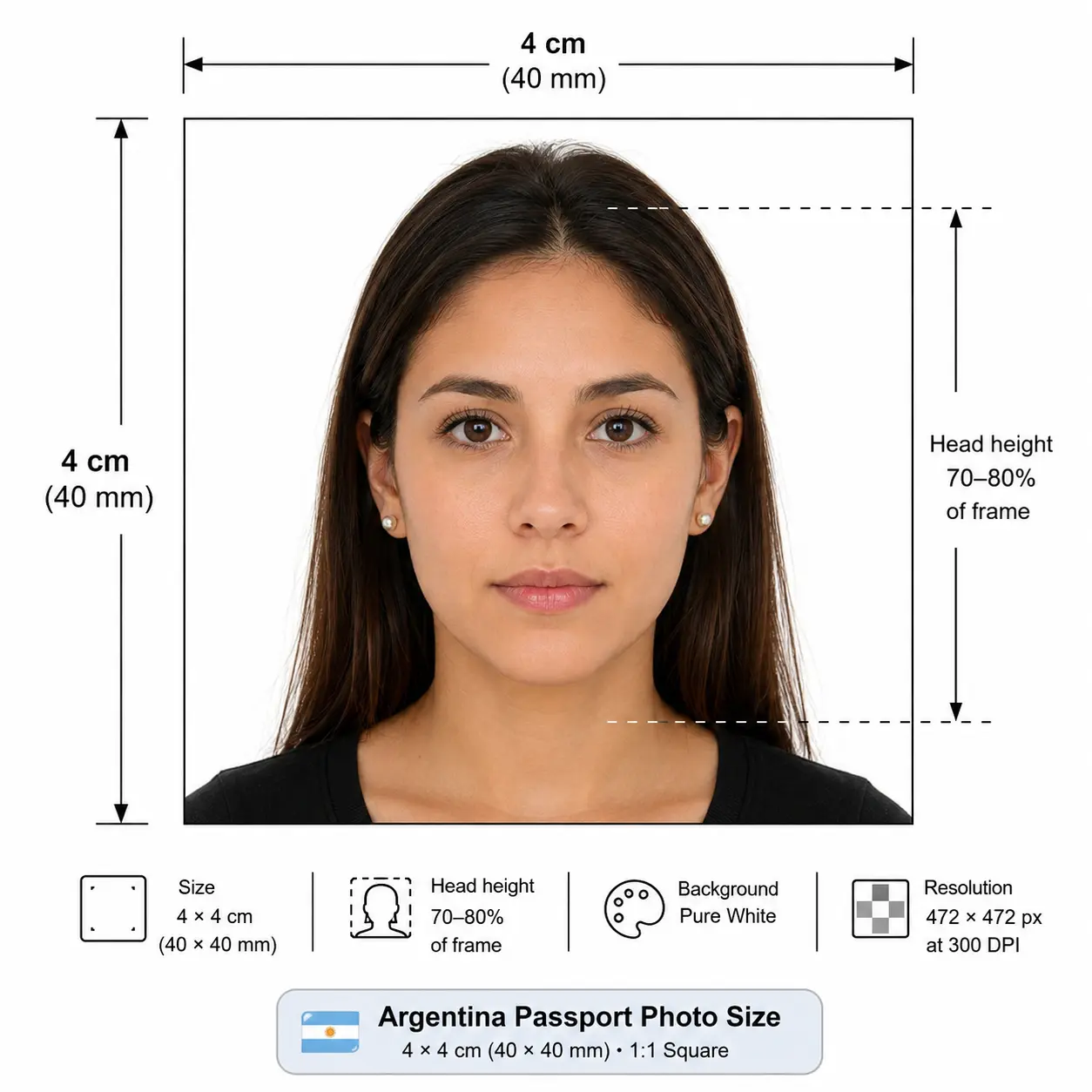
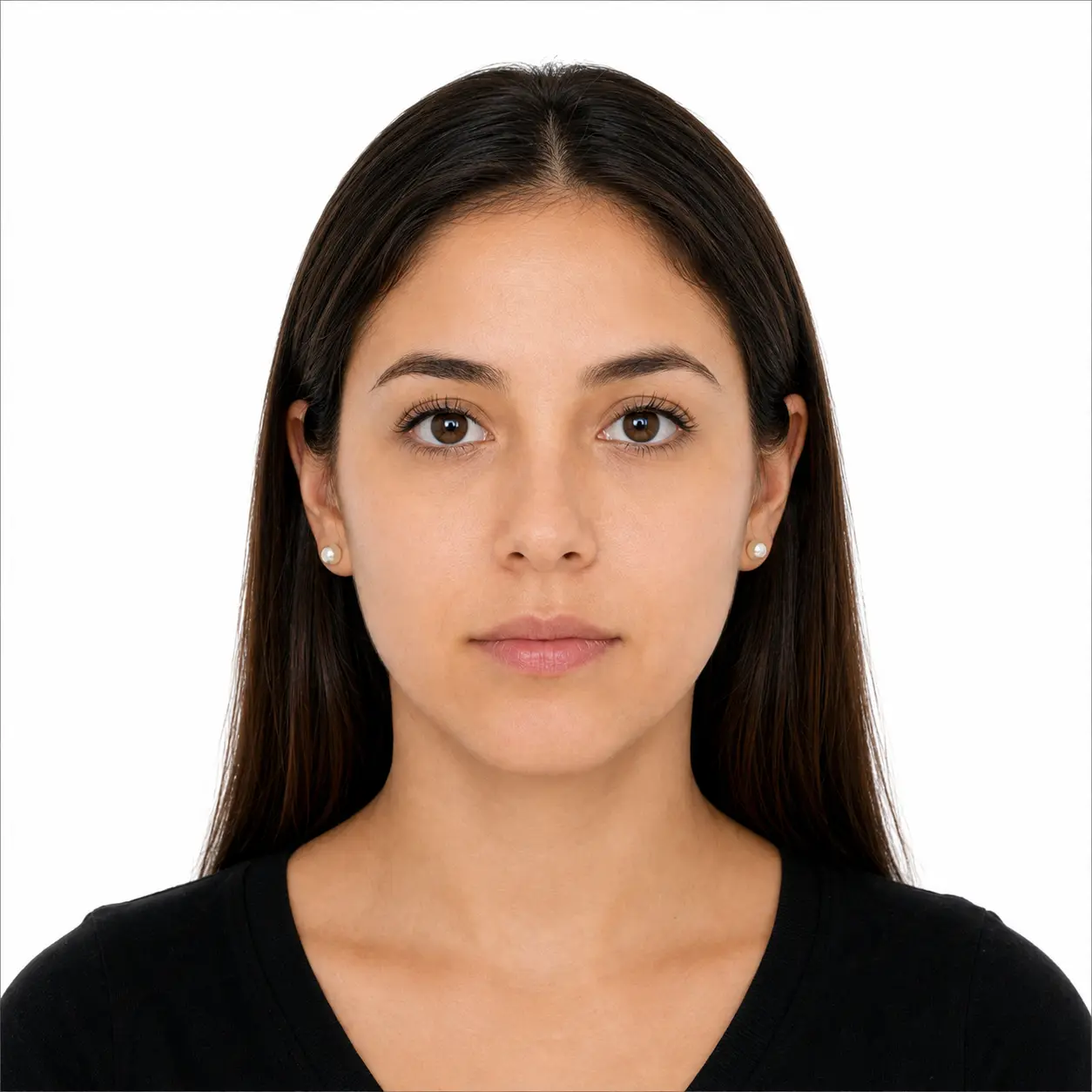
Submitting an accurate photograph is the most critical step in processing your Argentine passport or Documento Nacional de Identidad (DNI). Below are the exact technical specifications required. Each rule links to the detailed standard in our passport photo rules library.
| Photo Size | 4 x 4 cm (40 x 40 mm), 1:1 square |
|---|---|
| Pixels @ 300 DPI | 472 x 472 px (945 x 945 px at 600 DPI) |
| Background Color | Pure, plain white (no patterns or shadows) — see background colour rules |
| Lighting | Even and diffuse, no shadow on the face or behind the head — see shadow rules |
| Head Size | Head height should be roughly 70% - 80% of the photo — see head size rules |
| Face Coverage | Face centred and square to the camera — see face size requirements |
| Eyes | Both eyes open, looking directly at the lens — see eyes requirements |
| Hair | Must not cover the eyes or obscure the outline of the face — see hair rules |
| Ears | Not mandatory, but the face outline must stay clear — see ears visibility rules |
| Head Coverings | Not permitted except for documented religious reasons, with the full face visible — see head covering rules |
| Resolution | Minimum 300 DPI (600 DPI recommended for printing) — see resolution rules |
| File Format | JPEG, PNG (for digital submissions), 24-bit colour in sRGB |
| Glasses Rules | Not recommended (tinted lenses prohibited, frames must not cover eyes) — see glasses rules |
| Expression Rules | Neutral expression, mouth completely closed, eyes open — see smile rules |
| Photo Age | Taken within the last 6 months to reflect current appearance |
| Digital Submission | Accepted through official consular portals and Mi Argentina integrations |
Argentina Passport Photo Dimensions & Pixels
The 4 x 4 cm format is a true square, which distinguishes it from the portrait formats used across Europe. Because both sides are equal, the pixel dimensions are identical in width and height at any given resolution.
Need a 472 × 472 pixel file with a pure white background? Open the Passport Photo Maker and get one in under a minute.
For pixel conversions across every country standard, see our passport photo size in pixels reference, or the full worldwide list in passport size photo dimensions. Every national standard is indexed in the requirements by country hub.
RENAPER Compliance: National Registry of Persons Overview
In Argentina, the issuance of civil identification, including the DNI and the Pasaporte, is managed by the Registro Nacional de las Personas (RENAPER). RENAPER employs advanced biometric facial recognition technology to verify applicant identities and prevent fraud. Because these systems rely on precise facial mapping, they require high-fidelity imagery. Photos that are distorted, poorly lit, or improperly scaled will cause the biometric software to fail, leading to an automatic rejection of your passport application. Utilizing an Argentina passport photo maker ensures that your image is scaled to standard parameters before it ever reaches a RENAPER database.
The Argentine Passport & DNI Application Process
Whether applying domestically within Argentina or at a consulate abroad, the workflow remains structured around biometric data capture. At domestic civil registry offices (Registros Civiles) and shopping mall kiosks, photos are often taken on-site. However, applicants submitting forms through consulates, processing visa applications, or navigating digital renewals heavily rely on providing their own 4x4 cm passport photos. Arriving with a pre-verified, perfectly formatted image prevents the need to reschedule appointments if the consulate's hardware is down or if physical application forms mandate attached photographs.
How many photos should you bring?
Requirements differ by channel. Domestic offices and mall kiosks normally capture the image on site, so no printed photo is needed. Consular applications abroad and paper forms typically require printed 4 x 4 cm photos — bring at least two identical copies from the same session, and confirm the exact number with the consulate handling your file before the appointment.
Child & Infant Passport Photo Rules in Argentina
Taking a compliant passport photo of a baby can be challenging, but RENAPER applies the same core biometric rules to minors, with slight leniency regarding eye contact. The 4 x 4 cm size, pure white background and 70–80% head proportion all still apply — there is no reduced format for infants. When photographing an infant:
- No pacifiers or toys can be visible in the frame.
- Parents' hands, arms, or clothing must not appear in the shot.
- Lay the infant on a plain white sheet, or drape a white cloth over a car seat.
- Ensure the child's face is illuminated evenly to prevent deep shadows across the eyes.
- Shoot from directly above with soft, indirect daylight rather than overhead room lighting.
- Shoot wide and crop down — cropping tightly in camera leaves too few pixels once the square frame is applied.
Full positioning, lighting and timing technique for newborns and toddlers is covered in our baby passport photo at home guide. The eyes requirements and shadow rules pages cover the two checks that fail most often on child photos.
Photographing a child? Upload the shot and let the tool apply the 4 x 4 cm crop and white background automatically.
Navigating Digital Consular Submissions
For Argentines residing overseas, consulates frequently request digital uploads of your passport photo via email or specialized application portals prior to an in-person appointment. The digital file must retain the 1:1 aspect ratio of a 4x4 cm photo — that is 472 x 472 pixels at 300 DPI, or larger. Heavy compression, digital manipulation of facial features (like airbrushing), and scanned images of old printed photos are strictly forbidden. Our tool generates an optimized, high-resolution JPEG that passes consular digital screening checks without triggering file-size or resolution errors.
If a portal enforces a file-size ceiling, the reduce file size guide and compress to 240 KB guide explain how to hit it without dropping below the pixel minimum. iPhone users shooting in HEIC should convert first with the HEIC to JPEG guide. Broader portal rules are covered in the digital passport photo requirements guide.
Common Reasons for Application Rejection
To avoid delays in receiving your travel document, pay close attention to these frequent mistakes specific to Argentine applications:
- Incorrect Aspect Ratio: Submitting a 2x2 inch photo instead of a 4x4 cm photo. Both are square, but the US format is physically larger at 51 x 51 mm.
- Background Anomalies: Shadows cast on the white background or off-white/cream walls. See the background colour rules.
- Poor Lighting: 'Red-eye' effects from camera flashes or heavy shadows under the nose and chin. See the shadow rules.
- Head Outside 70–80%: A correctly sized photo with a head that is too small or too large in frame still fails. See the head size rules.
- Hair Across the Face: A fringe over the eyes or hair obscuring the face outline fails landmark detection. See the hair rules.
- Outdated Appearance: Submitting a photograph older than six months or one where hair drastically obscures the face.
- Digital Alterations: Using filters, portrait blur or beauty enhancements that warp the natural geometry of your face.
- Upscaled Low-Resolution Files: Enlarging a small image to reach 472 x 472 pixels invents pixels rather than detail and fails the sharpness check. Crop down from a larger source instead.
- Printed on Plain Paper: Standard copier paper is refused. Use glossy or matte photo paper — see the print at home guide.
The full cross-country breakdown of what causes refusal and how to correct it is in passport photo rejection reasons.
Can I Take My Argentina Passport Photo at Home?
Absolutely. Taking your own photograph at home is easier than ever, provided you follow a few essential guidelines to ensure it is suitable for our Argentina passport photo maker.
Lighting: Face a window to utilize natural daylight. This provides even illumination across your face and minimizes harsh shadows. Avoid using a strong flash in a dark room.
Background: Stand roughly 1.5 feet away from a plain wall. Don't worry if the wall isn't perfectly white; our automatic background removal tool will seamlessly swap it for a pure white canvas.
Camera Placement: Keep the camera at eye level, roughly 4 to 6 feet away from you. Have a friend or family member take the picture, or use a tripod. Do not submit selfies, as the wide-angle lens on a smartphone's front camera heavily distorts facial proportions.
Camera settings: Switch off portrait mode, background blur and skin smoothing before you shoot. These alter facial geometry and are detected by biometric validation.
Printing a 4x4 cm Argentina Passport Photo
If you are applying at a consulate or attaching a photo to a paper form, printing is part of the specification rather than an afterthought. The 4 x 4 cm format tiles cleanly onto standard photo paper.
| Print resolution | 300 DPI minimum — export at 472 x 472 pixels or larger |
|---|---|
| Paper | Glossy or matte photo paper. Plain copier paper is refused |
| Copies per 4 x 6 inch sheet | Six 4 x 4 cm photos in a two by three grid with cutting margins |
| Copies per A4 sheet | Up to thirty, though most applicants only need two |
| Cutting | Guillotine or steel rule for square edges. Do not cut inside the printed border |
| Colour management | sRGB. Disable printer auto-enhance, skin smoothing and colour correction |
| Handling | Let ink dry fully. Do not staple, fold or glue the photo face |
Printer settings, paper choice and cutting technique are covered in full in the print passport photo at home guide, and multi-copy sheet layout in the print sheet guide.
Argentine 4x4 vs International Photo Standards
A common mistake travelers make is assuming passport photo sizes are universally identical. They are not. Here is how the Argentine passport photo compares to the standard US passport photo.
Argentina Passport Photo
- Dimensions: 40 x 40 mm (4x4 cm)
- Aspect Ratio: 1:1 (Square)
- Background: Pure White
- Head Proportion: ~70-80% of image height
- Pixels @ 300 DPI: 472 x 472
US Passport Photo
- Dimensions: 51 x 51 mm (2x2 inches)
- Aspect Ratio: 1:1 (Square)
- Background: White or Off-White
- Head Proportion: ~50-69% of image height
- Pixels @ 300 DPI: 600 x 600
Argentina shares the square 1:1 shape with the US and India but not the dimensions. Across South America and the wider world the formats diverge further:
| Country | Photo Size | Aspect Ratio | Pixels @ 300 DPI |
|---|---|---|---|
| Argentina | 40 × 40 mm | 1 : 1 | 472 × 472 |
| Chile | 45 × 45 mm | 1 : 1 | 531 × 531 |
| Brazil | 50 × 70 mm | 5 : 7 | 591 × 827 |
| Colombia | 40 × 50 mm | 4 : 5 | 472 × 591 |
| Peru | 35 × 43 mm | ~7 : 9 | 413 × 508 |
| United States | 51 × 51 mm (2 × 2 in) | 1 : 1 | 600 × 600 |
| United Kingdom | 35 × 45 mm (35x45) | 7 : 9 | 413 × 531 |
| Canada | 50 × 70 mm (50x70) | 5 : 7 | 591 × 827 |
How to Create an Argentina Passport Photo
Processing your image is entirely automated. Follow these five simple steps to secure your compliant document photo:
- Upload: Select a well-lit, front-facing photo from your smartphone or computer using the widget above.
- Crop: Our system will immediately identify your face and crop the image to the mandatory 4x4 cm dimensions. The crop guide explains how the 1:1 ratio and head-height rule are applied together.
- Background: The integrated AI will strip away your original background, instantly replacing it with a RENAPER-approved pure white backdrop.
- Verify: Review the photo to ensure your expression is neutral and your head is framed correctly within the biometric markers.
- Download: Export your finalized digital image for consular submission, or download a 4x6 inch printable layout to take to your local pharmacy.
Frequently Asked Questions
Size & Dimensions
What is the official photo size for an Argentine visa and passport?
The official size for both the Argentine passport and visa is 4x4 cm (40x40 mm), a perfect 1:1 square. Your head should occupy roughly 70-80% of the total image height. At 300 DPI the photo equals 472 x 472 pixels.
What is the Argentina passport photo size in pixels?
A 4x4 cm Argentine passport photo equals 472 × 472 pixels at 300 DPI and 945 × 945 pixels at 600 DPI. Because the format is square, both sides are identical. Do not confuse it with the 2x2 inch US format, which is 600 × 600 pixels at 300 DPI and physically larger.
Appearance & Compliance
Does RENAPER accept photos with off-white backgrounds?
No, the background must be stark, plain white with no patterns, shadows, or secondary colors. Off-white or cream backgrounds frequently lead to rejection.
Can I wear my glasses for the Argentine DNI or Passport photo?
RENAPER strongly recommends removing glasses to avoid any glare or frames obstructing your eyes. Tinted lenses or sunglasses are strictly prohibited.
Can I smile in my passport photo?
No. You must maintain a neutral facial expression with your mouth closed and both eyes open. Smiling can distort your facial features and cause the biometric software to reject your photo.
Can I wear makeup in my passport photo?
Yes, natural and subtle makeup is allowed. However, you should avoid heavy contouring, dramatic eyeliner, or glossy lipstick that alters your everyday appearance or creates a glare on the camera.
Can I wear a uniform in my Argentina passport picture?
No. Uniforms, military attire, or clothing that resembles a uniform cannot be worn in your Argentine passport or DNI photo. Everyday clothing is required.
Children & Copies
What are the Argentina passport photo rules for a baby or child?
The same 4x4 cm size, pure white background and 70-80% head proportion apply to minors, with slight leniency on eye contact for infants. The child must be alone in the frame with no pacifier, toy, or parent's hands, arms or clothing visible. Lay the infant on a plain white sheet and light the face evenly. See the child and infant rules section.
How many Argentina passport photos do I need?
Requirements vary by channel. Domestic civil registry offices and mall kiosks in Argentina usually capture the photo on site. Consular applications abroad and paper forms typically require printed 4x4 cm photos, so bring at least two identical copies and confirm the exact number with the consulate handling your file.
Submitting & Printing
Do I need to print my passport photo or can I submit it digitally?
It depends on the application method. Online renewals often accept digital uploads, whereas in-person applications at embassies or civil registries typically require physical prints on high-quality photo paper.
How do I print a 4x4 cm Argentina passport photo?
Print at 300 DPI or higher on glossy or matte photo paper. A standard 4 x 6 inch sheet holds six 4 x 4 cm photos in a two by three grid with cutting margins, and an A4 sheet holds up to thirty. Cut with a guillotine for square edges and do not trim inside the printed border. See the print at home guide.
What happens if my passport photo is rejected?
If your photo is rejected, your passport application will be placed on hold, causing processing delays. You will be required to submit a new, fully compliant photo before the application can proceed.
Official Sources & References
- Registro Nacional de las Personas (RENAPER) — argentina.gob.ar/interior/renaper
- RENAPER — Argentine passport (Pasaporte) information: argentina.gob.ar
- Ministerio de Relaciones Exteriores — consular services: cancilleria.gob.ar
- Local Registros Civiles and Argentine consulates — appointment booking and on-site photo capture
- ICAO Doc 9303 — Machine Readable Travel Documents biometric photograph standard: icao.int