
Colombia Passport Photo Size (4x5 cm) & Free Online Maker
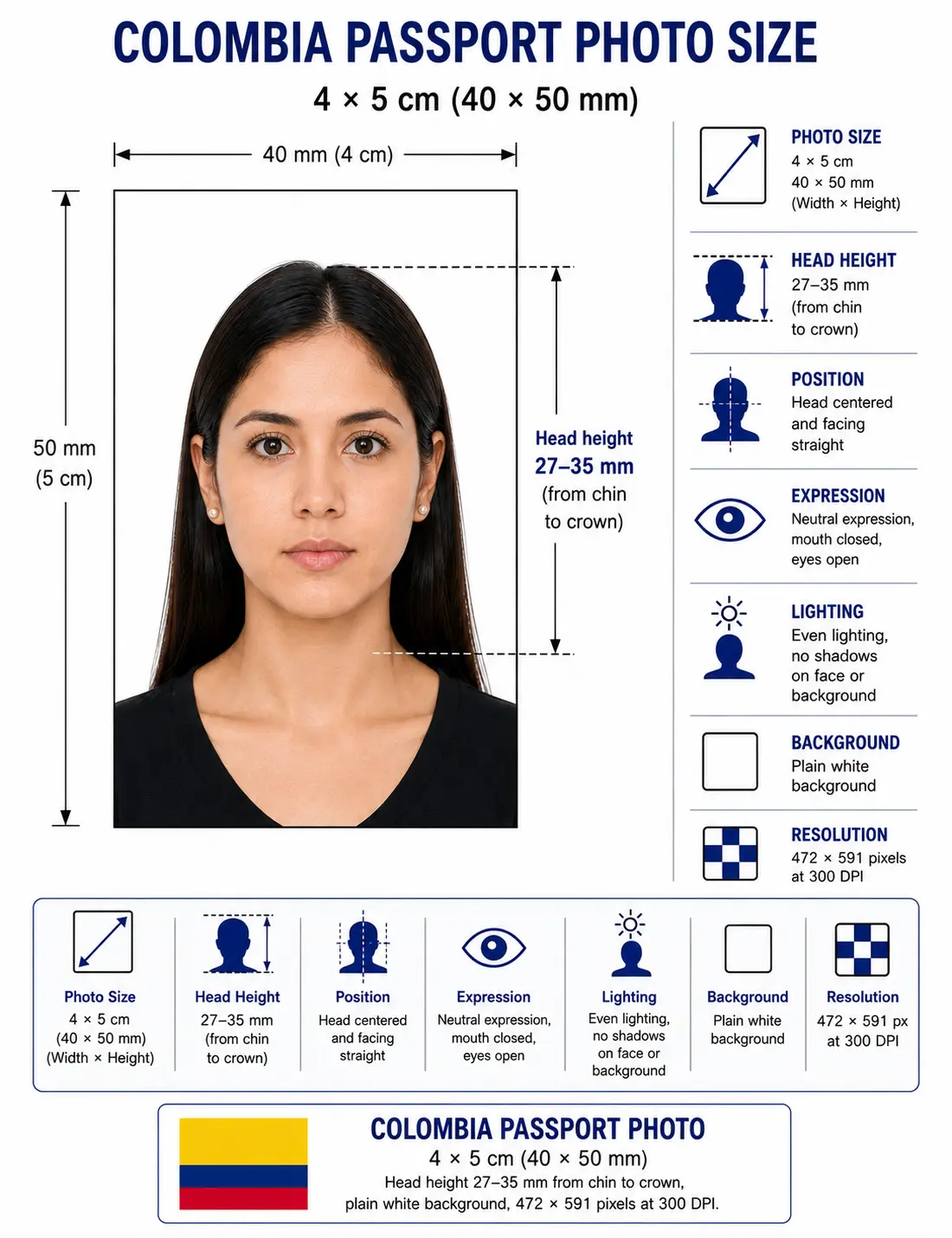
A Colombia passport photo must be 4 × 5 cm (40 × 50 mm) on a plain white background, with the head measuring 27–35 mm from chin to crown, taken within the last 6 months.
Applying for a Colombian passport through the Ministry of Foreign Affairs (Cancillería) requires a strictly compliant 4x5 cm photograph. Even minor deviations in head size, background colour, or lighting lead to application delays or outright rejection at the consulate. Our Colombia passport photo maker verifies the official dimensions, replaces incorrect backgrounds, and prepares your Colombian passport picture for a Cancillería submission — at home, in under a minute.
Colombia Passport Photo Size (Quick Answer)
The Colombia passport photo size is 4 × 5 cm (40 × 50 mm) — a 4:5 portrait ratio equal to 472 × 591 pixels at 300 DPI. The background must be plain white, the head must measure 27–35 mm chin to crown, and SITAC online uploads must stay under 300 KB as a JPEG.
| Requirement | Value |
|---|---|
| Photo size | 4 × 5 cm (40 × 50 mm) |
| Pixels @ 300 DPI | 472 × 591 px |
| Pixels @ 600 DPI | 945 × 1181 px |
| Aspect ratio | 4 : 5 |
| Background | Plain solid white, no shadows |
| Head height (chin to crown) | 27 – 35 mm (about 54–70% of frame height) |
| Ears | Both should be distinctly visible |
| Expression | Neutral, mouth closed, eyes open |
| Age of photo | Within the last 6 months |
| Digital file (SITAC) | JPEG, under 300 KB, minimum 300 DPI |
| Issuing authority | Ministerio de Relaciones Exteriores (Cancillería) |
Applying for a Colombian visa instead? That uses a different size — see Colombia visa photo requirements. Every national standard is indexed in the requirements by country hub, and each rule is explained in the passport photo rules library.
Colombia Passport Photo Visual Reference
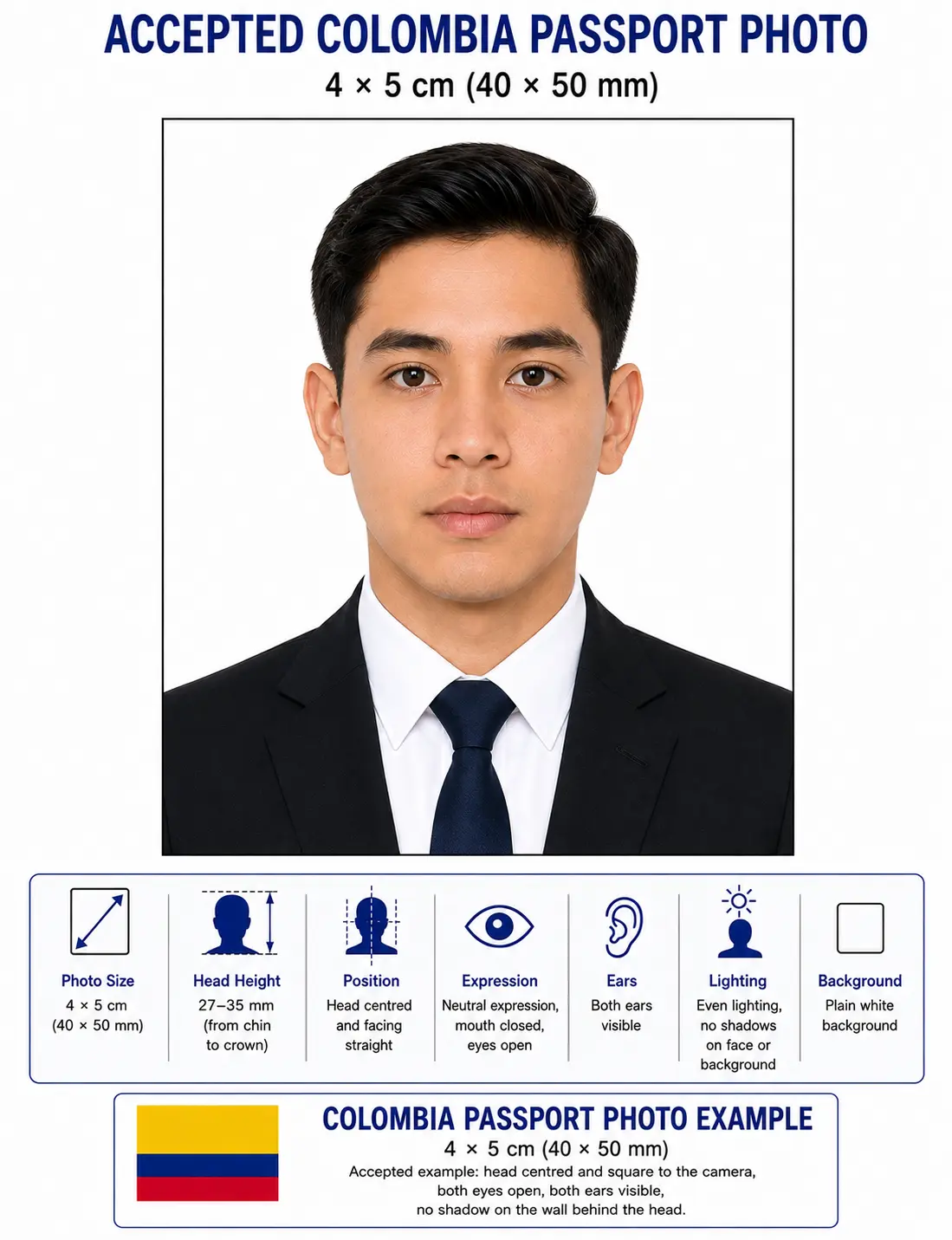
The diagram below marks every measurement the Cancillería checks: the 40 × 50 mm frame, the 27–35 mm chin-to-crown head height, and the plain white background.
Why Upload Your Photo Here?
Editing passport photos manually using generic software is risky and often leads to dimension errors, because most editors snap to standard print sizes rather than the 4:5 biometric frame Colombia requires.
Automatic Crop
Our tool instantly locks onto your facial features, applying a mathematically precise crop mapped to the 4 × 5 cm Colombia format. See the crop guide for how the 4:5 ratio is applied.
Biometric Framing
We analyse your eye line and chin-to-crown distance, keeping the head inside the required 27–35 mm band. See head size rules and face size requirements.
Correct Background
No white wall at home? Our AI clears your current background and replaces it with the shadow-free white the Cancillería requires. See background colour rules.
Printable Photo Sheet
Receive a high-resolution, print-ready grid containing multiple 4 × 5 cm photos, formatted for local pharmacy or home printing without Photoshop. See the print at home guide.
Official Colombia Passport Photo Requirements
Before submitting your application, ensure your photograph matches these exact specifications mandated for the Colombian passport picture. Each rule links to the detailed standard in the passport photo rules library.
| Photo Size | 4x5 cm (40 mm x 50 mm), 4:5 portrait ratio |
|---|---|
| Width | 40 mm (472 px @ 300 DPI) |
| Height | 50 mm (591 px @ 300 DPI) |
| Background | Plain white, strictly no shadows or patterns. See background colour rules |
| Lighting | Uniform and diffuse, no hot spots or shadow behind the head. See shadow rules |
| Head Size | Approximately 27 mm to 35 mm from chin to crown, about 54–70% of the frame height. See head size rules |
| Face Coverage | Face centred and square to the camera. See face size requirements |
| Eyes | Both open, looking straight at the camera. See eyes requirements |
| Ears | Both should be distinctly visible unless covered for documented religious reasons. See ears visibility rules |
| Hair | Must not cover the eyes or the outline of the face. See hair rules |
| Headwear | Forbidden unless worn daily for documented religious reasons, with the full face visible. See head covering rules |
| Resolution | Minimum 300 DPI for physical prints; clear and unpixelated for digital |
| File Format (Digital) | JPEG / JPG, maximum 300 KB for SITAC uploads |
| Colour | 24-bit colour, sRGB, natural skin tones, no filters |
| Glasses Rules | Highly discouraged. Tinted lenses, heavy frames, and flash glare are prohibited. See glasses rules |
| Expression Rules | Neutral expression only. Mouth closed, eyes open and looking straight at the camera |
| Clothing | Must contrast with the white background. Avoid white shirts, light pastels, uniforms and camouflage |
| Photo Age | Taken within the last 6 months |
| Digital Submission Rules | No digital alterations, filters, or deep retouching. Must accurately represent current appearance |
Colombia Passport Photo Dimensions & Pixel Conversions
Agencies publish the requirement in centimetres, but online portals validate uploads in pixels. These are the same photo expressed every way you may be asked for it.
Do not upscale a small photo. Stretching an undersized image to 472 × 591 pixels invents pixels rather than detail, and the result is soft around the eyes and hairline. Colombian biometric validation measures sharpness, so an upscaled file fails even when the pixel count reads correctly. Shoot wide and crop down.
For pixel conversions across every country standard see passport photo size in pixels and the worldwide passport size photo dimensions reference. Colombia shares the 40 × 50 mm format with Estonia and Hong Kong.
Country-Specific Photo Rules
While many nations use a 3.5 × 4.5 cm standard, the 4x5 cm Colombia photo requirement is specific to the country's travel documents, cédulas (identification cards) and consular paperwork. The background must be completely white — off-white or cream is not tolerated. Colombian authorities also require that both ears be distinctly visible unless covered for documented religious reasons. Headwear of any kind is forbidden barring religious garments worn daily. The applicant's clothing must contrast against the white background, so white shirts and light pastels should be avoided.
Compare with neighbouring standards: Peru uses 3.5 × 4.3 cm, Chile uses 4.5 × 4.5 cm, Brazil uses 5 × 7 cm, Mexico uses 4.5 × 3.5 cm and Argentina uses 4 × 4 cm. None of these are interchangeable with the Colombian format.
Digital Passport Submission Rules (SITAC)
For citizens applying for renewals or certain consular services online through the SITAC portal (Sistema Integral de Trámites al Ciudadano), digital photos are mandatory. The digital file must maintain the 4:5 aspect ratio, be formatted as a JPEG, and must not exceed 300 KB. Despite being a digital upload, the original capture must be uncompressed and free of pixelation. Scanning a physical photo is discouraged unless scanned at a minimum of 300 DPI, because artefacts introduced by scanning software cause system rejection.
| Specification | Printed photo | SITAC digital upload |
|---|---|---|
| Size | 40 × 50 mm | 4:5 ratio, 472 × 591 px or larger |
| Resolution | 300 DPI minimum | 300 DPI minimum, no pixelation |
| File size | Not applicable | Maximum 300 KB |
| Format | Photo paper, glossy or matte | JPEG, 24-bit colour, sRGB |
| Editing | None permitted | None permitted — no filters or retouching |
If your export is over the 300 KB ceiling, the reduce file size guide covers hitting a target without dropping below the pixel minimum. iPhone users shooting in HEIC should read the HEIC to JPEG guide first. Broader portal rules are covered in the digital passport photo requirements guide.
National Biometric Standards
Modern Colombian passports are e-passports containing an embedded microchip that stores your digitised photograph and fingerprints. Consequently your photograph must be machine-readable. Lighting must be perfectly uniform across your face with no hot spots from flash and no shadow on the neck or background. The biometric software plots specific points on your face, particularly the distance between the pupils and from the nose to the chin. A tilted head, even by a few degrees, disrupts this facial mapping and renders the photo invalid.
Colombia Passport Photo vs Colombia Visa Photo
These two Colombian documents do not use the same photo size, which is the single most common mistake applicants make. A passport photo cannot be reused for a visa application, or the reverse.
| Requirement | Colombia Passport Photo | Colombia Visa Photo |
|---|---|---|
| Size | 4 × 5 cm (40 × 50 mm) | 3 × 4 cm (30 × 40 mm) |
| Aspect ratio | 4 : 5 | 3 : 4 |
| Pixels @ 300 DPI | 472 × 591 px | 354 × 472 px |
| Background | Plain white | Plain white |
| Expression | Neutral, mouth closed | Neutral, mouth closed |
| Who it is for | Colombian citizens applying for their own passport | Foreign nationals applying to enter Colombia |
| Submission | Cancillería offices, Gobernaciones, consulates, SITAC | Colombian consulate or the online visa portal |
If you are a foreign national rather than a Colombian citizen, see the dedicated Colombia visa photo requirements guide for the 3 × 4 cm specification and submission process.
Colombia Passport Photo for a Baby, Infant or Child
Colombia applies the same 4 × 5 cm specification to minors, including newborns. There is no reduced size and no relaxed background rule. The difficulty is meeting an adult framing standard with a subject who cannot sit up, so these are the points that most often cause a child photo to be refused.
Same size, same head height
40 × 50 mm frame with the head 27–35 mm chin to crown. No age exemption applies to dimensions or framing.
Child alone in the frame
No supporting hands, arms, car seat, toy or dummy may appear, and no other person may be visible. Support the child from behind a plain white sheet.
Eyes open, mouth closed
Both eyes should be open and looking towards the camera wherever achievable, with a relaxed closed mouth. See eyes requirements.
No shadow behind the head
Lay the child on a plain white sheet in soft indirect daylight and photograph from directly above. Side lighting creates the background shadow that fails the check. See shadow rules.
Ears visible where hair allows
Colombia expects both ears visible. Keep a child's hair off the sides of the face. See ears visibility rules.
Fresh photo every application
A child's appearance changes quickly, so a photo that no longer resembles the child is refused even inside the six-month window.
Positioning, lighting and timing technique for infants and toddlers is covered in the baby passport photo at home guide.
Cancillería Rejection Reasons
Submitting a non-compliant photo is the leading cause of application delays at Colombian consulates. Common pitfalls specific to this authority include:
- Incorrect dimensions: Submitting a US 2 × 2 inch photo, or the 3 × 4 cm visa size, instead of the required 4 × 5 cm. See the crop guide.
- Wrong background: Using grey, blue, cream or textured backgrounds instead of stark white. See background colour rules.
- Head proportion errors: The head falling outside the 27–35 mm chin-to-crown band, either zoomed in or too small. See head size rules.
- Harsh shadows: Shadows cast on the white background directly behind the applicant's head. See shadow rules.
- Glasses glare: Any reflection obscuring the eyes. See glasses rules.
- Ears hidden: Hair styled across the sides of the face covering one or both ears. See ears visibility rules.
- Hair across the face: A fringe over the eyes or hair obscuring the face outline. See hair rules.
- Clothing blending in: A white or pale shirt merging into the white background so the shoulder outline disappears.
- File over 300 KB: A correctly sized JPEG saved at maximum quality exceeding the SITAC ceiling.
- Digital editing issues: Over-smoothing skin, beauty filters, portrait blur, or manually erasing the background poorly.
- Head tilted: Even a few degrees of rotation disrupts the facial mapping the e-passport chip relies on.
- Photo over 6 months old: Especially if it was used on a previous Colombian application.
The full cross-country breakdown is in passport photo rejection reasons.
Can I Take My Colombia Passport Photo at Home?
Yes, taking your own picture is entirely possible and increasingly common, provided you follow strict preparation guidelines before running your image through our Colombia passport photo maker.
- Phone camera requirements: Use the rear-facing camera on a modern smartphone. Selfie cameras distort facial proportions due to wide-angle lenses and are often rejected by biometric scanners. Switch off portrait mode, background blur and skin smoothing.
- Lighting: Stand facing a window during daylight hours. Natural, indirect sunlight provides the best even illumination across your face, eliminating harsh shadows.
- Background: While our tool features automatic background removal, starting with a plain, light-coloured wall helps the AI accurately trace your hair and shoulders.
- Distance from wall: Stand at least 50 cm (20 inches) clear of the wall so no shadow falls behind your head.
- Distance from camera: Have a friend or family member stand approximately 1.5 to 2 metres (5 to 7 feet) away to capture your head, shoulders, and upper chest.
- Printing requirements: If submitting a physical application, print the downloaded template on high-quality photographic paper using a dye-sublimation or high-end inkjet photo printer.
Printing a 4x5 cm Colombia Passport Photo
If you are applying in person at a Cancillería office, a Gobernación or a consulate, printing is part of the specification rather than an afterthought. At 300 DPI a 472 × 591 pixel file prints at exactly 40 × 50 mm — provided your printer software does not rescale it.
| Print resolution | 300 DPI minimum — disable fit-to-page and auto-scaling |
|---|---|
| Paper | Glossy or matte photo paper, 200–250 gsm. Plain copier paper is refused |
| Copies per 4 × 6 inch sheet | Six 4 × 5 cm photos with cutting margins |
| Copies per A4 sheet | Around twenty-four, though most applications need two |
| Cutting | Guillotine or steel rule for square edges. Do not cut inside the printed border |
| Colour management | sRGB. Turn off printer auto-enhance, skin smoothing and colour correction |
| Handling | Let ink dry fully. Do not staple, fold or glue the photo face |
Printer settings, paper choice and cutting technique are covered in full in the print passport photo at home guide, and multi-copy sheet layout in the print sheet guide.
Colombia Passport Photo vs Other Countries
If you are a dual citizen or applying from abroad, you cannot reuse a passport photo from another country for a Colombian application. The standards are distinctly different.
| Country | Photo size | Pixels @ 300 DPI | Head height | Background |
|---|---|---|---|---|
| Colombia | 4 × 5 cm (40 × 50 mm) | 472 × 591 px | 27 – 35 mm | Strictly white |
| United States | 2 × 2 in (51 × 51 mm) | 600 × 600 px | 25 – 35 mm | White or off-white |
| Brazil | 5 × 7 cm (50 × 70 mm) | 591 × 827 px | 31 – 36 mm | Plain white |
| Mexico | 4.5 × 3.5 cm (45 × 35 mm) | 531 × 413 px | Varies | Plain white |
| Chile | 4.5 × 4.5 cm (45 × 45 mm) | 531 × 531 px | Varies | Plain white |
| Peru | 3.5 × 4.3 cm (35 × 43 mm) | 413 × 508 px | Varies | Plain white |
| Argentina | 4 × 4 cm (40 × 40 mm) | 472 × 472 px | Varies | Plain white |
| UK / EU / Schengen | 3.5 × 4.5 cm (35 × 45 mm) | 413 × 531 px | 29 – 36 mm | Light grey or white |
For the complete worldwide reference see passport size photo dimensions, or browse every standard in the passport photo requirements by country hub.
How to Create Your Colombia Passport Photo
Using our specialised system gets your photo consulate-ready in a few clicks.
Upload
Take a clear photo following our home photography guidelines, then upload the image file directly into our secure web widget.
Crop
Set the 4 × 5 cm frame so the tool applies the exact 4:5 bounding box required by Colombian authorities and centres your face inside it.
Background
The built-in AI strips away any messy wall or outdoor scenery, replacing it with a pristine, compliance-ready solid white backdrop.
Verify
Review the final image against the on-screen biometric markers. Check your expression, ear visibility, clothing contrast and overall clarity.
Download
Download your individual digital file for SITAC online processing, keeping it under 300 KB, or grab the 4 × 6 inch print sheet for your local photo centre.
Important Compliance Notice
Passport and visa requirements may change at the discretion of the government. Always verify current specifications directly with the official Colombian Ministry of Foreign Affairs (Cancillería) or your local consulate. While Passport Photo Maker is expertly designed to help you create compliant photos based on current official guidelines, the final approval of any photograph remains solely with the issuing passport authority during your application process.
Frequently Asked Questions
Size & Dimensions
What is the exact size of a Colombian passport photo?
The official size for a Colombian passport photo is 4x5 cm (40 mm x 50 mm), a 4:5 portrait ratio. At 300 DPI that equals 472 × 591 pixels. Note that the Colombian visa photo uses a different size of 3 × 4 cm, so the two are not interchangeable.
What is the Colombia passport photo size in pixels?
A 4 × 5 cm Colombian passport photo equals 472 × 591 pixels at 300 DPI and 945 × 1181 pixels at 600 DPI. For SITAC online uploads the file must be a JPEG under 300 KB while keeping the 4:5 aspect ratio.
How big should the head be in a Colombia passport photo?
The head must measure approximately 27 mm to 35 mm from the bottom of the chin to the crown, which fills roughly 54 to 70 percent of the 50 mm frame height. Both ears should be distinctly visible unless covered for documented religious reasons.
Is the Colombia passport photo the same as the Colombia visa photo?
No. The Colombian passport photo is 4 × 5 cm (40 × 50 mm) while the Colombian visa photo is 3 × 4 cm (30 × 40 mm). Both require a plain white background and a neutral expression, but the physical sizes differ, so a passport photo cannot be reused for a visa application. See Colombia visa photo requirements.
Appearance & Compliance
What background color is required for Colombian travel documents?
A plain, solid white background with no patterns, textures, gradients or shadows. Off-white and cream are not tolerated by the Cancillería. Your clothing must contrast with the white background, so avoid white shirts and light pastels. See background colour rules.
Can I smile in my passport photo?
No, you must maintain a strictly neutral expression with your mouth completely closed and both eyes fully open, looking directly at the camera. Even a slight smile can distort the facial landmarks the biometric scanner plots.
Can I wear glasses in my Colombia passport picture?
The Cancillería strongly recommends removing all glasses. Tinted lenses, thick frames, and any glare from the flash are automatic causes for rejection because they obscure the eye landmarks the biometric system measures.
Are head coverings allowed in a Colombia passport photo?
Hats and decorative headwear are forbidden. Head coverings worn daily for documented religious reasons are accepted provided the full face remains visible from chin to forehead with no shadow across the features. See head covering rules.
What clothing should I wear?
Wear normal daily clothing that contrasts clearly with the required white background. Avoid white shirts, light pastels, uniforms, or camouflage attire. Clothing that blends into the background makes the outline of your shoulders disappear.
Is makeup allowed in passport pictures?
Light, natural makeup is permitted, provided it does not alter your natural facial features, hide your skin tone, or create a glare on your face. Heavy contouring changes the facial geometry biometric software measures.
How recent must my photograph be?
Your photo must have been taken within the last 6 months to accurately reflect your current daily appearance. If your appearance has changed significantly, submit a new photo even inside the six-month window.
Digital, Children & Printing
Does the Cancillería accept digital photos?
Yes, for online applications and renewals through the SITAC system, digital photos are accepted provided they are in JPEG format, under 300 KB, and keep the 4:5 aspect ratio at a minimum of 300 DPI with no pixelation or compression artefacts.
What are the Colombia passport photo rules for a baby or child?
The same 4 × 5 cm size, plain white background and 27 to 35 mm head height apply to minors, including newborns. The child must be alone in the frame with no supporting hands, car seat, toy or dummy visible. Eyes should be open and looking at the camera where achievable, and the mouth closed. See the child and infant requirements section.
How do I print a 4x5 cm Colombia passport photo at home?
Print at 300 DPI on glossy or matte photo paper, never plain copier paper. A standard 4 × 6 inch sheet holds six 4 × 5 cm photos with cutting margins. Disable printer auto-enhance and fit-to-page scaling, then cut with a guillotine for square edges. See the print at home guide.
Official Sources & References
- Ministerio de Relaciones Exteriores de Colombia (Cancillería): cancilleria.gov.co
- SITAC — Sistema Integral de Trámites al Ciudadano: tramites.cancilleria.gov.co
- Colombian consulates worldwide — overseas passport application guidance
- Gobernaciones and regional passport offices inside Colombia — appointments and on-site capture
- ICAO Doc 9303 — Machine Readable Travel Documents biometric photograph standard: icao.int
Create Your Colombia Passport Photo Now
Don't let a poorly framed photo delay your travel plans. Upload your picture below and download a 4 × 5 cm Colombia-ready file plus a print sheet.