
Bangladesh Passport Photo Size (45×55 mm)
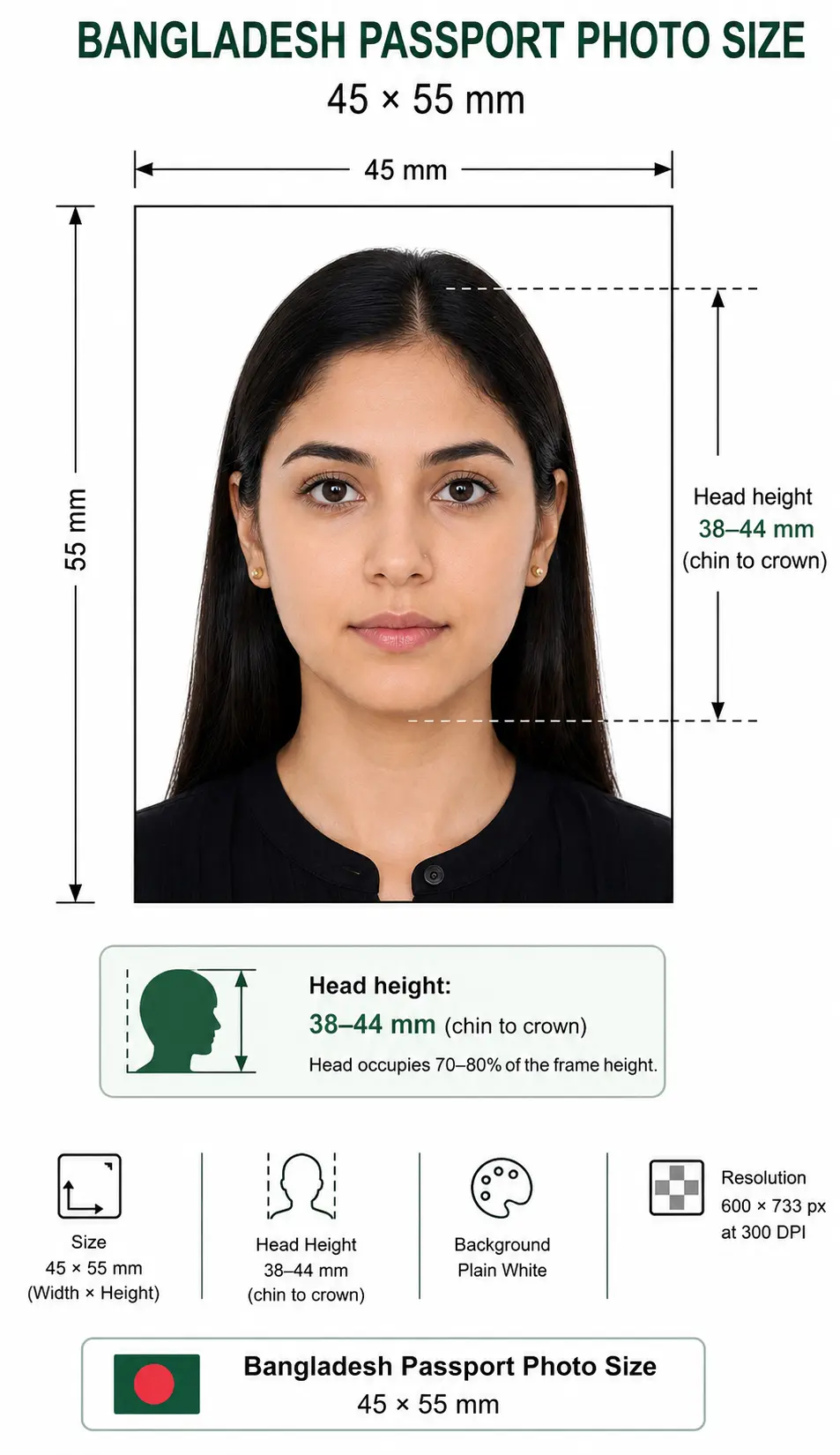
A Bangladesh passport photo is 45 mm wide by 55 mm tall (4.5 × 5.5 cm or 1.77 × 2.17 inches) in colour on a plain white background, with the face filling 70–80% of the frame — about 38–44 mm from chin to crown.
The standard is set by the Department of Immigration and Passports (DIP), under the Ministry of Home Affairs. Most applications are returned for small, avoidable reasons — a grey or patterned backdrop, a shadow across the cheek, glare on glasses, or a head placed too high or too low. Because the image is linked to your biometric record, even a minor mismatch can delay printing and your travel plans. This tool sets the size, background and framing for you automatically.
Bangladesh Passport Photo Size (Quick Answer)
45 × 55 mm in colour on a plain white background, head 38–44 mm chin to crown (70–80% of the frame), taken within the last 6 months. At 300 DPI that is 531 × 650 pixels.
| Requirement | Value |
|---|---|
| Printed photo size | 45 × 55 mm (4.5 × 5.5 cm / 1.77 × 2.17 in) |
| Pixels @ 300 DPI | 531 × 650 px |
| Online form photo size | 25 × 30 mm — approx. 591 × 709 px at 600 DPI |
| Background | Plain white, evenly lit |
| Head height (chin to crown) | 38 – 44 mm (70–80% of frame) |
| Expression | Neutral, mouth closed, both eyes open |
| Age of photo | Within the last 6 months |
| Printed copies | Usually two identical copies |
| e-Passport (adult) | No photo submitted — captured live at the passport office |
| Issuing authority | Department of Immigration & Passports (DIP) |
Bangladesh Passport Photo Visual Reference
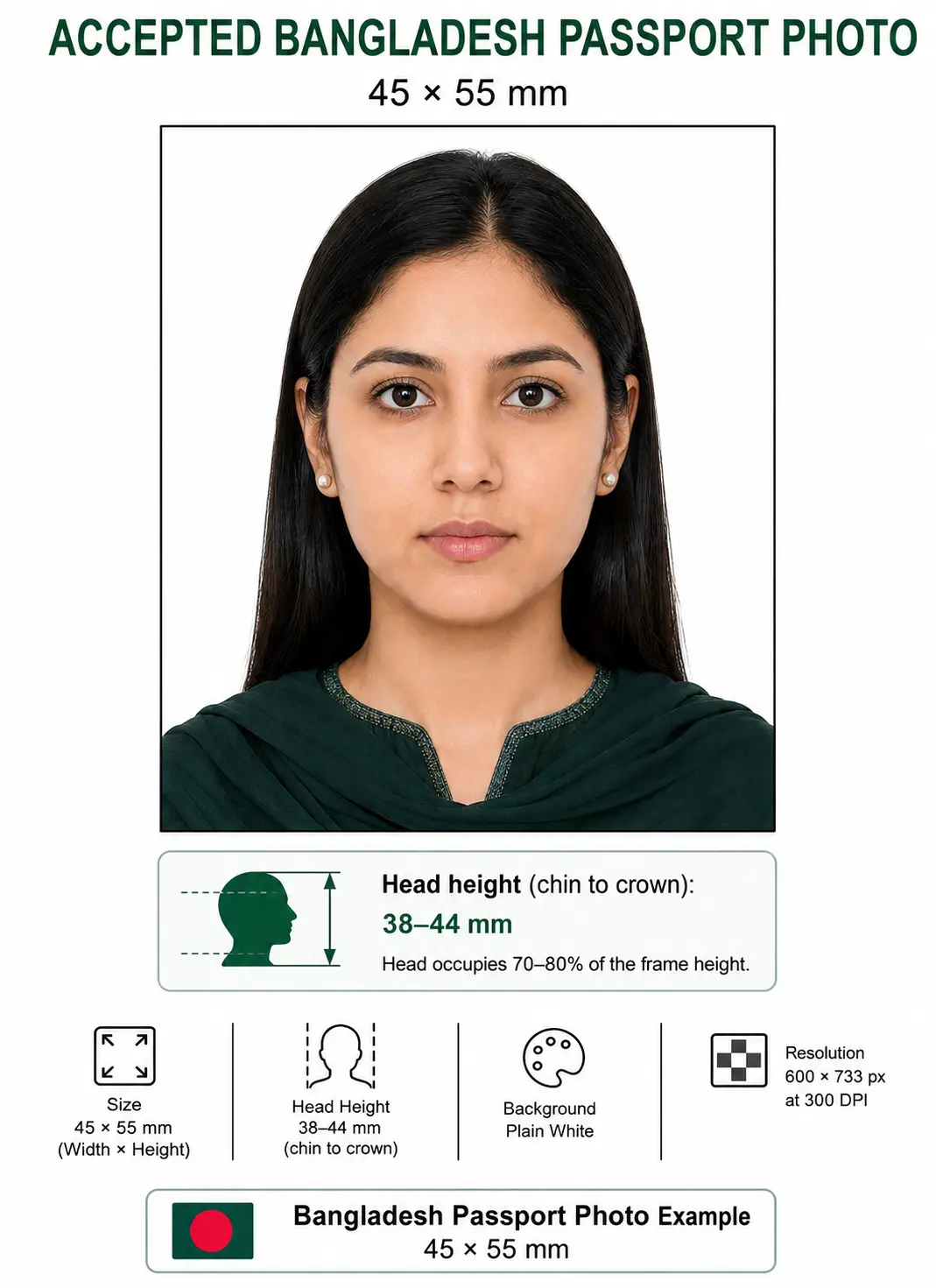
The diagram marks every measurement checked at submission: the 45 × 55 mm frame, the 38–44 mm chin-to-crown head height, and the plain white background.
Why Upload Here Instead of Editing by Hand
Cropping a photo to 45×55 mm in a phone gallery or a generic editor almost always drifts off-spec: the head ends up too big, the background stays grey, or the file prints at the wrong scale. Uploading here does the measuring for you and keeps the result inside the limits DIP expects.
Automatic crop
The frame is cut to an exact 45×55 mm ratio, so you never guess the borders.
Biometric framing
Your face is centred and scaled to fill about 70–80% of the photo, chin to crown.
Correct dimensions
Output is locked to the 45×55 mm frame — no manual resizing or DPI math.
Clean white background
Busy or coloured backdrops are replaced with the plain white DIP requires.
Printable photo sheet
Download a ready-to-print layout for studio or home printing at the right size.
No Photoshop required
Everything runs in your browser — no software, no editing skills, no watermarks.
Bangladesh Passport Photo Requirements
These specifications reflect the 45×55 mm format used for Bangladeshi passport, MRP and printed submissions. For the e-passport, the official biometric image is captured at the passport office; the values below are what you need for printed submissions and online MRP forms. Each rule links to the detailed standard in the passport photo rules library.
| Requirement | Specification |
|---|---|
| Photo Size | 45 × 55 mm (4.5 × 5.5 cm / 1.77 × 2.17 in) |
| Width | 45 mm (531 px @ 300 DPI) |
| Height | 55 mm (650 px @ 300 DPI) |
| Aspect ratio | 9 : 11 portrait |
| Background | Plain white, evenly lit, no shadows or patterns — see background colour rules |
| Lighting | Soft and even, no shadow on the face or the wall — see shadow rules |
| Head Size | Face fills ~70–80% of the frame, about 38–44 mm chin to crown — see head size rules |
| Face coverage | 70–80% of frame height — see face size requirements |
| Eyes | Both open, level and looking at the lens — see eyes requirements |
| Hair | Must not cover the eyes or obscure the face outline — see hair rules |
| Ears | Not mandatory, but the face outline must be clear — see ears visibility rules |
| Head coverings | Religious coverings accepted if the full face stays visible — see head covering rules |
| Resolution | 300 DPI minimum (roughly 531 × 650 px at 45×55 mm) — see resolution rules |
| File Format | Colour JPEG for digital uploads; glossy or matte print for physical copies |
| Colour | Full colour, sRGB, natural skin tones. Black and white is not accepted |
| Glasses Rules | Best removed; if worn, no glare, no thick frames over the eyes, no tinted lenses — see glasses rules |
| Expression Rules | Neutral face, mouth closed, both eyes open, looking straight at the lens — see smile rules |
| Digital editing | Not permitted — no filters, beauty smoothing or colour casts |
| Photo Age | Taken within the last 6 months |
| Printed copies | Usually two identical copies for printed submissions |
| Digital Submission Rules | e-passport photo captured live at the office; online MRP forms often accept a 25 × 30 mm white-background JPEG — see the digital vs printed section |
45×55 mm in Every Unit
Different forms publish the requirement in different units. Use this reference to match any official specification document or upload field.
Do not confuse the two sizes. The 45 × 55 mm figure is the printed photo. Online machine readable passport forms commonly ask for a much smaller 25 × 30 mm digital image, which is approximately 591 × 709 pixels at 600 DPI. Uploading a 45×55 mm file to a field expecting 25×30 mm is a routine cause of rejection.
For pixel conversions across every country standard see passport photo size in pixels, or the full worldwide table in passport size photo dimensions. Every national standard is indexed in the requirements by country hub.
Bangladesh Visa Photo: A Different Specification
Two separate things are often mixed up, and they use different sizes:
| Criteria | Bangladeshi passport (citizen) | Bangladesh visa (foreign national) |
|---|---|---|
| Photo size | 45 × 55 mm printed | 35 × 45 mm digital |
| Format | Colour print, or 25 × 30 mm JPEG for online forms | JPEG |
| File size limit | Varies by form | 300 KB maximum |
| Background | Plain white | Plain white |
| Who it is for | Bangladeshi citizens applying for a passport | Foreign nationals applying to enter Bangladesh |
| Submitted to | Regional Passport Office or Bangladesh mission | Official Bangladesh online visa portal |
Foreign nationals applying to visit Bangladesh: the official online visa portal asks for a 35 × 45 mm JPEG under 300 KB. That is the same physical size as the widely used 35×45 mm standard, not the 45×55 mm citizen passport format. Full detail is on our Bangladesh visa photo requirements page.
Bangladeshi citizens applying for a foreign visa: the size is set by the destination country, not by DIP. Check the destination's own standard before reusing your passport photo.
Who Issues Bangladeshi Passports
Passports in Bangladesh are issued by the Department of Immigration and Passports (DIP), an agency under the Ministry of Home Affairs. DIP runs the nationwide network of Regional Passport Offices (RPOs) and, for citizens abroad, coordinates with Bangladesh High Commissions and Embassies through the Ministry of Foreign Affairs. Since the rollout of the electronic passport (e-passport) programme, DIP has moved most applicants away from paper photo submissions toward live biometric capture.
In practice this means the authority itself records the image that ends up in your passport chip. The photo you prepare at home is used for online forms, MRP renewals still in circulation, children’s applications, and the many visa applications that Bangladeshi travellers submit to foreign missions — all of which still expect a correctly sized, white-background portrait. Applications and status tracking run through the official e-passport portal.
How the Bangladesh e-Passport Application Works
The typical journey from application to collection looks like this:
- Register online on the official e-passport portal, entering your details exactly as they appear on your National ID or birth registration.
- Choose your passport type — validity period and page count — and pay the government fee through the accepted bank or online channel.
- Book an appointment at your chosen Regional Passport Office, or at a Bangladesh mission if you are applying from overseas.
- Attend biometric enrolment in person. Staff capture your live photograph, fingerprints, iris scan and signature. Physical appearance is mandatory for applicants aged six and above.
- Track and collect. Follow your application status online and collect the passport once printing is complete.
Because adults do not hand over a printed photo for the e-passport, the tool on this page is most useful for online form uploads, MRP cases, children’s applications where a photo is requested, and the visa photos you will need for travel.
Need a compliant 45×55 mm file for an online form?
Create Bangladesh PhotoBangladesh Passport Photo Rules Explained
The rules exist so that facial-recognition systems can reliably match your photo to you. A compliant Bangladeshi photo is a straight-on, well-lit portrait where nothing competes with your face:
- Head position: centred, level, looking directly forward — not tilted or turned.
- Framing: the face should occupy roughly 70–80% of the height, with a small margin above the hair. See the crop guide for how the ratio and head height are applied together.
- Lighting: soft and even across the face, with no hotspots and no shadow on the wall behind. See the shadow rules.
- Eyes: both open, level and directed at the lens, with hair clear of the eyes. See the eyes requirements and hair rules.
- Coverings: the full face must be visible. Religious head coverings are generally accepted provided the facial features from chin to forehead are clear. See the head covering rules.
- Skin tone and colour: natural colour reproduction — no heavy filters, beauty smoothing or colour casts.
Child and Infant Passport Photo Requirements
Children need their own passport, and the photo standards are the same 45×55 mm, white-background format. There is no smaller size for infants and no relaxed head-height band.
Applicants under six years of age are not required to complete biometric enrolment. Because no fingerprints or iris scan are recorded for them, the photograph carries proportionally more weight in the record — which is exactly why child photos are scrutinised closely.
- The child must be alone in the frame — no supporting hands, toys, dummies or seats visible, and no other person in shot.
- Eyes open and looking forward where possible; for infants, lay them on a plain white sheet and shoot from directly above.
- No shadow behind the head — move the child away from the wall before you photograph.
- Neutral expression is preferred, but the rules are applied more gently for babies.
- Shoot wide and crop down. Cropping tightly in-camera on a small face leaves too few pixels once the 45×55 mm frame is applied.
Requirements for minors can vary by office and age band, so confirm with your RPO or mission before the appointment. Positioning, lighting and timing technique is covered in the baby passport photo at home guide.
Photographing a child? Upload the shot and let the tool apply the crop.
Create Child PhotoPhoto Rules When Renewing or Converting to an e-Passport
Many Bangladeshis still hold a Machine Readable Passport (MRP) and are converting to an e-passport as it expires. When you convert or renew, you re-enrol in person, so a fresh live photo is taken at the office — the picture in your old passport is not reused.
Where you still need a prepared image is the online application form and any MRP renewal handled by post or at a mission. Use a current photo that matches your appearance today; a beard, new glasses or a significant change in look since your last passport is enough reason to retake it.
Digital Upload vs Printed Photo: What Bangladesh Expects
Knowing which format you actually need saves a wasted trip:
| Application route | Photo required | Format |
|---|---|---|
| e-Passport (adult) | None submitted | Live capture at the passport office |
| Online MRP form / portals | Digital image | Commonly 25 × 30 mm, approx. 591 × 709 px at 600 DPI, white background |
| Printed MRP / mission submission | Physical prints | 45 × 55 mm colour, usually two identical copies |
| Bangladesh visa (foreign nationals) | Digital image | 35 × 45 mm JPEG, 300 KB maximum |
| Foreign visa (Bangladeshi travellers) | Varies | Set by the destination country, not by DIP |
The maker produces both a print-ready 45×55 mm sheet and a digital file, so you are covered whichever route applies. If a portal enforces a tight kilobyte ceiling, the reduce file size guide and compress to 240 KB guide cover hitting it without dropping below the resolution minimum. iPhone users shooting in HEIC should convert first with the HEIC to JPEG guide. Broader portal rules are covered in the digital passport photo requirements guide.
Can I Take My Bangladesh Passport Photo at Home?
Yes. A recent smartphone is more than capable of a compliant 45×55 mm photo — the trick is getting the setup right before you upload:
- Phone camera: use the rear camera at full resolution, not the front-facing selfie lens, and turn off any beauty or filter mode.
- Lighting: face a window or two soft lights so the face is lit evenly, with no shadow on the wall.
- Background: stand about half a metre in front of a plain white wall to avoid shadows behind you.
- Distance: keep the camera at eye level, roughly one metre away, and frame from the chest up — don’t zoom, which distorts the face.
- Printing: for physical copies, print on photo paper at 45×55 mm — see the printing section below.
Common home mistakes: selfie-lens distortion, warm indoor lighting that yellows the skin, a shadow on the wall, cropping too tightly, and holding the phone below the chin so the angle points upward. Upload your shot here and the framing and background are corrected for you.
Printing a 45×55 mm Bangladesh Passport Photo
Printed submissions usually ask for two identical copies, so printing is part of the specification rather than an afterthought. At 300 DPI a 531 × 650 pixel file prints at exactly 45 × 55 mm — provided you disable any fit-to-page scaling, which silently changes the physical size.
| Print resolution | 300 DPI minimum — export at 531 × 650 pixels or larger |
|---|---|
| Paper | Glossy or matte photo paper, 200–250 gsm. Plain copier paper is refused |
| Copies per 4 × 6 inch sheet | Four 45 × 55 mm photos with cutting margins |
| Copies per A4 sheet | Around twelve, though most submissions need only two |
| Cutting | Guillotine or steel rule for square edges. Do not cut inside the printed border |
| Colour management | sRGB. Turn off printer auto-enhance and colour correction |
| Handling | Let ink dry fully. Do not staple, fold or glue the photo face |
Printer settings, paper choice and cutting technique are covered in full in the print passport photo at home guide, and multi-copy sheet layout in the print sheet guide.
Bangladesh Passport Photo Size Compared to Other Countries
Travellers often assume one photo works everywhere. It does not — Bangladesh uses one of the larger formats, with a noticeably tighter facial fill than most.
| Country | Photo size | Pixels @ 300 DPI | Head height | Background |
|---|---|---|---|---|
| Bangladesh | 45 × 55 mm | 531 × 650 px | ~70–80% (38–44 mm) | Plain white |
| India | 51 × 51 mm (2 × 2 in) | 600 × 600 px | 50–69% | Plain white |
| Pakistan | 35 × 45 mm | 413 × 531 px | 70–80% | Plain white |
| Nepal | 35 × 45 mm | 413 × 531 px | 70–80% | Plain white |
| Sri Lanka | 35 × 45 mm | 413 × 531 px | 70–80% | Plain white |
| Myanmar | 35 × 45 mm | 413 × 531 px | 70–80% | Plain white |
| China | 33 × 48 mm | 390 × 567 px | 28–33 mm | Plain white |
| United Kingdom | 35 × 45 mm | 413 × 531 px | 29–34 mm | Light-coloured |
| United States | 51 × 51 mm (2 × 2 in) | 600 × 600 px | 50–69% (25–35 mm) | White or off-white |
The 35×45 mm format used across South Asia and Europe is covered on our 35×45 photo size page, and the square US and Indian standard on 2×2 photo size.
How to Create Your Photo with the Bangladesh Passport Photo Maker
From upload to download is a five-step process:
- Step 1 — Upload Drop in a clear, front-facing photo taken on a plain background. JPEG, PNG or WebP all work.
- Step 2 — Crop The maker cuts your image to the exact 45×55 mm ratio and centres your face automatically. The crop guide explains how the ratio and head-height band work together.
- Step 3 — Background Any busy or coloured backdrop is replaced with the clean white DIP requires.
- Step 4 — Verify Check the preview — head size, position and lighting at a glance.
- Step 5 — Download Save the digital file for online forms and a print-ready 45×55 mm sheet for physical copies.
Common Reasons Bangladesh Passport Photos Get Rejected
Most rejections trace back to the same handful of issues. Watch for these before you submit. The full cross-country breakdown is in passport photo rejection reasons.
- Wrong dimensions: the photo is not a true 45×55 mm, so the head lands off-spec. See the crop guide.
- Wrong size for the field: a 45×55 mm file uploaded where the online form expects 25×30 mm, or the reverse.
- Coloured or grey background: anything other than plain white, including textured walls. See the background colour rules.
- Head too large or too small: the face does not fall inside the 70–80% range. See the head size rules.
- Shadows: a shadow cast on the wall behind the head, or across one side of the face. See the shadow rules.
- Glasses glare: reflections on the lenses or frames sitting across the eyes. See the glasses rules.
- Hair across the face: a fringe over the eyes or hair obscuring the face outline. See the hair rules.
- Old photo: an image more than six months old or one that no longer looks like you.
- Poor lighting: underexposed, yellow-tinted or unevenly lit faces.
- Low resolution: a file below 531 × 650 pixels prints pixelated at 45×55 mm. See the resolution rules.
- Over-editing: beauty filters and heavy retouching that alter facial features and break biometric matching.
- Printed on plain paper: photo paper is required for physical submissions. See the print at home guide.
Frequently Asked Questions
Size & Dimensions
What is the correct Bangladesh passport photo size?
The widely used format is 45 mm wide by 55 mm tall, which is 4.5 × 5.5 cm or 1.77 × 2.17 inches. At 300 DPI that equals 531 × 650 pixels. The photo must be in colour on a plain white background with the face filling roughly 70 to 80 percent of the frame.
What size photo does the online passport form need?
Online machine readable passport forms commonly ask for a smaller digital image of 25 mm wide by 30 mm tall on a white background. At 600 DPI that equals approximately 591 × 709 pixels. This is a different size from the 45×55 mm printed photo, so check which one the form you are completing asks for.
What is the head size in a Bangladesh passport photo?
The face must fill roughly 70 to 80 percent of the frame height. On a 55 mm tall photo that works out to about 38 to 44 mm from chin to crown, with a small margin above the hair. This is a noticeably tighter facial fill than the US 2×2 inch standard.
Appearance & Compliance
What background colour is required?
A plain, evenly lit white background with no shadows, textures or patterns. Off-white or coloured walls and any objects in the frame will usually cause a rejection.
Can I wear glasses in the photo?
For biometric capture it is best to remove glasses. If you keep them on, the frames must not cover your eyes and there must be no glare on the lenses. Tinted or dark lenses are not accepted.
Are head coverings allowed in a Bangladesh passport photo?
Head coverings worn for religious reasons are generally accepted provided the full face from the chin to the forehead stays clearly visible and no shadow falls across the features. Decorative hats and caps are not permitted.
Can I smile in a passport photo?
No. Keep a neutral expression with your mouth closed and both eyes open, looking straight at the camera. A broad smile changes your facial geometry and can fail biometric checks.
How recent does my passport photo need to be?
Use a photo taken within the last six months so it reflects your current appearance. An older image, or one that no longer matches how you look, is a common reason applications are returned.
e-Passport, Children & Visas
Do I have to submit a photo for a Bangladesh e-passport?
For most adult applicants, no printed photo is submitted. Your live photograph, fingerprints, iris scan and signature are captured in person at the Regional Passport Office or Bangladesh mission during enrolment. Online MRP forms and some portals still ask for a digital photo.
Where is my biometric photo taken for a Bangladesh e-passport?
At the Regional Passport Office you selected during online registration, or at a Bangladesh High Commission or Embassy if you apply from abroad. Appearing in person is mandatory for enrolment.
What are the passport photo rules for a baby or child in Bangladesh?
The same 45×55 mm size, white background and head-height band apply. Applicants under six years of age are not required to complete biometric enrolment, so a recent photograph carries more weight for their record. The child must be alone in the frame with no supporting hands, toys, dummies or seats visible. See the child and infant requirements section.
What photo size does a Bangladesh visa need?
Foreign nationals applying for a Bangladesh visa through the official online MRV portal are asked for a 35×45 mm digital photo in JPEG format with a maximum file size of 300 KB. That is a different specification from the 45×55 mm photo a Bangladeshi citizen prepares for a passport application. See our Bangladesh visa photo page.
Can I use the same photo for a Bangladeshi passport and a visa?
Not reliably. The two specifications differ: 45×55 mm for Bangladeshi passport and MRP submissions, and 35×45 mm for the Bangladesh online visa portal. Foreign missions issuing visas to Bangladeshi travellers each set their own size, so always check the requirement for the specific application.
Taking & Printing
Can I take my Bangladesh passport photo at home?
Yes. Use the rear camera at full resolution, stand about half a metre in front of a plain white wall in even daylight, keep the camera at eye level roughly a metre away, and switch off any beauty or filter mode. Then upload the shot to the Passport Photo Maker to apply the 45×55 mm crop and white background.
How do I print a 45x55 mm passport photo at home?
Print at 300 DPI on glossy or matte photo paper. A 4×6 inch sheet holds four 45×55 mm photos with cutting margins, and an A4 sheet holds around twelve. Cut with a guillotine for square edges and do not trim inside the printed border. Most submissions ask for two identical copies. See the print at home guide.
Official Sources & References
- Department of Immigration & Passports — Bangladesh e-Passport portal: passport.gov.bd
- Bangladesh Online MRV Portal — visa application and photo specification: visa.gov.bd
- Ministry of Foreign Affairs — consular services and mission guidance: mofa.gov.bd
- Regional Passport Offices (RPOs) and Bangladesh High Commissions — biometric enrolment and local practice
- ICAO Doc 9303 — Machine Readable Travel Documents biometric photograph standard: icao.int
Compliance Notice
Passport and visa photo requirements can change, and individual offices or missions may apply them differently. Always verify the current rules with the Department of Immigration and Passports or the relevant issuing authority before you submit. Passport Photo Maker helps you create a compliant photo, but final approval always rests with the issuing authority.
Related Bangladesh Passport Photo Guides
Get Your Bangladesh Passport Photo Ready in Seconds
Whether it is for an online e-passport form, an MRP renewal or a visa to travel abroad, don’t risk a rejected submission over a grey background or a mis-sized crop. Upload your photo below and the Bangladesh passport photo maker returns a 45×55 mm image with a clean white background — ready to download or print.