Immigration New Zealand checks your photo before the online system will accept your application at all. Two details catch most applicants: the background must be plain and light but not white, and the photo must be completely unedited — no AI retouching, filters, or background swaps.
An online New Zealand visa or NZeTA photo must be a JPG in 3:4 portrait ratio between 512 KB and 3.14 MB, with your face filling 70–80% of the frame height on a plain, light, non-white background, taken within the last 6 months and not digitally edited. Paper applications use a printed 35 × 45 mm photo instead.
| Requirement | Value |
|---|---|
| Online size | 3:4 portrait aspect ratio (no fixed mm size) |
| Paper size | 35 mm × 45 mm |
| File size (INZ live page) | 512 KB – 3.14 MB |
| Background | Plain, light-coloured — not white |
| Face coverage | 70–80% of frame height, centred |
| File format | JPG or JPEG only |
| Photo age | Within the last 6 months |
| Digital editing | Not permitted (including AI tools and filters) |
| Selfies | NZeTA mobile app only |
| Applies to | Visitor, Student, Work visas and NZeTA — one shared standard |
Good news on this one: based on Immigration New Zealand's published photo standards, the same photo specification applies whether you're applying for a Visitor Visa, Student Visa, Work Visa, or an NZeTA. INZ does not publish a separate photo spec per visa category. What actually changes is your application channel — online vs. paper, and (for NZeTA only) app vs. website — not your visa type. The requirements table further down breaks out that channel-based difference in detail.
Frames your face to the 70–80% height ratio INZ requires, without guesswork.
Centers your face and levels your eyes to match INZ's positioning examples.
Outputs 3:4 digital for online applications or 35 × 45 mm for paper applications.
Replaces busy or white backgrounds with a plain, light, non-white tone INZ accepts.
Generates both an upload-ready file and a print-ready file, since some applicants need both.
Cropping and resizing only — no filters or beautification that could trip INZ's editing rule.
These specifications come from Immigration New Zealand's official photo standards page and its companion PDF guide for photographers. Where the two official sources state slightly different numbers, both are shown below rather than picking one arbitrarily.
| Requirement | Specification |
|---|---|
| Photo size (online application) | 3:4 portrait aspect ratio (no fixed mm size for digital uploads) |
| Photo size (paper application) | 35 mm wide × 45 mm high — see 35×45 photo size |
| Pixel dimensions (per official PDF guide) | Between 900×1200 px and 2250×3000 px — see passport photo size in pixels |
| File size (per live INZ photo standards page) | Between 512 KB and 3.14 MB |
| File size (per official PDF guide for photographers) | Between 500 KB and 3 MB |
| File size — professional photographer route | Under 10 MB |
| Background | Plain, light-coloured, and explicitly not white — see background colour rules |
| Head/face size | Face covers 70–80% of the frame height, centred — see head size rules and face size requirements |
| Eyes | Open, level, looking directly at the camera — see eyes requirements |
| Lighting and shadows | Even lighting, no shadow on face or background — see shadow rules |
| Hair | Must not obscure the eyes or face outline — see hair rules |
| Ears | Not separately mandated by INZ, but the face outline must stay clear — see ears visibility rules |
| Head coverings | Permitted for religious or medical reasons with the full face visible — see head covering rules |
| Resolution | Not separately stated beyond the pixel-dimension range above; sharp, in-focus, no blur — see resolution rules |
| File format | JPG or JPEG only |
| Glasses | Prescription glasses allowed if clear, non-tinted, and glare-free; no sunglasses — see glasses rules |
| Expression | Neutral expression, mouth closed, eyes open, facing camera directly |
| Photo age | Taken within the last 6 months |
| Digital editing | Not permitted — no AI tools, filters, beautification, skin smoothing, or background swaps |
| Selfies | Only accepted for NZeTA applications made via the official mobile app |
| Varies by visa type? | No — the same standard applies to Visitor, Student, Work, and NZeTA photos; what varies is the submission channel (online vs. paper, app vs. website) |
A note on the file-size discrepancy above: INZ's own live photo-standards page and its downloadable PDF guide for photographers give two slightly different ranges. We're showing both rather than guessing which one is current, because INZ hasn't reconciled them publicly. If your file lands inside the narrower 500 KB–3 MB / 900×1200–2250×3000 px range, it satisfies both versions of the rule.
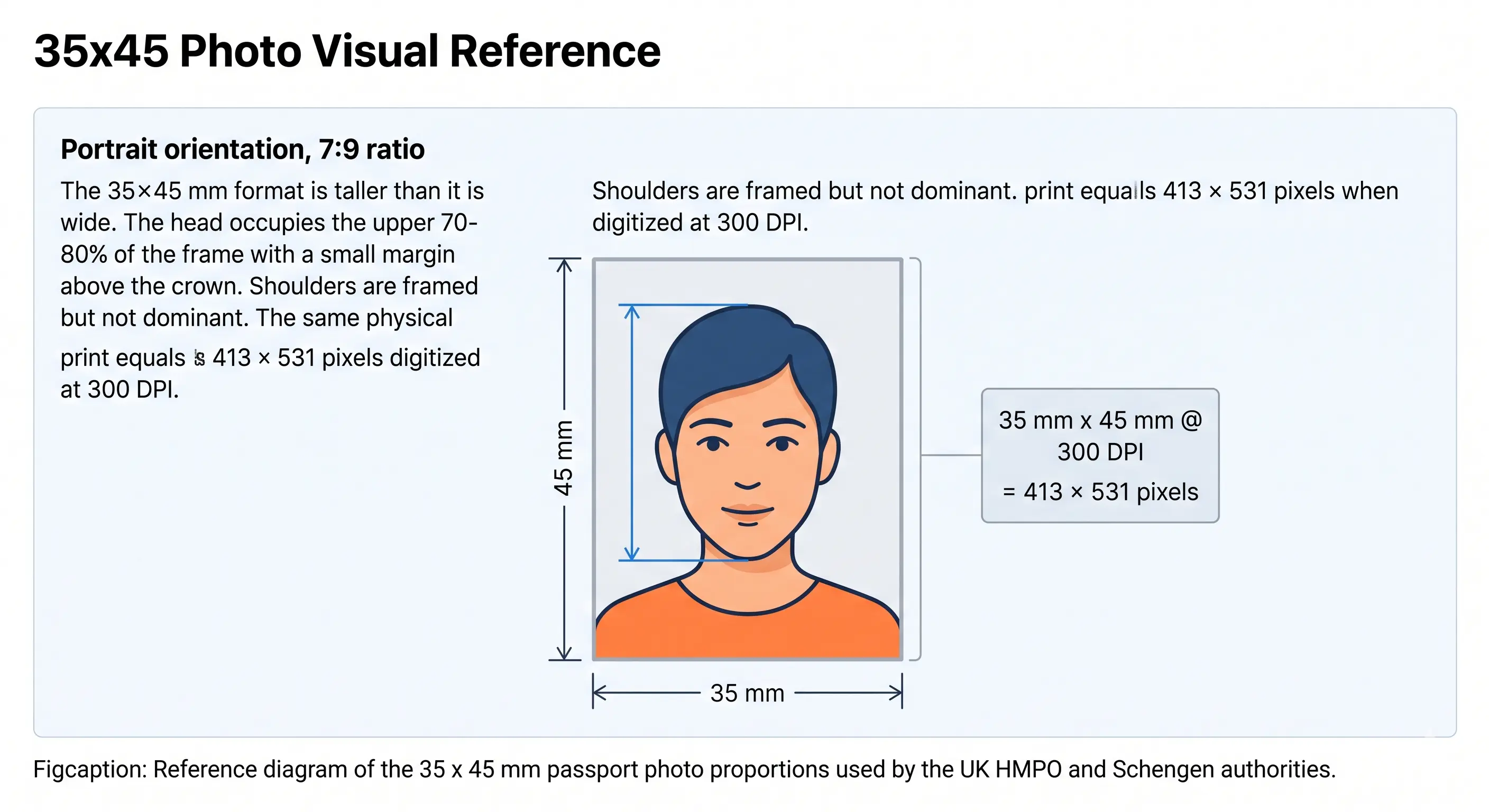
If you're submitting a paper application, the printed photo must be exactly 35 mm wide by 45 mm high. The diagram below shows that format and its 7:9 portrait proportions. Note that this is the print specification — online applications use a 3:4 digital ratio instead, which is a slightly different shape.
This is the single most common reason a technically correct photo is refused by INZ. Immigration New Zealand asks for a plain, light-coloured background that is specifically not white. Most of the world does the opposite: the United States, India, Australia and Japan all require plain white for their own documents.
The practical consequence is that a photo prepared to a US 2×2 inch standard, or reused from an Australian or Indian application, can be rejected on background colour alone even when the framing, file size and format are all correct. A light grey or very pale neutral tone is the safe choice. Our background colour rules page covers how different authorities define "light" and where the boundaries sit.
Two related traps: INZ treats digitally swapping the background as a prohibited alteration, and it flags patterned clothing or backgrounds as something that can interfere with its facial-recognition processing. Shoot against a genuinely plain light wall rather than fixing it afterwards.
Immigration New Zealand is the government body, operating under the Ministry of Business, Innovation and Employment, responsible for processing visitor, student, work, and resident visa applications, as well as the NZeTA pre-travel authorisation for visa-waiver travellers. INZ runs its own photo-compliance checks at the point of online submission — if your photo fails their automated check, you'll get an error message before you can finish the application, rather than finding out weeks later during manual review.
Most Visitor, Student, and Work visa applications to INZ are completed online through Immigration Online, where you upload supporting documents as PDFs and your photo as a JPG or JPEG. NZeTA applications are slightly different: you can apply either through the dedicated NZeTA mobile app (which also lets you submit a selfie) or through the NZeTA website, which — like the visa applications — does not accept a selfie. Paper-based visa applications still exist for some categories and require a printed 35×45 mm photo rather than a digital upload.
For online visa applications and for NZeTA applications made through the website, your photo must be a JPG or JPEG in 3:4 portrait orientation, sized between 512 KB and 3.14 MB. Password protected or compressed files are rejected outright by Immigration Online, and this applies to your supporting documents as much as your photo. If you're applying for an NZeTA through the mobile app instead, the app will guide you through taking a real-time selfie rather than asking you to upload a pre-existing file.
One detail that trips people up: INZ explicitly states it does not accept scanned or re-photographed photos — a photo of a printed photo will be rejected regardless of how good the print looks.
Note the direction of the file-size rule. INZ sets a minimum of 512 KB as well as a maximum, so over-compressing is as much of a failure as an oversized file. If your export lands above the ceiling, our reduce file size guide covers bringing it down without dropping below the pixel minimum. If your phone saves HEIC rather than JPG, convert first with the HEIC to JPEG guide. Broader portal rules across countries are covered in digital passport photo requirements.
If you're submitting a paper-based visa application, your printed photo must measure exactly 35 mm wide by 45 mm high, matching the instructions printed on the paper application forms themselves. INZ also notes that using a professional photographer improves your odds of acceptance, provided that photographer is working from INZ's official requirements and keeps the resulting digital file under 10 MB if a digital copy is also needed.
Printing at home is workable but unforgiving at this size — inkjet colour casts can push a light grey background toward white or cream. Our print passport photo at home guide covers paper choice, DPI and cutting, and print sheet layout explains how to fit multiple copies on one sheet cleanly.
Yes, with some care — though INZ itself notes that getting a compliant selfie is genuinely difficult, and recommends having someone else take the photo wherever possible.
It's a reasonable assumption that a country's visa photo and passport photo rules would match — but for New Zealand, they're published as two separate standards, and a few details genuinely differ. Don't reuse a NZ passport photo for an NZ visa application (or vice versa) without checking both specs.
| Attribute | NZ Visa / NZeTA Photo | NZ Passport Photo |
|---|---|---|
| Digital format | 3:4 aspect ratio, 512 KB–3.14 MB (or 500 KB–3 MB per PDF guide) | Different size bands apply under the NZ Passport Office's own published rules — confirm separately before reusing a file |
| Paper format | 35×45 mm | 35×45 mm (same physical print size) |
| Background | Plain, light, explicitly not white | Passport Office guidance differs in places on whether white is acceptable — verify against current Passport Office instructions rather than assuming parity |
| Issuing authority | Immigration New Zealand (INZ) | New Zealand Passport Office (a separate part of the Department of Internal Affairs) |
| Submission | Digital upload (most applications) or 35×45 mm print | Typically print-based, submitted with the passport application |
Honest disclosure: we have not independently re-verified every NZ Passport Office photo specification against today's official passport guidance for this comparison — that's a separate authority from INZ with its own published standard. The paper print size (35×45 mm) is confirmed consistent across both. For anything else in the passport column, treat it as a starting point and check the current NZ Passport Office requirements directly before reusing a visa photo for a passport application. Our New Zealand passport photo page covers the citizen-facing standard.
Upload a recent, unedited photo of yourself — phone photos are fine as long as filters are off.
Visitor, Student, Work and NZeTA all share one INZ photo specification, so there is nothing to choose here.
The tool frames your face to the 70–80% height ratio and applies a plain, light, non-white background.
Check the result against the file-size and pixel-dimension ranges in the table above before downloading.
Download the digital JPG for an online application, or the 35×45 mm print file for a paper application.
For the cross-country view of what causes refusal and how to correct each cause, see passport photo rejection reasons.
If your visa or NZeTA application is declined or you need to reapply — including after a passport renewal, since NZeTA is tied to your passport details — you'll need a fresh photo that still meets the 6-month recency rule at the time of the new application. There's no indication from INZ that reapplicants face a different photo standard than first-time applicants; the same specifications apply each time you submit.
Yes, in practical terms. INZ publishes one set of photo standards covering both — the same framing, background, and editing rules apply either way. What differs is your submission channel, not the photo itself.
Not in terms of framing or background — both use the same 3:4 portrait ratio for online submissions. The file-size detail varies slightly between INZ's own live page (512 KB–3.14 MB) and its PDF photographer guide (500 KB–3 MB), so aim for the narrower range to be safe with either.
35 mm wide by 45 mm high, as stated on INZ's official guidance for paper-based applications specifically. See our 35×45 photo size guide for unit conversions.
No — and this is the detail that catches most applicants out. INZ's standard calls for a plain, light-coloured background that is specifically not white. Many other countries require plain white, so a photo prepared to a US, Indian or Australian standard can be refused by INZ on background colour alone even when every other measurement is correct.
Yes, if they're clear, non-tinted, and don't create glare or obscure your face. Sunglasses aren't acceptable under any circumstances. See glasses rules.
Taken within the last 6 months, with no exceptions stated by INZ.
No. INZ is unusually direct about this compared to many countries: it explicitly prohibits AI editing tools, beautification filters, skin smoothing, face slimming, colour or contrast adjustments, and digitally removing objects such as glasses or jewellery near the face. INZ also states that using AI to edit your photo can delay or result in your application being declined, separate from any size or background issue.
Only if you're applying for an NZeTA through the official mobile app. Every other application path — visa applications, NZeTA via website, and paper applications — requires someone else to take the photo to INZ's standard.
Most likely digital editing or a white background. INZ is explicit that AI-enhanced, filtered, or otherwise altered photos fail their standard regardless of correct dimensions, and its background rule excludes white specifically.
No — based on INZ's published standards, one photo spec covers all three, plus NZeTA. The submission channel (online vs. paper) is what actually changes the requirement.
Visa and NZeTA photo requirements are set by Immigration New Zealand and can change without notice. The specifications on this page reflect INZ's published photo standards and official PDF photographer guide as currently available, but you should always verify against Immigration Online or the NZeTA application portal directly before submitting, especially given the file-size discrepancy noted above between INZ's two own official sources.
Passport Photo Maker helps you create a photo that follows INZ's published standards — it does not guarantee your visa or NZeTA will be approved. Final approval rests solely with Immigration New Zealand, and a technically compliant photo does not override other eligibility or character requirements in your application.
Where this page could not independently verify a specific detail against an official INZ source, it has been flagged in the relevant section above rather than presented as confirmed fact. Last reviewed .
Whether you're applying for a Visitor, Student, or Work visa, or requesting an NZeTA before you travel, get a photo that follows Immigration New Zealand's published standards in one upload — no Photoshop, no guessing the background colour, no risk of an AI-editing flag.
Compliance notice: requirements are set by Immigration New Zealand and may change without notice — always verify against Immigration Online or the NZeTA portal before submitting. Passport Photo Maker helps create a compliant photo but does not guarantee visa or NZeTA approval.
